

The filenames have become unusually long, and a pop-up insists there is a way back. A second note waits nearby, offering several ways to make contact.
MAIN ransomware can leave a confusing trail. Understanding those visible clues helps you avoid losing more than access to your documents.
Overview
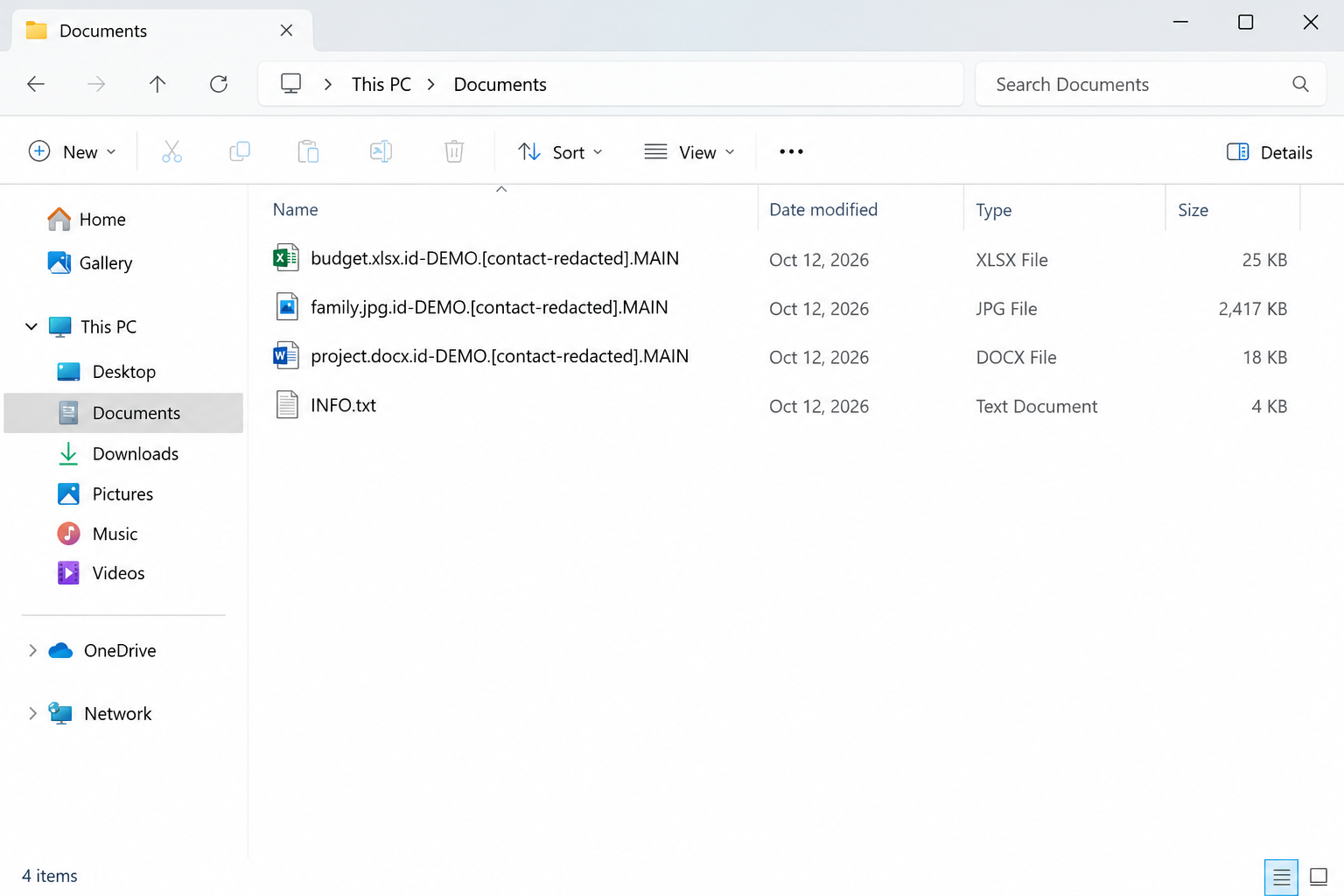
The complete filename pattern matters
MAIN is documented as a Dharma-family ransomware variant. Its renamed files combine a victim identifier, a bracketed email address, and the final .MAIN suffix.
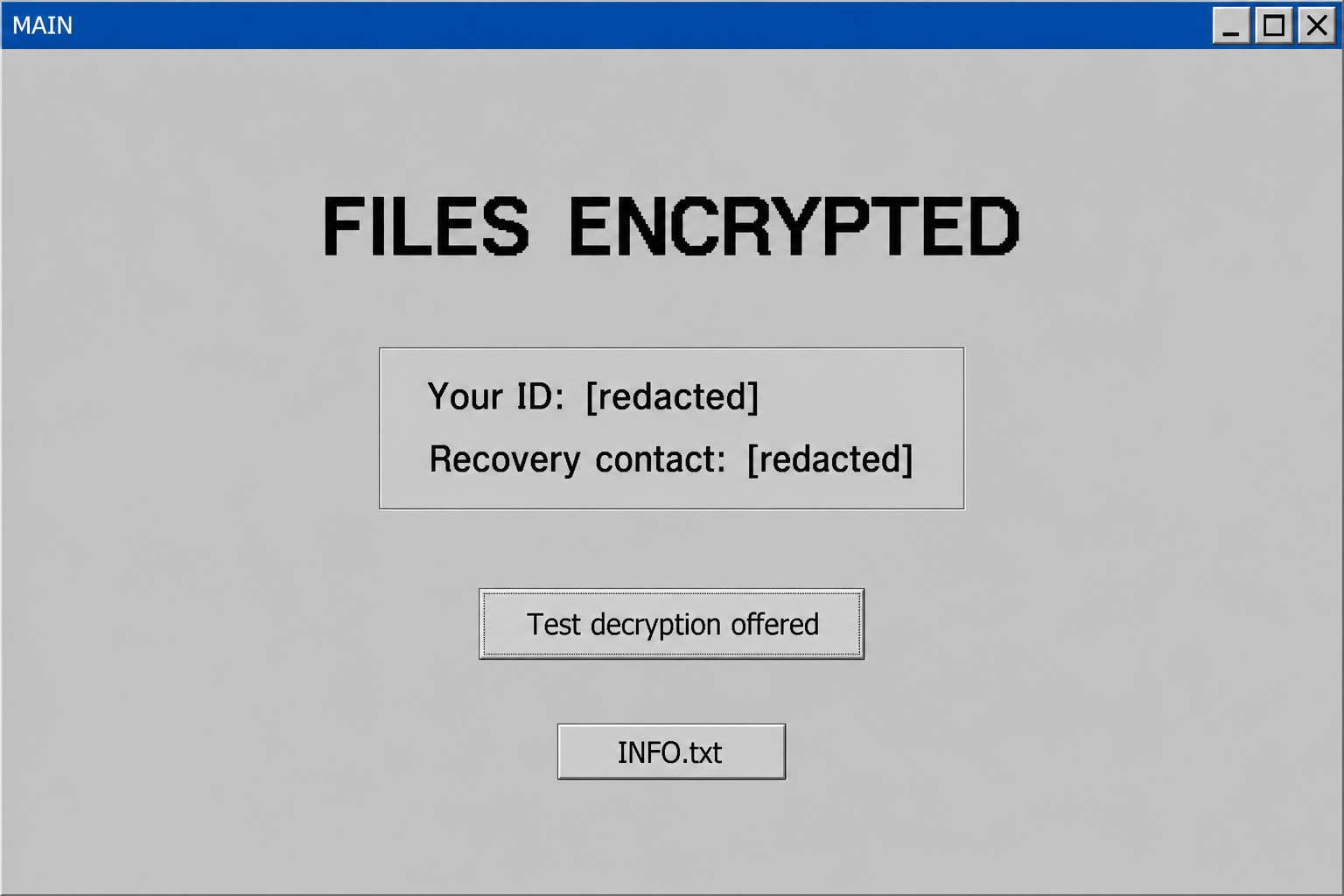
It also leaves INFO.txt and a more detailed pop-up demand. These paired artifacts are stronger identification clues than the short extension alone.
Keep the entire filename when seeking help. The added identifier and address may distinguish your incident from another ransomware using a similar word.
- Inaccessible files ending in .MAIN.
- An inserted victim ID and bracketed contact address.
- The INFO.txt text note.
- A pop-up presenting decryption and contact instructions.
The multiple contacts do not create accountability
The documented demand lists MainpartVI@tutamail.com, MainpartVI@mail2tor.cc, and the Telegram handle @MainpartVI. They are indicators associated with the note.
A backup inbox does not make the extortion more dependable. It merely gives the attacker another route for continuing a conversation.
Similarly, a victim identifier helps match messages to an incident. It is not evidence of a registered business or enforceable recovery agreement.
An older family name is not a decryption guarantee
No verified public decryptor specifically supporting MAIN was located during our October 6, 2026 check. The catalog does contain a Dharma-related entry.
That entry should not be read as blanket support for every later Dharma variant. Compatibility depends on the actual implementation and available keys.
Plan around containment, trustworthy cleanup, and usable backups. Ask a competent specialist to assess the precise variant before running any family-name decryptor.
Why MAIN’s Long Filenames Are Useful Evidence
It is tempting to shorten a filename that suddenly contains brackets and an unfamiliar address. Resist that impulse until evidence has been preserved.
Those components can help identify which note and files belong together. They can also help a responder avoid an unrelated tool or misleading search result.
Use the text as an indicator rather than a hyperlink. You do not need to email the address to document that it appeared.
The illustrative folder below uses a demo identifier and redacted address. The shape matters here, not a working path to the attacker.
How MAIN Ransomware Works
Step 1: An attacker obtains access before the notes appear
The incident begins with an opportunity to execute malicious code or access the environment. Its exact route cannot be inferred solely from the .MAIN suffix.
Remote access deserves investigation where it exists. A family associated with remote-access attacks does not prove that every individual infection entered that way.
Review authentication records, unexpected sessions, security alerts, and recent software changes. Do not close the inquiry after finding a ransom note.
Step 2: Data is encrypted and filenames acquire identifying material
The documented specimen adds the ID, email component, and .MAIN ending. The files become unreadable as their normal contents.
Names and contents are separate. Removing brackets or restoring an original extension cannot substitute for the correct recovery method.
Preserve representative encrypted samples and the original directory structure. Do not test random utilities against an entire irreplaceable collection.
Step 3: Two notes reinforce the same demand
INFO.txt is brief, while the pop-up provides more instructions. Together they keep the proposed contact route visible even if one window is closed.
Closing a window does not remove the program responsible for encryption. Conversely, keeping a plain text evidence copy does not mean accepting its instructions.
Record both artifacts where practical. Differences between a note, a pop-up, and filenames may be relevant to identification.
Step 4: Contact options move the victim toward negotiation
The demand offers a primary address and an alternative communication path. That can make an unanswered message feel like a normal support delay.
There is no independent service obligation behind those channels. The criminal can change terms, disappear, or ask for further information.
Do not send confidential documents to demonstrate their importance. That can create another exposure even if a file was never copied during the intrusion.
Step 5: A small demonstration is presented as reassurance
The documented pop-up proposes a limited file-decryption test. Its purpose is to increase confidence before payment.
Even a successful test would not verify a complete backup, a large database, or every damaged document. It would show a result for the selected samples.
A later download would still require safety assessment. The party supplying it is the same party associated with the extortion.
Do Not Mistake Dharma Compatibility for MAIN Compatibility
Family listings are starting points
A recognized decryption catalog can contain tools for historical variants. The existence of one such listing is encouraging but not decisive for a newer case.
Read the tool’s documentation. Identify which versions, keys, and file conditions it supports before assuming a shared family name resolves the problem.
Use a copy to answer the technical question
If a trusted specialist recommends a test, use a duplicate sample. Keep the original untouched so an unsupported attempt cannot consume your only evidence.
A renamed output is not enough. Open the recovered file with a safe appropriate application and check that its contents are actually usable.
Remote access must be reviewed before normal work resumes
A replacement Windows installation does not secure a reused password or another exposed system. Restoration and access remediation need to fit together.
For an organization, let the response team coordinate those changes. Rushing one server back online can undo containment performed elsewhere.
What to Do If MAIN Has Encrypted Your Computer
Contain the affected computer and protect backup repositories. If this is a workplace device, contact the responsible team before changing system settings or wiping data.
Keep INFO.txt, the pop-up evidence, and complete filenames. Do not remove the ID and contact components while documenting the incident.
Investigate available backups and relevant account access together. A usable restore should not be returned to an environment an attacker can still enter.
Use trusted cleanup tools, including Malwarebytes when suitable, without expecting decryption. Treat a Dharma utility as a compatibility question, not an automatic MAIN fix.
Report the attack and preserve any exchanges or payments. Unsolicited intermediaries cannot be trusted merely because they know the ransomware name.
Remove MAIN and Close the Underlying Access Gap
Contain the incident before running cleanup tools
Disconnect the affected computer from Wi-Fi and wired networks. Unplug external storage and leave backup drives disconnected while you assess what happened.
Pause synchronization from a clean device where possible. Otherwise, encrypted versions may replace usable cloud copies while you are trying to rescue them.
At work, contact your IT or incident-response team immediately. A ransomware screen on one computer may be the visible part of a larger intrusion.
Keep the ransom note, filenames, discovery time, and any security alerts. A specialist may need disk or memory evidence before cleanup changes the machine.
If you cannot isolate a computer and encryption is visibly continuing, seek immediate assistance about shutting it down. Powering off can lose volatile evidence.
Do not repeatedly restart, reinstall, or experiment with utilities. Those actions can overwrite recovery evidence without addressing the underlying access problem.
Use trusted scanners on an isolated personal computer
For a home computer, arrange cleanup after preserving the evidence you need. Obtain security tools through their official websites using an unaffected system.
Malwarebytes can scan for malicious programs and related unwanted software. It is an infection-removal tool, not a way to decrypt already encrypted documents.
Install a current copy, update its detection data when safely possible, and run the available comprehensive scan. Review detections before applying the recommended quarantine actions.
Keep the scan report. It can help distinguish the ransomware payload from another infection, a suspicious installer, or a remote-access program.
Windows Security also provides scan options. Microsoft Defender Offline restarts into an offline scanning environment, so save your work before starting it.
Follow Microsoft’s ransomware protection guidance rather than instructions in the criminal’s note. A note telling you to disable protection is not trustworthy advice.
If Windows will not start or the scanners cannot operate, stop improvising. Use reputable technical assistance instead of downloading a supposed one-click emergency decryptor.
Do not upload the executable to unfamiliar recovery websites or run it elsewhere for testing. A second execution can create another incident.
Verify the environment before restoring anything
A completed scan is useful, but it cannot establish that every account, remote session, or networked computer is safe.
Check for unauthorized remote-access software, suspicious accounts, changed security settings, and unknown scheduled tasks. Business environments require coordinated investigation beyond this home-computer checklist.
Change exposed passwords from a clean device. Prioritize email, cloud storage, administrator access, and any account whose credentials were saved on the affected system.
Enable multifactor authentication where supported and revoke suspicious sessions. Simply changing the password may leave an existing signed-in session active.
A trusted reinstall may be appropriate when system integrity remains uncertain. Preserve recoverable data first, and reinstall from authentic installation media.
AdGuard can help reduce exposure to malicious advertising during future browsing. It neither cleans an infected system nor reverses file encryption.
Keep backup media offline until cleanup and access checks are complete. Reconnecting your only good copy too early can turn a recovery opportunity into another loss.
Assess Recovery for Files Ending in .MAIN
Make a recovery copy, not another damaged original
Keep an untouched copy of the encrypted data whenever practical. Include the ransom note and retain the original directory structure.
Use a separate destination for recovery experiments. Never let a utility overwrite your only encrypted copy or replace an intact backup.
Before sharing samples, consider their sensitivity. Choose an ordinary, nonconfidential file and ask the service about handling rules if business or personal information is involved.
The note’s name, complete filename suffix, and contact details can help identify a variant. An extension alone is not enough to establish decryption compatibility.
For example, two infections can use the same suffix while generating different keys. A familiar family name can also hide a newer, unsupported version.
Record the exact error or result from each attempt. Keep a simple checklist so another helper does not repeat risky tests on the same files.
Check recognized decryption projects
Visit the No More Ransom decryption catalog from a clean browser. Look for the actual variant and read the tool’s requirements carefully.
A tool for a related family does not automatically unlock your files. Some decryptors support only older versions, certain keys, or specific encryption mistakes.
Download through the catalog’s trusted vendor link, not a sponsored search result or an unsolicited message offering guaranteed recovery.
Test only a duplicate sample first. Successful decryption should produce a usable document or image, not merely remove the added extension.
If the utility reports an unsupported file or key, stop. Changing the filename to resemble a supported variant does not change its encrypted contents.
When no compatible tool is available, preserve your encrypted archive. Researchers sometimes release new tools later, but future recovery cannot be promised.
Look for copies that existed before encryption
Check disconnected drives, backup software, cloud version history, another computer, and files previously sent to trusted contacts. You may have more copies than you remember.
Cloud synchronization is not automatically a backup. Confirm that an earlier usable version survives and that the account itself has not been compromised.
Restore into a cleaned environment. Open a selection of documents, photos, and project files before assuming the recovered collection is complete.
Compare important dates and contents. An older spreadsheet might open perfectly while still missing the transactions you needed to recover.
Windows Previous Versions or existing snapshots may offer additional copies. Availability depends on prior configuration and whether those snapshots survived the incident.
Do not create new restore points expecting them to contain yesterday’s files. Recovery depends on copies that already existed before the damage.
Deleted-file recovery utilities are a different category. They may locate unencrypted originals in some circumstances, but they do not mathematically decrypt overwritten data.
If you want a specialist to investigate that possibility, minimize writes to the affected storage. Continued installations can overwrite remnants that might otherwise be recoverable.
Evaluate recovery offers without surrendering control
Be wary of anyone who contacts you first, claims exclusive access to a secret decryptor, or requests an advance payment in cryptocurrency.
Ask a recovery provider what method it intends to use, what evidence supports success, and whether it would negotiate with the attacker.
Get the scope, fee, privacy terms, and limitations in writing. A legitimate assessment should distinguish a possibility from a demonstrated recovery result.
Do not provide remote administrator access to an unknown helper. Recovery desperation can make a second scam feel like the only remaining option.
If you already paid, retain receipts, transaction references, wallet addresses, and correspondence. Contact the payment provider promptly and report the extortion.
Recovery is sometimes partial. Prioritize irreplaceable files, verify them individually, and keep your evidence archive until the investigation and restoration decisions are settled.
Frequently Asked Questions
What does .MAIN mean at the end of a filename?
It is an indicator associated with this documented ransomware variant. Match it with the full naming pattern and notes rather than relying on four letters alone.
Why is an email address inside the filename?
The documented pattern includes an attacker contact component alongside the victim ID. Preserve it for identification; it does not need to be contacted.
Does INFO.txt contain a recovery key?
The note directs contact rather than supplying a verified free solution. Retain it as an incident artifact, not a repair program.
Can a Dharma decryptor recover MAIN files?
A family entry does not establish MAIN support. A qualified compatibility check and successful duplicate-sample test are necessary before treating a tool as suitable.
Does MAIN always enter through Remote Desktop?
No universal route has been established here. Review remote access when relevant, but determine the actual entry point from incident evidence.
Will closing the ransom pop-up stop the attack?
Not necessarily. The displayed window and the malicious activity are separate. Contain the machine and arrange proper cleanup instead of relying on the close button.
The Bottom Line
MAIN ransomware leaves a distinctive filename pattern and two ransom messages. Preserve those clues without mistaking the contact channels for trustworthy support.
Restore only after cleanup and access checks. Investigate exact decryptor compatibility, and never assume an older Dharma listing guarantees a solution for .MAIN files.

Join the discussion
0 commentsShare your experience or ask a question about this article.
Your progress
Did these steps help?
Let us know how the guide worked for you.
Describe what you see and the step you reached. Keep passwords and other private information out.
Discussion
Start the conversation
Have a question or something useful to share? Add the first comment.