

Your documents still appear in their folders, but the names have changed and familiar files will not open. A warning note offers an explanation.
If the new names end in .lab, resist the urge to start renaming everything. The next steps should protect your remaining options.
Overview
Lab is a file-encrypting ransomware variant
Lab ransomware is reported as part of the Makop family. It modifies affected filenames and demands payment for a supposed decryption service.
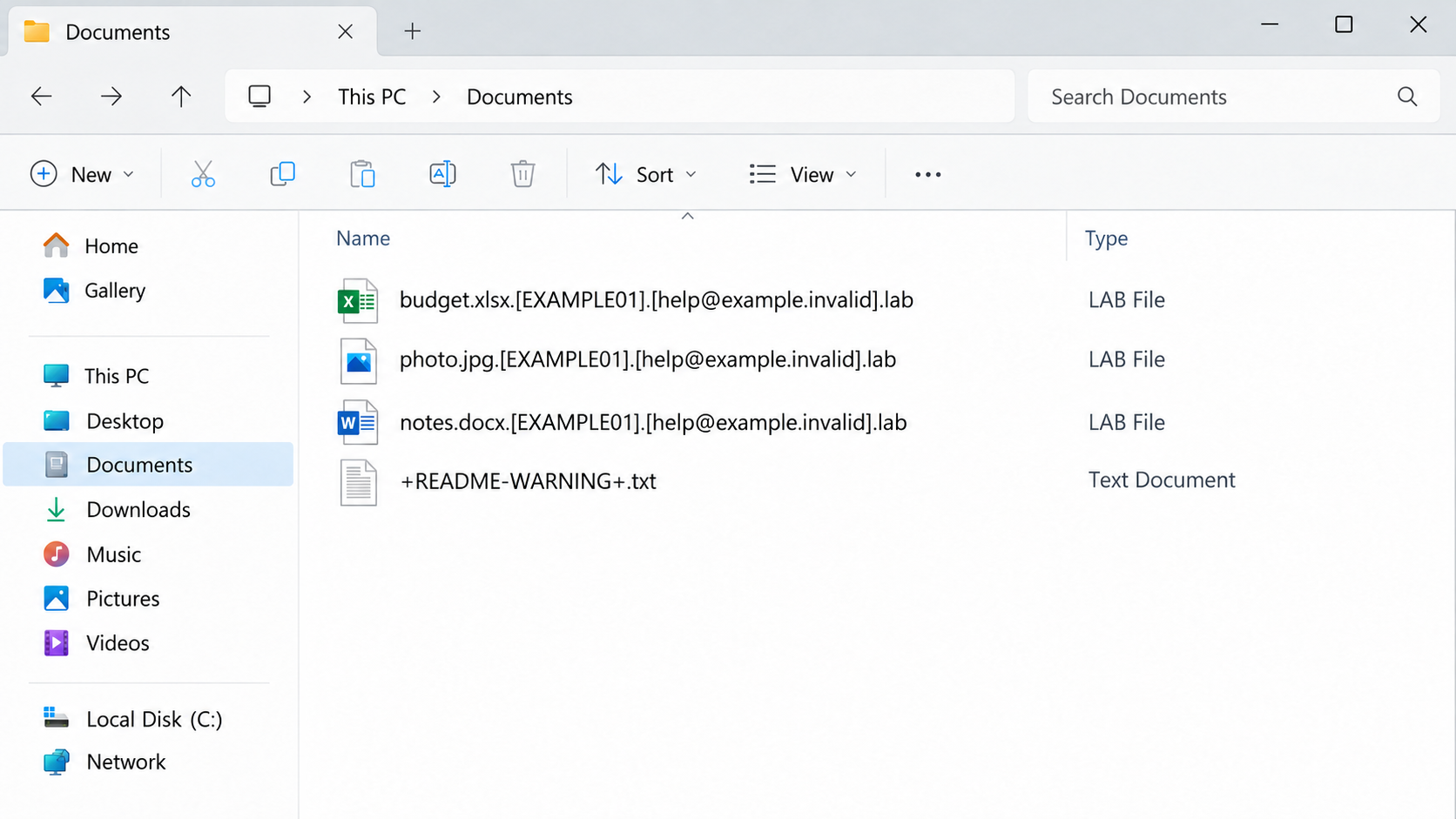
The naming pattern adds a victim identifier, a contact email in brackets, and the .lab ending. The ransomware also creates +README-WARNING+.txt and changes the desktop wallpaper.
The folder illustration uses invented sample identifiers and a nonfunctional email address. It shows the reported naming pattern, not files from an actual victim’s computer.
The note combines inaccessible files with a leak threat
The reported demand says files were encrypted and stolen. It threatens disclosure and says the price will increase if contact is delayed beyond 24 hours.
Encryption and data theft are separate findings. A ransom note can claim theft without proving which information, if any, left a particular system.
- Preserve complete encrypted names and the ransom note.
- Separate affected equipment from networks and clean backups.
- Distinguish removing malware from recovering document contents.
- Assess the leak claim through evidence, not the attacker’s deadline.
Neither payment nor a scan guarantees file recovery
Malicious-software removal can help stop further damage, but it does not decrypt files already changed. Paying an attacker also provides no dependable recovery guarantee.
No sample was executed for this guide, and no compatible public decryptor is confirmed here. Avoid applying a tool solely because another ransomware family sounds similar.
Your useful starting point is containment, evidence preservation, and a careful inventory of surviving data. Do not let a threatened price increase replace that plan.
What the .lab Filenames Tell You
The added suffix is a marker, not the cause of unreadable content
A changed extension makes the incident obvious, but removing it does not reverse encryption. The original document’s contents may remain unusable after the name looks normal.
Keep the full names intact while recording the incident. The identifier and contact segment can help distinguish the reported variant from unrelated file damage.
A file extension alone is not a complete malware diagnosis. Pair it with the note, security detections, timing, and other changes observed on the affected computer.
Do not install a random application claiming to open .lab files. Treating encryption as a missing-file-association problem can lead to more unwanted software.
The original file type still helps prioritize recovery
The name may preserve clues about whether the item was a photograph, spreadsheet, database, or document. Use those clues to identify the most important missing collections.
A family photo archive and an accounting database need different validation after restoration. A file that merely appears in a folder is not yet a usable recovery.
List critical categories before making bulk changes. That helps prevent a rushed cleanup from destroying evidence or overwriting a valuable intact version.
If this is workplace data, involve its owner. The employee who discovers encryption may not know which application, backup, or retention policy controls the files.
How Lab Ransomware Changes an Affected System
Step 1: Malicious code gains an opportunity to run
Ransomware needs an execution or access path, but this variant’s name does not identify how a particular machine was compromised.
Suspicious downloads, malicious messages, compromised access, and other routes deserve investigation where evidence supports them. Do not blame the last email automatically because encryption appeared afterward.
Preserve relevant alerts, account activity, and approximate discovery times. These can help a responder build a timeline without depending solely on a victim’s memory.
Closing the visible warning does not establish that the executable or original access route has been removed. The incident is broader than the message on the desktop.
Step 2: Accessible files become encrypted and receive the .lab pattern
The reported behavior includes content encryption and additional filename segments. Files that previously opened in ordinary applications then fail to work as expected.
Accessible storage deserves attention, including connected drives and shared folders. Do not assume every location was affected, but do not reconnect clean copies while that question remains unresolved.
Ask which files still open correctly and where they are stored. A computer’s desktop view cannot establish the condition of every backup, cloud version, or disconnected disk.
Keep experiments away from the only encrypted originals. A recovery attempt that writes over those files can reduce future options without producing readable data.
Step 3: The ransom note turns damage into a time-pressured demand
The +README-WARNING+.txt message and changed wallpaper tell the victim to engage with the attacker. The 24-hour escalation claim increases pressure to make contact quickly.
That deadline is part of an extortion demand, not a technical assessment of your recovery options. It does not show that a dependable decryption service exists.
Keep a copy of the note without treating its instructions as your response plan. A qualified responder may need its identifiers and exact wording.
Do not send sensitive samples to a stranger who claims to prove recovery. A small successful demonstration would not guarantee restoration of the rest of the data.
Step 4: The leak allegation adds a second problem to investigate
The note’s stolen-data assertion raises confidentiality concerns as well as availability concerns. Those should be assessed separately with appropriate technical and management help.
A working backup can restore business operations without resolving whether information was accessed or copied. Likewise, a theft allegation does not establish that every file was taken.
Review logs and affected accounts where available. Organizations may need legal or privacy advice based on the data involved and their reporting obligations.
Do not promise staff or clients that nothing leaked simply because files were restored. Equally, do not announce an unverified theft as an established fact.
Make the First Hour About Containment
Separate the system without sacrificing good copies
Disconnect network access and avoid attaching external backup media. For a business incident, coordinate with the response team rather than moving the computer around the network.
The StopRansomware Guide prioritizes isolation and evidence-aware response. Powering down can be necessary if isolation is impossible, but it also loses volatile evidence.
Do not reboot repeatedly just to see whether the names return to normal. A reboot is not a decryption method and may complicate the investigation.
If the machine controls essential operations, use the organization’s established incident process. Safety and continuity decisions may need people beyond the person investigating the malware.
Record the scope before rebuilding
Identify the affected computer, user, connected storage, shared locations, and first visible changes. Preserve the note and relevant detection information.
Ask whether other employees or household members see similar filenames. Gather that information without opening unknown attachments or spreading suspicious files as examples.
A rebuild can be a sensible recovery choice, but it should follow a plan for preserving necessary evidence and encrypted data. Do not wipe the only available copy.
Have a responder decide how suspicious executable files will be handled. A backup of valuable documents is different from casually copying every program from the compromised system.
What to Do if Lab Ransomware Encrypted Your Files
Work through containment and recovery as separate jobs. The aim is a trustworthy system containing validated data, not merely a desktop without the ransom message.
Isolate and notify the responsible people.
Separate affected equipment from networks and removable storage. Contact your IT provider promptly for business devices, shared drives, or uncertain execution scope.
Use an unaffected communication route when coordinating the incident. Avoid making your response depend on an account or machine that may be under attacker control.
Retain the identifying evidence.
Save the note, complete file patterns, discovery time, alerts, and any suspicious correspondence. Keep encrypted originals separate from recovery experiments.
Do not publish confidential documents or identification details when asking for help. A responder can explain which limited samples are appropriate and how to transfer them safely.
Choose a controlled malware-removal or rebuild plan.
Use trusted tools and qualified assistance where needed. Malwarebytes is useful for malicious-software detection, not for turning encrypted .lab content back into its original form.
Investigate the access path as well as the ransomware executable. Restoring files while leaving compromised access in place can expose the recovery environment.
Inventory intact versions outside the affected system.
Check disconnected backups, provider version history, earlier attachments, and authorized copies held by others. Record which dates and important changes each source contains.
Do not connect a good backup to the compromised machine as a test. Examine and restore through an environment the response team considers trustworthy.
Verify any decryption tool before using it.
Consult the No More Ransom catalog and the tool publisher’s exact compatibility guidance. A family label is not sufficient.
Use separate test copies if a legitimate specialist identifies an appropriate tool. Preserve originals when no compatible option is available.
Assess account and information exposure.
Review relevant credentials and sessions from an unaffected environment. Investigate the stolen-data claim with your responder instead of accepting or dismissing it automatically.
Follow applicable reporting and privacy duties. If any ransom was already paid, retain transaction identifiers and tell the appropriate authorities or payment service.
Validate recovery before returning to normal work.
Open important files in their proper applications and check dates, completeness, and business consistency. Keep a list of missing or older items.
AdGuard can reduce some future malicious-ad exposure, but it is not ransomware cleanup or decryption. Improve backups and access controls as part of the return-to-service plan.
Lab Ransomware Removal
The removal instructions below address malicious software. Preserve necessary evidence first, and follow your organization’s response plan if the incident affects business systems.
The Malwarebytes Windows option is a security tool, not a promise of Lab decryption. Obtain it through an authentic route from a safe environment.
Contain the incident before running cleanup tools
Disconnect the affected computer from Wi-Fi and wired networks. Unplug external storage and leave backup drives disconnected while you assess what happened.
Pause synchronization from a clean device where possible. Otherwise, encrypted versions may replace usable cloud copies while you are trying to rescue them.
At work, contact your IT or incident-response team immediately. A ransomware screen on one computer may be the visible part of a larger intrusion.
Keep the ransom note, filenames, discovery time, and any security alerts. A specialist may need disk or memory evidence before cleanup changes the machine.
If you cannot isolate a computer and encryption is visibly continuing, seek immediate assistance about shutting it down. Powering off can lose volatile evidence.
Do not repeatedly restart, reinstall, or experiment with utilities. Those actions can overwrite recovery evidence without addressing the underlying access problem.
Use trusted scanners on an isolated personal computer
For a home computer, arrange cleanup after preserving the evidence you need. Obtain security tools through their official websites using an unaffected system.
Malwarebytes can scan for malicious programs and related unwanted software. It is an infection-removal tool, not a way to decrypt already encrypted documents.
Install a current copy, update its detection data when safely possible, and run the available comprehensive scan. Review detections before applying the recommended quarantine actions.
Keep the scan report. It can help distinguish the ransomware payload from another infection, a suspicious installer, or a remote-access program.
Windows Security also provides scan options. Microsoft Defender Offline restarts into an offline scanning environment, so save your work before starting it.
Follow Microsoft’s ransomware protection guidance rather than instructions in the criminal’s note. A note telling you to disable protection is not trustworthy advice.
If Windows will not start or the scanners cannot operate, stop improvising. Use reputable technical assistance instead of downloading a supposed one-click emergency decryptor.
Do not upload the executable to unfamiliar recovery websites or run it elsewhere for testing. A second execution can create another incident.
Verify the environment before restoring anything
A completed scan is useful, but it cannot establish that every account, remote session, or networked computer is safe.
Check for unauthorized remote-access software, suspicious accounts, changed security settings, and unknown scheduled tasks. Business environments require coordinated investigation beyond this home-computer checklist.
Change exposed passwords from a clean device. Prioritize email, cloud storage, administrator access, and any account whose credentials were saved on the affected system.
Enable multifactor authentication where supported and revoke suspicious sessions. Simply changing the password may leave an existing signed-in session active.
A trusted reinstall may be appropriate when system integrity remains uncertain. Preserve recoverable data first, and reinstall from authentic installation media.
AdGuard can help reduce exposure to malicious advertising during future browsing. It neither cleans an infected system nor reverses file encryption.
Keep backup media offline until cleanup and access checks are complete. Reconnecting your only good copy too early can turn a recovery opportunity into another loss.
Recovering Documents With the .lab Ending
These recovery options depend on what survived and which tools genuinely match the incident. Neither Windows snapshots nor a working decryptor should be assumed available.
Make a recovery copy, not another damaged original
Keep an untouched copy of the encrypted data whenever practical. Include the ransom note and retain the original directory structure.
Use a separate destination for recovery experiments. Never let a utility overwrite your only encrypted copy or replace an intact backup.
Before sharing samples, consider their sensitivity. Choose an ordinary, nonconfidential file and ask the service about handling rules if business or personal information is involved.
The note’s name, complete filename suffix, and contact details can help identify a variant. An extension alone is not enough to establish decryption compatibility.
For example, two infections can use the same suffix while generating different keys. A familiar family name can also hide a newer, unsupported version.
Record the exact error or result from each attempt. Keep a simple checklist so another helper does not repeat risky tests on the same files.
Check recognized decryption projects
Visit the No More Ransom decryption catalog from a clean browser. Look for the actual variant and read the tool’s requirements carefully.
A tool for a related family does not automatically unlock your files. Some decryptors support only older versions, certain keys, or specific encryption mistakes.
Download through the catalog’s trusted vendor link, not a sponsored search result or an unsolicited message offering guaranteed recovery.
Test only a duplicate sample first. Successful decryption should produce a usable document or image, not merely remove the added extension.
If the utility reports an unsupported file or key, stop. Changing the filename to resemble a supported variant does not change its encrypted contents.
When no compatible tool is available, preserve your encrypted archive. Researchers sometimes release new tools later, but future recovery cannot be promised.
Look for copies that existed before encryption
Check disconnected drives, backup software, cloud version history, another computer, and files previously sent to trusted contacts. You may have more copies than you remember.
Cloud synchronization is not automatically a backup. Confirm that an earlier usable version survives and that the account itself has not been compromised.
Restore into a cleaned environment. Open a selection of documents, photos, and project files before assuming the recovered collection is complete.
Compare important dates and contents. An older spreadsheet might open perfectly while still missing the transactions you needed to recover.
Windows Previous Versions or existing snapshots may offer additional copies. Availability depends on prior configuration and whether those snapshots survived the incident.
Do not create new restore points expecting them to contain yesterday’s files. Recovery depends on copies that already existed before the damage.
Deleted-file recovery utilities are a different category. They may locate unencrypted originals in some circumstances, but they do not mathematically decrypt overwritten data.
If you want a specialist to investigate that possibility, minimize writes to the affected storage. Continued installations can overwrite remnants that might otherwise be recoverable.
Evaluate recovery offers without surrendering control
Be wary of anyone who contacts you first, claims exclusive access to a secret decryptor, or requests an advance payment in cryptocurrency.
Ask a recovery provider what method it intends to use, what evidence supports success, and whether it would negotiate with the attacker.
Get the scope, fee, privacy terms, and limitations in writing. A legitimate assessment should distinguish a possibility from a demonstrated recovery result.
Do not provide remote administrator access to an unknown helper. Recovery desperation can make a second scam feel like the only remaining option.
If you already paid, retain receipts, transaction references, wallet addresses, and correspondence. Contact the payment provider promptly and report the extortion.
Recovery is sometimes partial. Prioritize irreplaceable files, verify them individually, and keep your evidence archive until the investigation and restoration decisions are settled.
Check Recovery Quality, Not Just Recovery Quantity
A synchronized copy may need an earlier version
A cloud folder can synchronize encrypted changes as well as good files. Check its history and retention rather than assuming the current cloud copy is intact.
Microsoft’s OneDrive restore guidance explains plan-dependent rollback features. Confirm what your account supports before restoring or overwriting anything.
A restored collection may combine files from different dates. Note those differences so an older record is not silently treated as the latest business information.
Restore linked systems in a deliberate order
A business application may depend on several data sets that need to agree. Restoring one recent file beside an older database can produce misleading results.
Ask the application’s responsible administrator which components belong together. Do not replace a production database with an apparently readable copy without checking its consistency.
For household files, compare important documents with earlier attachments or another trusted copy. Check the contents and dates, not merely whether the application opens.
Keep the first restored collection in a controlled location until it has been reviewed. That gives you a reference if later copies conflict.
Record which source supplied each recovered folder. If an important item is missing, that record makes it easier to revisit the right backup.
Agree on who can replace files during recovery. Several well-intentioned people restoring different versions can overwrite useful work and make the final state harder to understand.
After the system returns to service, test a new backup by restoring selected files elsewhere. A successful backup notification is not the same as verified usable data.
Keep a controlled set of encrypted originals
Successful recovery of some files does not make the remaining encrypted data worthless. Retain it securely with the note and incident records when practical.
Future assistance cannot be promised, but deleting the only copies removes possibilities permanently. Balance retention with confidentiality and the organization’s normal evidence policy.
Reject unsolicited services claiming certain recovery without examining compatibility. A reassuring sales promise is not a decryption capability.
Frequently Asked Questions
What is Lab ransomware?
It is a reported Makop-family file encryptor using a .lab suffix with added identifiers. Its ransom note is named +README-WARNING+.txt.
Can changing .lab back to the original extension fix a document?
No. A rename does not undo encrypted contents. Preserve full names and use separate copies for any properly verified recovery attempt.
Will a malware scan decrypt my files?
No. Removing malicious programs and restoring readable data are different operations. A device can be cleaned while its documents remain encrypted.
Does the note prove files were stolen?
It establishes the attacker’s allegation, not the scope of exfiltration. Investigate access and data movement with a qualified responder, especially for business or regulated information.
Is paying before 24 hours the safest option?
No reliable recovery guarantee follows from that deadline. Prioritize isolation, evidence, and an assessment of surviving copies rather than letting an extortion threat set your plan.
Can a Makop or Phobos decryptor automatically handle .lab files?
No compatibility should be assumed from a name or detection label. Check the exact tool instructions and retain untouched encrypted copies before any specialist-approved test.
The Bottom Line
Do not let Lab ransomware’s price threat rush you into paying or overwriting files. Isolate affected systems, preserve the note, and protect clean recovery sources.
Remove malicious access before restoring data, then verify the recovered files. If no recovery works yet, retain encrypted originals and use legitimate specialist guidance.

Join the discussion
0 commentsShare your experience or ask a question about this article.
Your progress
Did these steps help?
Let us know how the guide worked for you.
Describe what you see and the step you reached. Keep passwords and other private information out.
Discussion
Start the conversation
Have a question or something useful to share? Add the first comment.