


Your familiar files are still there, but nothing opens. Photos, invoices, and projects now share an unfamiliar ending.
If that ending is .hexsomeware, pause before following the message on your screen. Your next decisions matter.
Overview
What Hexsomeware changes on an affected computer
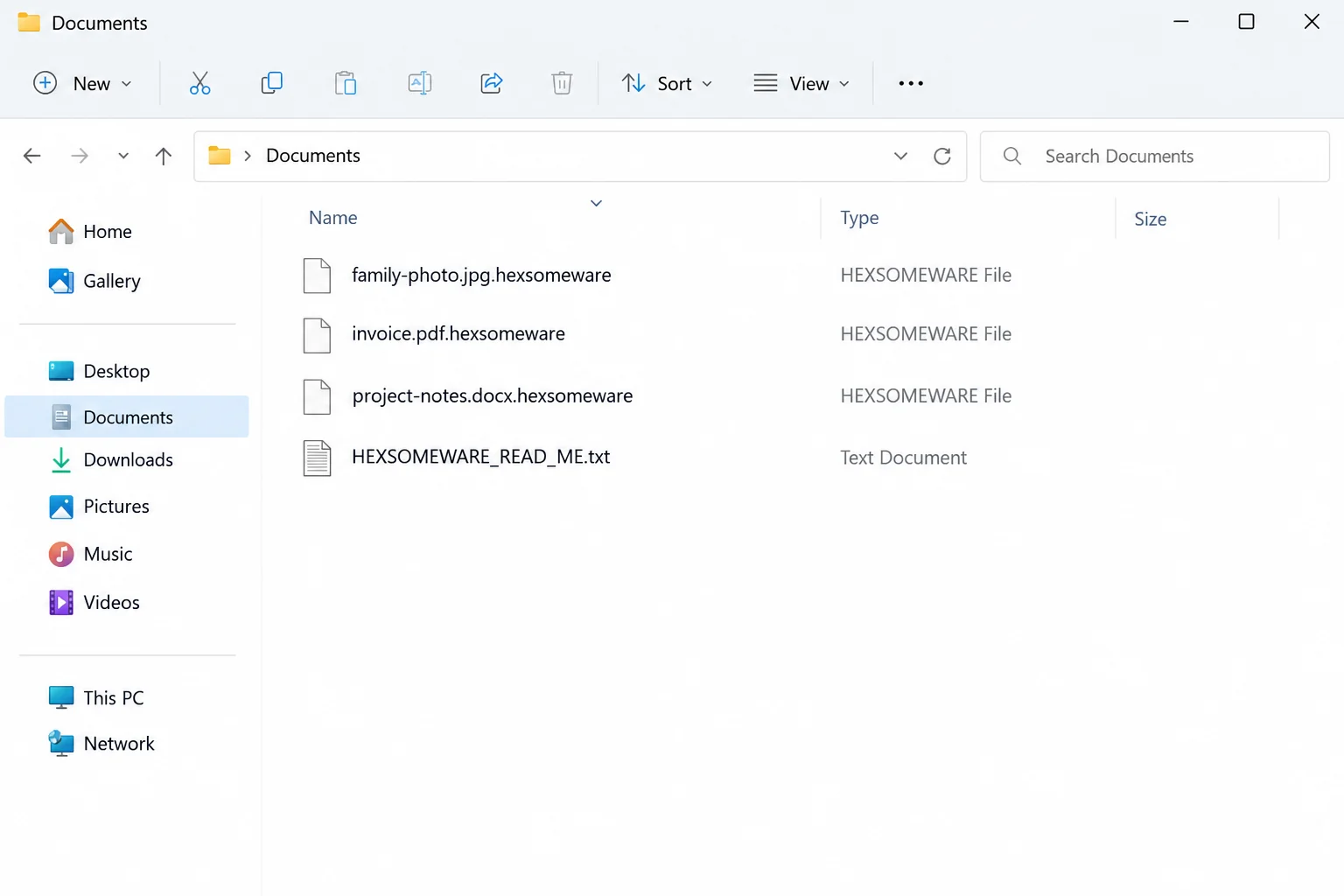
Hexsomeware is ransomware that encrypts files and adds the .hexsomeware extension. The reported sample also creates a text ransom note named HEXSOMEWARE_READ_ME.txt.
The extra extension is an identifying clue, not the cause of the damage. Removing those characters from a filename does not reverse encryption.
An affected spreadsheet might therefore remain visible in its original folder while its contents are unusable. Having the directory listing is different from having readable data.
The file-list illustration above explains these indicators. It is not a capture from a compromised reader’s computer or evidence of a particular attack date.
The ransom demand and disappearing screen
The documented behavior includes a full-screen payment demand and a request for 0.5 BTC. A text note provides another way for the attacker to deliver instructions.
The screen includes pressure about time and permanent loss. Those are the criminal’s claims, not a reliable assessment of what independent recovery might achieve.
The reported popup closes after restarting or signing out. That does not mean the underlying infection is gone, and it does not unlock encrypted files.
There is no good reason to reboot repeatedly just to make the warning disappear. On a business system, doing so can also complicate evidence collection.
The three decisions to keep separate
Hexsomeware ransomware removal is only one part of responding. Containment, cleanup, and data recovery have different purposes and should not be treated as interchangeable.
- Containment limits further access to devices, shared folders, and backups.
- Cleanup removes malicious software or rebuilds a system you can trust.
- Recovery restores usable information from verified copies or a compatible, independently checked solution.
A clean malware scan cannot promise that the attacker had no other access. An available backup cannot help safely if it is restored into an uncontrolled environment.
How the Hexsomeware Infection Works
Step 1: Ransomware reaches a system that can access valuable files
Encryption requires the malicious program to run somewhere with access to the targeted data. That might include local folders and storage reachable through the affected account.
The available case information does not establish one confirmed delivery route for every Hexsomeware infection. An extension alone cannot tell you how the attacker entered.
A recent attachment, installer, exposed remote-access service, or compromised account may deserve investigation. None should be presented as this attack’s proven starting point without supporting evidence.
Start with what changed shortly before files became inaccessible. Record suspicious downloads, unusual sign-ins, security alerts, and the approximate time of the first visible problem.
Businesses should compare those observations with endpoint, identity, and network logs. The computer showing the ransom demand may not be the first machine the intruder accessed.
For a home user, a short written timeline is still useful. It prevents later guesses from turning into apparently certain facts when asking for help.
Do not reopen a suspected installer to see whether it causes the same symptoms. Repeating the event can damage remaining files without improving the diagnosis.
Step 2: File contents are encrypted and names gain .hexsomeware
The attacker gains leverage by making useful documents unreadable. Your usual applications cannot open them, even though the folder still shows the names you recognize.
The reported .hexsomeware suffix makes affected files easier to recognize. It is not a special archive format that a normal extraction program can open.
Suppose both a photo and its editing project are encrypted. Changing their names, reinstalling the editor, or choosing another default app will not recreate the original data.
Likewise, a file repair utility is not automatically a ransomware decryptor. Repairing a broken document structure and undoing encryption are fundamentally different jobs.
Preserve representative encrypted files in their current form. A recovery specialist may need the original filenames, the note, and other incident details to identify the exact variant.
Avoid batch-renaming the entire collection. Even if the content remains unchanged, losing identifying details makes later work harder and increases the chance of confusing damaged copies.
Check connected storage carefully, but do not reconnect disconnected drives to the affected computer. A previously offline backup should remain isolated while the incident is assessed.
Step 3: Payment instructions turn disruption into pressure
Hexsomeware’s text note and full-screen demand push the reader toward a Bitcoin payment. The documented request is 0.5 BTC, whose cash value changes with the market.
That demand does not establish a fair price for recovery or a functioning support relationship. It is a condition imposed by the party responsible for the disruption.
The reported instructions use a Bitcoin address rather than a normal customer-service channel. An address identifies a payment destination, not a trustworthy business or a verified person.
A countdown can make checking backups feel dangerously slow. However, a threat about what happens next is not technical evidence that every alternative has already disappeared.
Do not assume the attacker will supply working software after payment. Even a working tool might be slow, incomplete, or unable to repair files damaged during encryption.
Payment also does not demonstrate that the machine is safe. Unauthorized accounts, stolen credentials, or another malicious component require separate investigation where there is evidence of them.
For an organization, involve its incident-response team before anyone communicates or spends money. Preserve the message so decisions are based on the actual demand, not recollection.
Step 4: Visible warnings may disappear while the damage remains
The popup’s reported disappearance after restarting or signing out can be misleading. The most noticeable symptom may vanish while encrypted documents remain exactly as inaccessible.
That creates a second risk: treating a quiet screen as permission to reconnect everything. Network drives and backup devices should not become the test of whether cleanup worked.
Check the system through a planned response process instead. The absence of a warning window is much weaker evidence than a verified rebuild and reviewed access controls.
If files were already synchronized to a cloud service, investigate version history from a clean device. Do not assume synchronization is equivalent to an independent backup.
Some services may retain older versions; others may have copied the encrypted changes. Retention settings, account access, and the timing of changes determine what is available.
Recovery should proceed from preserved evidence and trusted copies, not from the criminal’s interface. The next sections explain how to organize that work without making avoidable changes.
What to Do If Hexsomeware Encrypted Your Files
-
Isolate the affected device promptly. Disconnect its network connection and leave offline backup drives detached. For a workplace computer, contact IT before experimenting with cleanup or restoration.
If a shared environment is involved, tell responders which folders and systems were reachable. Avoid signing into administrative accounts on the suspected machine.
-
Save the ransom note and record filenames, visible demands, and approximate discovery time. Capture the warning if safely possible, without reopening a suspicious program to reproduce it.
Keep copies of encrypted files before attempting repairs. Store incident material separately from known-good backups, clearly labeled so it cannot be mistaken for clean data.
-
Protect accounts from a separate trusted device. Review important sign-ins and change exposed passwords where appropriate. Revoke unfamiliar sessions and enable multifactor authentication on supported accounts.
Prioritize accounts that could reach backups, remote administration, and shared storage. Password changes alone do not remove software already running on a compromised computer.
-
Arrange trusted cleanup or a controlled rebuild. Malwarebytes for Windows can help identify malicious files; its scan does not decrypt documents or certify that every intrusion route is closed.
Use the Malwarebytes Windows download only through a trusted route, preferably using a clean device to obtain tools needed for an isolated investigation.
-
Inventory recovery options before changing encrypted data. Check disconnected backups, cloud version history, and unaffected copies. Test candidate restores on a clean system before committing to a full restoration.
Ask an experienced responder to assess whether preserving a disk image would be useful. Recovery attempts should work on copies, not the only remaining evidence.
-
Reduce repeat exposure after recovery. Patch the operating system and applications, review remote access, and separate backups from everyday accounts. AdGuard can help filter some malicious advertising.
AdGuard is an additional browsing safeguard, not ransomware removal or decryption. Do not treat an ad blocker as protection for exposed servers, stolen accounts, or every harmful download.
Hexsomeware Removal: Secure the Environment Before Restoring
Step 1: Preserve the incident details before cleanup
Retain HEXSOMEWARE_READ_ME.txt and full .hexsomeware filenames. Do not repeatedly sign out or restart merely to dismiss the full-screen demand.
Preserve relevant evidence before running tools, especially on business equipment. Keep intact external storage disconnected instead of using it as a cleanup test.
Step 2: Install Malwarebytes, scan Windows, and quarantine threats
Use this procedure on a personal Windows PC after preserving the incident details. For a managed computer, let your security team decide when scanning should begin.
Malwarebytes can find and quarantine threats. Its free Custom Scan is separate from paid real-time protection and Threat Scan. Neither edition supplies ransomware decryption keys.
-
Download the Windows installer.
Open the official download page using the button below. Select Free Download there and save the Windows installer.
If the affected PC cannot browse safely, use a trusted computer and arrange an appropriate transfer without exposing clean backup media.
Malwarebytes for WindowsManual scanning and quarantine, with optional paid protection.
Opens the official free-scanner page. Choose its Windows download; paid protection is optional.
-
Open the setup file.
Open Downloads and double-click the MBSetup file. If Windows requests permission, check that the prompt identifies Malwarebytes before allowing the installation.

-
Complete setup without accepting unwanted extras.
Select Install, choose the appropriate Personal or Business device option, and continue. Business-managed computers should be handled through their administrator’s process.

Review any browser extension, trial, or subscription offers. Skip optional features you do not want, then select Open Malwarebytes when setup finishes.

-
Choose a supported scan.
Find the Scanner tile on the dashboard. For a free Custom Scan, open its three-dot menu, select Advanced Scan, and choose Custom Scan.
Expand the file-location selector and select the system drive and relevant locations. Review potentially unwanted program settings, then select Start Custom Scan.
A paid or eligible trial edition may also offer Threat Scan. Use the controls available in your edition; do not disable Windows protections to unlock another option.

-
Let the scan complete and inspect its findings.
Keep the computer powered on while scanning and wait for the results. A large Custom Scan can take longer than a scan limited to common locations.
Review each detection and its location. Leave confirmed threats selected and choose Quarantine. Save the report if a detection is unclear rather than adding it to exclusions.
The results illustration uses sample detections to show the Quarantine control. Those names are not identifiers for the malware discussed in this article.

-
Finish removal and handle a requested restart.
Follow the quarantine prompts. If a restart is requested, save your work and coordinate it with anyone preserving evidence before restarting.

Reopen the application afterward and review the result. Repeated detections, blocked removal, or signs of continuing access need further investigation, not an automatic clean-device conclusion.
The screen design can vary by installed release. Follow the named controls and the vendor’s current scan instructions if your version looks different.
Step 3: Use a second opinion if findings remain unresolved
HitmanPro provides an optional second opinion when a Windows infection or unresolved finding warrants another check. Run scanners sequentially, not at the same time.
Scanning is free. Removal needs an eligible one-time 30-day trial or a paid license. A computer that already used its trial may not qualify again.
-
Obtain HitmanPro from the established download route.
HitmanProOptional second-opinion Windows scanner.
Free scan. Removal requires an eligible trial or paid license.
-
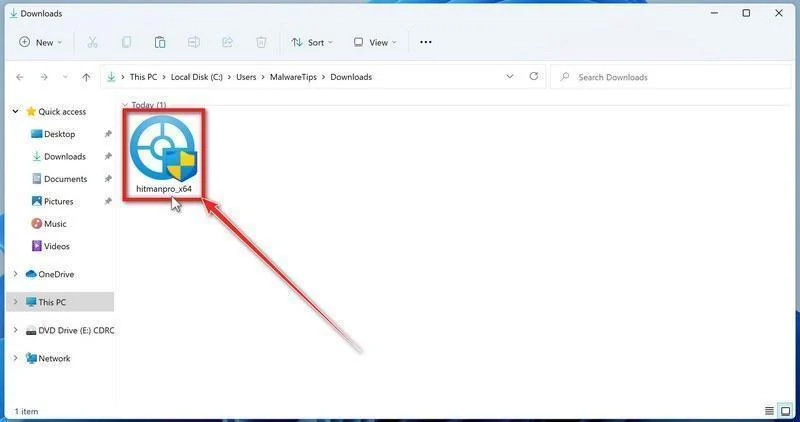
Launch the downloaded program.
Open Downloads and run the appropriate HitmanPro file for your system. Check the publisher in any Windows permission prompt before allowing it.
-
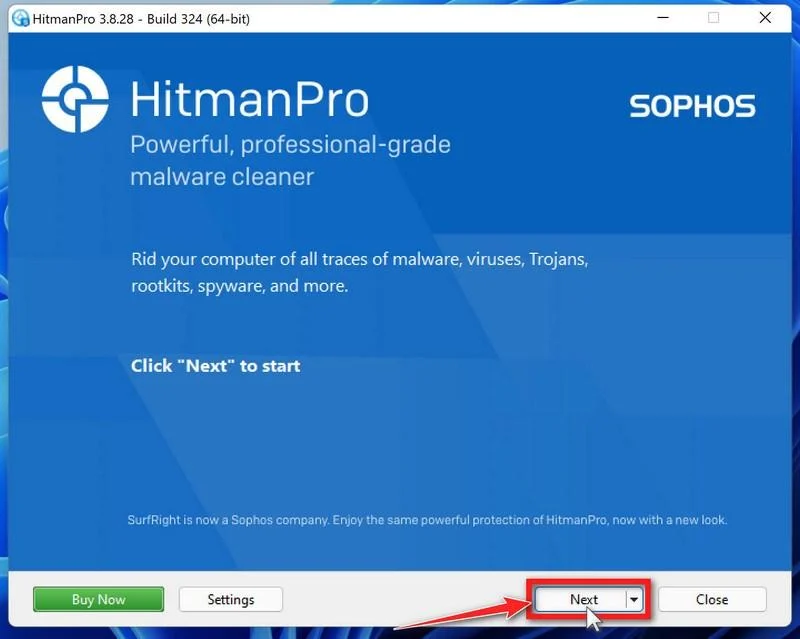
Start the scan.
Open HitmanPro, select Next, and follow its license and setup prompts. Its cloud checks require an internet connection; arrange controlled access if the PC was isolated.
-
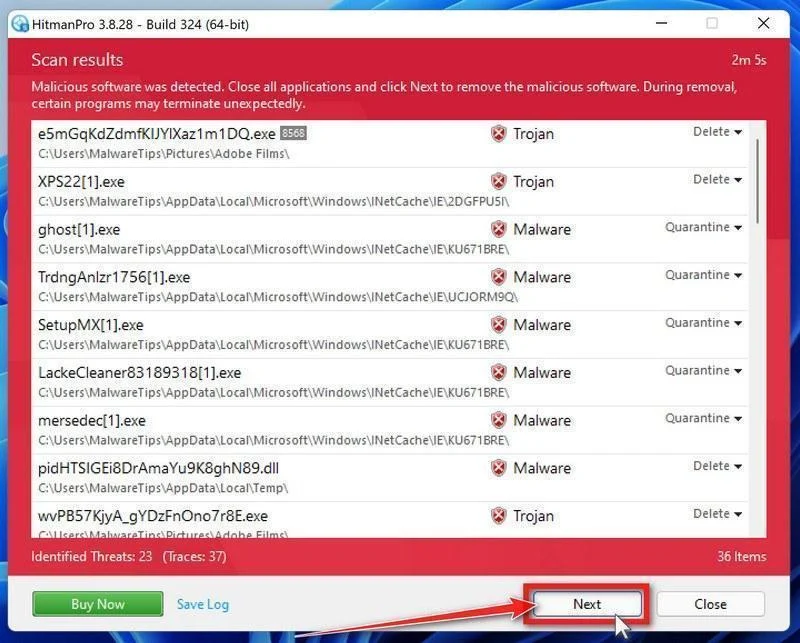
Review the results before removal.
Allow scanning to finish. Inspect the listed objects and proposed actions, then select Next for confirmed unwanted items. Save uncertain findings for qualified assistance.
-
Use an eligible license and complete cleanup.
If available, select Activate free license and follow the trial prompts. Otherwise, use an existing license or retain the report; do not assume purchase is mandatory.
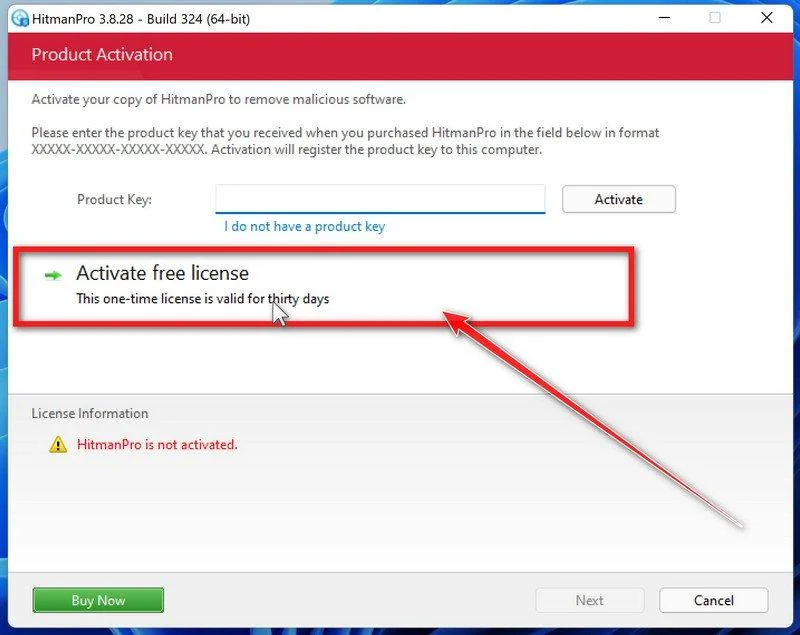
Finish the proposed cleanup and restart if requested. If problems persist, keep both scanners’ reports and seek help rather than repeatedly activating unfamiliar repair tools.
Step 4: Confirm system trust instead of relying on a vanished popup
Check completed removal actions and keep the reports. If access remains uncertain or malware returns, obtain qualified help with a supported rebuild.
The disappearing demand is not a decryption result. Use the separate recovery methods only after establishing a clean destination and preserving encrypted originals.
Can .hexsomeware Files Be Recovered?
Removing ransomware stops or contains the malicious software. It does not turn encrypted bytes back into working documents. Keep untouched encrypted originals before testing any recovery method.
Use a clean, updated recovery environment and keep it separate from systems still under investigation. Restore files only after the infection and its access path are addressed.
Option 1: Restore a verified backup or earlier cloud version
-
Find a backup dated before the encryption. Keep the original backup unchanged and check that representative documents actually open in a trusted environment.
-
Restore to a separate clean location, not over the only encrypted copies. Use the backup application’s documented restore process for databases and application-specific data.
-
For cloud storage, open its genuine version-history or restore controls from a trusted device. Compare dates and select an unaffected version where one exists.
-
Inspect restored documents and confirm that the required recent work is present. A familiar filename alone does not verify successful restoration.
Windows File History helps only if it was configured and a usable backup survives. Open Control Panel, then System and Security, File History, and Restore personal files.
Browse the available dates and preview the files. Use Restore to for a separate destination when offered, rather than replacing your only copy during testing.
Option 2: Look for a decryptor that matches the actual variant
A decryption tool must support the ransomware family and version involved. A matching extension, similar name, or confident advertisement is not enough.
- No More Ransom’s decryption catalog lists supported families and their tool instructions.
- Emsisoft’s ransomware decryptors provide family-specific tools and limitations.
- ID Ransomware can help identify a family from appropriate evidence, subject to its upload and privacy terms.
-
Record the ransom-note filename, appended extension, and existing detection. Do not identify the ransomware family from a filename extension alone.
-
Check the tool’s exact supported variant and requirements. For sensitive business material, ask your responder what evidence can be shared before uploading anything.
-
Read the developer’s instructions and run a supported tool only on copies in a separate location. Keep the original encrypted data even after an apparent success.
-
If no suitable decryptor is available, retain the copies and revisit trusted catalogs later. Do not pay a stranger to unlock a supposedly hidden download.
Option 3: Assess surviving snapshots without assuming they exist
Some systems retain earlier snapshots or previous versions; others never had them or lost them during the incident. Check availability instead of trusting the ransom note.
On Windows, open the affected folder’s Properties and look for Previous Versions. Open a suitable earlier version first and copy needed data to a different location.
If no version appears, that method has no available copy to restore. It does not establish whether a separate backup or cloud version exists.
Option 4: Consider deleted-file recovery only for recoverable originals
File-recovery software does not decrypt ransomware’s encrypted output. It may help only when readable originals or other usable copies remain recoverable on the storage.
Further writes can overwrite that recoverable data. For valuable files, have a qualified specialist assess or image the source drive before installing software or starting another scan.
Use the procedure below only when that recovery approach is appropriate. Install the tool elsewhere and save recovered files to a separate drive or clean destination.
-
Open the established recovery-tool download route.
EaseUS Data Recovery WizardFile recovery, not ransomware decryption.
View EaseUS Data Recovery Wizard
Check current compatibility, free-edition limits, and licensing before installation or purchase.
-
Install away from the recovery source.
Download and install on a separate suitable system or drive, following a specialist’s plan when necessary. Do not install into the disk you hope to recover.
-
Select the source and scan for recoverable data.
In the recovery application, choose the affected drive or location and begin scanning. Selecting an encrypted file does not make the tool a decryptor.
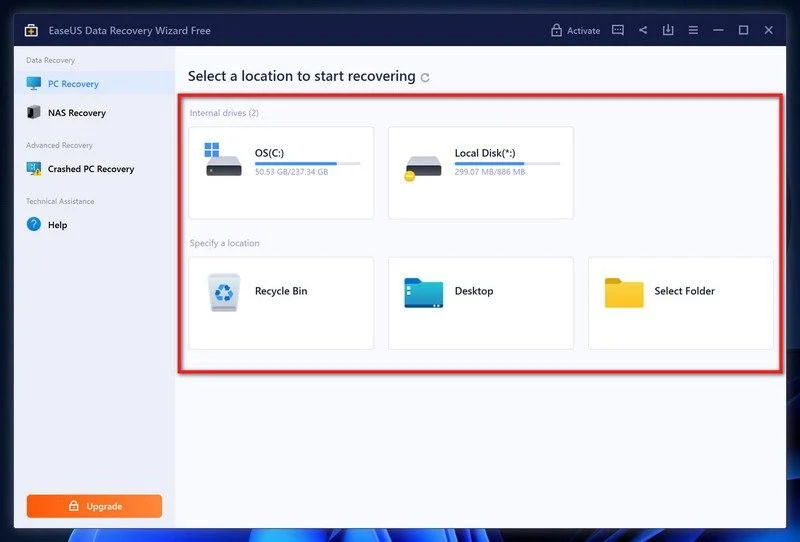
-
Inspect what the scan actually found.
Use the available filters to locate needed document types. Preview representative files to see whether their contents are readable, not merely listed by name.
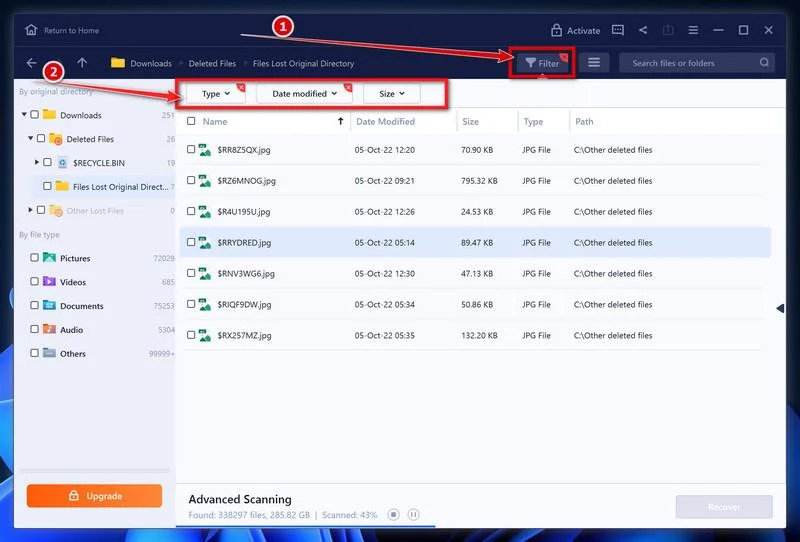
A preview can help evaluate a result, but free-edition export limits may still apply. Do not purchase solely because a scan displays filenames.
An unavailable preview is not a successful recovery. A listed filename may still refer to damaged or unusable data.
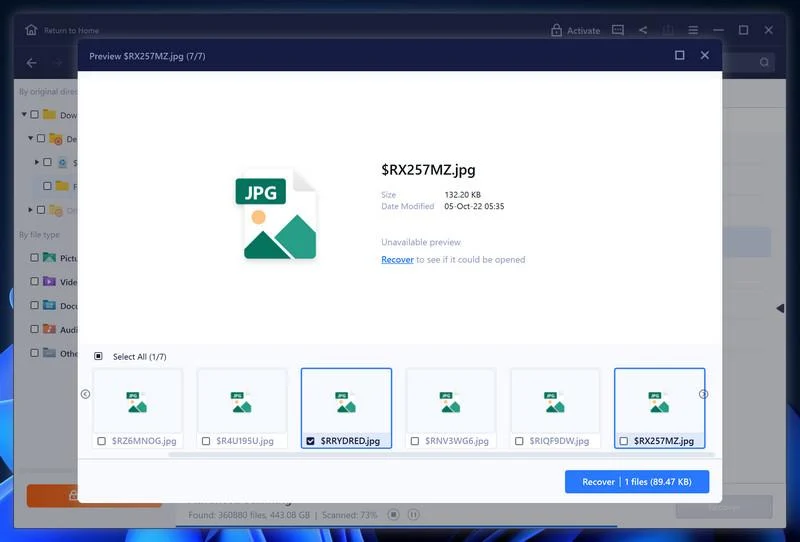
-
Recover to a different destination and verify the files.
Select appropriate readable results, choose Recover, and select a different drive or safe location. Never save the recovered output back over the recovery source.
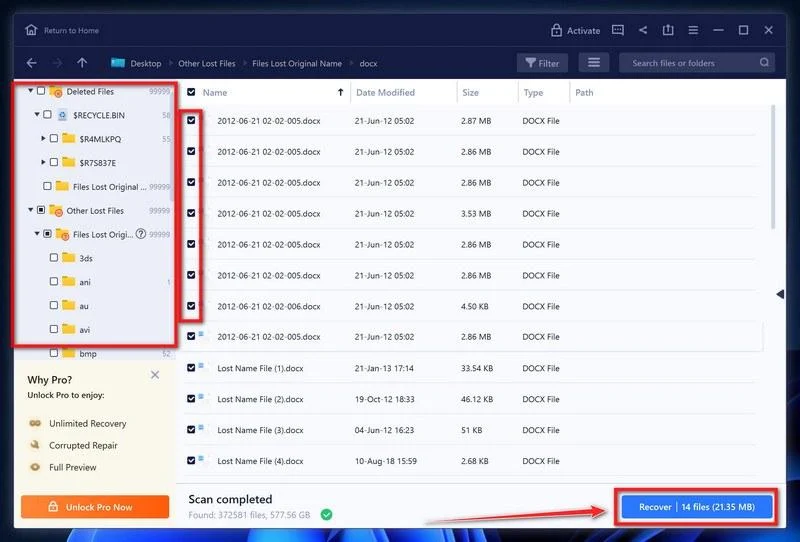
Open representative recovered files in the clean environment. Keep the original encrypted copies, scan reports, and a record of which method recovered each set.
If recovery fails, stop experimenting on the only source. Preserve it for qualified assistance or a future matching decryptor rather than accepting guaranteed-recovery sales claims.
Watch for a Second Loss During Recovery
Ransomware victims are attractive targets for people selling guaranteed decryption. A confident message and a logo do not prove that someone has a working solution.
Ask what evidence supports compatibility, what work will be performed, and whether the company intends to negotiate with the attacker. Get the terms in writing.
Do not hand over remote access merely because someone recognizes the file extension. Publicly visible details can be repeated by anyone who has read a ransomware report.
Uploading documents for diagnosis creates a separate privacy decision. Use small, non-sensitive samples where appropriate and understand who receives them before submitting confidential business or personal material.
If a provider promises guaranteed restoration without examining the case, pause. Useful help explains limitations, preserves originals, and distinguishes technical work from passing money to criminals.
Report a significant incident through the appropriate local cybercrime channel. Reporting supports investigation, but it does not guarantee immediate recovery or replace containment.
Frequently Asked Questions
Does renaming .hexsomeware files make them work again?
No. The extension is a visible marker added to encrypted files. Removing it changes the label, not the encrypted contents that the original application needs.
Keep the filenames intact when preserving evidence. Test any legitimate recovery process on copies rather than experimenting with your only remaining collection.
Why did the Hexsomeware popup disappear after restarting?
The reported popup closes after a restart or sign-out. Its disappearance is not a successful decryption message and does not confirm that the device is clean.
Evaluate the actual files and the system’s security state separately. Reconnecting backup drives because the screen looks normal can put unaffected copies at risk.
Will Malwarebytes restore the encrypted documents?
Malwarebytes is an antimalware tool, not a universal decryptor. It may help remove detected malicious components, but that process does not reverse existing file encryption.
Preserve encrypted data before cleanup and plan restoration independently. For a serious compromise, a controlled rebuild may offer more confidence than relying on one scan.
Is the 0.5 BTC payment a reliable recovery option?
No payment comes with an enforceable guarantee from the attacker. A promised decryptor may never arrive, fail on some files, or leave other damage unresolved.
Investigate verified backups and legitimate recovery options first. Organizations should use their incident-response and legal processes before making decisions about extortion demands.
Can an online decryptor be trusted just because it names Hexsomeware?
No. Anyone can put a ransomware name on a download page. Check the tool’s provenance, exact compatibility, and instructions through a reputable source.
Never disable protections or pay an unsolicited stranger to try an unverified program. Even legitimate tools should be tested against duplicate files before wider use.
How can I make recovery easier if this happens again?
Maintain separate backups, including copies unavailable to everyday user accounts. Test restoration periodically so you know whether important files are genuinely recoverable.
Keep systems updated and review unnecessary remote access. The No More Ransom prevention guidance explains why independent backups remain essential.
The Bottom Line
Do not let Hexsomeware’s payment screen dictate your response. Isolate the device, preserve the encrypted files, and establish a trusted cleanup plan before reconnecting storage.
Removal and recovery are separate tasks. Check verified backups and exact-variant decryption resources, and reject anyone promising certainty without examining the evidence.
If the infection has already reached shared systems, involve qualified responders now. A coordinated investigation is more useful than repeatedly restarting until the warning disappears.

Join the discussion
0 commentsShare your experience or ask a question about this article.
Your progress
Did these steps help?
Let us know how the guide worked for you.
Describe what you see and the step you reached. Keep passwords and other private information out.
Discussion
Start the conversation
Have a question or something useful to share? Add the first comment.