

Your files have acquired a .coffin ending, and a recovery note gives you seven days. A working folder suddenly feels like a countdown.
The temptation is to try whatever promises the quickest return to normal. A few careful decisions now can protect the options you still have.
Overview
The file ending and recovery note identify the reported pattern
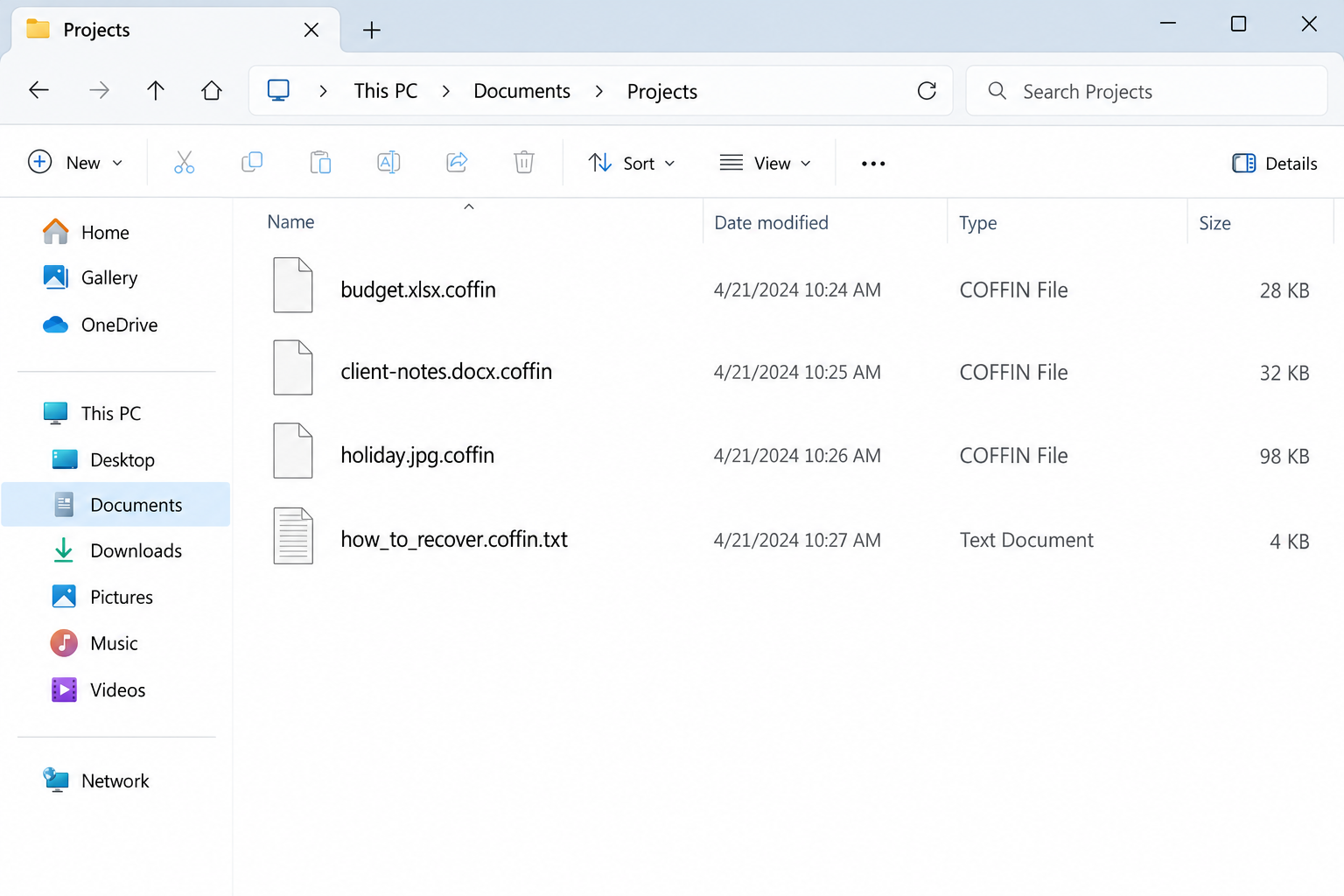
Coffin Locker ransomware is reported to encrypt accessible files, add the .coffin suffix, leave how_to_recover.coffin.txt, and change the desktop wallpaper.
For example, an ordinary budget spreadsheet might retain its original extension and gain .coffin afterward. Removing the added text does not restore the underlying contents.
The image illustrates that naming pattern using fictional files and dates. It is not a captured infection or a demonstration that a particular recovery tool works.
The demand creates a payment deadline, not a dependable recovery agreement
The reported note demands 0.075 BTC, gives a seven-day window, threatens a higher price afterward, and promises a decryption package following payment.
These are statements from an extortion demand. They do not establish that a working tool will arrive, support will be reliable, or every affected file will recover.
The note also claims that local recovery resources were destroyed. Check surviving copies independently rather than accepting an attacker’s description as a complete damage assessment.
Protect the recovery sources before attempting repairs
- Keep disconnected backup storage away from the affected system.
- Separate the encrypted originals from any copies used for recovery experiments.
- Investigate the computer’s access before putting restored files back into service.
- Use variant-compatible recovery resources, not a decryptor selected only by a similar name.
- Preserve the note and filenames for a trusted responder without publicly sharing private documents.
No compatible free Coffin Locker decryptor has been verified here. The current No More Ransom catalog does not list it, but that is not a prediction about future research.
The Ransom Note Cannot Tell You Everything That Happened
An attacker benefits when a victim believes the note is both a diagnosis and the only possible solution. Neither assumption is safe.
The demand may describe every mapped drive as affected. Your actual inventory should establish which locations were accessible and which files were changed.
A folder containing a ransom note is not necessarily proof that every item in it was encrypted. Test only copies when determining what remains usable.
Equally, one intact document does not show that the whole machine is trustworthy. An infection can affect selected data while leaving the desktop apparently functional.
There was no execution test for this article. The initial access route, exact encryption implementation, and damage on your system require incident-specific evidence.
Do not infer data theft merely from the existence of encryption. Confidentiality concerns should be investigated where there are signs of unauthorized access or copying.
Keep observations and claims in separate columns. A changed filename is an observation; an attacker’s assertion that every backup is gone remains a claim until checked.
That simple distinction can reduce panic. It also helps a technician avoid repeating the same assumptions when deciding what to inspect first.
How Coffin Locker Ransomware Works
Step 1: The attacker reaches an environment containing useful data
Encryption requires an opportunity for malicious code to operate. The first visible ransom note may appear after earlier activity that did not attract attention.
Preserve recent security alerts, installation history, and relevant access records. They may help explain the entry route without relying on a generic list of ransomware delivery methods.
A suspicious email is one possible lead, not automatic proof of how this incident began. Remote access, downloaded software, and compromised accounts need examination where relevant.
For a business, identify which credentials and devices could reach the affected shares. Do not restrict the inquiry to the computer where someone first noticed a locked spreadsheet.
Home users can start with a shorter timeline: what changed, when the machine last worked normally, and which drives were attached.
Step 2: Accessible files acquire unreadable contents and new names
The visible Coffin Locker pattern combines encrypted data with the added .coffin suffix. A familiar application may no longer recognize or open the result.
The suffix is an identifier, not the encryption itself. Changing it back can make a file look familiar while leaving its contents equally unusable.
Do not let an application overwrite the only copy while attempting an automatic repair. Recovery work should preserve what a later compatible method may need.
Note the affected locations, including attached media, shared folders, and synchronized storage. Check their status from a suitable trusted environment rather than reconnecting everything experimentally.
Some copies may survive elsewhere. A cloud account’s version history, a disconnected drive, or an earlier authorized transfer deserves a proper check.
Step 3: Persistence can put new work at risk after a restart
Reports describe a scheduled task named CoffinLocker and a Windows startup entry. Those reported persistence mechanisms are reasons to investigate whether malicious execution can resume.
A restart is therefore not a removal method. Nor should you restore valuable documents onto the machine simply because the ransom screen temporarily disappears.
Do not delete every unfamiliar scheduled task by guesswork. Legitimate software also creates tasks, and a name alone cannot authenticate or condemn an entry.
A responder should examine the executable, registration, and related evidence. The goal is to remove malicious access without damaging normal services or discarding the investigation trail.
When confidence in system integrity is low, a carefully planned rebuild may be preferable to repeated manual guesses. Preserve necessary data and evidence first.
Step 4: The deadline steers recovery decisions toward payment
The seven-day demand tries to make a technical incident feel like an expiring purchase opportunity. The promised turnaround adds the impression of a dependable service.
It is still an extortion arrangement. A payment receipt would not prove that the operator has supplied a usable key or that the environment is safe.
The Bitcoin amount also does not establish a fixed cash cost. Do not use a historical currency conversion as the price of solving the incident.
Give technical responders time to assess the actual damage and surviving copies. An attacker-created schedule should not replace your recovery priorities.
For an organization, keep communications, financial decisions, and any legal questions inside its authorized response process. A frightened employee should not negotiate alone.
Find the Best Surviving Version, Not Just a File That Opens
Compare where each copy came from
An offline backup made before encryption is different from a synchronized folder that copied the damaged versions. Identify the source and date of each candidate.
A colleague may hold last week’s document, while an email attachment contains yesterday’s version. List both instead of assuming the newest filename is the best copy.
For a business database, an intact backup may need transaction logs or an application-specific restore. Ask the person responsible for that system before replacing production files.
Record gaps openly. A successful restore of most documents can still leave important recent changes missing, and people need to know before relying on the data.
Do not overlook account-level recovery features
Some services preserve older file versions or deleted items according to the plan and retention settings. Availability depends on what existed before the incident.
Access those features through the actual provider from an unaffected environment. A stranger offering a special recovery portal is not the same as your storage service.
Check whether another person still has access to the account. Restoring files is less useful if an attacker can immediately remove or encrypt the replacement copies.
Keep valuable restored copies separate until the destination is ready. Do not sacrifice a good backup to test whether the infected machine behaves better now.
Keep encrypted originals even after partial recovery
A partial restore can make it tempting to discard everything still locked. Wait until the important missing items and investigation needs have been reviewed.
Retain the note, directory structure, and original encrypted names. A later specialist assessment may depend on details that a mass rename would remove.
Be careful with confidential material. Uploading an entire client archive to an unknown recovery site creates a new disclosure risk without establishing decryption compatibility.
What to Do if Coffin Locker Has Locked Your Files
Contain the affected system. Disconnect its network connections and separate external storage. Contact your IT team immediately for workplace equipment or shared folders.
Avoid repeated reboots or a rushed reinstall before evidence is preserved. If damage continues and isolation is impossible, seek urgent guidance about shutdown and its evidence trade-offs.
Save the identifying details. Keep the note name, full file suffixes, wallpaper text, detection alerts, and discovery time. Note which drives were connected.
Do not send the attacker private samples to prove that you are serious. Share carefully selected evidence only through a legitimate responder’s agreed process.
Establish a trusted cleanup plan. Malwarebytes can help detect malicious programs; it does not decrypt .coffin data. Preserve what you need before applying changes.
AdGuard is a future browsing-protection layer, not a ransomware repair. Follow the dedicated removal section below or your organization’s incident-response instructions.
Inventory recovery sources independently. Check offline backups, existing versions, earlier attachments, and authorized copies held elsewhere. Verify actual contents before considering a source usable.
Consult the No More Ransom decryption catalog for current compatibility. Do not run an unrelated tool on your only encrypted archive.
Restore into a trustworthy destination. Address the original access route and confirm the recovery target is ready before copying valuable data back.
Test important documents and applications, not just icons or filenames. Keep an exception list for files that remain damaged, incomplete, or older than required.
Report extortion and any payment already made. Preserve correspondence, transaction identifiers, and provider case numbers. Ask appropriate authorities and your payment provider about available assistance.
Do not pay an unsolicited recovery agent who promises guaranteed results. A confident guarantee is not evidence that they possess a compatible tool.
Coffin Locker Removal Guidance
These steps support containment and malicious-software removal. They cannot establish the full extent of a business intrusion or substitute for evidence preservation by a qualified responder.
The Malwarebytes Windows option is a security product, not a Coffin Locker decryption service. Obtain tools through genuine routes using an unaffected device.
Contain the incident before running cleanup tools
Disconnect the affected computer from Wi-Fi and wired networks. Unplug external storage and leave backup drives disconnected while you assess what happened.
Pause synchronization from a clean device where possible. Otherwise, encrypted versions may replace usable cloud copies while you are trying to rescue them.
At work, contact your IT or incident-response team immediately. A ransomware screen on one computer may be the visible part of a larger intrusion.
Keep the ransom note, filenames, discovery time, and any security alerts. A specialist may need disk or memory evidence before cleanup changes the machine.
If you cannot isolate a computer and encryption is visibly continuing, seek immediate assistance about shutting it down. Powering off can lose volatile evidence.
Do not repeatedly restart, reinstall, or experiment with utilities. Those actions can overwrite recovery evidence without addressing the underlying access problem.
Use trusted scanners on an isolated personal computer
For a home computer, arrange cleanup after preserving the evidence you need. Obtain security tools through their official websites using an unaffected system.
Malwarebytes can scan for malicious programs and related unwanted software. It is an infection-removal tool, not a way to decrypt already encrypted documents.
Install a current copy, update its detection data when safely possible, and run the available comprehensive scan. Review detections before applying the recommended quarantine actions.
Keep the scan report. It can help distinguish the ransomware payload from another infection, a suspicious installer, or a remote-access program.
Windows Security also provides scan options. Microsoft Defender Offline restarts into an offline scanning environment, so save your work before starting it.
Follow Microsoft’s ransomware protection guidance rather than instructions in the criminal’s note. A note telling you to disable protection is not trustworthy advice.
If Windows will not start or the scanners cannot operate, stop improvising. Use reputable technical assistance instead of downloading a supposed one-click emergency decryptor.
Do not upload the executable to unfamiliar recovery websites or run it elsewhere for testing. A second execution can create another incident.
Verify the environment before restoring anything
A completed scan is useful, but it cannot establish that every account, remote session, or networked computer is safe.
Check for unauthorized remote-access software, suspicious accounts, changed security settings, and unknown scheduled tasks. Business environments require coordinated investigation beyond this home-computer checklist.
Change exposed passwords from a clean device. Prioritize email, cloud storage, administrator access, and any account whose credentials were saved on the affected system.
Enable multifactor authentication where supported and revoke suspicious sessions. Simply changing the password may leave an existing signed-in session active.
A trusted reinstall may be appropriate when system integrity remains uncertain. Preserve recoverable data first, and reinstall from authentic installation media.
AdGuard can help reduce exposure to malicious advertising during future browsing. It neither cleans an infected system nor reverses file encryption.
Keep backup media offline until cleanup and access checks are complete. Reconnecting your only good copy too early can turn a recovery opportunity into another loss.
Recovering Files With the .coffin Extension
Use the recovery component below to assess surviving copies and compatible assistance. Its options are conditional, not a promise that local snapshots or a decryptor survived.
Make a recovery copy, not another damaged original
Keep an untouched copy of the encrypted data whenever practical. Include the ransom note and retain the original directory structure.
Use a separate destination for recovery experiments. Never let a utility overwrite your only encrypted copy or replace an intact backup.
Before sharing samples, consider their sensitivity. Choose an ordinary, nonconfidential file and ask the service about handling rules if business or personal information is involved.
The note’s name, complete filename suffix, and contact details can help identify a variant. An extension alone is not enough to establish decryption compatibility.
For example, two infections can use the same suffix while generating different keys. A familiar family name can also hide a newer, unsupported version.
Record the exact error or result from each attempt. Keep a simple checklist so another helper does not repeat risky tests on the same files.
Check recognized decryption projects
Visit the No More Ransom decryption catalog from a clean browser. Look for the actual variant and read the tool’s requirements carefully.
A tool for a related family does not automatically unlock your files. Some decryptors support only older versions, certain keys, or specific encryption mistakes.
Download through the catalog’s trusted vendor link, not a sponsored search result or an unsolicited message offering guaranteed recovery.
Test only a duplicate sample first. Successful decryption should produce a usable document or image, not merely remove the added extension.
If the utility reports an unsupported file or key, stop. Changing the filename to resemble a supported variant does not change its encrypted contents.
When no compatible tool is available, preserve your encrypted archive. Researchers sometimes release new tools later, but future recovery cannot be promised.
Look for copies that existed before encryption
Check disconnected drives, backup software, cloud version history, another computer, and files previously sent to trusted contacts. You may have more copies than you remember.
Cloud synchronization is not automatically a backup. Confirm that an earlier usable version survives and that the account itself has not been compromised.
Restore into a cleaned environment. Open a selection of documents, photos, and project files before assuming the recovered collection is complete.
Compare important dates and contents. An older spreadsheet might open perfectly while still missing the transactions you needed to recover.
Windows Previous Versions or existing snapshots may offer additional copies. Availability depends on prior configuration and whether those snapshots survived the incident.
Do not create new restore points expecting them to contain yesterday’s files. Recovery depends on copies that already existed before the damage.
Deleted-file recovery utilities are a different category. They may locate unencrypted originals in some circumstances, but they do not mathematically decrypt overwritten data.
If you want a specialist to investigate that possibility, minimize writes to the affected storage. Continued installations can overwrite remnants that might otherwise be recoverable.
Evaluate recovery offers without surrendering control
Be wary of anyone who contacts you first, claims exclusive access to a secret decryptor, or requests an advance payment in cryptocurrency.
Ask a recovery provider what method it intends to use, what evidence supports success, and whether it would negotiate with the attacker.
Get the scope, fee, privacy terms, and limitations in writing. A legitimate assessment should distinguish a possibility from a demonstrated recovery result.
Do not provide remote administrator access to an unknown helper. Recovery desperation can make a second scam feel like the only remaining option.
If you already paid, retain receipts, transaction references, wallet addresses, and correspondence. Contact the payment provider promptly and report the extortion.
Recovery is sometimes partial. Prioritize irreplaceable files, verify them individually, and keep your evidence archive until the investigation and restoration decisions are settled.
Turn a Partial Restore Into a Usable Recovery
Getting one file back is encouraging, but it is not the end of the job. Prioritize the information needed for normal life or critical business work.
Make a short checklist for each important category: recovered location, version date, missing items, and person responsible for checking it.
A readable photograph is easy to assess. A business archive, project directory, or database may need a more deliberate validation using the appropriate application.
Keep restored data separate from unknown software. Reinstall applications through authentic distribution rather than treating every program in the old backup as trustworthy.
If several people are restoring files, agree on one destination and a naming plan. Otherwise, an older recovered copy can overwrite a newer one.
Do not silently merge incomplete business records. Tell the people using them where the gaps are so that missing transactions or documents are not mistaken for an accurate history.
Recovery also needs a return-to-service decision. Someone should confirm that remote access, accounts, and security controls have been reviewed before a business machine rejoins the network.
For home users, that can mean a trusted repair assessment and a deliberate review of the accounts used on the computer, rather than immediately resuming financial activity.
Afterward, test the replacement backup process with a real restore. A backup that has never been opened is a hope, not a demonstrated recovery source.
Keep at least one recovery copy protected from ordinary daily access where practical. The next incident should not be able to reach every usable version at once.
Document which source supplied each restored collection. If two copies later disagree, that record can prevent an older version from being mistaken for the final recovery.
Frequently Asked Questions
What does the .coffin extension mean?
It matches the reported Coffin Locker naming pattern. Preserve the note and other evidence, because an extension alone does not establish every technical detail of an infection.
Can I rename the files to open them?
Renaming cannot reverse encryption. It can also obscure useful identifiers, so retain originals and use separate copies for any legitimate recovery experiment.
Will Malwarebytes restore the encrypted data?
No. Malicious-software removal and recovering document contents are separate tasks. Address the infection before restoring data from a trustworthy source.
Is the seven-day deadline a reason to pay?
No. It is pressure from the extortion demand, not proof of dependable decryption. Begin containment and a qualified recovery assessment instead.
Does the note prove all Windows recovery copies were destroyed?
No. That claim needs checking against the actual system and surviving backups. Avoid both assuming local recovery will work and assuming every possible copy is gone.
What if there is no compatible decryptor?
Preserve encrypted copies and assess older versions or other intact sources. Future tools cannot be guaranteed, but destroying originals removes options unnecessarily.
The Bottom Line
Do not let Coffin Locker’s deadline choose your recovery method. Isolate affected equipment, retain evidence, and protect any surviving clean copies.
Remove malicious access before restoring files. If data remains locked, preserve it and use verified recovery resources rather than paying for an unsupported guarantee.

Join the discussion
0 commentsShare your experience or ask a question about this article.
Your progress
Did these steps help?
Let us know how the guide worked for you.
Describe what you see and the step you reached. Keep passwords and other private information out.
Discussion
Start the conversation
Have a question or something useful to share? Add the first comment.