

A stranger says an abandoned estate could be shared with you. Your part would be 50%, and all they need first is a reply.
It sounds like an unusual opportunity rather than an ordinary bank message. Before answering, look closely at the arrangement you are being invited into.
Overview
The sender offers cooperation instead of a verifiable entitlement
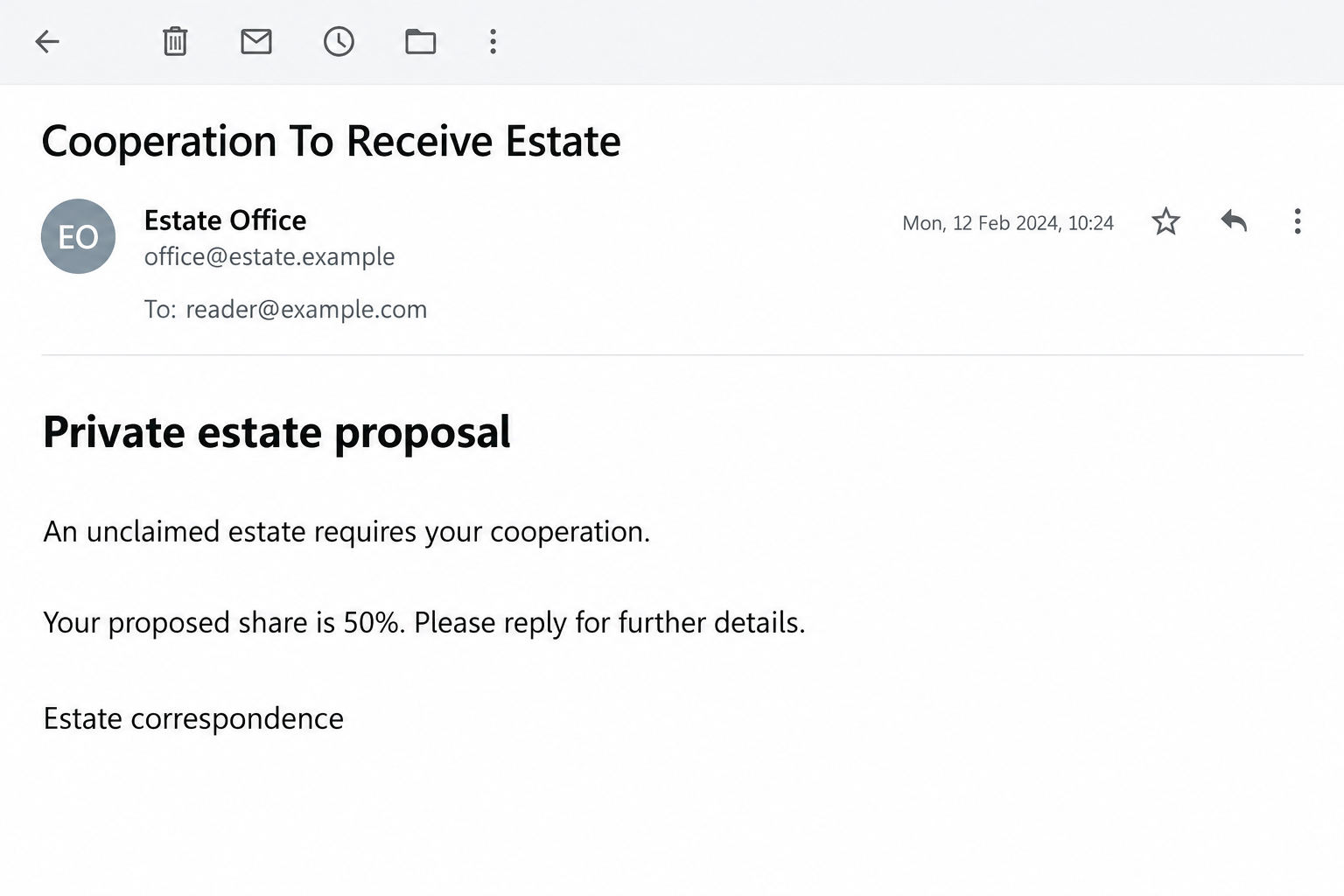
The Cooperation To Receive Estate email scam presents an unclaimed inheritance as a private opportunity. A stranger proposes sharing money supposedly left by someone without next of kin.
One reported message uses the name Elizabeth Gross and claims a senior European banking role. It offers the recipient half of the estate in exchange for assistance.
That is a claimed identity inside a fraudulent pitch, not a verified allegation against a real person with that name or the bank being invoked.
The reply is the opening, not the proof
The first message does not need to demand payment. Its immediate task is to find someone willing to continue a conversation about the promised money.
Follow-on requests in this type of fraud can seek identity documents, financial details, or advance charges. The opening email alone does not establish a particular fee amount.
The illustration uses invented addresses and a sample date. It is not an original bank letter, an authentic estate document, or evidence of a recipient’s entitlement.
A useful decision does not require solving the whole story
- An unsolicited profit-sharing proposal does not demonstrate a legal right to an estate.
- A genuine bank name can be copied without the bank’s involvement.
- Private correspondence and official-looking paperwork are not independent verification.
- Do not send money, account credentials, or identity documents to advance the proposed arrangement.
- If information or funds have already been shared, protect those specific exposures promptly.
The FTC has warned about secret inheritance-splitting offers. This message follows that established fraud pattern, not a dependable route to unexpected wealth.
Why the Offer Can Feel Worth Answering
The request starts smaller than the promised reward. You are not initially being asked to transfer your savings, only to indicate interest.
That makes the first step feel reversible. A reader may think they can ask a few questions, examine the documents, and stop if anything seems wrong.
But the conversation is controlled by someone trying to earn continued attention. Each reassuring answer can make the next request seem like part of a process already underway.
The 50% split also creates a story about mutual benefit. The supposed officer needs you, so their interest appears aligned with yours.
In reality, a promised share says nothing about whether the estate exists or whether the sender has authority over it. A generous percentage is not evidence.
The explanation about absent relatives removes the obvious objection: why would a stranger be chosen? It supplies a convenient opening without establishing an actual entitlement.
You do not need to prove a negative by investigating every deceased person or overseas bank. The person requesting your cooperation must supply an independently verifiable basis.
Do not let their preferred communication channel become the entire investigation. A conversation with the sender can clarify their claims, but it cannot independently authenticate those claims.
How the Cooperation To Receive Estate Scam Works
Step 1: An invented professional role gives the proposal borrowed authority
The message presents its sender as someone positioned to discover funds that ordinary people would never see. A banking or recovery-department title makes the story sound specialized.
Specific institutional names help it survive a quick reading. The recipient recognizes the organization and may assume that recognition authenticates the individual writing.
Those are separate facts. A bank can exist while an email claiming to come from one of its officers is fabricated.
Do not telephone a number in the proposal to verify the proposal. The person controlling the message can also control its recommended contact route.
If verification is genuinely necessary, use independently established institutional contact information. Do not provide identity documents merely to ask whether the approach is authentic.
Step 2: An absent heir becomes the reason to involve a stranger
The reported pitch describes an estate without next of kin and says the recipient’s help is needed. That explanation attempts to make an arbitrary selection feel purposeful.
Other inheritance approaches may claim a surname match or a previously unidentified beneficiary. Such assertions need records and proper verification, not acceptance because they sound personal.
Knowing your surname would not be extraordinary. Names and contact details can appear in public records, social profiles, or information exposed elsewhere.
Do not send a family tree or relatives’ documents to help the sender complete their story. That can expose people who never received the initial email.
A real estate inquiry can be assessed through an appropriate independent professional. It should not depend on privately helping a stranger obtain money they say has no claimant.
Step 3: Secrecy discourages the outside check that could interrupt the pitch
The approach frames the arrangement as discreet and unusually favorable. It may suggest that the sender will not make the same offer to others.
That creates a reason to protect the opportunity from scrutiny. Asking a family member or a bank about it can start to feel like risking the payout.
Reverse that logic. A proposal involving substantial money deserves more independent examination, not less, especially when the other party insists on confidentiality.
You should be free to consult your own adviser without losing access to basic facts. A stranger’s preference for secrecy does not create a duty to comply.
If the sender pressures you to delete correspondence or avoid discussing it, preserve the material and stop. Do not negotiate a supposedly safer version of the same arrangement.
Step 4: Paperwork can convert interest into sensitive disclosure
Once a recipient replies, a fraudster can introduce forms, certificates, account requests, or another professional identity. A document’s appearance does not establish its authenticity.
A copied signature, official seal, or familiar bank logo can make a file persuasive while leaving its source unchanged.
Identity documents can be particularly valuable. They may support impersonation or more targeted demands even if no transfer is ultimately completed.
Never provide an online-banking password, one-time code, or remote access to receive an inheritance. Those requests hand over control rather than demonstrate entitlement.
If an attachment asks you to install software or enable a feature, stop. A document about an estate does not need permission to run an unknown program.
Step 5: A release cost can make the recipient pay for nonexistent money
Advance-fee fraud introduces a cost before the promised windfall: processing, clearance, transfer, legal work, or another supposed obstacle. Specific labels and amounts can vary.
The proposed fee feels small when compared with the imaginary share. That comparison distracts from the more important question of whether the payout exists.
After a payment, a new problem may appear. Money already sent can make another payment feel like protecting an investment rather than taking a fresh risk.
Do not continue for that reason. A previous loss does not authenticate the next demand, and an additional transfer does not recover the first one.
The reported opening does not establish every later charge. The warning concerns the fraudulent estate proposal and the known advance-fee pattern, not an invented completed transaction.
Check the Identity Without Following the Sender’s Script
A name is a lead, not a verified professional
Searching a claimed name may find an unrelated real person. A matching professional profile is not proof that the person wrote your email.
Compare the organization, role, and actual contact route. Where a regulated professional is involved, relevant official directories may help establish whether that identity exists.
Even an authentic registration does not authenticate every message using the name. An impersonator can copy information from the same directory you consult.
A genuine professional should be reachable through independently verified details. Keep sensitive documents out of the exchange until the relationship and purpose are properly established.
Check the claimed institution separately
A message can combine a real bank with a vague international department. The combination may sound official without corresponding to an actual authorized process.
Use your existing bank contact or the institution’s independently located website. Explain the proposal without first sending the stranger your account information.
Do not treat an email signature’s street address as proof of an office. It may be copied, unrelated, or simply irrelevant to who controls the message.
No calls or direct contact tests were performed for this article. There is no verified legal entity or professional relationship behind the sender’s claimed role.
Separate real estate administration from this unsolicited deal
Legitimate estates can involve documents, professional charges, and identity checks. That does not validate a secret 50% profit-sharing offer from an unknown sender.
The distinction is the verifiable entitlement and independently authenticated process, not a blanket claim that any fee connected with an estate must be fraudulent.
If you believe there could be a genuine family matter, consult an independent qualified professional in the relevant jurisdiction. Do not use the proposal’s recommended adviser.
Explain the full arrangement, including the private split and secrecy request. Leaving those details out can make an adviser assess a different situation from the one presented.
What to Do if You Have Fallen Victim to This Scam
Stop the conversation and further payments. Do not send a final processing charge, cancellation fee, or payment to recover what was already transferred.
Preserve the correspondence before blocking the sender. You do not need to announce your investigation or persuade the fraudster to admit what happened.
Contact the provider that handled any payment. Use a known banking app, genuine website, or the number on your card. Describe the transaction accurately.
Ask about a recall, dispute, or other available response for that payment method. Act promptly, but do not assume recovery is guaranteed.
List exactly which personal details you shared. Distinguish a name and address from an identity document, banking credential, or authentication code.
Contact the appropriate document issuer or identity-protection authority when sensitive identification was exposed. Follow local procedures rather than buying protection from the original sender.
Protect any account access you disclosed. Replace affected passwords through the genuine services, end suspicious sessions, and inspect recovery information and account activity.
If the stranger accessed your device, disconnect it and obtain trusted help. Tell your financial provider when that access involved banking or payment information.
Investigate software exposure only where it occurred. Malwarebytes is relevant if you ran an attachment, installed a utility, or allowed an unknown program to operate.
AdGuard may reduce later exposure to malicious advertising and sites. Neither tool reverses a transfer or makes a fake inheritance payable; receiving the email alone does not establish infection.
Report with a useful evidence package. Keep the original email, full headers where available, claimed identities, payment references, and a short timeline.
The FTC’s response guidance for scam victims distinguishes payment and identity exposures. Use the appropriate reporting authority for your location and retain the case number.
Expect follow-up approaches. Someone may claim to represent a bank investigator, recovery office, police unit, or specialist who can release your refund.
Verify any new approach independently. Do not share codes or pay an advance recovery charge, even when the caller knows details of the first fraud.
Is Your Device Infected? Run a Free Malware Scan
Slow performance, constant pop-ups, or strange behavior? These are classic signs of a malware infection. The fastest way to find out is to scan your device with Malwarebytes Free — one of the most trusted malware removal tools available.
The free version detects and removes the most common threats, including:
- Adware — the cause of those annoying pop-ups
- Browser hijackers — unwanted redirects and changed homepages
- Trojans and spyware — hidden programs stealing your data
- Potentially unwanted programs (PUPs) — software you never asked for
👉 Select your device below — Windows, Mac, or Android — then follow the simple steps to download Malwarebytes, scan your system, and remove any threats it finds. The scan usually takes 5 to 20 minutes.
Run a Malware Scan with Malwarebytes for Windows
Malwarebytes is one of the most popular and trusted anti-malware tools for Windows — and it’s completely free for removing infections. It catches threats that many antivirus programs miss, including adware, browser hijackers, and trojans. Follow the steps below to scan and clean your PC in just a few minutes.
Download Malwarebytes
Click the button below to download the latest version of Malwarebytes for Windows from the official source. The free version is all you need — it will scan your computer and remove adware, browser hijackers, and other malicious software at no cost.
Download MalwarebytesOfficial installer for Windows 11 and 10. Your download starts right away.Want real-time protection? See Malwarebytes Premium Malwarebytes Free for WindowsScans and removes malware at no cost
-
Install Malwarebytes
When the download finishes, open your Downloads folder and double-click the MBSetup file. If Windows shows a User Account Control pop-up, click “Yes” to allow the installation.

Follow the On-Screen Prompts to Install Malwarebytes
The setup wizard will walk you through a few quick screens:
-
Choose where you’re installing the program — “Personal Computer” or “Work Computer” — then click Next.

-
Malwarebytes will now install on your device. This usually takes under a minute.

-
When installation is complete, the “Welcome to Malwarebytes” screen will open automatically.

-
On the final screen, click Open Malwarebytes to launch the program.

-
Enable “Scan for Rootkits”
Before scanning, turn on rootkit detection so Malwarebytes can find even the most hidden threats. Click the Settings gear icon on the left side of the screen.

In the settings menu, find “Scan for rootkits” and click the toggle so it turns blue.

Done? Click “Dashboard” in the left pane to return to the main screen.
Start the Scan
Click the blue Scan button. Malwarebytes will automatically update its virus database and start checking your computer for malware.

-
Wait for the Scan to Finish
The scan checks your entire system for browser hijackers and other malicious programs, so it can take 5 to 20 minutes depending on your computer. Feel free to do something else — just check back occasionally to see the progress.

-
Quarantine the Detected Threats
When the scan is done, you’ll see a list of everything Malwarebytes found — malware, adware, and potentially unwanted programs. Click the “Quarantine” button to remove all of them at once.

Malwarebytes will now remove the malicious files and registry entries and move them safely into quarantine.

-
Restart Your Computer
Some threats can only be fully removed after a reboot. If Malwarebytes asks you to restart, click Yes. Once you’re logged back in, Malwarebytes has finished removing the threats it found.

That’s it — your Windows PC is now clean of trojans, adware, and other malware, and should be back to running smoothly.
If you are still having problems with your computer after completing these instructions, then please follow one of the steps:
- Run a computer scan with ESET Online Scanner
- Ask for help in our Windows Malware Removal Help & Support forum.
Run a Malware Scan with Malwarebytes for Mac
Malwarebytes for Mac is a free on-demand scanner that removes the malware other security software tends to miss — adware, browser hijackers, and unwanted programs included. Cleaning an infected Mac with Malwarebytes has always been completely free, and it’s our go-to recommendation. Follow the steps below to scan and clean your Mac in just a few minutes.
-
Download Malwarebytes for Mac
Click the button below to download the latest version of Malwarebytes for Mac.
Download MalwarebytesOfficial installer for macOS. Your download starts right away.Want real-time protection? See Malwarebytes PremiumMalwarebytes Free for MacScans and removes malware at no cost -
Open the Malwarebytes setup file
When the download finishes, open your Downloads folder and double-click the setup file to begin the installation.

-
Follow the On-Screen Prompts to Install Malwarebytes
The Malwarebytes for Mac Installer will guide you through a few quick screens. Click “Continue” and keep following the prompts until the installation completes.



When the installation is complete, Malwarebytes opens to the Welcome to Malwarebytes screen. Click “Get started“.
-
Select “Personal Computer” or “Work Computer”
Malwarebytes will ask what type of computer you’re installing it on. Click either Personal Computer or Work Computer, whichever applies.

-
Start the Scan
Click the “Scan” button. Malwarebytes will automatically update its detection database and begin checking your Mac for malware.

-
Wait for the Scan to Finish
Malwarebytes will scan your Mac for adware, browser hijackers, and other malicious programs. This can take a few minutes, so feel free to do something else — just check back occasionally to see the progress.

-
Quarantine the Detected Threats
When the scan is done, you’ll see a list of everything Malwarebytes found. Click the “Quarantine” button to remove all the threats at once.

-
Restart Your Mac
Malwarebytes will now remove all the malicious files it found. Some threats can only be fully removed after a reboot — if Malwarebytes asks you to restart, allow it. Once you’re logged back in, your Mac is clean.

That’s it — your Mac is now free of adware, rogue browser extensions, and other potentially harmful software.
If you are still experiencing problems while trying to remove a malicious program from your computer, please ask for help in our Mac Malware Removal Help & Support forum.
Run a Malware Scan with Malwarebytes for Android
Malwarebytes for Android automatically detects and removes dangerous threats like malware and ransomware so you don’t have to worry about your most-used device being compromised. Aggressive detection of adware and potentially unwanted programs keeps your Android phone or tablet running smooth.
-
Download Malwarebytes for Android.
You can download Malwarebytes for Android by clicking the link below.
Get Malwarebytes for AndroidOpens Google Play in a new tab.Want real-time protection? See Malwarebytes Premium for AndroidMalwarebytes for AndroidScans your phone and removes malware at no cost -
Install Malwarebytes for Android on your phone.
In the Google Play Store, tap “Install” to install Malwarebytes for Android on your device.

When the installation process has finished, tap “Open” to begin using Malwarebytes for Android. You can also open Malwarebytes by tapping on its icon in your phone menu or home screen.

-
Follow the on-screen prompts to complete the setup process
When Malwarebytes will open, you will see the Malwarebytes Setup Wizard which will guide you through a series of permissions and other setup options.
This is the first of two screens that explain the difference between the Premium and Free versions. Swipe this screen to continue.
Tap on “Got it” to proceed to the next step.
Malwarebytes for Android will now ask for a set of permissions that are required to scan your device and protect it from malware. Tap on “Give permission” to continue.
Tap on “Allow” to permit Malwarebytes to access the files on your phone.
-
Update database and run a scan with Malwarebytes for Android
You will now be prompted to update the Malwarebytes database and run a full system scan.

Click on “Update database” to update the Malwarebytes for Android definitions to the latest version, then click on “Run full scan” to perform a system scan.

-
Wait for the Malwarebytes scan to complete.
Malwarebytes will now start scanning your phone for adware and other malicious apps. This process can take a few minutes, so we suggest you do something else and periodically check on the status of the scan to see when it is finished.

-
Click on “Remove Selected”.
When the scan has been completed, you will be presented with a screen showing the malware infections that Malwarebytes for Android has detected. To remove the malicious apps that Malwarebytes has found, tap on the “Remove Selected” button.

-
Restart your phone.
Malwarebytes for Android will now remove all the malicious apps that it has found. To complete the malware removal process, Malwarebytes may ask you to restart your device.
That’s it — your Android phone is now clean — no more malicious apps, adware, or browser redirects.
If you are still having problems with your phone after completing these instructions, then please follow one of the steps:
- Restore your phone to factory settings by going to Settings > General management > Reset > Factory data reset.
- Ask for help in our Mobile Malware Removal Help & Support forum.
Stay Protected: Block Ads and Malicious Sites
Now that your device is clean, keep it that way. Most infections start with a malicious ad or a fake download button — so blocking them at the source is your best defense.
We recommend AdGuard, which blocks malicious ads, phishing pages, and dangerous redirects before they can reach you.
👉 Download AdGuard and browse safely
If You Are Helping Someone Who Believes the Offer
Start with the arrangement, not an argument about intelligence. An apparently respectable stranger has offered a compelling story, and embarrassment can make it harder to discuss.
Ask the person to pause payments while an independent check takes place. A pause is an immediate protective action even when they are not ready to reject the entire story.
Look at the first message together. Where does the entitlement come from, who is authorized to distribute the estate, and why does secrecy supposedly matter?
Do not contact the sender pretending to be another interested beneficiary. That adds another conversation to the fraudster’s control without providing reliable verification.
If money has moved, help the person reach their financial provider promptly. A calm, accurate timeline is more useful than repeatedly explaining why they should have noticed sooner.
Respect control of their accounts and documents. Offer practical assistance without circulating identity material among relatives or posting the correspondence publicly.
Finally, agree on how future messages will be checked. A known family contact or professional adviser can provide a pause point before the next urgent demand.
Frequently Asked Questions
Is the 50% estate offer genuine?
Do not rely on it. The reported message is an inheritance-splitting scam, not verified evidence that an estate exists or that you are entitled to a share.
Does a real bank’s name make the sender legitimate?
No. A bank can be impersonated. Establish the specific sender and process through independently verified contact details, not information provided in the proposal.
Am I safe if I replied but sent no money?
Stop responding and review what information you supplied. A reply alone is different from exposing credentials or paying, but it can invite more targeted follow-ups.
What if the sender provides a will or death certificate?
Do not treat an emailed document as independent proof. Have any plausible genuine matter assessed through your own qualified adviser and verified institutional contacts.
Are all estate-related fees scams?
No. Genuine administration can involve costs. The problem here is an unverified private windfall and advance demands controlled by an unknown sender.
Can someone recover the money for an upfront charge?
Do not trust that promise. Contact the actual payment provider and appropriate authorities; an unsolicited paid recovery offer can repeat the original deception.
The Bottom Line
Do not join the Cooperation To Receive Estate arrangement or pay to release its promised 50% share. The unsolicited proposal does not establish a genuine inheritance.
If you already responded, protect what you shared. Contact the payment provider for money sent, secure exposed accounts, and keep evidence for an appropriate fraud report.

Join the discussion
0 commentsShare your experience or ask a question about this article.
Discussion
Start the conversation
Have a question or something useful to share? Add the first comment.