


A game download fails, then a friend asks why your account sent them a strange link. A Nyxar Stealer warning makes that coincidence harder to dismiss.
There may be several accounts to check, but you do not have to fix everything at once. Start by understanding which access needs protecting.
Overview
Nyxar is described as a modular information stealer
Nyxar Stealer is reported malware marketed to other criminals. Its advertised modules target browser credentials, messaging sessions, gaming accounts, cryptocurrency wallets, and other local information.
Reports also describe screen viewing and file-management functions. These broaden the concern beyond a copied password, although advertised capabilities do not prove every build used every function.
Ordinary users do not need an account with the malware operator to be affected. A malicious program may arrive disguised as something else.
The important distinction is execution, not the download’s label
An unfamiliar file icon or an unsuccessful installation does not tell you whether code ran. Retain the actual security warning and the sequence of events.
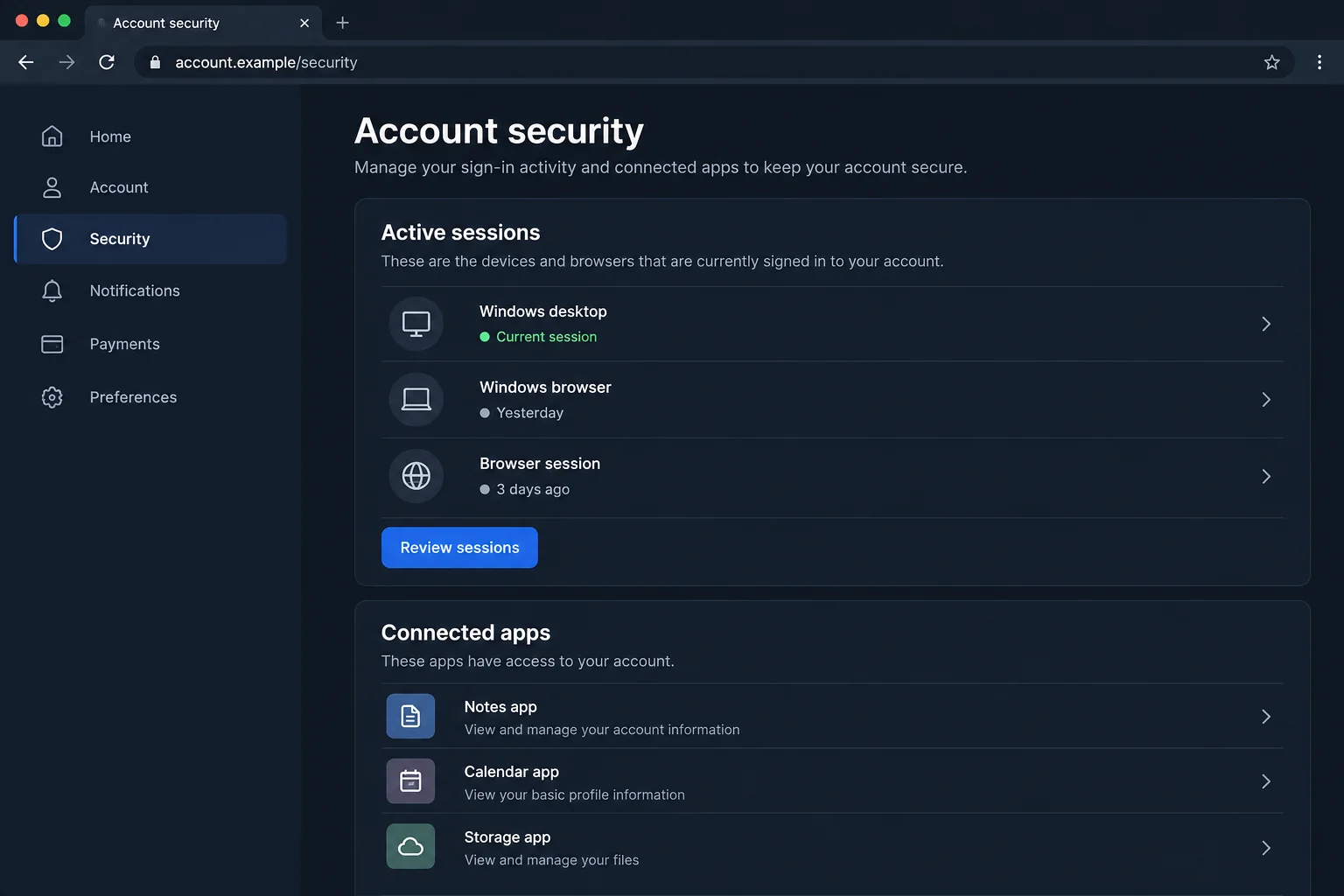
The security page above is a fictional illustration. It demonstrates the kind of session controls worth checking, not a real Nyxar panel or evidence of unauthorized access.
No program was run, account accessed, or wallet connected for this article. The delivery route and consequences on a particular device require their own investigation.
A gaming or chat account can be the next victim’s introduction
- A familiar account can send an unfamiliar file after someone else gains access.
- Saved sessions deserve review alongside passwords and recovery information.
- Unknown applications authorized to an account should be investigated separately.
- Valuable inventories, purchases, and linked payment methods can make gaming accounts worth targeting.
- Security software addresses the device; the platform controls recovery of the online account.
When a Friend’s Account Is Not the Same as Your Friend
Messages inside a game community can feel less formal than email. People trade screenshots, share tools, and download small projects without the usual business-account caution.
That familiarity is useful to an attacker controlling a real account. The username, past conversation, and shared server history may all be genuine.
What changed is who is sending the current message. An old friendship does not authenticate a new executable, archive, or sign-in request.
A request to test a game or review a project might be legitimate. Verify it through another established contact method when the file or behavior is unexpected.
Ask a specific question the real person can answer, but do not rely on a conversation happening entirely inside the possibly compromised account.
This is a general delivery risk, not proof of one Nyxar campaign. The exact file, download location, and execution history matter more than an invented backstory.
If your own account sent the link, warn people directly through a trusted channel. Ask them not to download or forward the file.
Keep the warning short and specific. Friends need the message time, affected account, and dangerous action to avoid, not an alarming claim that every device was hacked.
Server moderators may need to remove the malicious message and investigate its reach. Preserve useful identifiers before content disappears, without circulating the payload itself.
How Nyxar Stealer Works
Step 1: A disguised file gains the user’s trust
The reported tooling can produce executable or Java-archive builds and change their presentation. A recognizable icon is therefore not a reliable identity check.
That does not make every EXE or JAR malicious. It means you should establish where a program came from before allowing it to run.
A downloader may claim that antivirus flags are expected or that protection must be paused. Do not accept that explanation from the same source supplying the file.
Similarly, a password-protected archive is not evidence of safety. A password can simply prevent a mail gateway from inspecting what is inside.
After an alert, preserve the filename and source details. Do not send the file to friends for testing or execute it again under a different account.
Step 2: Local sessions and account data are collected
Nyxar’s reported targets include browser stores and services such as Discord, Telegram, Steam, and Epic Games. That is a potential collection scope, not an affected-account list.
Build your own list from the applications installed and used on the device. Include alternate profiles that other family members or teammates used there.
Session material can matter even when you carefully chose a unique password. Account access is not always a fresh login asking for that password again.
Security controls vary between platforms. Use their actual session and recovery options rather than assuming one change will sign out every possible connection.
If an authenticator backup or secret was accessible, raise that specific issue with the provider. Do not conclude that all two-factor authentication is useless.
Step 3: Remote functions may expose activity beyond saved logins
Reported screen-viewing and file-management features mean an affected computer may reveal information that was never stored as a browser password.
For example, sensitive material visible on screen can deserve attention during a remote-access incident. Avoid opening private accounts to investigate while that access may remain active.
The presence of a remote function does not establish that anyone watched a particular moment. Keep suspected capability separate from confirmed observations.
Disconnecting the affected device limits further network communication while you arrange help. Do not reconnect it merely to keep chatting with the person who supplied the file.
For workplace equipment, let the authorized team decide how to preserve evidence. Restarting, scanning, or reinstalling immediately may change information useful to their investigation.
Step 4: A stolen identity creates opportunities on other services
Control of a chat or gaming account can lead to impersonation, unauthorized purchases, or further malicious messages. Each consequence still needs confirmation.
A linked email address may also be valuable because it receives reset messages. Review its security instead of focusing only on the game that first attracted attention.
Watch for changes to recovery details, unfamiliar authorized applications, new sign-ins, and transactions you do not recognize. Preserve the relevant records.
Do not buy the account back from someone claiming to hold it. Payment does not establish ownership, erase copied data, or guarantee access will stay restored.
Use the platform’s support process and your original proof of ownership. A recovery specialist appearing in direct messages can be the next scam.
Different Accounts Need Different Checks
Chat services: review access, then warn contacts
For Discord, use the official compromised-account instructions to find the genuine support route and account controls.
Review authorized apps as well as the password. Do not assume an app is harmless because its name sounds like a moderation bot or game companion.
Preserve account-change emails. They may contain a legitimate recovery option, but verify the sender and destination before using any urgent link.
Discord warns that staff do not approach users through in-app direct messages for support. Do not supply credentials or payment to a supposed employee in chat.
Games: check more than the ability to sign in
Look at recent purchases, inventory activity, marketplace transactions, linked accounts, and recovery settings. Successfully opening the game does not mean nothing else changed.
Take concerns about missing items or unauthorized purchases to the platform. Keep receipt numbers and original account details rather than sending them to an unknown intermediary.
Do not assume every platform will restore traded items or reverse a purchase. Ask what its process can actually do, and report promptly.
If the account has administrative privileges in a community, tell the other moderators. A compromised moderator identity can affect people who never downloaded the original file.
Wallets: distinguish files, keys, and permissions
A copied wallet file may be protected in ways that differ from a revealed recovery phrase. Do not publish either while asking strangers for help.
Record what was accessible and follow the wallet provider’s genuine safety guidance. Avoid entering an old phrase into a website that promises to check whether it leaked.
Revoking a token allowance addresses a contract permission. It does not change the underlying signing secret if that secret was stolen from the device.
A legitimate support agent should not need your recovery phrase. Anyone asking for it has turned a recovery conversation into another exposure.
What to Do After a Nyxar Stealer Warning
-
Separate the computer from your recovery work. Stop using it for chat, purchases, and account resets. Disconnect it if execution or remote access is suspected.
Use a trusted alternative device for urgent changes. Do not carry the suspicious installer or an unknown extension across with your personal files.
-
Tell anyone responsible for the device. A workplace team, school administrator, or family member may need to coordinate the response and protect additional profiles.
Provide the detection and a clear timeline. Say what you actually opened, including whether you approved a prompt or installed supporting software.
-
Remove malicious software using trusted tools. Malwarebytes is relevant to finding unwanted programs on the affected device. Review the scan results and retain the report.
Windows users can also consult Microsoft Defender Offline guidance. Check device compatibility and recovery requirements before starting a scan that restarts the system.
-
Recover the accounts through their real providers. Protect the email used for recovery, replace exposed passwords, and inspect active access and account settings.
Where unfamiliar apps have authorization, remove that access through the genuine account. Keep multifactor protection enabled and repair recovery information that someone changed.
-
Handle financial or wallet exposure separately. Report unauthorized purchases to the platform and relevant payment provider. Save transaction references and ask about available remedies.
For exposed wallet secrets, plan protection through a clean environment and trusted guidance. Do not send funds to a supposed unlock, synchronization, or recovery address.
-
Stop the account from passing the threat onward. Warn contacts about specific unauthorized messages and ask moderators to remove harmful links after preserving useful evidence.
Avoid reposting the live download as a warning. People skim messages, and an actionable link can expose someone who misses the explanation.
-
Check the route that brought the file in. After cleaning, update applications and reconsider the download source. AdGuard can help reduce some harmful advertising and redirects.
It is not a Nyxar remover or an account-recovery service. Continue watching genuine security alerts and report fresh suspicious activity through the provider.
Clean a Windows Device After Suspected Nyxar Execution
The procedure below is for an affected Windows computer. A Java archive does not establish which operating systems a particular payload supports.
If you ran an untrusted archive on another platform, use that platform’s security tools and qualified assistance. Do not launch a Windows installer there.
Step 1: Preserve the message and separate the device from recovery work
Record the file source, warning, and execution time without opening it again. Ask your workplace responder before scanning a managed computer.
Use a clean device to recover chat and gaming access. Keep the affected computer away from payment sessions while its integrity is being assessed.
Step 2: Install the genuine scanner and quarantine detected threats
Use this procedure on a personal Windows PC after preserving the incident details. For a managed computer, let your security team decide when scanning should begin.
Malwarebytes can find and quarantine threats. Its free Custom Scan is separate from paid real-time protection and Threat Scan. Neither edition supplies ransomware decryption keys.
-
Download the Windows installer.
Open the official download page using the button below. Select Free Download there and save the Windows installer.
If the affected PC cannot browse safely, use a trusted computer and arrange an appropriate transfer without exposing clean backup media.
Malwarebytes for WindowsManual scanning and quarantine, with optional paid protection.
Opens the official free-scanner page. Choose its Windows download; paid protection is optional.
-
Open the setup file.
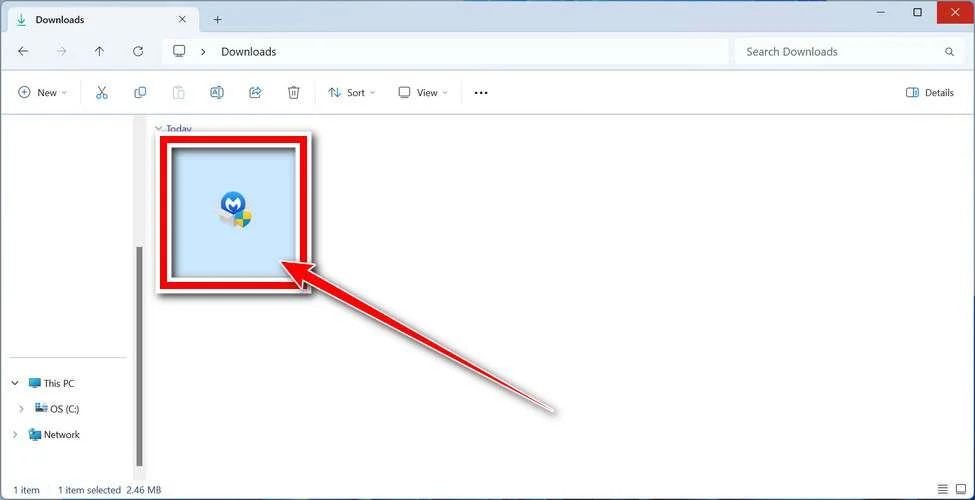
Open Downloads and double-click the MBSetup file. If Windows requests permission, check that the prompt identifies Malwarebytes before allowing the installation.
-
Complete setup without accepting unwanted extras.
Select Install, choose the appropriate Personal or Business device option, and continue. Business-managed computers should be handled through their administrator’s process.
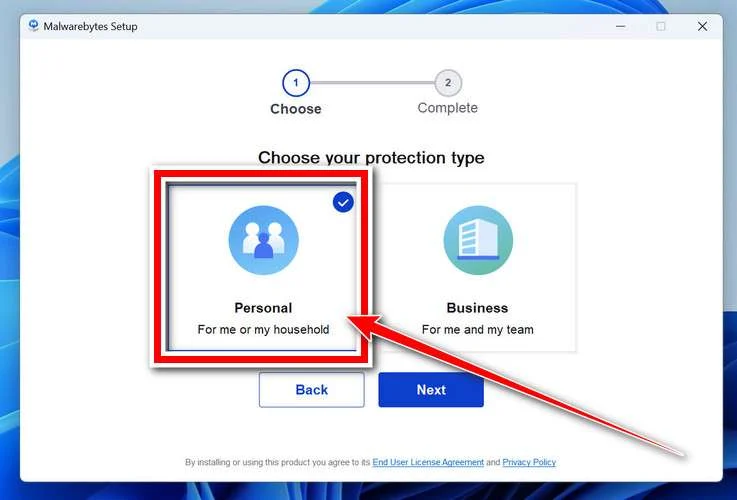
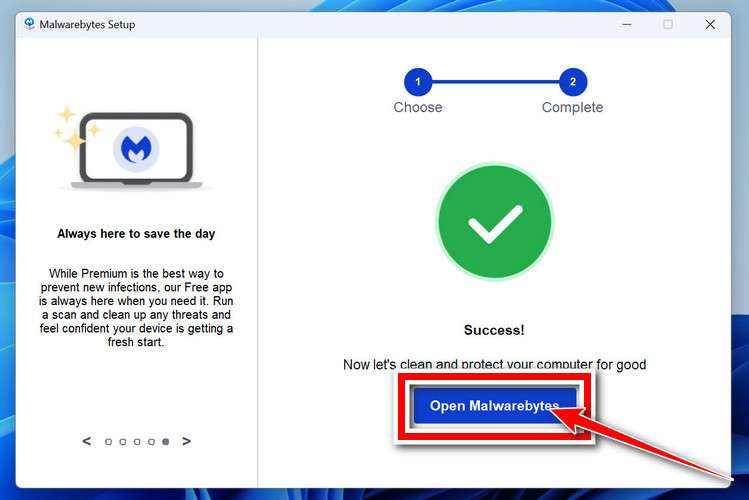
Review any browser extension, trial, or subscription offers. Skip optional features you do not want, then select Open Malwarebytes when setup finishes.
-
Choose a supported scan.
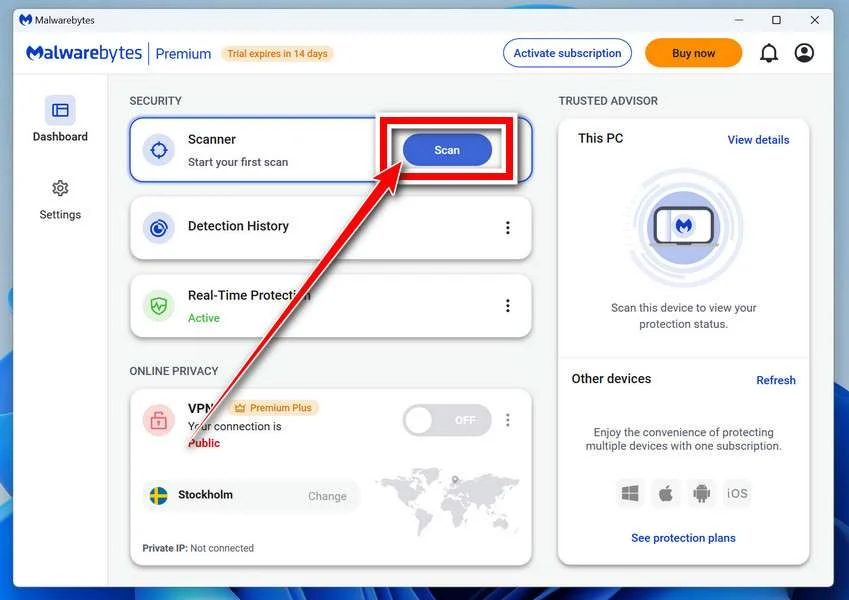
Find the Scanner tile on the dashboard. For a free Custom Scan, open its three-dot menu, select Advanced Scan, and choose Custom Scan.
Expand the file-location selector and select the system drive and relevant locations. Review potentially unwanted program settings, then select Start Custom Scan.
A paid or eligible trial edition may also offer Threat Scan. Use the controls available in your edition; do not disable Windows protections to unlock another option.
-
Let the scan complete and inspect its findings.
Keep the computer powered on while scanning and wait for the results. A large Custom Scan can take longer than a scan limited to common locations.
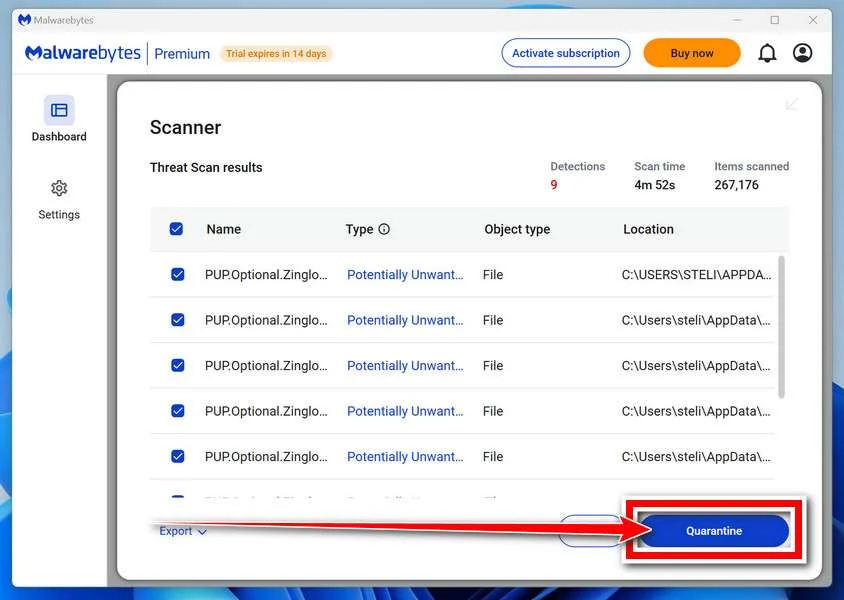
Review each detection and its location. Leave confirmed threats selected and choose Quarantine. Save the report if a detection is unclear rather than adding it to exclusions.
The results illustration uses sample detections to show the Quarantine control. Those names are not identifiers for the malware discussed in this article.
-
Finish removal and handle a requested restart.
Follow the quarantine prompts. If a restart is requested, save your work and coordinate it with anyone preserving evidence before restarting.
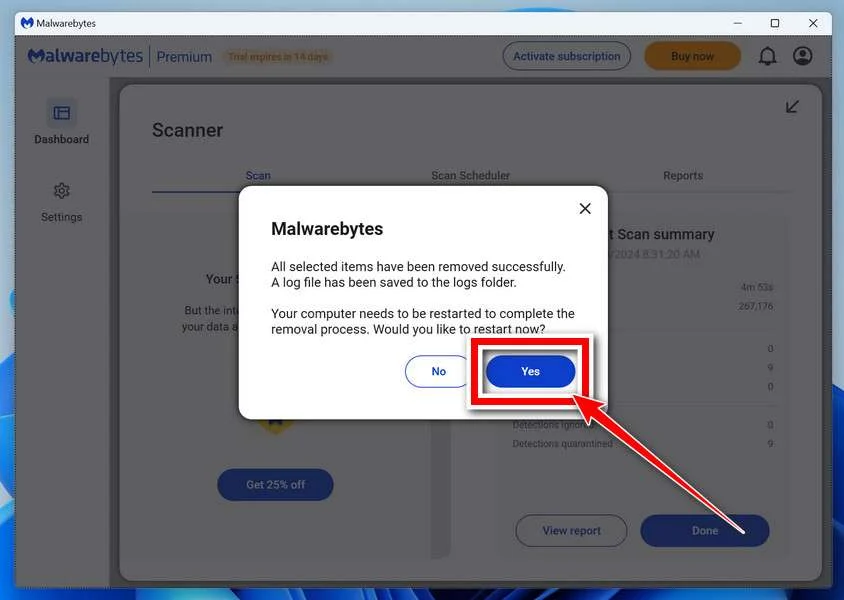
Reopen the application afterward and review the result. Repeated detections, blocked removal, or signs of continuing access need further investigation, not an automatic clean-device conclusion.
The screen design can vary by installed release. Follow the named controls and the vendor’s current scan instructions if your version looks different.
Step 3: Use a second opinion for unresolved Windows findings
HitmanPro provides an optional second opinion when a Windows infection or unresolved finding warrants another check. Run scanners sequentially, not at the same time.
Scanning is free. Removal needs an eligible one-time 30-day trial or a paid license. A computer that already used its trial may not qualify again.
-
Obtain HitmanPro from the established download route.
HitmanProOptional second-opinion Windows scanner.
Free scan. Removal requires an eligible trial or paid license.
-
Launch the downloaded program.
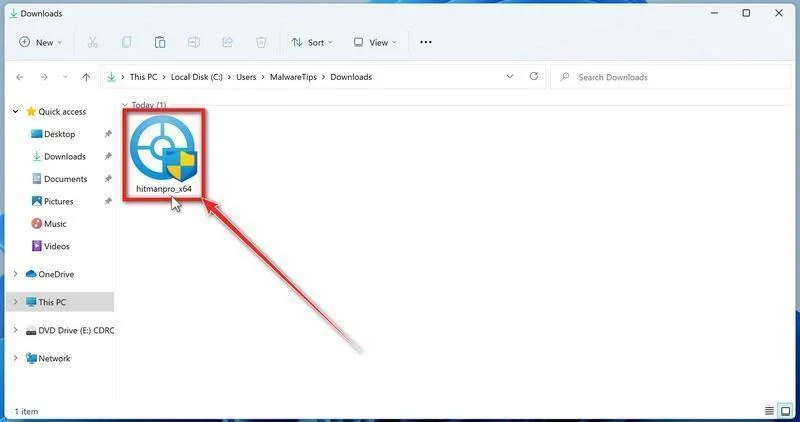
Open Downloads and run the appropriate HitmanPro file for your system. Check the publisher in any Windows permission prompt before allowing it.
-
Start the scan.
Open HitmanPro, select Next, and follow its license and setup prompts. Its cloud checks require an internet connection; arrange controlled access if the PC was isolated.
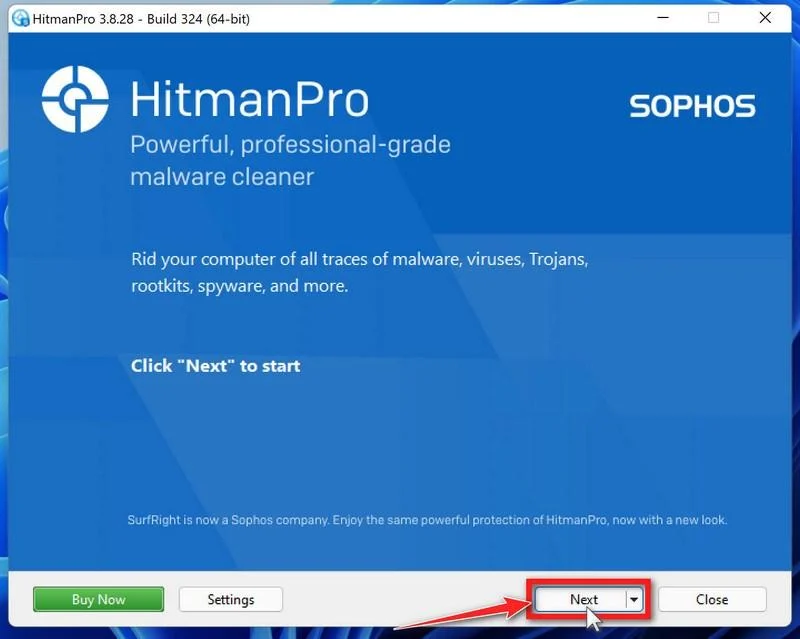
-
Review the results before removal.
Allow scanning to finish. Inspect the listed objects and proposed actions, then select Next for confirmed unwanted items. Save uncertain findings for qualified assistance.
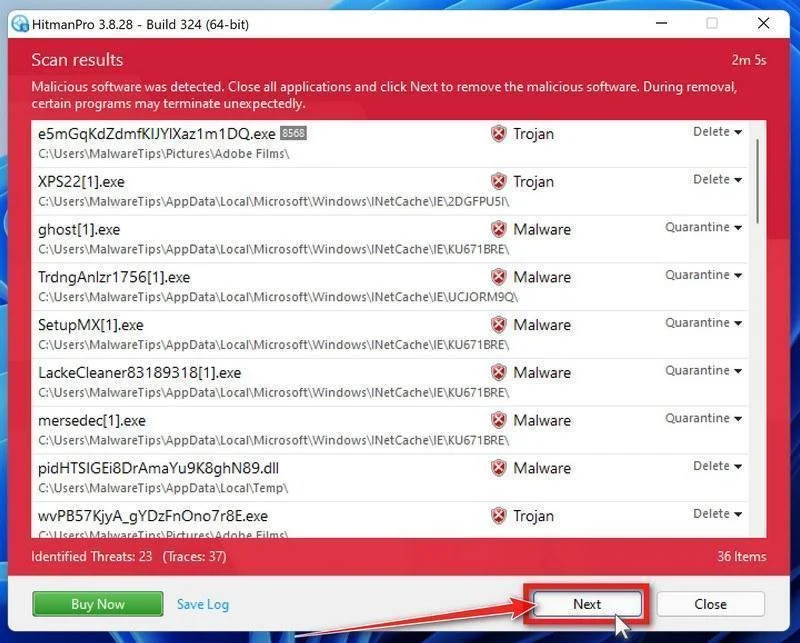
-
Use an eligible license and complete cleanup.
If available, select Activate free license and follow the trial prompts. Otherwise, use an existing license or retain the report; do not assume purchase is mandatory.
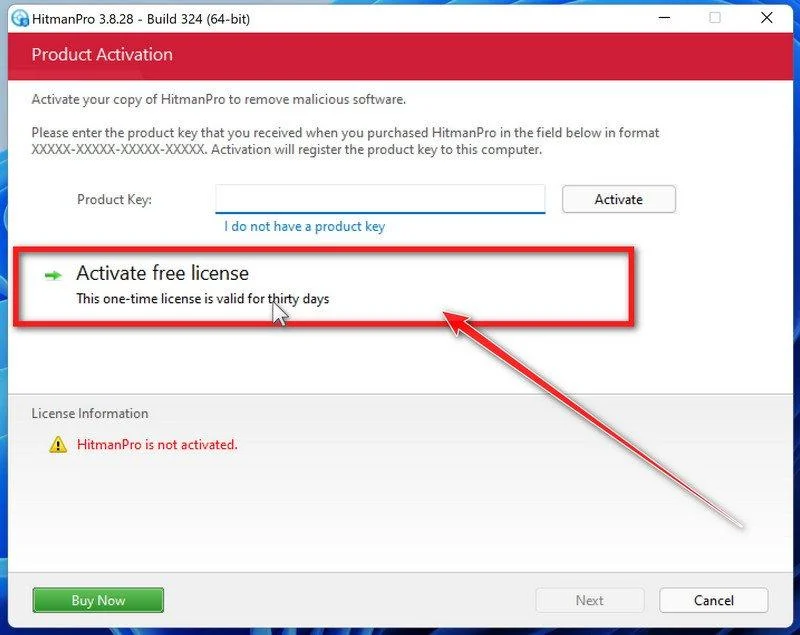
Finish the proposed cleanup and restart if requested. If problems persist, keep both scanners’ reports and seek help rather than repeatedly activating unfamiliar repair tools.
Step 4: Confirm removal actions and plan further help if needed
Keep scan reports and investigate detections that return. A supported rebuild may be appropriate when remote access or persistence cannot be ruled out.
Restore personal documents cautiously, not the unknown game tool or archive. Complete the platform account review even when the computer appears to work normally.
Do Not Turn Cleanup Into Another Untrusted Download
Search results and private messages can fill with people promising an instant Nyxar fix. A malware name in a filename does not authenticate a removal utility.
Use security products through their established websites. Do not install a stranger’s script, browser extension, or remote-support program because it claims to specialize in your exact detection.
Keep a simple record of completed actions and unresolved accounts. That prevents repeated resets while an important recovery address or linked service goes unchecked.
If another person is helping, agree on responsibilities. Two simultaneous changes to recovery information can accidentally lock out the legitimate owner.
When the computer cannot be trusted after cleanup, consider qualified assistance or a properly prepared reinstall. Preserve necessary personal data without restoring the original suspect software.
Also review what will automatically return after sign-in. Browser synchronization, extensions, and application restoration deserve attention before you resume normal use.
An account restored today may receive follow-up phishing tomorrow. An attacker who learned your friends, purchases, or communities can make the next approach more personal.
That does not mean recovery failed. It means the information already exposed may continue to influence later messages, even after you close the usable account access.
On a shared gaming computer, identify who used each profile. A parent’s saved payment method and a child’s community account may need attention from different people.
Do not circulate screenshots of private chats to explain the incident. Share the minimum relevant message details, and keep personal conversations inside the authorized support process.
Once access is restored, review any community roles the account held. Remove unauthorized administrative changes rather than assuming that a successful login reversed them.
Frequently Asked Questions
Is Nyxar Stealer a legitimate monitoring application?
No. It is described as malware for criminal operators. Its reported theft and remote functions should not be confused with authorized account-security software.
Does every Nyxar build contain the same features?
Not necessarily. Modular tooling can produce different builds. A feature advertisement is not proof that a particular function operated on your computer.
Is a file safe because a real friend sent it?
No. The account may be compromised. Confirm unexpected downloads through a separate trusted contact method, especially when the message asks you to ignore security warnings.
Why should I check sessions if my password was unique?
A unique password prevents reuse elsewhere, but stolen session material presents a different issue. Review access controls and provider activity alongside changing exposed credentials.
Can a malware scan recover stolen game items?
No. A scan addresses malicious software. Missing items, unauthorized purchases, and account restoration must be handled through the relevant platform and payment processes.
Should I answer someone offering recovery in Discord messages?
Do not give them secrets, money, or remote access. Reach support through the platform’s genuine help center rather than an unsolicited recovery pitch.
The Bottom Line
A Nyxar Stealer warning calls for a coordinated response: isolate possible execution, clean the device, and protect the online identities it could reach.
If your accounts sent files or links, warn the recipients too. Use genuine support channels, and do not let a recovery promise create a second compromise.

Join the discussion
0 commentsShare your experience or ask a question about this article.
Your progress
Did these steps help?
Let us know how the guide worked for you.
Describe what you see and the step you reached. Keep passwords and other private information out.
Discussion
Start the conversation
Have a question or something useful to share? Add the first comment.