


A document refuses to open. Other files show the same strange ending, and a message demands that you make contact.
If you see .has, the filenames and note offer useful clues. Read carefully before taking the sender’s next instruction.
Overview
How to recognize the reported Has ransomware variant
Has is a reported Dharma ransomware variant. It encrypts files and modifies their names with a victim identifier, an attacker contact address, and the .has suffix.
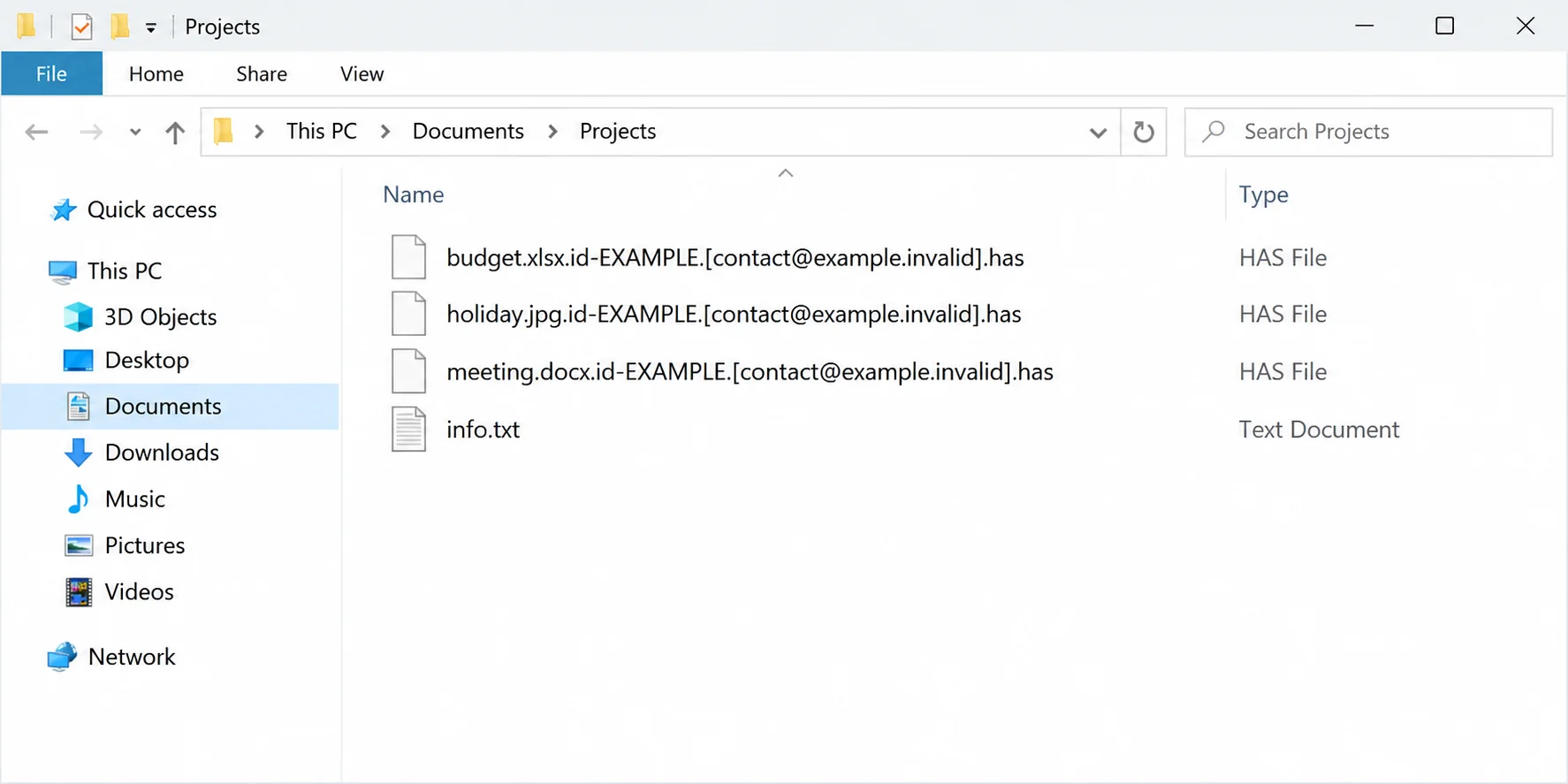
A documented example is 1.jpg.id-9ECFA84E.[hashhead@tuta.io].has. The original photo’s name survives, but the extra information is part of the attack’s identification system.
The affected computer also receives an info.txt note and a popup. Taken together, these details are more useful than the short extension by itself.
The illustration above uses fictional file examples to show that pattern. It is not an actual victim’s directory or a record of files we encrypted.
What the attackers say they can do
The demand claims the attackers encrypted data and obtained information they could disclose. A leak threat deserves investigation, but a written claim is not proof of exfiltration.
The documented contacts are hashhead[at]tuta[.]io and hashhead[at]mailum[.]com. They identify the reported campaign; they are not recommended support addresses.
The note offers limited test decryption and discourages independent recovery. Those promises are designed to keep the victim dealing with the attacker.
What a useful response must establish
Has ransomware removal requires more than closing the popup. You need to understand the affected environment before deciding where restored data can safely go.
- Which devices, accounts, shared folders, and backup systems may have been accessible?
- What evidence supports the encryption timeline and any claim that files left the network?
- Which clean backups or exact-variant recovery options can be independently verified?
A second question follows every proposed fix: does it remove malicious access, restore information, or merely change what appears on screen? Those are different outcomes.
How the Has Ransomware Attack Works
Step 1: An intrusion gives the encryptor access to files
Before the filename changes, something has enabled unauthorized execution. The available description does not establish the entry route for every victim of this particular variant.
Dharma’s broader history is not a substitute for examining your incident. Family associations cannot prove that your remote desktop service, email, or a particular download caused it.
Check recent authentication events, newly created users, remote-access changes, and endpoint alerts. Preserve logs before normal retention or cleanup removes information that could explain the sequence.
If several computers are affected, determine which systems were reachable from the same accounts. Shared access may matter more than the location of the first visible note.
Do not assume the intrusion started when an employee noticed a broken spreadsheet. Attackers may gain access before the damage becomes obvious.
That timing matters for restoration. A backup predating encryption can still be unsuitable as a complete system image if it contains earlier unauthorized changes.
Keep observations factual when asking for assistance. “The note appeared this morning” is useful; “an email definitely caused this” requires evidence beyond the timing.
Step 2: Encryption creates the .has filename pattern
The reported variant attaches an identifier and contact address before .has. Different victims may therefore see different identifiers while recognizing the same general arrangement.
Do not confuse that identifier with a decryption key. Its presence in a filename does not give a normal application enough information to restore the original contents.
A folder may contain both encrypted and unaffected files. Preserve that distinction rather than running a blanket renaming or file-repair operation across everything.
For example, an unchanged logo beside an unreadable accounting export does not prove the attack stopped. Some files may be skipped or fall outside accessible locations.
The safest early test is observation, not modification. Note which files fail and retain representative samples in the exact state in which they were found.
If filenames become long or awkward, resist shortening them for convenience. The embedded contact and identifier can help responders connect the files with the accompanying note.
Similarly, info.txt is a common filename used in many contexts. The name alone cannot establish ransomware; its contents and the broader symptoms provide the necessary context.
Step 3: A test-decryption offer makes payment feel safer
The attackers offer to decrypt up to three files as a demonstration, with a combined size below 3 MB and exclusions for files they consider valuable.
That offer creates an apparent way to verify their capabilities. A successful demonstration, however, would prove only that those selected files could be processed.
It would not establish that every file is recoverable, that the full tool will arrive, or that the computer can safely return to service.
Choosing a sample is also a disclosure decision. Sending financial, medical, or customer records may give the recipient information they did not previously possess.
The note provides another address if there is no reply within 12 hours. That is a contact instruction, not an independently verified expiration time for all recovery.
Do not interpret a responsive mailbox as evidence of legitimacy. Reliable communication can be part of an extortion operation just as easily as an unreliable one.
Organizations should keep negotiations and technical response under a coordinated process. An individual employee improvising contact may complicate reporting, evidence preservation, or an existing response plan.
Step 4: Leak threats add a separate layer of pressure
The threat to disclose data changes the victim’s concerns from availability to privacy. Those two problems can overlap, but they require different evidence and decisions.
Restoring a database does not answer whether someone copied it. Conversely, a ransom note claiming theft does not demonstrate that the database actually left the organization.
Responders may examine outbound transfers, account activity, accessed folders, and available monitoring records. Missing logs can limit certainty without proving either theft or safety.
If the incident involves regulated or confidential information, seek appropriate professional advice about obligations. Do not wait for an attacker to supply a supposedly definitive answer.
Paying for a deletion promise is not a technical way to verify deletion. Copies can exist outside the affected device, beyond anything the victim can inspect.
Keep the language accurate when informing colleagues or customers. Explain what is known, what remains under investigation, and which protective actions are being taken.
You do not need to dismiss the threat or announce an unconfirmed breach. Keep people informed using the evidence available, and update them when the findings change.
What to Do If Your Files End in .has
-
Disconnect affected machines from networks and keep backup media offline. Contact your IT or incident-response team immediately if shared systems, business records, or managed devices are involved.
Do not use an affected workstation to administer other computers. Limit further access while responders decide what evidence and systems need priority attention.
-
Preserve the full ransom note, a screenshot of the popup, encrypted samples, and their original names. Record when problems appeared and which users or systems noticed them.
Keep any existing communications without replying impulsively. Include message headers if correspondence already occurred, and store incident evidence somewhere separate from working recovery copies.
-
Secure accounts from a known-clean device. Review remote-access permissions and sessions, rotate compromised credentials, and check administrative users for changes that cannot be explained.
Enable multifactor authentication where supported. An account reset can help restrict access, but it does not repair encrypted data or erase malicious software.
-
Use trusted removal tools or rebuild under guidance. Malwarebytes for Windows may help detect malicious components; obtaining a clean scan is not equivalent to restoring trust after every intrusion.
The Malwarebytes Windows download is a tool route, not a Has decryptor. Do not run unknown “recovery” programs supplied by unsolicited helpers.
-
Make a recovery inventory: offline backups, unaffected originals, cloud versions, and application exports. Test selected restores before reconnecting production storage or replacing the only remaining encrypted copies.
Record the source and date of each copy. A successful test with one document does not establish that an entire backup set is intact.
-
Report the incident through the relevant cybercrime channel and follow your organization’s response requirements. If sensitive information may be involved, coordinate technical findings with appropriate privacy advice.
Afterward, harden remote access, update software, and test backups. AdGuard may reduce some malicious advertising exposure, but it cannot remove this ransomware or recover files.
Remove Has Ransomware Without Confusing Cleanup With Recovery
Step 1: Preserve the incident details before cleanup
Keep the complete victim identifier, contact segment, .has ending, and info.txt note. Do not shorten long filenames or send confidential test files to the attacker.
Ask the incident team to preserve relevant account and access records before cleanup. Leave clean backup media separate from computers still being investigated.
Step 2: Install Malwarebytes, scan Windows, and quarantine threats
Use this procedure on a personal Windows PC after preserving the incident details. For a managed computer, let your security team decide when scanning should begin.
Malwarebytes can find and quarantine threats. Its free Custom Scan is separate from paid real-time protection and Threat Scan. Neither edition supplies ransomware decryption keys.
-
Download the Windows installer.
Open the official download page using the button below. Select Free Download there and save the Windows installer.
If the affected PC cannot browse safely, use a trusted computer and arrange an appropriate transfer without exposing clean backup media.
Malwarebytes for WindowsManual scanning and quarantine, with optional paid protection.
Opens the official free-scanner page. Choose its Windows download; paid protection is optional.
-
Open the setup file.
Open Downloads and double-click the MBSetup file. If Windows requests permission, check that the prompt identifies Malwarebytes before allowing the installation.

-
Complete setup without accepting unwanted extras.
Select Install, choose the appropriate Personal or Business device option, and continue. Business-managed computers should be handled through their administrator’s process.

Review any browser extension, trial, or subscription offers. Skip optional features you do not want, then select Open Malwarebytes when setup finishes.

-
Choose a supported scan.
Find the Scanner tile on the dashboard. For a free Custom Scan, open its three-dot menu, select Advanced Scan, and choose Custom Scan.
Expand the file-location selector and select the system drive and relevant locations. Review potentially unwanted program settings, then select Start Custom Scan.
A paid or eligible trial edition may also offer Threat Scan. Use the controls available in your edition; do not disable Windows protections to unlock another option.

-
Let the scan complete and inspect its findings.
Keep the computer powered on while scanning and wait for the results. A large Custom Scan can take longer than a scan limited to common locations.
Review each detection and its location. Leave confirmed threats selected and choose Quarantine. Save the report if a detection is unclear rather than adding it to exclusions.
The results illustration uses sample detections to show the Quarantine control. Those names are not identifiers for the malware discussed in this article.

-
Finish removal and handle a requested restart.
Follow the quarantine prompts. If a restart is requested, save your work and coordinate it with anyone preserving evidence before restarting.

Reopen the application afterward and review the result. Repeated detections, blocked removal, or signs of continuing access need further investigation, not an automatic clean-device conclusion.
The screen design can vary by installed release. Follow the named controls and the vendor’s current scan instructions if your version looks different.
Step 3: Use a second opinion if findings remain unresolved
HitmanPro provides an optional second opinion when a Windows infection or unresolved finding warrants another check. Run scanners sequentially, not at the same time.
Scanning is free. Removal needs an eligible one-time 30-day trial or a paid license. A computer that already used its trial may not qualify again.
-
Obtain HitmanPro from the established download route.
HitmanProOptional second-opinion Windows scanner.
Free scan. Removal requires an eligible trial or paid license.
-
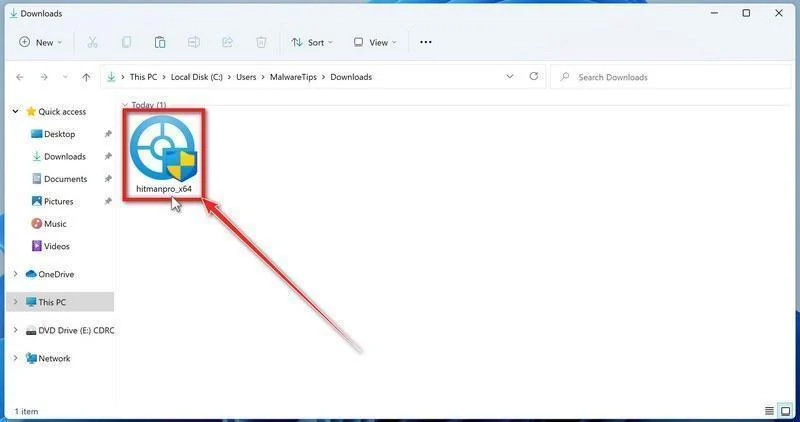
Launch the downloaded program.
Open Downloads and run the appropriate HitmanPro file for your system. Check the publisher in any Windows permission prompt before allowing it.
-
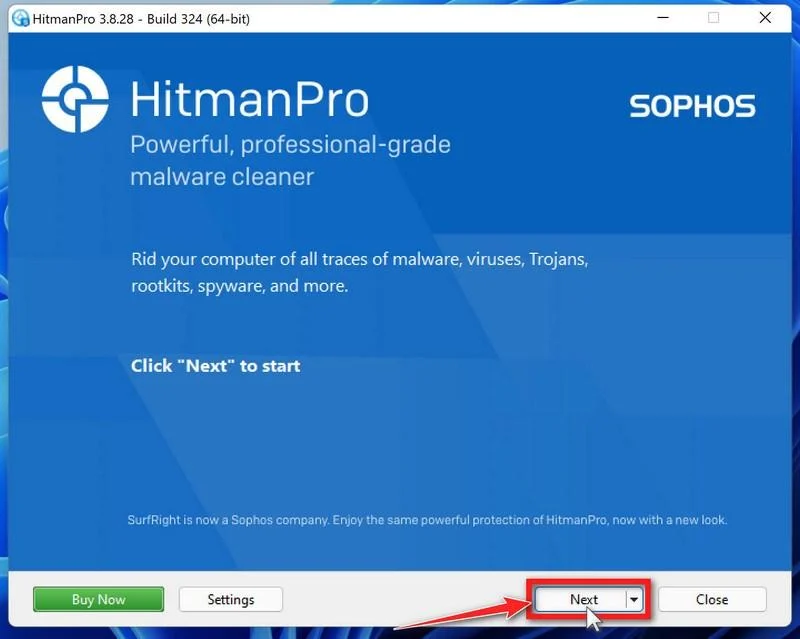
Start the scan.
Open HitmanPro, select Next, and follow its license and setup prompts. Its cloud checks require an internet connection; arrange controlled access if the PC was isolated.
-
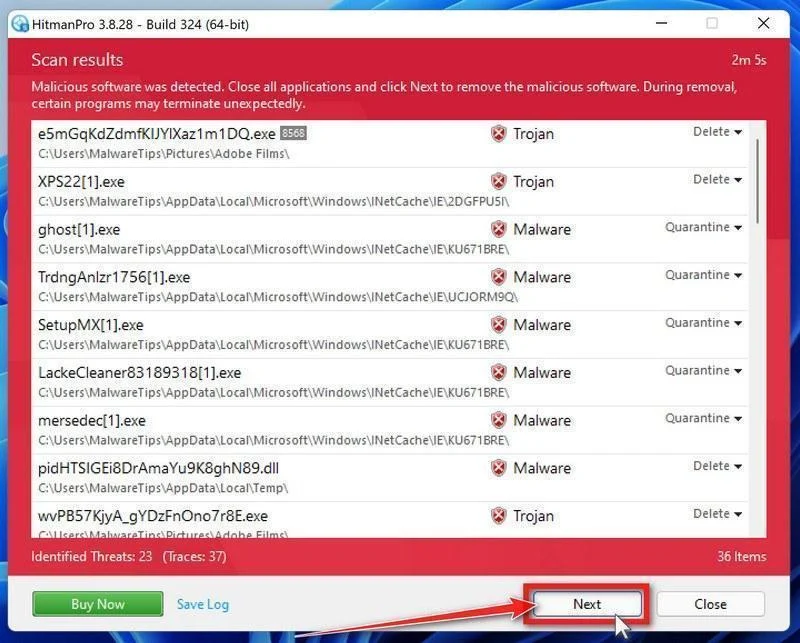
Review the results before removal.
Allow scanning to finish. Inspect the listed objects and proposed actions, then select Next for confirmed unwanted items. Save uncertain findings for qualified assistance.
-
Use an eligible license and complete cleanup.
If available, select Activate free license and follow the trial prompts. Otherwise, use an existing license or retain the report; do not assume purchase is mandatory.
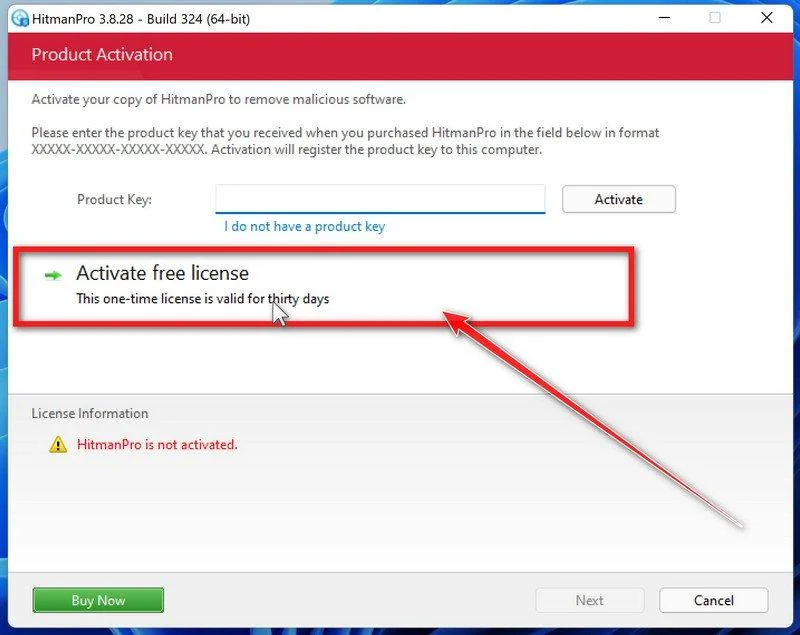
Finish the proposed cleanup and restart if requested. If problems persist, keep both scanners’ reports and seek help rather than repeatedly activating unfamiliar repair tools.
Step 4: Close the access gap before restoring Has-affected files
Review remaining alerts, remote-access changes, and administrator accounts with qualified support. Rebuild from trusted media if the environment cannot be reliably cleared.
Recover data only after the destination is ready. A small test decryption or an older Dharma tool does not establish compatibility with this Has variant.
Recovery Options for .has Encrypted Files
Dharma and Crysis names do not guarantee support for .has. Verify a tool’s exact requirements, and retain untouched encrypted data throughout any assessment.
Removing ransomware stops or contains the malicious software. It does not turn encrypted bytes back into working documents. Keep untouched encrypted originals before testing any recovery method.
Use a clean, updated recovery environment and keep it separate from systems still under investigation. Restore files only after the infection and its access path are addressed.
Option 1: Restore a verified backup or earlier cloud version
-
Find a backup dated before the encryption. Keep the original backup unchanged and check that representative documents actually open in a trusted environment.
-
Restore to a separate clean location, not over the only encrypted copies. Use the backup application’s documented restore process for databases and application-specific data.
-
For cloud storage, open its genuine version-history or restore controls from a trusted device. Compare dates and select an unaffected version where one exists.
-
Inspect restored documents and confirm that the required recent work is present. A familiar filename alone does not verify successful restoration.
Windows File History helps only if it was configured and a usable backup survives. Open Control Panel, then System and Security, File History, and Restore personal files.
Browse the available dates and preview the files. Use Restore to for a separate destination when offered, rather than replacing your only copy during testing.
Option 2: Look for a decryptor that matches the actual variant
A decryption tool must support the ransomware family and version involved. A matching extension, similar name, or confident advertisement is not enough.
- No More Ransom’s decryption catalog lists supported families and their tool instructions.
- Emsisoft’s ransomware decryptors provide family-specific tools and limitations.
- ID Ransomware can help identify a family from appropriate evidence, subject to its upload and privacy terms.
-
Record the ransom-note filename, appended extension, and existing detection. Do not identify the ransomware family from a filename extension alone.
-
Check the tool’s exact supported variant and requirements. For sensitive business material, ask your responder what evidence can be shared before uploading anything.
-
Read the developer’s instructions and run a supported tool only on copies in a separate location. Keep the original encrypted data even after an apparent success.
-
If no suitable decryptor is available, retain the copies and revisit trusted catalogs later. Do not pay a stranger to unlock a supposedly hidden download.
Option 3: Assess surviving snapshots without assuming they exist
Some systems retain earlier snapshots or previous versions; others never had them or lost them during the incident. Check availability instead of trusting the ransom note.
On Windows, open the affected folder’s Properties and look for Previous Versions. Open a suitable earlier version first and copy needed data to a different location.
If no version appears, that method has no available copy to restore. It does not establish whether a separate backup or cloud version exists.
Option 4: Consider deleted-file recovery only for recoverable originals
File-recovery software does not decrypt ransomware’s encrypted output. It may help only when readable originals or other usable copies remain recoverable on the storage.
Further writes can overwrite that recoverable data. For valuable files, have a qualified specialist assess or image the source drive before installing software or starting another scan.
Use the procedure below only when that recovery approach is appropriate. Install the tool elsewhere and save recovered files to a separate drive or clean destination.
-
Open the established recovery-tool download route.
EaseUS Data Recovery WizardFile recovery, not ransomware decryption.
View EaseUS Data Recovery Wizard
Check current compatibility, free-edition limits, and licensing before installation or purchase.
-
Install away from the recovery source.
Download and install on a separate suitable system or drive, following a specialist’s plan when necessary. Do not install into the disk you hope to recover.
-
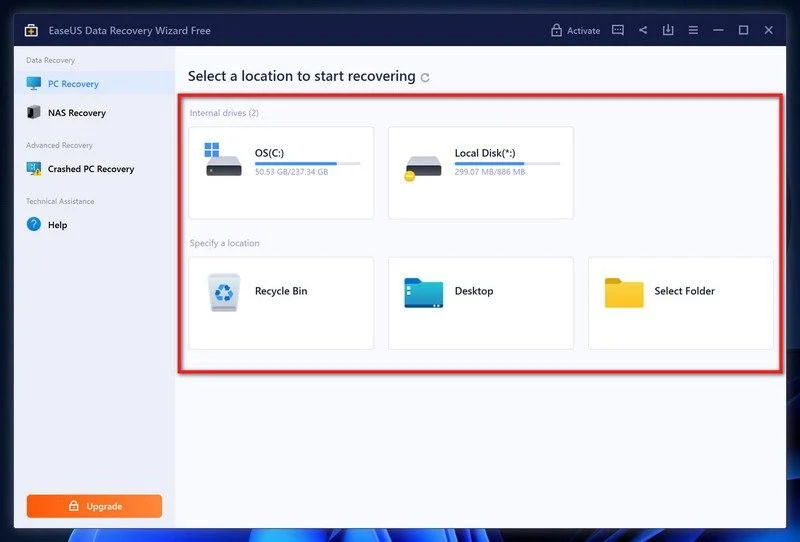
Select the source and scan for recoverable data.
In the recovery application, choose the affected drive or location and begin scanning. Selecting an encrypted file does not make the tool a decryptor.
-
Inspect what the scan actually found.
Use the available filters to locate needed document types. Preview representative files to see whether their contents are readable, not merely listed by name.
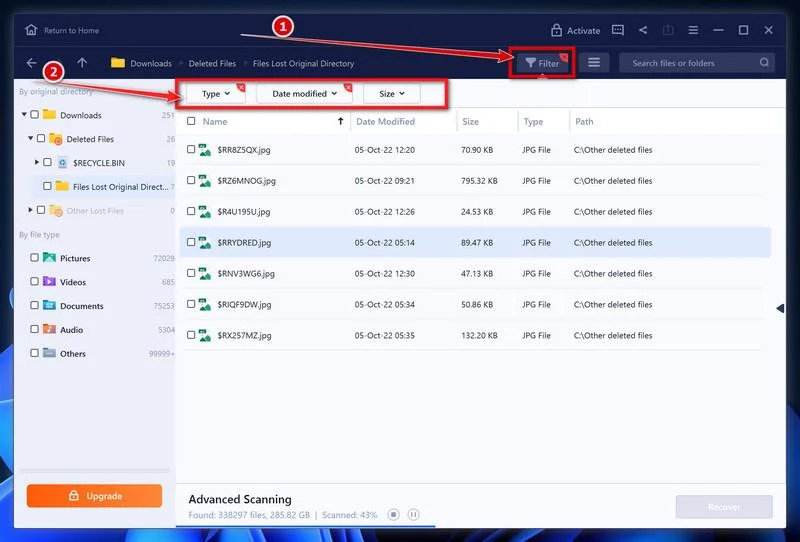
A preview can help evaluate a result, but free-edition export limits may still apply. Do not purchase solely because a scan displays filenames.
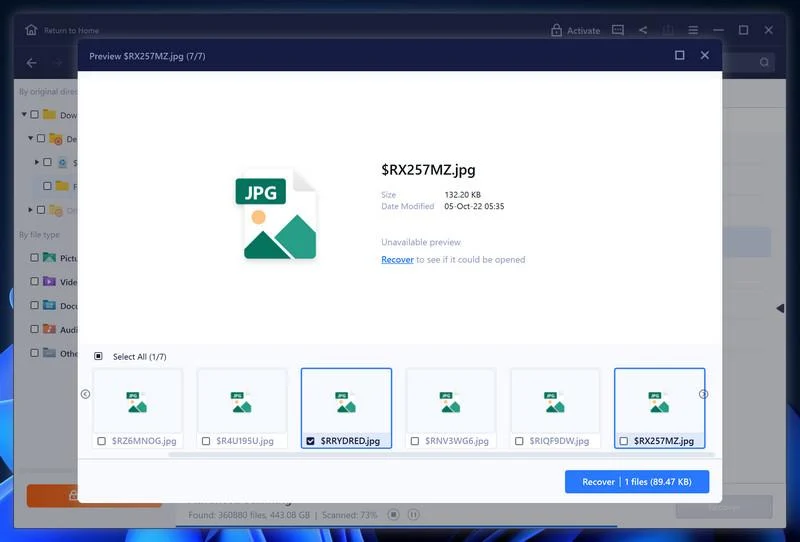
An unavailable preview is not a successful recovery. A listed filename may still refer to damaged or unusable data.
-
Recover to a different destination and verify the files.
Select appropriate readable results, choose Recover, and select a different drive or safe location. Never save the recovered output back over the recovery source.
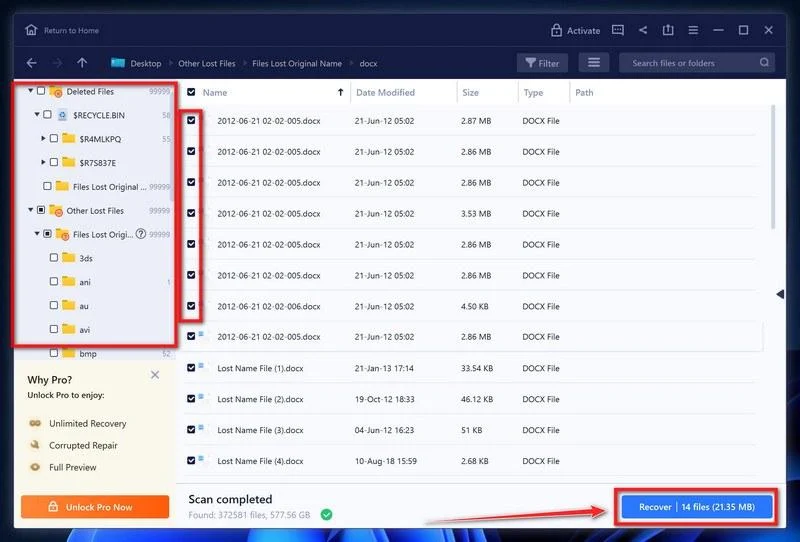
Open representative recovered files in the clean environment. Keep the original encrypted copies, scan reports, and a record of which method recovered each set.
If recovery fails, stop experimenting on the only source. Preserve it for qualified assistance or a future matching decryptor rather than accepting guaranteed-recovery sales claims.
Questions to Ask Anyone Offering Paid Recovery
Ask whether the provider has a technical recovery method or plans to communicate with the attacker. Those are different services with different risks and expectations.
Request a written description of the work, pricing conditions, data handling, and failure policy. Avoid agreements that treat an impressive promise as evidence of capability.
Be particularly cautious when someone wants unrestricted remote access before explaining their approach. Access to an already compromised network should not be handed out casually.
A demonstration on one harmless sample may help assess a claim, but it cannot guarantee the rest of the collection. Understand precisely what a test establishes.
Keep control of untouched originals throughout the process. If a provider needs copies, determine where they will be stored and who can access their contents.
Recognizing the attacker’s email address does not make a provider an insider. These identifying details are public and easily repeated in a convincing sales pitch.
Frequently Asked Questions
Is every file ending in .has infected with this ransomware?
An extension alone is not a complete diagnosis. Compare the changed naming pattern, the note, the popup, and the actual loss of access.
The reported contact addresses and victim identifier help distinguish this case. Preserve those details rather than assuming a short suffix uniquely identifies every incident.
Will changing the extension back recover my documents?
No. Renaming does not undo encryption. A document can regain its old name and still contain unreadable data that its original program cannot interpret.
Leave preserved samples unchanged. Recovery tools or specialists may need the full names and accompanying note to assess the exact variant.
Does the Has note prove that my information was stolen?
No. It records the attacker’s assertion. Investigating possible data theft requires additional evidence, such as access records or signs of transfers.
Take the possibility seriously without treating the note as an independent forensic finding. Businesses should coordinate the investigation and any required notifications through appropriate professionals.
Can a free Dharma decryptor recover .has files?
Not automatically. A tool for an earlier Dharma-related variant may not work on Has. Compatibility depends on details beyond the family name.
Read the current tool’s documentation through a trusted catalog. Test only on duplicates and do not interpret a failed experiment as proof that every recovery option is exhausted.
Should I send the attackers three files for a free test?
Do not send sensitive documents simply to satisfy their offer. A test can expose additional information and does not guarantee delivery of a complete recovery tool.
If an organization is considering contact, qualified responders should handle that decision. Keep the technical assessment separate from pressure to establish a conversation.
Does removing Has stop the attackers from returning?
Removing a detected file does not prove that accounts, remote access, and other systems are secure. The original access route still needs investigation.
Review credentials, administrative changes, and exposed services before restoring normal connectivity. Rebuild affected systems when their previous state cannot be trusted.
The Bottom Line
Do not treat Has ransomware’s contacts as your recovery service. Isolate affected systems, preserve evidence, and establish a safe environment before bringing files back.
Investigate the leak claim separately from encryption, and verify any decryptor against the exact variant. A family name or successful sample test is not a guarantee.
If shared systems are affected, involve your incident team now. Start with containment and known-good copies, not the attacker’s deadline or an unsolicited recovery promise.

Join the discussion
0 commentsShare your experience or ask a question about this article.
Your progress
Did these steps help?
Let us know how the guide worked for you.
Describe what you see and the step you reached. Keep passwords and other private information out.
Discussion
Start the conversation
Have a question or something useful to share? Add the first comment.