

A small camera, a soft suction tip, and the promise of finally feeling confident about your breath. Oralis TonsilVision makes a private, frustrating problem look surprisingly manageable.
The offer deserves more than a quick glance at the before-and-after story. For something used near your throat, the questions extend well beyond whether the package arrives.
Overview
A plausible gadget does not validate absolute safety promises
This Oralis TonsilVision review found a camera-and-suction product offered through an operating storefront. We did not find enough evidence to label the entire seller a confirmed scam.
However, the marketing goes too far when it answers a question about tonsil injury with an unqualified “No.” A camera and silicone tip cannot establish zero risk.
The strongest reason to pause is the safety claim, especially where the site promotes use involving children. A sales page is not an individualized medical assessment.
Do not buy this device because the advertising makes home extraction sound automatically harmless. Seek appropriate clinical advice before putting a removal tool near sensitive throat tissue.
The offer and return process need to be read together
The page reviewed listed a $79 Essential Kit and a $142.20 Duo Kit. It advertised a 30-day results guarantee and a phone-connected camera.
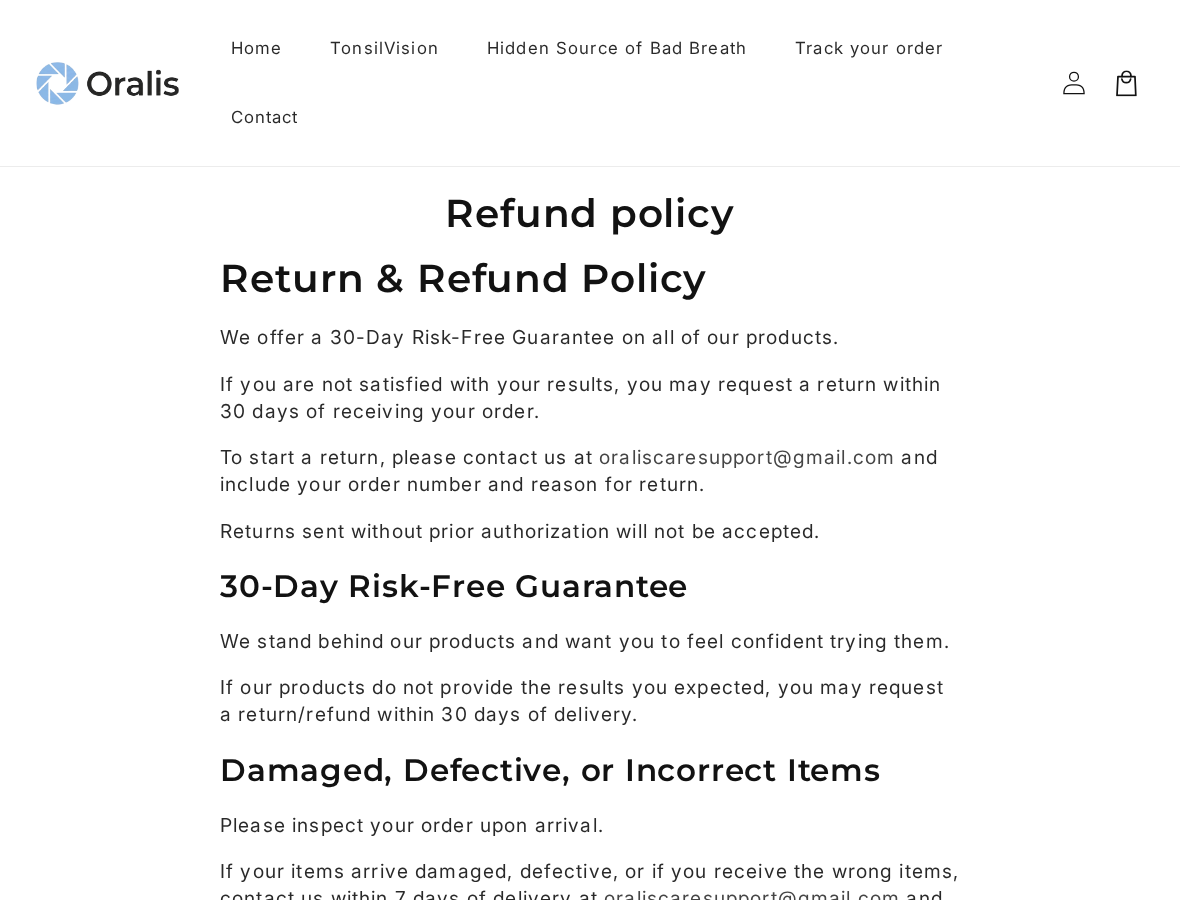
The separate refund policy adds a procedure: request authorization, return the item, and wait for inspection and approval. That is more involved than an instant email refund.
- Results-based return requests have a 30-day window from delivery.
- Damaged, defective, or incorrect items must be reported within seven days under the posted policy.
- Unapproved returns are not accepted.
- The published contact page shows an unusable phone-number field rather than a callable support number.
Our review is about claims, not a hands-on safety test
We reviewed the seller’s pages on October 6, 2026. We did not order the device, test suction pressure, inspect manufacturing records, or contact support.
There is no verified finding here of contamination, a hidden refill subscription, or a factory in a particular country. Those would require separate evidence.
The supported conclusion is narrower but still important: do not let confident medical marketing substitute for product evidence, clear merchant details, and advice about your own symptoms.
What Oralis TonsilVision Is Selling
The camera is a visibility feature, not a diagnosis
Oralis describes a rechargeable tool with three suction settings and a camera that connects to the WiFi Tooth app. The intended purpose is locating and removing tonsil stones.
Seeing an enlarged image may sound reassuring. It does not tell an inexperienced user whether a pale spot is a removable stone or something requiring professional examination.
A clearer view also does not measure tissue vulnerability, identify an infection, or establish the cause of persistent bad breath.
For a buyer, the useful question is not merely whether the camera switches on. It is whether the complete device is appropriate for their condition.
Bad breath is not one diagnosis with one gadget solution
Someone who has tried brushing, rinsing, and mints may welcome a new explanation. The product page taps into that frustration by making hidden stones the central story.
But an advertisement cannot diagnose the source of an individual’s symptoms. Persistent or changing symptoms deserve assessment rather than a purchase based on embarrassment.
Even a visible stone does not establish that it explains every symptom. Pain, swelling, bleeding, or difficulty swallowing should not become a reason to keep experimenting.
The advertised specifications do not answer the safety question
The listed camera resolution, magnification, battery, and charging connection describe features. They do not demonstrate safe suction limits or clinical testing of the complete product.
Terms such as food-grade silicone concern material suitability in context. They do not prove that every placement, pressure setting, or use on a child is harmless.
Ask for the actual manufacturer, model, instructions, contraindications, and safety evidence. If those answers are unavailable, treat that as a reason to postpone buying.
How the Oralis TonsilVision Sales Funnel Works
Step 1: A personal worry becomes the central hook
The sales copy describes avoiding close conversations, worrying about breath, and repeatedly checking yourself. It gives the reader an emotionally recognizable situation.
That framing is persuasive because the problem feels immediate and socially uncomfortable. The reader wants relief, not another list of uncertain explanations.
Pause before allowing that urgency to choose the treatment. A story that understands your frustration can still exaggerate what a product can safely accomplish.
Step 2: Camera-guided suction is presented as the missing answer
The page contrasts the product with improvised removal methods and masking odors. A camera is presented as the difference between guessing and confidence.
The technical idea may be plausible, but the conclusion needs limits. Visibility can assist positioning without making every attempted extraction safe.
Nothing in the marketing should encourage digging deeper, raising pressure until something moves, or continuing through pain. Those are not sensible tests of whether a purchase works.
Step 3: Testimonials reinforce certainty
Seller-hosted testimonials describe relief and improved confidence. These are marketing materials on the seller’s own page, not independently verified clinical results.
We did not establish that the testimonials are AI-generated or fabricated. Their format alone cannot prove either allegation.
They also cannot establish how often users experience discomfort, fail to remove a stone, or obtain a refund. Success stories leave those denominators unknown.
Look for evidence addressing the device’s limitations, not only accounts describing a satisfying result.
Step 4: The bundle makes a second device look like better value
The offer includes single and two-device options, with the Duo Kit promoted as better value. Compare the full package price rather than only the savings label.
A $142.20 purchase is larger than a $79 purchase, even if each item costs less within the bundle. Buy no more than you actually need.
We did not complete checkout or establish recurring billing. A bundle is not a refill plan, and the evidence does not justify calling this a subscription trap.
Step 5: The guarantee moves into an authorization-and-inspection process
The product page makes the refund promise sound straightforward. The policy explains the steps required to pursue it.
Request authorization before shipping anything back. Keep the order number, delivery date, and correspondence so the seller can identify the claim.
The damaged-item deadline is shorter than the results-guarantee window. Someone waiting several weeks to report a broken device could encounter a different policy argument.
A guarantee may reduce financial uncertainty, but it cannot reverse an injury. Do not use the refund promise as a reason to overlook physical risk.
The Safety Claim Is the Point to Challenge
“No” is not a responsible substitute for limitations
The reviewed FAQ asks whether the device can hurt or damage tonsils and answers “No,” then refers to soft tips and user-controlled suction.
That reasoning does not establish the absolute conclusion. User control is helpful only when the user knows what to do and when to stop.
A supplier should explain possible adverse effects, unsuitable users, pressure limits, and conditions requiring professional care. Reassurance should not replace those instructions.
Clinical guidance is more cautious than the advertisement
NHS MyHealth Devon guidance warns against manual removal and water-jet irrigation because complications can include bleeding, infection, or inhalation of a foreign body.
That guidance does not directly test Oralis TonsilVision. It does demonstrate why working around the tonsils should not be portrayed as a consequence-free home routine.
The sensible takeaway is caution, not a claim that every use causes injury. Do not replace medical advice with instructions from an advertisement.
Children require a higher threshold, not a smaller tip
The seller also publishes content directed at parents. A pediatric situation should not be handled as simply an adult purchase with a different person using it.
Discuss a child’s symptoms with an appropriate clinician. Do not let advertising about confidence or convenience persuade you to attempt an examination or extraction beyond your competence.
A child struggling, gagging, or becoming distressed is not a signal to continue until the product delivers its promised result.

Company, Address, Support, and Product Traceability
The contact page gives a trade name, not a complete identity
The published contact-information page lists Oralis Care and a Gmail support address. It does not provide a registered company number or street address on that page.
A trade name is not a full legal identity. Request the merchant’s registered details before paying if you need to know who is responsible for the order.
Missing information should be stated accurately. We cannot conclude that a company is fake simply because the reviewed page is incomplete.
A return destination is still worth asking for in advance
Oralis requires authorization before a return. Ask where an approved return would go and who would pay postage, especially before buying from another country.
A low-cost package can become a poor purchase if the return journey is expensive or impractical. Do not assume the parcel’s dispatch address accepts refunds.
We did not verify a return warehouse or manufacturer address. No claim that a listed address belongs to a fulfillment center is supported here.
The phone field is visibly unfinished
The contact page’s phone entry consists of asterisks. It is not a usable phone number for a buyer seeking help.
The mailbox shown is oraliscaresupport@gmail.com. A Gmail address alone is not proof of dishonesty, but it leaves email as the practical published contact route.
We did not test whether the seller replies. Buyers should request a written answer about returns before ordering rather than assume either reliable support or deliberate silence.
The manufacturer and safety documentation matter
For this device, traceability means a named manufacturer, identifiable model, clear operating instructions, and a documented safety basis. Attractive packaging answers none of those questions.
Ask whether spare tips are available and how cleaning is specified. Avoid improvising cleaning chemicals, attachments, or pressure settings based on general online tips.
We did not verify a clinical study of this exact product. A generic statement about camera-guided tools would not automatically validate this model’s advertising.
What to Do If You Ordered Oralis TonsilVision
- Separate the purchase decision from the health question.
If you have pain, swelling, persistent symptoms, or uncertainty about what you are seeing, seek professional advice. Do not test the device simply because it has arrived.
For a child, ask an appropriate clinician before attempting home removal. A return deadline should not pressure you into using a tool you are uncomfortable with.
- Inspect the order and preserve its identification.
Check the model, contents, packaging, instructions, and condition without attempting an extraction. Photograph missing parts or visible damage and keep the shipping label.
Retain any manufacturer or model markings. Those details can help distinguish the actual received item from what the product page represented.
- Report damage or the wrong item promptly.
The reviewed policy asks for damaged, defective, or incorrect items to be reported within seven days of delivery. Email the order number and clear photographs.
Ask whether the proposed resolution is replacement, store credit, or a refund. The policy allows discretion, so do not assume those options are interchangeable.
- Request return authorization within the relevant window.
For disappointing results, the posted guarantee allows a request within 30 days of delivery. Contact the seller and obtain instructions before sending the item.
Ask for the return address, authorization reference, postage responsibility, and required contents. Save the reply and use tracked shipping if an approved return is necessary.
- Track the refund after inspection and approval.
The policy allows up to 10 business days after approval, with additional bank processing possible. Record the approval date and the amount promised.
If it does not arrive, follow up with that record. Do not interpret “return received” as automatically meaning the refund has been approved.
- Escalate unresolved merchant problems with accurate evidence.
If the seller fails to resolve non-delivery, a materially different item, or a documented guarantee dispute, ask your payment provider about available dispute procedures and deadlines.
Provide the offer, receipt, delivery record, and messages. Routine merchant disputes do not require a malware scan, and chargeback success should never be promised.
Frequently Asked Questions
Is Oralis TonsilVision a confirmed scam?
No confirmed fraud finding follows from the reviewed evidence. The investigation identifies overconfident safety marketing, incomplete contact details, and return conditions buyers should understand.
Does a camera make tonsil stone removal risk-free?
No. Better visibility is not a guarantee against tissue injury, gagging, or other complications. Do not treat a camera as medical clearance for home extraction.
Is the $79 price proof of a markup scam?
No. Price alone does not establish fraud. Comparing alternatives requires verified model, specifications, support, and return terms, not a similar-looking photo or an unverified cheap listing.
Can I return a used device if results disappoint?
The reviewed policy offers a results-based 30-day request window. Obtain written authorization and instructions, including any hygiene conditions, before assuming the return will be accepted.
Does Oralis have a working support phone number?
The contact page reviewed showed only asterisks in its phone field. It published a Gmail support address; we did not test the seller’s response.
Does buying Oralis enroll me in refills?
We did not establish a refill plan or recurring subscription. Check your actual payment screen and receipt, but do not confuse the two-device bundle with automatic renewal.
The Bottom Line
This Oralis TonsilVision review reaches a firm practical conclusion: do not buy because the advertisement says throat injury cannot happen. That reassurance outruns the evidence reviewed.
Get appropriate advice about your symptoms, require clearer product and merchant information, and understand the return process before paying.
If already ordered, prioritize your health, inspect the package, and act within the applicable claim window. A promised refund is not a reason to take unnecessary physical risks.








