

KoPartner turns an ordinary idea, spending time with someone, into an earning opportunity. The colorful website makes flexible work sound easy to fit around your life.
Before joining, there is more to consider than the advertised hourly rate. A few careful checks can change how you read the opportunity.
Overview
The earning figures do not tell one consistent story
This KoPartner review found an active platform, a Google Play app, and a named operator. Those are meaningful signs of an operating service, not proof of reliable income.
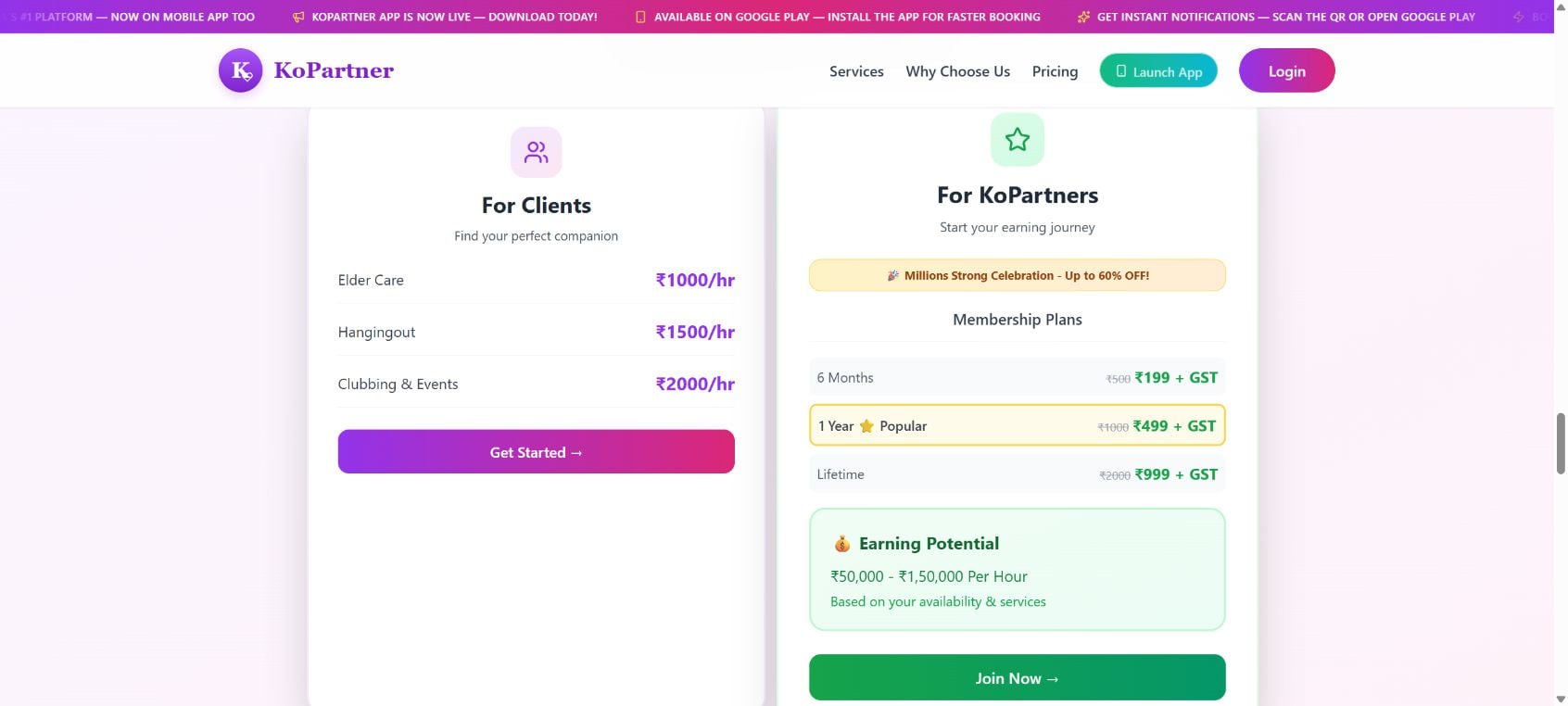
The strongest concern is visible on the platform’s own website: different sections advertise sharply different hourly earning amounts, without a clear explanation reconciling them.
The pricing panel’s lower figure is 25 times the headline’s advertised hourly maximum. Its upper figure is 75 times that maximum. The FAQ introduces another limit.
That could reflect a serious copy error rather than deliberate deception. Either way, the site should correct or explain it before asking people to pay for access.
Our practical verdict is firm: do not buy membership based on those earning figures. Require a coherent explanation and evidence of actual booking demand first.
Membership, demand, and income are different things
KoPartner advertises paid membership options for people offering companionship and everyday assistance. It says partners keep 80% of their earnings.
A membership can provide access without providing work. An attractive hourly rate produces no income when nobody books your services.
- Confirm whether any bookings are guaranteed, rather than assuming membership includes them.
- Ask how rates, commissions, payout timing, and canceled bookings are handled.
- Obtain the membership refund and renewal terms before paying.
- Consider the identity, banking, and personal information required for registration.
- Verify the service’s safety arrangements before agreeing to an in-person booking.
This is an earning-opportunity investigation, not a fraud finding
We did not buy membership, submit identification, accept a booking, or test payouts. The reviewed evidence does not establish that the company steals fees or fabricates every profile.
The assessment is based on public pages inspected on October 6, 2026. It identifies contradictory marketing and unanswered practical questions that applicants should resolve before committing.
An app-store listing is useful evidence that an app exists. It does not certify the earnings advertised on a separate website.
What KoPartner Offers
Companionship and assistance are presented as bookable services
The platform describes movie outings, shopping, social activities, event companionship, travel, and everyday assistance. Its service list also includes elder care and appointment support.
The site states that the interactions are professional and that it is not a dating service. Applicants should not infer a different arrangement from suggestive outside promotions.
Different activities carry different responsibilities. A coffee outing, helping an older adult, and accompanying someone to a medical appointment should not be treated as identical jobs.
Ask what training, boundaries, insurance, and qualifications apply to the service you intend to offer. A general verified-profile badge cannot answer all of those questions.
Service prices are not the same as take-home earnings
A customer-facing booking amount may cover several hours. An hourly figure may describe gross revenue rather than what a partner receives after commission and expenses.
The public page itself presents some activities as packages while other areas use hourly descriptions. Do not turn those different units into a guaranteed hourly wage.
Before joining, request an example using the exact service and duration you plan to offer. The example should show what the client pays and what reaches you.
Travel, waiting time, preparation, and taxes can further affect the result. None of those become free simply because the work is described as flexible.
Large membership claims require independent support
The website promotes millions of registered partners and a five-million milestone. We did not independently verify those totals or the number of active paying clients.
Google Play displayed 100K+ downloads during our check. That figure is not directly comparable with website registrations, total users, or active partners.
A lower app-download bracket does not disprove a larger registration claim. But neither number establishes how many customers are booking in your city today.
For an applicant, local demand is far more useful than a nationwide milestone. Ask for information that connects the promotion to work you could realistically obtain.
How the KoPartner Membership Journey Works
Step 1: The website presents flexible earnings and success stories
The homepage combines income claims with testimonials describing substantial monthly results. It invites people to picture companionship work as a flexible source of earnings.
Those testimonials appear on the platform’s own site. We did not verify the individuals, their booking records, or whether their results are typical.
A successful account, even if genuine, would not establish the outcome for a new applicant in another location. The opportunity needs evidence beyond the best-looking example.
Step 2: Paid membership becomes the entry decision
The public pricing section lists six-month, annual, and lifetime memberships, plus GST. Applicants should examine what each plan actually provides.
The prices shown are in Indian currency. Check the total with GST and any payment-provider conversion before deciding whether the membership is worth it.
More important than the introductory price is whether the fee buys meaningful access, renews automatically, can be refunded, or becomes nonrefundable immediately.
We did not complete payment. No claim that a particular plan silently renews or that every applicant enters a subscription is supported by this review.
Step 3: Verification creates a separate privacy commitment
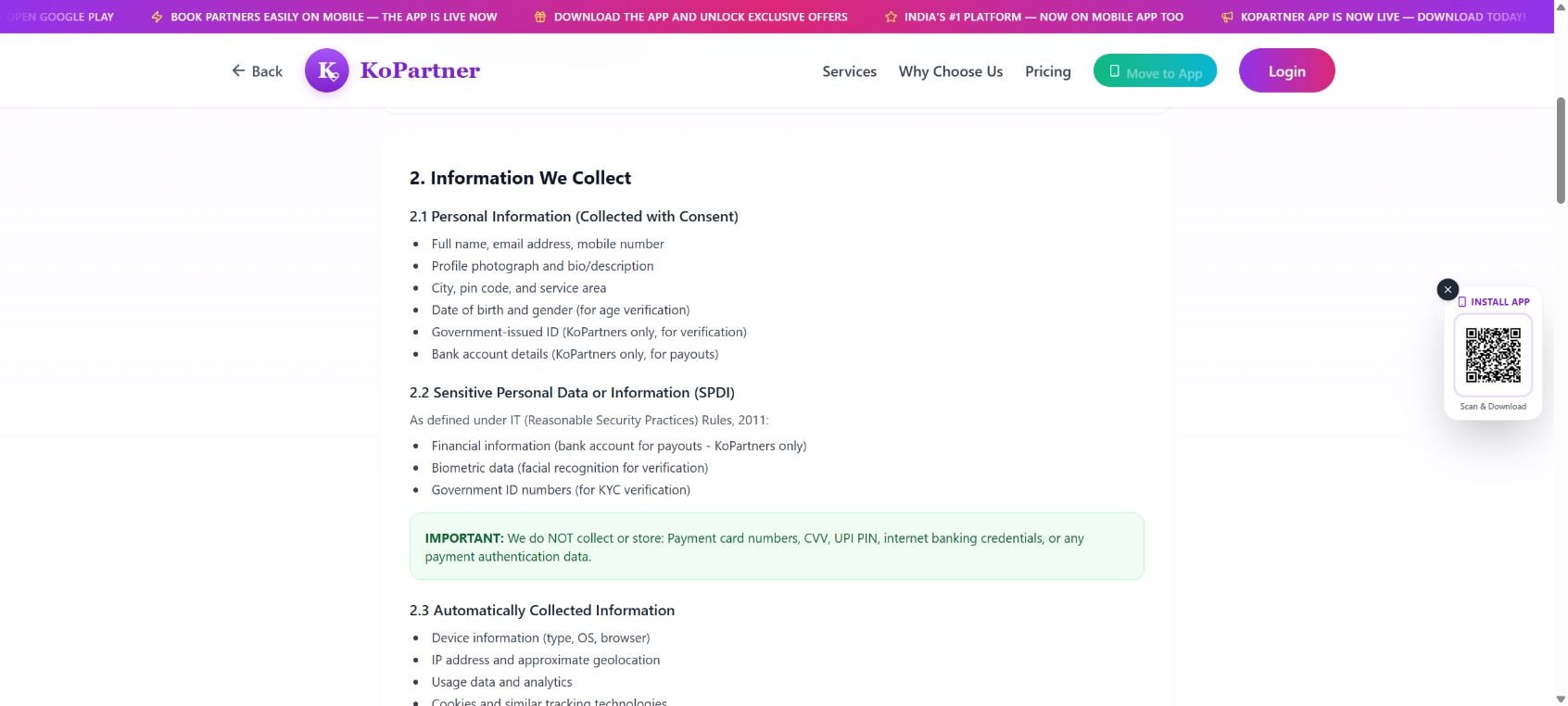
The privacy policy describes collecting identification and bank details from partners. It also refers to facial recognition for verification.
That may serve legitimate identity and payout purposes. Nevertheless, it is a more sensitive commitment than giving an email address to browse an offer.
Understand who receives the documents, how long they are retained, and how deletion works before uploading anything. An earning pitch should not rush that decision.
Step 4: Bookings, not the membership itself, create revenue
Access to a marketplace is not employment. Available hours and a profile do not guarantee that clients will choose your service.
Ask about completed bookings in your area, how partners are matched, and whether availability can be inspected before purchasing membership.
If support offers only another income illustration, repeat the demand question. Multiplying a rate by hypothetical hours does not demonstrate that those hours can be booked.
Also ask how rejected, canceled, or disputed bookings affect compensation. A clear answer should describe actual rules rather than only an optimistic earning scenario.
Step 5: Payout and exit terms determine what happens afterward
Before accepting work, establish the payout schedule, minimum withdrawal amount if any, deductions, and procedure for a disputed booking.
Before paying membership, establish whether cancellation stops access, whether unused time is refunded, and what “lifetime” means if services change.
We could not retrieve usable membership terms through the footer controls during our review. That is a limitation of the reviewed interface, not proof no policy exists.
Ask the operator for the applicable terms in writing. Do not fill that gap with assumptions based on another platform’s rules.
Why the Income Contradiction Is Material
The page changes the scale of the opportunity
The headline, pricing panel, and earnings FAQ do not simply vary by a small amount. They suggest substantially different earning ceilings.
The pricing panel labels its much larger range per hour. The examples and testimonials elsewhere also use monthly or multi-hour calculations, creating further room for confusion.
A reader should not have to decide which unit the operator probably meant. The operator is responsible for presenting a clear, consistent financial proposition.
Whether this is an error or exaggerated marketing, do not use the biggest figure as the basis for a purchasing decision.
Illustrative arithmetic does not prove ordinary results
Consider a hypothetical $20 booking rate with an 80% partner share. That would leave $16 before expenses, not $20. It is not a quoted KoPartner rate.
Five paid bookings would differ from five hours spent waiting for inquiries. Calculate using completed paid work, not all the time you remain available.
A realistic estimate should include quieter weeks, travel expenses, canceled appointments, and the time required to build a profile.
If the opportunity depends on recovering a membership fee, calculate the break-even point using conservative assumptions. Do not borrow money against an advertised income illustration.
“Up to” is a ceiling, not an expected paycheck
An advertised maximum does not tell you the median result, the share of members who receive no bookings, or the time needed to obtain a first payout.
Ask for those distributions. If the operator cannot provide them, treat expected earnings as unknown rather than assigning yourself the best advertised outcome.
This is not about dismissing companionship work. It is about separating a potentially real service from an income claim that has not been substantiated for you.
Company, Address, Support, and Data Checks
The named operator is consistent across two public surfaces
The website identifies KoPartner as a unit of SET INDIA BUSINESS PVT LTD. Google Play names SET INDIA BUSINESS PRIVATE LIMITED as the developer.
That alignment supports an identifiable operator. It does not prove all earnings, profile checks, or service-quality claims made in the marketing.
Compare that name with the invoice before paying. If another entity accepts payment, request an explanation of its role and your complaint route.
The published Delhi address has not been independently inspected
Google Play lists UB-32, Indira Prakash Building, New Delhi, Delhi 110001, India. We did not independently inspect the premises or verify its function.
No evidence here establishes a fake address or a fulfillment depot. For this service, the relevant question is accountability for membership, bookings, and personal data.
A registered or published address should not be mistaken for a guarantee that someone can resolve an urgent safety concern during a booking.
Public support contacts exist, but response quality is untested
The app listing provides help@kopartner.in and +91 87963 71910. We did not call or email them, so their responsiveness remains untested.
The privacy page separately lists privacy@kopartner.in, dpo@kopartner.in, and grievance@kopartner.in. Use the route matching your issue rather than assuming every mailbox handles refunds.
Request a ticket reference and written answers to membership questions. Save the reply before sharing identification or entering a paid arrangement.
Privacy promises are declarations, not independent security findings
The policy describes identity, financial, and biometric information. It also makes encryption and access-control claims that we did not independently audit.
Its retention provisions include deletion or anonymization timelines, backup retention, and exceptions for financial or legal records. Account deletion should not be interpreted as instant erasure everywhere.
There is no breach finding in this review. The point is proportionality: understand the data commitment before providing sensitive records for an unproven earning opportunity.
Questions to Resolve Before an In-Person Booking
Income is only one part of the decision. A companionship platform also introduces meetings with people you may not know.
- What does verification actually check, and when was it last completed?
- Which conduct is prohibited, and how is a boundary violation reported?
- Who provides emergency assistance, outside ordinary customer-support hours?
- Can a participant end a booking without being penalized for a safety concern?
- What insurance, qualifications, or supervision apply to elder-care and appointment assistance?
Choose appropriate public settings for initial social meetings and tell a trusted person your plans. Do not accept changes that place you in an uncomfortable or unsafe situation.
Appointment assistance is not automatically licensed medical care. Clarify the permitted role rather than assuming the service title establishes professional qualifications.
These precautions apply to marketplaces generally. They are not an allegation that every KoPartner participant is dangerous or dishonest.
What to Do If You Joined KoPartner
- Save the offer you relied on.
Keep the membership receipt, advertised earnings, plan duration, and any support explanation. Capture the exact wording and date, especially if different parts of the site disagree.
Do not depend on a later version of the website to reproduce the promise you saw. Your original record is more useful in a complaint.
- Ask what your membership actually purchased.
Request the written membership terms, booking eligibility, commissions, payout schedule, and refund rules. Ask the operator to reconcile the inconsistent hourly figures.
If you were promised bookings personally, include that conversation. Distinguish a specific commitment from a general advertisement describing potential income.
- Avoid further payments made solely to unlock earnings.
If someone requests an additional fee to release a payout, verify it through the official account and written terms before paying.
Do not send money to an unrelated personal account because a caller claims it will accelerate verification. We did not establish that KoPartner makes such requests.
- Review the sensitive information you supplied.
List any identity documents, photographs, bank information, or verification data submitted. If leaving, use the published privacy contact to request deletion and ask what must be retained.
Keep the request and response. Never send account passwords, card security codes, payment PINs, or one-time verification codes to a supposed support agent.
- Handle a payment dispute according to the actual facts.
Start with the merchant and document the requested remedy. If unresolved, ask your payment provider about available dispute routes and deadlines.
A membership that produced no bookings is not automatically an unauthorized transaction. Explain any misleading promise, service failure, or refusal with evidence rather than changing the story.
- Put personal safety ahead of a booking or account.
End an interaction that feels unsafe, preserve relevant messages, and seek local emergency assistance if needed. Do not wait for ordinary account support during an immediate threat.
If you suspect identity misuse or a deceptive payment request, report the concrete incident through appropriate official channels. No refund or recovery should require another speculative payment.
Frequently Asked Questions
Is KoPartner a confirmed scam?
The reviewed evidence does not establish systematic fraud. It does establish inconsistent earning figures and important membership, demand, and privacy questions that applicants should resolve before paying.
Does membership guarantee paid bookings?
We did not verify a booking guarantee. Access to a platform is different from employment or assured income. Obtain any specific guarantee in writing.
Why do different sections show different earning amounts?
The operator needs to explain that. It may involve copy errors, service differences, or inconsistent units, but buyers should not assume the largest figure is achievable.
Does Google Play prove the website has millions of partners?
No. Downloads and total website registrations measure different things. The reviewed listing supports the app’s existence, not the platform’s nationwide membership or earnings claims.
Is KoPartner a dating service?
The website says it is not and describes professional interactions. Clarify service boundaries before booking and reject requests that conflict with the agreed activity.
Does deleting the app erase my identification immediately?
No such outcome should be assumed. Request account and data deletion through the published privacy route and ask about backups, retention exceptions, and completion dates.
The Bottom Line
This KoPartner review identifies an operating platform with marketing that does not provide a coherent basis for predicting earnings. That is reason enough not to pay impulsively.
Require consistent figures, local booking evidence, written membership rules, and an understood data commitment. If those remain unresolved, keep your money and identification documents.
A real app can offer a real service without delivering the income you imagined. Judge the opportunity by completed paid work and accountable terms, not its biggest promise.

Join the discussion
2 commentsShare your experience or ask a question about this article.
Discussion
Love you 🤟🤟🤟
Main free hun