

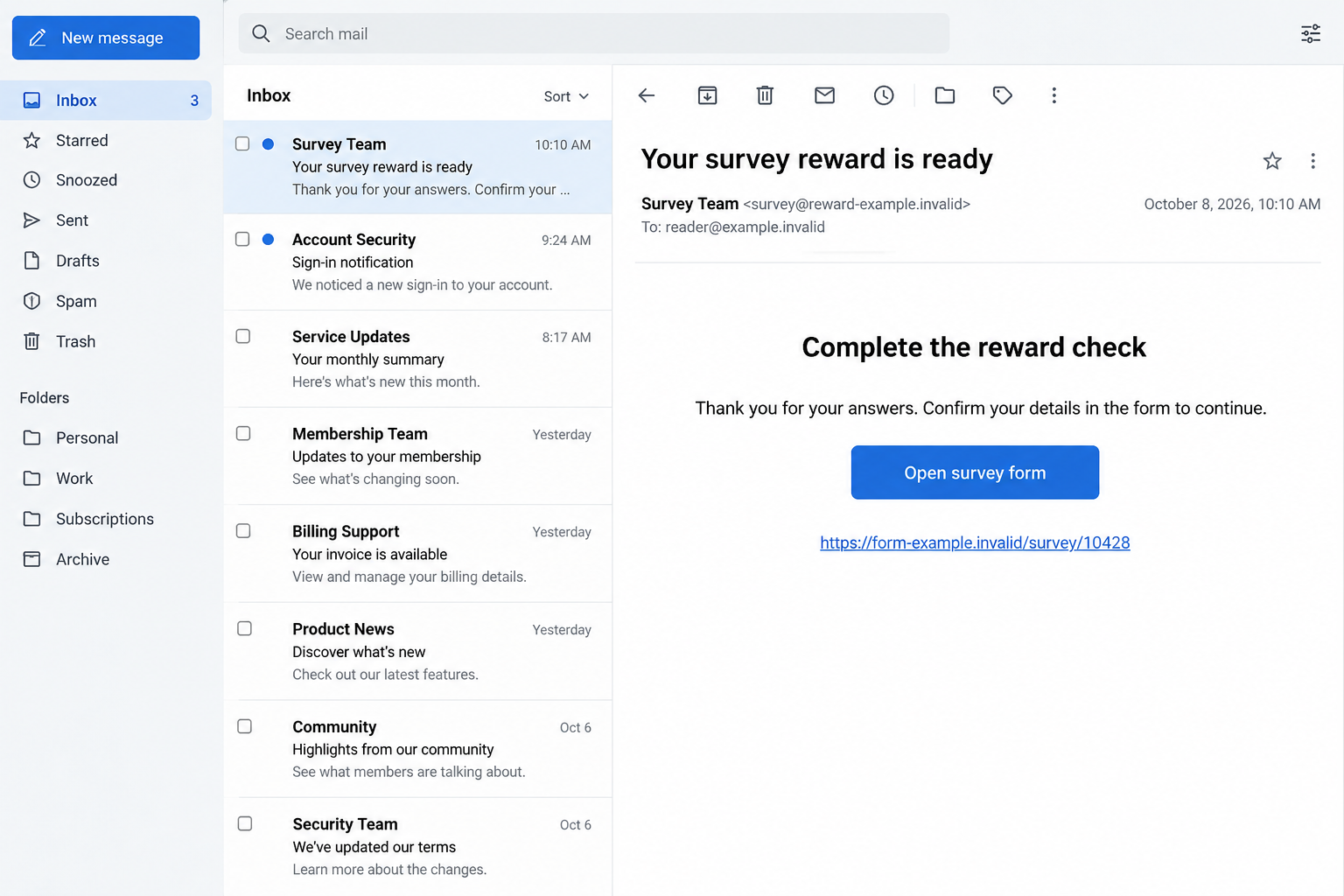
The survey link opens cleanly, the form looks professional, and the address belongs to a service you recognize. Nothing about the page immediately looks broken.
A Jotform scam can exploit that reassuring first impression. Before answering the next question, check who created the form and why they want the information.
Overview
The form host and the person asking are different parties
Jotform is a legitimate form-building service. People and organizations use it for genuine surveys, applications, registrations, and many other ordinary tasks.
The scam is a third party using a form or its appearance to obtain information deceptively. This warning is not an accusation against Jotform itself.
A familiar hosting address can tell you where a page is served. It does not independently confirm the identity, purpose, or authority of its creator.
Verify the request before entering sensitive details. A form’s technical availability is not the same thing as an organization confirming that it asked you to complete it.
Jotform explicitly recognizes and prohibits phishing abuse
The company’s abuse-report page acknowledges that some forms can evade its safeguards. It provides a route for reporting suspicious or abusive content.
Its current terms prohibit phishing, financial fraud, and collecting third parties’ login credentials for other services. Those rules do not guarantee every visible form is safe.
No specific active malicious survey was established for these illustrations. Their content and addresses are fictional examples of an unsafe request, not captured forensic evidence.
The confirmed concern is deceptive data collection. The presence of a name, payment option, or sensitive field alone does not prove every form is fraudulent.
Judge the requested information against the stated purpose
A useful check is simple: explain why each field is necessary. If a survey asks for account access, the request has moved beyond ordinary answers.
- An email address for a response is different from the password to that inbox.
- A reward description does not justify obtaining your banking login.
- A claimed sponsor needs confirmation outside the form.
- A privacy statement written by the creator does not authenticate that creator.
- A secure connection does not determine whether the request is honest.
- A form that remains online can still need reporting and review.
Do not let the form define what counts as verification. Confirm the underlying interaction through the organization that supposedly requested it.
Why a Real Form Link Can Still Be Dangerous
Hosting does not equal endorsement
Recognizing a provider can help you avoid some lookalike domains. It cannot tell you whether every user-created page on that provider has a legitimate purpose.
Think of the form as a document someone placed on a platform. The platform and the person making the document are related, but they are not interchangeable.
You still need to know who will receive the submission and how the request connects to something you actually agreed to do.
That is particularly important when an invitation comes from a social account, forwarded message, advertisement, or stranger rather than an existing relationship.
Ordinary features can make an extraordinary request feel normal
Required-field markers, neat spacing, dropdown menus, and confirmation buttons are useful design features. They can also make a questionable request seem administratively complete.
A creator can write reassuring explanations above a field. The explanation still needs checking when the field asks for something that grants access to another account.
Even a long form can conceal the important question near the end. Do not become less selective because you have already answered several harmless questions.
Completing part of a form creates no obligation to complete the rest. You can leave when the information request no longer fits the stated task.
How the Jotform Scam Works
Step 1: An invitation gives the form a believable purpose
The approach can promise a survey reward, application opportunity, account check, or response from a familiar organization. The message supplies a reason to open the page.
These are possible pretexts, not a claim that all Jotform-related phishing uses one script. The common feature is a misleading reason for collecting information.
A real organization may use a form provider legitimately. Confirm that the particular invitation belongs to it rather than judging the provider’s general reputation.
If you were not expecting the task, ask how the sender obtained your details. Do not begin by giving them more information to complete their claim.
Step 2: The hosted page supplies borrowed credibility
The link opens a form that looks functional and familiar. A recipient may assume the hosting service checked or approved the offer.
That assumption is the trust gap. A technically genuine platform address is not a statement that the form owner’s claims have been independently verified.
A copied sponsor name can widen the gap. Seeing the same name in the invitation and form may just mean both were written by the same person.
Find the sponsor through a route unrelated to the invitation. Ask whether it authorized this form and whether the requested information matches its process.
Step 3: Harmless questions ease the way to sensitive fields
A form may begin with general preferences or contact information. Those first answers can make the later request feel like part of one continuous, ordinary task.
When the form asks for a password, access code, or private account detail, reassess it. The harmless opening does not justify the sensitive ending.
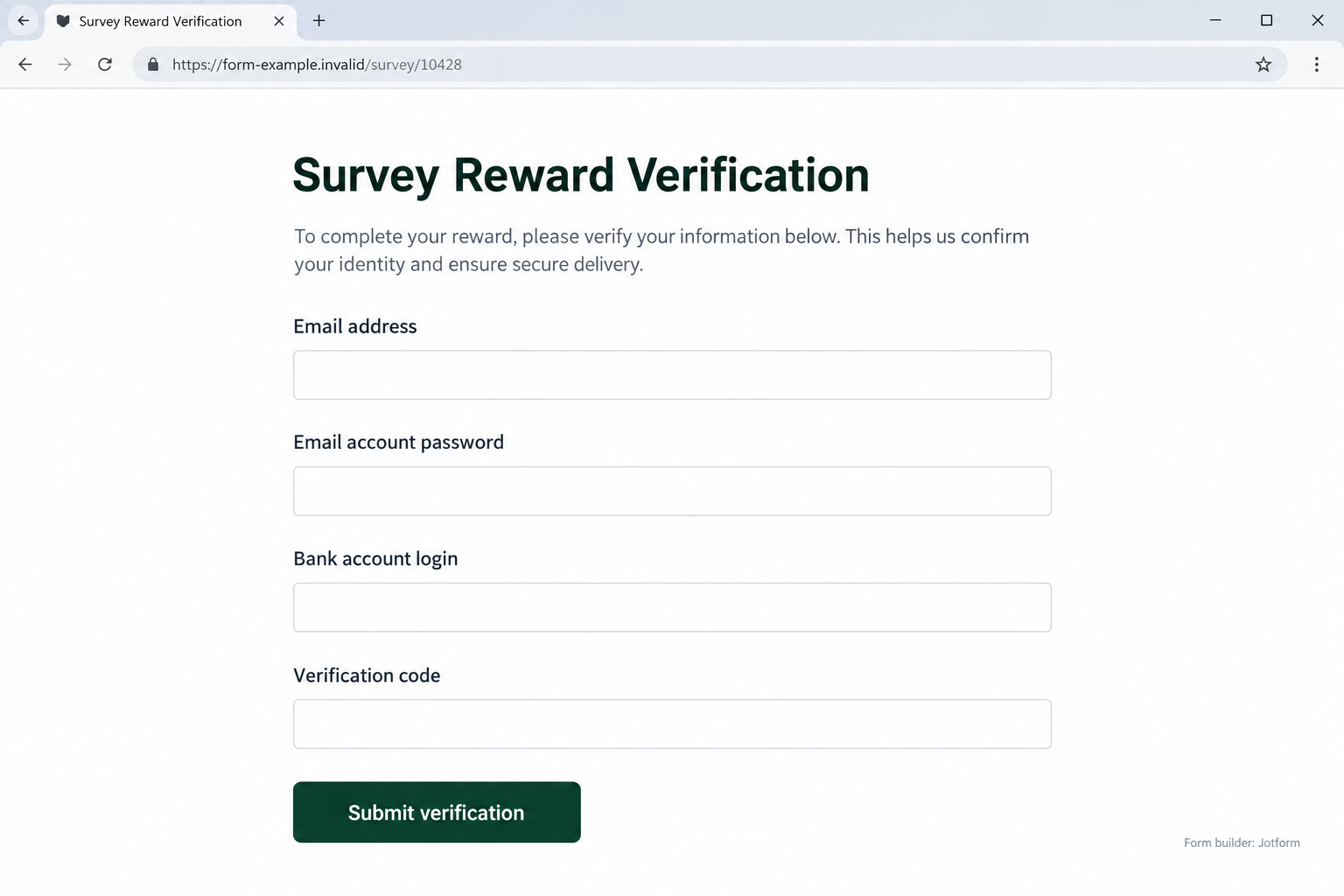
The example below deliberately combines unrelated account requests. A survey reward should not require the creator to receive an inbox password or banking login.
This is an illustrative warning-sign form, not a screenshot of an operational Jotform campaign. Its fictional address prevents it from directing readers to an actual destination.
Step 4: Submission sends information to the form’s collection process
Pressing a button can feel like confirming a reward. In practical terms, you are submitting the answers requested by the form owner.
Do not rely on a reassuring confirmation screen to judge how the recipient may use them. The page’s success message is not an independent security assessment.
If an error appears, that also does not prove information was never received. Treat sensitive details you entered as potentially exposed and seek appropriate help.
Never submit a real password just to test whether a form is fraudulent. A test with genuine access information can create the problem you were trying to investigate.
Step 5: Follow-up contact can turn collected details into another request
Someone with your contact information may send another message claiming the form was incomplete. They may ask for an additional document, code, payment, or conversation.
That familiarity can feel earned because the person knows what you submitted. Knowing your answers does not establish legitimate authority.
Check the next request independently too. Do not consider it safe simply because it follows an earlier form submission.
Report the suspicious form and preserve the contact history. Stopping the first interaction is useful even when you cannot yet tell whether the information was misused.
Fields That Need a Clear, Independent Reason
A contact address is not permission to access the account
A survey may need an email address to send a result. It should not require the password that lets someone operate that email account.
Read labels carefully, but do not stop at labels. A request described as a verification word can still seek an authentication secret.
If you cannot explain what a requested code authorizes, keep it private. Ask the actual service that generated it, not the person collecting it.
This distinction lets you assess the request without treating every form as hostile. Ordinary communication and account access are different kinds of information.
Payment functions are not automatically fraudulent
Businesses can use legitimate online payment tools. A payment option alone does not prove a scam, nor does this article accuse every form taking payment of wrongdoing.
The questions are who receives the money, what you are buying, and whether the process matches an independently verified agreement.
Do not confuse paying a genuine merchant with typing credentials into a stranger’s questionnaire. They create different exposures and require different checks.
If the transaction seems unrelated to the promised survey, stop. Ask the claimed sponsor about the requirement before providing payment details.
An application may need documents, but the requester still needs verification
Some real processes collect sensitive information for a valid reason. The presence of an identity field therefore cannot establish deception by itself.
Confirm the organization, purpose, privacy route, and appropriate submission channel first. A stranger’s explanation inside the form is not that independent confirmation.
A useful question is whether you would provide the same information if the familiar hosting name disappeared. If not, the provider may be carrying too much trust.
Do not upload someone else’s private information merely because a field asks for it. Verify your own authority and the recipient before submitting any document.
How to Check the Form Without Filling It In
Verify the claimed sponsor through its own channels
Open the organization directly using a saved address or an official route you already recognize. Look for the opportunity or request there.
If it is missing, ask that organization’s support team whether the exact form belongs to it. Keep the invitation out of the verification route.
A matching logo is weaker evidence than an independently reached representative confirming the form’s purpose. Explain which fields made you concerned.
Do not accept a private direct message from an unknown supposed employee as the complete answer. Reconnect through the organization’s established support process.
Preserve the exact URL and visible request
A report is more useful when it identifies the specific page. Save the complete form address rather than reporting the entire hosting service as fraudulent.
If safely available, keep a screenshot of the suspicious fields and the original invitation. Remove private answers before sharing images publicly.
Do not enter new information to uncover every branch of the form. Report what you actually observed and describe what remains unknown.
Jotform’s review can assess the reported page. It does not replace a separate password change, bank report, or identity response when exposure already happened.
Distinguish form access from a request for another account’s secret
A legitimate private form may use an access code supplied by its owner. That is different from collecting the password to your email or financial account.
Do not call every password-looking box fraud without checking its role. The important distinction is what account the information controls and who should receive it.
An invitation should make that purpose understandable before you submit. Confusing wording is a reason for clarification, not a reason to reveal a secret.
When clarification requires more sensitive information first, leave the interaction. A safe explanation should not depend on exposing the very access you are questioning.
What to Do if You Have Fallen Victim to This Scam
-
Stop answering the form and its follow-up messages. Close the page and do not make a further payment to unlock the claimed reward.
If someone contacts you about missing fields, keep the message as evidence. Do not let the collected details make their new request feel authorized.
You can report an incomplete form. There is no need to submit additional real information to make the report more convincing.
-
Secure any credentials you entered. Go directly to the actual email, bank, or other account provider and replace an exposed password.
Change the same password anywhere else it was used. Review available authentication controls and account activity with that provider’s current guidance.
Explain any code disclosure promptly. Tell support what the code notification said instead of assuming the form’s label accurately described it.
-
Contact the payment provider when relevant. Identify the particular card disclosure, approved payment, bank transaction, or account access involved.
Ask about appropriate restrictions, replacement, or dispute options. Reporting a form to its host does not itself stop a financial transaction.
FTC recovery advice recommends contacting involved services quickly. Keep transaction references and support responses, while avoiding any assumption that recovery is guaranteed.
-
Report the specific form to Jotform. Independently open its official abuse-report page and provide the URL and factual description requested.
Include the invitation and suspicious fields when useful, but do not put account passwords or recovery secrets into the report.
Also alert the organization being impersonated. Its staff may need to know that a form is using its name without authorization.
-
Address documents and device exposure separately. For identity information, follow IdentityTheft.gov or the relevant official process in your country.
If the interaction also involved a download, installation, or remote-access session, use Malwarebytes or another trusted security tool to investigate that exposure.
Review browser permissions you approved. AdGuard can help reduce unwanted ads or redirects, but neither tool cancels a form submission or retrieves disclosed credentials.
-
Keep monitoring and reject unsolicited recovery help. Check relevant accounts for changes and retain a brief record of every genuine support response.
Tell providers about unfamiliar activity when it appears. The lack of an immediate problem does not settle how exposed information may later be used.
Do not pay a stranger promising to erase the submission or recover money. Continue through verified account providers and appropriate reporting channels.
Frequently Asked Questions
Is Jotform itself a fraudulent website?
No. It is a legitimate platform. This warning concerns deceptive requests created by third parties, and Jotform provides an abuse-reporting process.
Does an authentic Jotform address prove the survey is genuine?
No. Hosting and ownership are separate. Verify the claimed sponsor and purpose before supplying information to a user-created form.
Can a form legitimately ask for an access code?
Possibly, when it controls access to that form. That is different from requesting a password or authentication code belonging to another service.
Are all payment forms or identity fields scams?
No. Assess the recipient, reason, authority, and verified process. A legitimate collection task still requires appropriate privacy and security checks.
What if I submitted a password and then received an error?
Treat it as potentially exposed. Change it through the actual service and report the form; an error message does not independently prove nonreceipt.
Will reporting the form secure my bank account automatically?
No. The host’s review and the bank’s response are separate. Contact the financial provider directly about any credentials, code, or payment exposure.
The Bottom Line
A Jotform scam borrows confidence from a real hosting service. The provider’s name cannot answer who created the request or why they need your account information.
Verify the sponsor before submitting, keep unrelated credentials private, and report abusive forms by their exact URL. If information was exposed, secure the affected services directly.








