

A notification says a benefit deposit is waiting. It uses a familiar government abbreviation and offers one link to receive the money.
An Indiana Uplink scam can start with that tempting promise. Before deciding what the payment would help cover, check whether the notice belongs to your real account.
Overview
The fake payment notice impersonates a real agency
Indiana’s Department of Workforce Development, or DWD, handles genuine unemployment services. Uplink is part of its real online account process.
The scam borrows those names to make a payment claim sound official. It directs the recipient to an unverified page rather than the independently reached account.
The deceptive request is the problem, not the agency or a legitimate benefit claim. Do not assume every DWD communication is fraudulent.
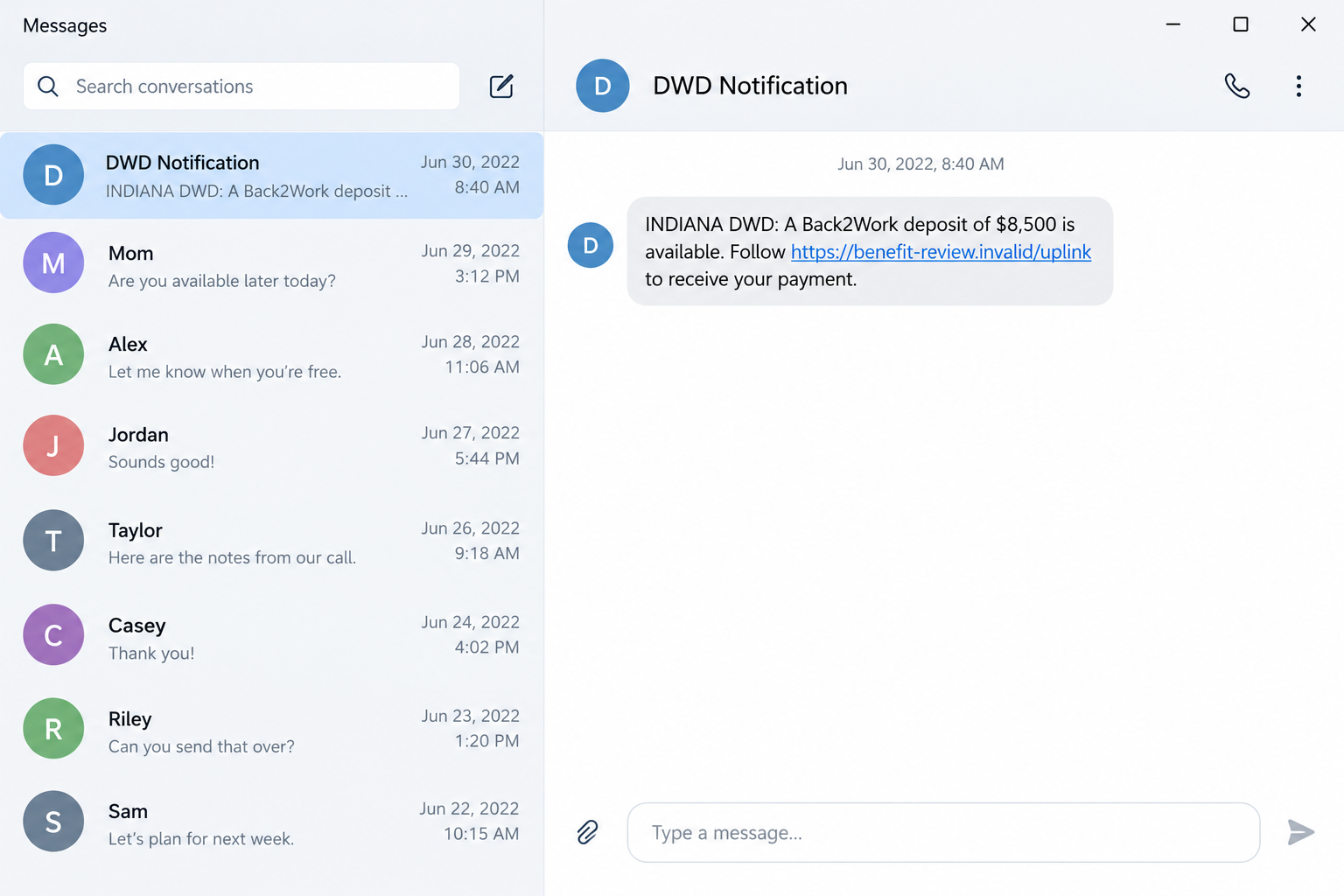
A historical 2022 version advertised a supposed Back2Work deposit of $8,500. That was scam wording, not evidence that the recipient qualified for such a payment.
DWD’s current guidance identifies the unsafe link request
The official fraud page says DWD may email customers, but will not send text or email links asking recipients to click to receive benefits or payment.
That distinguishes a genuine communication channel from a false money-release instruction. The appearance of the agency’s name does not authenticate the request.
The sample screens are fictional reconstructions of the pattern. They are not a newly intercepted 2026 message, a real benefit approval, or an active phishing endpoint.
Use the current official account and reporting guidance to investigate. This article does not determine eligibility, payment amounts, or the outcome of any individual claim.
Check the benefit question without using the sender’s shortcut
If you have an account, open it through your usual official route. Compare the claim with actual notices and payment information there.
- Do not log in through a link promising an unexpected deposit.
- Do not provide identity details just because a page contains Uplink or DWD wording.
- Review payment-election details through the genuine account if access was exposed.
- Ask DWD about unfamiliar account activity using independently obtained contact information.
- Preserve the suspicious message before reporting it.
- If you never applied, investigate possible identity misuse separately from the text itself.
The safe route answers the real account question first. The scam route starts by asking you to trust the person who supplied an unverified financial promise.
Why a Benefit-Deposit Message Can Be Persuasive
The promise arrives when money may already be a concern
A benefit payment can matter to rent, groceries, and other immediate needs. A message offering access to money therefore deserves more scrutiny, not less.
The sender may frame the next step as routine administration. Clicking feels like completing paperwork rather than deciding who should receive sensitive information.
Look past that framing. You are not receiving a payment merely because a message claims funds were approved.
An amount can also feel authoritative because it is precise. Precision is easy to write into a text and does not establish an actual claim record.
An official abbreviation can substitute for missing evidence
DWD and Uplink are recognizable to people who have used the system. Those familiar terms can make unrelated links feel connected to the same service.
The complete address matters. Putting an agency name into a page title, path, or longer domain does not establish government ownership.
Do not let a familiar word finish a verification process that has barely begun. Open the official service independently and compare the requested action.
If the contact also claims to handle identity verification, check that claim separately. An agency name does not authenticate every partner, form, or messaging account.
How the Indiana Uplink Scam Works
Step 1: The text presents an unexpected payment as available
The message announces money rather than asking whether you have a pending account question. That puts the recipient in the position of supposedly missing an opportunity.
The historic Back2Work wording is one example. The claimed amount or label could change without changing the need to verify the notice.
Do not treat the amount as your entitlement. A scam can mention a real agency while inventing both the payment and the recipient’s supposed qualification.
Before discussing collection, look for the event in your genuine account. If no account exists, do not create one to satisfy the stranger’s instruction.
Step 2: The link offers to complete the supposed payment process
A button or URL is presented as the place to receive funds. That makes the sender’s destination appear to be part of the benefit system.
The destination may use familiar wording while sitting outside the real service. Its connection to the agency still needs independent confirmation.
Copying the link into another tab does not make it safer or official. You are still using the address selected by the unverified sender.
Start from DWD’s official site instead. A genuine payment inquiry should not require you to enter an account through the suspicious message.
Step 3: A copied account page requests access information
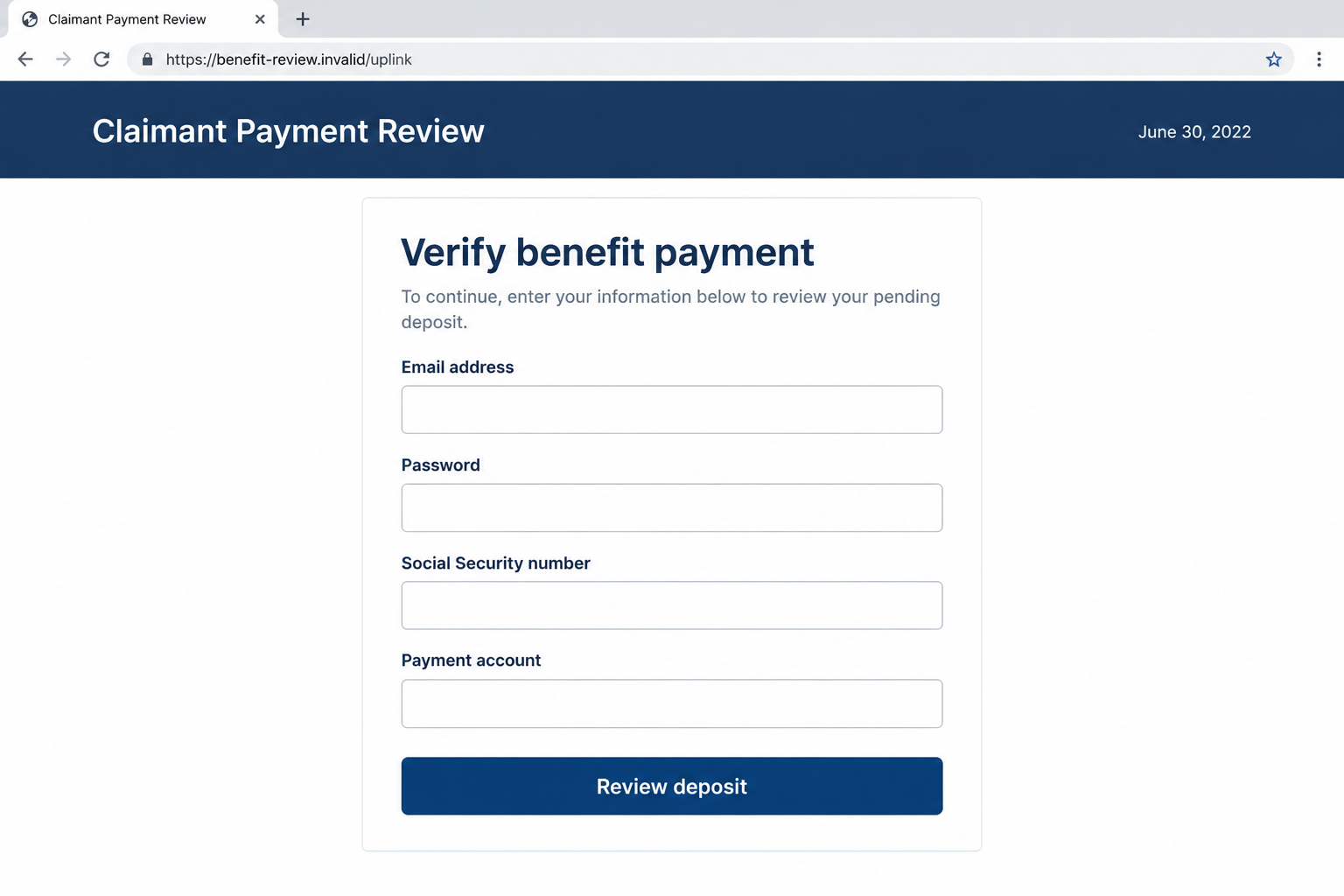
The next screen may ask for a username, email address, password, or identity information. The payment promise gives those fields a misleading explanation.
A recipient may believe the details are needed to match the deposit. In reality, credentials can provide access to the service the page claims to represent.
The illustrated form below is hypothetical. It shows unsafe collection requests at a fictional address and is not a verified copy of the current Uplink interface.
Do not test such a form with real personal information. Report the request based on what you can safely observe without supplying the answers.
Step 4: An identity request can widen the exposure
Some forms may seek a Social Security number or other identity details. That creates a different risk from a password disclosure alone.
Legitimate benefit processes also need identity verification. The important distinction is whether you reached the correct process through your own verified account.
DWD describes its ID.me route and instructs users to begin through Uplink. Do not substitute a stranger’s separate messaging app or lookalike page.
If an identification request appears, pause and check its origin. Familiar verification terminology should not be enough to authorize sharing private documents.
Step 5: Account access can put payment settings at risk
A stolen login can affect more than the sign-in itself. The account may contain personal information and choices connected to benefit payments.
DWD’s fraud-protection guidance specifically discusses password security and checking payment-election details. These are concrete account checks, not speculation about a text’s appearance.
Do not assume a settings change occurred merely because the message arrived. Review the genuine account and explain any unfamiliar change to the agency.
If you cannot access the account, use official assistance. An access problem should not send you back to the person whose form may have caused it.
Step 6: The claimed deposit may never materialize
A submission does not create a real benefit payment. A loading screen, confirmation message, or promised processing period may just keep the recipient waiting.
The important fact becomes what information was shared. Do not let waiting for the advertised deposit delay a response to account or identity exposure.
A follow-up demand can claim another detail is needed before release. Reassess it rather than assuming the original process became legitimate through continued communication.
End the unsafe interaction and document it. The actual agency can help investigate an account, but the unverified sender should no longer control the conversation.
Verify the Real Account and Payment Route
Use agency guidance, not a search advertisement or forwarded link
Open DWD’s official Indiana site or use a trusted bookmark. Find the account route there rather than accepting the address in an unexpected text.
Read any warning displayed by the service. A current official notice can explain how genuine communication differs from the payment-link trap.
Do not assume the first search result belongs to the agency. Check the actual organization and destination before entering credentials.
If you are unsure, contact official assistance through the published route. Keep passwords and sensitive identity information out of a conversation you have not authenticated.
Compare payment information with your account record
Look for the claimed event without supplying the expected answer first. A legitimate account record should be examined on its own terms.
Review unfamiliar notices or payment settings, and ask the agency to clarify anything you cannot explain. Do not let the text decide what the record ought to show.
A genuine delayed payment is not resolved by a stranger’s verification form. Continue the account inquiry through DWD rather than combining the two issues.
Similarly, an ordinary agency email does not authorize an unrelated payment-release link. Verify the requested action as well as the sender’s apparent name.
Distinguish a claimant account from other services
A benefits question, an employer account, an identity-verification provider, and a bank account are different systems. A convincing form can blur their roles.
Know which service you are actually using before entering a password. Do not provide several accounts’ credentials because a page calls them one combined verification.
The right account-support route depends on the issue. Ask staff which process applies instead of following a stranger’s guess about your status.
This article does not provide claim-filing or eligibility advice. Use current official instructions for obligations, notices, and any deadlines affecting a genuine case.
If You Never Applied for Unemployment Benefits
The message and a fraudulent claim are separate questions
An unsolicited benefit text can be sent without a real claim existing. Receiving it does not by itself establish that someone used your identity.
However, an actual agency notice about a claim you did not make deserves investigation. Verify it independently instead of dismissing everything after spotting a suspicious message.
DWD’s fraud page distinguishes identity-related reporting from other unemployment fraud. Use the category and process that fit your actual situation.
If a genuine record exists, explain that you did not file it. Preserve the notice and ask the agency what correction and reporting steps apply.
A suspicious payment should not be moved at another person’s instruction
If unexpected funds appear, do not treat the text’s sender as the person authorized to explain or redirect them. Ask the actual financial provider and agency.
An instruction to send money back to a new account can create another exposure. Keep the inquiry within verified channels.
Document the incoming transaction separately from the message’s alleged amount. Do not turn a claimed deposit into a confirmed financial event without the record.
A careful account check protects you without guessing who is responsible. State what you observed and let the relevant providers investigate.
What to Do if You Have Fallen Victim to This Scam
-
Stop using the payment link. Leave the page and decline requests for further information, approval codes, or release fees.
Save the text, visible URL, and any existing screenshots. You do not have to revisit the destination to collect perfect evidence.
Keep a short note of what you entered. That record will help distinguish a login exposure from identity documents, banking information, or software activity.
-
Contact DWD through its official fraud guidance. Explain the notice and whether information was disclosed or unfamiliar account activity appeared.
The agency lists AskUI@dwd.in.gov for screenshots of fraudulent messages. Follow its current instructions and avoid adding passwords or unnecessary sensitive information to the report.
For an unauthorized claim or identity issue, use the separate official reporting process. Reporting the text alone may not address a genuine fraudulent claim.
-
Secure exposed account credentials. Access the real Uplink process yourself and change a submitted password. Replace the same password used elsewhere.
Review account information and payment-election details using DWD’s published guidance. Report an unfamiliar destination or change promptly instead of assuming it is routine.
If sign-in is unavailable, seek agency assistance. Do not purchase account recovery from an unknown person promising a faster way in.
-
Tell financial providers about their specific exposure. Contact the bank or card issuer if you supplied credentials, payment details, or authorized a transaction.
Explain what was disclosed and what the records show. Ask about available protections or remedies without assuming the fraudulent payment promise created a real deposit.
FTC victim guidance supports prompt provider contact. Retain references and written responses, and do not rely on guaranteed-recovery claims.
-
Address identity and relevant device risks. If identity details were shared, consult IdentityTheft.gov and the agency’s current identity-fraud reporting instructions.
If you installed software or accepted remote access during the interaction, obtain trusted help and check for malicious software with Malwarebytes.
For unwanted advertisements or redirects, review browser permissions and consider AdGuard. Those tools do not correct benefit records or reverse a completed disclosure.
-
Keep watching the affected records. Follow up on account changes, unfamiliar notices, or transactions and preserve your case details.
Do not share private claim documents in public comments. Give necessary information only through the official reporting or support route that requests it.
If another stranger promises to obtain the missing benefit for payment, decline. Real claim questions belong with the agency, not an unsolicited intermediary.
Frequently Asked Questions
Is the real Indiana Uplink system a scam?
No. This warning concerns impersonation of DWD and Uplink. Genuine benefits and account processes should be accessed through official agency routes.
Was the $8,500 Back2Work claim a confirmed entitlement?
No. It appeared in a historical fake-message example. The amount does not establish a legitimate program payment, approval, or your eligibility.
Does DWD ever communicate by email?
Yes. Its guidance distinguishes ordinary emails from links asking recipients to click to receive benefits or payment. Check the request independently.
Can a legitimate account process require ID.me verification?
Yes. DWD describes an ID.me process initiated through Uplink. An unrelated message or lookalike form should not replace that verified account route.
Does receiving the text mean someone filed a claim in my name?
Not automatically. Verify any actual agency notice or account activity separately, and use DWD’s identity-fraud process when a real unauthorized claim is involved.
What account setting matters after a login disclosure?
DWD’s protection guidance highlights payment-election information as well as password security. Review the genuine record and report any change you did not make.
The Bottom Line
The Indiana Uplink scam uses a payment promise to steer recipients away from the genuine account process. The agency’s name does not make that shortcut legitimate.
Check DWD independently, keep account and identity details private, and report the precise exposure. A real benefit question can be resolved without trusting the suspicious sender.








