

An Account Renewal Notice can arrive when your inbox is already crowded with subscriptions and reminders. Keeping an important address active sounds like a task worth handling.
The message is brief, and the button looks convenient. A closer look at what it asks you to renew tells a more useful story.
Overview
A renewal label hides a credential request
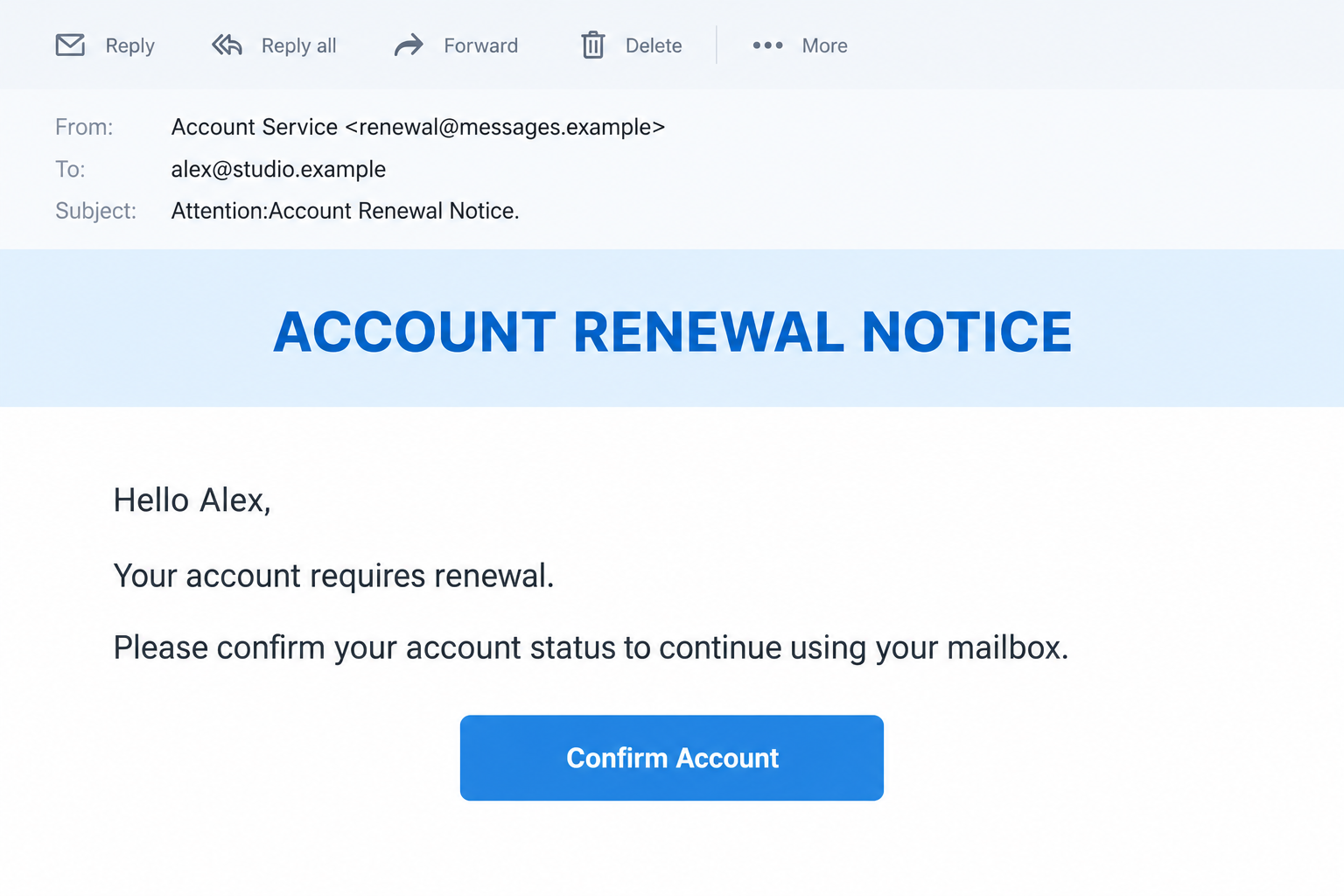
The Account Renewal Notice email scam dresses a password-collection attempt as routine account maintenance. The documented message offers confirmation to keep a mailbox usable.
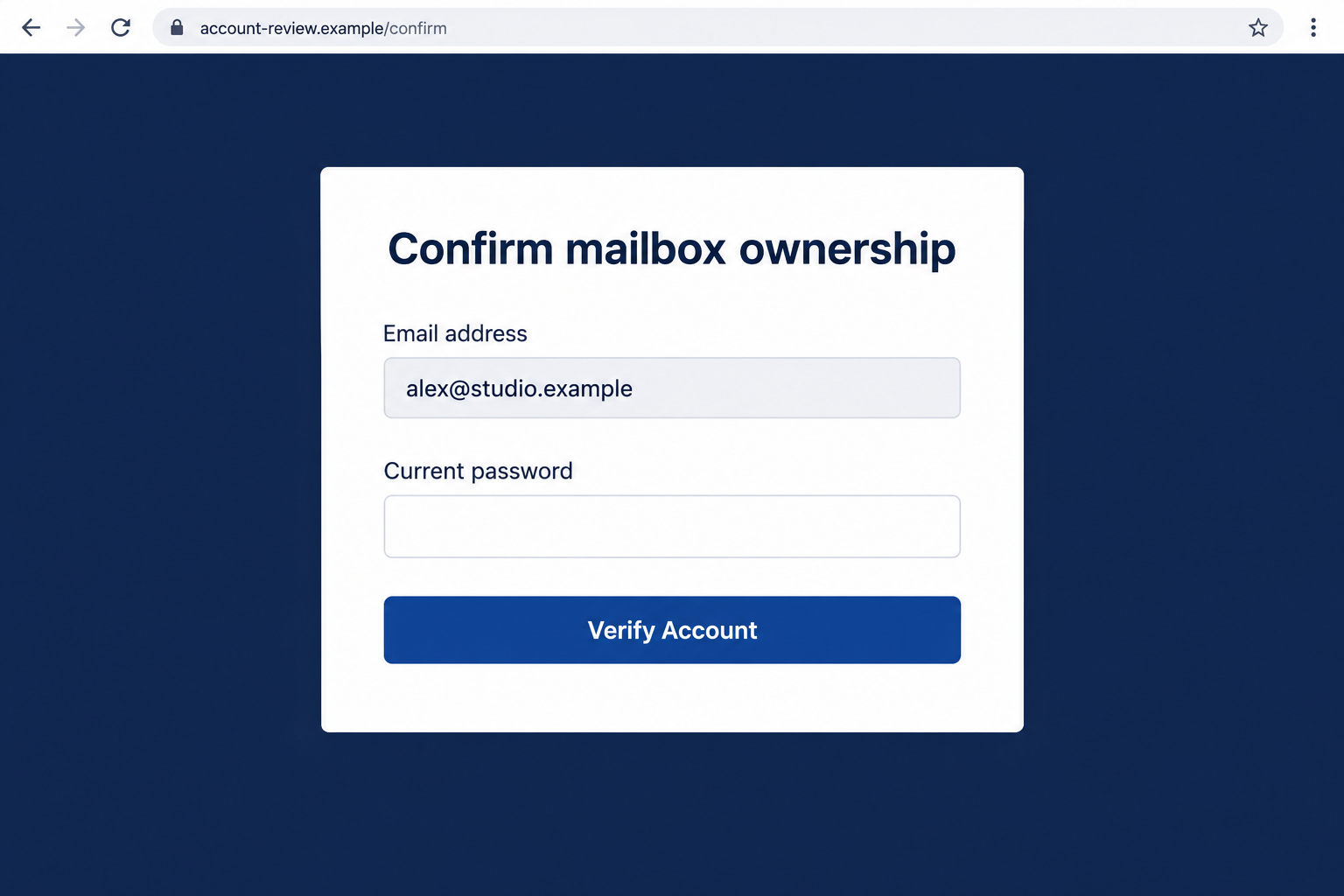
Its destination is a generic authentication form, not evidence of a genuine renewal process. Supplying the mailbox password there puts account access at risk.
The notice names a deadline, but a date printed in an email does not establish an actual service obligation. Confirm any renewal through your known account.
The images in this article are illustrative interfaces with invented contact details. Their simplified wording is intended to make the request easy to recognize.
The hosting address is not the sender’s authority
A reported destination used freschezzafoods[.]com. That address is an indicator associated with the supplied form, not a link readers should visit.
A business-looking domain can host content placed by somebody else. Without additional records, we cannot establish who controlled the page or how it appeared there.
The suspicious form should not be turned into an accusation against a food business. Domain ownership and operation of a particular page are different questions.
Likewise, no legitimate email provider becomes responsible because a notice adopts its administrative tone. The accusation belongs to the deceptive request.
The checks that matter before confirming
- Does a matching renewal appear in the account dashboard you normally use?
- Can you identify which service, plan, or mailbox is supposedly expiring?
- Does the destination belong to your established provider or approved identity service?
- Is the page collecting a current email password without explaining a genuine account relationship?
- Can your administrator verify the notice without using its confirmation control?
A vague reminder deserves a specific answer from the provider. It does not deserve a secret merely because it says your address may stop working.
Renewal, Verification, and Billing Are Not the Same Task
A paid mailbox can have a legitimate renewal date. A hosting package can lapse. Organizations may also review whether staff accounts should remain enabled.
Those ordinary events explain why this lure sounds plausible. They do not establish that this particular sender manages any of them.
Renewal concerns the service relationship. Authentication concerns who is accessing an account. A scam blurs them so entering a password feels like fulfilling an obligation.
Before acting, identify the actual provider. It might be a workplace administrator, hosting company, or consumer email service rather than the name in the warning.
If you pay for hosting, open the billing portal independently. An account record there is better evidence than a date supplied by an unfamiliar email.
If your employer manages the mailbox, ask IT whether any renewal action is yours to perform. Many service changes happen administratively without individual confirmation.
A free personal mailbox should not be assigned a paid renewal obligation without verification. However, do not assume every account policy follows the same rules.
The reliable distinction is authorization, not whether a notice uses the word renewal. A real requirement remains checkable outside the message that announces it.
How the Account Renewal Notice Scam Works
Step 1: The email introduces a small administrative obligation
The opening asks you to keep an existing account available. It avoids the obvious improbability of a prize or unexpected inheritance.
This is a low-friction pretext. A reader may consider confirmation less demanding than reviewing a bill, calling support, or investigating a security incident.
The address or name in the greeting can make the reminder feel individualized. Such details can be inserted without ever logging into the real mailbox.
Do not mistake that personalization for proof of an established customer relationship. A sender needs more than knowledge of where its email was delivered.
At this stage, the protective habit is simply to locate the obligation in your own records. Nothing requires starting from the notice’s link.
Step 2: A deadline makes confirmation seem safer than delay
The warning presents a cutoff. Whether it is near or already past, the date makes ordinary caution feel like a risk to continued access.
Readers may worry about losing work conversations, login recovery messages, or an address used for years. Those concerns make a quick confirmation attractive.
The date is part of the lure, not a verified countdown. An older message may be forwarded later without reflecting any current account status.
Checking the official account takes the same issue seriously without trusting the stranger’s route. You can investigate a possible expiry and reject the emailed form.
If there is a real deadline, support should identify the affected plan or account. A generic warning cannot supply that evidence on its own.
Step 3: The confirmation control opens a different website
The notice routes the reader away from its own description and into a password prompt. The change can happen before the person notices the address.
A button’s appearance is not tied to its destination. Blue styling and a confident label can be attached to any URL the sender chooses.
Sometimes a page arrives with the address already filled in. That convenience can come from the link, not a secure connection to your provider.
Check the actual host before interacting. Do not rely on a provider name placed elsewhere in the URL, page title, or surrounding graphics.
A valid encrypted connection also does not authorize the website to renew your mailbox. It says something about transport, not the honesty of its operator.
Step 4: Ownership verification asks for the existing password
The supposed confirmation becomes authentication. Instead of showing an account record, the form asks the visitor to supply the credential that protects it.
The important boundary is where that credential goes. An unrelated form can capture a password even when it resembles a familiar sign-in screen.
You should never test the page with your real password to learn what happens next. That experiment can complete the action you were trying to investigate.
An error, reload, or reassuring message afterward is not a safe verdict. The submission may already have disclosed the information.
This report does not trace the form’s server-side implementation. The visible mismatch is sufficient reason to avoid sharing a secret and to secure one already shared.
Step 5: The operator can attempt to use the credential elsewhere
A working password may allow an intruder into the mailbox. Whether that succeeds depends on the provider, authentication settings, and whether the credential remains valid.
Access could expose private correspondence or password-reset links. A reused password can also create risks for accounts outside email.
These are possible outcomes of credential theft, not a claim that this sample produced a specific financial loss. There is no documented victim transaction here.
The danger can continue through an added forwarding rule or unfamiliar account connection. A password change is important, but not always the entire response.
Review the settings that control ongoing access. An account that looks ordinary at first glance may still contain a change its owner never approved.
How to Verify the Notice Without Helping Its Sender
Find the real obligation in an established account
Use your normal bookmark, saved app, or known billing route. Check the actual account status and service dates there.
If the dashboard shows nothing relevant, contact support using existing records. Do not let the warning provide a replacement telephone number or unfamiliar help center.
Ask a narrow question: does this mailbox require an action now, and where is that action documented? You do not need to accuse anyone to verify it.
For workplace accounts, share the warning through the approved security channel. IT can compare it with notices generated by the organization’s own systems.
Separate the website name from control of its content
A domain can contain older business pages, abandoned paths, or content somebody inserted without permission. A professional root page does not validate every other path.
Conversely, a suspicious path does not prove that its registered owner created it. Reporting should identify the page and request investigation rather than invent ownership facts.
That is why the reported domain is defanged here. It helps recipients recognize an indicator without inviting them to revisit potentially harmful content.
Do not assume all future deliveries will use that host. A changed address can preserve the same renewal pretext and password request.
Use authentication clues without treating them as guarantees
Expand the sender details. A display name can be convincing while the underlying address has no relationship to the account being discussed.
Mail authentication results may help your administrator evaluate origin. Passing one check is not blanket approval of every instruction in a message.
A legitimate sending account can also be abused. The requested action and the destination still need verification even when the sender looks familiar.
For readers, a known route is often simpler than interpreting technical headers. For administrators, preserving the original email makes that interpretation more reliable.
If You Also Have a Real Hosting Renewal Due
A genuine renewal and a fraudulent notice can coexist. Keep them separate rather than treating one as confirmation of the other.
Check the plan name, account owner, period covered, and existing billing history inside your established portal. Those details locate the real obligation.
If another person manages the subscription, contact that person before changing billing. A shared company mailbox does not necessarily make every user an authorized purchaser.
Do not enter card details simply because a second page follows the password form. A new payment request requires its own independent verification.
Where a genuine service invoice is overdue, pay through the provider’s confirmed route. Avoid substitute bank details supplied only through an unexpected follow-up.
Keep confirmation of the real renewal in your records. It can help support distinguish billing history from the deceptive email when examining the incident.
The goal is to preserve legitimate service without rewarding the impersonation. You can resolve an actual expiry while still refusing the suspicious confirmation workflow.
What to Do if You Have Fallen Victim to This Scam
- Stop using the renewal page.
Close it and decline any further confirmation prompts. Record whether you only opened it or also entered a password, code, or other account information.
A normal account can remain active while a disclosed password is being misused. Do not use continued access as a reason to postpone recovery.
- Secure the real account first.
Navigate independently to the provider and replace the exposed password with a unique one. Use a different trusted device if you installed suspicious software.
Reset matching passwords elsewhere as well. Avoid slight variations of the old password that leave other accounts vulnerable to easy guesses.
- Remove access you do not recognize.
Check active sessions, recovery contacts, connected applications, and authentication methods. Follow the provider’s instructions to revoke anything added without your knowledge.
Ask an administrator to help with managed accounts. Revoking sessions and inspecting organizational logs may require privileges the mailbox user does not possess.
- Examine mailbox behavior after the password change.
Review forwarding destinations, filters, delegated access, and recent outgoing mail. Investigate rules that hide warnings or copy correspondence to an unfamiliar address.
Where suspicious messages went to contacts, warn them through another channel. Explain which request should be ignored without forwarding a functioning phishing link.
- Preserve and report the misleading renewal.
Keep the original email and your account timeline. Report it through the mail application’s phishing option and the provider’s genuine support route.
If you disclosed financial details in a later interaction, notify the relevant bank promptly. A renewal lure alone does not prove an actual charge occurred.
- Check any accompanying software exposure.
Use Malwarebytes when you downloaded or ran an unexpected file, accepted an extension, or noticed unusual device behavior. Obtain security tools through their official channels.
AdGuard can add phishing filtering where its product supports it. That protection complements account recovery; it does not reset passwords or guarantee safe browsing.
- Watch for follow-up account changes.
Review future login alerts and service messages through known routes. A second notice might exploit the same worry, even after the original page disappears.
For Gmail, use Google’s guidance for securing compromised access. Other providers should offer their own account-specific recovery process.
Frequently Asked Questions
Do real email accounts ever require renewal?
Paid hosting and managed services can. Confirm the requirement inside your established account or with its administrator. That possibility does not validate an unsolicited password form.
Is the deadline in this notice a real cutoff?
Not merely because it appears in the message. A genuine service deadline should be independently verifiable through the provider’s account records.
Does the listed business domain identify the scammer?
No. A reported hosting address does not establish who placed or controlled a page. Avoid blaming a domain owner without further evidence.
What if the page already knew my email address?
The link can carry an address into the form. A prefilled field makes the page convenient, but does not prove access to your mailbox.
Must I scan my device after receiving the reminder?
Receiving it alone is not proof of malware. Scanning becomes relevant if you downloaded software, ran a file, or experienced suspicious behavior.
Can I safely confirm using a different password?
Do not interact with the suspected form. A fake submission is unnecessary. Check the real account instead and report the original message.
The Bottom Line
The Account Renewal Notice scam makes mailbox confirmation sound routine while directing the reader toward an unauthorized password request. Verify the obligation, not the button’s appearance.
Use your provider’s established route to check account status. Anyone who supplied a credential should replace it and review ongoing access before moving on.








