

Nine missing emails could mean a customer waiting, an invoice overlooked, or a conversation you never knew started. A Mailbox Delivery Report lands at an inconvenient moment.
It promises a quick settings fix. Before letting that notice interrupt your day, there are a few details worth checking beyond its tidy heading.
Overview
The warning invents a problem with incoming mail
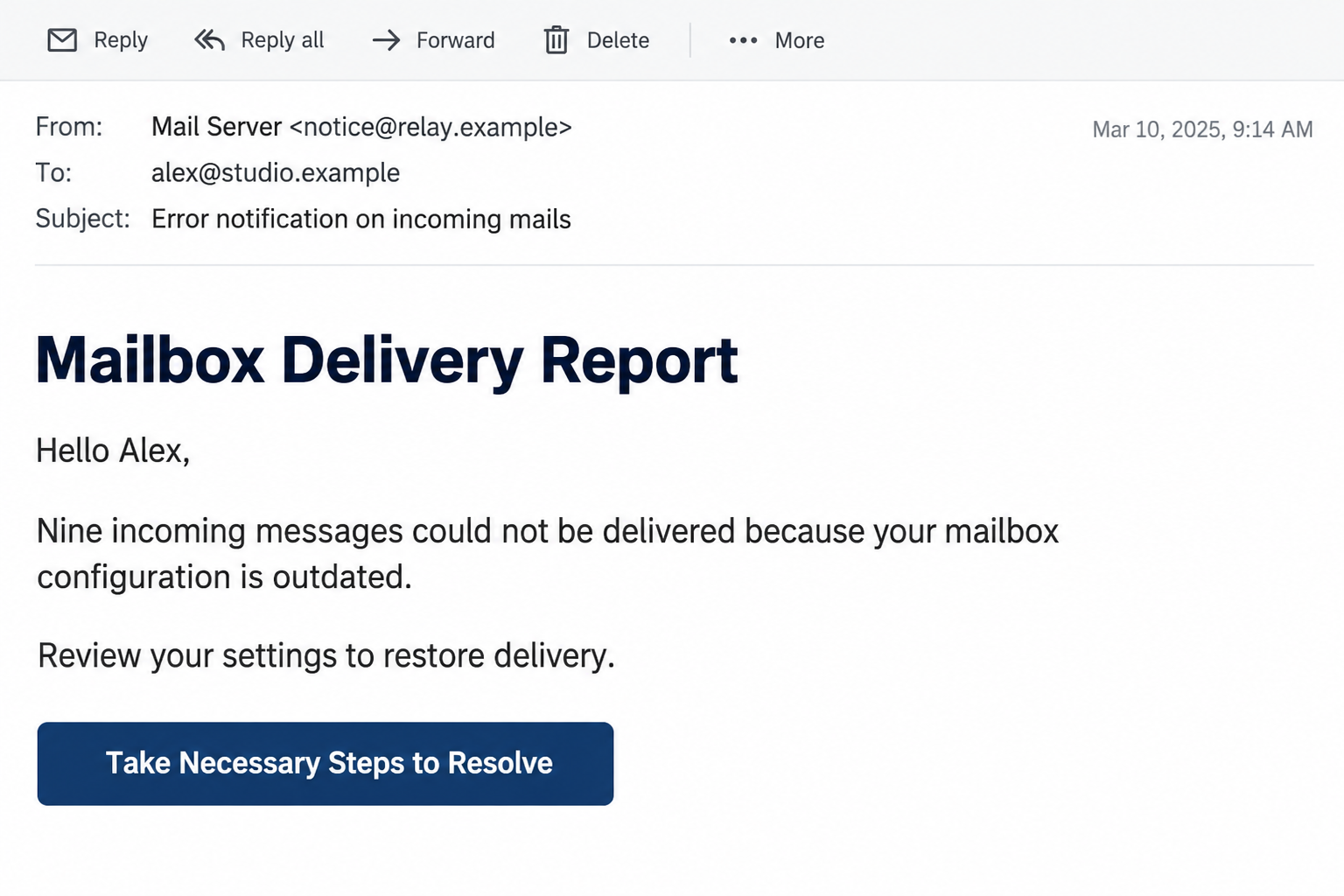
The Mailbox Delivery Report email scam uses a false configuration warning to draw recipients into an unrelated sign-in page. Its goal is mailbox access, not repair.
The documented notice describes nine undelivered incoming messages. It blames obsolete settings and offers a control labeled “Take Necessary Steps to Resolve.”
That is an administrative-sounding story, but the number and explanation are not evidence of a real delivery incident. They need confirmation from your provider.
Our images illustrate the notice and password prompt using fictional accounts. They simplify the presentation rather than reproduce an original recipient’s inbox.
The repair route becomes a copied login
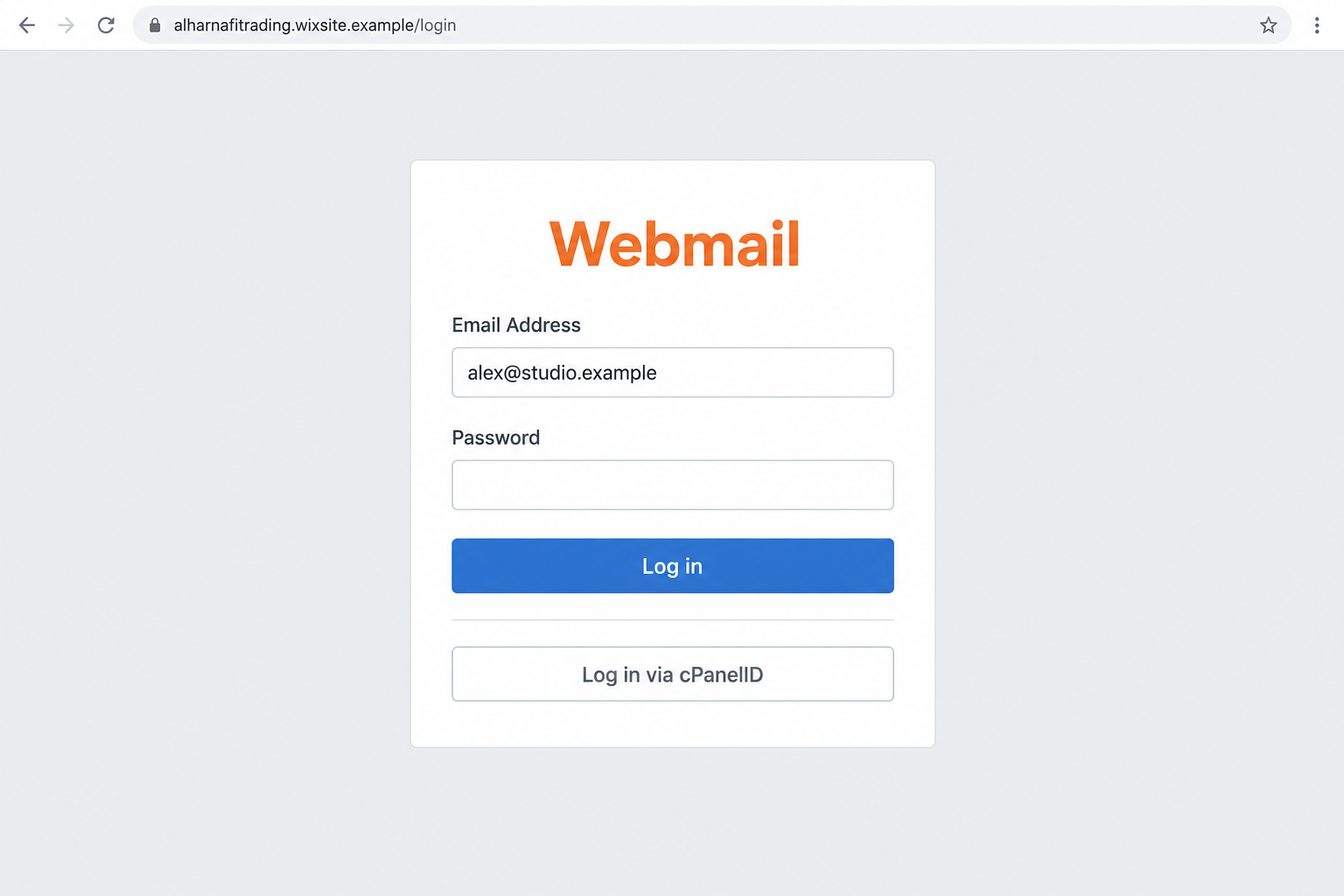
The supplied destination specimen presents Webmail credentials and an alternative cPanelID control. A reported hosting indicator is alharnafitrading.wixsite[.]com, shown here without a clickable link.
The useful finding is the mismatch between the claimed mailbox repair and the destination collecting its password. Familiar software labels do not establish authority.
Wix and cPanel are legitimate services. Their names in a deceptive page do not show they sent the message or authorized its use.
This report does not establish the operator’s identity, current hosting status, or malware installation. Those conclusions would require evidence beyond the supplied email and form.
What deserves an immediate pause
- A specific missing-message count without a verifiable queue or sender list.
- An unexplained configuration problem that only an emailed button supposedly resolves.
- A password request outside your recognized mailbox or hosting portal.
- A page relying on Webmail styling instead of an independently confirmed address.
- A claim you cannot reconcile with your administrator’s delivery records.
If the notice matches this pattern, leave its controls alone. Check your normal mailbox and contact the hosting provider through details you already trust.
Why Nine Missing Messages Feels Like Your Problem
Most people do not inspect mail-server logs. When a message never arrives, there is often nothing visible to explain its absence.
The scam leans on that uncertainty. It does not need to prove which customer wrote. You supply possible names from the work already on your mind.
A small business owner might picture a missed quote. Someone handling accounts might imagine a supplier asking why an invoice remains unpaid.
These are examples of the pressure the story creates, not evidence that this campaign intercepted those conversations. The concern comes from your routine, not the sender’s knowledge.
An exact number helps the warning sound measured. Nine feels like a system’s count, even though anyone writing an email can invent it.
Technical language then changes the question. Instead of asking whether mail is missing, the reader starts wondering how to update a configuration they never configured.
The repair button offers relief from that uncertainty. It is an attractive shortcut when the alternative seems to be finding someone who understands the server.
You do not need that expertise to make the first safe decision. A message’s repair instructions should be verified independently before they receive credentials.
How the Mailbox Delivery Report Scam Works
Step 1: An apparently routine server notice reaches you
The opening message adopts the tone of maintenance rather than advertising. That matters because administrative mail often gets processed quickly, between more demanding tasks.
The recipient is encouraged to treat an unsolicited statement as an account event. A display name resembling a mail team can reinforce that assumption.
Neither a team name nor a matching address proves the sender checked your inbox. Destination information can be copied into a message without account access.
Public contact pages, old correspondence, and exposed address lists can all supply potential recipients. This specimen does not identify how any particular address was obtained.
Pause at the point where the email claims knowledge of your service. Ask whether its sender is actually responsible for the account you use.
Step 2: The story turns absence into a repair task
Next comes the suggestion that your settings are behind the problem. The warning moves responsibility toward you, even though no independent troubleshooting has happened.
This is different from a normal outgoing bounce. The email claims messages were waiting to reach you, so your Sent folder cannot validate the alleged count.
That limitation makes provider records especially important. An administrator can examine routing, rejection reasons, filtering, and queues without trusting the warning’s own description.
You should not guess which mail protocol is broken, delete mailbox settings, or loosen security filters just because an unsolicited notice demands a fix.
A genuine configuration change may require action. Its details should come from your established support channel, with instructions specific to the service actually hosting your mail.
Step 3: The repair control takes you outside that service
The risky transition happens when the embedded control is treated as the provider’s official route. Button wording describes an action, not the organization receiving the click.
A link can contain your email address and still belong to a stranger. Personalization only shows the page received that string of text.
A hosted subdomain can look respectable because the underlying platform is familiar. The individual page still needs its own authorization and purpose checked.
Do not open the reported indicator to see whether it remains active. Your existing sign-in bookmark and provider contact are enough to investigate your own account.
If you already opened it, the next decision is simple: do not enter a password, accept a download, or grant notification permission.
Step 4: A recognizable sign-in layout asks for the secret
The copied page makes authentication seem like a necessary preliminary. Its design encourages you to finish signing in before returning to the missing-mail question.
A Webmail label and an external-login option can resemble genuine hosting software. Copying those visible elements does not create a connection to your server.
The password is the material at risk. Submitted credentials can be captured by the form’s operator and tested against the real email service.
An empty error screen afterward would not prove submission failed. A page can record information before displaying an error or sending you somewhere else.
We have not traced this specimen’s backend. The security advice does not depend on doing so: an unauthorized form should never receive the mailbox password.
Step 5: Stolen access can outlast the original warning
If the password works, the intruder may find customer conversations, invoices, recovery messages, and contacts. These are possible consequences, not documented losses in this case.
An attacker could also create a forwarding rule. That can expose later mail even after the original deceptive page has disappeared.
For a business, familiar correspondence can become leverage. A request sent from a real mailbox may persuade another person to trust an altered invoice.
Two-factor authentication can reduce risk, but submitting the password still requires a response. Do not wait to see whether a second suspicious email arrives.
Account recovery should address the password, sessions, recovery details, and mailbox rules. Simply deleting the warning leaves those questions unanswered.
Checking Delivery Without Using the Repair Button
Start with a known mailbox route
Open your usual mail application or a saved hosting bookmark. Do not let the notice supply a replacement address for a service you already use.
Look for account warnings there. If messages are genuinely missing, ask an expected sender to confirm when they wrote and whether they received a rejection.
A single message can be delayed, filtered, misaddressed, or rejected. None of those possibilities authenticates a separate email demanding your password.
Give support a specific example to investigate. A sender address, approximate time, and subject are more useful than an unverified claim that nine items exist.
Understand the real cPanel connection
cPanel’s official login documentation describes genuine Webmail access through a hosting server. Some providers also support external authentication.
That means a cPanelID option is not inherently suspicious. What matters is whether you reached the correct host and whether your provider actually supports that route.
Do not assume every legitimate login uses your email provider’s main brand domain. Custom-domain mail often runs through a separately named hosting company.
Establish that relationship through the hosting account you already own. An unsolicited page cannot make itself legitimate by explaining its own branding.
Keep the suspected email intact for review
Your mail application’s reporting tool may preserve information that a screenshot omits. Full headers can help administrators evaluate the sending path and authentication results.
Do not post private addresses, internal routes, or message contents publicly. Send evidence through your organization’s approved reporting method.
If support needs a link, provide it as text through that secure channel. You do not need to revisit the page or experiment with invented credentials.
Blocking one address can reduce repeats, but it does not fix a stolen account. Treat reporting and recovery as separate jobs.
Giving Support a Useful Missing-Mail Example
Start with one expected conversation, not the warning’s invented total. Ask the sender to identify the original address used and the approximate sending time.
A timezone matters when staff compare events across systems. Give the local time and location rather than forcing the administrator to guess.
If the sender received a rejection, ask them to preserve its details. Support can interpret the error without requiring either person to use the suspicious notice.
Do not ask the sender to repeatedly resend a confidential attachment while you investigate. That can create confusion and unnecessary copies without solving the underlying problem.
Keep the phishing report separate from the delivery ticket. One concerns an unauthorized request; the other asks whether an expected message genuinely failed.
After support confirms the cause, use only the approved instructions. A real problem discovered later does not retroactively authenticate the fraudulent repair button.
If no genuine missing message can be identified, you have no reason to recreate the email’s alleged configuration failure. Reporting the lure is enough.
What to Do if You Have Fallen Victim to This Scam
- Work out what you actually shared.
Receiving the email, opening a page, and submitting credentials are different exposures. Write down which actions happened before deciding what needs recovery.
If you entered the password, treat it as disclosed even if the page returned an error. Do not test it again.
- Replace the mailbox password through the real provider.
Use a trusted device and your established account route. Choose a new, unique password, then change other accounts where the old one was reused.
If you cannot sign in, begin official recovery or ask your hosting administrator. Avoid search-advertised account rescuers asking for advance payment.
- Inspect sessions and security settings.
Review active devices, recovery addresses, phone details, application access, and available authentication controls. Revoke unfamiliar access using the provider’s instructions.
Enable stronger authentication where supported. On managed accounts, ask IT to check whether existing sessions or connected mail clients also require revocation.
- Check the mailbox for quiet changes.
Look at forwarding, filters, delegates, outgoing messages, and deleted folders. A rule hiding security notices deserves attention even when the inbox otherwise looks normal.
Save suspicious settings for the administrator before removing them. Ask affected contacts to verify any unusual requests through a separate channel.
- Report the delivery lure with useful evidence.
Keep the original notice, arrival time, and any destination you opened. Tell the provider whether credentials were submitted so the report receives appropriate urgency.
For workplace mail, include your IT team promptly. They can inspect related account activity and determine whether colleagues received the same lure.
- Address device exposure when relevant.
If the site prompted a download, extension, or other suspicious software, run Malwarebytes and investigate what was installed. Follow workplace device guidance where applicable.
Consider AdGuard’s phishing protection as an additional browsing layer. It cannot guarantee detection or revoke credentials already submitted to a form.
- Verify important conversations after recovery.
Watch for unauthorized resets, new forwarding, or unexplained sent mail. Contact the relevant institution directly if an intruder appears to have used a financial account.
Google users can follow Google’s compromised-account checklist. Hosted business mail users should obtain equivalent checks from their provider.
Frequently Asked Questions
Does the report prove nine messages are missing?
No. The count comes from the warning itself. Your mail provider’s records and expected senders are the appropriate ways to investigate a real delivery problem.
Is the cPanelID option evidence that the page is genuine?
No. Genuine hosting systems can offer it, but counterfeit pages can copy the label. Confirm the host through your established provider before authenticating.
Does a Wix address mean Wix sent the scam?
No. A hosted page and its platform are separate. The reported address is an indicator of the supplied destination, not proof that Wix operates the fraud.
Can outdated settings cause real mail problems?
Yes, configuration changes can affect delivery. That possibility does not authenticate this notice. Ask support to identify the actual problem and the approved repair process.
Should I change my password if I only read the notice?
Reading it alone does not establish credential exposure. Report the message. Reset the password promptly if you entered it on the suspected page.
Can a malware scan restore the missing emails?
No. A scan checks device threats. Delivery investigation and mailbox recovery require the provider, and a scan cannot undo disclosure of an email password.
The Bottom Line
The Mailbox Delivery Report scam turns an unverified mail problem into an unauthorized password request. Its repair button is not a substitute for your provider’s records.
Check delivery through your normal service. If you submitted credentials, secure the mailbox and inspect its access settings before trusting further account notices.

Join the discussion
0 commentsShare your experience or ask a question about this article.
Discussion
Start the conversation
Have a question or something useful to share? Add the first comment.