

A PDF addendum arrives with a review request and a short access window. The NDA Document Addendum email sounds like one more piece of unfinished business.
You may wonder which agreement changed and whether someone is waiting on you. Before opening the file invitation, check the relationship behind the request.
Overview
A contract update becomes the reason to click
The NDA Document Addendum email scam presents a supposedly shared legal file as business the recipient should handle promptly. The invitation is deceptive, not verified contractual work.
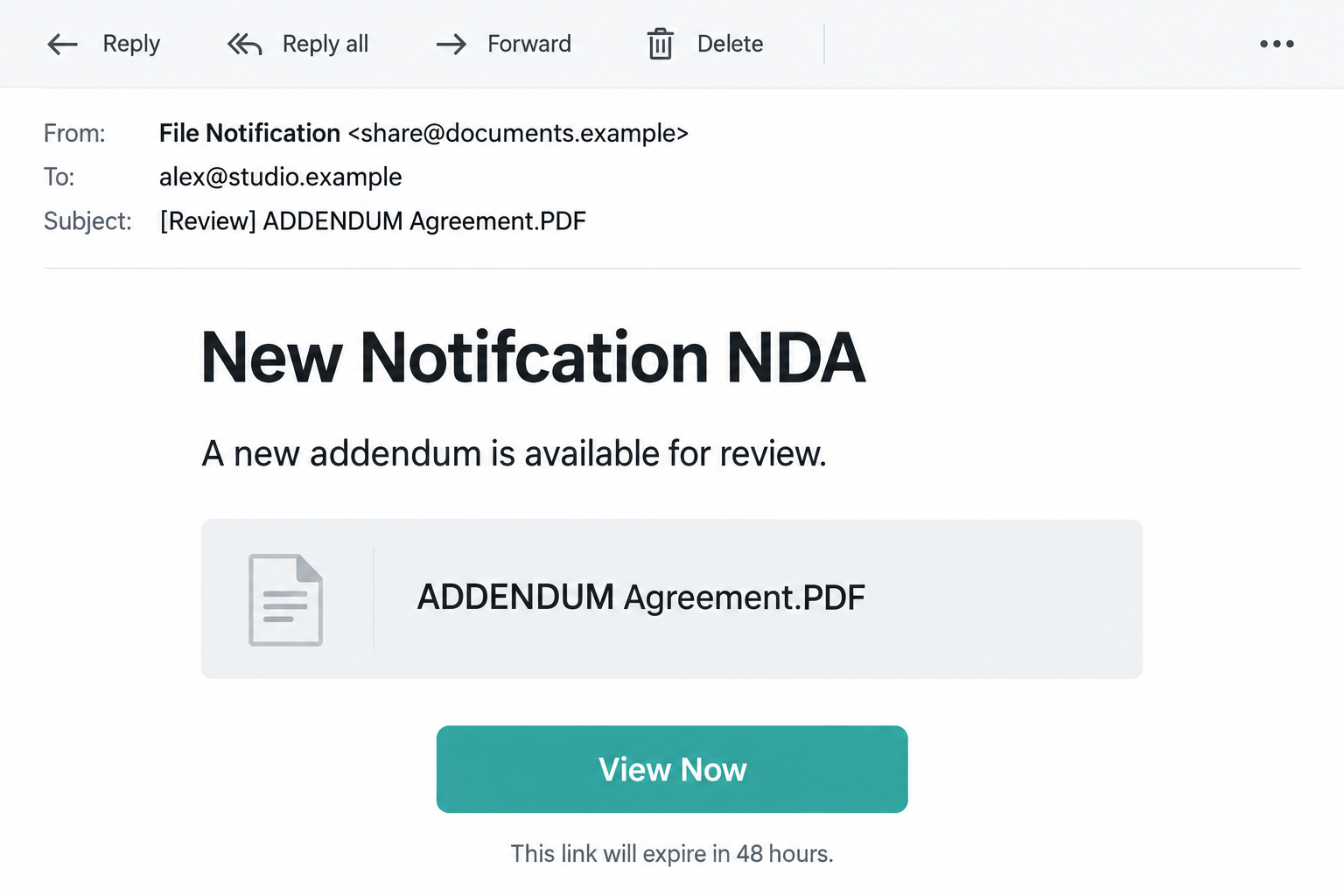
The supplied notice references an addendum PDF, offers a viewing control, and gives a 48-hour access window. Several misspellings appear in its notification language.
These details identify the specimen. They do not establish that a real counterparty amended an agreement, uploaded a file, or requested your signature.
The article’s interface images are illustrations with fictional data. They help explain the invitation and possible credential request without reproducing a private recipient’s correspondence.
The destination evidence has an important limit
The linked destination was unavailable in the supplied investigation. We cannot honestly show a recovered login from that page or claim to have traced its submissions.
Credential harvesting is the reported purpose and a recognized danger of deceptive document invitations. The exact sign-in design for this delivery remains unverified.
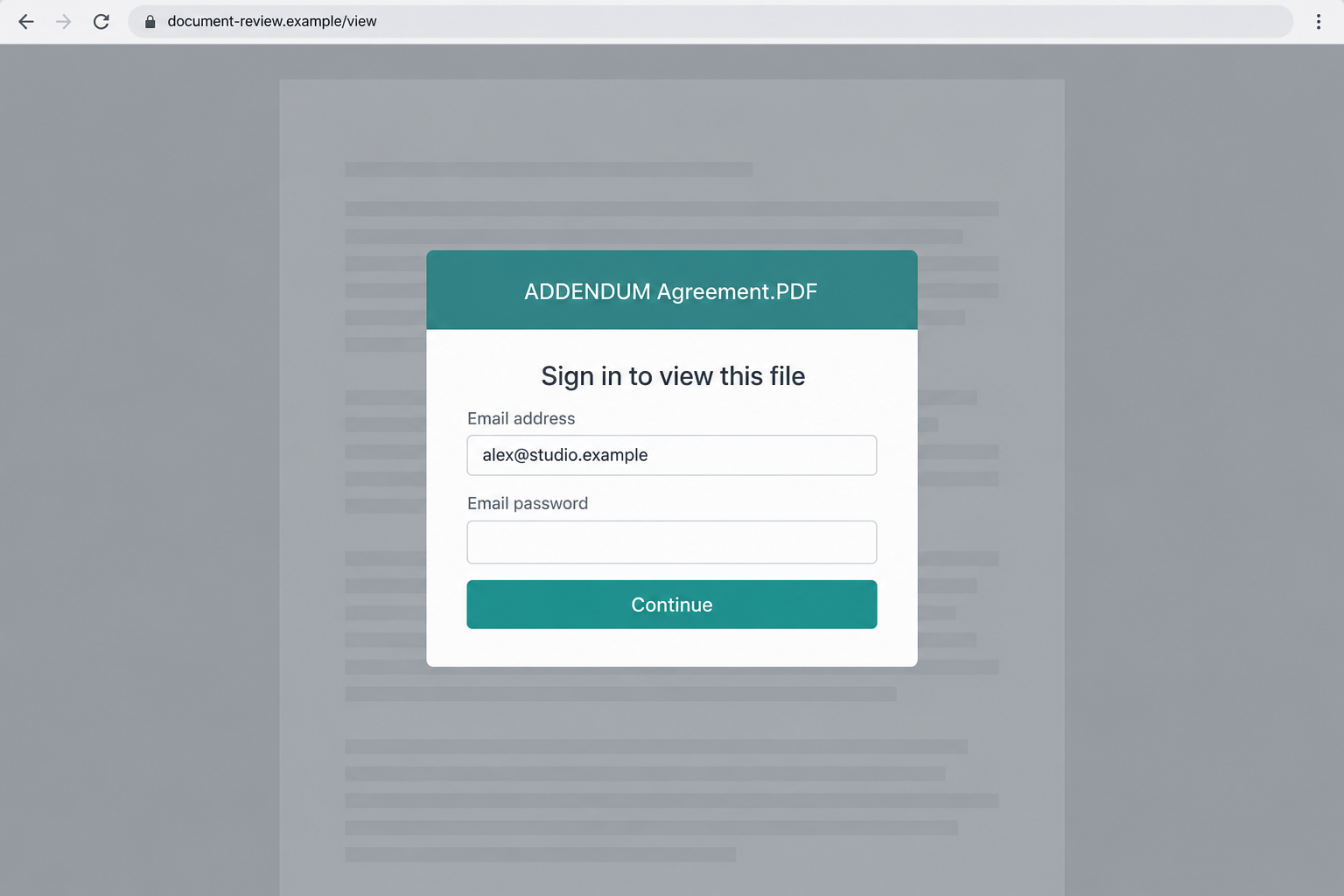
Our second image therefore illustrates a possible password lure. It is not evidence that this particular link displayed those fields or that malware was installed.
That limit does not make the notice safe. An unexplained legal request should be confirmed with the actual contracting party before any document access or authentication.
The practical decision points
- Can you identify the agreement this addendum supposedly modifies?
- Did a known counterparty tell you to expect a revised document?
- Does the invitation connect to your established contract or document workflow?
- Is the destination an approved service rather than an unexplained sign-in page?
- Can you confirm the request without using contacts supplied in the suspicious email?
If the underlying relationship cannot be established, do not treat the countdown as a reason to proceed. Ask the real sender through a known channel.
Why an Addendum Feels More Urgent Than an Ordinary Attachment
An addendum implies there is already an agreement. That framing encourages the recipient to search for an existing relationship rather than question whether one exists.
A person juggling vendor paperwork might assume a colleague initiated it. Someone awaiting a job offer might think it concerns hiring documents.
Those are illustrative reactions, not reported victims of this campaign. The lure works by leaving enough ambiguity for different readers to supply their own context.
Confidentiality can add another hesitation. A reader may avoid asking broadly about an NDA, even when a narrow check with the contracting party would resolve uncertainty.
The deadline makes that hesitation expensive in the reader’s mind. Waiting appears to risk losing access or delaying somebody else’s work.
But access expiry and contractual obligations are different things. A file link’s alleged lifetime does not establish a deadline for signing an agreement.
A genuine addendum should connect to recognizable parties and a real document. It should not require you to invent the missing business relationship.
When that relationship is unclear, verifying it is part of handling the paperwork responsibly. You are not delaying legitimate work by checking who initiated it.
How the NDA Document Addendum Scam Works
Step 1: A shared-file notice borrows the language of legal work
The invitation enters a workflow where attachments and unfamiliar document services can be normal. That makes the legal theme more persuasive than a generic account warning.
A file card can create the impression that a PDF is already available. The card itself does not prove the document exists or has been attached.
The sender can place a filename in an email without owning any genuine agreement. A reference to PDF describes the bait, not its safety.
Check whether the person sending it belongs to an established thread. A new display name resembling a colleague is not equivalent to that colleague’s confirmation.
For business recipients, finding the expected agreement is the most useful first step. Do not begin by trying to authenticate to an unknown file service.
Step 2: The viewing window discourages a careful handoff
The limited window encourages quick action before a lawyer, manager, or procurement colleague can review the request. Routine verification starts feeling like unnecessary delay.
A deadline may be legitimate in real document sharing. Its presence is not conclusive either way, and it does not authenticate the sender.
Consider what the request lacks: a clear connection to your agreement, recognizable instructions from the counterparty, and an independently confirmed access route.
Do not let an emailed timer replace those checks. If the file is genuine, the known sender can explain it or provide an approved route.
If the sender cannot be identified outside the suspicious message, there is no verified business process for the countdown to interrupt.
Step 3: The file control becomes an invitation to leave your workflow
Opening the control moves the reader from a legal-sounding message to a destination chosen by the sender. That transition deserves its own check.
The control’s label can suggest viewing or downloading without accurately describing the next page. A file invitation can instead lead toward authentication.
In this case, the original landing interface could not be recovered from the supplied evidence. We should not invent its provider, URL behavior, or exact fields.
The safe rule is still useful: verify the platform and sender before entering credentials or granting account permissions anywhere reached from an unexplained invitation.
A failed link is not permission to try another link from a follow-up email. Confirm the request with the actual contracting party first.
Step 4: A possible access prompt asks for more than the document needs
Deceptive file invitations commonly make authentication appear necessary before viewing. A password request can be dressed as confidentiality protection or identity validation.
The relevant question is whether the identity provider is genuine and the sharing request authorized. A document-themed background answers neither question.
A file-specific password supplied by the real sender is different from the secret protecting your email account. Do not substitute one for the other.
Some real services require a verified login or email code. That does not authorize an unrelated page to collect the mailbox password.
The example below shows how a fake access gate might look. Its interface is hypothetical because the original destination remains unverified.
Step 5: Disclosed access can affect confidential conversations
If a recipient shares a working credential with an unauthorized form, an operator may attempt to access the protected account. Strong authentication can affect whether that succeeds.
A business mailbox could contain negotiations, customer details, or old document links. Exposure can therefore reach beyond the single file mentioned in the invitation.
This is a conditional risk explanation. It is not a claim that this sample stole a particular contract, changed a payment, or compromised an identified company.
Any recovery should reflect what was actually disclosed. A password, a one-time code, an application permission, and an installed file create different questions.
Preserving that sequence helps support respond accurately. An account owner need not solve the whole investigation before reporting that a credential may have been shared.
Checking the Agreement, the Sender, and the Access Method
Locate the original contract relationship
Look in your own approved records for the agreement and counterparties. Identify who normally sends amendments and which internal team approves them.
If there is no matching relationship, ask the named person through a contact you already possess. Do not reply to learn whether the suspicious sender is genuine.
A short question about the agreement, version, and purpose is more useful than asking whether they sent an email with an unfamiliar title.
Do not circulate confidential paperwork widely while investigating. Use your organization’s legal or security channel and share only the information needed for confirmation.
Recognize legitimate sharing without trusting every login
Microsoft explains legitimate guest document access, including email passcodes and account sign-in. The exact route depends on sharing settings.
This does not mean every screen requesting verification is genuine. Establish which service is actually handling the file and whether its identity request fits that service.
A code requested through a known sharing process is not a reason to read other security codes to an unknown caller or paste them into another site.
On managed accounts, IT can explain approved document platforms and identity domains. You should not have to guess them from copied icons.
Read spelling errors as clues, not a complete verdict
The supplied notice misspells several ordinary document terms. That inconsistency is worth noticing in a request claiming to manage legal paperwork.
However, genuine senders make mistakes and fraudulent emails can be polished. Neither perfect grammar nor a typo settles authorization.
The stronger check is whether the request corresponds to a real agreement and a verified sender. Spelling helps prompt that check; it does not replace it.
Our illustrative notification uses simplified wording and may correct some errors. Do not treat every letter in the image as an exact specimen transcription.
Keeping a Genuine Contract Review Separate From the Lure
Once the actual counterparty confirms a document, check its version against the existing agreement. The filename alone does not establish which terms changed.
Ask the responsible business owner to identify the purpose of the amendment. An access invitation is not a substitute for understanding the underlying paperwork.
For legal questions, use your organization’s authorized reviewer. This security investigation does not determine whether a real amendment is enforceable or suitable to sign.
A confirmed sender can provide an approved viewing method. If an old link expired, request replacement access through the already verified relationship.
Do not disable browser protections or install an unfamiliar viewer merely to meet the invitation’s deadline. Explain the access problem to the genuine sender.
Keep the suspicious notice outside the contract record once identified. Its wording should not become evidence of a legitimate request or agreement change.
That separation lets the real work continue while security staff investigate the false invitation. Neither team needs to rely on the questionable access route.
What to Do if You Have Fallen Victim to This Scam
- Stop the unexplained document interaction.
Close the destination and keep a note of what you did. Include whether you entered a password, supplied a code, approved access, or downloaded anything.
Do not reopen the link to clarify the details. The original email and your browser history can help authorized support without another visit.
- Change any credential you disclosed.
Use the authentic account service from a trusted device. Replace reused passwords on other accounts, especially where that mailbox is involved in recovery.
If you cannot access the account, follow the provider’s supported recovery route. A contract sender or document notification cannot recover your identity account for you.
- Check permissions as well as passwords.
If you accepted an application connection or account consent prompt, review that authorization with IT. A password reset alone may not remove an approved application.
Also inspect active sessions, recovery contacts, and authentication methods. Remove unfamiliar access through the service’s genuine security settings.
- Tell the legal or business team what happened.
Identify the supposed agreement and whether any confidential material was shared. They can check the real counterparty and preserve the legitimate work separately.
Do not claim a contract was stolen unless the evidence shows it. Report the potential exposure and let the appropriate team determine its scope.
- Review mailbox changes and preserve evidence.
Look for forwarding, filters, unexpected sent mail, and unusual recovery messages. Save suspicious details through your organization’s incident process.
Report the original invitation as phishing. If relevant contacts received unauthorized follow-ups, alert them outside the potentially compromised email conversation.
- Handle downloads and device symptoms appropriately.
Run Malwarebytes if you opened an unexpected executable, installed software, or notice concerning device changes. A PDF label does not tell you what was actually downloaded.
AdGuard can supply an additional phishing-filtering layer where supported. Neither tool authenticates a contract or reverses account permission you already granted.
- Rejoin the genuine document workflow only after verification.
Obtain the real document from the known counterparty or approved system. Confirm its version and purpose with the appropriate business owner.
If the affected account is Microsoft, follow Microsoft’s personal-account recovery guidance. Workplace identities should instead be handled with organizational IT.
Frequently Asked Questions
Is the PDF mentioned in the notice a verified attachment?
No. A filename and file card do not establish an attached or available document. Check the actual invitation and confirm the sender independently.
Did this exact link display the illustrated password form?
That is not established. The original destination was unavailable in the supplied analysis. The second image is a hypothetical access-gate example, not a recovered page.
Are all document links that expire in 48 hours fraudulent?
No. Legitimate sharing can use expiration settings. Confirm the agreement, sender, and service rather than treating the timer alone as proof.
Does opening an NDA invitation automatically install malware?
Not established here. Device risk depends on the destination and actions taken. Credential disclosure and software installation are different exposures.
Should I ask the supposed sender to resend the addendum?
Contact the real counterparty using an existing address or number. Do not use the suspicious message as the source of that contact information.
What if I approved account access but entered no password?
Review the permission with your provider or IT team. An application authorization may allow access independently of whether you typed a password.
The Bottom Line
The NDA Document Addendum scam uses unfinished legal business to encourage an unverified interaction. A file card and deadline are not proof of a genuine agreement.
Confirm the contract through its real counterparties. If you shared credentials or approved access, secure that account before returning to the paperwork.








