

Your income statement is ready. The email looks like another small tax task, the sort you might clear between a work message and a bill.
Then the next page asks you to download something. That unexpected detour is at the center of the ATO income statement scam.
Overview
The ATO has confirmed this remote-access download campaign
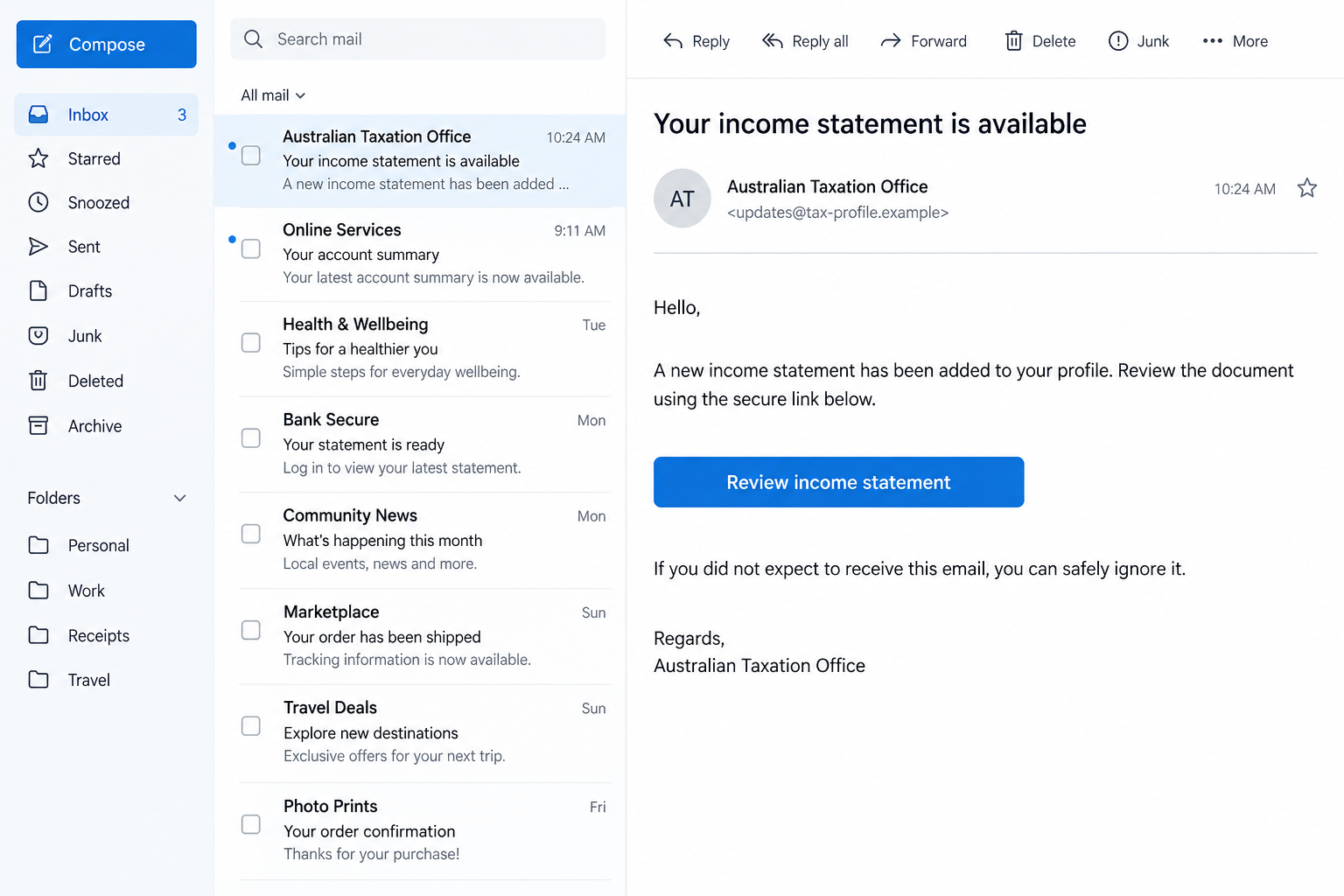
The Australian Taxation Office’s September 2026 warning describes scam emails about a new payment update or an income statement that recipients supposedly need to review.
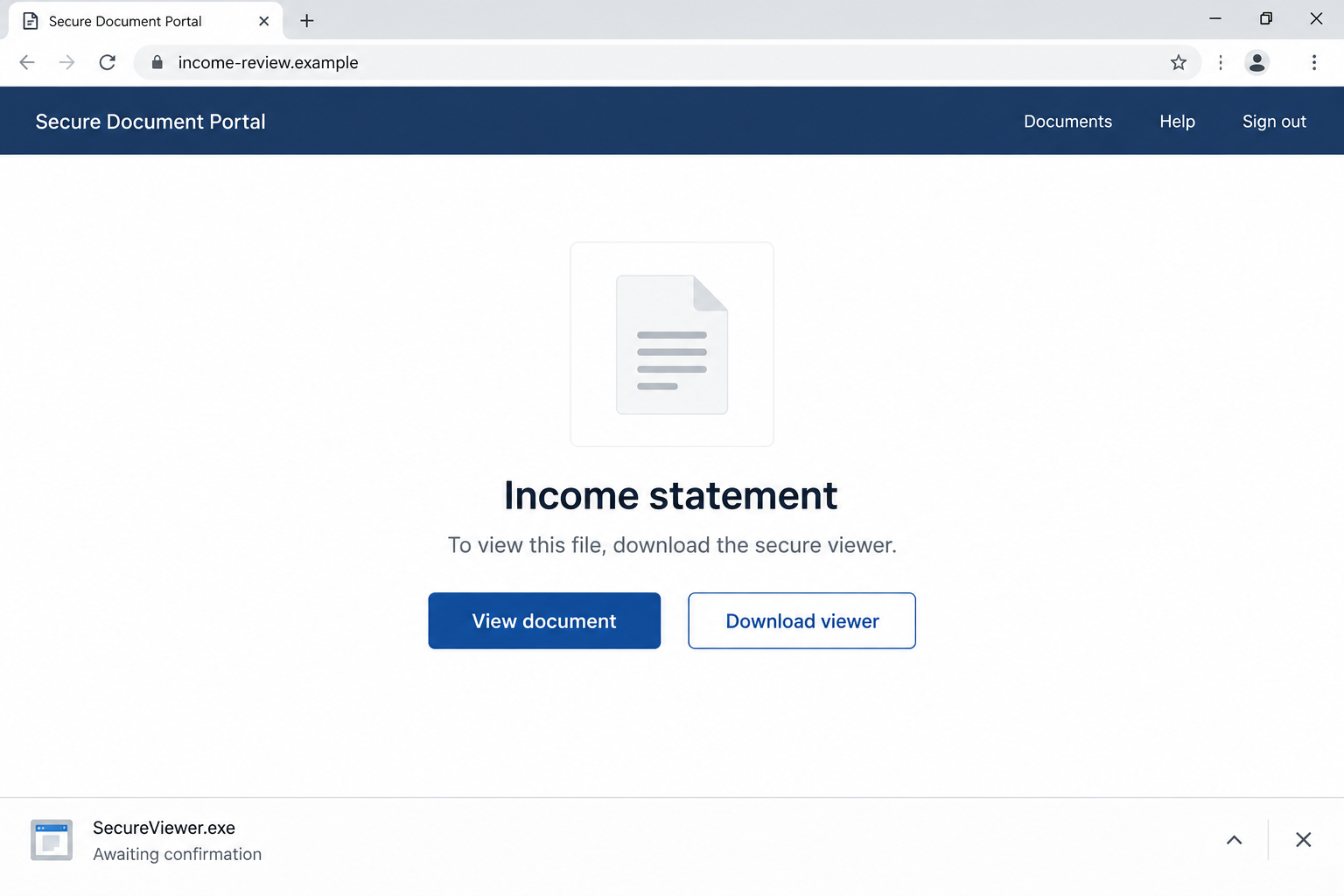
The included link leads to a page offering a file to view or download. The next click downloads malicious remote desktop connection software.
This is a confirmed scam campaign, not a billing dispute or speculation about an unusual email. The tax agency itself has warned people about the mechanism.
The ATO is being impersonated. A message that borrows its name does not make the agency responsible for the download or the person behind it.
A routine document becomes an unexpected software request
The hook is ordinary enough to fit a busy inbox. An income statement sounds like something you might need for a return, accountant, or financial record.
The danger appears when the supposed document route introduces software that can allow someone else access to your device.
A file download is not automatically an installation or a completed intrusion. What happened after the download matters when deciding how to respond.
- An unsolicited email claiming a tax statement or payment update is available.
- A button or link directing you away from your usual ATO access.
- A landing page offering to view or download the supposed file.
- An unexpected program or connection-related file instead of the document you expected.
- An instruction to open, install, allow, or connect something to finish viewing it.
The right response depends on how far you went
Someone who only read the email has a different exposure from someone who ran a download and opened banking on the affected computer.
Do not panic, but do not dismiss a software request as a harmless document error. Establish the sequence and protect any accounts that may have been exposed.
The agency’s live scam alert confirms the campaign. It does not name one universal filename, malware family, or outcome for every recipient.
Our screen examples are reconstructions using fictional addresses and filenames. They illustrate the document-to-download switch, rather than identifying an official portal or a captured malicious file.
The Moment a Tax Document Stops Being a Tax Document
A familiar workflow can make an unfamiliar instruction feel necessary. You wanted to view a statement, so the page tells you what supposedly comes next.
Perhaps a button says the file needs a secure viewer. Perhaps the browser downloads something whose name sounds related to your income record.
The request deserves a pause. An administrative task should not persuade you to grant access to an unknown person merely because a page calls the process secure.
The word secure is part of the presentation. It does not establish who operates the page, where the file came from, or what running it will do.
Even a clean layout can hide the mismatch. A document tile, loading indicator, and blue button can make a download look like normal troubleshooting.
Follow the promised result instead of the design. You expected tax information, not a new application, remote session, or permission to control the computer.
That distinction is particularly useful on a work device. A rushed employee may install a supposed viewer before asking why an external email requires it.
If something seems missing, stop at that point. Do not keep trying different buttons or devices until one successfully opens the suspicious file.
How the ATO Income Statement Scam Works
Step 1: The email presents a believable tax update
The impersonator says a statement is ready or a payment update has been added to your ATO profile. The message offers a convenient route to review it.
Unlike a dramatic arrest threat, this lure can succeed without frightening you. It simply gives you a small task that looks worth completing.
People handling tax paperwork may already expect notifications. The scammer benefits when their message happens to arrive among genuine administrative emails.
Receiving it does not prove a change occurred in your account. The underlying update remains a claim until you check through your established government-service access.
Step 2: The link moves you into a separate viewing page
The email’s link opens a page that invites you to view or download a file. The ATO has identified this intermediate stage in its warning.
The page may look more convincing because you reached it while pursuing a plausible document. You have already invested attention in the task.
Do not assume that a page showing your expected document title belongs to the ATO. The title can be supplied by whoever created the page.
Nor does a padlock authenticate the operator. It can show an encrypted connection while you are still communicating with the wrong website.
Step 3: The supposed file triggers a remote-access download
This is the confirmed switch: the viewing or download link delivers remote desktop connection software rather than the safe document route the message implied.
Do not open the file to find out what it is. Record the visible filename and download time without executing it.
The exact file type can vary. A familiar-looking name or extension is not sufficient to establish safety, and this article does not identify one universal payload.
A browser or operating-system warning is a reason to stop. The website cannot make the warning irrelevant by claiming installation is required.
In our illustrative page, the fictional viewer filename makes the switch visible. It is not a detection signature for this campaign.
Step 4: Running or approving the file may enable access
Downloading stores a file; opening it or approving a connection may take the incident further. The software and permissions determine what access becomes possible.
Remote-access tools are also used legitimately. The fraud here is persuading you to accept an unknown connection under the false explanation of reviewing tax information.
Do not enter credentials, open banking, or show identity documents while an unverified session may be active. Stop using the device for sensitive tasks.
If another person appears to move the pointer or control windows, disconnect the device from the network and contact trusted technical help.
Absence of visible movement is not proof that nothing happened. A quiet screen cannot confirm which programs ran or what permissions were granted.
Step 5: The incident can extend beyond the missing statement
Device access can expose information unrelated to tax. What becomes accessible depends on the session, software, open applications, and actions taken.
This does not mean every recipient loses money or every downloaded file immediately compromises every account. Avoid guessing beyond the evidence.
Focus on what was actually open and entered. Banking, email, password managers, and work applications deserve attention if they were used during the suspicious session.
Later contact may offer help restoring the statement or fixing a tax-profile error. Do not use that same sender to investigate their own download.
Which Checks Actually Help Before You Click?
Open the government service through your normal route
Use a trusted bookmark, official app, or address you independently entered. Review the ATO service linked through myGov rather than following the email’s shortcut.
If a statement or payment needs attention, handle it there. Ask your registered tax agent about unfamiliar correspondence through contact details you already know.
You are checking whether the claimed update exists, not trying to prove the email genuine from its color scheme.
Inspect the action, not just the sender name
Expand sender details and inspect the destination where possible, without following it. An unrelated domain or unexpected download route strengthens the warning.
However, a plausible display name is weak evidence. A scam can contain genuine agency addresses in its signature while its button leads somewhere else.
The most useful question is simple: why would viewing this tax record require me to run unfamiliar software from an unsolicited email?
Verify uncertain contact directly with the ATO
The agency publishes verification and reporting guidance, including its scam contact number, 1800 008 540.
Get the contact details independently. Do not call a help number on the download page to ask whether you should install its file.
If the message reached a business mailbox, send the evidence to your IT or security team through your normal reporting process.
Clicked, Downloaded, or Installed: Keep Those Separate
It is easy to say you clicked the scam when you are upset. A clearer description helps a responder decide what needs urgent attention.
Start with the email. Did you only read it, or did you follow its link? Did the browser save a file automatically?
Then identify what you did with that file. Did you leave it in Downloads, double-click it, approve a prompt, or enter an access code?
Finally, note any accounts used afterward. Did you type an email password, open online banking, access work files, or approve an authentication notification?
Do not recreate those steps on the suspicious website just to improve your explanation. Use the existing downloads list, messages, and memory of the event.
A technical helper may need to examine the device. Let them explain their method before giving access, particularly if they contacted you after the scam.
Trusted assistance should come from your established support provider or workplace team. A new unsolicited rescue offer is not automatically safer than the original email.
What to Do if You Have Fallen Victim to This Scam
-
Stop interacting with the viewing page. Close it and cancel any pending download or installation. Do not approve further prompts because the statement still will not open.
If you only read the email, report it and remove it. There is no reason to assume a completed remote session from the email alone.
-
Isolate a device that ran suspicious software. Disconnect its network connection and avoid logging into additional accounts until you receive trusted technical advice.
Do not reconnect simply to speak with the alleged tax-support team. Use a separate trusted device or phone to contact genuine assistance.
-
Give your technician or IT team the sequence. Explain the link, download, opening action, permission prompts, visible session behavior, and accounts accessed.
Ask them to assess remote-access software and persistence, rather than assuming deleting one downloaded file ends an already installed connection.
-
Secure exposed accounts from a different trusted device. Change compromised passwords through the official services, review sessions, and remove unfamiliar recovery information.
If this involved a workplace account, let the security team coordinate recovery. They may need to revoke sessions or examine activity beyond your individual computer.
-
Tell financial providers if banking was exposed. Explain whether the suspicious session could view the account, whether you entered credentials, and whether any transactions changed.
Ask about immediate protections and disputed payments. Do not describe an authorized transfer as something else; accurate details help the fraud team assess it.
-
Contact the actual ATO. Report exposure of tax identity information, myGov access, or payments through its verified scam channel.
For an untouched scam email, the agency lists ReportScams@ato.gov.au. If you shared sensitive information or paid, call the independently verified number promptly.
-
Inspect and protect the affected device. Malwarebytes can assist with detecting malware and unwanted software on supported systems after suspicious execution.
A clean scan alone does not prove every session and account is safe. Pair device assessment with account recovery and the technician’s findings.
AdGuard can help limit known malicious browsing destinations and redirects. It cannot remove an established remote session or recover information already exposed.
-
Preserve useful evidence without spreading the payload. Save the email, destination text, filename, timestamps, screenshots, and any payment records privately.
For Australian cybercrime, use ReportCyber through the official website. Follow responder instructions before forwarding a suspicious executable or reopening a file.
-
Watch for another request framed as cleanup. Reject demands for a fee, access code, or new download to restore a statement or reimburse losses.
Continue checking your genuine tax records independently. Solving the device incident should not send you back into the same unverified email conversation.
Frequently Asked Questions
Has the ATO confirmed the income statement malware scam?
Yes. Its September 2026 alert describes tax-themed emails leading to a view/download page that delivers malicious remote desktop connection software.
Is the payment update version a different warning?
The agency includes both payment-update and income-statement wording in the same malware warning. The shared danger is the unexpected remote-access download.
Does saving the file mean someone controls my computer?
Not automatically. Saving, opening, installing, and approving a connection are different actions. Report the actual sequence so trusted support can assess your exposure.
Can I fix the problem by deleting the download?
If it was never opened, removal can stop accidental execution. If it ran or installed software, deleting the original download may leave the installed component unaffected.
Should I log into myGov on the affected device?
Not while an unverified remote session or suspicious installation may be active. Use a different trusted device to verify correspondence and protect any exposed account.
What if I clicked but did not enter information or run anything?
Close the page and check whether a file was downloaded. Report the email and keep software current. A page visit alone does not establish a completed compromise.
The Bottom Line
The ATO income statement scam turns an ordinary tax update into a remote-access download. That software detour is the warning you should not ignore.
Check statements through your established ATO access. If you ran the download, stop sensitive activity, isolate the device, and coordinate recovery through trusted support.








