

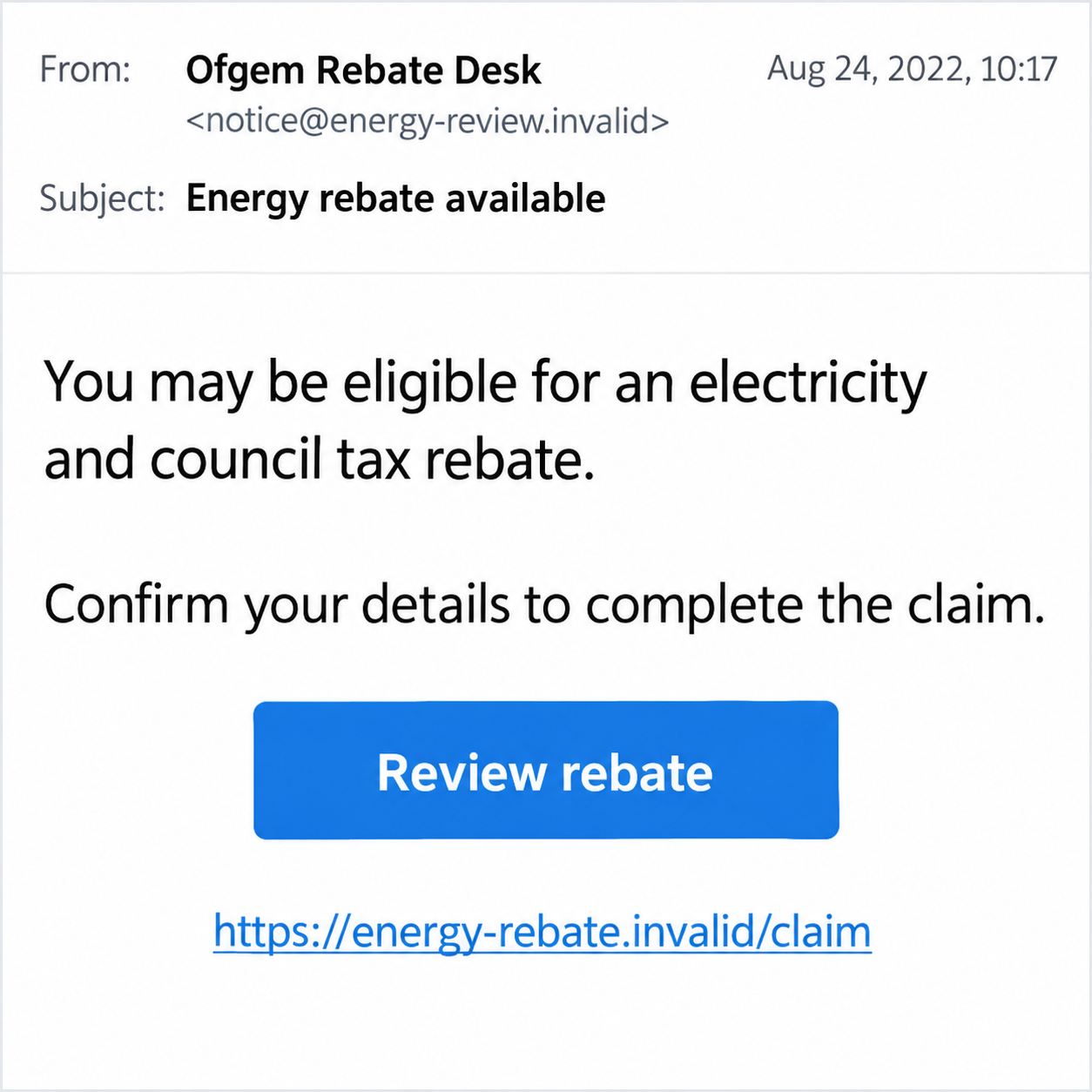
An email offers a little breathing room on household bills. It uses Ofgem’s name, mentions a rebate, and makes the next step look like routine paperwork.
The Ofgem rebate email scam deserves a closer look before you complete that paperwork. Start with who is offering the payment and what they want from you.
Overview
The regulator’s name gives a false claim borrowed authority
This scam email impersonates Ofgem and offers an energy rebate as a reason to collect personal or banking information. The impersonation is the fraud, not Ofgem.
The historical example discussed here was documented in August 2022 and also mentioned a council-tax rebate. It is not a current offer readers should apply for.
We are not converting its old British-currency figures into $ amounts. Neither the example nor this warning establishes today’s support payment or an individual’s entitlement.
A copied name can make the email sound official without proving that the sender manages a rebate. The requested information and independently verified process matter more.
Ofgem, your supplier, and your council do different jobs
Ofgem is Great Britain’s energy regulator. Your ordinary electricity or gas account is with a supplier, while council-tax questions belong with the relevant local authority.
An email combining those subjects can sound like one convenient government claim. That does not establish a single genuine office responsible for the supposed payment.
Ofgem’s official contact page warns about impersonators seeking bank details. Its advice is to reject or ignore suspicious contact using its name.
Legitimate schemes administered by public bodies still have their own application processes. This warning concerns unsolicited impersonation, not a verdict that every energy-related form is fraudulent.
Check the claim before supplying the missing information
- Find the named scheme through its genuine official website.
- Ask your actual supplier about matters involving your energy account.
- Use your council’s established route for a council-tax question.
- Do not validate an email by calling a number supplied inside it.
- Tell your bank if financial information or an approval was exposed.
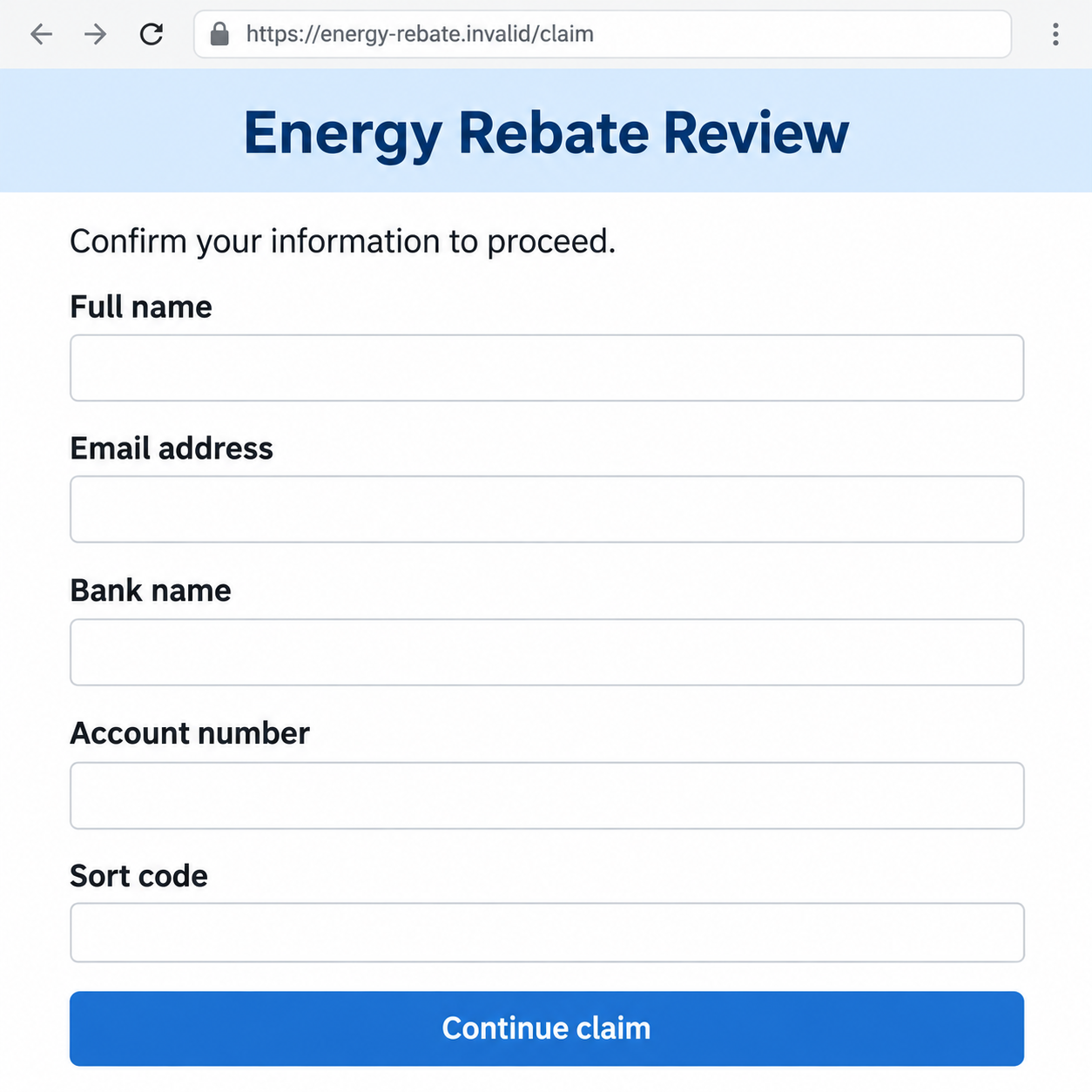
The two images are fictional historical interface examples. They contain no real account details and are not captured emails or payment pages from an actual reader.
Why the Energy-Rebate Hook Can Work
Help with bills is a believable thing to hope for
A household may have heard about discounts, rebates, or changing support schemes. An unsolicited email can borrow that background without identifying the program accurately.
The recipient may think the payment is something they missed. That feeling can make a vague claim seem more plausible than it would in another context.
There is nothing unreasonable about checking whether help exists. The unsafe step is letting the person making the promise choose where you disclose financial information.
You can investigate genuine support without using the email. Keep the hopeful question, but change the route used to answer it.
A refund label makes the form feel less threatening
A page asking you to pay an unknown bill may invite suspicion. A page saying money will come back can feel like a benefit rather than a risk.
That does not reduce what the form can collect. A banking field remains sensitive even when the heading describes an incoming payment.
Think about what you are authorizing, not merely what you expect to receive. A stranger’s description cannot establish that a real provider will use the data safely.
The same rule applies to a small proposed processing charge. Paying less does not authenticate the recipient or create an entitlement to the larger promised amount.
How the Ofgem Rebate Email Scam Works
Step 1: A message presents support as a personal entitlement
The opening can say you qualify or that a rebate is ready. It supplies the conclusion before showing an authentic application record or independently checked decision.
That claim may be paired with a familiar public-body name. A sender does not need to be part of that organization to type its name into an email.
Nor does a recognizable display name establish the actual sending address. Names, copied formatting, and official-sounding signatures are separate from verification.
Keep the message if you need to report it, but do not reply with private details. Genuine eligibility can be checked through the responsible program’s published route.
Step 2: The claim link becomes the easiest-looking route
A button offers to complete or review the rebate. That turns the email’s claim into a task the recipient may perform before checking who runs the page.
The visible button text does not identify the destination. A page can mention Ofgem, energy support, and government help without being controlled by those organizations.
Use a separately opened official website or known account. Do not rely on the suspicious page to supply the evidence that the suspicious page is legitimate.
You also do not need to test a form with false information. Testing does not verify the operator and can expose you to more unwanted instructions.
Step 3: The supposed rebate process asks for personal or bank details
The requested fields may look administrative: name, email, address, or account information. Their familiar appearance can make the collection feel ordinary.
Judge them in context. You did not reach this form through a verified scheme, and the email has not established who will receive the answers.
A bank name, account number, password, and card security code expose different things. Do not describe them as one identical risk when seeking help.
The illustration below uses empty bank-information fields to explain that collection stage. It is not a genuine claim form or a destination you should visit.
Step 4: A verification request can expand the exposure
A follow-up may ask for a password, one-time code, payment, or approval in a banking app. Those additional actions are not made safe by the original rebate promise.
Read the bank’s own message and transaction details. A caller saying “this releases your refund” does not establish what the provider is asking you to approve.
If a request involves sending money, stop and contact the bank independently. Do not make a test transfer to demonstrate that the rebate account works.
These are possible further risks, not confirmed actions in every historical email. Tell support exactly which information and approvals were involved in your own interaction.
Step 5: The missing payment gives the sender another excuse
If no rebate arrives, another message may claim an error, missing detail, or final fee. The recipient can remain engaged because the original money still feels close.
That expectation is not evidence of progress. A completed form or reassuring confirmation does not prove that Ofgem, a supplier, or a council received a claim.
Do not keep adding information to repair an unverified application. Separate account protection from any real question you have about energy support.
The genuine question remains answerable through official services. The scammer does not need to stay in the conversation for you to resolve it.
Verify the Organization, Not Just the Word Rebate
Your energy supplier can check your own bill
Open the account or contact channel you already use for electricity or gas. Compare any claim about your bill with its actual balance and correspondence.
A copied email cannot override the provider’s records. Ask about the specific billing issue rather than accepting the sender’s interpretation of it.
If you genuinely need support, ask the supplier what help and official schemes apply. An old scam’s advertised payment is not a guide to current eligibility.
Keep legitimate responsibilities active. Rejecting a fake rebate does not remove a real bill or replace a repayment arrangement you already have.
Your council checks the council-tax part
Use the local authority’s official site or contact details from genuine correspondence. Confirm whether there is any relevant account credit or named support process.
A message linking council tax and electricity into one offer needs more than a regulator’s name. Ask which body would actually decide and issue each payment.
Do not send a complete council-tax statement to an unverified address as proof. Such a document can contain useful personal and account information.
A real scheme has a process you can reach independently
Search the responsible body’s own information for the program name. Compare dates, eligibility, required documents, and the legitimate contact route.
If a question remains, ask through that established route. You should not need the unexpected email’s button to find out whether a scheme exists.
Ofgem also administers environmental and social schemes with specific contacts. That is why an unsolicited household claim and a genuine initiated application must not be confused.
Different Information Calls for Different Protection
A banking detail is not the same as a login or approval
Sharing an account number does not, by itself, prove that someone logged into online banking or emptied the account. It still deserves a provider’s exposure assessment.
A disclosed password, card code, or approved transaction may require other immediate measures. Give the bank a precise list rather than a broad guess about what happened.
Keep the provider’s directions separate from the sender’s demands. The person promising the rebate is not a safe adviser on how to protect the account.
Receiving the email is not evidence of infection
Technical response depends on clicking, submitting information, installing software, or approving permissions. An email arriving in your inbox does not establish that those things occurred.
The NCSC’s phishing response guidance distinguishes those situations. Use the actions that match your interaction instead of assuming the most serious scenario.
If the message reached a workplace account or device, tell the appropriate IT team about the actual actions. They can assess the organizational risk.
What to Do if You Have Fallen Victim to This Scam
-
Leave the claim page and stop follow-up replies. Do not supply another field or accept a call that promises to correct the rebate.
Save the original message and any visible destination address. Preserve what you already have rather than returning to a suspicious site to collect more material.
-
Tell your bank about financial exposure. Use the contact details on your card, established app, or verified provider website.
Explain whether you supplied account details, card information, credentials, or approved a transaction. Ask which protective measures apply to that specific situation.
Request a review of actual payments if needed. The bank’s assessment and dispute process, not the email’s refund promise, determine the available next steps.
-
Secure an exposed password through the real service. Replace it where reused and review account recovery information and unfamiliar sessions.
If the email account itself was affected, check its recovery route and activity. Do not send a reset link or confirmation code to someone claiming to assist.
-
Document identity information that went beyond banking fields. Record any address, date of birth, reference number, or document image you submitted.
Keep complete documents private. Ask the relevant provider or fraud-reporting service about the exposure rather than posting all the data in an online warning.
-
Assess software and browser changes if they occurred. Review unexpected downloads, installed applications, extensions, or permissions associated with the claim link.
Malwarebytes can help check suspicious software. AdGuard may reduce harmful advertising or redirects, but it does not restore money or verify a benefit application.
Seek trusted technical help if symptoms continue. Receiving the email alone is not a reason to declare every account or device compromised.
-
Report the impersonation and any fraud. Suspicious emails can be forwarded to report@phishing.gov.uk, and Ofgem publishes a contact route for impersonation reports.
Financial fraud can be reported to Police Scotland if you are in Scotland. Report Fraud covers England, Northern Ireland, and Wales.
Keep the report reference with your bank case. Do not identify the sender’s displayed name or a copied address as a proven offender.
-
Check real energy or council-tax matters separately. Contact the organization that actually manages the bill or program using a trusted route.
Ask about genuine support if that is what you needed. The scam does not determine whether you qualify for any current help, and neither does this historical example.
-
Decline another payment to recover the promised rebate. A new adviser claiming to release, insure, or retrieve the money may extend the original deception.
Continue with the bank and official services you reached yourself. Keep monitoring the affected accounts without letting the sender dictate another verification task.
Frequently Asked Questions
Is Ofgem itself the scam?
No. The scam abuses the regulator’s identity in an unsolicited rebate claim. Ofgem is a real organization with official advice and contact channels.
Does the 2022 email show what support I can claim today?
No. It is a historical scam example, not current eligibility guidance. Check the specific scheme, supplier, or council through its official process.
Can Ofgem verify an ordinary credit on my supplier account?
Your actual supplier is the starting point for its billing records. Use Ofgem’s published guidance to understand the relevant roles and complaint routes.
Are every bank-detail request and energy form fraudulent?
No. Context matters. A verified scheme application you initiated differs from an unexpected rebate email that has not established its sender or information-collection route.
What if I shared an account number but no password?
Tell the bank exactly that. It can assess the disclosure without assuming a login takeover or payment occurred. Do not continue responding to the rebate sender.
Can a scan obtain the missing rebate?
No. Security tools address possible technical threats. The bank handles financial exposure, while genuine public services establish whether any real entitlement exists.
The Bottom Line
The Ofgem rebate email scam uses a trusted regulator’s name to make an unverified information request feel like help with household bills.
Check the proper organization independently before completing a claim. If you already shared data, act on that actual exposure and stop following the email’s promised solution.








