

A voicemail says your delivery address needs attention before a deadline. The message sounds routine, and you may already be waiting for something to arrive.
The FedEx delivery voicemail scam makes that small uncertainty feel urgent. Before typing the website the caller mentions, check where the message is sending you.
Overview
The voicemail sends a delivery problem to an unofficial website
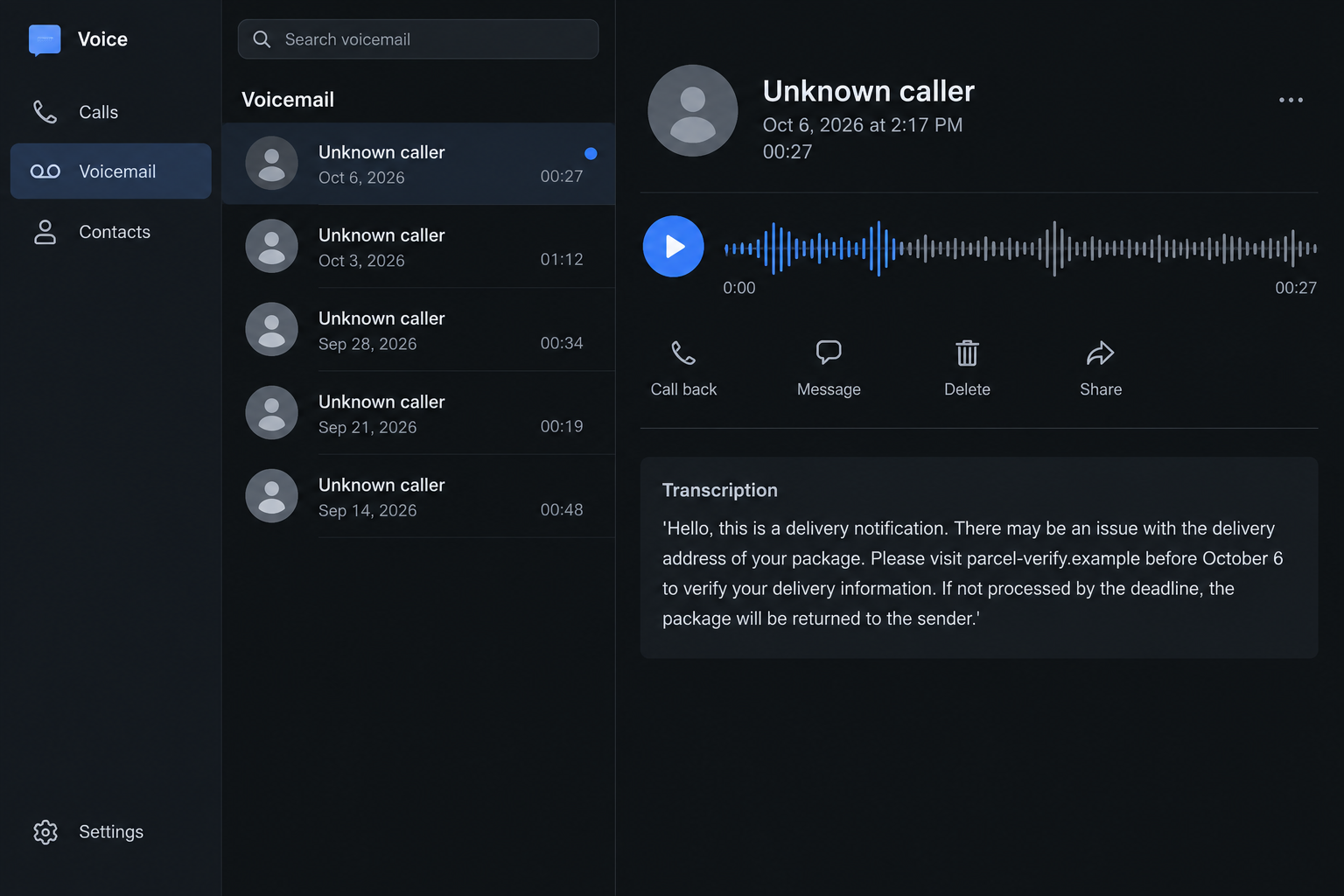
A recent reported message claimed a package had an address issue and directed its recipient to fedexyd[.]com. It threatened a return if the deadline passed.
The domain is not fedex.com. A recognizable courier name inside a different address does not turn that destination into the carrier’s official tracking service.
This is a delivery impersonation lure, not an instruction you should follow. Check the package through your own order records and independently opened FedEx channels.
The legitimate courier is not operating this scam. Its name provides the association that makes an unsolicited voicemail seem worth acting on.
A spoken address can become a convincing written instruction
The reported voicemail used an October 6 deadline. That is a detail of the October 6 report, not a new deadline for everyone reading this article.
A voicemail transcription can put the destination directly on your screen. It may look like an ordinary delivery notification even though it came from an unverified caller.
We did not independently capture the site’s current form or establish a specific payment amount. The dangerous instruction is to trust an unrelated verification destination.
- An unsolicited recording claims there is a package-address problem.
- A short deadline threatens return to sender.
- The recipient is directed to a courier-like domain instead of independently checking tracking.
- The message creates an action without establishing which shipment it concerns.
- A follow-up form can request personal, account, or payment information.
- The claimed delivery issue has not been confirmed through the actual carrier.
Real delivery contacts and legitimate duties still exist
FedEx’s fraud guidance warns about impersonation and financial-data phishing. It also explains that genuine international shipments can involve duties and taxes.
Do not assume every courier call, email, or secure payment link is fraudulent. The safe distinction is an independently verifiable shipment and an authenticated payment route.
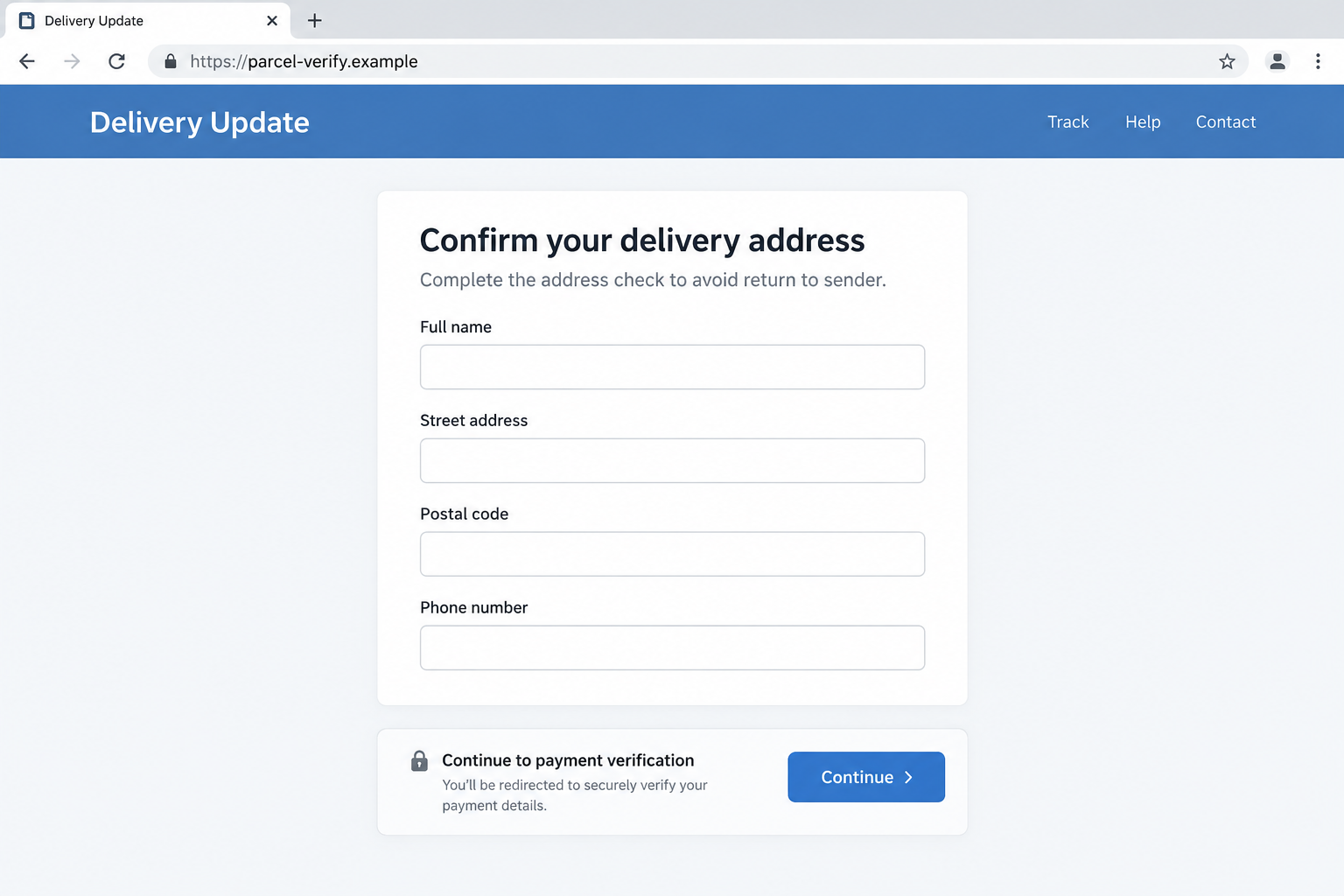
Our two screens are nonfunctional illustrations. The second shows a possible address-to-payment phishing route, not a claim that we captured fedexyd[.]com’s exact current checkout.
A caller’s familiarity with delivery language is not enough. Verify the actual package before supplying details or accepting a fee.
Why a Voicemail Can Slip Past Your Usual Link Checks
Many people have learned not to tap suspicious delivery texts. A voicemail seems different because it sounds like someone is trying to resolve a practical problem.
The contact also does not need you to answer. A recorded message can leave an instruction that you act on later, without a conversation.
Typing an address yourself often feels safer than clicking a link. It helps only when you choose the genuine address, not one dictated by an impostor.
The destination remains untrusted whether it arrives in an SMS, voicemail transcript, email, or your own browser’s address bar. Manual entry does not authenticate it.
A familiar brand followed by extra letters can be easy to overlook. The important question is who owns the destination, not which name it resembles.
Do not ask a search engine whether the voicemail sounds official and then choose a promoted result at random. Start from your existing order and carrier records.
People awaiting several deliveries may struggle to remember every tracking number. That uncertainty is exactly why a vague message about your package can feel relevant.
A real order does not prove the caller knows about it. The message might reach you by chance while you happen to be expecting a shipment.
Likewise, an accurate name or address would not settle the matter. Such information does not establish authority to request a card number or account login.
How the FedEx Delivery Voicemail Scam Works
Step 1: A recorded notification introduces an address problem
The opening sounds like a routine service update. It claims there may be an issue with the delivery address and asks you to resolve it.
That wording creates a task without requiring a detailed explanation. You do not need to believe a dramatic emergency, just a small problem with your package.
The reported transcript did not independently establish a matching shipment. The carrier’s records, not the recording, should tell you whether your delivery needs attention.
Keep the voicemail if you want to report it. You can note the claim without calling back, confirming your identity, or visiting the suggested site.
Do not assume a synthetic-sounding voice proves AI cloning. The available report described an automated voice, but no audio forensic analysis established how it was produced.
Step 2: A deadline turns uncertainty into a quick decision
The caller says the parcel will be returned if the information is not corrected in time. That consequence makes a short verification seem worth doing immediately.
You may think the worst outcome is missing a delivery. The hidden risk is moving your personal or payment information into a site the carrier never authenticated.
A deadline supplied by an unsolicited recording is not a reason to skip tracking. Open your actual order confirmation and check the shipment from there.
If the date has passed, do not seek a new deadline from the caller. The real carrier’s current record is the appropriate place to review the status.
A repeated call does not add credibility. It repeats the request; it does not prove that a package has been accepted, delayed, or returned.
Step 3: A courier-like domain replaces independent tracking
The recipient is told which website to use. In the recent report, the address was fedexyd[.]com, a separate domain rather than the official carrier domain.
We show it here as inert text, not a link to visit. Readers do not need to open a suspicious destination to check a real shipment.
A page may copy colors, headings, or tracking language. Those features are presentation, not evidence that the courier authorized the site.
A lock icon or HTTPS connection does not prove business legitimacy. It can secure the connection to the wrong operator just as well.
Find the order with the retailer or sender and obtain its actual tracking reference. Then use the carrier’s genuine website or app to inspect it.
If the voicemail mentions a shipment you cannot identify, ask the real carrier through its established support route. Do not supply guesses to the unverified contact.
Step 4: Verification can collect information that exceeds a delivery check
Delivery phishing pages commonly request names, addresses, phone numbers, account credentials, or card details. The page can call those requests verification or a small processing charge.
The visible label does not limit how the information may be used. A card number supplied for a minor fee still exposes the card itself.
The precise form behind the reported domain was not captured in our review. Do not mistake the illustrated fields for forensic findings about that particular site.
Our example shows why an address check should not quietly become a payment check. Each new request needs an independent reason and a verified recipient.
Genuine duties or taxes are a separate matter. FedEx advises verifying international-shipment messages and amounts through its official Import Tool.
Step 5: Another message can exploit what was already shared
If you provided information, a later contact may sound more convincing. It can refer to your name, address, attempted payment, or supposed delivery problem.
That knowledge does not authenticate a courier, bank employee, or refund agent. It may simply reflect information entered into the first untrusted form.
Someone might claim your verification failed and ask for a different card or code. Do not provide another credential to troubleshoot a suspect destination.
No particular follow-up script or loss was independently established for the reported voicemail. The sensible response depends on what you actually did after receiving it.
Stopping before you entered information is a good outcome. You do not need to wait for an unauthorized charge to report an impersonating message.
Check the Parcel, Not the Voicemail’s Story
Start with the purchase you recognize
Open the retailer account or original order record through a trusted route. Confirm which carrier is delivering it and whether a tracking number exists.
A retailer may use a carrier different from the one named in the message. The caller’s reference to your package should not override the actual order details.
If you are receiving a gift, ask the sender for the shipping reference. There is no need to guess your way through an unknown verification page.
Use the carrier’s own records
Enter the tracking reference through the genuine FedEx site or official app. Read the current status and check whether it actually requests action.
A number appearing on an untrusted page does not establish that the page belongs to the carrier. Check it independently rather than trusting the display.
Contact FedEx directly if a genuine status is unclear. You can explain the voicemail separately without following its website instruction.
Give a payment demand its own verification
Do not treat every payment request as an address correction. Ask what the charge is for, which shipment it concerns, and where it is independently recorded.
Actual customs duties can be legitimate. A fee invented by an unverified website does not become legitimate because you happen to have an international order.
Declining the suspect route leaves you free to resolve a real delivery issue through the carrier. You are not required to trust the first person who contacts you.
What to Do if You Have Fallen Victim to This Scam
-
Stop using the destination named in the voicemail. Close any related page and do not retry a failed verification with another card or login.
Find the actual order and shipment through trusted accounts. Keep the suspected delivery scam separate from any genuine package that still needs attention.
-
Contact your card issuer if payment details were entered. Describe the unverified delivery website and explain exactly what information you provided.
Ask about blocking misuse, replacing exposed credentials, and disputing transactions where available. A small attempted charge does not mean the card exposure is small.
-
Secure a login supplied to the page. Change it on the authentic service and review sessions, recovery details, and any unfamiliar account changes.
If that password was reused, update the other affected services too. Do not let a supposed delivery agent guide your password reset.
-
Save the original message and route. Keep the voicemail, transcript, calling number, destination spelling, approximate time, and any transaction record.
Do not publish unredacted addresses or payment information. A concise private timeline helps the carrier, bank, or investigator understand the sequence.
-
Report the impersonation to FedEx. Its official fraud page provides reporting guidance, including abuse@fedex.com for suspicious communications.
Use the genuine website to confirm the route before sending evidence. Report the facts you observed rather than claiming an unverified domain operator has been identified.
-
Review device exposure if the page introduced a download. A delivery message should not require installing an unknown app or granting remote access.
Malwarebytes can inspect supported systems after risky file execution. AdGuard may block known harmful destinations; neither product reverses card charges or confirms a shipment.
-
Escalate losses through appropriate fraud channels. US readers can report internet-related fraud to IC3 and use their bank’s established dispute process.
If more sensitive identity records were disclosed, visit IdentityTheft.gov for relevant safeguards. Receiving a voicemail alone is not proof of identity theft.
-
Be cautious about follow-up help. A caller promising a refund may be reusing the same delivery story to request another payment or authentication code.
Hang up and independently reach the institution supposedly helping you. Keep trusted family members informed if repeated calls are creating pressure.
Frequently Asked Questions
Does typing the website myself make the voicemail safe?
No. Manual entry avoids clicking, but the destination can still belong to an impostor. Independently choose the actual carrier’s website instead of transcribing the caller’s instruction.
Is fedexyd[.]com the official FedEx domain?
No. It is a different domain. The recent voicemail directed recipients there, but you should verify any real shipment through genuine FedEx channels.
Will FedEx ever contact me about an address or payment?
Genuine shipment contacts and international duties can exist. Confirm the package and charge independently rather than assuming an unsolicited recording authorizes a particular website.
Did your review establish the exact phishing form?
No. The destination illustration shows a possible verification route, not the site’s captured current fields. The reported voicemail and the carrier’s fraud guidance establish the warning.
Does an automated voice prove the message used AI?
No. A recording or synthetic-sounding voice does not establish a particular technology. Judge the unverified destination and request, not a guessed production method.
What if I only listened and never visited the site?
Listening does not itself submit card details or install software. Preserve and report the message, then review any expected parcel through your usual legitimate tracking route.
The Bottom Line
The FedEx delivery voicemail scam creates a deadline around an unverified package and sends you to a courier-like website. A spoken instruction is still an untrusted link.
Start from the order and the real carrier. If you already supplied information, protect the affected accounts or card instead of returning to the verification page.

Join the discussion
0 commentsShare your experience or ask a question about this article.
Discussion
Start the conversation
Have a question or something useful to share? Add the first comment.