

An interview invitation arrives while you are looking for work. The company is real, the hourly rate sounds appealing, and several remote positions seem available.
The Khondrion recruitment scam uses that promising opening. Before moving your job search into the suggested chat, take a closer look at the invitation.
Overview
Khondrion has confirmed that its identity is being misused
Khondrion is a legitimate company. The problem is people falsely presenting themselves as its recruiters, not the company’s real work or genuine hiring process.
Its official contact page carries a recruitment scam alert. The warning specifically includes approaches directing applicants to Telegram.
That is stronger evidence than an email merely sounding odd. The organization whose name supplies the credibility has acknowledged the impersonation.
Verify the vacancy and recruiter through the company’s independently located website. Do not send money or sensitive records through an unsolicited hiring conversation.
The invitation bundles attractive jobs into one easy next step
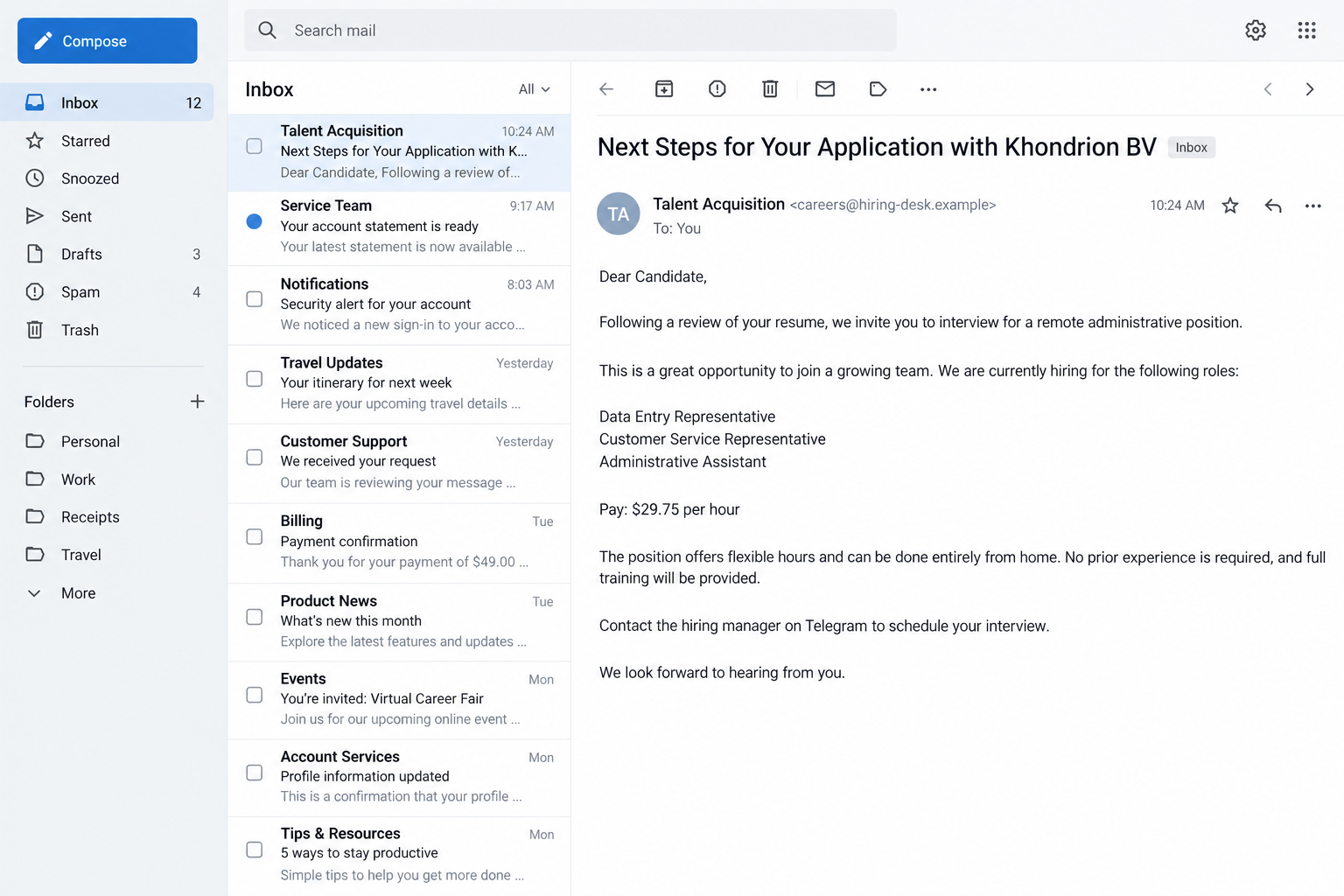
A recent public report showed an email offering data entry, customer service, and administrative assistant positions. It advertised $29.75 per hour and a remote interview.
The recipient said they had not applied to Khondrion. The message addressed a generic candidate and directed the next conversation toward Telegram.
Those are details of the reported invitation, not verified vacancies or a salary offered by the real company. No particular financial loss was established.
- An unexpected email claims your application has advanced.
- Several ordinary administrative roles make the opportunity broadly appealing.
- The company name can be checked online, giving the message borrowed credibility.
- A private messaging account becomes the proposed hiring contact.
- References and contact details come from the same unverified invitation.
- The real company warns against trusting this kind of approach.
The warning does not establish every possible follow-up
The verified finding is recruiting impersonation. We did not establish that this particular invitation delivered malware, issued a fake check, or caused an account takeover.
Those outcomes should not be invented to make the story more dramatic. A false recruiter is already enough reason to stop and verify.
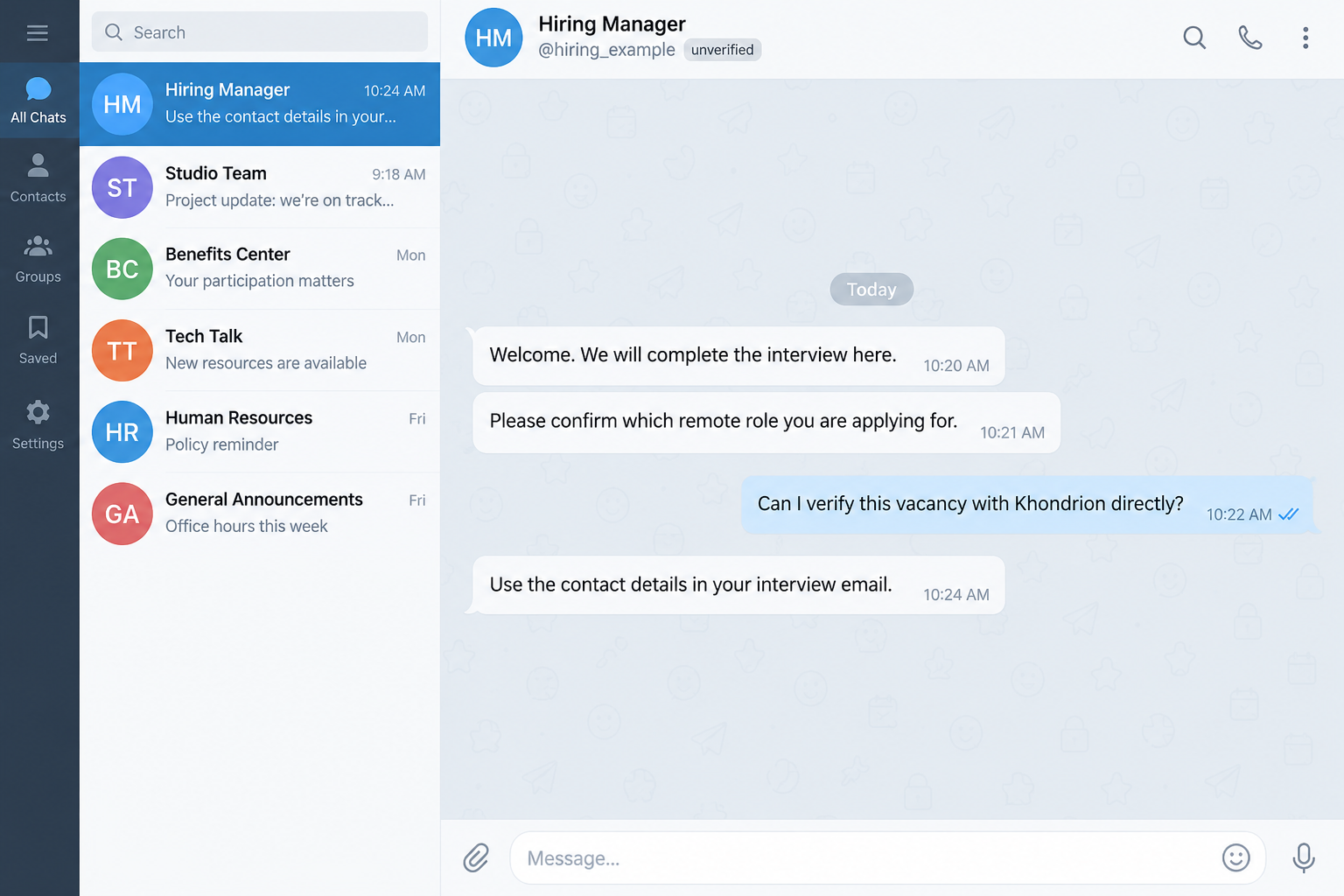
Our email and chat images are reconstructed examples with fictional contact details. They illustrate the invitation and verification stages, not a complete victim transcript.
A real company, real messaging app, or real employee biography does not authenticate the person who brought them into your inbox.
Why This Offer Can Reach Someone at Exactly the Wrong Moment
Job hunting creates a long trail of applications, saved listings, recruiter messages, and follow-ups. Remembering every organization you contacted can become difficult.
An email referring to your application takes advantage of that uncertainty. You might assume it belongs to one of the many submissions you made.
The reported invitation also lists different jobs. Someone uninterested in data entry might still notice customer service or administrative work and decide to reply.
The advertised hourly rate gives the message a concrete attraction. It does not verify who set that figure or whether any job actually exists.
A flexible schedule can be especially persuasive when you need income around school, caregiving, another job, or health limitations. Scammers do not need elaborate promises.
They need an offer plausible enough to start a conversation. Once you answer, the interaction feels like progress instead of an unsolicited message.
Looking up the company may seem like the sensible next step. It is useful, but the result can answer only whether that company exists.
It does not connect the sender to the business. The recruiter, specific role, and proposed interview channel each still need confirmation.
You are not being unreasonable by asking those questions. A job search involves personal information and financial decisions, and an authentic employer should withstand independent checking.
How the Khondrion Recruitment Scam Works
Step 1: An email presents itself as a hiring follow-up
The message frames the contact as the next stage of an application. That wording implies you have already begun a relationship with the employer.
In the reported example, the subject named Khondrion BV and referred to next steps. The body offered an interview for several remote positions.
A familiar-looking hiring phrase is easy to write. It does not show that a recruiter reviewed your resume or obtained it through an authorized system.
Compare the invitation with your own application records. Check the role, submission date, platform, and confirmation email without opening a new attachment from the sender.
An employer can legitimately approach a candidate who never applied. The issue here is the confirmed misuse of Khondrion’s identity, not unsolicited recruiting alone.
Keep that distinction in mind when screening other invitations. An unexpected contact deserves verification, but it should not automatically turn a genuine company into a suspect.
Step 2: The company name makes the offer feel researchable
The sender uses an organization you can find independently. Its existence can make the proposed job feel more substantial than a completely unknown business.
You may see offices, research information, company announcements, or named employees. None of those public facts proves who controls the email address contacting you.
Copied information can be accurate. That is why checking only whether an address or staff member appears on the genuine website is insufficient.
Ask whether the specific person, vacancy, and invitation belong to the company. A name match is background information, not confirmation of a hiring conversation.
Also inspect the complete sender address. A display name saying Talent Acquisition can conceal an unrelated mailbox or a domain that merely contains familiar words.
Do not publish the identity of a named employee as the scammer. An impostor may borrow that person’s name without their knowledge or involvement.
Step 3: The invitation sends you to a private interview contact
The reported message moves the next step to Telegram. Khondrion’s own warning explicitly identifies Telegram-directed approaches among the false recruiting messages.
Changing channels separates the conversation from the email where it began. A new username, display name, or profile may become your main reference point.
A messaging profile can look professional without proving employment. Initials, a company name, a polite greeting, and regular replies are all easy to provide.
The safest check happens outside that profile. Open the real company website independently and use the contact information published there.
Our example chat shows the verification problem, not a documented reply from an actual suspect. Contact details supplied by the invitation cannot independently validate themselves.
You do not need to complete the chat interview to decide whether the recruiter is authorized. Establish that relationship before answering sensitive questions.
Step 4: The conversation can turn interest into disclosure or payment
After someone engages, an unverified recruiter may request application records, identification, banking information, or money. Khondrion warns applicants against providing these through unsolicited approaches.
The available evidence does not establish one identical financial script for every message. Watch the actual request rather than assuming a particular check or fee follows.
A request for your bank password, card security code, or login approval is not a routine way to assess your suitability for administrative work.
Employment paperwork can legitimately involve sensitive information later. It belongs in a verified onboarding process, not a private exchange whose recruiter has never been authenticated.
If money becomes necessary to continue, stop and contact the real employer. Do not let an earlier friendly conversation replace the checks you skipped.
The FTC’s recruiting warning describes broader job scams that eventually demand deposits or redirect fake-check funds. Those are separate possible patterns, not proven Khondrion outcomes.
Check the Invitation Without Losing a Real Opportunity
Keep a short record of what the sender offered
Save the email, sender address, subject, role names, advertised pay, and Telegram username. You can preserve these without answering more questions.
Do not forward identity documents or banking records just to ask whether an offer is genuine. The basic invitation details should be enough for initial verification.
If you have several active applications, compare their confirmation messages. A role that cannot be matched to your records should receive extra scrutiny.
Contact the employer through a route you found yourself
Use Khondrion’s genuine contact page, not a signature, link, phone number, or recruiter reference copied from the invitation you are checking.
Ask whether the company is recruiting for the named positions and whether it authorized this contact. Keep the question focused on the particular approach.
A genuine employee with the same name does not necessarily own that Telegram profile. Request confirmation of the channel as well as the person.
If you cannot get confirmation, do not proceed with financial or sensitive onboarding steps. Silence is not proof of fraud, but it is not permission either.
Separate the job description from the application process
Administrative jobs can be real, and remote work can be legitimate. The role title does not make an unverified recruiter or application form trustworthy.
Ask what the work involves, who supervises it, and where the vacancy is listed. Broad job labels should lead to concrete information, not escalating demands.
A request to change your financial behavior deserves special attention. Moving money, buying transferable value, or paying for access is different from answering interview questions.
You can decline a suspect process while continuing your search elsewhere. Missing this invitation does not mean you have rejected a verified employment offer.
If someone forwarded the invitation to you, let them know about the company’s warning. They may be passing along what looked like a useful opportunity.
Keep the explanation specific and calm. Share the genuine warning page rather than reposting a suspect username or encouraging people to contact the alleged recruiter.
For a confirmed vacancy, continue through the employer’s established application route. You can resume a real hiring process without returning to the impersonator’s chat.
What to Do if You Have Fallen Victim to This Scam
-
Pause the hiring exchange. Do not complete another interview step, send another document, or make a payment while the contact remains unverified.
Preserve the conversation first, then block the impersonating accounts. You do not need to persuade the sender that you have identified the problem.
-
Tell the real company about the invitation. Use the contact route on Khondrion’s independently opened website and provide the relevant recruiting details.
Explain that its identity appears to be misused. Do not accuse an actual employee merely because their name appeared in the invitation.
-
Review what information you sent. A resume, identity document, banking record, password, and verification code create different risks and need different responses.
If credentials were disclosed, change them through the genuine services and inspect unfamiliar sessions. Replace reused passwords wherever the same login secret was used.
-
Respond to financial exposure promptly. If you paid or supplied payment information, contact the relevant bank or card issuer using its established support route.
Give an accurate timeline and ask which protections or recovery options apply. A suspected recruiting scam does not guarantee reimbursement for every payment method.
-
Protect exposed identity records. If you sent government identification or similarly sensitive details, ask the issuing institution about appropriate safeguards.
US readers can use IdentityTheft.gov for a tailored plan. Do not assume a resume alone requires replacing every identity document.
-
Check suspicious links or files separately. Downloading an unexpected application or opening an untrusted file deserves a device review, even if no payment occurred.
Malwarebytes can help inspect supported devices. AdGuard can reduce exposure to known harmful sites, but neither tool authenticates a recruiter or retrieves lost funds.
-
Report the approach through legitimate channels. Use the messaging service’s reporting controls and the appropriate fraud-reporting service for your jurisdiction.
Internet-enabled fraud can be reported to the FBI’s IC3 in the United States. Keep evidence and reference numbers for follow-up.
-
Watch for a second contact offering rescue. A person claiming to recover your money or repair the application may be exploiting information from the first exchange.
Do not pay a recovery fee or accept another stranger’s access instructions. Work through organizations you independently verified, and keep trusted people informed.
Frequently Asked Questions
Is the real Khondrion company running this scam?
No. Its identity is being misused in false recruiting messages. The company’s own alert confirms the impersonation and explains how applicants should verify contact.
Is the advertised $29.75 hourly rate genuine?
It appeared in the reported invitation. It was not established as a salary for an actual Khondrion vacancy, so do not treat it as confirmed employment.
Does using Telegram automatically make every job offer fraudulent?
No. Here, the named company specifically warns about false Telegram-directed recruiting. Verify the employer and invitation instead of judging every job solely by its messaging app.
What if I really have been applying for remote administrative jobs?
Compare the invitation with your applications and confirm the vacancy independently. A message matching your interests can still come from someone unrelated to your search.
Did the reported message contain a fake check?
That was not established. This report concerns a confirmed recruiting impersonation, not an invented check-payment stage or a claim that every applicant loses money.
Should I keep talking until I know what the recruiter wants?
No. Preserve the approach and verify it with Khondrion. Continuing a false hiring conversation only gives the contact more opportunities to obtain information or apply pressure.
The Bottom Line
The Khondrion recruitment scam turns a real company’s name into an invitation to an unverified private conversation. The employer’s existence does not authenticate the recruiter.
Check the vacancy and contact through Khondrion itself before proceeding. An attractive hourly rate is not worth surrendering your documents, account access, or money to an impostor.

Join the discussion
0 commentsShare your experience or ask a question about this article.
Discussion
Start the conversation
Have a question or something useful to share? Add the first comment.