

The message says money lost to fraud is finally coming back. A compensation payment has supposedly been arranged, and a familiar form is waiting for your details.
A Google Forms scam can make that promise look routine. Before completing the questions, separate the form’s hosting service from the person making the offer.
Overview
A familiar form can carry an entirely false compensation claim
Fraudsters can create forms that collect information under a fabricated government, grant, or recovery story. A professional-looking questionnaire does not establish the creator’s authority.
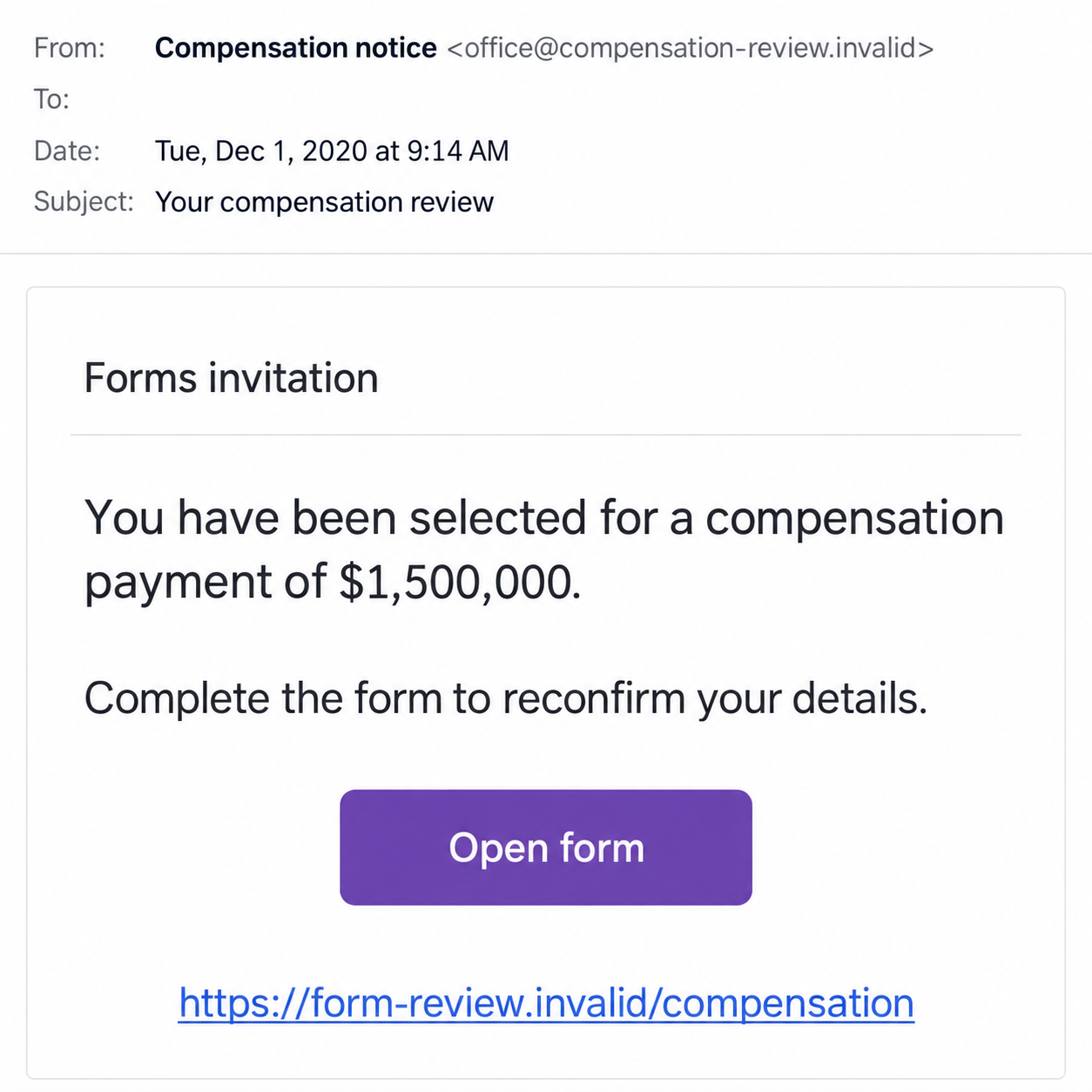
The historical December 2020 invitation discussed here claimed multi-government compensation of $1.5 million for earlier fraud victims. That amount was a promise, not a verified award.
The scam mechanism is the false claim and deceptive data request. Google Forms is a legitimate tool used for many ordinary surveys, registrations, and other tasks.
Do not infer a Google breach from a malicious form. The problem can be a dishonest creator using a genuine service rather than an attacker controlling Google’s systems.
The host and the sender have different responsibilities
A real form-hosting address establishes where the form is served. It does not prove that a government, bank, employer, or other organization authorized its contents.
Google’s abuse policies prohibit phishing, including soliciting sensitive information such as passwords and financial details. A prohibited request can still be encountered before enforcement.
A form may also imitate the familiar layout while being hosted somewhere else. You need to assess both its actual destination and the authority behind the request.
Checking only the logo or the form’s neat formatting leaves the more important question unanswered: who wants the answers, and why should you trust them?
Do not prove entitlement by supplying the keys to your accounts
- Verify a named compensation program through its responsible official organization.
- Do not put account passwords or security codes into questionnaire answers.
- Question financial-data requests attached to an unexpected money promise.
- Use the platform’s abuse-report route for deceptive forms.
- Contact the affected provider if sensitive information was already exposed.
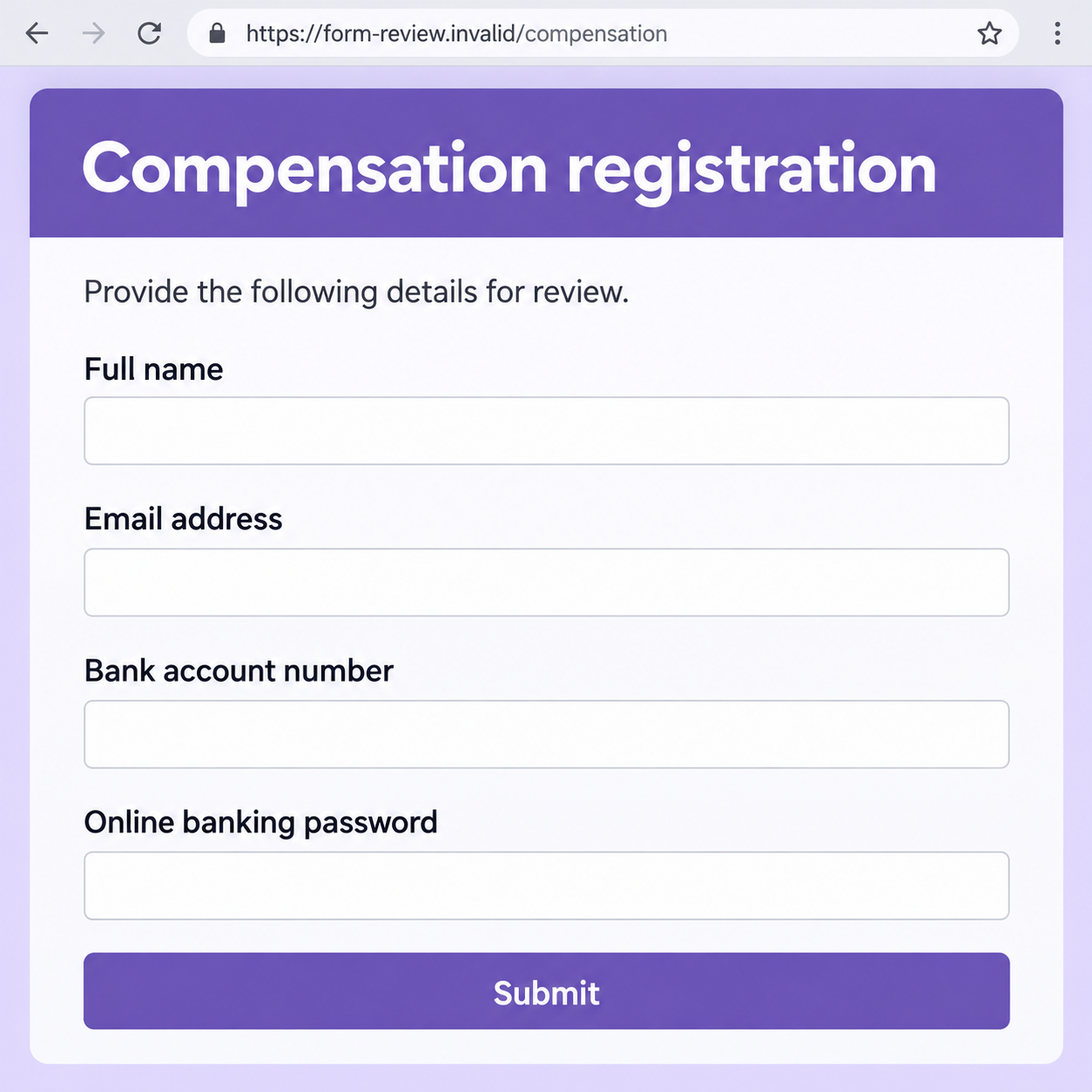
The images are invented examples, not a captured historical questionnaire. Their addresses cannot function, and the second demonstrates dangerous questions without using a real Google-hosted form.
Why the Compensation Story Can Reach a Vulnerable Reader
It offers an ending to a problem that may still hurt
Someone who lost money may have spent weeks contacting providers or reporting the incident. A message saying compensation is ready can sound like the outcome they wanted.
The sender may claim that governments or investigators know what happened. That claim can feel personal even when it supplies no authentic case reference.
There is no shame in wanting to check whether help exists. The safe route is to ask the real organization independently, not to complete the stranger’s chosen questionnaire.
A previous fraud report does not automatically create a right to the amount named in an unrelated email. Keep the real case records separate from the promise.
The form makes a large claim look like a small task
The message may ask only for acknowledgement or reconfirmation at first. Those words make the process sound administrative rather than like a new disclosure decision.
A familiar form layout helps that impression. Clear fields and a Submit button can make a questionable claim feel as ordinary as signing up for an event.
But the seriousness of the answers matters more than the format. A bank password remains a bank password when it is entered into a survey box.
Do not finish because you already answered the first question. Each new request deserves its own assessment before additional private information is supplied.
How the Google Forms Scam Works
Step 1: An invitation attaches the form to a money promise
The opening announces compensation, a grant, or another benefit and provides a form link. It offers a result before establishing a genuine program or verified selection process.
In the historical example, several governments were invoked as payment authorities. Their names did not supply evidence of an authentic joint compensation arrangement.
A named official or telephone number inside the message is not independent confirmation. It can be invented, copied, or controlled by the same person making the claim.
Preserve the invitation for a report. Its own telephone contact cannot independently authenticate the offer or the form.
Step 2: The familiar hosting interface lowers suspicion
The recipient reaches a form that may look like one used by a school, club, or workplace. Familiar buttons can make the transition feel normal.
A genuine host does not approve every individual creator’s claims. The same platform can support legitimate questionnaires and be misused for deceptive collection.
A secure connection also does not establish the creator’s relationship with the supposed paying organization. It is a transport property, not a compensation certificate.
If the destination is a lookalike instead, there is an additional identity problem. Do not assume that every page resembling a familiar form is actually served by that platform.
Step 3: Ordinary contact fields can lead toward sensitive questions
A name and email may appear first. Those fields can seem reasonable for an application, making the next request feel like a continuation of an accepted process.
Personal information is not automatically proof of fraud in every questionnaire. The context here is an unexpected payment promise with no independently verified authority.
Be especially clear about passwords, financial details, and identity documents. A form title saying verification does not explain why its creator should receive them.
Do not test the form with a real account detail to see whether the offer works. The advertised payment is not evidence that the request is appropriate.
Step 4: The answers give the creator information, not legitimacy
A completed questionnaire can provide material for account access, identity misuse, or targeted follow-up. The possible harm depends on which answers were actually disclosed.
Submitting a form does not prove the program accepted a claim. A confirmation message can be configured by the same unverified creator.
Do not assume closing the page erases information already transmitted. If you are unsure what was entered or submitted, explain that uncertainty when seeking help.
The fictional example below highlights an especially unsafe question: a banking password requested as an answer. It is not a working form or an exact historical capture.
Step 5: A follow-up can introduce fees or another verification demand
The creator may claim a payment needs processing, insurance, or another approval. A recipient expecting compensation can feel close enough to continue cooperating.
The FTC’s recovery-scam warning explains how promises to retrieve lost money can become demands for fees or private information.
Not every deceptive form follows the same payment sequence. This possibility is not proof that a specific fee was charged in the historical invitation.
Verify any genuine recovery option with the organizations already handling your case. Do not pay a stranger because you completed their earlier questions.
A Real Google Sign-In Is Not a Questionnaire Answer
Some legitimate forms require authentication
A school or workplace form may legitimately require a Google account or restrict access to an organization. A sign-in requirement alone is not a scam verdict.
Distinguish the provider’s actual authentication process from a field asking you to type a password as a response. They serve very different purposes.
If the route is unclear, close it and reach the known organization or account independently. Do not enter credentials while trying to authenticate the invitation.
A password should not become evidence of compensation eligibility
An online banking password controls access to a financial service. An unknown compensation administrator does not need that password to determine whether its advertised program is genuine.
The same applies to codes that approve sign-ins or transactions. Read the actual provider notification instead of accepting the form creator’s description of it.
If a real public program needs identity or payment information, verify its responsible office and published process first. A familiar form is not a substitute.
Do not confuse your Google account with the promised paying body
Being signed into Google does not establish a relationship with a government or investigator. Authentication to a host and eligibility for a benefit are separate questions.
Likewise, receiving a form invitation does not prove anyone accessed your Google account. The sender may have obtained an email address without controlling the inbox.
Review actual account activity if there is evidence of unauthorized access. Avoid turning the mere arrival of an invitation into a conclusion that every service was compromised.
Check the Creator’s Authority Outside the Form
Find the responsible organization and the specific program
Look for the compensation scheme through the real agency, employer, or service named in the offer. Compare its published process with the invitation.
An organization should be identifiable without relying on the form’s Contact button. Do not use the creator’s own answer as independent proof of authorization.
If no program can be verified, do not submit to discover whether you qualify. The claimed amount does not create a reason to bypass that basic check.
Consider who may receive or share the responses
Forms can have collaborators and different response settings. Do not assume all answers will remain visible only to the friendly name shown in the invitation.
Ask a verified organization about its information handling when the request is legitimate but sensitive. An unverified creator’s privacy reassurance cannot settle that question.
You can decline unnecessary disclosure even if the form is still online. Its continued availability is not evidence that the host approved the offer.
What to Do if You Have Fallen Victim to This Scam
-
Stop answering and leave the form. Do not upload another document or supply a code to finish the claimed compensation review.
Preserve the invitation and form address you already have. Avoid revisiting a suspicious page just to complete an evidence collection.
-
List the information that may have been exposed. Separate ordinary contact answers from financial details, credentials, identity documents, and payment approvals.
If you are unsure whether sensitive answers were submitted, say so. Do not assume either that everything was stolen or that closing the page removed every risk.
-
Contact the bank after financial disclosure. Use its normal app or independently verified support route, not the compensation message’s adviser.
Explain any banking password, card detail, account number, or transaction approval involved. Those exposures need different safeguards and review.
Do not move money as a verification exercise. The provider can advise on actual account protection and disputes without using the form creator’s proposed solution.
-
Secure credentials through their real services. Replace an exposed password where it was used and inspect recovery contacts or sessions if account access was affected.
Prioritize the email account if its credentials were supplied. A genuine Google sign-in you independently verified is different from disclosing that password as a form answer.
-
Handle identity exposure with appropriate support. Keep a private list of documents or identifiers shared and watch for unexplained account or credit activity.
U.S. readers can use IdentityTheft.gov for guidance when personal information has been misused. Other locations have their own identity and fraud services.
-
Report the deceptive form using the responder route. Google’s violation-reporting instructions describe the Help or Report controls and abuse-report submission.
Use the responder instructions rather than an editor-feedback procedure if you do not own the form. Reports do not guarantee immediate removal or recover information already supplied.
Do not contact an untrusted form owner to authenticate the claim. That conversation may transmit additional contact information while leaving the same person in control.
-
Investigate related technical changes only when relevant. A downloaded file, installed tool, permission approval, or persistent redirect needs separate attention.
Malwarebytes can help assess questionable software. AdGuard can limit harmful advertisements or known scam destinations, but neither validates a compensation form or retrieves money.
A message or normal form-viewing session alone is not evidence of device infection. Describe the actual interaction to a trusted technician if you need help.
-
Report fraud and refuse another recovery payment. Use the proper local reporting channel and keep your provider and platform case references together.
In the United States, ReportFraud.ftc.gov accepts scam reports. An unsolicited promise of compensation after another fee should be independently checked, not rewarded with more information.
Frequently Asked Questions
Does a real Google Forms address prove the offer is authorized?
No. It identifies the hosting service, not the creator’s relationship with a government or other organization. Verify that relationship outside the invitation.
Is every questionnaire asking for a name or email fraudulent?
No. Ordinary forms can collect appropriate contact information. The warning concerns deceptive claims and sensitive requests without an independently verified purpose.
Is every Google sign-in prompt on a form suspicious?
No. Legitimate forms may require authentication. Do not confuse actual provider sign-in with typing an account password into a questionnaire field.
Does this warning confirm a $1.5 million compensation program?
No. That was the historical invitation’s advertised promise. This article does not establish a real award, current eligibility, or a government payment.
Can reporting the form guarantee that it is removed immediately?
No. Google assesses reports under its policies. Protect affected accounts and financial information separately rather than waiting for platform action.
Can I check the offer by asking its form owner?
That is not independent verification. Contact the real paying organization through its published route, and avoid supplying more information to the unverified creator.
The Bottom Line
The Google Forms scam borrows the familiarity of a useful tool to make an unsupported compensation request look ordinary. Hosting does not authenticate the creator or the money.
Verify the program independently before answering. If sensitive details were exposed, protect the relevant accounts and report the form without buying another recovery promise.








