

A holiday bonus appears on a website dressed like Italy’s tax agency. Familiar service links and recognizable login choices make the offer look surprisingly ordinary.
Then one option takes the process in a different direction. The Bonus Vacanze scam deserves a closer look before you prepare any paperwork.
Overview
The holiday-bonus page is collecting an identity package
This is a confirmed phishing campaign impersonating Agenzia delle Entrate and Agenzia delle entrate-Riscossione. The false holiday-bonus application leads people into providing sensitive documents.
CERT-AGID’s September 16, 2026 investigation documents the deceptive portal and the manual document-upload route behind its offer.
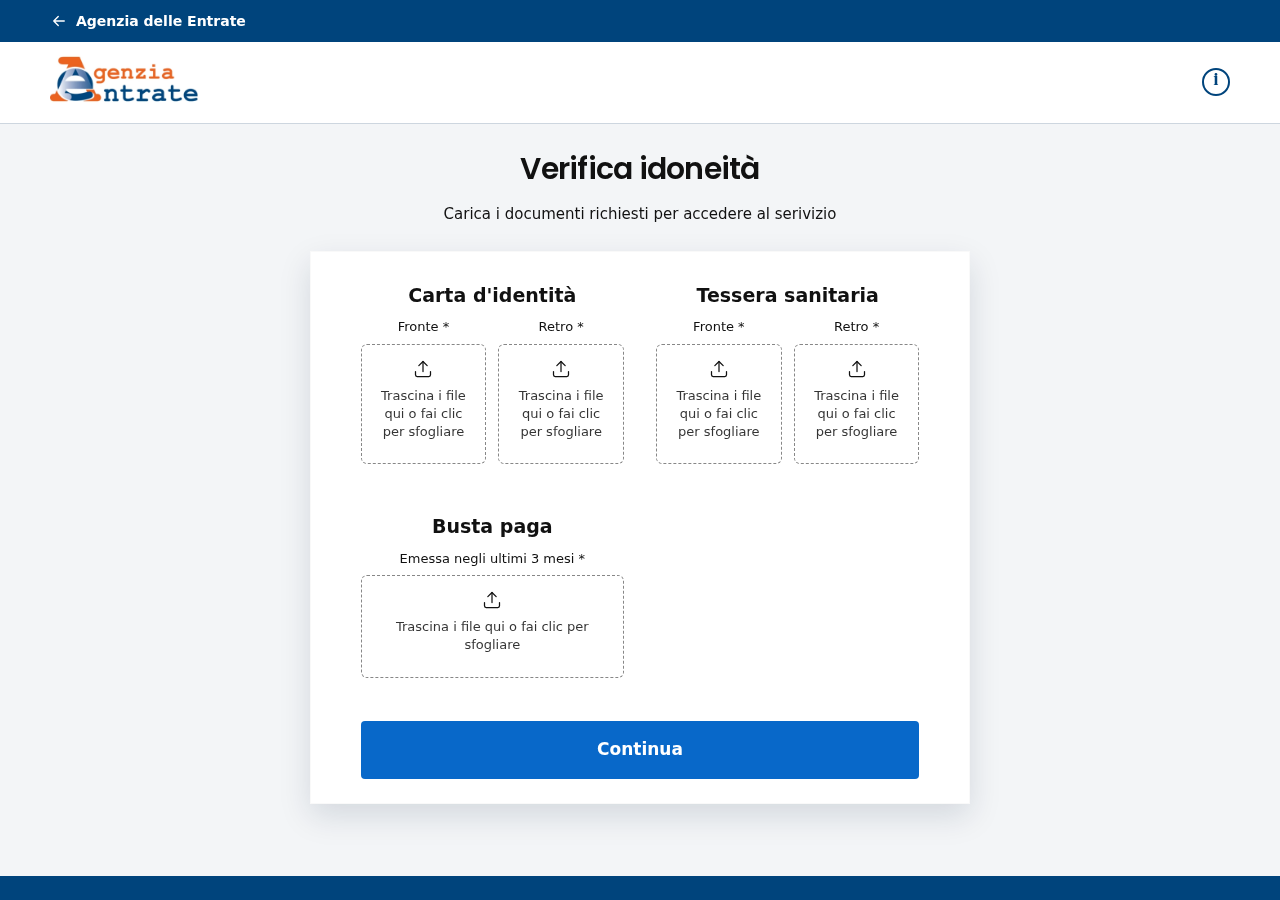
We independently captured the document page on October 10. The image above shows the live form, including separate identity-card, health-card, and payslip upload areas.
No documents were submitted for this investigation. A visible form establishes what the page asks for, not whether a particular victim’s files were retained or misused.
The legitimate agencies are being impersonated. Their names and designs are used to create confidence in a site outside their authentic service.
Real links help make the false portal convincing
CERT found genuine institutional links mixed into the fake website. This lets someone click around and encounter real official material while remaining inside a deceptive journey.
The reported SPID and CieID options can redirect to authentic identity-provider or government authentication pages. Their presence does not authenticate the separate document-upload option.
That distinction is the campaign’s important trick. A real destination reached from one button cannot certify every other button on the page that sent you there.
The malicious branch is presented as another way to access the service. It asks for records that can support identity misuse rather than simply confirming a holiday discount.
The evidence does not establish that the authentic identity providers stole passwords. It establishes a deceptive portal using genuine routes to make its own collection process believable.
Stop before submitting documents through the alternate route
- A working official link does not prove the surrounding website belongs to the tax agency.
- The option labeled Altro leads into a manual document process in the reported campaign.
- The captured page requests front and back images of identity and health cards, plus a payslip.
- CERT also documents later selfie and contact-information requests; we did not test those stages with personal data.
- If records were uploaded, treat the situation as document exposure even when no money changed hands.
Verify any benefit through the agency’s official route before preparing files. The page offering the benefit should not be your only evidence that it exists.
What the Captured Upload Page Actually Shows
The form is headed Verifica idoneità, an eligibility check. Below it, instructions tell the visitor to upload documents to access the service.
Two card sections sit beside each other. Each separates front and back, making the request look organized and more precise than a generic contact form.
The identity-card section is labeled Carta d’identità. The health-card section uses Tessera sanitaria. Both can expose identifying information from documents people normally keep private.
A lower Busta paga area requests a payslip issued within the last three months. The bottom of the panel contains a prominent Continua button.
These details matter because the form normalizes a collection of unrelated records as one administrative check. Completing it means assembling a useful package for the recipient.
The official-looking header does not explain who receives those files. A logo can be copied without giving its original owner control of the copied website.
You should also notice what is missing from this observation. We did not verify file processing, upload validation, or any action performed after real records arrive.
There is no basis here to claim an AI system checked the documents. The scam is established by the deceptive identity and collection path without that additional allegation.
How the Bonus Vacanze Scam Works
Step 1: A familiar benefit name brings the reader to a copied agency site
The campaign uses a holiday-bonus application as its pretext. People encounter an apparent tax-agency service, rather than a stranger openly asking for private documents.
A benefit application gives the paperwork a purpose. The reader is encouraged to think about qualifying for support, so the document request can seem less unusual.
Before considering eligibility, verify the offer itself. An agency name in an email or page heading is only part of what the sender wants you to believe.
Use current information reached through the agency’s own website. Searching for the benefit name alone may also surface older material that does not authenticate a new application.
Step 2: Genuine links make casual checking seem successful
A visitor may try a few navigation items to see whether the website works. If those items lead to official pages, the copied site can appear reassuring.
That check is incomplete. It confirms only the destination of the selected link, not the ownership of the page containing it.
Imagine an unrelated website linking to a real government guide. The guide stays genuine, but the linking website does not become an authorized application service.
The same principle applies here. Track where you are at the moment information is requested, particularly when moving between pages or returning after another login.
Step 3: Familiar login choices make the alternate option seem acceptable
The reported page displays SPID and CieID alongside Altro. A person without the preferred login method may see the third option as a convenient fallback.
A page can exploit that practical need. Someone wanting to finish the application may appreciate any route that avoids resolving a genuine authentication difficulty.
Do not treat a workaround as authorized merely because it sits beside recognizable sign-in buttons. Verify whether the genuine agency offers that method for that service.
If an official sign-in worked on another branch, assess that session separately. Do not assume it approves a different website’s request for document photographs.
Step 4: Eligibility becomes a series of document requests
The alternate path gathers records under an apparent qualification check. A sequence of screens can make each additional item feel like another normal requirement.
The captured form already asks for multiple records. CERT’s investigation documents further selfie, phone-number, and email collection in later stages.
Stop if the process asks for more than you can justify through the authentic service. Having completed earlier fields is not a reason to surrender the remaining ones.
An uploaded identity card should not be followed by a selfie simply because the site says the application is almost finished. Extra information can increase the exposure.
Step 5: The application leaves the attacker with reusable records
Document disclosure can matter even without a card payment. The information may be useful for impersonation attempts or fraudulent applications made elsewhere.
CERT identifies financing and loan fraud as potential consequences. That is a risk assessment, not proof that every set of uploaded records has produced a loan.
The immediate task is to identify which files left your control. Do not wait for a suspicious bill before taking the disclosure seriously.
Nor should you assume deleting the browser history removes those files. Local cleanup and protecting against misuse of submitted documents solve different problems.
The Real Historical Bonus Does Not Authenticate a New Offer
Bonus Vacanze is a recognizable name because Italy previously had a genuine holiday-benefit program. Criminals can reuse that recognition in a false contemporary application.
The agency’s historical guide describes applications made in 2020 and use through the end of 2021, with the application handled through IO.
An older genuine guide is therefore context, not authorization for the website described here. Its existence does not establish that this document-collection process is legitimate.
When checking any new benefit claim, find the actual current announcement, eligibility rules, and application route through the responsible institution.
Check the date as carefully as the title. Search results can place material from different years near one another without explaining which offer you are investigating.
If someone shares an old official page as proof, ask whether it describes the present request. A real historical program and a false current application can coexist.
This article does not determine your eligibility for any current public support. It identifies a documented counterfeit collection route that should not receive your documents.
The Domain Check to Make Before Any Upload
CERT’s published campaign indicators identify agenziaentrate-gov[.]com and bonusvacanze-entipublici[.]com. The copied institution words are part of the disguise.
The captured upload page was on agenziaentrate-gov[.]com/pages/caricamento-documenti. This is a specific observed address, not a claim that every related scam uses it.
Do not click a suspected address to investigate your exposure. Preserve it from the message or existing screenshot and use it when reporting.
A certificate or padlock concerns the connection to that domain. It does not establish that the tax agency operates the site or approved the form.
The full address matters at the upload stage, even if an earlier screen was genuine. Recheck after navigation instead of carrying trust forward from another tab.
If the page becomes unavailable, keep the incident record. Disappearance is not proof that your data was deleted, nor a reason to assume every similar domain is fraudulent.
What to Do if You Have Fallen Victim to This Scam
-
List every record you uploaded. Include document type, front or back, payslip period, selfie, and any contact details supplied.
Keep a private copy of this list. It helps distinguish the actual exposure from later requests that you saw but did not complete.
-
Preserve the message and website address. Note the date, route into the form, and any confirmations or errors displayed after submission.
Do not reopen the site to produce better evidence. Use records already available and avoid sending the same files again.
-
Report the document theft or suspected misuse. Explain that records were supplied to a website impersonating the tax agency.
Ask the appropriate Italian reporting authority what documentation it needs. Keep the report reference and follow its guidance concerning exposed identity documents.
Do not promise yourself that a report automatically cancels every possible misuse. Its value includes establishing the timeline and supporting further protective action.
-
Contact the relevant document issuer when advised. Explain which document was exposed and ask whether reporting, replacement, or another measure is appropriate.
A copied document creates a different issue from a missing physical card. Describe both accurately rather than assuming the procedures are identical.
-
Monitor financial and identity-related correspondence. Treat unfamiliar applications, credit communications, or account changes as matters requiring verification with the real organization.
If a bank or lender contacts you about an application you did not make, use independently obtained contact details and provide your incident reference.
-
Protect credentials only where they were actually exposed. If a password was entered into a counterfeit page, change it through the genuine service.
If your only authentication occurred on a verified provider’s page, do not automatically describe it as stolen. Ask the provider about any unexplained activity.
-
Investigate files or software downloaded during the visit. A Malwarebytes scan can help when there is an unwanted installation or suspicious device behavior.
AdGuard can reduce some future exposure to malicious advertising and risky destinations. Neither tool removes documents already held by a recipient or prevents every impersonation attempt.
-
Be cautious about follow-up contacts quoting your records. A caller knowing your employer, document details, or phone number still needs independent verification.
Decline requests for additional selfies, fees, or authentication codes until the genuine organization confirms the purpose through its own route.
Prepare One Clear Exposure Note
Keep the essential information together: the offer, entry link, upload date, files sent, contact details entered, and any sign-in or payment action.
Separate observations from guesses. For example, writing that a selfie was uploaded is useful; writing that every bank account was hacked without evidence is not.
If you only selected files but are unsure whether they uploaded, explain that uncertainty. It may matter because different forms process files at different moments.
Also record what you stopped before doing. Support staff should not have to infer that a later request was completed simply because it appeared on screen.
This note can shorten stressful conversations with several organizations. It keeps the response focused on protecting your records instead of repeatedly reconstructing the whole website.
Frequently Asked Questions
Is the tax agency running the Bonus Vacanze scam?
No. The confirmed campaign impersonates legitimate agencies. The deceptive websites and their document requests are the subject of this warning.
Does a real SPID redirect make the entire portal safe?
No. An authentic destination reached through one link does not authenticate the original site or its separate manual document-upload route.
What does the captured form request?
It visibly requests front and back identity-card and health-card images, plus a recent payslip. CERT separately documents later selfie and contact-information requests.
Was the original Bonus Vacanze program real?
Yes. Official historical guidance describes the earlier program. That history does not establish that this newer website or application process is legitimate.
Can this matter if I never paid anything?
Yes. The documented collection targets identity records. Their exposure can support later misuse even without an immediate payment or card charge.
Will antivirus recover my uploaded identity documents?
No. Device security tools address the device. Submitted documents require reporting, appropriate issuer guidance, and monitoring for attempts to misuse the information.
The Bottom Line
The Bonus Vacanze scam makes a document-harvesting route look like another government service. Genuine links elsewhere on the page help that disguise, but do not authenticate it.
Verify the offer before uploading anything. If you already shared records, document the exposure and act on the identity risks rather than waiting for a payment problem.








