

A message from SNS 24 says a debt has reached tax enforcement. You have 48 hours to settle it, and the payment instructions are already there.
It sounds serious enough to interrupt your day. Before paying, take a closer look at what this SNS 24 debt text scam is claiming.
Overview
The enforcement notice is a confirmed health-service impersonation
Portugal’s health authorities have confirmed fraudulent messages using SNS 24, SNS, and MIN.SAUDE to demand money or collect private information.
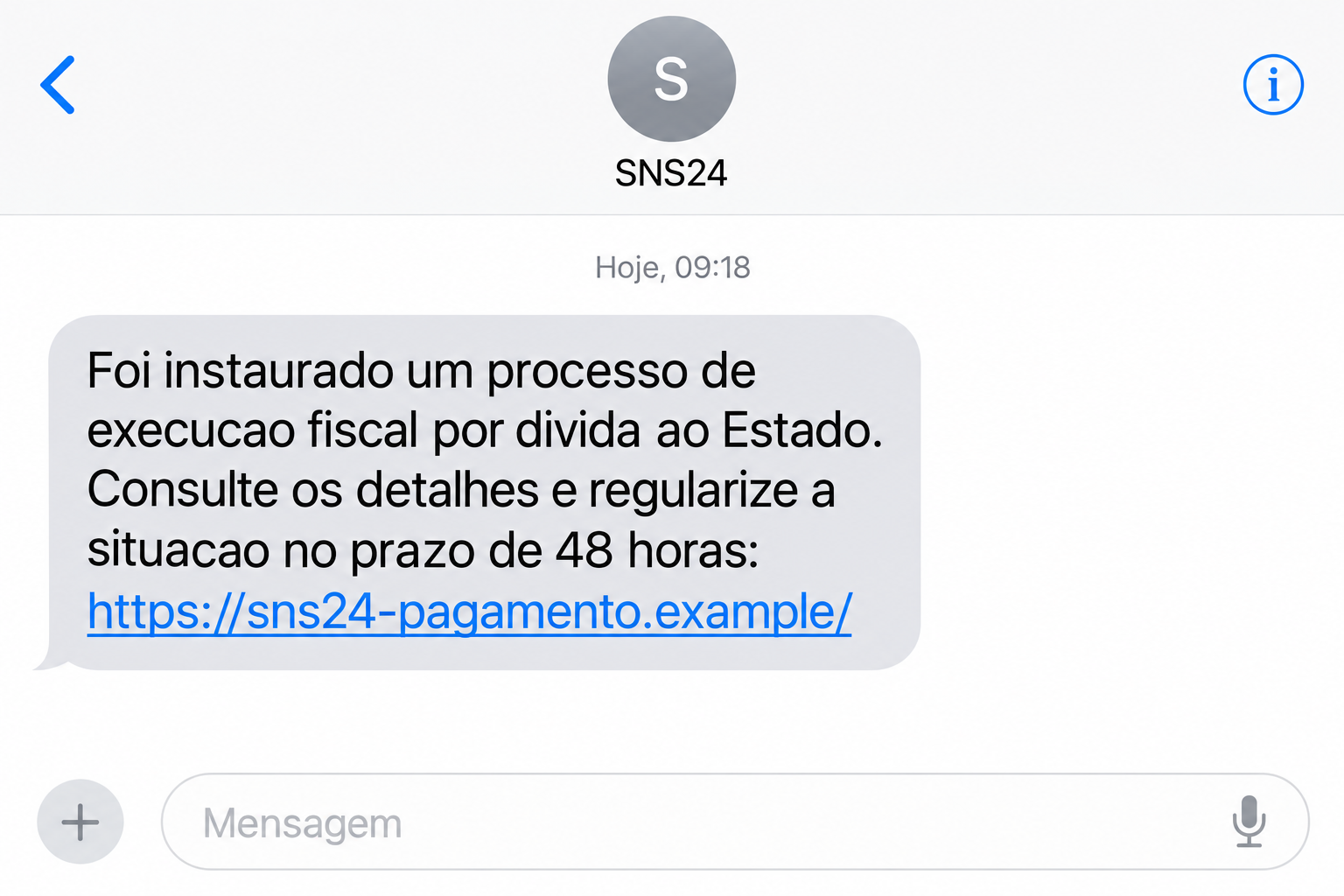
One documented version claims that a tax-enforcement process has begun over money owed to the state. It supplies payment details and a 48-hour deadline.
The SPMS warning dated July 6, 2026 states that SNS 24 does not send messages requesting fiscal-enforcement payments.
The institution names are real. The criminals’ demand is not an authentic SNS 24 instruction, and paying it does not establish that any debt was settled.
The example above is an illustration with a fictional link. It shows the pressure used in these messages rather than reproducing a particular recipient’s payment instructions.
The trap can ask for money without needing a fake login
Do not look only for suspicious websites. The documented debt messages can supply a bank-payment reference, encouraging payment directly through the reader’s usual banking tools.
Other versions send people toward counterfeit websites. Those pages may use a payment or refund explanation to obtain personal and banking details.
These are different routes, not stages that every victim necessarily encounters. Someone can lose money through a false payment demand without entering an account password.
Equally, a reader can expose information on a fake form without completing a transfer. The useful question is what the interaction actually involved.
A hospital’s January warning independently describes both bank-reference and linked-site messages alleging unpaid emergency-department charges.
Verify the alleged bill through the health service
A payment request needs confirmation from the real organization. A reference number, a familiar sender name, and a deadline are not enough.
- Use sns24.gov.pt through an address you type yourself when checking the SNS 24 service.
- Contact the health unit independently if the message refers to a visit or an alleged hospital bill.
- Keep a payment-reference demand separate from a request for passwords or card details when describing your exposure.
- Ask your bank promptly about a payment already made to a suspected fraudulent destination.
- Do not assume a text is authentic simply because you recently used healthcare services.
Why a Medical Debt Can Feel Too Urgent to Question
Few people want to find out that an overlooked bill has become a government matter. The message benefits from that understandable fear of administrative consequences.
Medical visits can also leave people unsure about paperwork. You may have dealt with reception, a referral, or several follow-up notices without remembering every detail.
The scam converts that uncertainty into an apparently simple solution: pay the listed amount and avoid further trouble. It saves you the effort of finding the actual record.
The problem is that the sender has supplied both the accusation and the solution. There is no independent confirmation connecting either one to your health unit.
A modest amount can make verification feel disproportionate. Someone may decide it is easier to pay than spend time on a phone call.
That decision still sends real money to a destination that has not been authenticated. The seriousness of the message does not make its instructions more reliable.
Nor does a larger amount prove a genuine case. SPMS says the values vary, so recognizing one reported sum is not a complete method of detecting these texts.
A recent hospital visit makes the story personally plausible. It does not establish that the person sending the message knows anything about that visit.
How the SNS 24 Debt Text Scam Works
Step 1: A public health name makes the message worth reading
The text presents itself as connected to a familiar health service. The recipient is encouraged to treat it as administration rather than unsolicited financial contact.
This can be convincing even when the message is brief. An institution name carries much of the explanation that a stranger would otherwise need to provide.
Read the requested action before deciding what the sender name means. A service you recognize can still be the subject of an impersonation.
If the message seems connected to an existing appointment or prescription conversation, verify the new demand independently. A recognizable surrounding context is not a billing record.
Step 2: An alleged debt becomes an enforcement threat
The July warning describes a claim that tax enforcement has started over a state debt. That language makes delay appear to carry a serious cost.
The 48-hour deadline discourages checking, especially if the message arrives outside office hours. Waiting for an answer from the health unit may feel risky.
Do not let that deadline decide the verification method. You can investigate a claimed obligation without using the payment route supplied by an unverified sender.
Write down the claim and ask the genuine health service about it. You are checking whether the issue exists, not negotiating with the person who sent the text.
Step 3: The recipient is offered a fast way to comply
A bank-reference version can move straight to payment instructions. The reader may use a genuine banking app while following a fraudulent demand.
That distinction is essential. A trustworthy app processes the instructions you enter; it does not necessarily establish that the text requesting payment is legitimate.
A linked version instead places the explanation inside a copied website. Familiar colors or health-service wording can make its form look like a normal administrative page.
The page may ask for information under a collection or refund pretext. Stop and verify the request before supplying details, even if the initial amount seems unimportant.
Step 4: The result depends on payment and disclosure
If you paid the supplied reference, preserve the transaction record. Your bank needs the payment method, recipient details available, amount, and time to assess the next action.
If you used a form, identify what it received. Name and contact details, card information, and login credentials create different protection priorities.
Paying once does not authenticate a second demand. Treat additional fees or claims that payment failed as new assertions requiring confirmation outside the suspicious route.
A polished receipt from the linked website is also not proof that the health service received anything. Look for confirmation in the real organization’s own records.
A Real Healthcare Question Deserves a Real Billing Check
The official warnings say SNS 24 services are free and reject the fiscal-enforcement text. That does not answer every possible question about charges at every healthcare provider.
If you are concerned about an actual visit, contact the unit that treated you. Ask whether a balance exists and how it would normally be communicated.
Do not supply the text’s payment reference first as if it were already verified. Start with your visit and ask the organization to locate its own record.
If it confirms an amount, obtain payment instructions through its authenticated route. Compare those instructions independently rather than assuming the SMS must have been correct.
Someone may also receive a false demand without ever attending the named service. That inconsistency is a reason to stop, not to provide more information for correction.
For an elderly relative, the simplest help is often practical. Find the genuine health-unit contact and sit with them while they verify the claim.
Do not make them feel foolish for taking an official-looking threat seriously. A calm check is more useful than an argument about whether they should have recognized it.
If several people in a household received similar demands, report the pattern without publishing their health details. You do not need medical histories to explain the impersonation.
What to Do if You Have Fallen Victim to This Scam
-
Contact your bank about money already sent. Use the bank’s genuine support channel and describe the payment as a suspected fraudulent health-service demand.
Have the transaction confirmation ready. Ask whether the payment can be stopped, traced, or disputed, depending on the route used and its current status.
Do this promptly. Reporting to the health service is useful, but should not delay a time-sensitive discussion about the transfer.
-
Protect a card if its details were entered. Explain whether the form received the number, expiry date, security code, or any transaction approval.
Your issuer can advise on blocking or replacing the affected card and reviewing activity. Do not wait for the claimed bill to appear in a real health account.
-
Secure an account password if one was disclosed. Navigate to the genuine service to change it, and review available session or recovery controls.
If the same password protects email or another important account, change those copies too. The priority follows the credentials exposed, not just the logo shown.
-
Preserve evidence with the payment route visible. Save the message, sender, deadline, reference or URL, and the associated bank record.
Keep private records private. Mask medical identifiers and account details when sharing an example outside the bank, health service, or appropriate reporting authority.
-
Verify the alleged health debt separately. Contact your health unit through a number obtained independently, or use the official SNS 24 administrative route.
The published warnings provide SNS 24’s administrative contact and csirt@spms.min-saude.pt for incident reporting. Verify those details from the linked official warning before use.
Describe the false message and any action taken. Do not send passwords, security codes, or complete card details in an incident email.
-
Report the fraud through the appropriate channels. Follow Portugal’s government health-fraud guidance and seek a police-report route if money or identity information was involved.
Distinguish a suspected attempt from a completed payment in the report. A clear timeline is more useful than assuming the attacker accessed medical records.
-
Investigate software exposure if there was any. If the linked page persuaded you to install something, examine that device while also handling the financial issue.
A Malwarebytes scan can help identify unwanted software. AdGuard can assist with blocking some deceptive advertising and risky destinations during future browsing.
Neither tool retrieves a payment reference transfer or erases submitted information. Keep device cleanup and bank recovery as separate tasks.
-
Ignore demands for a recovery fee. An unexpected helper claiming to release, refund, or cancel the payment needs independent verification before receiving money or information.
Use the case reference supplied by your actual bank or reporting authority. Do not move into a new conversation simply because someone mentions your earlier loss.
What to Tell the Bank When You Ask for Help
Start with the action: you paid a reference from a suspected false SNS 24 text, entered card information, or supplied login details. Those are different incidents.
Describe whether you approved anything in the banking app and whether the confirmation showed a recipient. Read from the record rather than relying on memory.
If the text led to a website, keep its address as evidence without reopening it. A screenshot of the address and message can help establish the route.
Say whether any later caller requested another payment or code. It may affect what the bank asks you to monitor, even if no second action occurred.
Also identify what you did not do. Paying a reference without sharing a password does not automatically mean your entire online banking account was compromised.
Ask for a written case number or acknowledgment. Keep it with your evidence so subsequent conversations begin from the same facts.
If you no longer have the text, say that plainly. The transaction record may still show useful details, so do not postpone the bank contact.
If someone else entered the payment for you, include them in the reconstruction. Ask which instructions they used and preserve the confirmation from that account.
Keep records of further contact attempts as well. They can help show whether a second demand is connected, without requiring you to answer it.
Frequently Asked Questions
Does SNS 24 send tax-enforcement payment texts?
SPMS explicitly says it does not. The documented 48-hour fiscal-debt text is a fraudulent request using the service’s identity.
Is every healthcare bill in Portugal fake?
No. This warning concerns impersonation messages. If you have a question about an actual provider’s bill, verify it directly with that provider through independent contact details.
Can I be scammed while paying through my real banking app?
Yes. The app can be genuine while the demand and recipient are fraudulent. Confirm why the payment is owed before entering instructions from an unsolicited text.
Do these texts always contain a website link?
No. Official warnings describe both bank-reference demands and linked phishing pages. Looking only for a strange URL would miss the direct-payment version.
Does a recent hospital visit make the message authentic?
No. A real visit can make the claim sound plausible, but the health unit must independently confirm the alleged balance and the correct payment route.
Can the health service automatically refund money paid to an impostor?
Do not assume that. Contact your bank about the actual transaction and report the impersonation. Recovery depends on circumstances, not the institutional name in the text.
The Bottom Line
The SNS 24 debt text scam turns fear of an official debt into a fast payment decision. The 48-hour countdown is part of that pressure.
Verify the claim with the real health service. If you already paid or disclosed information, respond to that specific exposure immediately and preserve the transaction evidence.

Join the discussion
0 commentsShare your experience or ask a question about this article.
Discussion
Start the conversation
Have a question or something useful to share? Add the first comment.