

A parcel notification arrives just as you are wondering where an order has gone. There is apparently a fee to settle before delivery can continue.
The Royal Mail fee to pay scam makes that small administrative task worth checking carefully, especially when the message supplies its own payment link.
Overview
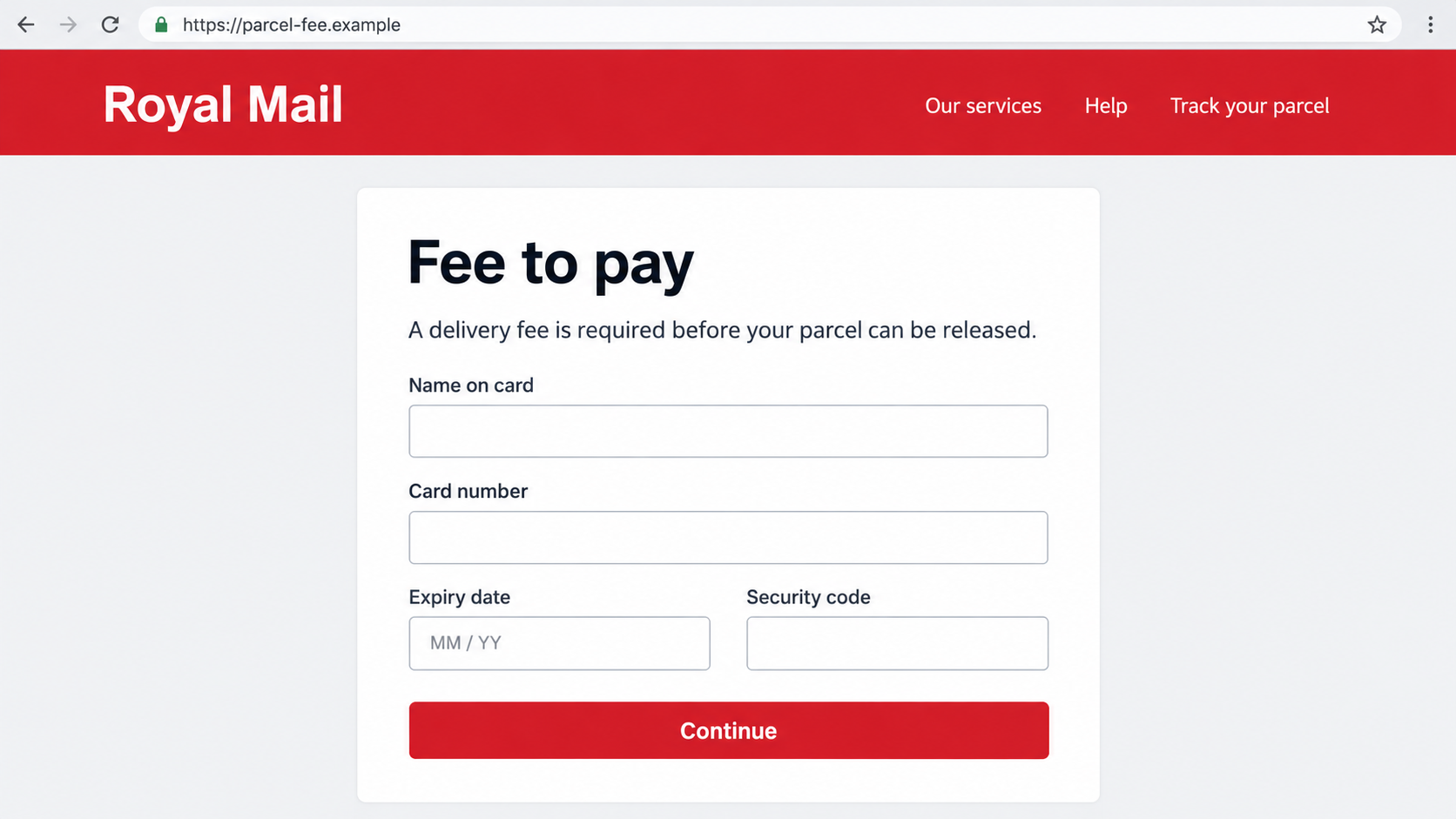
A delivery claim leads to a fraudulent payment form
This phishing pattern borrows Royal Mail’s name to persuade a recipient that a parcel needs attention. The message directs them to an imitation website.
That page asks for personal and card information under the cover of resolving a delivery fee. Submitting those details exposes them to the operator.
The displayed fee may appear minor, but the card number, expiry date, and security code are valuable regardless of the amount shown.
Royal Mail publishes examples of impersonating messages, including parcel and fee stories. A copied logo does not establish a legitimate collection process.
Real fees and customs notices need careful distinction
Do not conclude that every Royal Mail fee is invented. Genuine underpaid-postage and customs charges exist, while standard redelivery should not be confused with those obligations.
Royal Mail’s current scam advice says underpaid items use a grey Fee to Pay card rather than an emailed or texted payment demand.
It also describes an exception for customs-fee notifications by SMS or email, alongside a grey card, when the sender supplied your contact details.
That nuance makes independent verification essential. A message should not be trusted or rejected solely because it contains the words fee or customs.
The payment destination is the important boundary
Check the parcel and fee through Royal Mail’s real site or known support route, not through a form reached from an unexpected message.
Watch for these combinations:
- A missing-address or failed-delivery story paired with an unfamiliar payment website.
- A short deadline that discourages checking the original order.
- A small charge followed by requests for full card details.
- A supposed delivery payment that turns into banking-code instructions.
- A later caller claiming to fix suspicious activity caused by the first payment.
The image above is a fictional payment-page illustration. It is not an authentic Royal Mail checkout or a captured page from a current criminal domain.
Why a Small Parcel Fee Can Conceal a Bigger Risk
The amount encourages you to finish quickly
A modest delivery charge can feel easier to pay than investigate. The form looks like a minor inconvenience rather than a financial decision.
But entering a card provides more than the advertised payment amount. The operator receives information that may support attempts against your account elsewhere.
The correct comparison is not the fee versus the parcel’s value. It is the information requested versus the evidence that the site is authorized.
Expected deliveries create believable timing
People often have several orders moving through different carriers. A vague parcel message can accidentally coincide with a real purchase.
That coincidence does not show the sender knows your delivery. Compare the tracking reference with the retailer’s original confirmation or your actual order account.
A plausible-looking reference is also not enough on its own. The status needs to appear through a tracking service you accessed independently.
A clean page can hide an untrusted destination
Brand colors, familiar buttons, and polished wording are easy to imitate. A fraudulent page may look more convincing than an older genuine service page.
HTTPS protects data in transit to the site you opened. It does not prove that Royal Mail controls that site.
Do not enter card details merely because a browser shows a secure connection. Verify the destination and the underlying parcel issue first.
How the Royal Mail Fee to Pay Scam Works
Step 1: A message claims your parcel needs attention
The initial text or email presents a familiar delivery inconvenience. A parcel may supposedly be waiting, delayed, or unable to continue until a fee is settled.
The sender uses Royal Mail’s identity to make the request feel routine. The message may omit the retailer, precise item, or meaningful delivery history.
You are encouraged to use the supplied link before inspecting your original order. This bypasses the independent record most likely to expose a mismatch.
Neither generic wording nor personalization decides the case alone. A scammer can know a name or address without having authority over a parcel.
Keep the message available for reporting, but start your parcel check somewhere else.
Step 2: A link opens a site that imitates Royal Mail
The destination may reproduce navigation, branding, delivery explanations, and a fee form. Those familiar elements supply reassurance while hiding who controls the page.
A domain can include Royal Mail’s name without belonging to the company. The real destination matters, not the wording used in a button.
A web address displayed in an email can also differ from the underlying link. Redirects may take you somewhere other than the first address shown.
You do not need to follow that chain to investigate it yourself. The safer route is opening the genuine service separately.
Any page asking for sensitive information should be checked before typing, because collection can occur while data is entered.
Step 3: The form collects delivery and payment details
The page asks for information that appears related to the claimed problem: your name, address, contact details, and a card to pay the fee.
The delivery questions make the financial fields feel like part of one ordinary workflow. In reality, both groups of information can be useful to fraudsters.
A full address and telephone number may support personalized follow-up contact. Card details may support unauthorized purchase attempts, subject to the issuer’s protections.
That does not mean every submitted card will immediately be charged. It means the data should be treated as exposed even if checkout appears to fail.
Do not try several cards when the form reports an error. A fake error can collect additional payment information.
Step 4: A verification request may authorize something else
Some phishing flows ask for a banking code or approval after card submission. Treat that as a separate authorization decision, not a routine parcel step.
Read the genuine bank message carefully. It may describe a merchant, amount, device enrollment, or account action different from the delivery fee.
A scammer’s explanation cannot override that wording. If the bank prompt does not match a transaction you knowingly intended, stop.
Additional authorization is a possible escalation, not a stage established for every Royal Mail impersonation sample.
Call the issuer directly if a code was shared or an approval accepted. Tell it what the genuine prompt actually said.
Step 5: The exposed information supports further contact
A later caller may know the details you entered and claim to represent a fraud department. That knowledge can make the second approach feel independently informed.
It may instead originate from the same exposure. Do not move money, share more codes, or install software because someone correctly describes the earlier form.
Follow-up bank impersonation is a possible consequence, not a guaranteed outcome after every click. The warning helps you recognize the changed story if it appears.
Keep communication with your actual issuer inside a channel you initiated. A genuine fraud concern can be checked without obeying an incoming caller.
The alleged parcel should be verified separately with Royal Mail or the retailer. Resolving fraud does not confirm that the original delivery claim was real.
Verify the Parcel, the Fee and the Website
Match the tracking record to the original order
Look up the order in your retailer account or initial confirmation. Obtain the tracking reference there rather than copying an unexplained reference from the suspicious message.
Open Royal Mail through its official site and use the appropriate tracking or receiving service. Confirm that the parcel and status correspond to your order.
If the retailer supplied another carrier, check with that carrier. Do not pay Royal Mail simply because a separate message says it holds the item.
For a gift or an order placed by another household member, ask that person for the original shipment information. Do not let uncertainty become payment approval.
You can explain that a suspicious notification arrived without forwarding an active phishing link to them. Share a safely redacted screenshot instead.
Separate free redelivery from an actual fee obligation
Royal Mail’s redelivery service offers free redelivery options. A generic fee demand should not be mistaken for a normal rescheduling charge.
Underpaid postage and customs obligations are different. Read the grey card and verify its details through the real receiving service.
Even a physical card should be checked if something feels inconsistent. Use the official site’s navigation instead of relying solely on printed instructions.
Check customs notifications without using their payment shortcut
A customs-fee SMS or email can be genuine under Royal Mail’s published exception. Its mere existence is not enough to authenticate the message in front of you.
Verify the shipment, card, and amount through an independently reached official service. Contact Royal Mail if the records do not match.
A customs explanation does not excuse an unrelated domain or a request for banking passwords. Those demands need their own scrutiny.
What to Do if You Have Fallen Victim to This Scam
-
Contact the card issuer without waiting for a visible charge.
Say that card details were entered into a suspected parcel-fee phishing form. Ask whether the card should be blocked and replaced.
Give the time and information exposed. A failed checkout message does not establish that the operator failed to collect the card.
-
Explain every banking code or approval involved.
Tell the issuer whether you supplied a code, approved a transaction, or accepted a device-related request. Preserve the original bank notification.
Ask it to review pending transactions and relevant account changes. Do not continue approving requests to supposedly cancel the first action.
-
Review charges and request the appropriate dispute route.
Keep transaction dates, amounts, merchant descriptions, and reference numbers. Distinguish an unauthorized charge from a payment you were deceived into approving.
Let your bank explain the available process. Do not assume the recovery outcome or rely on the scammer’s promised refund.
-
Protect credentials and personal information you submitted.
If the page requested a password, change it through the legitimate account. Replace matching passwords elsewhere and inspect recovery settings.
For names, addresses, or identity documents, watch for targeted contact and unfamiliar financial applications. Ask your bank about protections appropriate to that exposure.
-
Assess downloads separately from the payment form.
Simply receiving the message does not establish an infection. If it prompted an installation, stop using the affected device for sensitive accounts until checked.
Malwarebytes can help assess suspected malicious software on supported devices. AdGuard may reduce unwanted ads and known risky destinations, but neither reverses card exposure.
The NCSC’s missed-parcel advice explains the separate danger of delivery messages that push application downloads.
-
Report the message and retain a safe evidence copy.
Royal Mail lists reportascam@royalmail.com for suspicious emails and text screenshots. Suspicious texts can also be forwarded to 7726.
Save the message, visible address, and relevant receipt without revisiting the form. Conceal private card information before sharing a screenshot with others.
-
Report losses through the official fraud route for your location.
Use the government reporting guide to find the appropriate channels. Include your issuer’s case reference when useful.
A phishing-message report and a financial-loss report serve different purposes. Make both when relevant instead of assuming forwarding a text opens a bank dispute.
-
Reject the next urgent caller, even if they know your parcel details.
Someone claiming to secure your account may ask for transfers, codes, or remote access. End that incoming conversation and contact your bank yourself.
Tell household members what happened. Their awareness can prevent the exposed address or shared delivery story from persuading someone else.
Frequently Asked Questions
Is every Royal Mail fee message fraudulent?
No. Royal Mail describes genuine customs-fee SMS or email notifications in certain circumstances, alongside a grey Fee to Pay card.
Verify the parcel and obligation through an official route you reached separately.
Does Royal Mail charge for ordinary redelivery?
Its official redelivery service provides free redelivery options. That differs from genuine underpaid-postage or customs charges.
A message presenting a routine missed delivery as an unexplained payment obligation deserves independent checking.
What does a grey Fee to Pay card prove?
A genuine card is part of Royal Mail’s fee process, but an apparent card should still match the parcel and official records.
Use the real website or support service if the reference, amount, or instructions seem inconsistent.
Can a secure-looking payment page still steal my card?
Yes. HTTPS encrypts the connection; it does not certify that the destination belongs to Royal Mail.
Check ownership and the underlying delivery issue before entering financial information.
Should I replace my card if the fee never went through?
Ask your issuer promptly. A fake form can collect details without completing the advertised transaction.
The bank can assess whether blocking, replacement, or additional monitoring is needed.
Why would a bank caller know the information I entered?
Details collected by the form may support a personalized follow-up. Knowing your address or alleged parcel problem does not authenticate an incoming caller.
Use your bank’s established contact route instead.
The Bottom Line
The Royal Mail fee to pay scam hides card theft inside a believable parcel task. The small advertised charge is not the full risk.
Distinguish genuine fee processes from imitation forms, verify through Royal Mail independently, and contact your card issuer quickly if payment information was exposed.








