

The caller sounds helpful. They say BT has found a problem with your broadband, and fixing it should take only a few minutes.
Then the conversation turns toward your computer. BT technical support scam calls become easier to recognize when you slow down that moment.
Overview
The caller invents a technical emergency
This scam impersonates BT to turn an unexpected call into permission to inspect, control, or supposedly repair your equipment.
The explanation may involve a compromised connection, a security fault, or an approaching disconnection. The caller presents cooperation as the quickest way to keep service working.
That premise matters more than the particular telephone number. A familiar company name cannot establish that the person speaking actually works for it.
BT’s official scam guidance identifies urgency, remote-access requests, and demands for passwords or bank information as warning signs.
Unsolicited access differs from a support session you requested
A genuine remote-support tool can be abused by an impostor. Its name, polished interface, or legitimate download page does not authenticate the caller.
BT Business explains an important exception: remote assistance may be used after a customer has contacted support and granted permission.
That is different from a stranger announcing a fault and steering the entire verification process. You should control how support begins.
Useful warning signs include:
- A surprise claim that your broadband or equipment has been hacked.
- A deadline that supposedly prevents you from calling BT independently.
- Instructions to install software or disclose a remote-session code.
- A repair or refund that unexpectedly requires access to online banking.
- Requests to hide the conversation from family, colleagues, or your bank.
The damage depends on what you allowed
Receiving a call does not automatically compromise your computer. Listening, installing a tool, granting access, and authorizing a payment are different levels of exposure.
Remote access can let someone view files or operate a session, depending on the permissions granted. Financial loss is possible, not inevitable after every call.
This guide describes the documented impersonation pattern, not a newly verified outbreak tied to one current number.
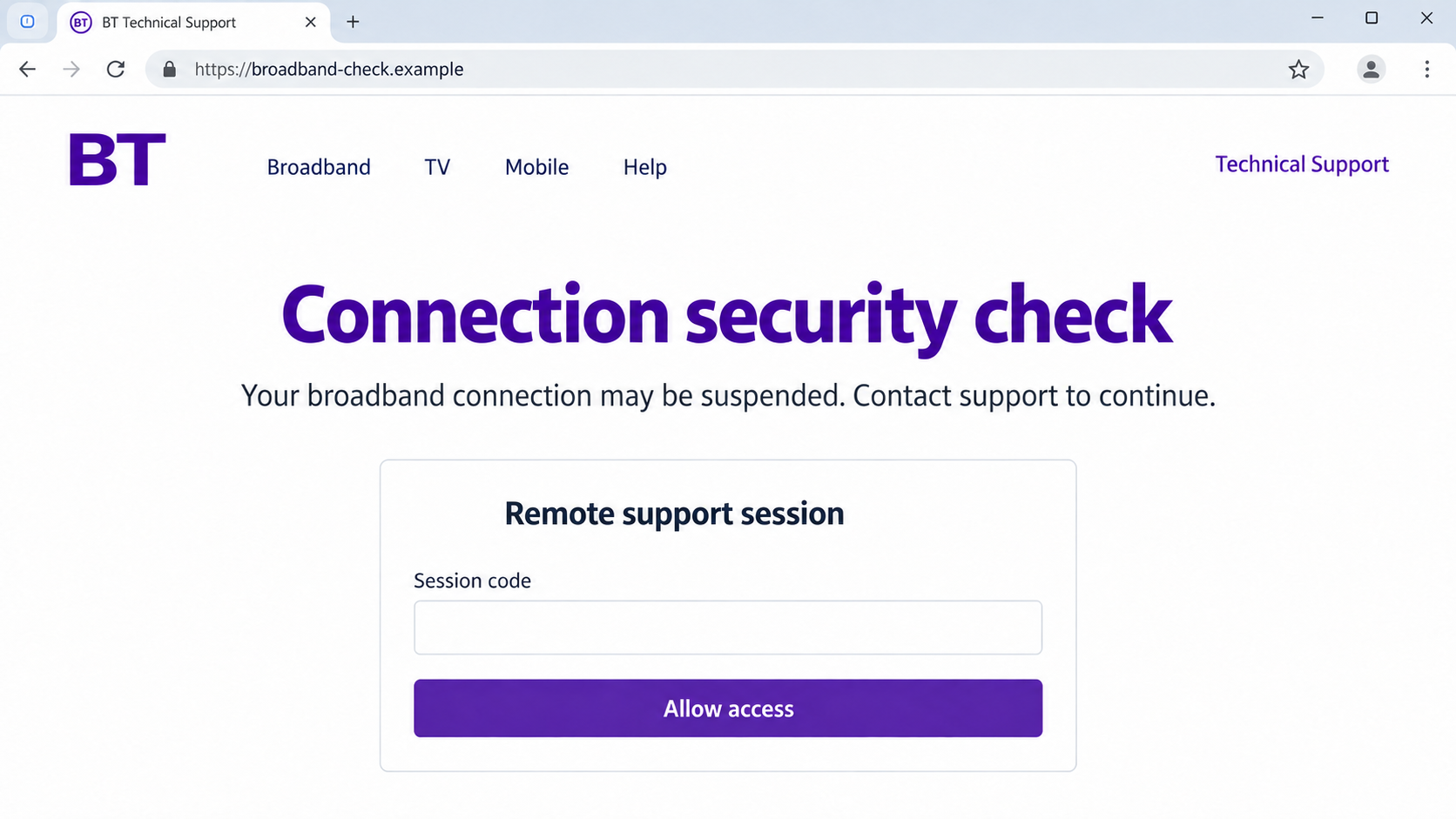
The lead image is an illustrative support interface with a fictional address. It is not an actual BT page or evidence of a particular session.
Why the Broadband Story Gets Your Attention
A familiar inconvenience supplies the opening
Slow internet, dropped connections, and unreliable video calls are common enough that a technical explanation can sound plausible before any evidence appears.
Someone working from home may think first about avoiding an outage. A caller who promises a quick fix benefits from that practical concern.
Even a recent genuine fault does not validate the call. Coincidence can make a mass-contact scam feel personally informed.
Technical language can conceal a missing diagnosis
An impostor may talk confidently about security, network errors, or unauthorized users without identifying a verifiable support case.
The important question is not whether those terms sound professional. It is how the caller proved their identity before requesting access.
A screen filled with warnings also needs context. Routine diagnostic entries do not establish that the caller has discovered a criminal intrusion.
The threat of interruption discourages a pause
A disconnection deadline creates an artificial choice: cooperate immediately or lose the connection you need for work, school, or everyday tasks.
You do not have to settle that claim during the incoming conversation. A separate check through BT can establish whether a real account issue exists.
How the BT Technical Support Scam Works
Step 1: An unexpected call claims to come from BT
The approach starts with a live caller or recorded message. The person may use a technical-department title and speak as though a fault has already been confirmed.
Older reports include both computer-security claims and internet-disconnection warnings. Those reports establish the pattern, not the ownership of every number displaying a similar label.
Caller ID is not a reliable identity check. A number can be spoofed, and the displayed label may come from a contact database rather than BT.
If you are not a BT customer, the mismatch is useful. If you are a customer, the company name still proves very little.
Do not provide an account number to help a stranger explain why they called. Start verification outside their conversation instead.
Step 2: The caller makes your connection sound unsafe
The story gives an ordinary computer problem a frightening consequence. Your connection supposedly poses a risk, or service allegedly needs urgent intervention.
This shifts attention away from the caller’s identity. You are encouraged to focus on stopping the problem rather than checking who is requesting help.
A request to press a telephone option can simply route you to the next person in the scam. It does not validate a support department.
BT Business says it does not unexpectedly call to announce a hacked broadband connection, compromised hub, or immediate payment-based disconnection.
You can review its published examples and support exception without following the caller’s instructions.
Step 3: A supposed diagnosis requires remote access
The caller asks you to open a website, download a support application, or read out a session identifier.
Some legitimate tools support both temporary screen sharing and ongoing unattended access. What matters is the permission being requested, not merely the application’s branding.
Do not approve a connection because the caller says access is read-only. Confirm the actual permission screen and the identity of the person requesting it.
Once control is granted, the operator may navigate your desktop while explaining each action as a repair. Confidence and narration can make invasive behavior feel routine.
The session should stop immediately if a broadband check turns into instructions involving banking, payment apps, saved passwords, or private documents.
Step 4: Access becomes a route to money or information
The operator may introduce a repair charge, supposed compensation, or another financial pretext. These are possible extensions, not outcomes documented in every reported call.
A refund story is especially dangerous if it requires opening online banking while the stranger can view or control the screen.
Seeing a balance or transaction on that screen is not enough to verify a refund. Check directly with your bank through a separate trusted channel.
Passwords, documents, and session tokens may also be exposed during remote interaction. A clean-looking desktop does not tell you exactly what the operator accessed.
Never move funds because the caller claims a technical repair requires it. Your internet connection does not need a transfer to an unfamiliar beneficiary.
Step 5: The caller tries to keep control of the response
If you hesitate, the person may repeat the outage threat, transfer you to a supposed supervisor, or insist the work must remain confidential.
A second voice is not independent verification when the first caller arranged the transfer. Both participants can belong to the same operation.
They may also ask you to remain connected while checking your bank or support account. That leaves them in a position to direct the answers.
Break the connection before seeking help. If a remote session was enabled, disconnect the affected device from the network as well.
Your next conversation should be with a provider or bank you contacted independently, not a recovery specialist introduced by the original caller.
Check the Support Claim Without Handing Over Control
Start from your own account and bill
Open BT through a saved bookmark or an address you type yourself. Review account information and choose the support route appropriate to your service.
Residential and business accounts have different help paths. Do not assume a business-account instruction proves that every residential notice appears in the same place.
Use a contact number from your existing bill or the official site. Ask whether the alleged fault, case reference, or appointment belongs to your account.
Describe the access request precisely
Tell genuine support whether the caller wanted a download, screen sharing, full control, a password, or a payment. Those details help distinguish the exposure.
If software was installed, record its exact name and when it was added. Do not reconnect to the impostor to ask what they installed.
For a shared workplace computer, notify IT before making extensive changes. They may need logs and approved procedures to contain the incident.
Mention whether work email, customer records, or shared drives were open. Your employer may need to assess information exposure even if no personal payment occurred.
Do not erase session logs or reinstall the computer before receiving that guidance. Evidence needed for an organizational response can disappear during well-intended cleanup.
Do not confuse blocking a number with securing a device
Blocking can reduce repeat contact from that number, but spoofed calls may arrive under another identity. It does not remove remote-access permissions.
Likewise, deleting a shortcut is not the same as uninstalling software. Ask a trusted technician to check unattended access, startup behavior, and additional installations.
Related Virgin Media impersonation calls use a similar technical pretext, but verification must go through your actual provider.
What to Do if You Have Fallen Victim to This Scam
-
End the call and isolate any remotely accessed device.
Stop screen sharing and disconnect Wi-Fi or the network cable. Use another trusted device for urgent communication with your bank and provider.
If only a call occurred, do not assume malware is present. Write down what happened so you can choose the right response.
-
Contact your bank immediately if banking information or access was exposed.
Explain that an impostor may have observed or controlled a session. Identify transfers, card details, security codes, and accounts involved.
Ask about blocking pending activity, replacing exposed cards, and reviewing recent transactions. Recovery depends on the payment and circumstances, so act promptly.
-
Secure account credentials from a known-safe device.
Change passwords entered or displayed during the session. Prioritize email and financial accounts, then replace any reused credentials elsewhere.
Review recovery addresses, recent logins, active sessions, and multifactor settings. An attacker-controlled recovery option can undermine a password change.
-
Have the computer checked beyond the obvious support application.
A trusted technician should examine remote tools, unattended-access settings, unfamiliar accounts, and software installed during the interaction.
If a Windows device may have downloaded malicious software, a reputable scanner such as Malwarebytes can help identify threats. A scan cannot guarantee nothing was viewed.
AdGuard may help reduce risky advertising and known unwanted destinations afterward. It cannot revoke remote control, reverse a transfer, or authenticate a future caller.
-
Notify BT through its official support route.
Describe the technical claim and the permissions requested. Provide the displayed number as reported evidence, without assuming it identifies the real operator.
Ask whether any account changes or support requests occurred. Retain the case reference and any instructions genuine support gives you.
-
Preserve the evidence you already have.
Keep call logs, voicemail, chat messages, download names, payment references, and approximate session times. Record which actions you performed and which the operator controlled.
Do not stage another call or reopen a risky page to strengthen the record. Avoid sharing passwords or complete bank information in public complaints.
-
Report the incident through the relevant official channels.
GOV.UK reporting guidance explains suspicious-message reporting and the appropriate fraud-reporting routes.
For callers threatening your safety, contact the police. A provider’s nuisance-call team may also help with repeated abusive contact.
-
Watch for a second approach offering to fix the loss.
A stranger may claim to represent investigators, technical support, or a recovery service and ask for another payment or session.
Verify any follow-up independently. Share the incident with a trusted person so the next urgent request does not reach you in isolation.
Frequently Asked Questions
Does BT ever use remote support?
BT Business describes remote help after you have contacted support and authorized it. That exception does not authenticate an unexpected caller asking for access.
Confirm the case through a separately obtained BT contact before allowing a session.
Can a local telephone number prove the call is genuine?
No. Caller ID can be spoofed, and a displayed company label is not a secure identity check.
Use a number you obtained independently rather than calling the incoming number back.
What if my internet really has been unreliable?
A genuine fault and an unrelated scam call can occur together. The timing does not establish that the caller knows your account.
Report the connection problem through normal support and mention the unexpected call separately.
Have I been hacked just because I answered?
Answering alone does not normally give the caller control of your computer. The greater risks arise from disclosures, downloads, granted permissions, and payments.
Evaluate what actually happened rather than treating every contact as a completed compromise.
Is removing the support program enough?
Not necessarily. An operator could have accessed information or changed settings before the program was removed.
Review exposed accounts and have a trusted technician assess the session, particularly if unattended access or banking activity was involved.
Should I allow another session to get my refund?
No. Do not return to the impostor for a refund or accept an unsolicited recovery session.
Handle financial disputes with your bank and technical checks with independently verified support.
The Bottom Line
BT technical support scam calls turn a believable connection problem into an unsafe request for access. The caller’s confidence is not proof of authority.
End the conversation, check through BT yourself, and respond according to what was exposed. A separate trusted support route breaks the impostor’s control.

Join the discussion
0 commentsShare your experience or ask a question about this article.
Discussion
Start the conversation
Have a question or something useful to share? Add the first comment.