

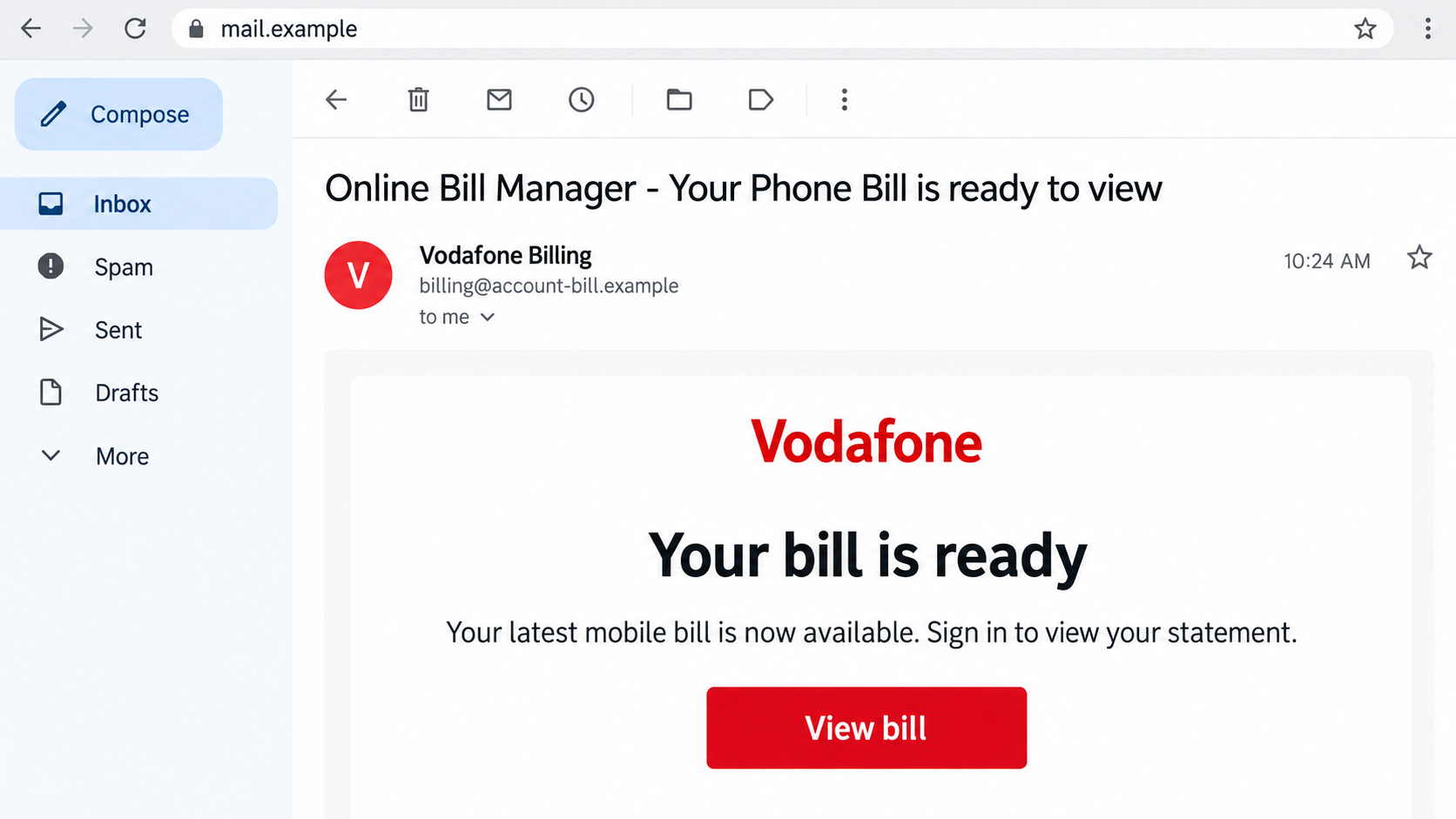
A Vodafone email says your latest phone bill is ready. It has familiar billing language and a button that looks like a routine account shortcut.
The Vodafone bill email scam hides inside that ordinary task. Before signing in, make sure the shortcut leads somewhere you would trust with your account.
Overview
The bill notice is used to collect a login
Fraudulent Online Bill Manager messages impersonate Vodafone and direct recipients toward fake account pages. Their purpose is stealing information, not displaying your genuine statement.
The message may contain an invoice date, a supposed balance, and a description of normal billing features. Those details make opening the button feel routine.
One version uses a familiar-looking sender display name while the actual address is unrelated. The important information can be hidden behind the name your inbox emphasizes.
Vodafone’s official phishing advice describes copied branding, unsafe websites, and requests for usernames, passwords, PINs, or banking details.
A genuine bill notification should be checked against the account
Vodafone does provide real online billing. A bill email is not fraudulent merely because it asks you to view a statement.
The safe test is opening the account independently and comparing the actual statement. Use the genuine app or the provider’s official account route for your service.
For U.K. consumer accounts, My Vodafone provides billing and usage management. Business services can use different portals.
Do not let uncertainty about a business login or an old billing label persuade you to use an unfamiliar email destination.
Watch for the point where viewing becomes disclosure
These warning signs deserve attention:
- The actual sender differs from the organization named in the message.
- A View bill button leads to an unrelated account website.
- The form demands information you did not expect for viewing a statement.
- A code is requested under a different purpose than the genuine notification describes.
- A billing query turns into a download, remote-support request, or urgent payment.
The pictured email is an illustration using a fictional sender domain. It is not a captured Vodafone bill or evidence of a charge on your account.
Why a Routine Statement Makes Effective Bait
The subject does not need to sound dramatic
Many phishing messages announce an emergency. A bill-ready notice can be persuasive because it seems like ordinary administration you already handle every month.
You may click while sorting email, without stopping to inspect where the button goes. The request feels familiar before the account page appears.
A good-looking invoice layout can make the later login seem like a continuation of the same trusted task. That is where the sender gains an advantage.
A surprising total gives you another reason to sign in
An unexpected balance can push the recipient to investigate immediately. Explanations about data use, international calls, or billing cycles make the amount sound possible.
The explanation should be checked against real usage and the genuine bill. A convincing account of why a charge could occur is not the charge itself.
If you are not a customer, that mismatch is straightforward. If you are, the claimed amount still needs checking outside the email.
Business billing language can make uncertainty feel normal
A message may describe usage monitoring, cost centers, printed bills, or account management. Those details can appeal to someone handling company phones.
Business services do have multiple genuine portals. A fraudster can use that complexity to make an unfamiliar site feel like one more legitimate account system.
Verify the route through your existing account administrator or the provider’s official portal directory. Do not ask the email sender to choose the replacement login for you.
How the Vodafone Bill Email Scam Works
Step 1: A familiar billing email arrives
The subject announces a statement or invoice ready to view. The body uses Vodafone’s identity and describes a monthly bill as though it belongs to your account.
The sender may include a total and plausible billing explanation. A message does not have to contain spelling errors or obvious threats to be fraudulent.
Inspect the actual email address rather than only the display name. Also note whether the message belongs to your service and normal billing schedule.
Dates or balances that do not fit your records are useful clues. Do not reply with customer information to help the unknown sender correct them.
Keep the suspicious message available while comparing it with an independently opened account. You can check the bill without entering the email’s process.
Step 2: The View bill button opens an imitation account page
The link takes the reader away from the inbox and into a site that looks like a Vodafone sign-in page.
Brand colors, a polished logo, and standard account fields provide visual reassurance. They do not establish who operates the website.
The visible button label may conceal a different destination. A redirect can also take you somewhere other than the first address shown.
On a desktop, link inspection can reveal a mismatch without opening the page. On mobile, avoid an accidental tap while trying to inspect it.
When uncertain, leave the email and start through the official service. The bill does not become less accessible because you refused the sender’s shortcut.
Step 3: Viewing the statement requires giving the operator sensitive information
The fake page asks for a username and password or other account information. The request appears necessary because the promised statement is supposedly private.
Submitting credentials gives them to the page’s operator. The screen may then report an error, request more information, or send you elsewhere.
A failed login is not evidence that your password stayed private. A phishing form can collect data even while pretending the account check failed.
Some attacks may ask for payment details or a security code next. Match any genuine code notification with the action it actually authorizes.
Do not keep trying different passwords or cards to make the statement appear. That can expose information from several accounts rather than solve a billing problem.
Vodafone’s identity-protection guidance says it will not contact you asking for passwords or security codes.
Step 4: Stolen details can be used beyond the original bill page
The operator may attempt to enter the real mobile account, reuse a password elsewhere, or send a more personalized follow-up message.
The consequences depend on what was shared and which protections remain in place. Opening the email alone is not the same as granting account access.
A mobile account can hold contact details, billing records, and controls that affect service. Tell Vodafone about unfamiliar changes rather than assuming only the password matters.
If the interaction included a separate download or attachment, assess that device risk separately. A phishing bill and a malware attachment are not interchangeable incidents.
Do not run a downloaded program to unlock a statement. A suspicious file needs a separate device check, while the bill can be verified through your account.
Find the Genuine Bill Without Following the Email
Use the account route you already recognize
Open My Vodafone from your installed app or a saved official bookmark. Compare the billing period, account, amount, and payment status with your records.
A genuine unexpectedly high bill still deserves a billing query. Make that query through normal support, without sending banking information to the suspicious sender.
If no matching bill appears, ask the real provider whether a statement exists. Do not accept an email explanation about a supposedly hidden account record.
If the genuine portal is temporarily unavailable, use contact information from an earlier verified bill. An email offering a substitute login should not fill that gap.
Match the portal to the service, country and account type
Vodafone operates in multiple markets, and business products may have separate account systems. An unfamiliar regional name is not automatically evidence of fraud.
The official U.K. business portal directory identifies different billing and service-management routes. Use your own account’s established route rather than a universal guess.
For company-managed phones, involve the person responsible for the contract. A user account and the organization’s billing administrator may have different permissions.
Check which line or service the invoice covers. A fixed-line or business product may not appear beside a personal mobile bill in the consumer app.
The administrator can compare the account reference with existing records without visiting the email destination. Do not forward an active phishing link as a convenient login shortcut.
Review account activity if a fake form was used
Ask support to examine relevant contact, billing, or service changes. Provide the time of the suspicious login attempt and any real notifications received afterward.
If service unexpectedly stops, contact Vodafone through another available channel. Explain any earlier credential disclosure so the issue is assessed as more than an ordinary coverage problem.
Tell your bank if that telephone number receives banking security codes. The bank can assess access concerns while Vodafone investigates the service change.
Keep mobile-account containment separate from bank containment. Your bank should hear about card information or banking authorizations; Vodafone should hear about the provider account.
What to Do if You Have Fallen Victim to This Scam
-
Leave the fake billing flow.
Stop entering information and do not download anything to make the invoice appear. Save the email, then open the genuine account independently.
If you only read the message, report it without assuming a compromise. If you entered data, note the exact fields and any later approvals.
Distinguish a password you typed from information the browser filled automatically. Include both when explaining what the page could have received.
-
Notify Vodafone about exposed account details.
Use the provider’s real fraud or support channel for your account. Describe the Online Bill Manager message and the approximate disclosure time.
Ask support to review access and relevant changes. Request a case reference so additional notices can be linked to the same incident.
-
Change the compromised password and address any reuse.
Reset it through the genuine provider service. If the same password was used for email or other accounts, replace those copies as well.
Check account recovery details and active sessions where the service allows it. Tell support if contact information was changed without your involvement.
-
Contact your bank if financial data was submitted.
A mobile-account password disclosure is different from giving away a card or banking code. Tell the issuer which financial information and authorizations were involved.
Ask about card replacement, suspicious transactions, and any payment you approved after deception. The bank can explain appropriate protections and available recovery options.
-
Inspect the device when the email led to software or risky permissions.
Record the download or application name and get help from a trusted technician. For a work device, report the event to your IT team.
Malwarebytes may help detect malicious software on supported platforms. AdGuard can reduce unwanted ads and risky destinations, but neither changes a stolen password or reverses a charge.
-
Report the original email to the right mailbox.
Vodafone U.K. lists phishing@vodafone.co.uk for suspicious emails claiming its identity. Forward the original message so the relevant sender and link information is preserved.
A cropped image of the display name may hide the actual sender. Keep the original email available if the fraud team requests more detail.
For another country’s account, use that provider’s current official reporting instructions. Do not send credentials or security codes inside the report.
-
Keep billing evidence and report losses separately.
Save the real bill, the fraudulent notice, account-change messages, and any payment records. Keep provider and bank references together.
U.K. scam-reporting routes distinguish suspicious-message reporting from reporting a financial loss. Follow the route relevant to what happened.
-
Check new billing or support messages through the established case.
An operator with your details may send a better-looking follow-up or claim a refund requires another login. Do not let that restart the unsafe process.
Use the support channel you already verified. If several people manage the account, warn them so a second recipient does not follow the same link.
Frequently Asked Questions
Are Vodafone bill-ready emails always fake?
No. Genuine billing notifications exist. The question is whether this sender and destination belong to your account’s real provider process.
Does Online Bill Manager wording prove the message is legitimate?
No. Familiar billing terminology can be copied. Check the statement inside the genuine account and use the official route for your particular service.
What if the total seems plausible for my usage?
A believable amount is not an authenticated bill. Compare the actual billing period and usage in your account before paying or entering credentials.
Does every genuine Vodafone login use the same website?
No. Regional and business services can have different portals. Find the appropriate route through your existing contract information or the provider’s official directory.
Can a login error mean my details were not collected?
No. A fake form can receive the password and still display an error. Treat submitted credentials as exposed and secure the real account promptly.
What if I receive an unexpected security code afterward?
Do not share it with the sender. Read what the genuine notification authorizes and contact Vodafone or your bank, depending on which service issued it.
The Bottom Line
Do not sign in through an unverified Vodafone bill email. Open your actual provider account and view the statement there.
If the fake page received credentials, contact Vodafone and secure the account. If it also received card details or banking approvals, involve the bank immediately.








