

A message says your SPID annual fee needs checking. Follow the payment link, it suggests, or risk losing access to the public services you rely on.
When your digital identity handles everyday paperwork, that warning feels inconvenient to ignore. The SPID annual fee scam uses precisely that concern.
Overview
The false renewal process begins with your tax code
This payment-verification route is a documented phishing scam. It borrows the names and logos of SPID and AgID to collect personal and banking information.
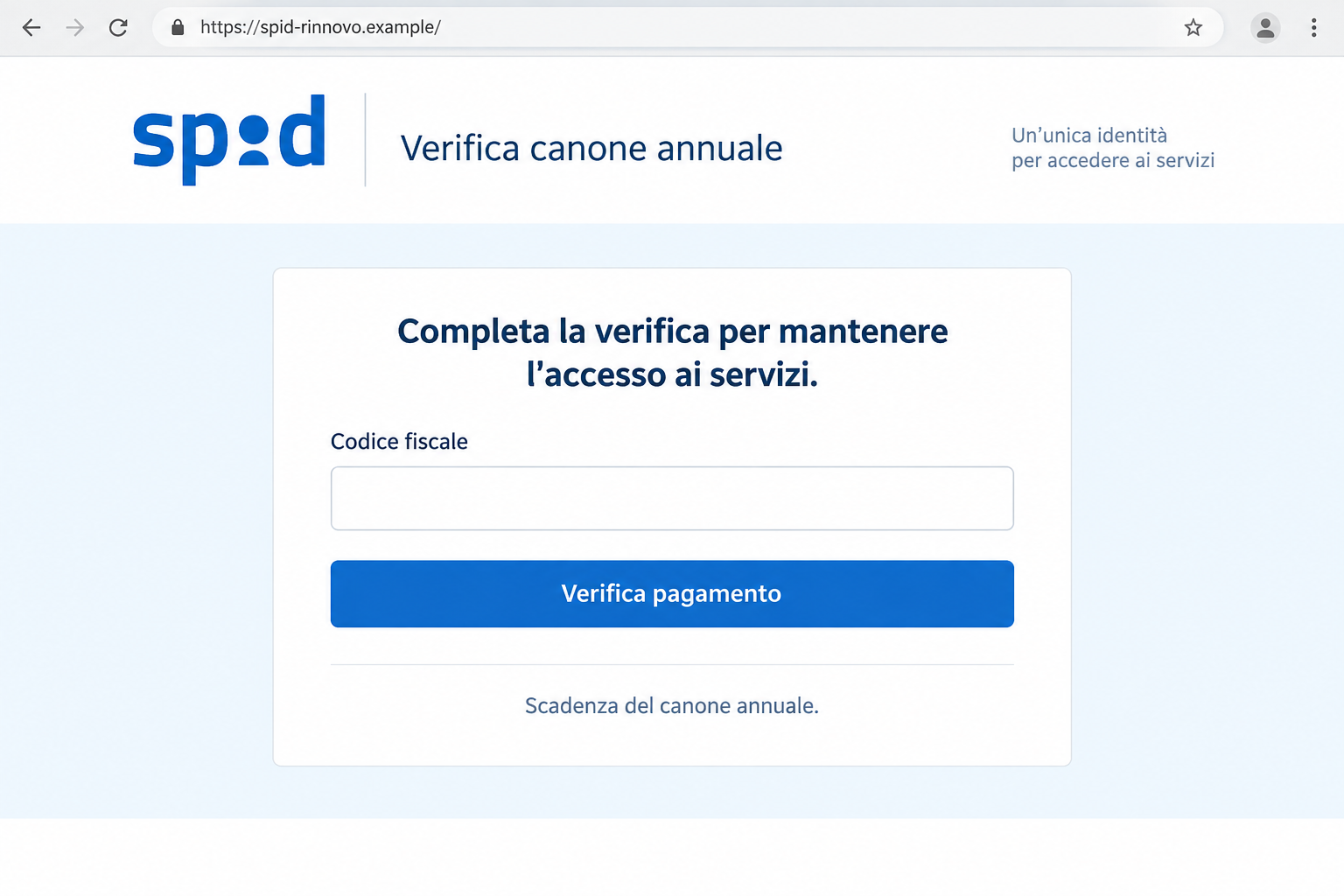
The apparent task is checking an annual fee. The visitor enters a tax code, receives a fake case reference, and is directed toward payment.
CERT-AGID’s warning describes threats of late charges and problems maintaining access to public-administration services.
Don’t use those pages to renew or repair your identity. Open your own provider’s genuine service instead.
The lead image is a fictional illustration of the opening form. It doesn’t reproduce a specific recipient’s message or establish a particular fee amount.
A real fee still needs the right recipient
Some SPID providers can charge for services. That matters because the scam can use a plausible payment story rather than a demand that sounds obviously impossible.
The question isn’t simply whether money can ever be owed. It’s whether your actual provider issued the request and whether you’re dealing with its real service.
Your provider handles the SPID account you use. A separate page with an AgID logo doesn’t become that provider’s billing desk.
A false renewal site can threaten your access without having authority over it. Paying that site isn’t a reliable way to preserve a genuine account.
Check the provider relationship you already have
- Find the provider that issued your SPID credentials before following a renewal instruction.
- Use its established website or app to check account status and any real payment requirement.
- Read the complete address of a page asking for private information.
- Don’t treat a reference number generated after your input as proof of an existing official case.
- If payment information was supplied to the false page, tell the relevant bank or issuer what happened.
The campaign includes spidgov[.]click, spidgo[.]click, and spidgov[.]info. Familiar words inside an address aren’t a substitute for reaching your known provider.
Why Losing Access Is Such a Powerful Threat
People use digital identity to handle practical tasks, not merely to maintain another online profile. An interruption can sound like trouble with taxes, benefits, or appointments.
The email can make a small payment seem like the easiest way to protect all those activities. That urgency pushes the provider’s identity into the background.
If you haven’t used SPID recently, you may also be unsure about changes to your provider’s service. Uncertainty gives the sender room to introduce an invented requirement.
You don’t need to settle that uncertainty inside the message. A genuine provider can tell you about your account through the relationship you already have.
Think about how you normally sign in. Which app, website, or provider name appears? Start there, even if the new notice offers a faster shortcut.
A real deadline might deserve attention, but an unsolicited warning hasn’t established one. Find the actual account notice before allowing the sender to set your pace.
You can take your access seriously while refusing an unverified form. Closing a counterfeit page doesn’t cancel your digital identity.
Likewise, a problem logging into a genuine service doesn’t authenticate the false offer. Technical trouble and a phishing message can occur at the same time.
How the SPID Annual Fee Scam Works
Step 1: The message turns an account concern into an urgent payment task
The annual-fee story gives the reader something specific to fix. Warnings about interest or continued access make delay appear costly.
The request can sound more believable when the recipient knows paid identity services exist. The attacker benefits from that real-world context.
Don’t jump from a plausible subject to an authenticated sender. A real service can be the basis of a convincing false demand.
Compare the request with the provider’s own account information. The message’s urgency should not determine which website receives your details.
Step 2: AgID and SPID branding make the website look institutional
The false portal uses recognizable identity-system names and designs. Domains containing spid and gov add another visual cue suggesting a public service.
But the actual provider relationship hasn’t changed. The website needs to belong to the organization handling your account, not merely mention the system it uses.
If you reach a page you don’t recognize, leave and open your provider independently. It’s easier to verify a known relationship than a newly introduced portal.
A reassuring privacy footer or familiar sign-in styling can’t resolve that identity problem. Those details can be copied along with the rest of the page.
Step 3: A tax-code check creates the appearance of a personal case
The documented process asks for codice fiscale before checking the supposed annual payment. That makes the result seem tied to a particular person.
Once a reference number appears, the reader may assume the site has found a genuine record. A page can generate that reference without consulting the provider.
Don’t send more information simply because a case has apparently been opened. First confirm that the real provider recognizes the request.
If you stopped after this field, note the tax-code disclosure. It warrants careful treatment of follow-up contacts, without assuming an unseen password or card was also exposed.
Step 4: The verification leads into payment
The false route then asks for a sum resembling fees charged by some genuine services. That resemblance helps the demand appear routine.
Matching a familiar price doesn’t authenticate a recipient. The important connection is to your own provider’s actual billing process.
Stop if the page begins requesting banking information you can’t justify through that relationship. The payment label doesn’t make the collection safe.
Keep track of anything you approved separately from information entered into a form. The appropriate bank response depends on those actions.
The warning establishes phishing, not every possible later transaction. Your own records are needed to determine whether money moved or particular credentials were exposed.
Where a Genuine SPID Request Should Be Checked
Open the website or app of your chosen identity provider. Use a route you normally use, or obtain it from the official provider directory.
The SPID directory lists authorized identity providers and their service information. It helps you identify the organization responsible for your credentials.
Check account notices there, including any genuine renewal requirement. Look at the product or service the fee concerns rather than assuming one rule applies to everyone.
If a real payment is due, ask the provider to confirm the route. Don’t pay the unsolicited page merely because a genuine charge also exists.
If you’re uncertain which provider you use, inspect your established app or previous authentic account records. Avoid searching for the new message’s exact payment link.
A browser search can produce lookalikes or sponsored results alongside legitimate pages. The directory and your existing provider relationship offer a clearer starting point.
Use the provider’s real support channel for access problems. Someone offering to restore your identity through an unrelated payment form isn’t a shortcut you should accept.
Take your genuine account reference and the false message to support. Ask them to locate any payment notice in their own system.
If the names or references disagree, explain the mismatch before paying. That gives the provider a specific question to answer without exposing another password.
This is especially useful when assisting someone else. Help identify their provider instead of collecting their passwords or codes to investigate on their behalf.
Three Things a Payment Page Cannot Prove About Itself
A displayed case number doesn’t prove a provider opened a case
A string formatted like a reference can be created by the website. Ask whether the provider recognizes it through the authentic account or support route.
Save the number as evidence if you already interacted, but don’t use its appearance as permission to disclose more.
A familiar fee doesn’t prove a valid invoice
The scam deliberately uses a payment story that can resemble real services. Check which account, service, period, and provider the charge belongs to.
If those connections aren’t clear, leave the form. A low amount doesn’t turn an unverified recipient into a legitimate billing contact.
A government-looking domain doesn’t prove government control
Read the full domain, including its ending. A name such as spidgov can be chosen to look official without connecting the site to the actual identity system.
The published campaign indicators identify several such addresses. Use a matching address when reporting, rather than reopening it for another test.
What to Do if You Have Fallen Victim to This Scam
-
Contact the bank or card issuer about exposed payment information. Describe the fake SPID fee page and exactly what it received.
Ask about protecting the affected payment method and reviewing activity. Explain any approval or transaction separately from the initial tax-code field.
-
Report money already sent. Keep the amount, time, payment route, and recipient details from the actual transaction record.
Ask the payment provider what can still be stopped or disputed. A page saying renewal succeeded doesn’t establish that your genuine provider received anything.
-
Reach your identity provider independently. Tell it about the impersonation and ask whether your account shows unexpected changes or activity.
Explain whether you supplied a password, code, or authentication approval. The provider can guide the relevant account protections without relying on the counterfeit portal.
Don’t cancel a legitimate paid service just because an impostor demanded a similar fee. Resolve the actual account situation with the organization responsible for it.
-
Replace passwords that were disclosed. Make changes through the genuine service, then address other important accounts using the same password.
If the false page only received a tax code, don’t describe that as a confirmed password theft. Accurate exposure details make the response more useful.
-
Keep the message, domain, and case-looking details. Save screenshots already available and any relevant payment confirmations.
Don’t publish complete identity or banking information. Redacted examples can warn others while fuller evidence stays with appropriate reporting and support channels.
-
Report the false request through official channels. CERT-AGID’s warning lists malware@cert-agid.gov.it for suspicious messages.
Describe the annual-fee pretext and include the destination. Don’t include your password or security code when explaining the incident.
-
Investigate downloads or installations if they occurred. If the linked page persuaded you to install software, assess that device as well as your account.
Malwarebytes can assist with checking for unwanted programs. AdGuard may help block some malicious advertising or links before you reach another deceptive page.
These measures don’t refund a payment or revoke a disclosed code. Complete the provider and bank responses appropriate to your actual exposure.
-
Reject unexpected recovery instructions. A caller offering to preserve your access through another payment, remote session, or code request needs independent verification.
Continue through the genuine provider’s support case. Knowing the reference from the false page isn’t evidence that the caller works for the real service.
If Your Genuine Login Isn’t Working
Check that you’re using your established provider and the correct account. Avoid returning to the fee message just because it offers a quick repair.
Use official support to distinguish a login error, forgotten password, account restriction, or legitimate service requirement. Those problems shouldn’t be diagnosed by a stranger’s form.
Keep any genuine notice separate from the suspicious one. That prevents an authentic problem from being used to justify the impostor’s proposed solution.
If you recently disclosed information, tell support before attempting repeated approvals. A clear explanation is safer than improvising steps suggested by the false page.
For someone dependent on public services, help them find the right provider contact. The goal is to restore the genuine route, not merely silence the warning email.
Frequently Asked Questions
Is every SPID-related fee fraudulent?
No. Some provider services can involve charges. Verify a fee with your actual provider; the counterfeit annual-payment pages described here are the scam.
Does AgID branding authenticate a renewal website?
No. An AgID logo on a separate website doesn’t make it your provider’s billing service. Ask your provider about the actual renewal request.
Why does the form ask for my tax code first?
It makes the supposed payment check feel personal and administrative. The resulting reference doesn’t prove that your provider verified a real account or debt.
Will paying the false page preserve my genuine access?
Don’t rely on that. Confirm account status and any real payment requirement directly with the provider rather than using the impersonation page.
What if I never entered a password?
Record the information and actions that did occur. A tax-code disclosure or payment isn’t automatically proof that the SPID password was stolen.
Where should I ask about an actual renewal?
Use your identity provider’s genuine website, app, or support route. The official SPID directory can help identify the provider and its published service contacts.
The Bottom Line
Do not pay or enter information through this SPID annual-fee verification route. A plausible renewal story and copied government branding don’t make the false portal your provider.
Check genuine requirements with the provider you already use. If you paid or disclosed credentials, contact the relevant bank and provider now with the exact details.

Join the discussion
0 commentsShare your experience or ask a question about this article.
Discussion
Start the conversation
Have a question or something useful to share? Add the first comment.