

A digital notice says a traffic fine remains unpaid. It has formal wording, a reference, and a payment route that appears ready for you to use.
When the sender calls itself SEND, the message can sound like official paperwork catching up with you. Look closer before settling the alleged balance.
Overview
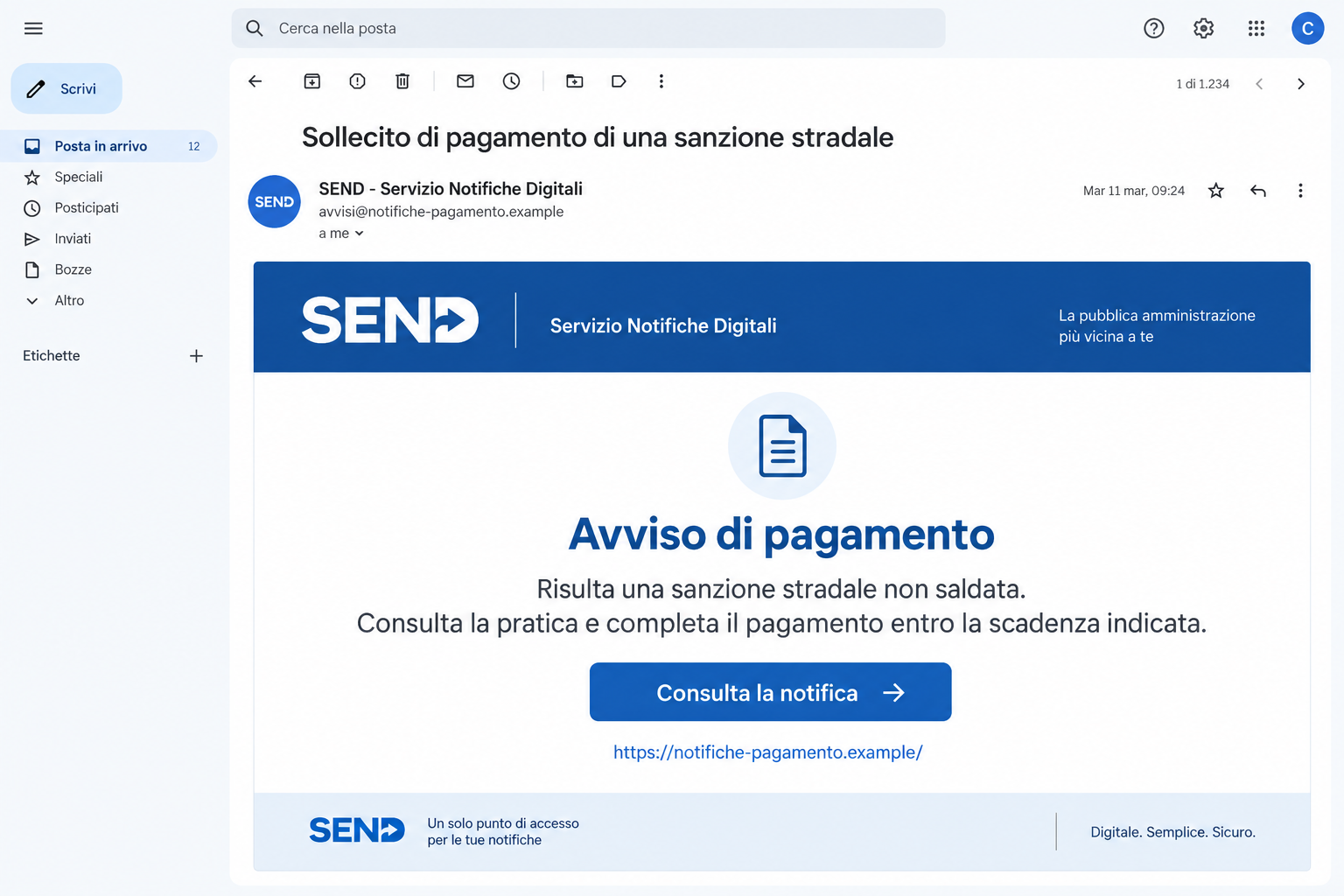
The false fine notice sends you toward a counterfeit payment page
The SEND traffic fine scam uses messages about unpaid road penalties to collect card details on a fake website. Don’t pay through the unsolicited route described here.
SEND, Servizio Notifiche Digitali, is a real Italian platform for communications with legal value. Criminals impersonate it because that role makes their notices hard to dismiss.
CERT-AGID warns about the campaign, including email and SMS messages carrying apparent amounts, case references, and approaching deadlines.
Those details give the story shape, but they don’t authenticate the sender or establish that you owe the sum shown.
The image above is an illustrative email using a fictional address. It isn’t a captured legal notice or a reason to assume your own fine exists.
A real legal-notification service is being impersonated
The warning doesn’t mean every SEND communication is fraudulent. Genuine notices and payment obligations exist, and some readers may already have real matters to resolve.
The safe decision is to find the actual notice through the service you open yourself. Then check its issuer and content before addressing any payment.
That avoids two mistakes: giving a false page your card, and ignoring real paperwork because a scam uses the same platform’s name.
The platform delivering a communication and the authority issuing it have different roles. Questions about a genuine notice’s contents belong with its actual issuing body.
Check the document before touching the payment form
- Open SEND independently through notifichedigitali.it or its genuine IO service.
- Match the claimed matter with the notice actually available through your authenticated route.
- Ask the issuing authority about an unfamiliar genuine penalty instead of replying to the suspicious sender.
- Keep a bank’s transaction record separate from a receipt generated by an unverified page.
- Tell your card issuer promptly if the counterfeit form received payment details.
Several lookalike notifichedigitali domains are documented. A familiar name at the start of a link shouldn’t stop you reading the complete address.
Why This Message Can Feel More Serious Than Ordinary Spam
A legal-notification platform suggests consequences, records, and deadlines. The recipient may worry that refusing to engage will make a problem worse.
The scam uses that concern to make a direct payment look responsible. You are offered a way to finish the matter without first locating the real document.
Formal wording can do much of the persuasion. A reader may recognize the tone of administration even when they don’t recognize the particular case.
Numbers help too. An amount and a reference look like information taken from a system, rather than an accusation written by a stranger.
But a site can generate those details. Their useful test is whether they correspond to a genuine notice reached independently.
If you recently drove somewhere unfamiliar, the story may seem plausible. That personal coincidence doesn’t tell you who sent the message.
You also don’t need to remember every journey to make a safe decision. Start with the actual notice and its issuer, not an argument with the email.
Before deciding whether you can afford the payment, find the genuine notice. Its issuer and official payment route matter more than the email’s reassuring details.
How the SEND Traffic Fine Scam Works
Step 1: The message introduces an alleged unpaid road penalty
The false email or text presents itself as a reminder connected to a fine. It uses a service associated with official notifications to lend the claim authority.
A deadline encourages prompt action, while a reference makes the matter appear to have a history. The recipient may feel they are already behind.
Don’t assume that feeling reflects an actual case. The first independent check is whether a genuine notice exists through the real service.
Avoid replying for clarification. Asking the sender to explain its own accusation keeps you inside the unverified conversation.
Step 2: The link offers an easy administrative shortcut
The message points toward a page presenting itself as the place to resolve the fine. The reader doesn’t have to work out how to find the real platform.
That convenience is part of the lure. The same contact that introduced the problem chooses the website supposed to solve it.
Use your own entry point instead. A few extra moments locating the real notice are more useful than another minute completing an untrusted form.
If a browser warns about the destination, don’t bypass the warning to check your penalty. The genuine platform remains the place to investigate.
Step 3: The copied page makes a payment request look routine
The website uses familiar styling and an apparent secure payment process. The alleged fine becomes the explanation for asking for card details.
Before entering them, ask what authentic document connects this form to the obligation. A page that simply repeats the message hasn’t supplied independent confirmation.
A recognizable logo is not the receiving bank, issuing authority, or platform’s permission. Its presence doesn’t explain who controls the form.
If the page asks for extra information, stopping is still useful. Earlier progress doesn’t create a duty to finish the counterfeit process.
Step 4: The card disclosure creates a separate financial problem
The campaign’s goal is obtaining card details through the false payment site. Whether your own interaction also produced a payment must be checked in your banking records.
If you entered a card, explain that exposure to the issuer. If you approved a transaction, report that separately with the amount and time.
A success message on the website doesn’t prove an authority received money. Nor can an error guarantee that the form discarded the information supplied.
Don’t retry with another card to make the case close. Resolve any genuine fine through the authenticated service and the card incident through the issuer.
How to Find the Real Notice
Begin with the genuine platform’s own address, not the URL in the unexpected message. Use a bookmark you trust or type notifichedigitali.it yourself.
The official SEND help centre explains account access, notification management, payment questions, and using SEND through IO.
Once you reach your actual notices, compare the matter rather than only the amount. Who issued it, what does it concern, and which document is available?
If there is a genuine notice you don’t understand, contact its issuing authority. The delivery platform doesn’t necessarily decide the underlying fine or its merits.
Don’t use a suspicious email’s phone number for that conversation. Obtain the authority’s contact through its own published information or the authenticated notice.
If you can’t access the platform, use its genuine assistance route. A login problem is not a reason to accept the false site’s alternative payment process.
For a relative who needs help, use the service’s appropriate access arrangements. Don’t collect their credentials in a chat while following instructions from the suspicious notice.
And don’t assume that ignoring the counterfeit message settles a real matter. After rejecting the scam, check any independently confirmed legal communication through its actual issuer.
Read Beyond the Familiar Part of the Link
The campaign uses addresses resembling the platform’s name, including notifichedigitali[.]sbs and notifichedigitali[.]bond. Similar spelling can obscure a different operator.
CERT-AGID’s campaign indicators also list variants ending in shop, cfd, lat, and icu.
These are examples, not an exhaustive blacklist. Memorizing them won’t identify a newly renamed copy of the same payment trap.
Look for the real service relationship instead. The address asking for your card must belong to the verified payment process for the notice you actually found.
A connection padlock doesn’t establish that relationship. It tells you something about the connection, not whether the sender’s legal claim is true.
A convincing link label can also hide another destination. If examining it is awkward on your phone, take the simpler route: open the genuine service yourself.
What to Do if You Have Fallen Victim to This Scam
-
Contact the issuer about card details supplied to the fake page. Explain what the form received and whether you completed a payment approval.
Ask about blocking or replacing the affected card and checking recent activity. Don’t wait for the apparent traffic case to appear in an official record.
-
Identify any payment in your real transaction history. Save its time, sum, payment method, and recipient information available.
Ask the payment provider what options apply to that transaction. A receipt from the counterfeit site isn’t enough to establish where money went.
-
Check your genuine SEND notices. Use the actual platform or established IO route to determine whether any real communication also needs attention.
Handle a confirmed notice with its issuer. Don’t confuse protecting your card with canceling or disputing a genuine fine, which is a separate matter.
-
Secure credentials if the interaction included a false login. Change exposed passwords through the real provider and examine available account protections.
Describe authentication codes or approvals accurately to support. The traffic-fine pretext doesn’t tell them which identity or financial service was actually involved.
-
Preserve the false notice and website address. Keep the sender, apparent reference, deadline, and existing screenshots alongside payment evidence.
If sharing a warning publicly, conceal personal details and full financial information. The deception can be shown without publishing a complete identity record.
-
Report the impersonation through official channels. The CERT warning identifies truffe@pagopa.it and malware@cert-agid.gov.it for suspicious messages.
Send the relevant message details without including passwords or bank codes. Explain which stages you completed and whether there was actual financial loss.
-
Investigate software or permission changes separately. If you installed something after following the link, assess the device instead of treating the incident as only a card problem.
Malwarebytes can help examine unwanted software. AdGuard can reduce exposure to some deceptive advertising and risky links during future browsing.
Security software cannot establish that a legal notice was paid or retrieve card data already disclosed. Keep those questions with the issuer and genuine authority.
-
Reject further demands through the suspicious route. Don’t pay an extra cancellation or release fee just because the first attempt supposedly failed.
Use case references supplied by your actual bank, platform support, or issuing authority. A caller knowing the false message’s reference still needs independent verification.
Keep the Legal Question Separate From the Bank Question
When speaking to the bank, start with the financial action: card details entered, payment approved, or money sent. Those facts determine what it can investigate.
When speaking to the genuine authority, start with the actual notice. Ask about its content or payment status using the records obtained through the real service.
This separation prevents a common misunderstanding. A bank discussing a suspicious payment isn’t confirming the validity of a traffic penalty.
Likewise, an authority confirming a real notice doesn’t authenticate a different website that asked for your card. Two conversations may be necessary because two issues exist.
Keep each organization’s acknowledgment with your notes. That makes later follow-up easier and reduces the chance of confusing an impostor’s reference with an actual case.
A Short Incident Note Can Save Repeated Explanations
Record the original message, link, date, actions, information disclosed, and any genuine transaction. Note whether you only viewed the page or completed its form.
Include a login or banking approval if there was one. Don’t assume it was harmless simply because the surrounding story concerned a road fine.
If the webpage disappeared, say so without revisiting another copy. Your existing evidence and financial records are the useful starting points.
If someone helped you pay, ask them which route they used. A second person may have followed the same unverified instructions through a genuine banking app.
When warning others, explain the process rather than circulating a live payment link. The key detail is the false notice leading directly into an unverified card form.
Frequently Asked Questions
Is SEND a real public service?
Yes. The scam impersonates the genuine Italian digital-notification platform. The false message and payment site are the problem, not the existence of SEND.
Are all SEND emails and SMS messages fraudulent?
No. Check the actual notice through an independently opened genuine service. A message’s format alone doesn’t settle its identity or the validity of the underlying matter.
Does a case reference make a fine authentic?
No. A false page can generate a reference. Confirm the document and issuing authority through your authenticated notification route before addressing payment.
Who can explain a genuine notice’s contents?
The authority that issued the notice is the appropriate contact for its underlying content. Use details obtained independently or through the genuine platform.
What if the website said payment was successful?
Check your bank record and the genuine service. A counterfeit confirmation cannot prove an authority received money or that the legal matter was settled.
Should I ignore real paperwork after finding a scam?
No. Reject the false route, then handle independently confirmed communications through their genuine issuer. Protecting yourself from phishing doesn’t erase a real obligation.
The Bottom Line
Do not pay through the false SEND traffic-fine link or give its form your card details. Find the actual notice through SEND or its genuine IO service.
If you already entered a card or paid, contact the issuer and preserve the transaction. Address any real fine separately with the authority that issued it.

Join the discussion
0 commentsShare your experience or ask a question about this article.
Discussion
Start the conversation
Have a question or something useful to share? Add the first comment.