

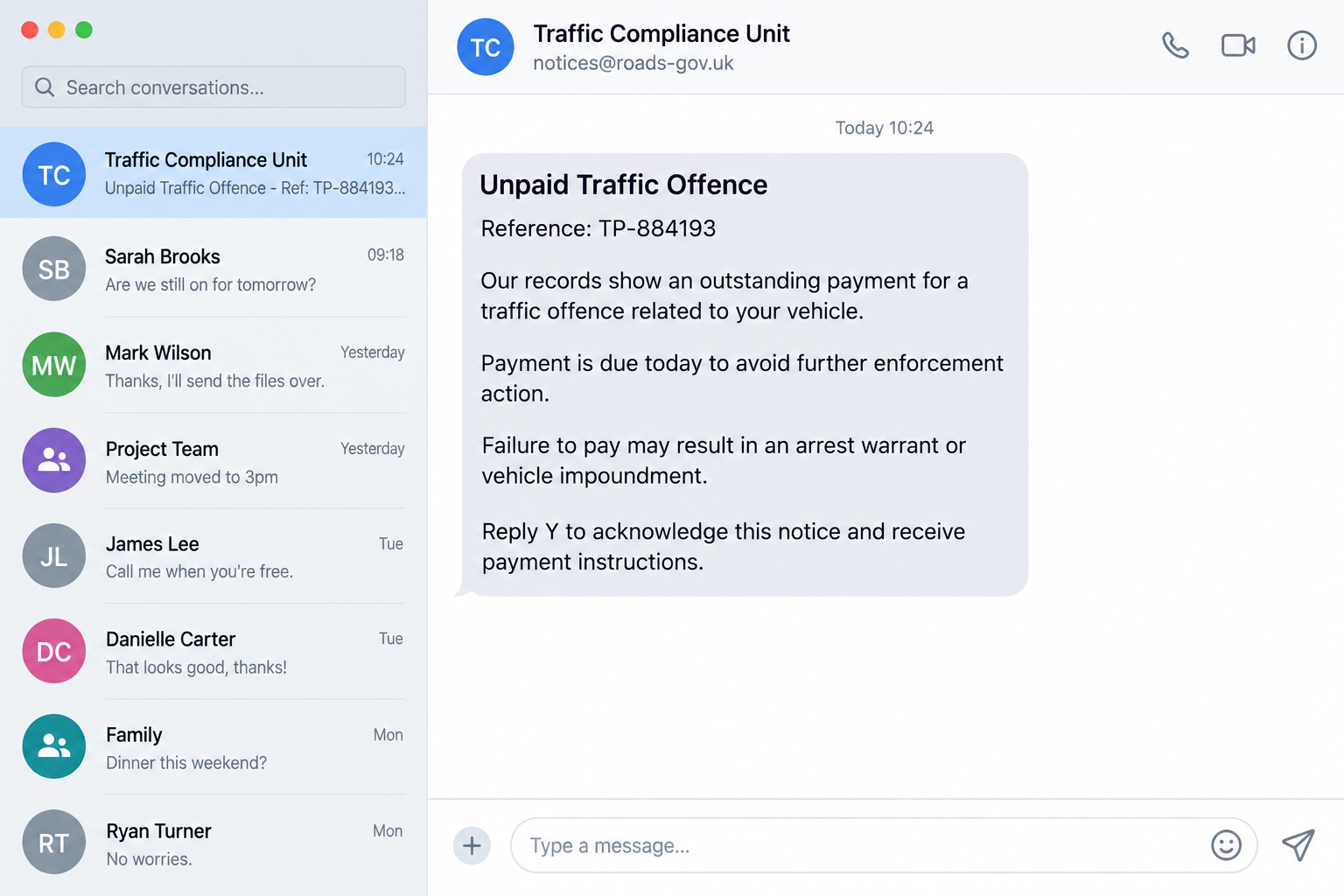
A traffic fine iMessage scam says an offense was recorded against your vehicle and the payment deadline is today. Ignore it, the sender warns, and your car could be impounded or a warrant may follow.
There is no photograph, location, or familiar case history. Instead, the notice offers one quick route out: reply with a letter or number, then use the payment link that appears.
Overview
The message combines a small fine with a serious threat
A traffic fine iMessage scam impersonates police, a road authority, a court, a toll service, or a parking agency. It claims that the recipient owes a modest amount for an offense, unpaid fee, court summons, or vehicle violation.
The amount is small enough to pay quickly, while the stated consequence is deliberately severe. Arrest, license suspension, vehicle impoundment, added penalties, and court action are used to make verification feel risky.
Real traffic procedures vary by location, but an unsolicited message demanding immediate payment through its own link should never be trusted without independent confirmation.
Replying can turn a protected message into a clickable link
Some messages tell the recipient to reply `Y`, `1`, `Q`, or another character to acknowledge the notice. This interaction can confirm that the account is active and may make an embedded link clickable inside the messaging service.
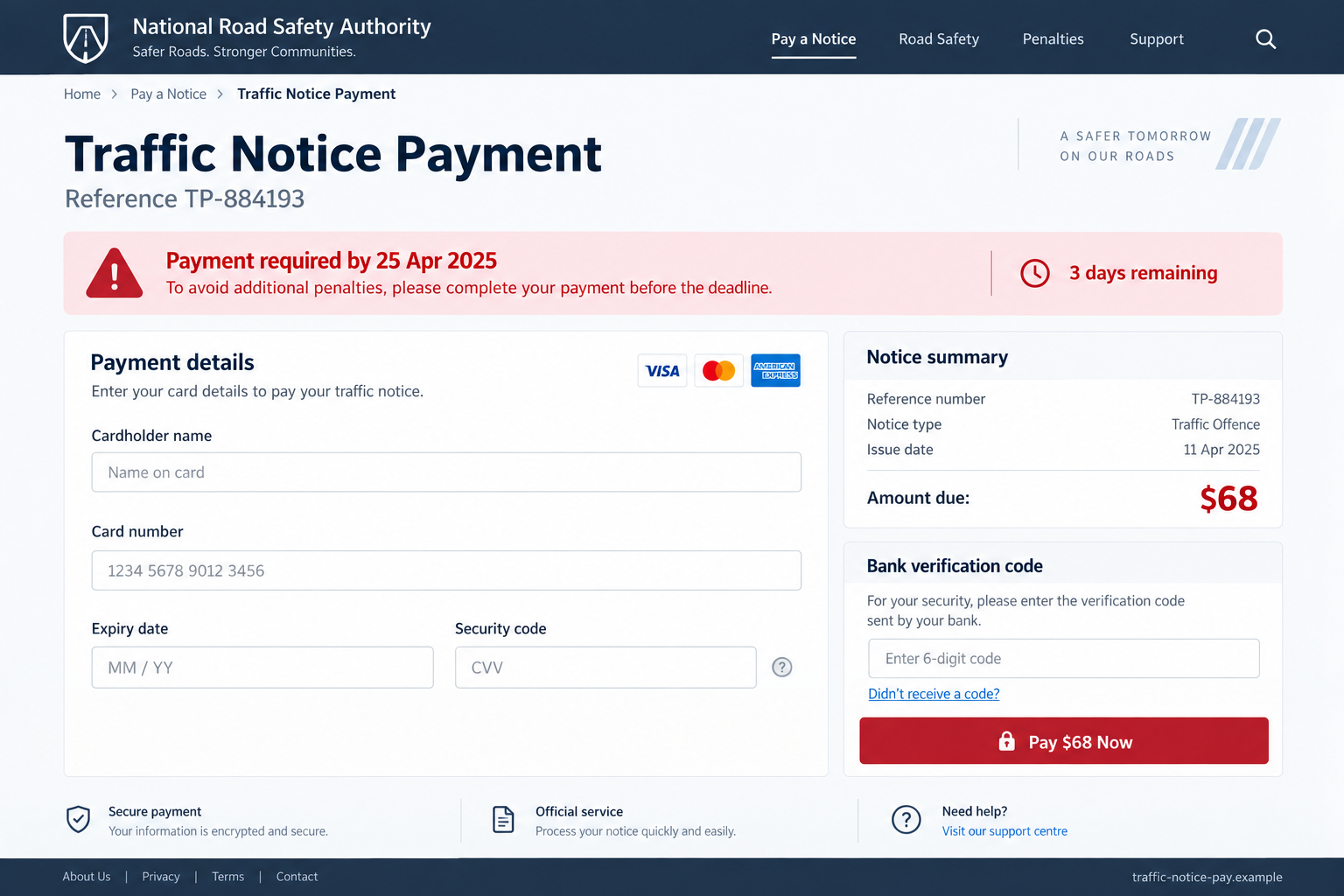
The next page imitates a government payment portal. It requests card details, online-banking credentials, or a one-time password supposedly needed to process the fine.
The small payment is only the pretext. The captured credentials can support much larger unauthorized transactions.
Police have confirmed this phishing pattern
On August 8, 2026, the Singapore Police Force warned about iMessages impersonating police, traffic police, and courts. The notices claimed recipients committed traffic offenses, owed parking fees, or failed to settle court summonses.
Police said the messages threatened arrest warrants or vehicle impoundment and directed people to click a link or reply with a code. The destination pages sought card details, banking credentials, and one-time passwords.
Warning signs include:
- a message from a foreign number or random email address;
- no vehicle registration, location, photograph, or offense detail;
- a demand to reply before the payment link becomes available;
- a deadline measured in hours;
- threats of immediate arrest over an ordinary payment;
- a domain that only resembles a police or court website;
- requests for online-banking credentials or one-time codes;
- a payment page reached only through the unsolicited message.
Why the Notice Feels Urgent Even When It Is Vague
Drivers cannot remember every camera, parking zone, toll road, or municipal rule they encountered. The scam exploits that uncertainty without needing a real violation.
The message may avoid a specific date or location because those details could be disproved. A reference number and official-sounding sender create the appearance of precision instead.
Many people also know that unpaid fines can grow. A countdown timer or last-notice label turns a normal verification delay into a supposed financial penalty.
Threats of arrest or impoundment make the recipient imagine the worst outcome before checking how the real agency serves notices.
The payment page often looks cleaner than the message. Government-style colors, a crest-shaped icon, card logos, privacy links, and HTTPS can create a false sense of safety.
None of those visual elements proves who operates the domain. Criminals can copy a public layout and obtain an encryption certificate.
How the Traffic Fine iMessage Scam Works
Step 1: A mass message claims a violation exists
The campaign sends iMessages from telephone numbers or email-based sender accounts. The notice describes an unpaid traffic offense, parking fee, toll, or court summons.
Different regions, agency names, and amounts can be inserted into the same template.
Step 2: Consequences create immediate pressure
The recipient is warned about extra fees, vehicle seizure, license action, court proceedings, or an arrest warrant. A deadline discourages independent research.
The threat is larger than the requested payment, making quick compliance feel like the safer option.
Step 3: The recipient is told to reply
The message says a reply acknowledges the notice or unlocks payment instructions. It may also exploit messaging behavior that restricts links from unknown senders until the recipient interacts.
Replying confirms that the address is monitored and can invite further contact.
Step 4: A copied portal displays the fake case
The page repeats the reference number and amount from the message. It may include a generic notice type, countdown, and payment deadline.
The portal rarely offers a verifiable photograph, full legal citation, or independent route to dispute the offense.
Step 5: Card and banking information is collected
The victim enters a name, address, card number, expiry date, and security code. Some versions ask for a bank login or account details.
The form may claim the first payment failed so that the victim submits a second card.
Step 6: A real one-time code approves the criminal’s action
The scammer attempts a purchase, wallet enrollment, bank login, or digital-token setup using the captured information. The victim receives a genuine security code.
The fake page labels that code as traffic-payment verification, hiding the transaction it actually approves.
Step 7: Unauthorized transactions reveal the theft
The page displays a receipt or error while the criminal uses the credentials elsewhere. The victim may notice card purchases, a new digital wallet, or an unfamiliar banking session.
The phishing domain and sender account can then be replaced for the next campaign.
A Police-Looking Payment Page Is Not Police Verification
Logos, shields, flags, legal footers, and accessibility links are public design elements. They can be copied without access to a government system.
A reference number displayed in both the message and website only proves that the same campaign generated both. It does not connect the notice to a real vehicle record.
Government agencies normally publish clear methods for checking fines. Those methods may use a license plate, notice number, mailed document, authenticated account, or official service counter.
The suspicious page keeps the recipient inside a closed loop. The message supplies the reference, link, support address, and payment route, so every apparent confirmation comes from the same unverified source.
A bank verification code deserves separate attention. Read the bank’s complete message to see the merchant, amount, login, device, or wallet action being authorized.
If the code describes anything other than the fine you independently confirmed, do not enter it. Contact the bank immediately.
How to Check a Traffic Fine Safely
Do not reply and do not use the link. Take a screenshot, then close the conversation.
Find the traffic police, court, toll authority, or parking agency website through a trusted government directory. Type the address yourself.
Use the official lookup process to search the reference, vehicle registration, driver’s license, or notice details. A message that cannot be found there should not be paid.
Call the public number from the official website if the online service is unclear. Ask how genuine notices are delivered and whether the agency uses iMessage.
Compare the claimed offense with real procedure. Many agencies do not threaten immediate arrest in a first unsolicited message about a small civil fee.
Check the domain carefully. Words such as police, court, road, gov, notice, and payment can appear in a privately registered address.
Never provide online-banking credentials to pay a traffic fine. Use only the payment methods documented on the verified agency portal.
Why Replying to the Message Is Not a Harmless Check
People often reply because they want clarification before paying. A single `Y` feels less risky than opening a link or sharing a card number.
The reply still gives the sender useful information. It confirms that the address is active, the message was read, and the recipient is concerned enough to engage.
Messaging systems may also change how links behave after the recipient responds. A URL that was initially restricted can become easier to open once the conversation is treated as active.
The criminal can then continue with a human-operated script. Questions about the vehicle, location, or offense are answered with claims that the complete file becomes available only after acknowledgment.
A follow-up caller may use the same reference number and pretend to be a court clerk or traffic officer. That coordination does not prove the case is real because both contacts can belong to the same group.
Replying can also lead to more messages from related accounts. The recipient may receive a final notice, payment reminder, or bank-verification request designed to build on the first response.
Do not reply `STOP` unless the sender is a verified service that uses a documented opt-out process. For an unverified phishing message, use the platform’s report-and-delete controls instead.
If you already replied but did not open the link, the main protective step is still simple: stop engaging, report the sender, and verify the alleged fine through the real authority.
A response alone does not mean your bank account is compromised. It does mean you should expect stronger follow-up pressure and remain cautious.
Do not continue simply to waste the scammer’s time. Extended conversation exposes more information about your location, vehicle, schedule, and emotional reaction.
Block the sender only after preserving the complete message and destination URL. That evidence can help the impersonated authority and messaging provider connect related reports.
Family members who share a vehicle should be warned. A second message about the same invented offense may target another person who assumes the first recipient already verified it.
Company, Address, and Fulfillment Checks
The named authority must recognize the notice
Contact the authority through its official website, not the sender. A genuine case should be verifiable without relying on the message’s link.
No match means the payment request remains unverified.
The domain must be linked from the government website
A secure connection and official words in the address are not enough. Follow the payment link published by the agency itself.
Recently registered lookalike domains deserve immediate suspicion.
Support must not exist only inside the phishing page
A chat widget, email form, or callback number on the page is controlled by the same operator. Use the agency’s separately published support channel.
Do not let the sender transfer you to a supposed court officer.
The payment should identify the correct government merchant
Review the merchant name and bank authorization message before approving anything. A personal account, unfamiliar processor, cryptocurrency wallet, or payment-app handle is not a normal traffic-fine destination.
Stop if the page requests a code for a wallet, device, or transaction you did not initiate.
What to Do if You Have Fallen Victim to This Scam
- Stop using the page. Do not retry with another card or submit another one-time code after an error message.
- Call the card issuer or bank immediately. Report phishing, freeze exposed cards, dispute unauthorized transactions, and ask whether a digital wallet or token was added.
- Review account sessions. Remove unknown devices, reset online-banking credentials, and change the password on the email account connected to financial services.
- Preserve evidence. Save the full message, sender address, reference number, destination URL, payment page, receipts, codes, and bank alerts.
- Verify the real fine separately. Contact the genuine authority so an actual notice, if one exists, is not ignored because of the scam.
- Monitor identity misuse. If the form collected a driver’s license or national ID number, follow local identity-theft guidance and review credit reports.
- Scan the device if anything was downloaded. Run a full Malwarebytes scan if the page installed a profile, app, extension, or file.
- Block known malicious infrastructure. AdGuard can reduce exposure to many phishing domains and deceptive ads, but it cannot cancel a card transaction or remove an unknown banking session.
- Report the message. Use the messaging service’s report function and notify the impersonated authority, bank, domain registrar, local police, and national fraud center.
- Ignore recovery offers. A stranger who promises to retrieve the payment for a fee may be using information collected by the first scam.
Frequently Asked Questions
Do police send traffic fines through iMessage?
Procedures vary, but the campaign documented by Singapore Police used iMessage fraudulently. Verify every notice through the authority’s official portal.
Why does the message ask me to reply Y?
The reply may confirm an active recipient and can make a link from an unknown sender clickable. It is not proof that you accepted a real notice.
Can a traffic fine lead to arrest?
Local law varies, but scammers exaggerate consequences to force quick payment. Ask the real authority about the specific case.
Is the payment page safe if it uses HTTPS?
No. HTTPS encrypts the connection to that domain. It does not prove the domain belongs to police or a court.
What if I entered my card but did not submit the code?
Contact the issuer anyway. The card details may already be exposed and used in another transaction.
Could the message reference a real unpaid fee?
Coincidence is possible. Check through the official authority’s website and pay only through its verified process.
The Bottom Line
A traffic fine iMessage scam turns a small alleged payment into a route for stealing card details, banking credentials, and security codes.
Do not reply to unlock the link. Leave the message, find the authority independently, and verify the notice before paying or sharing any financial information.

Join the discussion
0 commentsShare your experience or ask a question about this article.
Discussion
Start the conversation
Have a question or something useful to share? Add the first comment.