

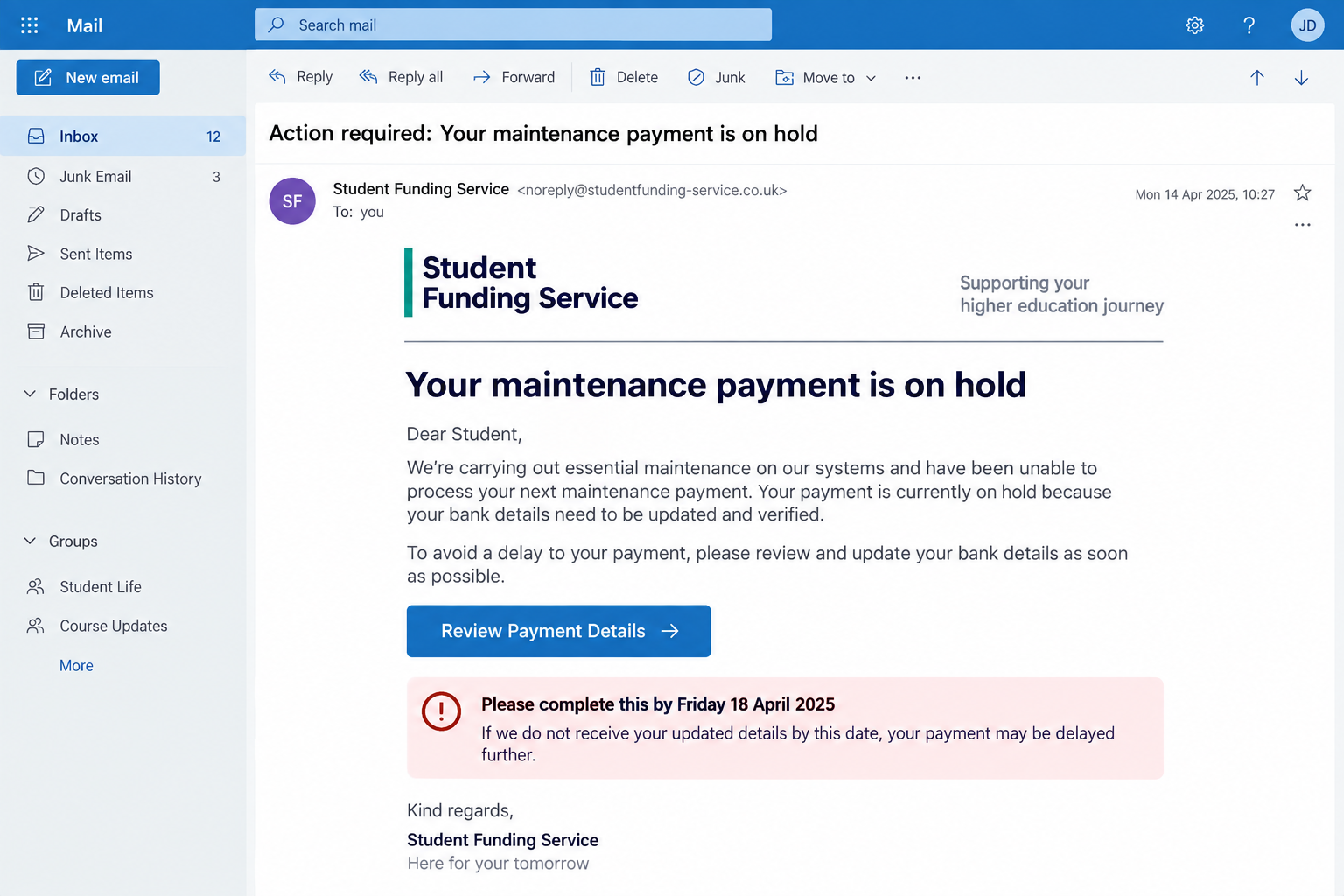
A student finance payment scam often arrives when money is already on your mind. The message says your maintenance payment is blocked, your bank details need attention, or your account will close unless you act today.
It can look like a routine administrative problem rather than an obvious trick. That timing is exactly what makes the link, form, and request for financial details so dangerous.
Overview
The message targets a payment students expect
Criminals impersonate a student funding agency and claim that an upcoming maintenance payment cannot be released. The stated problem may involve a failed identity check, an expired application, incorrect bank details, or an account review.
The recipient is pushed toward a link that appears to open a funding account. Instead, it leads to a phishing page controlled by the scammer.
This is a confirmed seasonal threat, not a dispute with a real lender. On September 1, 2026, the United Kingdom’s Student Loans Company warned students about texts, emails, and calls claiming that a payment was at risk as maintenance support began arriving for the academic year.
The form collects enough information for several crimes
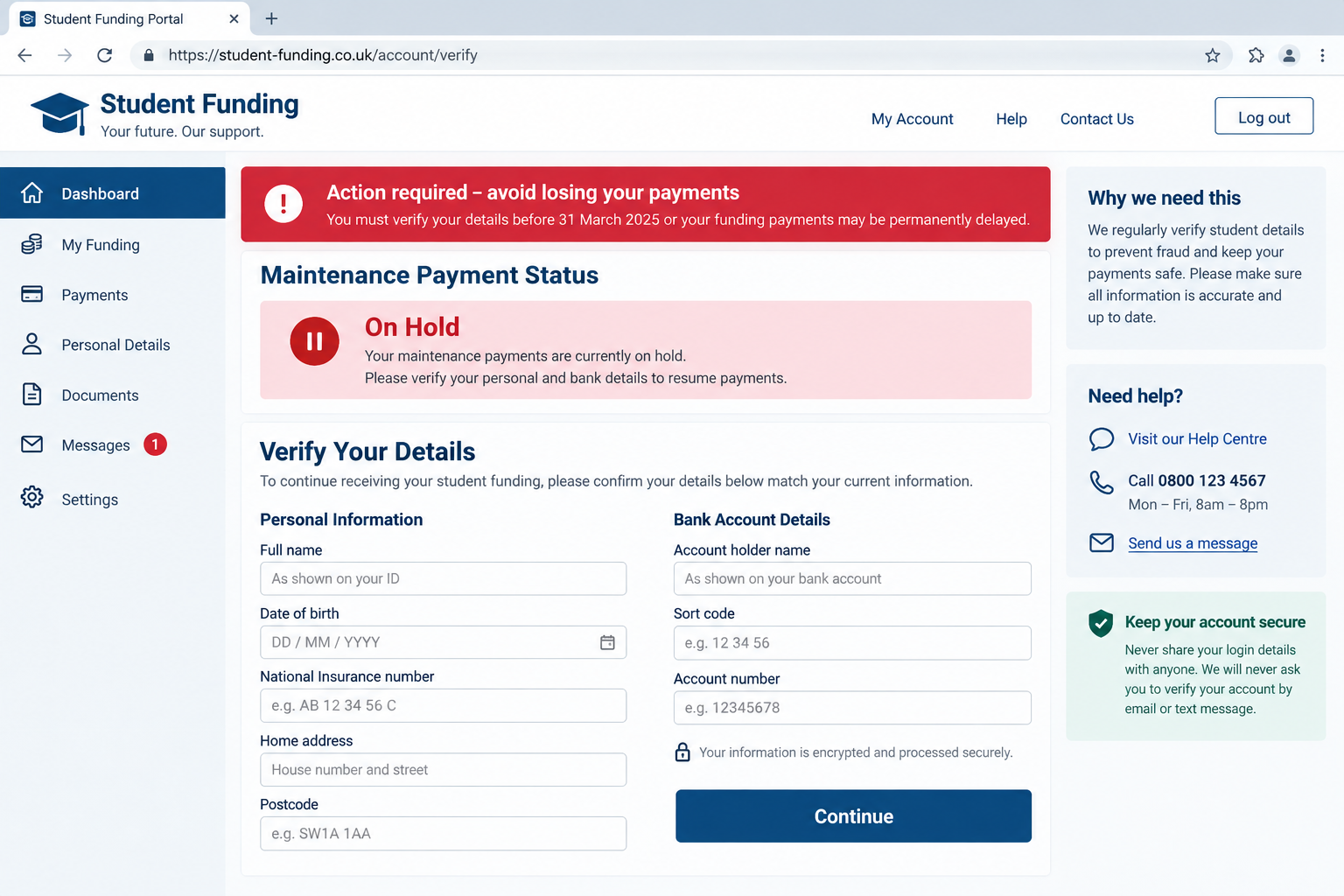
A fake page may ask for a customer reference number, date of birth, National Insurance number, home address, email password, bank account information, or card details. Some versions continue into a bank verification screen and request a one-time code.
Those details can be used for identity theft, account takeover, payment diversion, or a convincing follow-up call. The victim does not need to send money directly for the scam to cause a serious loss.
The phishing page may display a success message after the form is submitted. That confirmation does not mean a funding record was updated. It only tells the criminal that the information was received.
The safest check starts outside the message
Do not use the link, reply address, telephone number, or social media account supplied in the warning. Open the official student finance service through a saved bookmark or by typing the government address yourself.
A genuine payment problem should be visible inside the real account. If the message and official account disagree, trust the account and contact the agency through its published support route.
Warning signs include:
- A payment-on-hold notice that arrives unexpectedly by text, email, or direct message.
- A deadline measured in hours and a threat to close, suspend, or cancel the account.
- A link to a domain that contains funding words but is not the official government domain.
- A form that requests complete bank details, card information, passwords, or security codes.
- A generic greeting such as “Dear Student” when the agency already knows your identity.
- A sender who discourages you from signing in through the normal website.
Why the Payment-on-Hold Message Feels Convincing
The scam is timed around a real event. New and returning students expect maintenance support near the start of a term, and many are watching their bank balance closely. A warning about a delay therefore feels both plausible and urgent.
The Student Loans Company said about £2.6 billion in maintenance support was scheduled for roughly 1.1 million students in September 2026. A mass phishing campaign does not need to know who applied. Sending the same message widely is enough to reach many people who are expecting a payment.
The story also uses a familiar administrative inconvenience. Banks reject transfers, people change addresses, and online accounts sometimes request updated information. The criminal turns those ordinary possibilities into a reason to bypass normal caution.
A student may be budgeting for rent, food, travel, or course materials. The thought of losing access to that money creates a strong impulse to fix the problem immediately.
The message is usually brief. It does not provide enough detail to be easily disproved, but it includes a reference number, a formal sender name, and a button that appears to offer a simple solution.
Visual quality is no longer a reliable test. A clean logo, correct spelling, a privacy footer, and a secure padlock can all appear on a fraudulent page.
The scammer may even know the recipient’s university, course, or approximate payment date. Such information can come from public social media posts, earlier data breaches, compromised email accounts, or a form the victim completed elsewhere.
A correct detail proves only that the sender obtained it. It does not prove that the message came from the funding agency.
How the Student Finance Payment Scam Works
Step 1: A bulk message reaches students at the right moment
The campaign begins with an email, text, call, or social media message. It claims that a maintenance payment is pending, blocked, returned, or scheduled for cancellation.
Timing increases the hit rate. The same template may be sent before the academic year, near a known payment window, or after news about application deadlines.
Step 2: A believable problem creates urgency
The message blames an incomplete identity check, changed bank account, missing signature, security review, or expired application. It warns that the recipient must respond before a short deadline.
The requested action sounds protective: confirm the account so the money reaches the correct person. That framing hides the fact that the recipient is being asked to leave the trusted service.
Step 3: The link opens a copied funding page
The destination uses government-style colors, navigation links, security icons, and a familiar sign-in layout. Its domain may contain words such as student, finance, funding, payment, account, or support.
A padlock only means the connection to that particular domain is encrypted. It does not prove that the government owns the domain.
Step 4: The page asks for identity and banking data
The victim enters a name, date of birth, address, customer reference, National Insurance number, bank sort code, account number, or card information. Each screen is designed to feel like part of a normal verification process.
Some forms ask for the student’s email password or reuse the same password field as the real service. That can give the criminal access to messages containing application records, university details, and password reset links.
Step 5: A real security code is misrepresented
The criminal may attempt a bank login, card enrollment, or password reset while the victim is still on the page. A genuine code then arrives from the bank, email provider, or government service.
The fake page labels it as payment verification. In reality, entering the code may approve a new device, transaction, digital wallet, or account change.
Step 6: The victim sees a reassuring confirmation
After submission, the page announces that the payment is released or the update will take several hours. It may redirect to the real government website so the session appears to end normally.
That delay gives the criminal time to use the stolen information before the victim realizes the official account was never changed.
Step 7: Follow-up contact expands the loss
A caller may pose as a fraud investigator and claim that suspicious changes were detected. The victim is then asked for another code, a card number, or a transfer to a supposedly protected account.
Stolen identity data can also support new credit applications, mobile account changes, tax fraud, or later impersonation scams.
How to Check a Student Finance Message Safely
Close the message without clicking anything. Open a new browser window and navigate to the official service through GOV.UK or another verified government directory.
Sign in through that route and check the payment schedule, inbox, application status, and bank details. Do not assume the phishing page changed anything merely because it displayed a confirmation.
Compare the complete sender address and web domain, character by character. A display name can say Student Finance while the actual mailbox belongs to an unrelated or newly created domain.
Do not rely on a search advertisement for the login page. Sponsored results can be purchased by criminals. A saved official bookmark is safer.
Student funding agencies may send legitimate notifications, but an unexpected email or text should not be the place where you provide personal or financial information. The Student Loans Company says it will not ask for that information through email, text, or social media.
If the official account shows a real problem, use the contact details displayed there. A legitimate deadline will still exist after you leave the suspicious message and verify it independently.
Ask what the agency already knows. A real account should not require you to re-enter an entire identity profile through an unsolicited link just to explain a transfer delay.
Read every security code message in full. The text often states whether the code approves a login, new payee, card purchase, password reset, or device enrollment.
Never read a one-time code to a caller. Genuine support staff do not need the secret that proves possession of your device.
What the Fake Form Wants From You
The first page may collect basic details that help the criminal personalize the next stage. A name, university, telephone number, and email address make a follow-up call sound informed.
The identity page may request a date of birth, address history, customer reference, National Insurance number, passport, or driving license. Together, these details create a useful identity package.
The bank page can ask for a sort code and account number under the excuse of confirming where the maintenance payment should arrive. A card page may add the card number, expiry date, and security code.
The most dangerous field is often the one-time code. That code is generated by a real service because the criminal has initiated a real action elsewhere.
An email password is equally valuable. Student email accounts can contain funding letters, enrollment documents, housing records, scans of identity documents, and conversations that reveal trusted contacts.
The form may request permission to receive browser notifications, install a mobile profile, or download a verification application. Those requests are not necessary for checking a maintenance payment.
Even partial data matters. If you abandoned the form after entering only a telephone number and name, expect more convincing calls and messages.
Phishing operators can combine the information with data from other sources. The final fraud may occur days or months later and may not mention student finance at all.
Company, Address, and Fulfillment Checks
Verify the organization behind the message
A familiar agency name in the header is not ownership proof. Find the organization through an official government directory and compare its published domain, service name, and contact process.
Do not treat a copied registration number, crest, or postal address as verification. Public information can be placed on any page.
Inspect the complete web and email addresses
Look beyond the first familiar word. Hyphens, added terms, different country endings, misspellings, and unrelated subdomains can make a fraudulent address appear close to the real one.
The important part of a web address is the registered domain immediately before its ending. Words elsewhere can be chosen freely by the scammer.
Start a separate contact with the real agency
Do not call the number in the warning or accept a transfer to a supposed supervisor. Use the telephone number or secure message function inside the verified account.
If a caller objects to independent verification, end the conversation. A real agency does not need to keep you inside one unverified communication channel.
Confirm the payment through the official account
Funding fulfillment is visible as an application status, payment schedule, or account message. Verify the destination bank details there rather than entering them into a page reached through an alert.
A real payment does not require a card charge, crypto transfer, gift card, or transfer to a safe account. Any such request is a separate and serious warning.
What to Do if You Have Fallen Victim to This Scam
- Stop using the page and preserve evidence. Save the message, sender address, full URL, screenshots, telephone numbers, and the time each detail was submitted.
- Contact your bank immediately. Explain that your credentials may have been entered on a phishing page. Ask the bank to protect the account, card, digital wallet, and any pending transfers.
- Secure the real funding account. Open it through the official government route, change the password, review bank details and messages, and report the impersonation to the agency.
- Change reused passwords. Start with email, banking, university, mobile, and government accounts. Use a unique password for every service.
- End unfamiliar sessions. Review signed-in devices, forwarding rules, recovery addresses, and multifactor authentication settings in your email and other affected accounts.
- Respond to exposed identity information. Follow the identity-theft guidance for your country, monitor credit files, and consider protective alerts if sensitive identity numbers were disclosed.
- Report the phishing message. In the UK, suspicious emails can be forwarded to report@phishing.gov.uk and scam texts to 7726. Also notify the Student Loans Company through its official route.
- Scan the device if anything was installed. Run a full Malwarebytes scan if the page delivered a file, profile, extension, or remote-support application.
- Reduce future exposure. AdGuard can block many known phishing domains and deceptive advertisements, but it cannot invalidate stolen credentials or reverse a bank transfer.
- Warn trusted contacts. If email or social accounts were compromised, tell people not to trust payment requests or links sent from your account.
Do not wait for an unauthorized transaction before calling the bank. Credentials can be tested or sold later.
If a caller claims to recover the money for an upfront fee, stop. Victims are frequently targeted again by people pretending to be investigators or recovery specialists.
Frequently Asked Questions
Can a real student finance agency email or text me?
Yes, legitimate notifications exist. The safe response is still to leave the message and check the account through the official government website rather than using an embedded link.
What if the message includes my name and customer number?
Personal details can come from breaches, compromised accounts, old forms, or public posts. Verify the message independently because correct information does not authenticate the sender.
Does the padlock prove the payment page is real?
No. HTTPS encrypts the connection to the displayed domain. Criminals can obtain certificates for phishing domains too.
I entered my details but did not submit the final page. Am I safe?
Not necessarily. Forms can transmit information as each field is completed. Contact the relevant providers and secure the exposed accounts.
Why would the form ask for a one-time code?
The criminal may be attempting a real login, transaction, password reset, or device enrollment. Read the code message and never enter it into an unverified page.
Will updating bank details release a maintenance payment immediately?
Only the official funding service can explain its processing schedule. A phishing page cannot release a payment, regardless of the confirmation it displays.
The Bottom Line
A student finance payment scam uses a believable delay at a financially sensitive moment to steal identity, banking, and account information.
Do not fix the supposed problem inside the message. Open the official account separately, verify the payment there, and contact the agency through a channel you found yourself.

Join the discussion
0 commentsShare your experience or ask a question about this article.
Discussion
Start the conversation
Have a question or something useful to share? Add the first comment.