

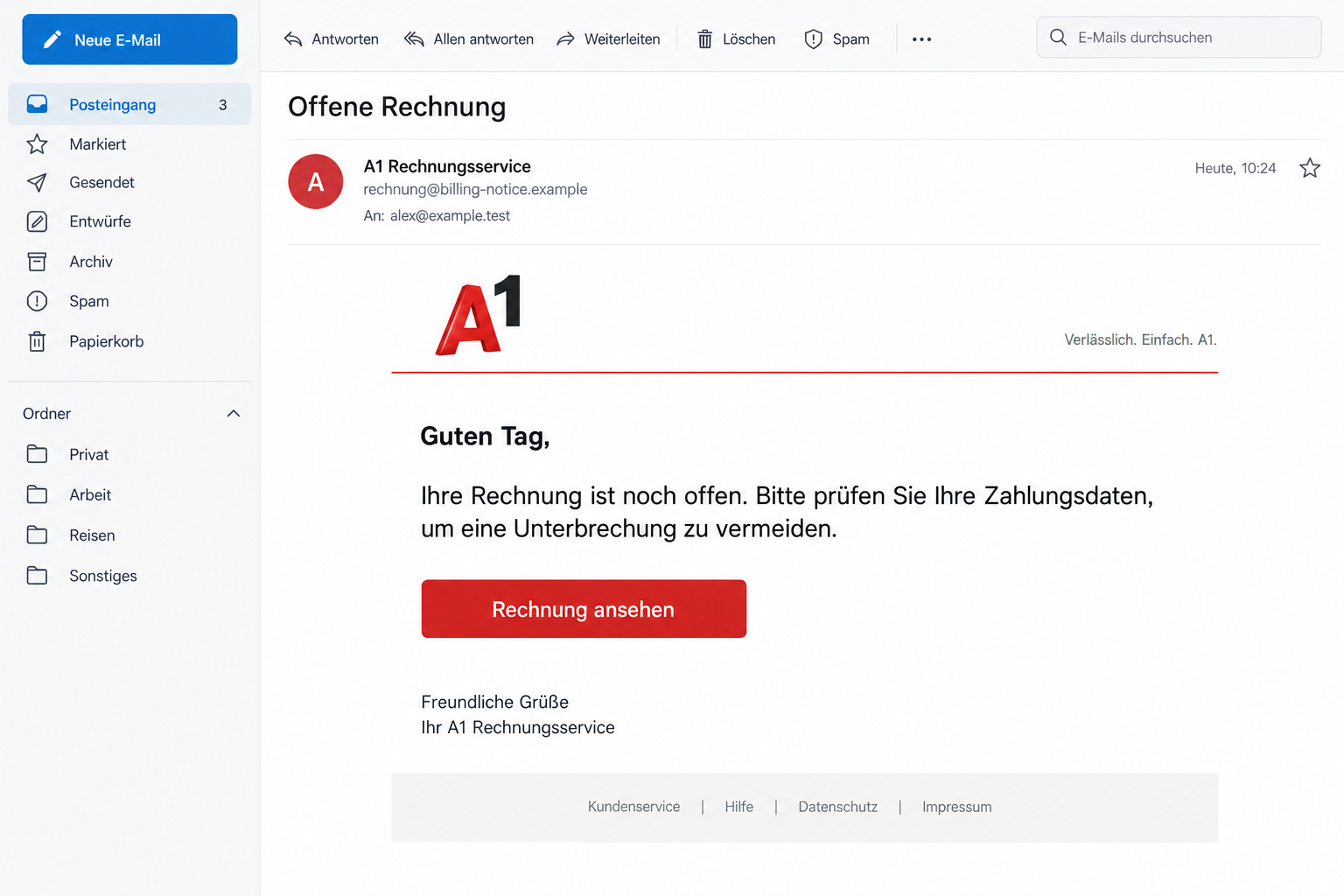
A phone bill lands in your inbox, apparently from A1. It says something needs attention, and the button looks like a quick fix.
If you’re checking an A1 invoice scam warning before paying, look closely at what happens after that first click.
Overview
A telecom bill can become a banking request
This is a fake-bill phishing campaign, not a complaint about A1’s prices or BAWAG’s banking service. Criminals are borrowing both names.
The important switch is from resolving a phone account problem to providing the credentials that protect a bank account.
That’s a much bigger request than the email first presents. An ordinary bill provides a reason to click, without announcing the eventual risk.
BAWAG has identified the specific route
BAWAG’s official warning describes unpaid A1 messages leading through a counterfeit telecom page, personal-data fields and bank selection to BAWAG login requests.
That documented sequence makes the deception clear. The bank isn’t confirming a legitimate A1 collection procedure; it’s warning customers about stolen banking access.
Your response depends on what you shared
The initial email doesn’t prove that a device is infected. Entering a banking password creates a different problem from merely reading the notice.
- Read it only: report the impersonation and check your actual phone bill separately.
- Entered bank credentials: contact the bank urgently, even without a visible transaction.
- Approved an unexpected banking operation: describe that approval precisely to the fraud team.
- Installed something from the page: address the installation as well as any exposed accounts.
The illustration above shows the billing hook. It isn’t an original email capture or evidence of a particular customer’s invoice.
Why an Ordinary Phone Bill Is Such a Good Cover
Most people don’t treat a telecom invoice as unusual. It belongs among rent, utilities and other tasks that need clearing off the list.
The scam takes advantage of that habit. You’re more likely to investigate an unpaid bill than an unexplained request for banking credentials.
You might wonder whether a direct debit failed, a card expired, or a payment landed late. Those explanations make the notice feel plausible.
A busy reader may check the amount and logo, then skip the question that matters most: who controls the website taking the information?
Someone managing several household lines has another disadvantage. They might assume the message concerns a partner’s plan or a bill they haven’t seen.
That doesn’t make the recipient careless. The email is using an everyday responsibility to make an unfamiliar form feel like unfinished administration.
The safe response isn’t to stop paying phone bills. It’s to separate a genuine billing task from the route an unsolicited message recommends.
Opening your established A1 account gives you a place to check the issue without letting the email choose the next website.
How the A1 Invoice Scam Works
Step 1: The message gives you an unpaid-bill problem
The opening stage impersonates a familiar provider and makes a routine payment sound unresolved. It creates a reason to leave the inbox.
Notice the difference between a claim and a record. A message saying you owe something isn’t the same as an invoice inside your account.
Before responding, ask which phone line, billing period and existing account the notice supposedly concerns. Don’t supply missing details to help it sound accurate.
If the email is generic, you don’t need to find a reason it might apply. Let the genuine provider explain any actual outstanding balance.
Even a realistic sender label is only a label. The wording you see beside an email can be chosen to resemble customer service.
Keep the original message if you’re concerned. Its sender information and actual link destination can be useful when the bank investigates the attempt.
Step 2: A copied A1 page makes the request feel familiar
The next stage carries the provider’s visual identity into the browser. Familiar colors and a tidy layout can make the transition appear uneventful.
A page can resemble customer service while belonging to someone entirely different. Its appearance doesn’t establish authority over your phone contract.
For example, a billing-themed page on an unrelated domain remains unrelated even if the address contains the letters A1 somewhere.
Don’t hunt for spelling mistakes as your only test. A well-written page can be fraudulent, and an untidy genuine message can still need independent checking.
Close the email and open Mein A1 yourself. A bill visible there is more useful than a convincing page reached through a stranger’s button.
If you’re unsure, close the tab. You haven’t lost a genuine payment opportunity by taking the extra minute to open the official account.
Step 3: Personal details and bank selection bridge the gap
Bank selection can make the process resemble an ordinary payment choice. It supplies a familiar explanation for why a bank appears after a telecom bill.
That resemblance is why the transition deserves attention. Choosing a bank on a page doesn’t establish that the page can safely receive that bank’s credentials.
Personal fields also make the form feel administrative. A name or address request may seem harmless compared with the banking request that follows.
Think about the whole task, not one box at a time. The destination handling the information matters before you reach the password field.
Don’t select another bank to explore what happens. Testing extra branches adds exposure and isn’t needed to decide whether the original message is trustworthy.
The safest payment check happens outside this form, using your actual bill and a payment method reached through the provider’s genuine account.
Step 4: The page asks for access instead of resolving the bill
The bank-login stage is where the billing pretext becomes an account-security incident. A password handed to an impostor can be reused against its owner.
You don’t need to finish the form for the information to become sensitive. Treat credentials typed into an untrusted page as potentially exposed.
A failed submission isn’t reliable reassurance. An error message may tell you nothing about whether information was already received.
This campaign warning doesn’t establish a universal code, app-installation or transfer stage. Those are details to report if they happened in your own case.
Don’t complete an additional request simply because the first screen accepted your details. Stop the interaction before providing anything else.
If a real banking notification then arrives, read the action it describes. A notice about an operation isn’t permission to approve it.
A1 and BAWAG Are Being Impersonated
A1 and BAWAG are legitimate services being impersonated. The accusation belongs to the false message and counterfeit form, not their ordinary customers or staff.
A1’s security portal lists fake invoice and payment-data messages and directs customers toward Mein A1 for billing checks.
Use that distinction when explaining the incident. Tell support you encountered an imitation, rather than assuming the genuine company sent the request.
Otherwise, you may ask the telecom provider to fix a banking exposure it cannot secure. A1 can clarify billing; your bank controls banking access.
Similarly, a suspicious email alone isn’t proof that either company leaked your details. The message can exploit a recognizable brand without an established breach.
A real contract number wouldn’t settle the matter either. Information appearing in a notice doesn’t authenticate the website behind its button.
If the bill turns out to be genuinely overdue, resolve it through A1 independently. That doesn’t make the impersonator’s banking form safe.
Check the Request Without Giving It Another Chance
Start from the account you normally use
Use the Mein A1 app already on your device, or type the provider’s known address yourself. Avoid a search advertisement promising instant billing help.
Compare the claimed issue with the invoice history. Look for the period, amount and payment status, not just a vaguely similar notification.
If someone else manages the plan, ask them directly. Don’t forward the suspicious button and tell them to pay it on your behalf.
Share a screenshot of the claim instead, with sensitive details covered. That lets them understand the problem without opening the suspected destination.
Read any banking prompt as a separate decision
A bank’s screen may describe signing in, registering a device or approving a payment. Those actions have different consequences.
Don’t let the billing page explain away wording that contradicts the task. If you’re reviewing a phone bill, an unfamiliar approval needs independent confirmation.
Ask yourself whether you started that banking action, understand its purpose, and recognize any recipient or amount shown.
When those answers don’t match, decline and contact the bank. You don’t need to prove criminal intent before refusing an unexpected approval.
Keep evidence that explains the change of brands
Useful evidence shows the journey: the alleged A1 invoice, the website address, the bank-selection screen and the information you were asked to provide.
A screenshot of a logo alone doesn’t explain the incident as clearly as the address and request visible together.
Record what happened in order while you remember it. Include whether you used autofill, submitted a form or approved a separate banking prompt.
You don’t have to recover every screen. Don’t revisit the phishing page just to produce a more complete record after you’ve recognized it.
What to Do if You Have Fallen Victim to This Scam
-
Tell the bank first if its credentials were involved. Explain that an apparent A1 bill led you to a banking form.
Say which information you entered and approximately when. Mention any code, notification approval, download or transfer separately, rather than saying only that you clicked.
BAWAG publishes +43 59905 995 in its campaign warning. Alternatively, use the contact route inside the genuine banking app or your existing banking documents.
Ask what must be blocked or reset. The bank may need to address sessions, registered access or pending operations, not just the password.
-
Replace exposed passwords through genuine services. Follow the bank’s recovery instructions, using a trusted device and a page you reached independently.
If the password was reused elsewhere, replace it there too. Prioritize email because it may be used to receive resets for other accounts.
A password change doesn’t automatically cancel an already authorized transaction. Keep the bank involved if there was an approval or money movement.
-
Check transactions and report anything unfamiliar. Review pending operations as well as posted entries, then ask the bank about the appropriate dispute procedure.
Keep dates, recipients, amounts and case references. Describe what you actually did, including approvals, so the fraud team can assess the sequence accurately.
Don’t wait for the amount to become large before asking for help. An unfamiliar entry can matter even when the original bill looked routine.
-
Send the false message to the genuine reporting teams. A1 lists abuse@a1.at; BAWAG lists stop-phishing@bawag.at.
Attach the original email where possible, rather than copying only its visible text. Preserve a private copy before removing it from your inbox.
Reporting helps identify the attempt, but it doesn’t itself freeze your account. Use customer support urgently for exposed banking access.
-
Address anything installed or permitted by the site. Remove an unfamiliar download or browser permission and follow device-specific recovery guidance.
For supported devices, Malwarebytes can help inspect suspected malicious software. Its result cannot undo credentials already submitted to a phishing form.
AdGuard can reduce risky ads and some unwanted browsing exposure. Use it as an additional layer, not a substitute for checking banking requests.
-
Keep the real bill separate from the fraud incident. Confirm the account’s actual balance with A1 once urgent banking protection is underway.
If a legitimate payment is due, complete it through the established provider route. Never resume the suspicious form because you still need to settle the bill.
For a business account, tell the person responsible for payments. They should know not to process a second demand from the same email.
-
Expect follow-up contact to need fresh verification. Someone claiming to fix the incident doesn’t earn trust by knowing the earlier invoice story.
End unexpected calls requesting another approval or banking secret. Contact your bank through the route you’ve already established, then ask about the claimed instruction.
If there was a loss or identity misuse, retain the bank’s case number and report the incident to local police using official contact information.
Frequently Asked Questions
Is every A1 billing email fake?
No. Genuine billing correspondence exists. Check the invoice through your established A1 account rather than treating every message, or every familiar logo, as automatically trustworthy.
Why does the page ask me to choose BAWAG?
Bank selection can disguise the move from a telecom problem to banking access. It doesn’t authenticate the page collecting your information.
Can I safely continue if no money left my account?
No. Exposed credentials need attention before a loss appears. Stop the form and ask the bank what access or pending operations require protection.
Does clicking mean my phone has malware?
Not necessarily. A phishing page can steal submitted information without installing software. Report downloads or unusual permissions if those occurred.
Should I send the email to A1 or BAWAG?
Both have reporting routes. Banking exposure also needs immediate bank support; forwarding the email to the telecom provider isn’t enough.
What if I really do owe A1 money?
Pay the genuine invoice through the official account. A real balance doesn’t turn an impersonator’s link into an authorized payment channel.
The Bottom Line
Don’t resolve a phone bill through this A1 invoice scam’s banking form. The documented route asks for bank access under a telecom billing pretext.
If you entered BAWAG credentials or approved something unexpected, contact the bank now. Then check the real invoice separately through Mein A1.








