

An email says ANWB has set a free car cooler aside for you. Someone apparently noticed you hadn’t claimed it and kept one back.
The ANWB coolbox email scam makes the offer sound personal. A small confirmation is supposedly all that stands between you and the gift.
Overview
The reserved cooler story is a false message
Autokoelbox means car cooler. In these emails, the promised gift provides a reason to follow a confirmation link you didn’t request.
This warning concerns people impersonating ANWB. It isn’t a claim that the real motoring organization or its legitimate products are fraudulent.
Two documented versions use different deadlines
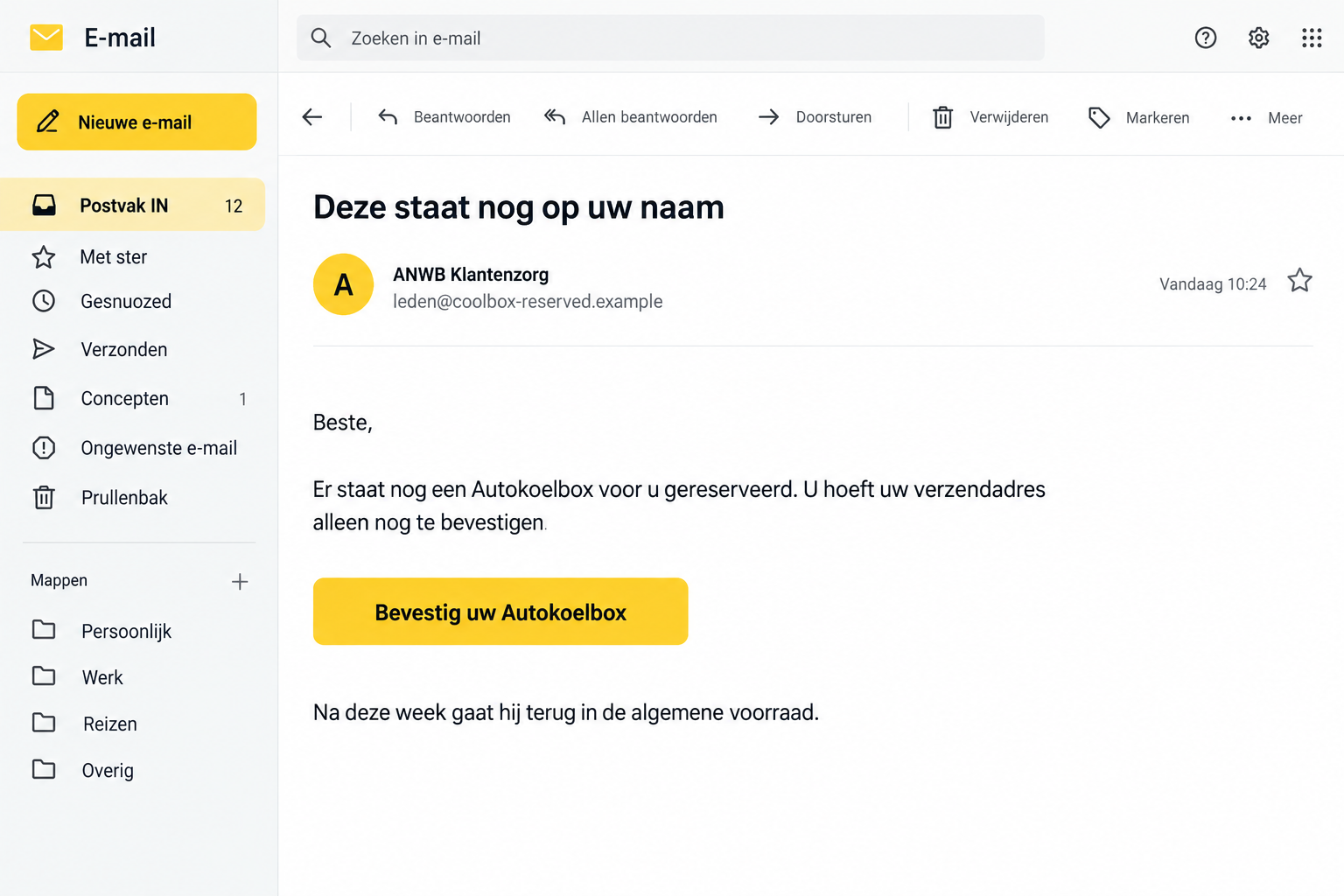
A September 16 false-email specimen claims a cooler was held back for the recipient and will return to general stock after the week.
A September 11 example instead demands address confirmation within 48 hours or says another person will receive it.
Both were identified as false messages by Fraudehelpdesk. You don’t need to rely on somebody’s disappointing shopping experience to recognize the impersonation.
The gift doesn’t justify an unverified form
The original messages establish the lure and link, not every possible screen beyond it. A fixed shipping fee or recurring subscription isn’t proved here.
- Don’t confirm the gift through the unsolicited email’s button.
- Verify any real promotion through ANWB’s own account or service channels.
- Protect information you actually submitted, rather than assuming every possible exposure occurred.
- Keep the original message for reporting, then remove the attempt from your inbox.
The image recreates the reserved-gift approach with fictional sender details. It shouldn’t be read as a genuine ANWB dispatch notification.
The Clever Part Is the Favor Someone Supposedly Did for You
This pitch isn’t simply a flashy prize announcement. It gives the impression that a helpful staff member has already taken care of something.
The recipient is placed near the end of a process: the item exists, the reservation is made, and only confirmation remains.
That can make a person skip the first question. Instead of asking why they qualified, they start wondering which address the parcel should use.
The apparently helpful gesture also creates a mild sense of obligation. Someone saved the gift, so responding feels courteous rather than risky.
A stock deadline supplies the final nudge. You aren’t threatened with arrest; you’re encouraged not to waste a benefit that’s already yours.
That softer tone can be deceptive precisely because it doesn’t sound aggressive. Fraudulent messages don’t all need capitals, warnings and obvious financial threats.
A cooler is also believable as a motoring-related promotion. It fits travel and car use better than a completely unrelated luxury prize.
None of those features authenticates the sender. A sensible-looking product and friendly wording can still lead to a destination outside the real organization.
How the ANWB Coolbox Email Scam Works
Step 1: A familiar organization appears to offer a member benefit
The message places the gift in the context of a customer relationship. If you’re an ANWB member, that background can seem natural.
If you’re not a member, you may wonder whether a past booking or purchase explains it. Don’t fill that gap with your own guess.
If you can’t identify the promotion, ask ANWB before claiming it. Don’t build the missing explanation from a purchase or booking the message never mentions.
Look at the full sender details, but don’t rely on the display name. Customer care is a description an impostor can put beside an address.
Personal phrasing doesn’t necessarily mean the sender knows your membership status. A message can sound individually prepared without being an authenticated account communication.
Before acting, ask whether you recognize the offer from the organization itself. A gift appearing only in an unsolicited email needs checking.
Step 2: The reservation creates a reason to hurry
The promised benefit is presented as temporarily held for you. That turns ignoring the message into an apparent loss.
Think about the choice it tries to create: claim the cooler now or let somebody else have it. Independent verification is quietly left out.
You can put that option back. Close the email, locate the genuine organization’s contact information, and ask whether this exact offer exists.
Don’t let a stock claim determine how much checking you do. A deadline in a false email isn’t an obligation imposed by the real provider.
The message may not need to ask for money at this point. Its immediate goal is to move you toward the confirmation route.
Accepting the story can make later requests feel like part of dispatch. That’s why checking the invitation before entering any information is worthwhile.
Step 3: The confirmation link takes over the claim process
The next action is a button rather than a question about an identifiable promotion. The email wants its destination to handle the supposed benefit.
A form reached that way might ask for contact details, login information or payment information. Stop if it asks for anything you haven’t independently verified.
These are exposure decisions, not a claim that every documented cooler email used the same checkout. The linked destination needs its own assessment.
A name and address can feel routine for shipping, but they still belong to you. The word delivery doesn’t prove who is collecting them.
A login request is more sensitive. Don’t use your member password to unlock a gift on a website you can’t authenticate.
If a payment request appears later, it doesn’t become legitimate because you already completed earlier boxes. Pause before supplying a card or banking approval.
You can abandon the process at any stage. Time already spent answering questions isn’t a reason to continue after the request changes.
What a Real ANWB Offer Should Let You Verify
Real organizations can run promotions. The useful rule isn’t that every free item is fraudulent, but that the organizer and claim route must be genuine.
ANWB’s phishing guidance directs uncertain recipients to their secure member environment and explains where to find its correspondence.
Use an established login route, not the cooler button. Check whether the message or offer appears in communications you can connect to your account.
If you need help, contact member services through the organization’s official website. Describe the subject and promised item, without following the suspect form.
Ask whether there is a campaign with that name and whether the destination belongs to it. You don’t have to disclose a password to ask.
A genuine promotion should also provide understandable eligibility and terms. Those explain why you qualify, what you receive, and whether any legitimate cost exists.
Don’t substitute a different real giveaway for verification of this one. Finding an ANWB competition elsewhere doesn’t authenticate the email in your inbox.
Likewise, a product photo doesn’t show that somebody reserved an item in your name. Images can describe an object without proving a dispatch arrangement.
If the offer can’t be connected to the real organizer, leave it alone. You don’t need to investigate a cooler’s manufacturing quality to reject impersonation.
The Information Request Matters More Than the Gift
Don’t create a delivery task for yourself until the offer is verified. A reservation claim isn’t an order you placed or a parcel you can independently track.
If a household member asks about the cooler later, show them where the story began. That prevents a second person from assuming you authenticated the offer.
The same applies to an inbox shared by colleagues. Mark the suspicious request clearly rather than passing it along as an approved customer benefit.
Once the claim has been rejected, keep it out of shopping reminders. A calendar note saying Confirm Cooler can accidentally revive the original pretext weeks later.
Preserve evidence for reporting in a separate folder instead. You can retain the record without leaving the claim button among errands you intend to finish.
An address request isn’t automatically harmless
A delivery pretext makes contact information seem relevant. But giving it to an unknown collector can help make later approaches more convincing.
That doesn’t mean sharing an address automatically compromises a bank account. It means future callers or emails might know details that feel reassuring.
If you supplied your phone number, be alert to messages about the cooler, dispatch or a problem with the claim. Verify each separately.
Someone knowing which gift you expected isn’t evidence of membership-service access. They may simply be using information from the earlier interaction.
A password needs a different response
Contact details and credentials aren’t equivalent. A reused password may affect accounts that have nothing to do with the cooler.
If you typed one into the claim page, change it from the genuine service. Also replace it wherever else you used the same combination.
Start with your email account if it shares that password. Access there may affect reset messages for other services.
Keep a record of which accounts used the exposed credential. That makes recovery more reliable than trying to remember them while answering further suspicious messages.
A later charge must be checked on its own facts
If you supplied payment details, use your card statement and bank’s records to find out what happened. The email’s gift description isn’t a receipt.
Preserve any amount, merchant descriptor or terms you actually saw. Don’t assume an unfamiliar charge is a confirmed subscription without checking its details.
Ask the issuer about both payment security and disputed transactions. A replacement card and a dispute address different parts of the problem.
Don’t pay a second amount to unlock the promised parcel or obtain a refund from an unverified sender. Verify the request before considering it.
What to Do if You Have Fallen Victim to This Scam
-
Stop using the claim link. Close the browser page and don’t return to it to complete missing details.
If the email merely arrived, preserve it for reporting. You don’t need to cancel real ANWB membership because somebody copied the organization’s name.
A membership cancellation wouldn’t remove information already handed to an impostor. Focus on what the false form received.
-
Change any member or email password you entered. Use the account’s authentic website or app, reached without the cooler email.
Look for unfamiliar account changes and review available sign-in protection. Contact the genuine service if you can’t regain access.
Don’t rely on an on-screen failure as evidence the password stayed private. Treat an untrusted credential request seriously even without a successful login.
-
Call your payment provider if banking details were involved. Explain the false ANWB gift, the information provided and any approvals made.
Ask the provider about blocking exposed payment access and contesting entries you don’t recognize. Keep its case reference and required evidence.
If no card information was supplied, say that clearly. Accurate exposure details help avoid confusing an address-confirmation incident with a payment incident.
-
Report the original email to ANWB. Its reporting instructions list valse-email@anwb.nl and request the original message as an attachment.
Fraudehelpdesk also accepts suspicious emails through valse-email@fraudehelpdesk.nl. These are reporting routes, not promises of compensation or an individual investigation.
Keep a copy with dates and screenshots before deleting the message. Don’t attach your full card details or usable account codes.
-
Check your device if the claim led to a download. Remove unrecognized software or unexpected browser permissions rather than accepting more instructions from the page.
Use Malwarebytes where supported to investigate software exposure. A clean result doesn’t tell you whether a form collected your password.
AdGuard can add protection against some malicious browsing and advertising routes. It doesn’t validate member benefits or reverse payments.
-
Watch for a second story built around the cooler. A message about shipping trouble or refund verification may be another untrusted request.
Don’t respond with a security code, identity document or additional payment merely because the caller knows the item you expected.
Return to ANWB or the bank using established contact information. Confirm the new claim without using the number or link supplied by that caller.
-
Help anyone else who received the offer. Explain the reserved-gift pretext rather than blaming them for liking a free item.
Share a redacted screenshot, not an active claim link. Keep the real organization’s reputation separate from the impersonator’s message.
If a loss or identity misuse occurred, report it through the appropriate police channel and retain the report reference for your provider.
Frequently Asked Questions
Is the reserved ANWB Autokoelbox email genuine?
The documented September messages are false emails. Don’t confirm the reservation through their links; verify offers with the real organization.
Does being an ANWB member make the message safe?
No. Membership makes the story plausible, but it doesn’t authenticate the sender or the destination collecting your information.
Is a subscription definitely hidden behind the cooler offer?
That isn’t established by these specimens. If you encountered terms or a charge, preserve them and have your payment provider assess that actual transaction.
What if the email only asks for an address?
Verify the recipient of that information before sharing it. A shipping explanation alone doesn’t establish a genuine reservation.
Can ANWB still run legitimate giveaways?
Yes. The warning targets specific false messages, not every competition. Check the exact promotion and official entry route independently.
Do I need a bank replacement card after reading the email?
Reading alone doesn’t establish card exposure. Contact the issuer if you supplied payment information or see unfamiliar transactions.
The Bottom Line
Don’t claim a cooler through this ANWB coolbox email scam. A friendly reservation story doesn’t make an unsolicited confirmation link genuine.
If you responded, secure the passwords or payment details you actually exposed and report the email. Verify real member benefits directly with ANWB.








