

Your parcel is apparently waiting at customs. A PostNL email says one small payment will get it moving again, with delivery close behind.
The PostNL customs email scam arrives at exactly the kind of moment when you want a simple answer: where is my package?
Overview
A tiny customs charge can hide a false request
The email claims a parcel can’t be released until a small amount is paid. It’s a delivery problem with an apparently convenient solution.
The scam is the impersonation and payment route, not the fact that import charges can exist. PostNL is a real delivery company being abused.
Recent false emails show several versions
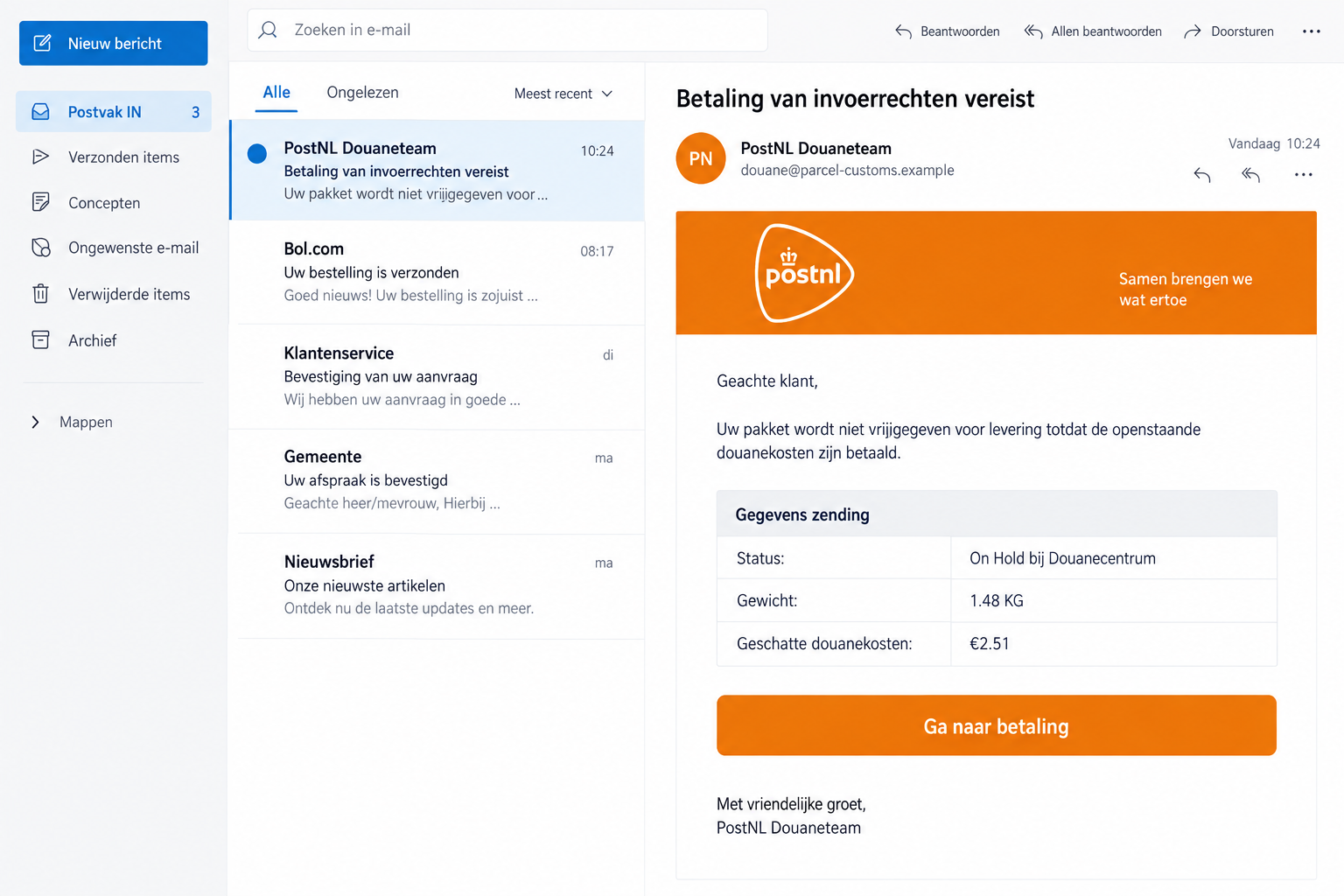
A September 28 specimen lists €2.51, a 1.48 KG weight and an on-hold customs status, then links to payment.
Other September examples threaten a return within 24 hours or use a tracking-update button. Fraudehelpdesk identifies these messages as false.
The safe check starts outside the email
PostNL says it never asks for payment through a payment link in an email or SMS. Use its app or independently opened tracking page.
- Don’t pay through an unsolicited customs button just because the amount is small.
- Check your actual order and tracking record using information from your purchase.
- If a card or bank login was submitted, contact the relevant provider immediately.
- Report the message without forwarding an active payment route to another shopper.
The illustration shows the fee pretext, not an authentic delivery record. Its sender and interface details are fictional.
Why the Email Can Feel Like Part of Your Order
Online shopping involves several parties. A retailer takes the order, another company carries it, and import processing may add a delay.
That leaves room for uncertainty. A shopper can receive a message from an unfamiliar department and assume it’s simply the next handoff.
The scam fits inside that gap. It doesn’t have to persuade you to buy something new; it claims to unblock something you already want.
You might be waiting for a gift, replacement part or item for work. Paying a couple of euros can feel easier than risking another delay.
A tracking-style table adds apparent detail. Weight and a status label resemble the information people expect to see in a shipping update.
But those fields are claims made by the message. They aren’t evidence that the sender controls the parcel or has checked a customs record.
The figure can also be difficult to assess from memory. Few customers know the precise packed weight of every order they’re expecting.
A small mismatch may be dismissed as packaging. That’s why the order’s actual tracking route provides a better test than the email’s level of detail.
How the PostNL Customs Email Scam Works
Step 1: The message assigns your parcel a problem
The email starts with a delivery obstacle and suggests the sender already has the shipment in its system.
For a reader expecting several parcels, the story can seem plausible before they’ve matched it to any specific order.
Don’t make that match by guesswork. Compare the identifier with the retailer’s dispatch record or information already available in your delivery account.
Even a correct-looking number isn’t enough on its own. The request’s destination and payment method still need independent verification.
If no parcel is expected, don’t invent a forgotten purchase to explain it. You can report the notice without opening its link.
A family member’s order should be checked with that person directly. Forwarding the payment button can move the same trap into a second inbox.
Step 2: The fee is made to look easier than the delay
The low amount encourages a quick decision. You may compare the fee with the value of the parcel rather than the risk of the form.
That’s the wrong comparison. The form might receive payment information usable beyond the amount described in the email.
One September 8 false message adds a 24-hour return threat. That is the sender’s claim, not an independently verified customs deadline.
Don’t pay solely to avoid the consequence it describes. A real deadline should be checked through the genuine parcel service.
There is no need to negotiate with the email’s supposed customs team. Asking it for more reassurance keeps verification inside the same untrusted conversation.
Step out of that conversation instead. Find the order yourself and check what the carrier actually says about it.
Step 3: A button replaces independent tracking with the sender’s route
Some messages ask for payment directly. Others soften the request by offering details or a shipment update first.
The September 30 specimen uses a shipment-viewing button while saying customs costs remain outstanding.
A button’s wording doesn’t determine its safety. Viewing details can still be the invitation that moves you onto an impersonation page.
Check where the action takes you, not whether it sounds less alarming than Pay Now. Don’t open the destination just to inspect more convincingly styled screens.
The public email examples don’t establish an identical downstream checkout for every version. Your actual interaction determines which information needs protection.
If you land on a request for a password or payment data, stop and reopen tracking through your existing delivery app.
Step 4: A routine delivery task can become a security incident
Once sensitive information is entered into an untrusted form, the issue is no longer only whether the package will arrive.
A card number, reused password and banking approval require different responses. Tell your provider which of those was involved rather than assuming they are interchangeable.
If a genuine verification message appears, read what it authorizes. A code isn’t automatically safe because a website calls it a delivery confirmation.
No wallet-registration or code stage is established for all these specimens. This is a precaution for anyone whose own payment attempt included one.
An error after submission also doesn’t prove the information wasn’t collected. Avoid retrying with a second card to make the supposed customs payment succeed.
Instead, contact the payment provider and explain the false parcel message. Let it assess what access or transactions need attention.
Real Import Charges Don’t Make the Fake Link Safe
PostNL can send legitimate information about import processing. That’s why a blanket rule saying all customs-related messages are scams would be misleading.
Verify the parcel before deciding what to pay. A real delivery record is a better starting point than the email’s ready-made checkout.
Use the app you’ve already installed or open the official website yourself. Start tracking with the details from your order, not the phisher’s button.
If the independent record shows a genuine charge, follow the service’s authenticated payment instructions. Don’t return to the suspicious message because its amount looks similar.
A real charge and a false email can coexist. Scammers may reach someone who happens to have an international parcel due.
That coincidence doesn’t establish that the retailer leaked information or that the carrier sent the imitation. Keep conclusions attached to what you can actually verify.
Similarly, recognizing this campaign doesn’t erase genuine import costs. If you’re uncertain about a real charge, ask the carrier about that specific shipment.
Keep the financial question separate from delivery frustration. A delayed parcel isn’t itself proof of fraud by the retailer or carrier.
Read the Details That Actually Help You Decide
A shipment identifier should connect to your own records
Locate the retailer’s dispatch message or order account. Compare the carrier and shipment information with the notification you already trusted.
If the unexpected email is the only place the parcel appears, you don’t have a reliable independent match.
Don’t reply with a real tracking number to correct the sender. That may give an impersonator information it didn’t previously have.
If a household has multiple deliveries, keep a simple list of retailers and expected carriers. It reduces the temptation to explain an unrelated alert away.
The sender’s name doesn’t identify the collector
A mail reader may show PostNL or Customs Team prominently while hiding the address. Expand the details before trusting the label.
PostNL also warns that sender details can be altered. An address that appears familiar shouldn’t override an inconsistent payment request.
The recipient of a payment matters too. If the bank shows an unfamiliar merchant or purpose, don’t approve it based on the email’s branding.
Preserve that information for the issuer if something went wrong. It may explain the transaction more usefully than a screenshot of the orange header.
Don’t let a tiny figure limit your response
A displayed fee and exposed payment access are separate issues. The first tells you what the message promises; the second tells the bank what to secure.
If the website took your card information but showed no completed payment, tell the issuer both facts. It can advise on the appropriate precautions.
Check subsequent statements for entries you don’t recognize. Record them rather than assuming a small charge belongs to the parcel.
If you do recognize a genuine import payment, keep that receipt separate. Mixing real and false payment attempts can make the timeline difficult to explain.
What to Do if You Have Fallen Victim to This Scam
-
Leave the customs-payment page. Stop entering details, cancel unexplained prompts and don’t follow its troubleshooting instructions.
If you only received the notice, check tracking independently and report it. An email sitting in the inbox doesn’t establish that a card was stolen.
-
Notify the issuer of any card you supplied. Explain that you entered it on a fake PostNL page, including whether you approved a separate operation.
Use the issuer’s trusted contact route and ask about blocking, replacement and pending charges. Don’t phone a number appearing inside the parcel email.
If banking login information was involved instead, make that clear. Protecting a card alone may not address exposed online-banking access.
-
Reset any password used on the false site. Change it through the genuine account, then replace reused credentials on other services.
Review account details for changes you didn’t make. If you can’t access your genuine account, contact its support through official channels.
Don’t use a reset link sent by the same unexpected customs conversation. Recovery needs a route you can authenticate independently.
-
Collect a clear incident record. Keep the original email, claimed fee, link destination, submission time and any banking confirmation.
Record actual debits separately from advertised fees. For a dispute, ask the provider what documentation it needs and when it must be supplied.
Cover payment numbers, codes and personal details before sharing screenshots with anyone other than an authenticated support channel.
-
Report the impersonation. PostNL’s reporting page provides phishing@postnl.nl and guidance for people who clicked, paid or shared information.
Send the original message where possible. If money was lost or another misuse occurred, report the incident to police through the appropriate official channel.
The carrier’s report doesn’t replace a call to the bank. Each handles a different part of the incident.
-
Inspect any software or permissions the page introduced. If you downloaded a supposed delivery app, don’t keep using it to track the parcel.
Malwarebytes can assist with software checks on supported platforms. It can’t retrieve information already submitted or undo an approved payment.
AdGuard can reduce some risky advertising exposure. Continue verifying parcel demands, even when a browsing-protection tool doesn’t block them.
-
Check the real package without reconnecting to the phisher. Use your existing order records and the official PostNL app or tracking service.
Contact the seller through the order account if the carrier or shipment details don’t match. Don’t accuse it of fraud based solely on an unrelated email.
If the actual package needs a legitimate action, complete it independently. The fake customs link has no role in fixing the real delivery.
-
Be cautious about refund or delivery follow-ups. Another message may claim the first payment failed or that compensation is available.
Don’t supply a new card or security code to continue that conversation. Ask the carrier or payment provider directly about the claimed problem.
Warn family members who might handle deliveries for you. Give them the recognizable pretext, not a clickable copy of the suspected payment link.
Frequently Asked Questions
Is every PostNL customs charge a scam?
No. Import charges can be genuine. Verify them through the official app or tracking route instead of paying through an unsolicited email button.
Why does the fake notice ask for only €2.51?
A modest figure makes immediate payment seem convenient. It doesn’t limit the risk created by supplying sensitive information to an impersonator.
Does a tracking number prove the email is real?
No. Match it against your order and independent carrier record. A number inside a message doesn’t authenticate the sender’s payment destination.
What if the email says the parcel will be returned today?
Verify that claim with the genuine carrier. A deadline in a false message isn’t a confirmed customs instruction.
Did I necessarily install malware by opening the link?
No. Information theft can happen through a form without an installation. Device cleanup becomes particularly relevant if you downloaded software or granted unexpected permissions.
What should I do after entering a card but seeing an error?
Contact the issuer. The failed checkout message doesn’t show whether the page already captured your card information.
The Bottom Line
Don’t pay through the PostNL customs email scam. Verify the parcel and any genuine import cost outside the message’s link.
If you entered payment details, involve your issuer now. Protect any exposed credentials, report the impersonation, and use the real carrier for delivery questions.








