

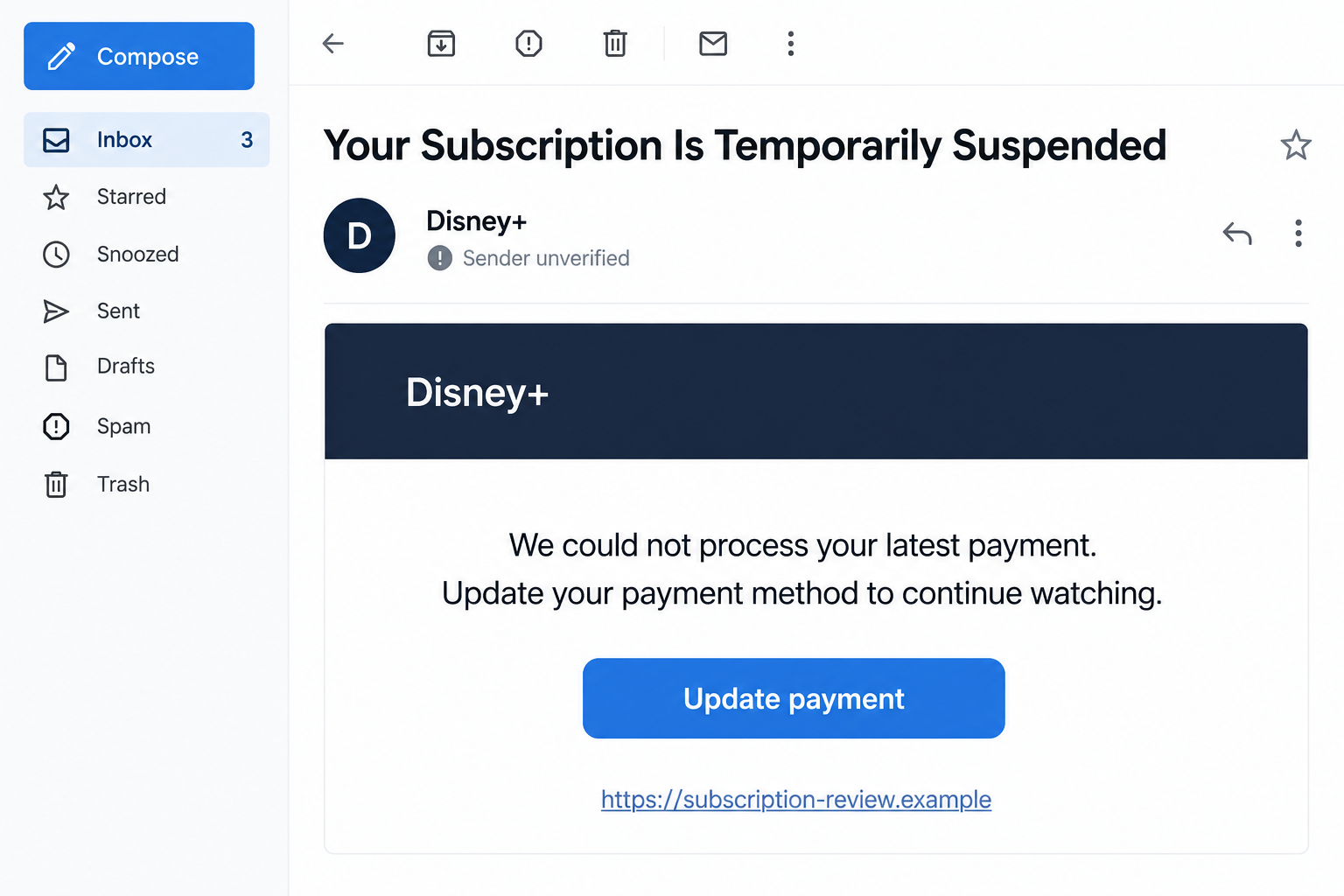
An email says your Disney+ subscription is temporarily suspended. It lists an ordinary payment problem and offers a button to get everything working again.
The Disney Plus email scam makes that interruption feel easy to fix. Before updating anything, check which account and billing process the message is actually leading you toward.
Overview
The suspension notice imitates a real subscription problem
Cards expire, payments fail, and subscription access can require attention. The scam borrows those ordinary problems to make an unexpected email sound relevant.
The message claims you must update payment information to continue watching. Its button can lead to a copied login or billing page.
Disney’s phishing guidance warns about people impersonating Disney+ to obtain personal information or payments.
This does not make Disney+ a fraudulent service. Nor does it establish that every genuine billing notification or account interruption is fake.
A streaming notice can expose more than a viewing profile
A fake sign-in may collect the credentials you use for MyDisney. Disney explains that this login can connect several services and experiences.
A later billing form may seek card information. The email’s apparently modest task can therefore become an account and payment problem.
The effect depends on what you shared and where the same password is used. A unique streaming password does not automatically grant access to your bank.
If you supplied financial details or an authorization code, tell the relevant institution about that separate exposure.
The safest check starts outside the email
Before using the proposed reactivation button, establish these details through your normal account or purchase records:
- Whether the genuine subscription currently has a payment issue.
- Which organization actually bills your subscription.
- Whether the email’s destination belongs to the real service.
- Whether a requested code authorizes a login or a financial action.
- Whether the contact asks for software, gift cards, or other unusual steps.
A recognizable logo does not answer those questions. A page copying the brand still needs to be the correct place to act.
Why the Payment-Failure Story Sounds Believable
The explanation fits everyday card problems
The email may refer to an expired card, a billing-address mismatch, or a transaction that could not be processed.
Those explanations do not need to be exotic. They make the message feel like something that could happen after a routine renewal.
If you recently changed your card, you may supply the connection yourself. The sender has not necessarily demonstrated knowledge of that change.
Use your actual subscription record to resolve the uncertainty. A plausible explanation in an email is not a verified account finding.
Restoring access feels like a small chore
You may be thinking about a film or a family viewing plan, not the account structure behind it. The button promises to remove an inconvenience.
That mindset makes familiar login fields easy to complete without much thought. The phishing page benefits from an action that feels automatic.
Pause when a routine task changes destination. You can reopen the genuine service yourself and continue from there.
A clean design can hide a poor explanation
Professional fonts, a familiar color scheme, and an ordinary greeting can make the notice seem complete. They are presentation choices, not account evidence.
Ask what the message actually establishes. It may contain a long list of possible payment failures without identifying the one affecting your subscription.
Even a personalized greeting is not enough. Information about you can make a message more relevant without proving who sent it.
How the Disney Plus Email Scam Works
Step 1: A suspension email creates an immediate repair task
The subject or main heading says access is temporarily suspended. The body blames a payment problem and supplies a convenient next step.
The word “temporarily” makes the problem sound manageable. You only have to complete a small correction to get the service back.
The notice may look like an account update rather than an advertisement. That encourages the recipient to treat the button as part of normal administration.
Check the actual subscription before accepting that premise. Do not infer a real failed payment just because the message describes a common reason.
The illustration above reconstructs the pressure pattern using a fictional destination. It is not a captured Disney+ email or a particular subscriber’s bill.
Step 2: The button opens a copied account or payment page
The destination may imitate the service’s sign-in screen. An account heading and a familiar button make the transition look ordinary.
The important change is who controls the page. A surprise email has selected the destination where you are about to supply information.
Do not judge it only by whether “Disney” appears in the address. A brand name can be included in a website operated by someone else.
Read the real hostname, not merely a familiar word or a path after it. A secure-connection icon does not authenticate the operator.
If the location is uncertain, leave it. You can sign in through the app or website you normally use instead.
Step 3: A fake sign-in collects MyDisney credentials
The page asks for an email and password to identify the subscription. To the recipient, that seems like the expected first step.
To the operator, it is an opportunity to capture a reusable login. The page does not have to provide real streaming access to collect it.
A rejected password is not reassurance. A copied form can display an error after receiving the information.
MyDisney’s shared login makes the distinction important. You are not necessarily protecting only one viewing profile when you change the exposed password.
Disney’s password guidance is the appropriate route for changing or resetting the real credential.
If the password was reused outside Disney’s services, those accounts need their own attention. Do not assume changing one credential changes unrelated websites.
Step 4: The supposed billing fix asks for card details
After sign-in, the page can present a payment form. It may ask for a card number, expiry information, security code, or billing address.
Those fields fit the original payment-failure story. That fit is not proof they are going to the genuine billing provider.
A small verification amount or an apparently ordinary subscription price does not limit how the collected card data might be used.
If an approval or code appears, read the issuer’s explanation. A banking transaction is not simply confirmation that streaming access has been restored.
Do not approve something unfamiliar because the website calls it verification. The action described by the real institution matters more than the page’s reassurance.
Disney warns that it will not ask you to buy gift cards or money orders to pay for the service. Such instructions are not normal reactivation.
Step 5: A confirmation or follow-up keeps the story alive
The fake page may display a successful update. The real subscription can remain unchanged while the recipient believes the task is finished.
If access still fails, another message may offer a new payment attempt or support route. That can prolong the original deception.
Do not keep submitting details until something works. Check the real account and billing arrangement through independently reached channels.
A call from a supposed support agent is not automatically a trustworthy continuation. Verify it separately, especially if it asks for device access.
Disney’s guidance says it does not direct customers to install third-party troubleshooting software. Do not accept an unknown installer to repair a subscription.
Who Actually Bills Your Disney+ Subscription?
The service you watch and the company billing you may differ
Some subscriptions are billed directly by Disney. Others have an existing arrangement with a subscription partner.
Disney’s billing partnership guidance explains that partner-billed subscriptions are typically managed through that partner.
Check your account and original receipt to establish your own arrangement. Do not let an unexpected email decide which company should receive your card.
The fact that you watch on an iPhone, television, or browser does not by itself identify who bills you. Device choice and billing are different questions.
An existing partner arrangement needs the correct account
If your subscription is billed through a partner, open that partner’s genuine subscription management route yourself. Use the account associated with the purchase.
A missing payment field inside Disney+ may reflect that billing arrangement, not a reason to use the email’s form.
Available partners and sign-up options can differ by market and change over time. Your own receipt is more useful than assuming one universal route.
If the arrangement is unclear, ask verified support which billing provider handles it. Do not send payment details to a stranger while investigating.
A genuine billing problem still needs a genuine fix
An expired card can require attention, but the correct update belongs inside the verified billing process. The scam email is not needed to find it.
A rejected fraudulent message does not cancel your subscription or erase a real charge. Keep any legitimate account issue separate.
Ask about the actual payment status rather than accepting the email’s deadline. Do not rely on a guessed grace period or a stranger’s promise about continued access.
What a Safe Account Check Looks Like
Start with your normal route
Open the Disney+ app directly or use a trusted bookmark. Do not begin with a reactivation button in the surprise message.
Check the account’s subscription details and relevant purchase records. Establish whether there is a real payment issue before changing anything.
If you need help, obtain support through the genuine Help Center. A telephone number printed in the email has not been authenticated.
Check unfamiliar changes before assuming a breach
Look at unfamiliar email changes, devices, or account activity where those controls are available. Ask household members about changes you do not recognize.
A family member’s viewing profile is not automatically evidence of a takeover. Investigate the specific change rather than treating every surprise as a breach.
If account access is genuinely lost, use the provider’s recovery process. Do not pay somebody who claims they can restore it through a private shortcut.
What to Do if You Have Fallen Victim to This Scam
-
Stop the message’s reactivation process. Close the suspicious page and decline further payment attempts, approvals, or software requests.
Save the email and visible destination, then record what you entered. Note whether a payment occurred or any code was supplied.
-
Secure MyDisney after credential exposure. Use Disney’s genuine password-change or recovery route from a trusted device.
Disney recommends a unique password and logging out of devices after changing it. Follow the current account controls rather than the fake page’s instructions.
If you are locked out or see unauthorized changes, contact verified support. Do not assume deleting the email ends an existing session.
-
Replace reused passwords elsewhere. Identify unrelated services where you used the same email and password, especially important email or financial accounts.
Those services do not change merely because MyDisney changes. Use their own genuine settings and review suspicious activity where appropriate.
If the password was unique to MyDisney, keep that fact clear. It avoids unnecessarily treating every account as already compromised.
-
Contact the card issuer for financial exposure. Explain that a copied streaming billing page collected details or obtained a payment.
Ask about replacing the card, blocking pending activity, and disputing transactions as applicable. Include banking approvals or codes you shared.
Do not send another payment to receive a refund. Keep genuine Disney charges separate from the suspicious transaction while the issuer investigates.
-
Resolve the actual subscription through its real billing provider. Check your account and receipt to determine who handles payment.
If a legitimate renewal failed, update it through that verified process. Do not assume the fake confirmation repaired the real arrangement.
A duplicate sign-up may create another genuine charge, so ask support before buying a second subscription to solve the confusion.
-
Deal with any installation or remote access. End a stranger’s active connection and stop sensitive activity on a device they still control.
Malwarebytes can help check a computer after an unfamiliar download or installation. Reading an email alone is not evidence of malware.
AdGuard can reduce exposure to known malicious websites and ads. Neither tool changes your billing provider, invalidates stolen credentials, or guarantees reimbursement.
If the site obtained browser notification permission, remove that permission through the browser’s own controls. Do not use its paid “cleanup” offer.
-
Report and watch for related follow-up. Mark the email as phishing and reach Disney through the official Help Center if you need account assistance.
Keep support and bank references together. Check any later refund or recovery request independently, even if it mentions the original subscription problem.
Frequently Asked Questions
Is every Disney+ suspension email a scam?
No. Genuine payment issues exist. Check your real subscription and billing provider independently before using a message’s link or supplying details.
Why does the fake notice list ordinary payment problems?
Expired cards and address changes make the story believable. A plausible explanation does not establish that it applies to your account.
Does a stolen Disney+ password affect MyDisney?
Disney explains that the shared login can connect several services. Secure that credential through the genuine process and separately replace unrelated reused passwords.
What if I cannot find a payment-update option in Disney+?
Your subscription may be billed by a partner. Check the receipt and genuine subscription details, then use the correct provider’s management route.
Should I pay with gift cards to restore access?
No. Disney warns that it does not ask customers to purchase gift cards or money orders for service payment.
What if I supplied a card but no password?
Contact the card issuer about that financial exposure. Do not assume every account login was stolen, but do not ignore the card details collected.
The Bottom Line
Do not use a surprise Disney+ suspension email to decide where you sign in or pay. Check the real subscription and billing provider yourself.
If you already shared credentials or card details, secure MyDisney and contact the issuer as appropriate. Restoring streaming access does not resolve a separate phishing exposure.








