


An email says DPD could not deliver your parcel. You’re expecting an order, so arranging another attempt sounds like a quick, ordinary task.
The DPD email scam takes advantage of that moment. Before changing a delivery or entering payment details, look at how the message connects to your actual order.
Overview
A real delivery brand gives the email its cover
DPD is a legitimate parcel carrier. The scam involves people borrowing its name to create a delivery problem and steer recipients toward an unsafe website.
A failed attempt, incomplete address, or parcel awaiting instructions can be a believable opening. Those situations sometimes occur in genuine deliveries.
DPD’s Dutch phishing guidance describes fake emails seeking logins, payments, or downloads under the carrier’s name.
The risk is not that a parcel company emailed you. It is letting an unverified message choose where you disclose information or pay.
The destination can turn rescheduling into data collection
A copied delivery page may ask for an address first, then card details or a login. Each request is presented as necessary to finish the same task.
The ordinary-looking form hides a change of purpose. You think you are correcting a delivery; the operator is collecting information useful for fraud.
A parcel reference printed in the email does not settle the question. It needs to match the order through a carrier or retailer you independently reach.
A delivery you genuinely expect can make the bait convincing without making the email authentic. Scammers benefit from that coincidence.
These checks are more useful than a familiar logo
Before following the email’s instructions, work through a few concrete questions:
- Does the retailer’s own order record say DPD is handling this parcel?
- Can you confirm the reference through the carrier’s genuine tracking route?
- Does the real shipment record show the claimed delivery issue?
- What is the payment for, and who is supposed to receive it?
- Are you being asked for banking codes or software unrelated to delivery?
You can answer these without opening the surprise email’s button. Its shortcut is not the only way to check a parcel.
Why the Missed-Delivery Story Works
The message meets you during a real waiting period
When an order is on the way, people naturally watch for updates. A delivery email feels relevant before its source has been examined.
It may arrive after you missed a doorbell or spent a day away from home. You can supply the explanation the sender never established.
That does not mean the sender knows your schedule. A broadly sent message can find plenty of people waiting for something.
Start with the order you placed, not the story that just arrived. Your purchase confirmation provides a better starting point.
A small administrative request keeps resistance low
“Update your details” sounds less alarming than “send us your card number.” The information request can grow after you have already committed to the task.
A modest-looking delivery charge can have the same effect. The amount feels too small to justify a lengthy check.
But the amount requested is not the limit of the exposure. A card form can reveal data usable for transactions beyond that supposed fee.
The return-to-sender threat discourages checking
The email may suggest the parcel will be returned if you hesitate. That turns a routine inconvenience into a deadline.
An actual delivery deadline should be checked through the shipment record. A deadline controlled only by the unexpected message has not been established.
You do not have to decide that your order is safe forever. You only need to stop the unverified email from making the next decision.
How the DPD Email Scam Works
Step 1: The email introduces a delivery problem
The message claims a delivery attempt failed or a parcel needs attention. It may present a button for rescheduling or correcting an address.
A recognizable display name does much of the work. On a small inbox screen, the real address and destination can be less prominent.
Expand the sender details if you are assessing the message, but do not treat a matching display name as authentication.
Grammar and design provide clues, not a verdict. A polished fake can be dangerous, while an awkward legitimate notification may simply be poorly written.
The delivery story should be connected to an identifiable order. If you cannot make that connection, do not volunteer details to help the sender construct one.
Step 2: A button moves you to the sender’s chosen page
The destination can imitate tracking or a delivery-preference screen. It looks like the next part of the carrier’s workflow rather than a separate website.
That familiarity is the point. You recognize fields and buttons associated with shipping, so the page seems to need little explanation.
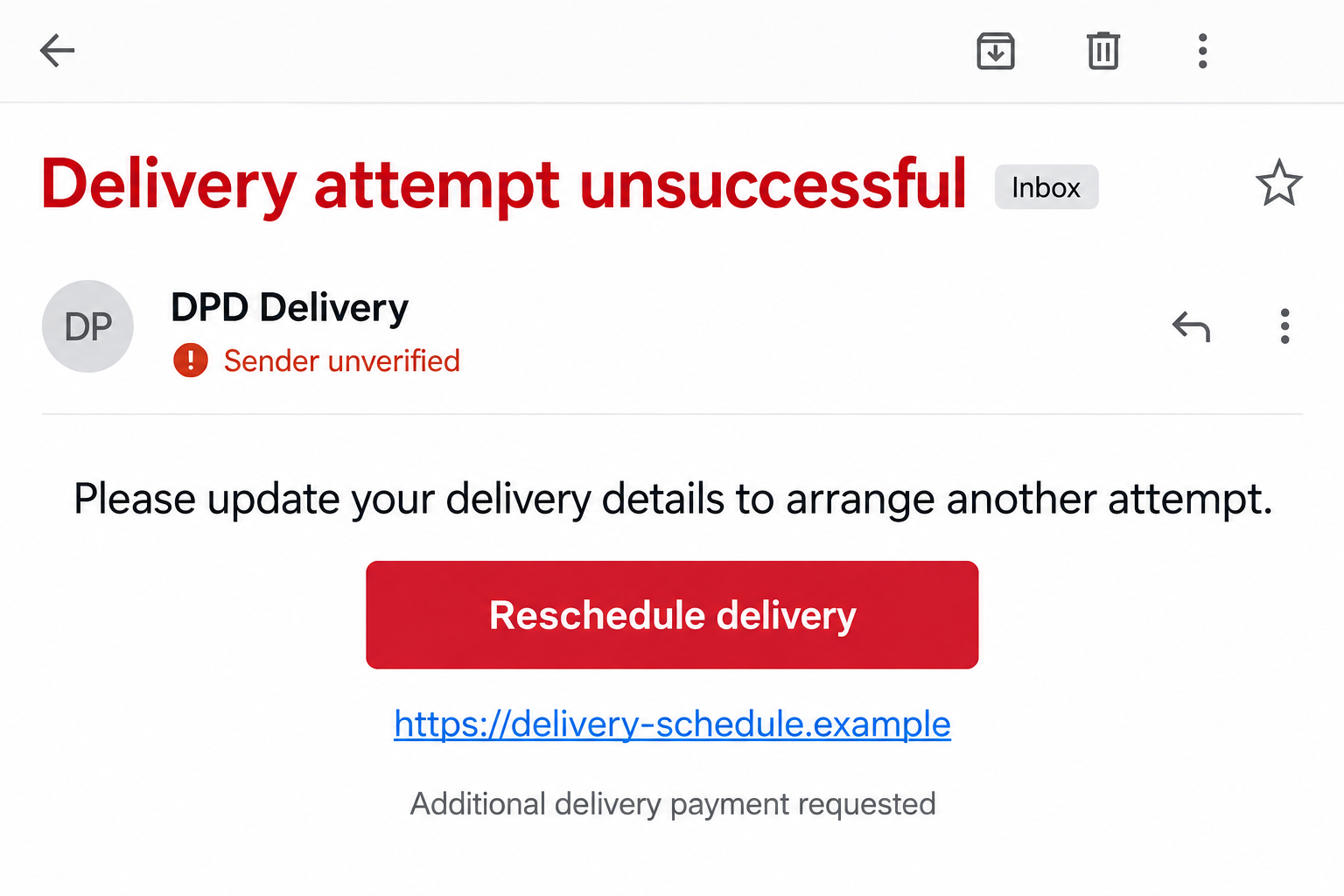
The illustrative email above shows this handoff using a fictional destination. It is not a captured DPD message or a record of a particular loss.
Do not rely on the padlock beside the address. An encrypted connection can still lead to a website operated by the wrong party.
Likewise, the letters “dpd” somewhere in a web address do not make the address belong to DPD. Read the actual destination.
The simplest interruption is to leave the page and reopen the order through your own retailer account. Continue from independently verified shipment information.
Step 3: The form collects delivery details and more
The initial questions may concern your name, address, or contact information. That fits the email’s premise and makes continued entry feel reasonable.
Then the page can request a card, account password, or another form of verification. The supposed delivery correction becomes a broader disclosure.
Pay attention to that change. An address problem does not explain why a stranger needs your banking password.
A fake carrier login may also target a password you reuse. The risk then extends to other accounts that accept the same credentials.
An error after submission does not establish that nothing was captured. The operator can receive information even when the page fails to complete its advertised task.
If you are unsure what was submitted, describe what you typed to the relevant bank or account provider. Do not revisit the page to test it.
Step 4: Payment or verification creates further exposure
Some versions introduce an extra delivery payment. Others claim that details must be confirmed before the parcel can move.
If a banking approval appears, read what it actually authorizes. A transaction notification is not automatically confirmation of a delivery preference.
The scam page’s explanation and your bank’s message may describe different actions. Do not approve something solely because the page tells you it is harmless.
An instruction to install an unknown application or attachment is another change of task. Receiving a parcel should not require surrendering device access to the email sender.
DPD’s phishing guidance specifically warns about delivery-themed downloads. A file’s name or carrier logo does not establish that it is safe software.
These branches do not occur in every email. Respond according to the payment, information, or software exposure that actually happened.
Step 5: A confirmation can leave the real parcel untouched
The fake page may finish with a reassuring confirmation. That can make the recipient believe the delivery is fixed and stop checking the genuine order.
A confirmation produced by the same unverified page is not independent evidence. It does not prove the real carrier changed anything.
Return to the retailer or carrier separately to establish what happened to the actual shipment. Deal with any genuine delivery issue there.
If money or credentials were disclosed, those need attention even when the real parcel later arrives. Delivery does not undo a separate phishing exposure.
Do Genuine DPD Deliveries Ever Involve Charges?
Distinguish delivery fees from import duties
Do not use the blanket rule that every payment mentioning DPD is fraudulent. Country, shipment type, and customs arrangements can matter.
DPD’s Dutch guidance on genuine emails recognizes an exception for parcels from the UK with import duties outstanding.
It says those emails contain a 14-digit parcel number that can be checked through the genuine tracking service. That is country-specific guidance.
A copied number alone is still not enough. Confirm the parcel and the charge without using the message’s payment destination.
Check the purpose of the charge
A seller’s delivery fee, a customs charge, and a surprise “address verification” payment are not the same thing. Ask what the money actually settles.
DPD’s Air Express information describes a legitimate duties-and-taxes payment workflow. It does not authenticate an unrelated missed-delivery email.
Compare any claimed charge with the independently reached shipment record and the carrier’s local instructions. An unexplained payment should not become legitimate through a familiar name.
Do not turn a regional domain list into a worldwide rule
DPD operates across different markets. A website or sender rule supplied for one country should not automatically be applied to every country.
Use the carrier’s official country service, reached independently. If a retailer selected a different delivery partner, follow the retailer’s own confirmed tracking information.
You only need to confirm the carrier and route for your own parcel. You do not need to memorize a worldwide address list.
Before You Change an Address or Arrange Redelivery
Retrieve the reference from the order you placed
Open the retailer’s official account or your original purchase confirmation. Establish which carrier and reference were assigned to the order.
If several orders are pending, check each relevant one calmly. Do not let an email with no clear order connection collect information about all of them.
For a gift you did not order yourself, ask the sender through a contact method you already know. Avoid the email’s proposed contact route.
Compare the real status with the claimed problem
The real parcel record should explain whether a delivery attempt, address issue, or charge needs attention. If it does not, ask verified support.
A vague status is not permission to pay the email sender. Give the genuine carrier the reference and let it explain the available next steps.
Keep a real deadline in view while rejecting the surprise message’s route. Verification should resolve the delivery concern, not make you forget it.
What to Do if You Have Fallen Victim to This Scam
-
Stop the fake delivery process. Close the page and decline additional forms, approvals, downloads, or payments from the same contact.
Retain the email, destination address, and a brief timeline. Record what you entered and whether any payment or installation completed.
-
Contact your card issuer or bank after financial disclosure. Use the number on your own card or the institution’s genuine app.
Explain that a delivery page collected details. Mention any banking code or approval, rather than reporting only the small fee shown initially.
Ask about stopping pending activity, replacing the card, disputing a charge, or recalling a transfer. Available options depend on what happened.
-
Replace exposed credentials through the real service. Start with the account whose password you entered, using a device you trust.
Change matching reused passwords elsewhere. Review recovery details and unfamiliar sessions through the actual provider, not a “security” page sent afterward.
If you gave only delivery details, do not automatically assume a password was stolen. Describe the exposure accurately.
-
Resolve the genuine parcel separately. Contact the retailer or carrier through independently verified information and check whether the real delivery needs action.
Do not assume the fake page rescheduled it. Keep any legitimate charge or deadline separate from the fraud report.
-
Check software exposure if there was a download. End unauthorized remote access and avoid sensitive logins on a device still under someone else’s control.
Malwarebytes can help inspect a Windows PC or Mac after suspicious software was installed. A parcel-themed email alone does not establish infection.
AdGuard can reduce exposure to known malicious pages and ads. It cannot restore copied credentials, settle a delivery, or reverse card payments.
-
Report the message through appropriate local channels. Mark it as phishing in your email service and use the carrier’s genuine country support.
Where money or significant identity information was lost, follow your local fraud-reporting process. Keep report and bank references with the original evidence.
Do not publish your address, full card number, or parcel label in a public warning. Share sensitive records privately with the relevant institution.
-
Be cautious with follow-up delivery or refund offers. Someone who knows the original story may claim the mistake can be corrected for another fee.
Check that request through the bank, retailer, or carrier you independently contacted. A new message is not a trusted continuation merely because it sounds familiar.
Frequently Asked Questions
Is every DPD missed-delivery email fake?
No. Real shipment updates exist. Verify the relevant order and delivery status independently before using a message’s button or supplying information.
Does a real tracking number make the email safe?
Not by itself. A reference can be copied. Confirm the shipment through the retailer or genuine carrier service and separately check the requested action.
Can a legitimate DPD shipment involve import duties?
Yes, depending on the market and shipment. Dutch guidance recognizes certain UK imports. Verify the charge through the proper local service rather than a surprise link.
What if the fake page displayed an error?
Your information may still have been captured. Tell the bank or account provider what you entered and act on that exposure.
Should I install software to receive the parcel?
Do not install an unknown file or application supplied by the suspicious email. Use verified carrier tools only when you independently choose them.
What if the real parcel arrived after I paid?
Arrival does not validate the earlier website. Check the payment recipient and contact the issuer if an impostor collected financial details.
The Bottom Line
Do not let a missed-delivery email choose where you pay or enter account details. Check the actual parcel through the retailer or genuine DPD service.
If you already disclosed information, contact the relevant bank or account provider promptly. Fixing the real delivery and containing the phishing exposure are separate jobs.

Join the discussion
0 commentsShare your experience or ask a question about this article.
Discussion
Start the conversation
Have a question or something useful to share? Add the first comment.