

A text claiming that Purolator cannot deliver your package can feel perfectly timed, especially when you are already waiting for an online order. The message may look routine, but one rushed tap can lead to a convincing website built to collect your address, card details, passwords, or other sensitive information.
The Purolator text scam is a form of SMS phishing, also known as smishing. This guide explains how to recognize the fake delivery notice, how the operation unfolds behind the screen, and what to do calmly and quickly if you have already interacted with it.
Overview
The Purolator text scam begins with an unexpected message that appears to come from the well-known Canadian courier. It usually claims that a parcel is waiting, a delivery attempt failed, or the shipping address is incomplete. To fix the supposed problem, the recipient is told to open a link and act before a short deadline expires.
There may be no real package problem at all. The sender is not Purolator, and the link does not lead to a legitimate Purolator service. It opens a phishing website controlled by criminals, often designed to resemble a genuine tracking, address correction, or payment page.
Purolator has issued an official warning about fraudulent text messages that impersonate the company and ask recipients to confirm address details. The company says these messages are not legitimate, and it has reported the smishing campaign to the Canadian Anti-Fraud Centre.
What the fake Purolator text may say
The wording changes from one campaign to another, but most versions use the same simple story. Something is allegedly preventing a parcel from reaching you, and only immediate action will keep it from being returned.
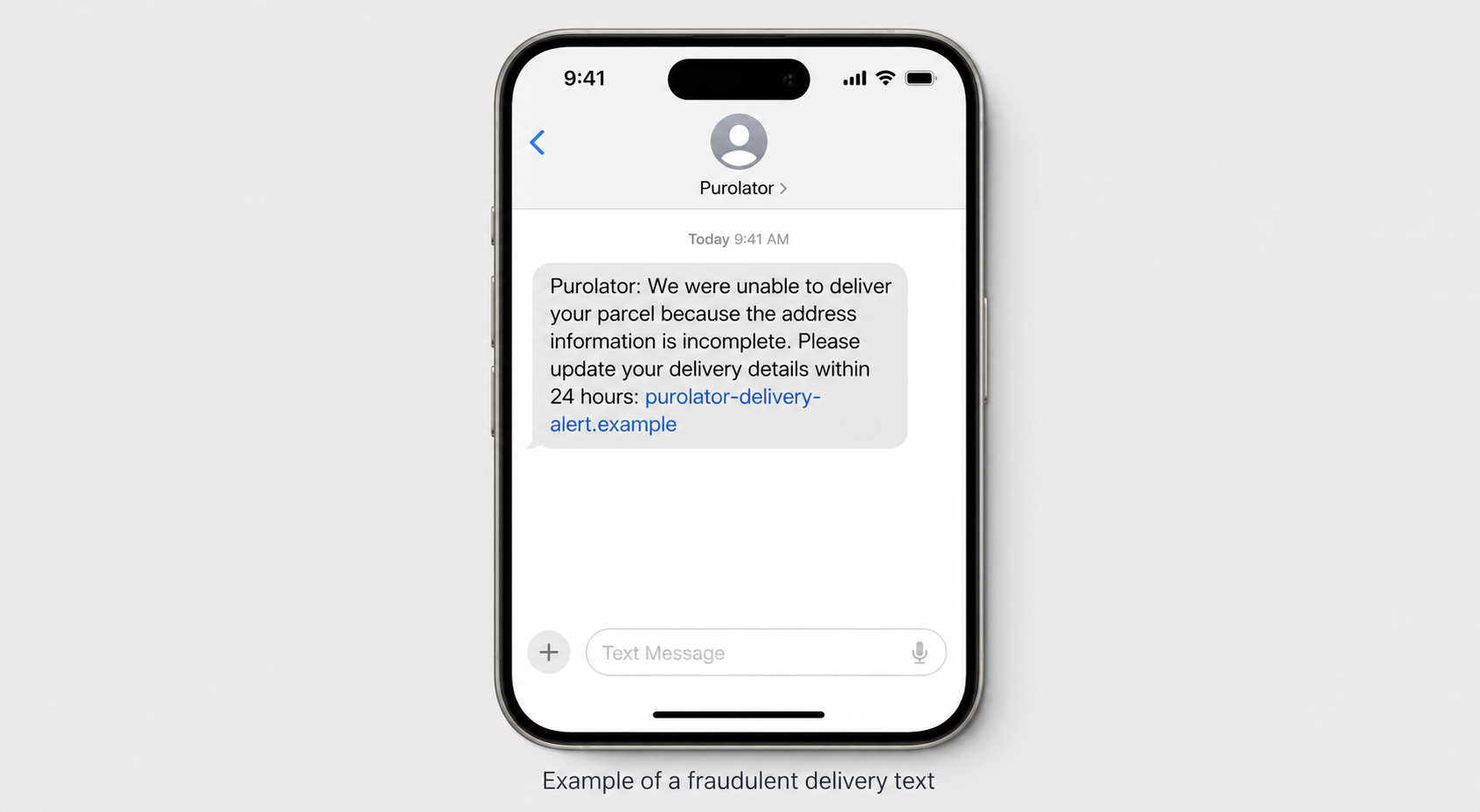
A typical message may resemble the following:
Purolator: We were unable to deliver your parcel because the address information is incomplete. Please update your delivery details within 24 hours: [fraudulent link]
Other variations may mention a missed delivery, an unpaid customs charge, a package held at a warehouse, or a small redelivery fee such as $1.99 or $2.99. The amount is intentionally low because the scammers want payment to feel easier than investigating the message.
The small fee is rarely the real prize. The payment form can capture the card number, expiration date, security code, billing address, phone number, and email address. Those details are far more valuable to a criminal than the fee displayed on the page.
Why the message can feel so believable
Package delivery scams work because they fit naturally into daily life. Millions of people order groceries, electronics, clothing, prescriptions, and gifts online. A scammer does not need to know that you are expecting a parcel. Sending the same message to thousands of random phone numbers will inevitably reach many people who are.
The timing creates a powerful coincidence. If you placed an order yesterday, a delivery warning today feels connected to that purchase. The victim supplies the connection in their own mind, while the scammer only supplied a vague message.
Modern sender spoofing can also make a message appear under a recognizable business name. In some situations, a fraudulent text may even appear in the same conversation as legitimate notifications. The Canadian Centre for Cyber Security warns that spoofing trusted sender information can make smishing messages much harder to distinguish from real communication.
A professional-looking page is not proof of authenticity either. Criminals can copy colors, page layouts, logos, shipping language, and tracking forms. They can also obtain HTTPS certificates, so a padlock in the browser only means the connection is encrypted. It does not prove the site belongs to Purolator.
Common warning signs of the Purolator text scam
You do not need to become a cybersecurity expert to recognize most fake delivery messages. Pause before tapping and look for several signs that commonly appear together:
- The message is unexpected. You did not request text updates, or you are not expecting a Purolator delivery.
- It creates urgency. The parcel will supposedly be returned, destroyed, or delayed unless you act within a few hours.
- The link is not on purolator.com. It may use extra words, unusual hyphens, misspellings, a URL shortener, or an unfamiliar domain ending.
- It asks for sensitive information. The page requests card details, banking information, account passwords, or an electronic money transfer.
- It demands a surprise fee. A tiny redelivery, address correction, or customs charge is presented as the only way to release the package.
- The tracking details are vague. The text may omit the sender, retailer, destination, or a tracking number you can verify independently.
- The language pushes you toward the link. There is no safe option to verify the issue through the official website or app.
Purolator advises customers to use purolator.com directly when tracking a shipment or updating an address. The company also states that it does not request credit card details, banking information, account payment updates, or wire transfers through unsolicited texts, emails, social messages, or WhatsApp messages.
If you genuinely expect a delivery, do not use the link, phone number, or contact information in the text. Open a new browser window, type purolator.com yourself, and enter the tracking number from your retailer’s order confirmation. You can also contact Purolator through the verified details on its official website.
How The Scam Works
The Purolator text message scam is best understood as a sequence. Each screen asks for something small, making the next request feel like a natural part of solving the delivery issue. Here is how the scheme commonly unfolds.
1. Scammers distribute the bait by text message
The campaign starts with a large batch of SMS or iMessage messages sent to Canadian phone numbers. The list may come from an old data breach, a marketing database, automated number generation, or another criminal source.
The scammers do not necessarily know your name, address, or shopping history. A generic delivery problem is broad enough to match many recipients. If personal information appears in the message, it may have been combined from previously leaked data to make the lure more persuasive.
The sender name may show as Purolator, Delivery Notice, Parcel Service, or an ordinary phone number. Because sender information can be falsified, a familiar name at the top of the conversation should never be treated as proof.
2. The message creates a problem and a deadline
The text introduces a minor but urgent obstacle. Perhaps the street number is missing, the postal code is invalid, the delivery attempt failed, or a small balance remains unpaid. These explanations are deliberately plausible and easy to understand at a glance.
Next comes the deadline. The package may supposedly be returned within 12 or 24 hours, or the recipient may be warned that another delivery attempt will not be made. This pressure is not just dramatic wording. It is a social engineering tool designed to interrupt careful thinking.
A person who believes a purchase is about to disappear is more likely to tap first and inspect later. The scammer wants the victim focused on saving the parcel, not checking who owns the linked website.
3. The link opens a Purolator lookalike website
The fraudulent link may be shortened to hide its destination or registered on a domain containing words such as purolator, parcel, delivery, track, update, or Canada. On a small phone screen, the address bar may be difficult to read, especially when the domain is long.
The landing page often copies recognizable visual elements from the real courier. It may display a delivery progress bar, a Canadian flag, a fabricated tracking number, or a notice saying the address requires confirmation.
Some fake sites are assembled from templates used for many courier brands. The criminals can replace one logo and color scheme with another while keeping the same data collection forms behind the page.
The safest test is simple: the registered domain must be exactly purolator.com or a clearly legitimate subdomain ending in .purolator.com. A name such as purolator.delivery-update.example would not belong to Purolator because the actual registered domain is delivery-update.example.
4. The first form collects identity and contact details
Before asking for money, the fake page may request the recipient’s full name, home address, postal code, phone number, and email address. This step feels consistent with correcting a shipping label, which reduces suspicion.
When submitted, the information can be transmitted directly to the scammers. Even if the victim stops before the payment screen, the data already entered may be stored and used in later fraud.
A confirmed combination of name, phone number, email, and address can support more convincing phishing calls and messages. It may also be bundled with information from other breaches and sold to additional criminals.
5. A small payment request captures the card
The next page commonly claims that a small redelivery or processing fee is due. A charge of $1.99 or $2.99 appears harmless, particularly when compared with the value of the package the victim believes is waiting.
The form asks for the cardholder name, card number, expiration date, security code, and billing address. Submitting the form gives the criminal enough information to attempt online purchases or sell the card details.
The fake site may display an error after submission and ask the victim to try another card. This is a particularly damaging trick because one person may unknowingly expose two or three payment cards while trying to complete a payment that can never succeed.
6. The scam may attempt to capture a verification code
Some banks require an additional one-time code before approving a purchase. Criminals may trigger a real transaction in the background and then show a fake verification screen asking the victim to enter the code received by text or banking app.
That code is not confirming a $1.99 delivery fee. It may be authorizing a much larger transaction, adding a card to a digital wallet, or approving access to an account. A one-time code should never be entered into a site reached through an unsolicited message.
Read every verification notification carefully. The amount, merchant, location, or requested action may reveal what is really happening. If anything is unfamiliar, stop and contact the bank using the number printed on the physical card.
7. Stolen information is used for additional fraud
Once the data is collected, it can be used immediately or retained for later. Criminals may test the card with small purchases, attempt a larger transaction, target the victim with bank impersonation calls, or send another message claiming that suspicious activity must be reversed.
This follow-up can be more convincing because the caller knows details the victim just entered. They may know the person’s name, card issuer, address, and the exact story that caused the compromise.
In other cases, the collected information is sold through criminal marketplaces. A victim may therefore see fraudulent activity days or weeks later, even if nothing unusual happens immediately after visiting the fake Purolator page.
8. The phishing site disappears and returns under a new address
Fraudulent delivery websites are often temporary. Hosting providers, browser security services, and authorities may block one domain, but the operators can quickly register another and reuse the same website template.
This is why memorizing one malicious address is not enough. The durable protection is to distrust unsolicited delivery links, verify shipments independently, and pay attention to the registered domain every time.
What To Do If You Have Fallen Victim
If you clicked the link or entered information, take a breath. A fast, organized response can greatly reduce the damage. What matters most is what you shared, downloaded, or approved, so work through the following steps in order.
-
Stop interacting with the message and fake website
Close the page and do not submit another form, download a file, call a number shown on the site, or reply to the original text. If the page says your payment failed, do not try a second card.
Do not continue simply to see what happens. Every additional screen may request more information or attempt to persuade you to install an app, browser extension, device profile, or remote access tool.
-
Identify exactly what was exposed
Write down whether you only opened the link or also entered a name, address, password, card number, bank information, or one-time verification code. Note whether you downloaded anything or installed an application.
Simply opening a page does not automatically mean your phone or bank account has been compromised. The risk rises substantially if you submitted information, approved a prompt, installed software, or granted permissions.
-
Contact your bank or card issuer immediately
If you entered any payment information, call the number printed on the back of the card or use the bank’s official mobile app. Explain that the card details were entered on a phishing website impersonating Purolator.
Ask the issuer to block or replace the card, review pending transactions, and advise whether the account needs additional protection. If you entered a verification code, mention that clearly because a transaction or digital wallet enrollment may already have been authorized.
Do not call a phone number from the suspicious text, fake website, or a follow-up caller. A criminal may impersonate the bank and offer to help with the very fraud they initiated.
-
Change any password you submitted
If the fake page asked you to sign in, change that password from the service’s official website or app. Use a clean device if you installed unknown software or believe your device may be compromised.
Change the same password anywhere else you reused it. Start with your email account, banking services, mobile carrier, cloud storage, and shopping accounts because access to those services can help a criminal reset other passwords.
Create a unique password for every account and enable multi-factor authentication. An authenticator app, passkey, or hardware security key is generally safer than relying only on SMS codes.
-
Secure your email and mobile account
Review your email account for unknown forwarding rules, recovery addresses, signed-in devices, and password reset messages. Remove anything you do not recognize and sign out of unfamiliar sessions.
Contact your mobile carrier if you shared account credentials, a carrier PIN, or enough identity information to support a SIM swap. Ask the carrier to add or strengthen the account PIN and confirm that no unauthorized device or SIM change is pending.
-
Check the device for unwanted software or profiles
Purolator advises people who clicked a fraudulent link to run a malware scan. Keep the phone and its apps updated, then use a reputable mobile security product if one is available for your device.
On Android, inspect recently installed apps and remove anything obtained through the fake page. Check accessibility, device administrator, notification access, and install-unknown-app permissions for entries you do not recognize.
On an iPhone, review Settings for unfamiliar configuration profiles, VPN entries, calendar subscriptions, or apps. If the website instructed you to install a profile, remove it and contact Apple Support if you are unsure what permissions it granted.
-
Preserve evidence before deleting the text
Take screenshots of the message, sender information, website address, forms, and any transaction notices. Record the time, the information you entered, and the steps you have taken.
Do not revisit a malicious site solely to collect evidence. Preserve what is safely available in your message history and browser history. These records may help your bank, mobile carrier, police, or fraud investigators.
-
Report the Purolator scam text
Forward the suspicious message to 7726, which spells SPAM on a phone keypad, or use your messaging app’s built-in report function. This helps carriers identify and block active campaigns.
Report the incident to the Canadian Anti-Fraud Centre. If money was lost, identity information was stolen, or threats were made, contact your local police agency as well.
You can also notify Purolator through contact details obtained directly from its official website. Sharing the sender number, link, and screenshot can help the company investigate new impersonation campaigns.
-
Monitor financial and identity activity
Review card and bank transactions regularly, including small amounts that may be used to test whether an account is active. Turn on transaction notifications so an unfamiliar charge is noticed quickly.
If sensitive identity information was disclosed, contact Equifax Canada and TransUnion Canada to discuss fraud alerts or other protective measures. Watch for unfamiliar credit applications, account changes, bills, and collection notices.
Keep monitoring after the first few days. Stolen data may be resold or used later, so the absence of immediate fraud does not always mean the information was discarded.
-
Be alert for recovery and bank impersonation scams
Victims are sometimes contacted again by someone claiming to be a bank investigator, police officer, cybersecurity expert, or refund service. The caller may know accurate personal details because those details came from the phishing form.
No legitimate helper needs your password, full card number, one-time code, cryptocurrency payment, gift card, or remote access to your device. End the call and contact the organization independently through a verified number.
The Bottom Line
The Purolator text scam turns an ordinary delivery concern into a hurried request for personal and financial information. The message may look polished, arrive at a believable time, and lead to a website that closely resembles the real courier, but the urgency and unfamiliar link are designed to keep you from checking carefully.
Do not use links in unexpected delivery texts. Track the parcel by typing purolator.com into your browser or by opening the official app, and contact the company through independently verified details. If you already interacted with the scam, act promptly, protect your accounts, report the message, and remember that a calm response can still prevent a suspicious text from becoming a lasting financial problem.

Join the discussion
0 commentsShare your experience or ask a question about this article.
Discussion
Start the conversation
Have a question or something useful to share? Add the first comment.