

A “DPD failed delivery” text or email can look completely routine, especially if you are actually waiting on a package. It arrives at the perfect moment, sounds urgent, and offers a simple fix.
The problem is that many of these messages are not from DPD at all. They are phishing attempts designed to push you onto a convincing copycat site, then pressure you into handing over personal and payment details.
This guide breaks down how the DPD Failed Delivery Scam works, what the warning signs look like, and exactly what to do if you clicked or paid.
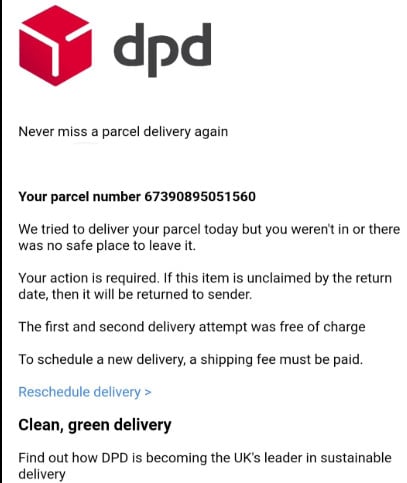
Scam Overview
What the DPD Failed Delivery Scam is really doing
The DPD failed delivery scam is a courier impersonation scam. It usually arrives as:
- A text message (smishing)
- An email (phishing)
- Occasionally, a WhatsApp message or social DMs
The message claims DPD tried to deliver a parcel but could not complete delivery, often due to an “address issue,” “missing information,” or “unpaid fee.” You are told to click a link to reschedule delivery, confirm details, or pay a small “redelivery fee.”
DPD has published multiple public warnings across its country sites that scammers are using the DPD name and logo to trick people into sharing personal and financial information, and that DPD does not request banking details via SMS or email.
The basic pattern (message, hook, fake site, theft)
Here is the structure that shows up again and again:
- The Message: You receive a text or email stating a delivery attempt was unsuccessful.
- The Hook: It urges immediate action and often claims the parcel will be returned to the sender if you do not act by a deadline.
- The Fake Site: The link leads to a convincing copycat DPD website.
- The Theft: The site asks for your address, date of birth, and bank card details to pay a nominal “redelivery fee,” often something like $1.50 or $2.99. After that, the scammers use the details for larger unauthorized transactions.
That tiny fee is not the real goal. The fee is bait. The real goal is your card number, security code, billing details, and enough personal data to make future fraud easier.
Why this scam works so well
1) Most people are already expecting packages
Online shopping has trained all of us to treat delivery updates as normal background noise. One more tracking message does not feel suspicious.
Scammers exploit that habit. Authorities and consumer organizations have repeatedly warned that package delivery scams often start with a text or email that includes a tracking link and tries to push you into taking fast action.
2) The message feels urgent but plausible
The scam is carefully written to trigger two reactions:
- Mild panic: “My package will be returned.”
- Fast compliance: “I should just fix this quickly.”
A deadline is often included because urgency reduces careful thinking.
3) The copycat site removes your last doubts
The fake page is the closer. It typically includes:
- DPD branding and colors
- A clean mobile layout
- A fake tracking form or “delivery issue” screen
- A small payment request to “unlock redelivery”
Even cautious people can be fooled because the page looks like a normal courier flow.
What DPD (and other official sources) warn about
DPD’s own fraud guidance across regions consistently emphasizes the same theme: scammers are sending messages in DPD’s name to obtain personal data or payment details, and customers should not share bank details or sensitive information through links in texts or emails.
Independent consumer and safety guidance echoes that:
- The UK’s National Cyber Security Centre warns about “missed parcel” scam texts and advises people not to click links, and to report suspicious texts through the 7726 spam reporting system.
- UK Finance has also highlighted that fake parcel delivery texts are a leading form of smishing and explains the role of the 7726 reporting system.
What scammers ask for (and why each item matters)
The fake DPD page typically asks for some combination of:
- Full name and address
- Useful for identity theft, account takeovers, and making a stolen card look more “legitimate” during a transaction.
- Phone number and email
- Used for future scam attempts, credential stuffing attempts, or selling your data to other criminal groups.
- Date of birth
- A powerful identity data point that can be used to pass basic verification checks.
- Bank card details (number, expiration, security code)
- The immediate target for unauthorized charges.
- Sometimes additional “verification”
- This may include a one-time passcode, which can enable account takeover or allow a fraudulent payment to be approved.
DPD Romania explicitly warns that scammers send messages leading to fake sites that request payments or card data, and that DPD does not request banking data via SMS or email.
The “small fee” trick (why $1.50 or $2.99 is a classic)
The small payment is strategic:
- It is low enough that many victims will pay without thinking.
- It tests whether the card works.
- It sets up the next stage: larger charges, subscriptions, or repeated attempts.
Royal Mail, for example, publicly documents scam examples where a message claims a small fee like $2.99 is required and links to a fake site. While that example is not DPD-specific, it shows how common and effective the “small fee” approach is in delivery scams.
Parcel redelivery guidance from major parcel services also commonly states that redelivery itself should not require you to pay via a random link, and that payment requests for redelivery can indicate a scam.
Common versions of the DPD failed delivery scam
Scammers constantly test new wording, but most versions fall into a few buckets:
“Address incomplete” or “missing information”
You are told the driver could not deliver because your address is missing a detail. You must “confirm address” via the link.
What makes it dangerous is that it feels realistic. People move, reorder items, or use autofill addresses all the time.
“Delivery reschedule required”
You are told you missed the delivery window and must reschedule.
This version often imitates legitimate courier flows and tries to look like a standard “pick a new date” page.
“Customs fee” or “delivery fee outstanding”
You are told the parcel is being held until you pay a small fee.
This overlaps with many courier impersonation scams beyond DPD, which is why consumer agencies warn broadly about paying delivery-related fees through unsolicited links.
“Your parcel will be returned today”
This is the urgency-heavy version. It pushes a short deadline to get you to click immediately.
The Guardian has described a surge in mass-text “spray and pay” parcel scams that use small fees and urgency to drive clicks, especially during high-shopping periods.
Red flags that reliably separate scam from real delivery updates
Use this checklist like a quick filter:
- You are asked to pay a small fee to reschedule or release delivery
- Treat this as a major warning sign. DPD fraud guidance warns about payment requests and sensitive data collection through fake communications.
- The link domain is odd
- Lookalike domains, random letters, extra words, or non-DPD domains are common.
- The message pushes urgency
- “Act today,” “final notice,” “returned to sender,” “last attempt.”
- Generic greeting
- “Dear customer” instead of your name can be a sign, though scammers sometimes include your name too.
- Spelling or formatting errors
- DPD’s own phishing warnings list poor grammar and suspicious formatting as common indicators. (DPD)
- It does not match your real shipping activity
- If you have no active orders, be skeptical. If you do, verify through official tracking instead of the link.
A safer mindset: treat every unexpected delivery link as untrusted
A useful rule is simple:
If you did not initiate the conversation, do not trust the link.
Instead, open your browser and manually go to the official DPD site for your country, or use the official DPD app, then enter your tracking number there. DPD’s phishing guidance commonly advises checking directly on the official website rather than using links in messages.
Variants of the Scam Emails and Texts
Below are common “DPD failed delivery” scam templates. The wording changes constantly, but the structure stays the same: urgency, a link, and a small “fee” or “confirmation” step.
Text message variants (SMS)
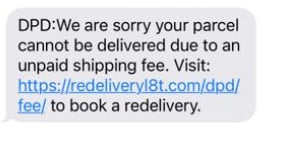
- Failed delivery with redelivery fee
“DPD: We attempted delivery today but were unable to complete it. Please reschedule within 24 hours to avoid return to sender. Pay $2.99 to rebook here: hxxps://dpd-redelivery[.]info/track” - Address incomplete
“DPD Notice: Your parcel is on hold due to incomplete address details. Update your address to receive delivery: hxxps://dpd-address[.]com/confirm” - Final warning return to sender
“DPD: Final attempt failed. Your parcel will be returned to the sender today unless you confirm delivery now: hxxps://dpd-delivery[.]link/” - Small “processing” charge
“DPD Delivery Issue: A $1.50 processing fee is required to reschedule your delivery. Confirm and pay here: hxxps://dpd-retry[.]site/” - Customs style fee wording
“DPD: Your package is waiting for clearance. Please pay $2.99 to release and schedule delivery: hxxps://dpd-clearance[.]com/” - “We could not access your building”
“DPD: Delivery failed because we could not access the property. Choose a new time slot: hxxps://dpd-timeslot[.]live/” - Fake tracking number and urgency
“DPD Tracking: Parcel ID DPD-483920 cannot be delivered. Confirm details within 2 hours: hxxps://dpd-track[.]top/DPD-483920” - “Delivery slot reserved” pressure
“DPD: Your delivery slot is reserved for today only. Confirm now or your parcel will be returned: hxxps://dpd-confirm[.]net/” - “Driver attempted to contact you”
“DPD: Our driver attempted to reach you. Please confirm your phone and address to rearrange delivery: hxxps://dpd-support[.]help/” - Payment failure bait
“DPD: Delivery fee payment failed. Update payment method to avoid cancellation: hxxps://dpd-payment[.]online/”
Email variants (subject lines and body examples)
Subject: DPD Delivery Label Attached
Body:
Please review the attached delivery label and confirm your details to proceed with shipment.
If the email pushes you to open an attachment or “enable content,” treat it as a major red flag.
Subject: DPD Delivery Exception: Action Required
Body:
Hello,
We attempted to deliver your parcel today but the delivery could not be completed due to an address issue.
Please confirm your delivery details within 24 hours to prevent return to sender.
Confirm here: hxxps://dpd-verify[.]com/
Subject: Your parcel is waiting. Redelivery required
Body:
Dear Customer,
Your DPD parcel is currently held at our depot. A redelivery fee of $2.99 is required to schedule a new delivery date.
Pay and reschedule: hxxps://dpd-redelivery[.]info/
Subject: DPD Shipment On Hold: Confirm Address
Body:
We require additional information to complete your delivery.
Please enter your full address and date of birth to verify the recipient and arrange redelivery.
Update details: hxxps://dpd-address-update[.]site/
Subject: DPD Invoice: Outstanding Delivery Fee ($1.50)
Body:
Your parcel cannot be dispatched for delivery until the outstanding fee is paid.
To pay the $1.50 charge and release your parcel, click below.
Secure payment: hxxps://dpd-billing[.]top/
Subject: Final Notice: Parcel Return Scheduled Today
Body:
Important: This is your final reminder. If you do not confirm your delivery information today, your parcel will be returned to the sender.
Confirm now: hxxps://dpd-lastnotice[.]link/
Subject: DPD Secure Delivery Confirmation Needed
Body:
For security purposes, we require confirmation of your payment card to proceed with redelivery.
Please complete verification to avoid delays.
Verify here: hxxps://dpd-secure-check[.]com/
Subject: Delivery Attempt Failed. Action Required Immediately
Body:
We attempted delivery but could not complete it. Please select a new date and time.
A small redelivery fee may apply depending on your area.
Reschedule: hxxps://dpd-reschedule[.]live/
Subject: DPD Delivery Update: Missing Information
Body:
Your parcel is pending due to missing recipient information.
Please confirm address and phone number for the driver.
Confirm details: hxxps://dpd-recipient[.]help/
Subject: Your DPD delivery has been suspended
Body:
Your delivery has been temporarily suspended. Confirm within 12 hours to reactivate delivery.
Reactivate: hxxps://dpd-reactivate[.]online/
How The Scam Works
Step 1: Scammers blast out mass messages
This is not targeted at first. It is volume-based.
Scammers send thousands or millions of texts and emails hoping to catch people who are:
- Waiting for a delivery
- Busy
- On their phone
- Used to courier updates
UK Finance has highlighted that parcel delivery scams are a major category of smishing, which fits the “send it to everyone and see who bites” model.
Step 2: The message is designed to feel routine
A typical scam message tries to sound like a normal courier notification:
- “We attempted delivery today…”
- “Your parcel cannot be delivered…”
- “Please confirm details…”
- “A small fee is required…”
It often includes a tracking-style reference or a fake “case number” to look official.
Step 3: The hook is urgency and loss
This is where the psychology kicks in.
Common hooks include:
- “Returned to sender if not resolved within 24 hours”
- “Final attempt”
- “Delivery on hold”
- “Action required to avoid cancellation”
The goal is not to inform you. The goal is to push you to click before you think.
Step 4: The link leads to a copycat DPD page
Once you tap, the scam shifts from persuasion to imitation.
The fake site commonly includes:
- DPD logo and brand colors
- A layout optimized for mobile
- A “delivery problem” banner
- A tracking-style interface
DPD Romania warns that these messages often contain links to fake sites imitating DPD pages and requesting payments or card details.
Step 5: The site collects personal details first
Many scam flows start by asking for:
- Name
- Address
- Date of birth
This does two things:
- It makes the process feel legitimate, like a normal “confirm your details” step.
- It gives scammers valuable identity data even if you stop before paying.
Step 6: The “nominal redelivery fee” appears
After you enter personal data, the page introduces the small payment, often framed like:
- “Redelivery fee”
- “Reprocessing fee”
- “Address correction fee”
- “Holding fee”
Amounts are kept small, usually in the $1 to $3 range, because that feels believable and low-risk to many people.
This mirrors widely documented delivery scam patterns, where a small fee is used to lure victims onto a fake payment page.
Step 7: Your card details are captured and tested
When you submit card details, scammers often do not immediately drain the card with one giant charge. Many will:
- Run a small test charge
- Attempt additional charges shortly after
- Sell the card details to other criminals
- Use the personal information to bypass fraud checks
Because the first payment was “authorized” by you, it can also delay suspicion. Some victims assume the first charge was the redelivery fee and do not notice the next transactions until later.
Step 8: Larger unauthorized transactions follow
Once scammers believe the card is valid, the next steps can include:
- Larger one-time charges
- Multiple smaller charges (harder to spot)
- Subscription billing
- Attempts on other merchants using the same card
If a bank blocks the first attempt, scammers may try again with different amounts or different merchants.
Step 9: In some versions, the scam escalates to malware
Not every DPD failed delivery scam is “payment-page only.”
Some variants attempt to:
- Trick you into installing an app
- Push a fake “tracking update” download
- Deliver malware through a malicious link
The UK’s National Cyber Security Centre has specifically warned about missed-parcel scam texts that can lead to malware and gives clear steps to avoid infection
DPD Netherlands has also warned that fake emails can be designed to steal information or install malicious software.
Step 10: Victims are targeted again
If you clicked, paid, or entered data, you may be placed on a “responsive” list.
That can lead to follow-up scams such as:
- More delivery messages from “DPD” or other couriers
- Bank impersonation calls referencing the fraud
- “Refund” scams claiming they can recover your money
- Account takeover attempts using the info you provided
This is why fast action matters, even if you only entered your address or date of birth.
What To Do If You Have Fallen Victim to This Scam
1) If you only clicked the link (and entered nothing)
- Close the page.
- Do not enter any information.
- Clear your browser tab.
- If the message came by text, report it as spam or junk in your messaging app.
If you want to be extra cautious:
- Clear browsing data for that site (history and website data).
- Run a mobile security scan if you have a trusted security app installed.
2) If you entered personal info but did not enter card details
Act as if your data may be reused:
- Watch for follow-up scams via text, email, or phone.
- Be skeptical of messages that mention your address or “delivery issue.”
- Consider changing passwords on key accounts if you reuse passwords anywhere.
Also:
- Check your email for unusual login alerts.
- Enable 2-factor authentication on your main email account if it is not already enabled.
3) If you entered card details or paid the “redelivery fee”
Move quickly. Minutes matter with payment fraud.
- Contact your bank or card issuer immediately.
- Ask to freeze the card or issue a replacement.
- Dispute any unauthorized charges.
- Ask the bank to block merchant category attempts if they offer that protection.
- Review recent transactions carefully, not just the “delivery fee.”
If your banking app allows it:
- Turn on instant transaction alerts.
- Set a lower online spending limit temporarily.
- Lock online or international transactions until you stabilize.
DPD’s fraud warnings emphasize that criminals use these tactics to obtain personal data and induce harmful actions, including financial theft.
4) If you entered a one-time passcode
Treat this as a serious escalation.
A one-time passcode can be used to:
- Approve a payment
- Add a card to a digital wallet
- Access an account if the scam is part of a takeover attempt
Immediately:
- Call your bank.
- Ask what the code was used for.
- Request additional protections on your account.
5) If you installed anything (app, profile, “tracking” software)
This is the highest-risk scenario.
- Disconnect from the internet (airplane mode).
- Uninstall the suspicious app immediately.
- Run a reputable mobile security scan.
- If you are unsure what was installed, back up essential files and consider a full device reset.
Then:
- Change passwords for your email and banking from a different, clean device.
- Watch for suspicious logins and new device authorizations.
The NCSC’s missed parcel guidance is a solid reference point here because it focuses specifically on avoiding malware delivered through parcel scam texts.
6) Report the scam (this helps reduce future victims)
Reporting differs by country, but these are common options:
- If you are in the UK:
- Forward scam texts to 7726 (SPAM) as recommended by the NCSC.
- UK Finance also references the role of 7726 in reporting smishing.
- If you are in the US:
- The U.S. Postal Inspection Service recommends forwarding smishing texts to 7726 and reporting to relevant authorities for broader smishing trends
- If you are elsewhere:
- Report through your local cybercrime reporting portal if available.
- Report the message inside your email provider (phishing report) or your phone’s messaging app.
Even if the report feels small, large-scale takedowns often begin with aggregated reports.
7) Monitor for the next 30 days
Scammers often delay charges or try again.
For at least a month:
- Check card statements every few days.
- Watch for tiny “test” charges.
- Watch for subscriptions you did not authorize.
- Review credit reports if your region supports free checks.
8) Protect yourself against repeats
Use practical defenses that reduce the chance of a repeat hit:
- Do not click delivery links from unexpected texts.
- Track packages through official sites or official apps instead.
- Turn on transaction alerts with your bank.
- Use a virtual card number for online shopping if your bank supports it.
- Keep your phone and browser updated.
The FCC’s consumer guidance on package delivery scams emphasizes that many start with a text or email and a tracking link, which is exactly why treating links as untrusted is so effective.
The Bottom Line
The DPD Failed Delivery Scam works because it feels normal. A missed delivery message is the kind of thing most people expect, and the small “redelivery fee” looks harmless.
But the design is deliberate: urgency pushes you to click, the copycat DPD site earns your trust, and the payment step captures card details that can be used for much larger fraud. If you clicked or paid, quick action with your bank and careful monitoring can dramatically limit the damage.
When in doubt, skip the link. Use official tracking channels, and treat any unexpected delivery fee request as a red flag.
FAQ
What is the DPD Failed Delivery Scam?
It is a phishing scam where criminals impersonate DPD by sending a text or email claiming a delivery attempt failed. The message pushes you to click a link to “reschedule” or “fix an address issue,” then a fake DPD-style site asks for personal details and a small “redelivery fee” to steal your card information.
How do I know if a DPD failed delivery text is real?
A real delivery update should be verifiable through official channels. If a message contains a link and asks you to pay a fee or enter card details, treat it as suspicious. The safest approach is to manually visit DPD’s official site or use the official DPD app and enter your tracking number there instead of clicking.
Do I ever need to pay a redelivery fee to DPD through a text link?
Scam messages commonly demand a small fee like $1.50 or $2.99 to bait victims. If a text or email pressures you to pay via a link, assume it is a scam until proven otherwise. Any payment request should be verified directly through official DPD channels, not through an unsolicited message.
Why do scammers charge a small amount like $1.50 or $2.99?
The small fee reduces suspicion and increases compliance. It also helps scammers test whether your card works. Once they have valid card details, they can attempt larger unauthorized charges, repeated small charges, or subscription billing.
What information do these fake DPD pages usually ask for?
Common requests include:
- Full name and address
- Date of birth
- Email and phone number
- Bank card number, expiration date, and security code
Sometimes the scam also asks for a one-time passcode sent by your bank.
I clicked the link but did not enter anything. Am I safe?
In most cases, yes. Simply clicking a link is usually not enough for scammers to take money. The risk rises if you entered personal info, payment details, or downloaded anything. Close the page, do not interact further, and report the message as spam.
I entered my address and date of birth but not my card. What should I do?
Be alert for follow-up scams. Scammers can reuse that information to make future messages more convincing or attempt identity-related fraud. Watch your email and phone for suspicious contacts, and enable extra security on key accounts, especially your email.
I entered my card details on the fake site. What should I do immediately?
Take these steps right away:
- Call your bank or card issuer and explain you entered your card details on a phishing site
- Freeze the card and request a replacement
- Dispute any unauthorized charges
- Turn on transaction alerts and monitor your statements closely for at least 30 days
What if I entered a one-time passcode from my bank?
Treat it as urgent. A one-time code can authorize a payment or allow an account action. Call your bank immediately, ask what the code was used for, and request additional protections on your account.
Can scammers steal money even if the “redelivery fee” went through normally?
Yes. The “fee” is often just the first step. Your card details may be used later for larger charges or sold to other fraudsters. Some victims only notice days later when additional transactions appear.
Should I reply to the message or email to confirm anything?
No. Do not reply, do not call numbers in the message, and do not continue the conversation. Interacting can confirm your number is active and may lead to more scam attempts.
How can I report a DPD scam text or email?
Report it using the tools available in your country:
- Use your phone’s “Report spam/junk” option for texts
- Report the email as phishing in your email provider
- If your country supports SMS spam reporting (such as forwarding to 7726 in the UK), use that system
You can also report the scam to DPD through their official fraud guidance channels for your region.
What are the biggest red flags to look for?
The most reliable warning signs include:
- A link that is not an official DPD domain
- Pressure and urgency, especially “return to sender” deadlines
- Requests for card details to “reschedule”
- A small fee demanded immediately
- Strange spelling, formatting, or generic greetings
How can I avoid these scams in the future?
- Never click delivery links from unexpected texts or emails
- Track parcels through the official DPD site or app by typing the address yourself
- Turn on bank transaction alerts
- Use virtual cards or card controls if your bank offers them
- Keep your phone and browser updated

Join the discussion
0 commentsShare your experience or ask a question about this article.
Discussion
Start the conversation
Have a question or something useful to share? Add the first comment.