

An email bearing the BENU name says your medical file needs a security update. Unless you act soon, access could be suspended.
When you rely on a pharmacy, that warning is hard to brush aside. The important question is what the message is really asking you to do.
Overview
The Hook Is Access to Your Healthcare Information
The BENU medical file email scam uses a familiar pharmacy name to make an unsolicited request feel connected to your care.
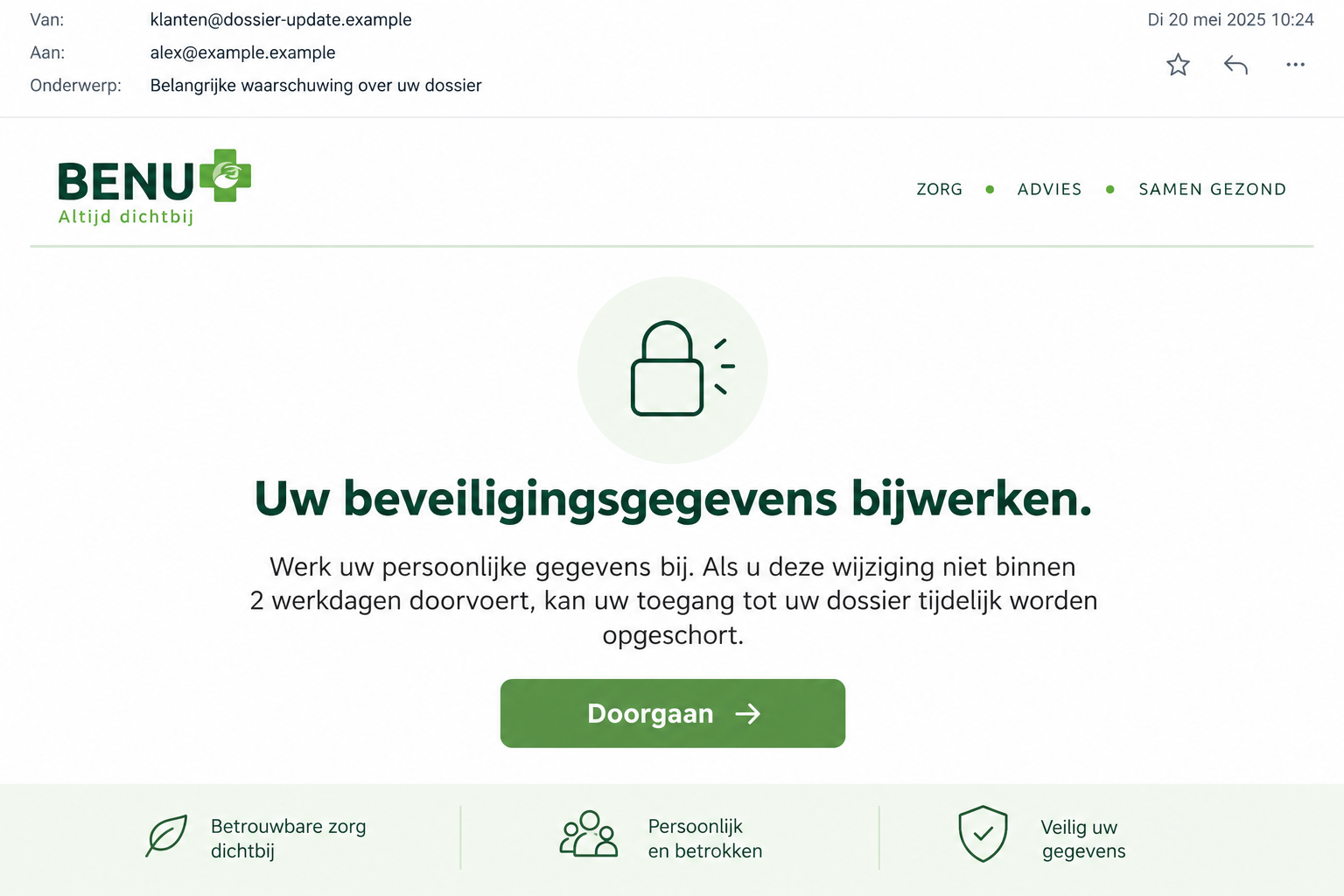
One documented message gives recipients two business days to update personal details. It claims their medical-file access could otherwise be temporarily suspended for security reasons.
That is the sender’s threat, not an authenticated decision about your pharmacy account. A message in your inbox cannot establish that your treatment records require correction.
The request is deliberately easy to understand: open the button, complete the update, keep access. It offers no reason to question who controls the destination.
BENU Has Warned About the Impersonation
BENU’s phishing guidance identifies urgent messages about healthcare details as a way to obtain logins or other information.
The pharmacy directs people to independently located login routes. The genuine service is being impersonated; it is not the scam described here.
Fraudehelpdesk has recorded multiple false BENU emails. Some threaten medical-file access; others ask you to review costs or collect a reimbursement.
Different subjects can lead to the same bad decision: trusting a healthcare-themed message enough to provide information before verifying the request.
The Details Worth Checking
- A short deadline tied to medical-file access or security.
- An account-update button in a message you weren’t expecting.
- Vague references to costs or reimbursements without an independently checked record.
- A page requesting information that seems unrelated to the task.
- A later contact using those details to appear familiar or helpful.
The lead image is an interface illustration of the reported warning. Its fictional address and layout are not evidence of an actual patient account.
The published examples do not show that every recipient encounters an identical form, payment demand, or bank-approval screen. Recovery should match what you actually shared.
Nor does receiving this email prove BENU’s medical records were breached. The false request and the source of the recipient list are separate questions.
Why a Medical File Warning Gets Your Attention
Healthcare messages often arrive when you are already juggling appointments, repeat prescriptions, insurance questions, and bills. An account notice can look like another ordinary part of that routine.
The scam borrows the importance of care without needing to name a specific medicine. The thought of losing access does much of the persuasive work.
You might worry that a delay will affect a prescription or an upcoming appointment. That concern is understandable, but it doesn’t authenticate the email.
Someone helping a relative can feel additional pressure. A caregiver wants to keep everything working and may process the request without checking whose account is involved.
A useful pause is to ask what access is supposedly changing. Is it the real pharmacy portal, a medical record, or simply the sender’s vague description?
If the message doesn’t identify a task you can verify elsewhere, don’t provide the missing context. Let the genuine pharmacy explain whether any action is required.
The cost-themed versions exploit a different concern: an unexpected bill. They encourage checking or correcting information before the recipient knows whether the claimed charge exists.
A reimbursement version reverses that pressure. Instead of avoiding a charge, you are encouraged to open the account because money supposedly awaits.
These hooks can change without changing your safest starting point. Contact the pharmacy or open your established account independently before acting on the claim.
If there is a genuine medication or access concern, resolve it directly with the care provider. Don’t let an inbox deadline dictate healthcare decisions.
How the BENU Medical File Email Scam Works
Step 1: A Familiar Name Presents an Unchecked Problem
The email looks connected to BENU through its name, heading, or service language. That familiarity encourages you to consider the request before checking the sender.
In the medical-file warning recorded by Fraudehelpdesk, the requested task is updating personal security details within two business days.
The threatened consequence is temporary suspension. It makes postponing the task sound riskier than completing it, even though the sender has supplied no independent authority.
A nearby cost-review example uses quieter language about checking a profile. A false message doesn’t need to shout to be dangerous.
Step 2: The Button Supplies a Convenient but Unverified Route
The message offers a button to continue, open an account, or view details. The label suggests a normal service action.
What matters is where that button goes. A healthcare label on a page doesn’t identify the organization receiving your entries.
You may see copied colors or a convincing login layout. Those features are easy to display and do not replace a verified account route.
Don’t evaluate the link by submitting a harmless-looking first field. Stop before any information reaches a destination you haven’t authenticated.
Use the website or app you already trust instead. If you need help finding the correct route, ask your pharmacy using established contact details.
Step 3: An Account Check Becomes Information Exposure
Typing your password into a false page gives it to someone outside the pharmacy, even if the screen looks familiar.
If you reused that password for email or other accounts, change those copies too. Otherwise, one pharmacy-themed message can put unrelated services within reach.
Personal details can also support a second approach. BENU warns that information may help fraudsters build trust for another scam, including bank-helpdesk impersonation.
A subsequent caller knowing about your account update is therefore not reassuring. It can be the very reason to end the conversation and verify separately.
Banking details, payments, or downloaded software require additional response steps if they occurred. Don’t assume those stages happened merely because you opened the first email.
Recognize the Real Pharmacy Without Guessing
Look Beyond the BENU Display Name
Expand the sender address. An email service can display BENU in large text while the actual mailbox belongs to a different domain.
The pharmacy publishes several legitimate sender domains, including its own subdomains and netpointfactoring.nl for invoices. Not every genuine message must come from the same address.
That distinction matters when checking billing mail. Rejecting a known external invoice sender just because it isn’t the main pharmacy domain can create confusion.
But a plausible address still shouldn’t override an unusual request. Confirm urgent healthcare-account instructions through the real service before supplying information.
Use the Login You Found Yourself
BENU explains its normal account setup through its website and app. Start there, not through a threatening inbox button.
If you already have the app, open it directly. Don’t install a replacement from a message claiming your current version has become unsafe.
If an account problem appears through the trusted route, note the actual error. It helps support distinguish a real login issue from the false email.
Never paste a password into a reply to prove which account you use. The pharmacy can help identify an account without that disclosure.
Confirm the Request With Your Own Pharmacy
The official contact page provides routes for pharmacy questions and Mijn BENU help. Use those independently located options.
Ask whether the claimed task exists and what information, if any, needs updating. You don’t need to read out every private detail in the email.
A helpful question is whether the account itself has any restriction. That is more useful than asking whether a logo or email template looks genuine.
If you are helping someone else, check with the account holder first. Avoid making changes to their care access based on a message neither of you requested.
A Refund Subject Does Not Make the Message Safer
A false BENU email recorded in August promised a €318.99 reimbursement. Its account-viewing button presented checking the claim as an easy administrative step.
A refund can feel less threatening than suspension, but it still gives the recipient a reason to follow an unverified link.
The amount is one example, not a standard BENU payout or a measure of what everyone could lose. Other messages use different descriptions.
Ask where the genuine reimbursement record appears. If there is a real billing question, the pharmacy or relevant billing service can explain it independently.
Don’t approve a bank request just because a page says it is needed to receive money. Read the action your banking app actually asks you to authorize.
A payment request, new-device approval, and account login are different events. The sender’s healthcare story does not change the consequences of confirming them.
You can abandon the claim even after opening the page. A supposed pending refund is not a reason to keep supplying increasingly sensitive information.
If someone follows up offering to fix a failed payout, start verification again from outside that conversation. More contacts do not make the original message genuine.
Help a Relative Without Sharing Their Medical Information
When a relative asks whether the email is real, focus first on the sender, task, and destination. You don’t need their diagnosis or medicine list.
Keep screenshots private and redact personal details before sharing them beyond the people assisting. Healthcare-themed phishing shouldn’t become another unnecessary disclosure.
If you manage their online access, explain what you are checking. A calm explanation can help them resist the next message without feeling foolish.
Agree on a simple rule: account-security and reimbursement demands get checked with the pharmacy before anyone follows an unsolicited link.
If access is genuinely needed for an immediate care question, use the known pharmacy contact. Don’t delay the practical conversation while investigating a suspicious email.
Separate that care question from account recovery. A login incident may require technical support, while a prescription question belongs with the pharmacy team.
Keep a note of who was contacted and what they advised. It avoids duplicate requests when several family members are trying to help.
Finally, don’t promise the patient that all risk disappears once the message is deleted. Entries already submitted require their own response, even if the inbox is clear.
What to Do if You Have Fallen Victim to This Scam
-
Leave the page and stop the exchange. Ignore demands to finish the update, pay an administrative fee, or confirm that you reported the message.
Preserve a copy before deleting it. You don’t need to reopen the button to collect additional proof.
-
Identify the information that left your control. Note whether you entered a password, contact details, identification, banking information, or actual medical details.
Tell support exactly what happened. Opening an email, submitting a form, and approving a bank action are different exposure levels.
-
Protect the relevant login. Reset an exposed password through the real BENU route, and replace reused passwords on other services.
Review account recovery settings and enable an additional authentication factor where supported. Ask account support about unfamiliar activity if you cannot check it yourself.
-
Call the bank for payment or banking exposure. Use your normal banking app or card contact, not a number supplied by the healthcare message.
Describe any approval, recipient, and amount. Ask the bank about stopping further misuse and investigating the transaction; reimbursement is not automatic.
-
Notify BENU and obtain advice. The pharmacy publishes valse-emails@benu.nl for suspicious messages sent as attachments. Its spelling includes “emails” in the plural.
Fraudehelpdesk also offers advice for disclosed information. Use its official website to reach the service, avoiding private recovery offers.
-
Check unexpected downloads or browser changes. If the page delivered a file or you installed software, use Malwarebytes to investigate possible device exposure.
For intrusive redirects or misleading browsing content, AdGuard can help reduce exposure. These tools cannot recover a leaked password or cancel an approved payment.
-
Keep genuine healthcare concerns on their normal path. Ask the pharmacy directly about any real account, prescription, or billing question.
Do not change medication or abandon treatment because the email threatened access. The fraudulent message has no authority over those decisions.
-
Watch for a more personal second approach. A caller referencing the medical-file update may be reusing details from your submission.
Decline banking instructions and reconnect with the relevant organization yourself. Knowing your name or the email subject is not proof of identity.
Frequently Asked Questions
Is BENU a Fake Pharmacy?
No. BENU is a legitimate pharmacy service. The scam consists of messages falsely using its identity to obtain information or draw people toward an unverified account page.
Will Ignoring the Fake Email Suspend My Medical File?
The false message cannot establish that. Check any real access issue with BENU independently rather than obeying the sender’s two-business-day threat.
Does This Prove My Pharmacy Records Were Leaked?
No. A phishing email does not establish where the recipient address came from or prove a breach of the impersonated pharmacy’s records.
Could a BENU Invoice Come From Another Sender Domain?
Yes. BENU lists recognized invoice and service senders. Check its current guidance and verify the bill separately; don’t rely on one simplified address rule.
What if I Entered Data but Didn’t Pay Anything?
Secure any exposed credentials and ask for advice about other information. Fraudsters can use submitted details in follow-up approaches even without an initial payment.
Can I Still Use My Normal BENU App?
Use your established app or independently located website. If its access seems affected, contact real support instead of following a replacement-app link in the suspicious message.
The Bottom Line
Do not update your medical file through the fake BENU email. Use the pharmacy’s genuine account or contact route to check whether anything needs attention.
If you disclosed information, protect that login and contact your bank for any financial exposure. Keep real care decisions separate from the sender’s invented deadline.








