


The applicant answers the technical questions, accepts the offer, and asks where the company will ship the laptop. Your understaffed team finally has some breathing room.
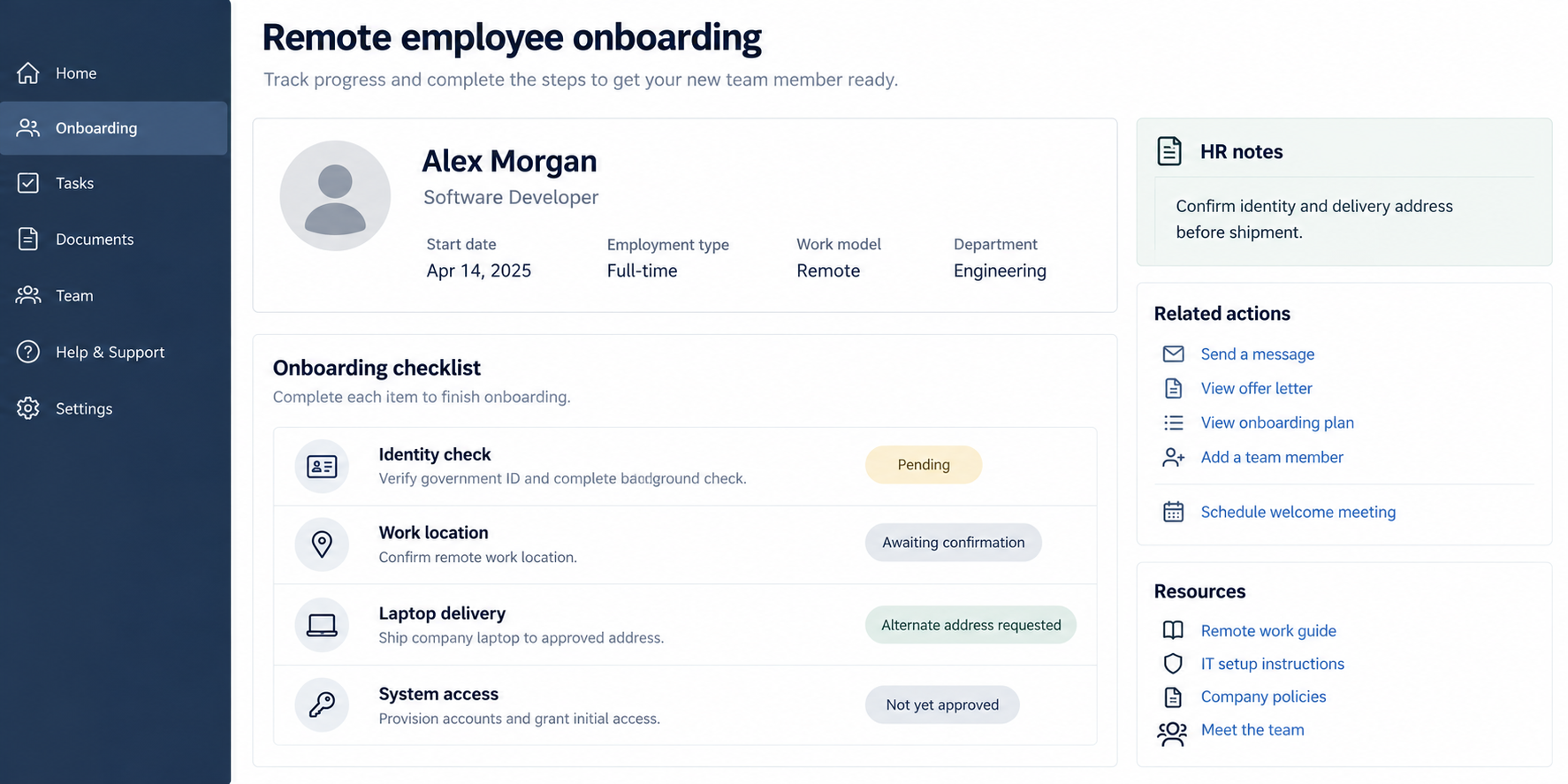
Then a delivery change arrives, followed by an unusual setup request. Before sending equipment, it is worth looking beyond a successful interview.
Overview
The employer is the target of the false identity
This scheme involves someone obtaining a remote position through concealed or stolen identity details. The business supplies pay, equipment, and legitimate access to its systems.
That distinguishes it from a fake recruiter who tricks a job seeker into installing malware. Here, the dishonest applicant seeks a place inside a real company.
The work may look credible, and some tasks may actually get completed. Useful output does not establish who is operating the account or where they are located.
For a small business, the stakes extend beyond a wasted salary. A developer’s routine access can include source code, customer information, infrastructure, and stored credentials.
Laptop farms can disguise the location of the work
FBI guidance describes North Korean IT worker operations using U.S.-based facilitators to receive employer equipment and support unauthorized remote connections.
A laptop in an approved country can therefore be operated by someone elsewhere. Its delivery record alone does not verify the employee’s identity or daily location.
The facilitator may knowingly participate or be misled about the arrangement. A shared address, remote job, or foreign background is not enough to identify criminal activity.
Decisions should follow evidence, not appearance
The useful warning signs are mismatches between records and behavior, especially when they affect equipment, payments, or access. Apply the same documented checks to every applicant.
- Identity details change between interview, contract, and onboarding.
- Someone redirects the laptop to an unexplained third party.
- Unapproved remote-control software appears on company equipment.
- Payroll or contact information overlaps unexpectedly across supposedly unrelated applicants.
- A worker requests unusually broad access before their role requires it.
Investigate these findings together. An accent, ethnicity, camera problem, or inconvenient time zone is not proof of deception and should never replace proper verification.
Why Technical Ability Does Not Settle the Identity Question
A good interview answers whether someone can discuss the job. It does not necessarily establish who will perform it after the account and laptop arrive.
A different person can attend later meetings, operate the equipment remotely, or use credentials obtained during onboarding. Your process needs continuity beyond one successful call.
That does not mean turning every meeting into an interrogation. It means resolving meaningful changes through HR and security before treating them as harmless administrative details.
For example, a contractor may legitimately use a different mailing address while relocating. A written explanation and verification can clarify that situation.
By contrast, repeated address changes combined with unexplained remote connections and inconsistent identity documents deserve a coordinated investigation. Each detail strengthens or weakens the overall picture.
Keep the distinction between suspicion and attribution. You can restrict risky access while investigating without publicly naming someone as a foreign operative.
How the Fake Remote IT Worker Scam Works
Step 1: A convincing applicant reaches the hiring team
The approach begins through recruitment channels the business already uses. A résumé, professional profile, portfolio, or staffing agency introduction makes the candidate appear ordinary.
Busy teams may focus on whether the skills match an urgent vacancy. Identity and location checks can become something to finish after the person starts.
That sequencing creates an opening. A person who passes a technical discussion may receive provisional access before discrepancies have been resolved.
Keep screening responsibilities explicit. The recruiter, hiring manager, HR team, and IT administrator should know which checks remain outstanding before approving the next stage.
Step 2: Borrowed details support the claimed identity
The applicant may use another person’s information or present inconsistent supporting records. A polished profile is only one source, and the applicant controls much of it.
Employment references should lead to independently verified organizations. Calling a number supplied solely by the applicant can simply reach another participant.
The FBI has also described identity manipulation during video interviews. A moving face on screen should not be treated as a complete background check.
At the same time, visual glitches do not diagnose a deepfake. Poor connections and ordinary camera effects exist. Escalate inconsistencies through a fair verification process.
Step 3: Company equipment goes to a facilitator
Shipping a managed laptop can feel safer than allowing a personal device. That benefit depends partly on who receives and operates the machine.
A facilitator can provide a local delivery address while another person does the work remotely. Several employer laptops may be handled from the same location.
This arrangement is commonly described as a laptop farm. The concern is concealed control of employer equipment, not simply having several computers in one building.
Record the approved destination, named recipient, device identifier, and reason for any change. A last-minute shipping request should not bypass checks because the start date is approaching.
Step 4: The approved account provides the entry point
Once onboarding completes, the company creates accounts and grants access. Activity can then appear under a legitimate employee identity even when someone else controls the session.
That makes ordinary permissions important. An account allowed to read one development repository presents a different exposure from an administrator account spanning the business.
Unapproved remote software, unusual access patterns, or unexplained changes in account use need review. None should be dismissed merely because the account belongs to an employee.
Ask whether each permission supports a current task. It is easier to grant a documented additional role than to retrieve information copied through unnecessary access.
Step 5: Payroll and access sustain the arrangement
The business may continue paying for apparently legitimate work while overlooking where the money ultimately goes or who actually performs the role.
Payroll changes can be especially easy to process as routine requests. Compare the request with the verified employment record and the business’s normal approval procedure.
Do not expect one dramatic warning. Small inconsistencies across HR, finance, and IT can remain invisible until someone compares their records.
A shared review should answer concrete questions: who was interviewed, where the device went, who accessed it, and which person or entity received payment.
Step 6: Discovery can reveal a wider security incident
A separate FBI warning describes theft of company data and code, followed in some cases by extortion after the workers were discovered.
That outcome is not established for every fraudulent hire. Nevertheless, ending the employment relationship does not automatically remove sessions, copied files, or previously issued secrets.
Plan containment before confronting a suspected operator. Security staff may need to preserve logs and restrict access in a coordinated sequence.
If a threat arrives, keep the message and involve incident responders and legal counsel. Do not promise payment or improvise negotiations through the former worker’s account.
Recruiter, Identity, Delivery, and Payroll Checks
Confirm what the staffing firm actually verified
A staffing contract can create a false sense that somebody else handled everything. Ask which identity, employment, location, and subcontracting checks were completed.
Identify the legal entity supplying the worker and the party responsible for replacements. An agency’s existence does not establish the identity of every individual it introduces.
Make substitution rules clear. A different person should not quietly take over a role because the contract uses broad language about delivering services.
Keep identity records consistent across the hiring process
Compare the applicant’s verified details with the contract, onboarding record, and approved access request. Resolve discrepancies through the team authorized to handle sensitive personnel documents.
Collect only what the process legitimately requires and store it securely. Circulating identity documents in informal chat groups creates privacy risks without improving verification.
For current employees, investigate changes using the same standards. Do not invent intrusive checks for one individual based on nationality or appearance.
Track where the laptop goes and who controls it
A courier’s delivery confirmation tells you a package reached somewhere. It does not establish that the verified employee is its sole operator.
Check unexplained delivery changes and use approved device-management procedures. Record which remote-support tools are permitted and who may authorize their installation.
Legitimate remote support should have a business purpose and an accountable operator. An unexplained persistent connection deserves more scrutiny than a one-off support session.
Review the payee without assuming guilt from a mismatch
Contractor arrangements can involve agencies or business accounts. The important question is whether the payee matches a documented, approved relationship.
A sudden payment change, reused account across unrelated identities, or request to route salary through an unexplained intermediary should trigger finance review.
Payroll and sanctions obligations depend on the facts and jurisdiction. Qualified counsel should advise on those questions while technical staff address immediate account exposure.
A Practical Onboarding Boundary for Small Teams
Start a new worker with the access needed for their first assigned task. Avoid handing over production administration simply because it will save setup time later.
Use individual accounts rather than a shared developer login. When a person leaves or a concern arises, individual records make it possible to trace and revoke access.
Keep secrets out of casual welcome messages. A password pasted into chat may remain available long after the account that received it has been disabled.
Separate development access from customer exports and financial systems. A programmer’s role is not a reason to expose every part of the business.
Make it easy for staff to raise a concern without making an accusation. “The laptop destination changed twice” is useful evidence; speculation about someone’s background is not.
Schedule a follow-up after onboarding. Confirm that the actual working arrangement matches the one approved, including agency involvement, equipment location, and required privileges.
For owners handling everything themselves, a short written checklist helps prevent urgency from deciding the rules. Complete the critical checks before shipping or granting sensitive access.
What to Do if You Have Fallen Victim to This Scam
-
Bring HR, security, and management together. Share the specific mismatch or suspicious activity through a restricted internal channel. Appoint one person to coordinate the response.
A coordinated review prevents one department from deleting records while another needs them, or warning the suspected operator before access can be controlled.
-
Restrict the accounts and equipment involved. Follow your incident process to stop suspicious sessions and unauthorized connections. Review cloud access as well as the laptop.
Account suspension, token revocation, and device isolation may require different controls. Confirm each action rather than assuming one disabled login covers everything.
-
Preserve the hiring and technical records. Keep applications, agency correspondence, shipping changes, device assignments, relevant logs, and payment instructions.
Record who collected each item and when. Preserve original files where possible, and limit access to personnel with a role in the investigation.
-
Determine what the account could reach. Examine repository access, file transfers, administrator changes, and newly created credentials or integrations.
Separate confirmed downloads from permissions that merely made a download possible. This distinction matters when explaining the incident to clients or deciding notification obligations.
-
Rotate secrets that may have been exposed. Prioritize credentials with broader privileges and review where they were used. Coordinate changes to avoid interrupting essential services unnecessarily.
If suspicious software was installed, use approved endpoint tools. Our Windows malware removal guide can supplement cleanup, but cannot replace a business incident investigation.
-
Verify payment and contract exposure. Ask finance to review the relevant payee and recent changes. Handle future payments with legal and HR guidance.
Do not reroute money based on a new message from the same unverified contact. Keep employment questions separate from immediate efforts to stop unauthorized system access.
-
Report the documented activity. U.S. businesses can report suspected incidents to IC3 or their FBI field office. Include facts, dates, and retained records.
Get qualified advice about privacy, employment, and contractual duties. Avoid public allegations against a named person before the identity and conduct are established.
Frequently Asked Questions
What is a laptop farm in this scam?
It is an arrangement where employer computers are hosted for concealed remote operation. The security concern is undisclosed control, not the number of laptops alone.
Can a fake remote worker complete real assignments?
Yes. Work quality and identity are different questions. Completed tasks do not resolve stolen credentials, unauthorized subcontracting, or false location information.
Does an overseas applicant automatically present this threat?
No. Apply consistent identity and access checks to everyone. Nationality, accent, appearance, and remote work arrangements are not evidence of criminal involvement.
Is this the same as a fake job-interview malware scam?
No. Fake interview scams target applicants. This operation targets employers by placing someone under a false identity inside a genuine hiring process.
Will an antivirus scan identify a dishonest hire?
No. Scanning may detect malicious software, but an account can be misused without malware. Identity verification and review of access records remain necessary.
Should we immediately wipe a suspicious company laptop?
Follow your incident team’s instructions first. Isolation may be urgent, but wiping can destroy evidence needed to understand access, copied information, and remaining exposure.
The Bottom Line
Do not grant broad access or ship equipment while material identity and delivery discrepancies remain unresolved. The fake remote IT worker scam turns rushed onboarding into an entry point.
If someone may already be inside, coordinate containment, preserve the records, and review what their account could reach. Treat the documented conduct seriously without profiling legitimate applicants.

Join the discussion
0 commentsShare your experience or ask a question about this article.
Discussion
Start the conversation
Have a question or something useful to share? Add the first comment.