

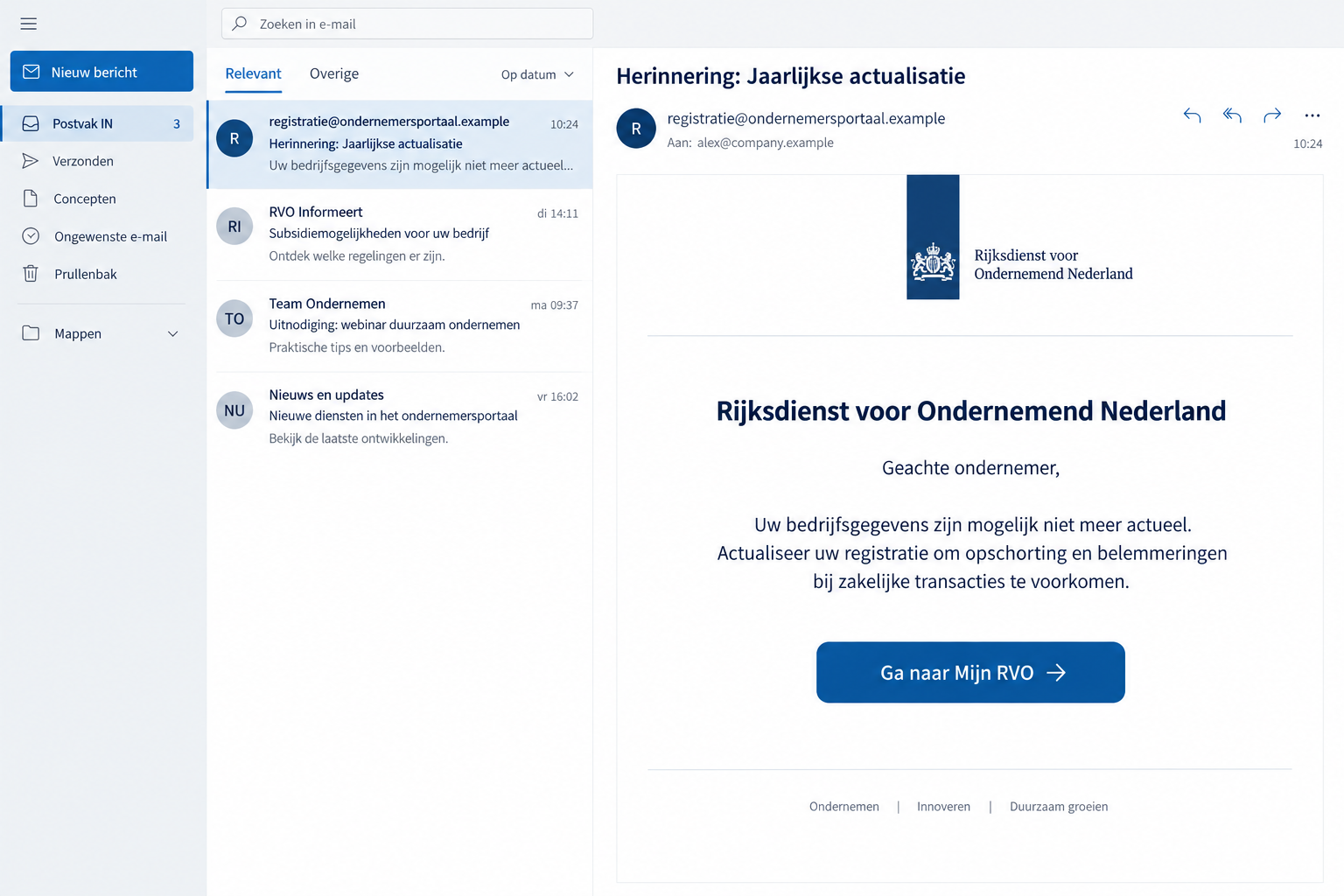
An RVO email says your business details may be outdated. It warns about registration problems and points to a button for an annual update.
The wording sounds like compliance paperwork, not a dramatic threat. That ordinary appearance is exactly why the request deserves a closer look.
Overview
An Annual Update Is Used to Borrow Government Authority
The RVO business update email scam impersonates the Netherlands Enterprise Agency. It claims business-register information was checked and may need correction.
A reported version warns of registration suspension, administrative sanctions, and obstacles to business transactions unless the recipient updates details through its button.
Those consequences belong to the false message. They are not evidence that the real agency has made a decision about your registration.
The button’s reference to Mijn RVO makes the request seem connected to a familiar government portal. The label does not authenticate its destination.
The Warning Concerns Impersonation, Not the Real Agency
Fraudehelpdesk identifies the annual-update email as false. Its archive contains further RVO-themed messages about updates and administrative obligations.
RVO independently warns about fraudulent communications using its name, including attempts to obtain personal data or money.
The real agency remains available to check your account. Someone borrowing its name cannot create an official obligation simply by putting it in an email.
The false email creates a task that must be verified outside the message. It does not establish that your actual application, registration, or subsidy is affected.
The Most Useful Clues Are in the Requested Action
- An unexpected demand to update business information after a supposed register review.
- Broad warnings about sanctions without a verifiable account notice.
- A portal button supplied by the same sender making the allegation.
- Requests for personal or identity information through an unconfirmed destination.
- Payment or login instructions that cannot be matched to the real agency’s process.
The illustration shows the update pretext with fictional addresses. Its visual presentation is not a captured government notice or proof of a genuine business file.
The exact downstream fields and any later payment flow are not established for this example. Treat such exposure as conditional, not a guaranteed stage.
Confirmation should come from the independently opened agency account or actual support. Reassurance provided by the false portal is not a second source.
Why the Message Sounds Like Something You Should Delegate
Business administration often means passing notices to whoever handles the relevant account. A registration update can appear suitable for an assistant or external adviser.
That delegation becomes risky when the first person assumes the notice is authentic. The next person receives it as an instruction rather than a suspicious message.
The annual-review language helps the email blend into recurring obligations. It sounds plausible even if the recipient cannot remember a previous review.
Broad consequences add weight without providing a concrete account problem. A business owner may fill in the missing detail from their own concerns.
Someone awaiting a government decision may connect the notice to that application. An unrelated false email can feel relevant because a real process is already underway.
The sender doesn’t need access to your application for that coincidence to happen. Don’t infer insider knowledge solely from familiar agency terminology.
Before forwarding the task, ask whether it corresponds to a notice in the actual service. Then assign any genuine action through the normal workflow.
If a colleague forwards it to you, ask how they verified the request. An internal forward confirms who passed it along, not who originally sent it.
For an outside adviser, send a description of the issue first. Avoid asking them to log in through a button that neither of you has authenticated.
A short administrative pause preserves the business decision. It stops an unsolicited sender from choosing both the urgency and the destination.
How the RVO Business Update Email Scam Works
Step 1: The Email Claims Your Business Record Has a Problem
The message says an examination of registration information found details that might no longer be current. It presents that review as official work already completed.
It then describes possible consequences if no update occurs. This makes the proposed task feel preventive, like something that protects your company from disruption.
The recipient is not shown an independently verified record. The sender’s description is doing the work of both identifying the issue and proving its authority.
If you believe there is a real registration issue, investigate it through the agency or appropriate registry. That can happen without touching this link.
Step 2: The Mijn RVO Button Offers to Resolve It
The email directs you to what it labels Mijn RVO. The button makes a government login or update seem like the logical next action.
A label is not a web address. It can conceal a destination entirely separate from the genuine agency’s account service.
Copied institutional design can reduce hesitation after the click. The page may appear connected to the email, but both belong to the same unverified route.
Do not use your own real details to see how far the process goes. A successful-looking form is not a safe authenticity test.
The appropriate alternative is opening RVO’s website yourself and navigating from there. Your existing trusted access route should not depend on the message.
Step 3: An Update Request Exposes Data or Access
The risk is the information you submit while believing the page is authorized. RVO warns that personal data can be abused against individuals or their businesses.
Credentials would require account protection if entered. Identity documents would need a different response. A request for payment would add a financial incident.
Those are exposure possibilities, not a claim that this one documented email always asks for every item. Record what your own interaction involved.
A profile update can also give a later contact enough context to sound relevant. That person still needs independent authentication.
Once you recognize the false route, stop using it. The sender cannot make further disclosure necessary by saying the original update remains incomplete.
Find the Genuine RVO Message Before Taking Action
Open the Agency Website Independently
Begin at rvo.nl or its English-language site, english.rvo.nl. Navigate to the appropriate service using that page rather than an inbox shortcut.
Use your established login provider only through the verified route. A page displaying a familiar sign-in name is not enough to establish its authenticity.
RVO’s official checking guidance recommends inspecting messages in MijnRVO. If the notice is absent, contact the agency.
An absent notice warrants a question, not an invented explanation. Let the agency establish whether any legitimate action exists.
Match the Actual File, Not a Vague Threat
If a real matter requires attention, determine which file it concerns. Business registration, an agency application, and access credentials are not interchangeable administrative tasks.
Ask for the actual issue and the approved way to resolve it. Do not supply extra identity information merely to make the suspicious message more specific.
If your adviser manages the account, ask them to inspect the genuine notice. They should not need the false portal to determine the file’s status.
Document any real deadline separately from the email. That lets you meet genuine obligations while rejecting a fraudulent demand.
Use the Agency’s Published Reporting Route
RVO publishes phishing@rvo.nl for suspicious communications. Its guidance covers email reports and screenshots of texts or WhatsApp messages.
Send evidence through RVO’s published reporting route. That is different from returning to the false portal and completing its requested update.
When reporting, include the suspicious message and the date received. Keep passwords and unnecessary identity documents out of your report.
Do not expect a report alone to secure an exposed login. Account protection and financial response may need to happen in parallel.
Sender Domains Are Clues, Not a Complete Verdict
A display name can say Rijksdienst voor Ondernemend Nederland while the underlying address belongs elsewhere. Expand the sender field before drawing conclusions.
RVO lists @rvo.nl addresses, but also certain legitimate outside services. Some official communications therefore come through recognized suppliers rather than one universal domain.
That makes a simple “anything outside rvo.nl is fake” rule unreliable. Consult current agency guidance when a supplier address is involved.
At the same time, a plausible sender cannot make an unexpected data request safe. The task and account record still need checking.
The strongest habit is to keep login and message authentication separate. A trusted account route gives you something to compare with the email.
If a message demands money directly, be especially careful. RVO says it does not request transfers by email, WhatsApp, or telephone.
Do not substitute a payment destination from the suspicious notice for one confirmed through the real service. A familiar agency name cannot authorize that change.
A page being unavailable does not prove who operated it. You can report a dead link without turning the outage into additional fraud evidence.
Likewise, similar wording across messages does not identify a shared criminal owner. Keep the warning attached to the confirmed impersonation and request.
Handle Business Data Exposure Without Overreacting
Begin with an accurate list of submitted information. The difference between public company details and a private administrator password is substantial.
Public information can make a later approach persuasive, but it does not by itself prove account control. Credentials or approvals require more immediate intervention.
If identification was uploaded, ask the relevant official identity-fraud advice service what documentation to keep and what protective steps fit your situation.
Do not send additional document copies to someone who contacts you claiming they can erase the first upload. They have not demonstrated control over that information.
For a business login, involve the account owner or administrator. They can check authorized access without making broad changes to unrelated company systems.
If a subsidy or application account was involved, confirm its contact and payment details through the genuine portal. Report unfamiliar changes to the agency.
That is a precaution based on access exposure, not a claim that the documented annual-update email has already redirected subsidies.
Keep communications factual when warning staff. Name the false subject and the action to avoid rather than announcing an unproven company-wide breach.
If several people acted on the same message, collect their accounts separately. Each submission may have exposed different information and require a different owner’s response.
What to Do if You Have Fallen Victim to This Scam
-
Abandon the emailed annual update. Close the false portal and stop sending information, even if the page says registration will remain incomplete.
Acknowledge the real business concern through official channels instead. The sender does not have authority to decide how you resolve it.
-
Tell the responsible business account owner. Explain which page was used, whose credentials were entered, and what permissions or actions were approved.
If an adviser or assistant handled the message, involve them without blame. Accurate information is more important than assigning fault.
-
Secure the exposed service directly. Reset affected credentials, replace reused passwords, and inspect recovery settings through the genuine provider.
Review sessions or delegated access where available. Ask provider support for help when account controls are unclear rather than improvising changes to unrelated systems.
-
Contact the bank for any financial part. If you supplied banking credentials, authorized a transaction, or transferred money, use the bank’s established contact route.
Describe what your app displayed and what you approved. Ask about protective restrictions and investigation options; a promised agency refund is not a recovery guarantee.
-
Check the genuine agency file. Inspect MijnRVO through the official website and confirm whether the claimed update or obligation exists.
If information appears changed or the account is inaccessible, notify RVO through independently located support. Preserve details of the discrepancy.
-
Report the false message. Send it to phishing@rvo.nl, using the reporting instructions on the agency’s website.
Keep the original email and any transaction evidence privately. Fraudehelpdesk can also receive a report or offer advice about exposed personal information.
-
Address downloads or browser changes if they occurred. An unexpected file or installed application warrants device assessment, such as a Malwarebytes scan.
If intrusive pop-ups or redirects appeared during browsing, AdGuard can be an additional barrier. These protections do not revoke stolen account access.
-
Prepare staff for a follow-up impersonation. An informed caller may use the business details you entered to introduce another urgent request.
Confirm new instructions through known contacts and reject unsolicited paid recovery services. Do not let the first disclosure authorize a second one.
Frequently Asked Questions
Is the Annual RVO Update Email Genuine?
The documented message discussed here is false. Verify any actual business task through the agency’s independently opened account or support, not its update button.
Can This Email Suspend My Registration?
The sender’s claim does not establish that power. Ask the relevant genuine service about your record instead of treating a phishing threat as an official decision.
Should Every RVO Message Appear in MijnRVO?
Follow the agency’s checking guidance: inspect the account and contact RVO if the message is missing. Don’t invent a reason to accept an absent notice.
Is Every Address Outside rvo.nl Fraudulent?
No. RVO recognizes certain outside service addresses. Check its current published guidance and the requested action rather than applying an overly broad domain rule.
Does the Scam Always Ask for a Payment?
Not established for this annual-update example. The confirmed lure requests an information update. Financial response is necessary if your actual interaction included banking data or payment.
What if I Forwarded It to My Accountant?
Tell them not to use the link and ask whether they already acted. If they submitted information, identify the relevant account and coordinate protection with its owner.
The Bottom Line
Do not update business information through the fake RVO email. Confirm the task in the genuine agency account or with independently located support.
If you responded, secure the access or data involved and alert the appropriate business owner. Contact your bank immediately for any financial exposure.








