

You open a text about a parking notice and start retracing yesterday’s journey. Was there a sign you missed, or a payment that didn’t go through?
The deadline leaves little room to think. Before you try to settle it, look closely at what the notice actually tells you.
Overview
A parking penalty becomes an urgent payment problem
The PCN fine notice scam uses the language of parking enforcement to make an unsolicited message feel like an overdue obligation.
PCN usually means Penalty Charge Notice in public enforcement. Private parking businesses also use similar abbreviations for parking charges, which adds confusion.
The fraudulent message skips the question that matters: who issued the notice, for which incident, and where can you independently confirm it?
Instead, it emphasizes consequences. You may be warned about increased charges, court action, or driving restrictions unless you open a supplied payment link.
Official warnings identify the impersonation
The Department for Transport warns about fraudulent traffic-fine texts that use its name. Those messages were not sent by the department.
A separate DVSA warning describes fake parking-penalty demands, including threats intended to rush the recipient.
Those warnings establish real impersonation schemes. They do not make every parking notice fraudulent or excuse ignoring a genuine penalty.
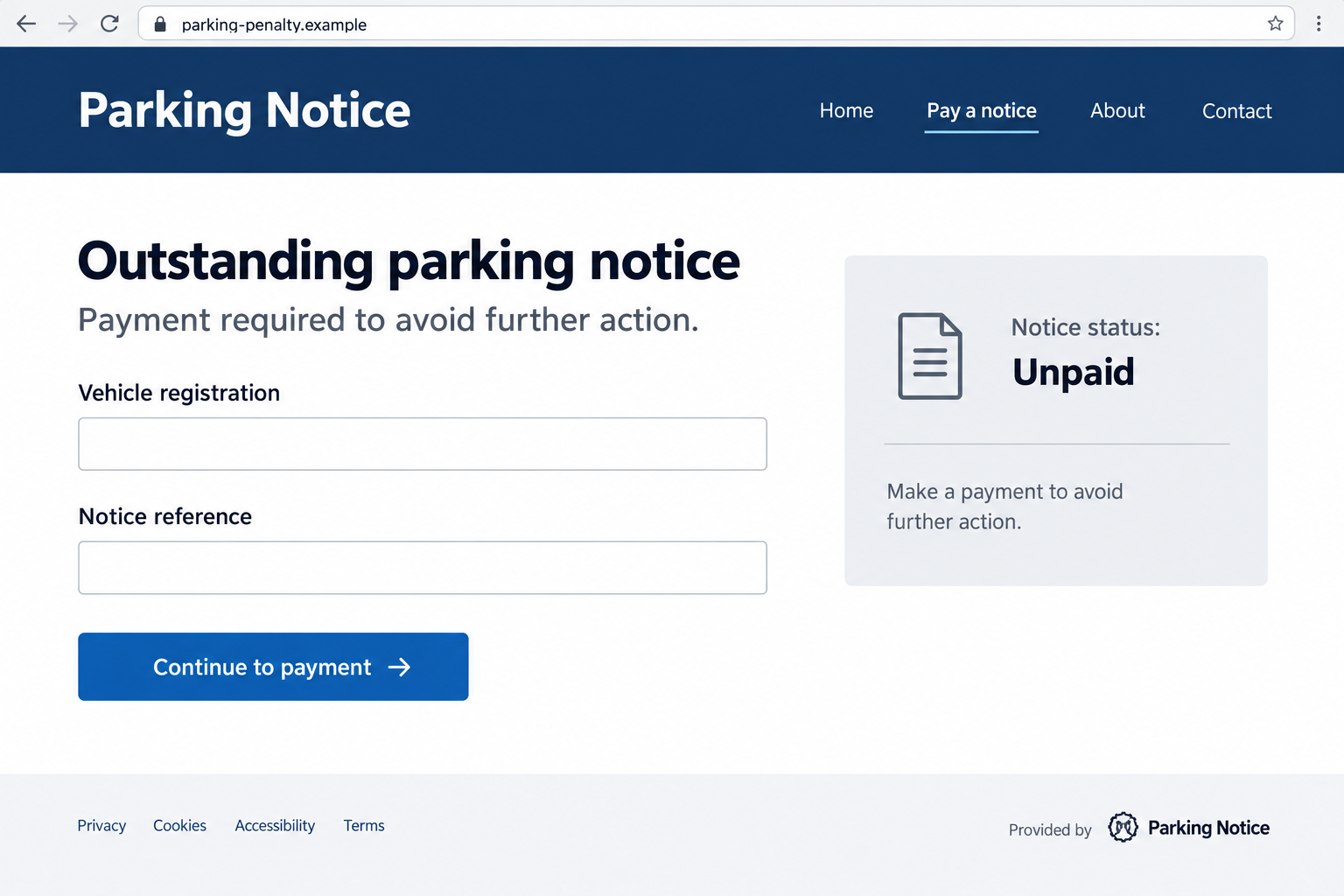
The interface above illustrates the payment lure. Its example domain is fictional, not a captured government notice or an address you should visit.
The safest check happens outside the message
Leave the supplied link alone. Find the claimed issuer through an established council, operator, or government website and check the notice there.
- Identify the authority or business supposedly issuing the charge.
- Compare the location, date, vehicle details, and reference with an actual record.
- Check the stated deadline through the issuer’s verified process.
- Never treat a logo, official-sounding abbreviation, or secure connection as permission to submit your card.
If you’ve already entered payment details, protecting the card comes first. Investigating the alleged parking event can happen without returning to the suspicious page.
Why This Notice Feels Plausible
Drivers can’t remember every parking arrangement
A single trip can involve street parking, a shopping-center car park, an app payment, and a short stop near a restricted area.
That uncertainty gives a vague notice room to work. You may supply a plausible explanation even when the sender hasn’t named an actual incident.
A message arriving after a real trip can feel especially convincing. Timing alone doesn’t establish access to parking records or a relationship with the issuer.
The same applies if it includes your registration. A recognizable detail deserves checking, but it doesn’t authenticate the payment destination.
The warning turns a small task into a larger fear
People often want to clear minor bills quickly. A threat of escalating penalties makes opening the link feel like the responsible thing to do.
The scam benefits when you focus on avoiding the consequence rather than confirming the debt. It makes the sender’s deadline seem more important than evidence.
Official language can deepen that effect. A reference to enforcement, a case number, or a legal abbreviation may look authoritative without identifying a valid proceeding.
You don’t need to interpret the supposed law while standing in a queue. A demand that cannot survive an independent check isn’t a payment instruction.
How the PCN Fine Notice Scam Works
Step 1: An unsolicited notice puts an unpaid penalty in your path
The first message announces a balance rather than asking whether you recognize a parking event. It assumes a debt already exists.
It may borrow the name of a transport authority, council, parking service, or a generic fines department. Similar wording can circulate under different identities.
Some versions provide almost no incident details. Others include a reference that looks usable but has not been checked against an issuer’s records.
Notice the difference between an identifier and verification. A string of letters and numbers can be generated by anyone.
The sender may also ask you to enter a registration before showing the supposed fine. That reverses the normal evidential question.
You’re being asked to help populate the story before the sender has demonstrated that it has a notice concerning your vehicle.
A genuine reference is useful when checked through an independently obtained route. The same reference repeated on the linked page proves very little.
Step 2: A deadline discourages checking the issuer
The message makes the threatened outcome feel close. A payment supposedly needs completing today, before a larger amount or another consequence applies.
The deadline changes what you focus on. You’re trying to beat the clock before you’ve established that the notice belongs to you.
The official warnings describe this pressure tactic. Treat the threat as a reason to verify, not as a reason to follow the link faster.
A real penalty can have real deadlines. The solution is to confirm them through the issuing body’s records, not disregard every notice.
If the message refuses to identify that body clearly, don’t fill the gap by guessing which council you might have visited.
A vague national department name is particularly unhelpful when the supposed event happened at a specific local street or privately operated car park.
Step 3: The link opens a convincing but unverified portal
The destination may imitate an official payment page with a plain layout, familiar colors, a crest-like graphic, and a prominent button.
Those details make the transition feel routine. The reader sees a payment form rather than a stranger asking for a card number.
Check the actual domain, not just a name displayed inside the page. Government branding can be copied onto an unrelated website.
A padlock means the connection is encrypted. It doesn’t establish that a council or parking operator controls the page receiving your information.
Don’t explore additional buttons to see whether the site looks complete. A fraudulent portal can reproduce menus, help text, and convincing confirmation screens.
Find the real issuer separately. Its verified site or contact process should let you establish whether a notice exists before payment becomes relevant.
Step 4: The form collects vehicle, identity, and card details
The page can ask for a registration, name, address, email, and card information. Each request seems connected to settling the penalty.
In combination, those fields expose more than the amount shown on the screen. They can help someone attempt further charges or personalize later approaches.
You may then see an error asking for another card. Don’t assume the first details weren’t collected because the page claims payment failed.
Some sites can transmit form entries before you press the final button. Treat information typed into a suspicious checkout as potentially disclosed.
If a code arrives from your bank, read what it authorizes. A caller or page may describe it as checking identity when it approves another action.
Don’t pass that code to the sender. Contact your bank independently if a payment request doesn’t match what you intended.
Step 5: The supposed resolution hides the real exposure
A confirmation page can leave you believing the fine is finished. It doesn’t prove the issuer received money or that a genuine notice was settled.
Meanwhile, the card or personal details may remain exposed. Later messages can reuse the original parking story to request another payment or security check.
If there’s also a real penalty, paying an impostor does not automatically resolve it. Confirm the genuine notice separately before its actual deadline.
This is why the response has two tracks: protect the information given away and establish the real status of the alleged parking matter.
Keep the payment record, but don’t follow a fresh “refund” link from the same sender. Recovery should begin with your own financial provider.
How to Check a Real Parking Notice
Start with the issuing body, not the payment button
Use GOV.UK’s parking-ticket guidance to understand the different notice types and find the relevant process.
A council penalty, a police notice, and a private parking charge aren’t interchangeable. The responsible organization and challenge procedure depend on the actual notice.
Read the name on a paper notice you already hold, or locate the council or operator through an established source. Don’t substitute the text’s contact details.
When you reach a verified portal, compare the reference, vehicle, location, and date. A matching record is more useful than familiar branding.
For a hire or company vehicle, contact the fleet administrator through your usual channel. The relevant records may be held by someone else.
Check the deadline without accepting the scam’s countdown
A genuine notice may offer different payment and challenge windows. Confirm the applicable rules before paying or deciding to contest it.
Don’t apply a deadline from a generic online article to every UK notice. Jurisdiction, notice type, and the issuer’s process matter.
If you believe an actual notice is wrong, use its verified challenge route. Replying to a phishing text is not an appeal.
Likewise, don’t assume a blank search result settles every parking issue. Ask the verified issuer about a reference that doesn’t match.
What to Do if You Have Fallen Victim to This Scam
- Stop the payment journey.
Close the page and stop replying. Don’t provide another card, bank code, or identity document to make a failed transaction “work.”
Note whether you only opened the page, typed information, completed a payment, or downloaded something. That distinction helps you choose the next action.
- Tell your card issuer what you entered.
Use your bank’s established app or the number printed on your card. Explain that a fake parking-payment form received the details.
Ask whether the card should be replaced, which transactions need reviewing, and what restrictions can stop further misuse. Don’t wait for a large charge.
- Report an actual payment accurately.
Keep the transaction amount, time, and merchant description. Tell the provider whether you approved a payment because of deception or never approved the transaction.
Ask about available dispute or recovery options and applicable time limits. A report is worthwhile, but repayment is not guaranteed.
- Secure any account details you supplied.
If the page requested a password, change it through the genuine account service. Review active sessions and restore any recovery settings that were changed.
Replace that password wherever you reused it. A parking form has no reason to collect your email or banking password to identify a notice.
- Preserve a small, useful evidence file.
Save the message, sender, website address, and payment receipt without opening the link again. Record the sequence while you remember it.
Keep financial details private. If warning others publicly, remove personal identifiers and show the suspicious domain as plain text rather than an active link.
- Report the impersonation through the appropriate route.
The transport warning recommends forwarding suspicious texts to 7726. Suspicious emails can be sent to report@phishing.gov.uk.
For a fraud report, use Report Fraud’s current reporting service. Its guidance directs people in Scotland to report through 101.
- Resolve any genuine notice independently.
Contact the actual council or operator if a parking event still needs checking. Explain that you’ve encountered an impersonation, without accepting the sender’s debt claim.
Keep a record of the genuine reference and response. Don’t assume losing money to the fake page extends a real payment or appeal deadline.
- Check device changes only where relevant.
If you installed software or allowed remote access, disconnect the session and remove the untrusted application. Review unexpected browser permissions or downloads.
Malwarebytes can help scan a potentially affected device. AdGuard can reduce unwanted advertising; neither tool cancels a card charge or settles a parking notice.
Warning Signs Worth Remembering
The strongest warning signs are practical mismatches, not merely spelling mistakes. A well-written message can still take you to an unrelated payment recipient.
- A national-sounding department demands money without identifying a specific issuing authority.
- The alleged notice cannot be matched to a location, date, vehicle, and genuine record.
- The payment page requests unrelated account passwords or asks for repeated cards.
- The sender discourages checking the council or operator through its established channels.
- A supposed refund requires another upfront payment or additional banking approval.
One convincing detail doesn’t cancel those problems. What matters is a verified route connecting the actual notice to the organization entitled to collect it.
Frequently Asked Questions
Does PCN always mean the same kind of fine?
No. Public Penalty Charge Notices and private parking charges use similar terminology. Identify the actual issuer and notice type before choosing a payment or challenge route.
Are all emailed parking notices fake?
No blanket rule is safe. Evaluate the particular notice independently. The confirmed scam is the impersonation and unverified payment demand, not the mere use of email.
Does a vehicle registration make the text genuine?
Not by itself. Check that registration against a specific incident through the issuer’s verified records. Accurate personalization cannot authenticate an unrelated checkout.
Can I ignore the threat of immediate driving restrictions?
Don’t act through the text. Check any real notice or driving concern with the relevant verified authority. A phishing sender cannot establish that consequence by assertion.
What if I entered my card but didn’t submit payment?
Tell your issuer anyway. The site may have received the fields while you typed. The bank can advise whether replacement and transaction monitoring are appropriate.
Will paying the fake portal clear a genuine PCN?
Don’t assume so. Verify the genuine issuer’s payment record separately. Keep the fraudulent transaction evidence for your financial provider and the fraud report.
The Bottom Line
Do not pay through an unsolicited PCN fine notice link. Confirm the issuer and the actual incident through a route you obtain independently.
The PCN fine notice scam exploits uncertainty about parking, not proof of a debt. A real penalty deserves attention, but a stranger’s checkout doesn’t deserve your card.
If you’ve already used the form, contact your bank now. Then check any genuine parking obligation separately, using the real authority’s records and deadlines.








