

A caller says a MacBook purchase has been approved on your Amazon account. You haven’t ordered one, and suddenly finding the cancel button feels urgent.
The person offering to help sounds prepared. Before you follow their instructions, separate the order they describe from the records you can check yourself.
Overview
An unfamiliar MacBook order opens the conversation
The Amazon MacBook call scam starts with an alarming claim: an expensive computer has been purchased using your account or payment method.
The contact may arrive as a recorded call, voicemail, text, or email. Its purpose is to move you into a conversation about cancellation.
A button, callback number, or instruction to press a key supplies the route. That route belongs to the message, not necessarily to Amazon.
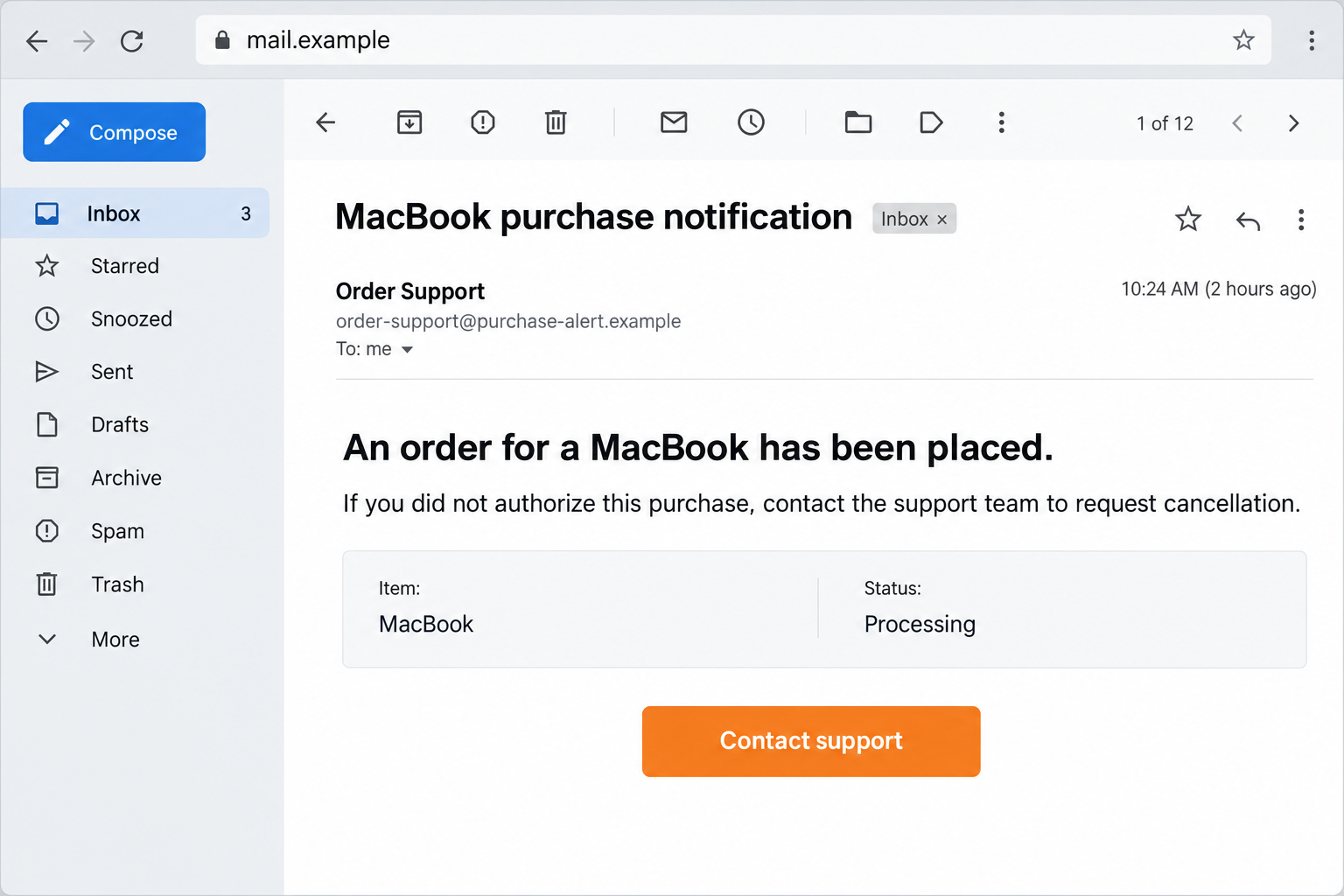
The email illustration above shows this kind of hook using fictional details. It is not an authentic order confirmation or a verified sender.
The “cancellation” can become refund or account fraud
The FTC describes Amazon purchase impersonation that escalates into false identity-fraud stories and demands to move money.
Another FTC warning explains bogus refunds and remote-access tactics. A supposed overpayment can actually involve the victim’s own funds.
The fraudulent caller may want credentials, card details, access to your device, or a transfer. Not every version uses every stage.
Amazon is being impersonated. A legitimate purchase, refund, or customer-service interaction isn’t fraudulent simply because the company sends a notification.
Three independent checks replace the caller’s story
You don’t need to resolve this on the incoming call. End the conversation and check the services involved through their normal routes.
- Look for the claimed purchase in the Amazon account you actually use.
- Compare it with your card’s real pending and posted transactions.
- Contact Amazon or your bank independently if either record shows a problem.
- Don’t transfer funds, reveal security codes, or install software to cancel the alleged order.
A message alone doesn’t prove an order or a charge exists. Conversely, a genuine unfamiliar charge should be investigated, not dismissed because a scam call arrived.
Why the MacBook Story Gets Attention
The product name makes the possible loss easy to picture
A MacBook sounds like a substantial purchase. You don’t need a precise model or amount to imagine an unwelcome bill.
That gives the caller a useful opening. Instead of selling something, they appear to be helping you stop a purchase you never wanted.
The reference to Amazon supplies a familiar setting. Even people who shop there only occasionally may have an account with saved payment information.
A scammer can exploit that possibility without seeing your shopping history. Receiving the call doesn’t establish that Amazon’s systems or your account were breached.
The conversation gradually changes the supposed problem
At first, the problem is an order. Later, the caller may describe a hacked account, a refund error, a compromised bank, or a criminal investigation.
Each change justifies another request. You started trying to stop a computer shipment and end up considering moving money to an unfamiliar recipient.
That shift is important. A shopping dispute doesn’t give an incoming caller authority over your savings, retirement account, or relationship with your bank.
If they tell you not to contact Amazon, not to tell the bank, or not to discuss the call, stop following the script.
How the Amazon MacBook Call Scam Works
Step 1: A purchase alert gives you a reason to respond
The message says the order has been placed, approved, or prepared for dispatch. It makes inaction seem like permission for the transaction to continue.
A recorded voice may offer a keypress to dispute it. An email may display a support number beside a convincing order summary.
The phone number or quoted price may change. What stays familiar is the invitation to call someone about a purchase you don’t recognize.
Don’t let an order number substitute for checking the account. A realistic identifier is easy to print in an email or recite over the phone.
Also separate what you know from what you’ve been told. You know you didn’t order a MacBook; you don’t yet know any MacBook order exists.
That difference removes the need to trust the supplied cancel route. The real account and payment records can answer the initial question.
Step 2: The supplied contact route reaches a convincing impostor
Once you respond, the person adopts a customer-service role. They may ask for an email address, order reference, or details that make the call feel routine.
A professional greeting, hold music, or a familiar caller-ID label can make the interaction appear connected to Amazon. None establishes the caller’s authority.
Caller ID can be spoofed. A callback number printed inside the suspicious notice is also part of the unverified contact, even if it answers politely.
The agent may claim the order cannot be canceled through your account. That explanation keeps you from using a route outside their control.
You can end the call without agreeing to anything. Reach customer service through the Amazon app or a website address you independently know.
If you’re already speaking to someone, don’t use their suggested “verification department” as an independent check. It may be another part of the same conversation.
Step 3: Cancellation becomes a request for sensitive access
The impostor can ask you to sign into a page, read out a one-time code, or install a tool described as a refund assistant.
A password request can expose the Amazon account. A security code may approve access or a financial action rather than cancel the purchase.
Read the full bank or account message yourself. Its explanation matters more than the caller’s instruction to ignore the wording and provide the code.
Remote-access software creates a different exposure. It may allow someone to view your screen, manipulate information, or operate accounts while you’re signed in.
Legitimate remote-support applications can be misused without being malware themselves. The dangerous part is giving an unverified caller control during a financial conversation.
Do not open banking while that session is active. A purchase cancellation is not a reason to let a stranger observe your account balances.
Step 4: A fake refund or “safe account” demands real money
One route claims too much money was refunded. The caller then asks you to return the difference quickly, often making you feel responsible for their mistake.
A screen showing a larger balance isn’t enough to confirm a refund. In reported scams, money moved between a victim’s own accounts supplies the illusion.
Compare the transaction history through your bank independently. Find the source of any credit rather than accepting a number displayed during remote access.
Another route claims your money must move to a protected account because your identity or current bank account is compromised.
The alleged destination might involve a transfer, cash, gift cards, or cryptocurrency. The reason changes, but you are being asked to send real value away.
Do not complete it. A caller who says your bank cannot be trusted is not a substitute for contacting that bank through its established fraud team.
Don’t share gift-card redemption details as proof of identity or payment cancellation. Whoever redeems those details can spend the balance.
Step 5: More instructions prolong the loss and delay reporting
After a payment, the caller may say another approval is needed, a transfer failed, or the first attempt is being refunded.
The conversation can continue as long as you believe the process is protecting your money. Every additional step deserves a fresh stop.
Keep in mind that a polite person promising recovery may still be the same impostor. A change in department name doesn’t verify their identity.
Once you recognize the deception, contacting the actual financial provider is more useful than arguing with the caller about returning the money.
Tell the provider about transfers, codes, and remote access as well as the original purchase story. It needs the real exposure, not just the alleged MacBook charge.
Checking Orders, Charges, and Refunds Safely
Use the account, not the incoming alert
Open the Amazon app you normally use or enter the known website address yourself. Check orders without clicking the notice’s sign-in link.
Make sure you’re looking at the right account. Household members, another email address, or a business account can explain a legitimate order you don’t immediately recognize.
Ask other authorized account users through an ordinary conversation. Don’t let the caller answer for them or pressure you into skipping that check.
If an unfamiliar order actually appears, use genuine customer service to investigate and secure the account. You still don’t need the incoming caller’s assistance.
A shopping record and a bank record answer different questions
The order history tells you what appears in that Amazon account. Your card statement tells you what that payment method has been charged.
An empty order list doesn’t settle an unfamiliar bank transaction. A payment may need investigation even when no matching order appears in the account you’re viewing.
Likewise, a pending entry isn’t automatically a completed loss. Ask the card issuer how it classifies the entry and what action is available.
For a claimed refund, look for an actual credit and its source. Don’t repay a stranger based on a screenshot, chat message, or caller’s calculation.
If you can’t inspect the records immediately, call back through genuine support later. The incoming caller doesn’t get to set the pace of your investigation.
What to Do if You Have Fallen Victim to This Scam
- End the call and stop further instructions.
Hang up rather than negotiate a smaller payment. Stop replying to related messages, including offers to complete or reverse the same refund.
If someone is guiding you through a transfer, pause it. Do not finish a transaction simply because you’ve already entered the recipient.
- Contact your financial provider promptly.
Reach the bank or card issuer independently. Explain which payments you made, whether codes were supplied, and whether a stranger accessed your device.
Ask about blocking further use, reviewing beneficiary changes, tracing transfers, or disputing a charge. Recovery options depend on the payment and circumstances.
- Act on gift cards or other transfers through their providers.
Keep gift-card receipts and the cards themselves. Report the exposed redemption details to the issuer and ask whether any remaining value can be protected.
For a payment app or wire transfer, contact that service too. Give the recipient details and reference, without paying anyone a recovery fee.
- Remove the caller’s access to the device.
Disconnect an active remote session. Stop using the affected device for financial accounts until the unwanted access has been addressed.
Uninstall the untrusted support application and review related permissions or unattended-access settings. Ask trusted technical help if you aren’t sure what changed.
- Secure accounts through a trusted device.
Change any exposed Amazon, email, or banking password through the genuine service. Review sessions, recovery details, saved addresses, and unfamiliar orders.
If a password was reused, replace it on those accounts as well. Ask the bank what further protection is needed after an exposed approval code.
- Save the contact and payment evidence.
Record the message, callback number, relevant email headers, transfer references, and software name. Write a brief timeline of the instructions and actions.
Store it privately rather than posting account screenshots publicly. Investigators and providers need the original details, not a conversation with the impostor.
- Report the impersonation and any identity exposure.
Amazon’s scam-prevention guidance explains its reporting routes. Use those routes instead of the suspicious notice’s support link.
For US fraud and identity recovery, start with the FTC’s recovery guidance. It separates payments, personal information, and device access.
- Use security tools for the actual device exposure.
After a download or remote session, Malwarebytes can help check for unwanted software. Scanning is useful cleanup, not proof that every account is safe.
AdGuard can reduce malicious advertising during browsing. It cannot authenticate an incoming call, reverse a transfer, or recover a disclosed gift-card balance.
Frequently Asked Questions
Does this call mean somebody really bought a MacBook?
No. The claimed purchase may be entirely invented. Check your actual Amazon orders and card records separately before treating the message as evidence of a transaction.
Is pressing a key enough to authorize the purchase?
Don’t assume a robocall’s claim is true. The keypress usually keeps you in its contact route. Stop participating and verify any actual order independently.
Can the caller ID prove the call is from Amazon?
No. A familiar display can be spoofed. Initiate your own support request through the genuine app or established website rather than trusting an incoming label.
Why would cancellation involve my bank balance?
It shouldn’t require a stranger to inspect savings or move funds into a “safe” account. That shift takes the conversation beyond an ordinary purchase dispute.
What if the refund seemed visible in my banking?
Check its source and transaction history without the caller watching. A transfer between your own accounts isn’t a refund from Amazon.
Can I get money back after following the instructions?
Ask the relevant provider immediately, with accurate payment details. Some options are time-sensitive, and recovery isn’t guaranteed. Don’t pay another stranger to obtain a refund.
The Bottom Line
Do not cancel an alleged MacBook order through an unsolicited caller, callback number, or refund page. Check the real account and payment records yourself.
The Amazon MacBook call scam turns fear of a purchase into permission for something far riskier: disclosing access or sending money.
If you’ve already complied, contact the financial provider and remove any remote access now. Then secure the exposed accounts through their genuine services.








