


A social post says a Costco employee knows where to get a box of meat for almost nothing. With grocery bills climbing, it’s hard not to look.
The story sounds more like a helpful tip than an advertisement. Before you take the survey, check where that helpful tip is sending you.
Overview
A free-food promise borrows Costco’s reputation
The Costco meat box scam uses an attractive grocery offer to draw people toward a survey and an unfamiliar payment page.
In reported versions, someone claims a relative works at the warehouse or says a canceled order left boxes available. That sounds like an insider opportunity.
The story can ask for only a small shipping charge after the survey. That shifts attention away from whether the promotion exists.
Costco is the brand being borrowed here. The warning concerns the impersonating promotion, not the retailer’s genuine groceries or legitimate offers.
The retailer warns about this broader giveaway pattern
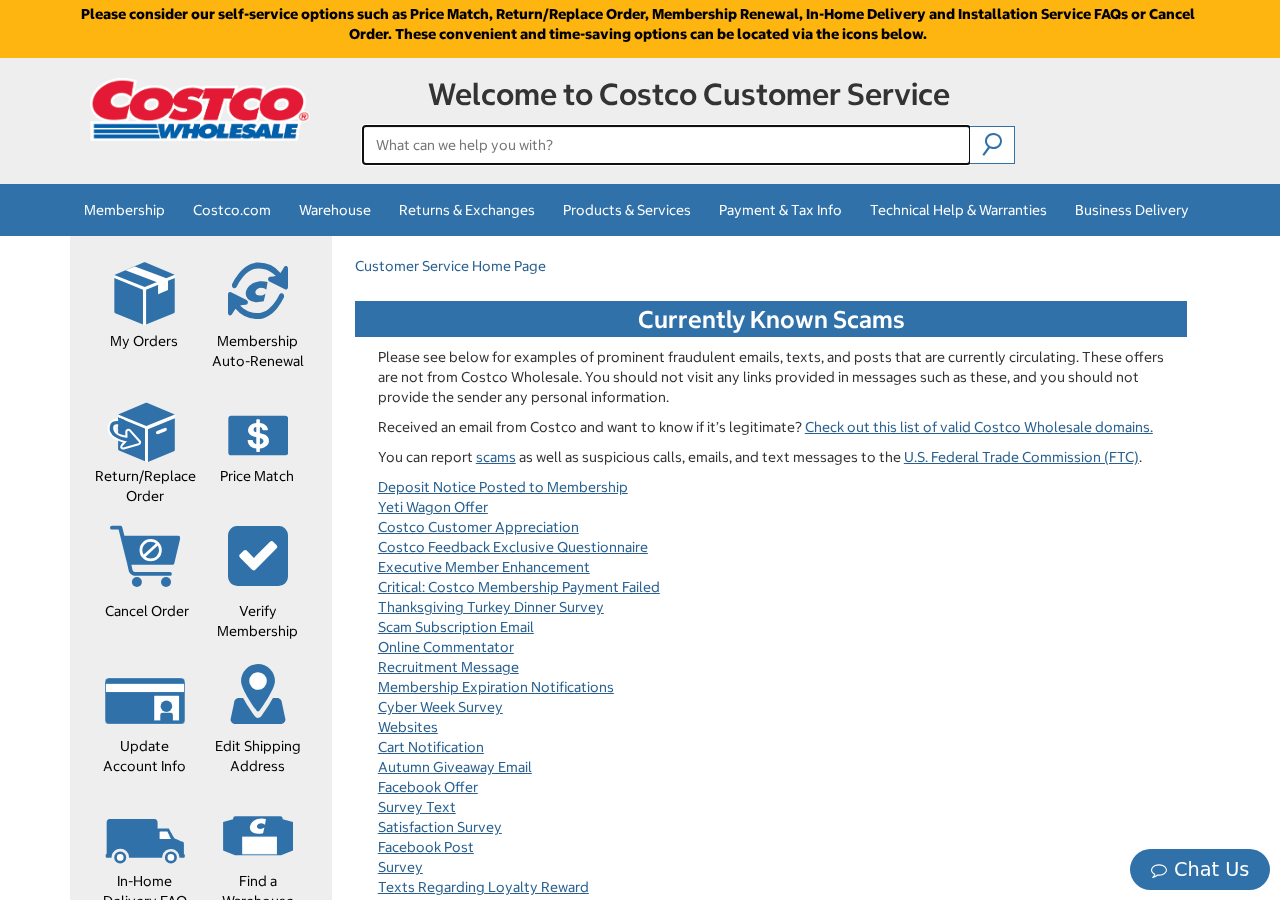
Costco’s current scam warning identifies fraudulent surveys, social posts, and giveaways using its name. The original screenshot above shows that warning.
Its fraud-prevention guidance also describes unauthorized promotions that move between websites and email addresses.
The specific meat-box story is a reported lure. These official warnings confirm the impersonation pattern, not every amount or later charge claimed about each version.
No universal monthly fee can be inferred from the promise alone. Actual recurring charges need checking against the checkout, receipt, and account statement.
The important decision happens before the shipping form
A survey result doesn’t authenticate a grocery promotion. Before paying anything, establish who offers the goods and who will receive the payment.
- Find the promotion through Costco’s established channels, not the post’s link.
- Check whether the payment recipient is actually connected to the advertised offer.
- Read any membership, trial, or recurring-payment terms before approving a charge.
- Don’t provide card details merely because the advertised shipping amount looks harmless.
If you already paid, save the receipt and merchant description. Those records are more useful for resolving the charge than the employee story.
Why an Employee Story Makes the Offer Work
It explains away an unusually generous deal
A large box of groceries for a small fee would normally invite questions. The story supplies an answer before you ask them.
Someone supposedly knows a worker. A canceled order supposedly created excess stock. The post presents the discount as an exception, not an everyday price.
That exception makes the reader feel fortunate rather than suspicious. You’re encouraged to act before the opportunity disappears or other shoppers claim it.
But a claimed employee relationship isn’t permission to collect payment on the retailer’s behalf. It needs more than a family anecdote to become verifiable.
The survey creates the feeling of qualifying
Answering questions gives the offer a process. You’re not simply receiving an improbable gift; you’re supposedly completing the steps to qualify for one.
Questions about shopping habits can look relevant. A progress bar and congratulatory result make the next screen feel earned.
That effort can make backing out harder. By the time shipping appears, you’ve already imagined using the groceries and spent time reaching the reward.
Don’t let that investment decide the payment. A few answers aren’t evidence that a box exists, that you’ve won it, or that Costco authorized it.
How the Costco Meat Box Scam Works
Step 1: A social post or message introduces the insider bargain
The opening connects the offer to a recognizable warehouse brand. It may describe a surplus, a distribution mistake, or a canceled bulk purchase.
These are reported versions of the lure, not verified warehouse events. The story itself doesn’t establish that an employee or retailer supplied the stock.
Images of groceries, appreciative comments, and a friendly writing style can make the post look like one shopper helping another.
A popular post is not necessarily a verified offer. Comments and shares show engagement, not control of the business supposedly giving away food.
Take note of what is missing: a promotion reachable independently, a named seller, and a clear explanation of how the goods are supplied.
If the link is the only place where the deal exists, you’re being asked to trust the promoter’s entire story before checking any of it.
Step 2: The link turns the tip into a branded survey
The destination can display Costco-like colors, product pictures, and a questionnaire. Familiar presentation makes leaving the original platform feel unremarkable.
You may be asked about shopping frequency, satisfaction, or preferences. Those questions give the page a plausible customer-research purpose.
Look at the actual web address. A logo displayed above a survey doesn’t establish that the retailer controls the domain or the data collection.
Don’t assume the social platform verified the offer either. An advertisement or shared post can reach you without a retailer having approved it.
The retailer’s warning is useful because it describes precisely this misuse of surveys and offers. The survey format isn’t the problem; unverified impersonation is.
Stop before supplying contact details if you cannot establish the promotion’s connection to Costco through a separate, trustworthy route.
Step 3: A reward screen encourages you to keep going
The survey may end with congratulations and an instruction to claim the meat box. The form presents the reward as the outcome of your answers.
A screen can declare success without awarding anything. It is part of the website’s design, not independent evidence that stock has been allocated.
The next step may be framed as confirming delivery information. Name, address, email, and telephone fields look reasonable for a shipment.
Yet those details are going to whoever operates the page. The practical question is whether you know who that is.
Don’t supply a membership number or account password to strengthen the supposed claim. A fake promotion can use those requests to expand the exposure.
If the page insists that qualification expires while you check, let it expire. Losing an unverified offer is safer than giving it payment access.
Step 4: A small shipping charge introduces the checkout
The offer now asks for a card to cover delivery. Because the food supposedly costs nothing, the fee can seem like a minor final detail.
That is the change to watch: a free-grocery story has become a financial transaction with an unfamiliar recipient.
Read the entire checkout before interpreting the payment. A trial, benefits club, or other service can be different from the groceries pictured earlier.
If recurring terms appear, identify the amount, interval, starting date, and cancellation route. Don’t assume the first visible fee is the complete commitment.
The reported lure alone does not establish that every version creates a subscription. A suspicious checkout can also collect card data without supplying meaningful terms.
Either way, do not pay through an offer whose retailer connection and payment purpose remain unverified. The small amount doesn’t fix those missing facts.
Step 5: The shopper is left with a charge rather than a verified order
After payment, a confirmation page can make the process feel complete. Check what the actual receipt says you purchased, not only what the promotion pictured.
An unfamiliar merchant description may be the first sign that the transaction went somewhere other than expected.
A receipt doesn’t automatically identify fraud, and legitimate businesses sometimes use different billing names. But the name should be explainable and connected to your consent.
If further charges appear, establish whether they match any service you knowingly authorized. Preserve the terms and dispute the facts accurately.
Don’t enter another card into a new delivery or refund link to resolve the situation. That may only expose a second payment method.
The useful records are now the original offer, checkout wording, receipt, and statement. They show what was promised and what actually happened.
Who Is Actually Taking the Payment?
The advertised brand may not be the billing merchant
Start by comparing the name in the promotion with the checkout, receipt, and bank statement. Don’t assume the Costco logo names the recipient.
A payment to a separate seller needs an explanation. It should identify that seller and describe its relationship to the offer.
Use the statement description when speaking to your issuer. Asking Costco to reverse a charge it never received may send you down the wrong route.
A contact or return address needs a clear role
If an address appears in the terms, find out whether it belongs to the seller, a returns service, or another organization.
An address printed on a page isn’t proof that groceries are stored there. No warehouse or return location is established by the employee anecdote.
Don’t send identification or goods to an address from a follow-up message without confirming its relevance through the actual merchant or your payment provider.
Cancellation depends on the service actually charged
When a receipt describes a membership or trial, locate its documented cancellation process. Save the request and any confirmation.
A refund and cancellation are different tasks. Returning the first fee may not, by itself, stop a separately authorized recurring arrangement.
Keep a record of failed contact attempts, including the date and address used. That helps show why you couldn’t resolve the charge directly.
The food shipment needs more than a picture
A box pictured in an advertisement doesn’t establish a supplier, contents, dispatch date, or delivery process. Check those points before treating it as an order.
Nobody’s employee anecdote tells you who will pack, dispatch, or deliver the box. Without a verified seller, there’s no reliable shipment to track.
If an unrelated membership appears on the receipt, pursue that billing problem. Don’t wait for a grocery delivery to resolve a charge for something else.
What to Do if You Have Fallen Victim to This Scam
- Stop using the promotion’s forms.
Don’t pay a second shipping charge or use a supposed claim-repair link. Keep the existing evidence without re-entering your information.
If you only answered survey questions, consider what contact details were disclosed. You may need to recognize follow-up marketing or phishing rather than replace a card.
- Save the offer and transaction records.
Keep screenshots of the promotion, checkout, recurring terms if present, and confirmation. Record the statement description and payment date.
These details help distinguish a promised grocery shipment from a separately billed service. Don’t publish unredacted receipts or card details in a comment.
- Notify the card issuer about the exposure.
If you entered a card on an unverified form, contact the issuer even when payment appeared to fail. Explain what information the page received.
Ask about replacement, monitoring, and any charge already posted. A blocked card and a disputed payment are related but separate protective actions.
- Identify and address any unwanted recurring service.
Read the receipt for a trial or membership. If one exists, send a cancellation request through the documented merchant route and retain it.
Tell the issuer about later charges and the cancellation evidence. Ask what additional controls are available rather than assuming card replacement cancels every agreement.
- Describe the dispute truthfully.
Explain whether you approved a fee because of a misleading grocery offer or never authorized the transaction. Include what was delivered, if anything.
Ask about the relevant dispute deadline. Avoid guessing that every unfamiliar description is card theft when your receipt may identify the merchant.
- Protect any account credentials supplied.
Change exposed passwords through the genuine service, particularly if the page asked for Costco or email access. Review unfamiliar sessions and recovery settings.
A card dispute won’t protect a mailbox password. Address each type of information you disclosed rather than relying on a single remedy.
- Report the impersonating offer.
Use the social platform’s reporting controls and Costco’s established support guidance. Include the public promotion link and impersonation details, not private financial information.
US consumers can also use ReportFraud.ftc.gov. A report helps document the scheme but doesn’t replace contacting the payment provider.
- Review downloads or browser changes if you encountered them.
If the offer prompted an installation, remove untrusted software and consider a Malwarebytes scan. Revoke unexpected notification permissions if the page added them.
AdGuard can help reduce malicious advertising. Neither it nor a scan cancels a trial, refunds shipping, or establishes whether food was ordered.
Checking a Grocery Offer Before Paying
The most useful question isn’t whether the food looks desirable. It’s whether the retailer recognizes the offer and whether the checkout describes the same transaction.
Navigate independently to the retailer’s customer-service area. Its scam examples and valid-domain guidance are safer than a promoter’s reassurance in the comments.
Be specific when asking about the offer: promotion name, item, public website address, and payment request. You don’t need to supply card information for that check.
A genuine bargain can withstand ordinary questions about who sells it, what you’ll receive, and the complete price. An unexplained survey reward can’t.
Frequently Asked Questions
Is the Costco meat box giveaway a verified Costco promotion?
The reported insider-surplus offer isn’t established as an authorized promotion. Costco warns about fake surveys and giveaways. Don’t order through it without independent retailer confirmation.
Does a relative working at Costco make the post trustworthy?
No. That relationship is a claim inside the promotion. It doesn’t authenticate the survey domain, payment recipient, or any grocery stock.
Why does a free meat box need card details?
The shipping request introduces a checkout. Before paying, verify the offer and complete terms. A small fee can still expose a card or approve something different.
Will every version charge a monthly subscription?
That isn’t established. Check the actual terms, receipt, and later transactions. Report recurring charges if they occur, without assuming every lookalike page uses identical billing.
Can Costco refund a payment to another merchant?
First identify who received it. Costco may help confirm impersonation, but your issuer and actual payment recipient are the relevant routes for investigating an unrelated charge.
What if I completed the survey but never entered a card?
Review what personal information you supplied and watch for follow-up contact. Card replacement isn’t automatically needed when no card details were disclosed.
The Bottom Line
Do not order through the unverified Costco meat box offer. An employee story and survey result don’t connect an unfamiliar payment form to the retailer.
The Costco meat box scam makes a small shipping fee seem like the last step toward free groceries. Verify the promotion before it becomes your transaction.
If you’ve already paid, preserve the receipt, identify the merchant, and contact your issuer. Cancel any actual unwanted recurring service using its documented process.

Join the discussion
0 commentsShare your experience or ask a question about this article.
Discussion
Start the conversation
Have a question or something useful to share? Add the first comment.