

The Costco Meat Box Giveaway Scam is built to look exciting, harmless, and time-sensitive. It usually promises a free or heavily discounted box of premium meat in exchange for answering a few questions, paying a small shipping fee, or claiming a prize before it expires.
At first glance, it can look like a legitimate promotion from a familiar brand. But behind the polished images and cheerful language, these scams are designed to collect payment details, personal information, or both. Here is how the scam works, why it is so convincing, and what to do if you got caught in it.
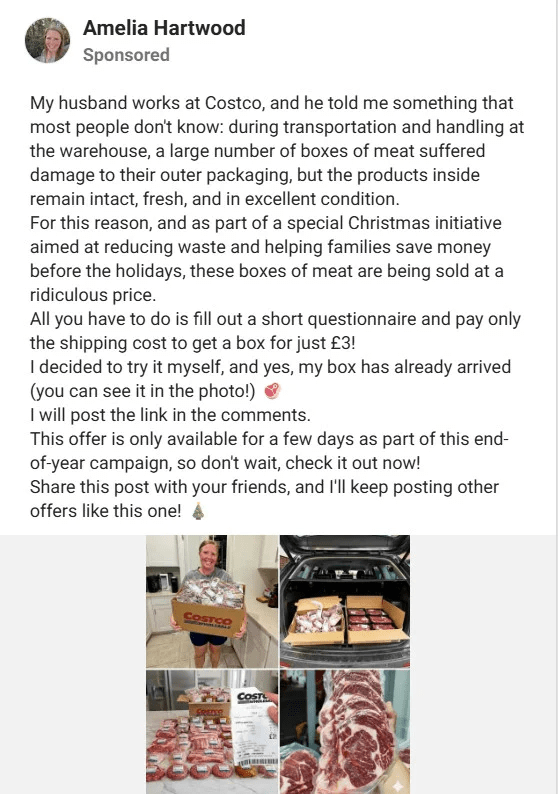
Scam Overview
The Costco Meat Box Giveaway Scam is a classic retail impersonation scam wrapped in a modern, high-converting marketing format. Instead of threatening victims or frightening them into action, it does the opposite. It uses excitement, convenience, and the appeal of a bargain.
That is one reason it works so well.
People are used to seeing contests, promotions, flash sales, reward offers, and sample boxes online. Major retailers constantly run promotions. Social media is full of giveaway language. Email inboxes are full of discount codes. Because of that, a fake “Costco Meat Box Giveaway” does not feel suspicious at first. It feels familiar.
The scam generally presents itself as a limited-time reward offer. The victim may see a Facebook post, an ad, a pop-up, a text message, or a link shared in a group or comments section. The wording is often simple and emotionally effective. It might say that Costco is giving away free meat boxes due to overstock, as part of a customer appreciation event, to celebrate an anniversary, or because a visitor has been selected for a reward.
The offer is carefully framed to remove doubt.
Instead of asking for a large payment up front, the scam usually starts with something small. The victim may be asked to answer a few survey questions. They may be told they have won after a spinning wheel animation or a quiz. They may be congratulated for being one of only a few people selected today. Then comes the key step: pay a small shipping fee, pay a handling fee, or confirm your identity by entering billing details.
That is where the real goal appears.
The meat box itself is often just bait. The scam is usually not about sending meat at all. It is about turning the trust attached to Costco into clicks, data collection, and card submissions. In some cases, the victim simply loses a small charge. In other cases, the card can be billed again later, enrolled in hard-to-cancel trial programs, or exposed to further fraud attempts. Sometimes the scam is less about payment and more about harvesting full contact details for future spam, phishing, or identity-based attacks.
What makes this scam especially effective is that the product category feels practical and valuable. A free phone or luxury prize may trigger skepticism. A meat box often does not. It feels realistic. Groceries are expensive. A food box promotion seems believable. People know retailers sometimes run warehouse clearance offers, seasonal food promotions, or member perks. The scam takes advantage of that mental shortcut.
Another powerful element is visual familiarity.
These scam pages often imitate the look and language of real retail marketing. They may use warehouse-style product photos, Costco-like branding, membership language, official-looking seals, red claim buttons, countdown timers, review snippets, and fake comments from happy winners. Some pages include survey questions that appear harmless, such as how often you shop at Costco, whether you prefer beef or chicken, or which delivery option you would choose. These questions are not there because the answers matter. They are there to create a ritual of legitimacy.
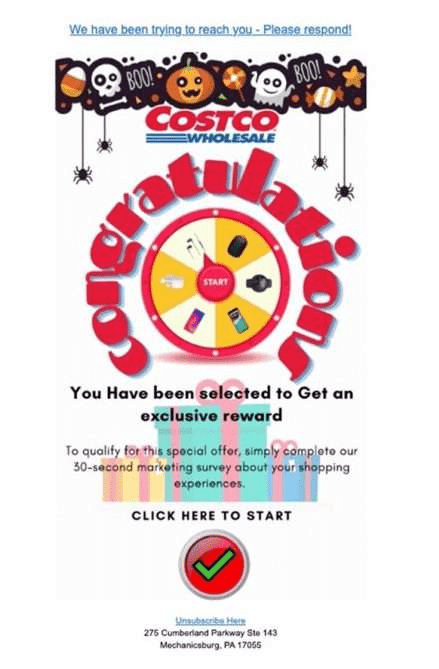
Once a visitor has clicked, answered questions, and advanced through multiple screens, they are psychologically more committed. The process feels earned. The prize feels real because the victim has “qualified” for it.
This is a common scam tactic.
Scammers know that people are more likely to trust an offer after they have interacted with it. A straight request for card details feels suspicious. A card request after a quiz, a congratulations screen, and a winner announcement feels different. The victim begins to think, “I already completed the process, so this must be real.”
The scam also often uses artificial scarcity.
Phrases like “Only 3 boxes left,” “Offer expires in 5 minutes,” “Only available for selected members,” or “Today only” are designed to shut down careful thinking. Urgency is one of the strongest levers in fraud because it pushes people to act before they verify. A person who would normally check the URL, search for the promotion, or visit Costco’s official website directly may skip all of that if they believe they will lose the reward by waiting.
The target audience is broad.
Some victims are bargain hunters. Some are busy parents trying to save money on groceries. Some are older adults who are very familiar with Costco as a trusted brand and therefore lower their guard when they see it used in an ad. Others are simply browsing casually and get pulled in by curiosity. This is one reason retail brand scams remain effective. They do not need a highly technical victim profile. They only need a trusted logo and a convincing offer.
The scam may also spread through private sharing.
A person who does not fully trust the offer may still send it to a spouse, friend, or parent saying, “Is this real?” That alone helps it travel. In some cases, victims are actively encouraged to share the offer with multiple contacts to “unlock” the reward. That turns ordinary users into unpaid distribution channels. The scam becomes more believable because it appears to come from someone you know.
Another reason this scam is dangerous is that the damage may not be obvious right away.
If a victim enters name, phone number, email address, and card details for a shipping fee of $2.99, $4.95, or $9.95, they may not immediately notice anything alarming. The amount is small. The card still works. The website may even show a successful order screen. Days later, more charges can appear. Or the victim may begin receiving a flood of spam texts, telemarketing calls, fake delivery alerts, and other scam messages. Because the original action seemed minor, the connection is not always immediately made.
That delay helps scammers.
People are less likely to react quickly if there is no immediate crisis. They may not dispute the card transaction at once. They may not change passwords. They may not even realize they were scammed until much later. By then, the fraud operation may already have moved on to a new domain name, new brand theme, or new “free gift” story.
It is also important to understand that these scam pages are often disposable.
They can be created quickly, promoted aggressively for a short period, then abandoned and replaced. Today it may be a Costco meat box. Tomorrow it might be a Sam’s Club freezer bundle, a Walmart grill giveaway, an Amazon kitchen set, or a Home Depot tool chest promotion. The product changes, but the structure remains almost identical.
That is why learning the pattern matters more than learning one exact page.
At its core, the Costco Meat Box Giveaway Scam relies on five things:
1. Brand trust
A familiar retailer lowers suspicion. People assume the company behind the page is real because the name is recognizable.
2. Practical value
A meat box feels useful, timely, and believable. It is not flashy enough to feel obviously fake.
3. Small upfront cost
A tiny shipping fee feels low-risk, which makes people more willing to enter their card details.
4. Urgency
Countdowns, limited quantities, and “claim now” messaging reduce careful thinking.
5. Data capture
Even if the victim never receives a product, the scammer may still profit from personal information, billing details, or repeat charges.
One of the most harmful misconceptions about scams like this is the belief that they are harmless because the initial amount is small. But these operations can create a chain of problems. A single fake giveaway claim can lead to unauthorized charges, account monitoring, phishing attempts, spam campaigns, subscription traps, or future fraud targeted using the details already collected.
This is why the scam should not be treated as just a fake promotion.
It is a trust-based fraud funnel. The “free meat box” is only the front end. The real value for the scammer is what happens after the victim decides the offer is safe enough to click.
The good news is that once you understand the structure, the warning signs become much easier to spot. The page may look polished. The copy may sound friendly. The offer may even feel plausible. But the moment a random promotional page asks you to hurry, submit personal details, and pay to claim a prize from a major retailer, you should step back and assume you may be looking at a scam.
That pause can save your card, your inbox, your phone number, and a great deal of frustration.
How The Scam Works
The Costco Meat Box Giveaway Scam usually follows a predictable sequence. It is designed to guide the victim from curiosity to trust to action, all in a matter of minutes.
Below is a detailed breakdown of how the scam typically unfolds.
Step 1: The victim sees an eye-catching offer
The scam begins with visibility.
A victim may encounter the fake giveaway through a social media ad, a sponsored post, a pop-up, a random website banner, a forwarded message, or even a comment thread where someone claims they successfully received their box. The wording is crafted to be irresistible.
Common themes include:
- Costco is giving away free meat boxes to celebrate an event
- Extra inventory must be cleared out quickly
- A customer appreciation promotion is ending today
- Selected users can claim a premium meat bundle for a small fee
- Only a few winners remain
The visual presentation matters a lot. The page or ad often uses appealing food images, warehouse-style branding, retail sale colors, and clean layout elements that resemble legitimate e-commerce marketing.
The key objective in this first stage is simple: get the click.
Scammers do not need every viewer to believe the offer. They only need enough people to be curious enough to open it.
Step 2: The user lands on a convincing promotional page
After clicking, the victim is taken to a page that looks like a promotional microsite or survey landing page.
This page is where the scam builds credibility. It may mention Costco by name, use similar fonts or branding cues, and present the offer as if it were a legitimate member reward. The language is often upbeat and reassuring.
The visitor may see:
- A congratulatory message
- Product photos of assorted meats
- A countdown timer
- Fake claim statistics
- Testimonials from “recent winners”
- A statement that only a limited number of reward boxes remain
- A reminder that the visitor must act immediately
This stage is designed to make the offer feel official enough that the visitor stops questioning it.
A real retailer page usually gives clear information about the company, terms, customer service, and normal checkout flow. Scam pages often skip those details or hide them behind vague links. But many users do not notice that because the page is optimized for emotion, not scrutiny.
Step 3: The victim is asked to complete a survey or quiz
The next stage is often a short survey.
This is a crucial manipulation step because it creates the illusion of a real promotional process. Instead of immediately asking for money, the page asks a few harmless questions. These might include:
- How often do you shop at Costco?
- Which meat products do you prefer?
- How satisfied are you with warehouse pricing?
- Have you used home delivery before?
- Which box would you like to claim?
The survey does not exist to gather meaningful consumer insights. It exists to create participation and momentum.
As the victim answers each question, the scam becomes more believable. It feels like a structured eligibility check rather than a random fraud page. This taps into a common psychological effect: people trust processes that look organized.
Sometimes the page shows fake activity after the survey. It may display messages such as “Checking availability,” “Verifying your answers,” or “Looking for rewards in your region.” These little animations are meant to simulate a legitimate system at work.
Step 4: The page announces that the victim has won
This is the emotional trigger point.
After the short quiz or survey, the page reveals that the visitor has been selected. The language is usually celebratory. It may say that the user won a premium Costco meat box, secured one of the last remaining rewards, or qualified for a near-free shipment.
This part is not subtle.
The page wants the victim to feel lucky and special. It may also show a warning that the prize will expire in a few minutes if not claimed. Fake inventory counters may drop in real time. The page may imply that other people are actively taking the remaining boxes.
At this moment, the victim is no longer just browsing. They are making a decision under pressure.
The scam now has three powerful forces working together:
- Excitement from being “selected”
- Fear of missing out
- The feeling that the prize was earned through the survey
That combination makes many people move forward without verifying the offer elsewhere.
Step 5: The victim is asked to pay a small shipping or handling fee
This is where the scam starts monetizing the interaction.
The page explains that the meat box is free, but shipping, handling, cold-chain packaging, or delivery confirmation requires a small payment. The amount is usually low enough to feel reasonable.
Examples of how this is framed include:
- “Only pay $4.95 shipping”
- “Cover refrigerated handling for your meat box”
- “Pay the final delivery charge to reserve your prize”
- “Confirm your claim with a small member processing fee”
This is one of the oldest and most effective scam tactics online.
A large charge would scare people away. A small charge feels normal. It is psychologically easier to justify spending $4.95 to claim something supposedly worth much more. Victims often think they are making a smart trade.
But entering payment details is the real point of the scam.
Once the victim types in card information, billing address, name, email, and phone number, the scammer has captured valuable data. Even if the visible charge is tiny, the underlying consequences can be larger.
Step 6: The victim may be hit with more than just one charge
After payment, the scam can go in several directions.
In some cases, the victim receives nothing at all. The page may display a confirmation screen, and then there is silence. No tracking number. No shipment. No customer support that actually responds.
In other cases, the initial small payment is only the beginning. The victim may later notice:
- Additional unauthorized charges
- Recurring monthly billing
- Charges from unfamiliar company names
- Enrollment in trial or subscription programs
- Aggressive spam calls or emails
- Other scam messages tailored to the information submitted
This is why the Costco meat box scam can be more harmful than it first appears.
The fake prize is often just the front end of a larger billing or lead-generation scheme. If card details are captured, they may be used directly, passed through a shady processing chain, or linked to offers that are intentionally difficult to cancel.
Victims sometimes assume they simply fell for a cheap gimmick and lost a few dollars. But the real cost can be much higher if they do not monitor their accounts.
Step 7: The scam page disappears or shifts to a new identity
By the time victims realize something is wrong, the page may already be gone.
That is one reason these scams are so frustrating. They are often short-lived, easy to clone, and quick to rebrand. A fraud operation might run the Costco meat box version for a few days, then launch the same template under a different store name or gift offer.
The contact details may be vague. The website domain may be newly created, oddly spelled, or unrelated to the brand being impersonated. The support email may never reply. Refund promises, if any, may lead nowhere.
This disposable setup benefits scammers because it reduces accountability. They do not need to maintain a long-term fake business. They only need enough time to collect submissions.
Why this sequence works so well
The steps above are effective because they mirror legitimate online experiences.
People really do see survey-based promotions. They really do pay shipping for “free” offers. They really do receive reward notices from brands. The scam works by imitating just enough of the real world to feel safe.
Each stage is carefully calibrated:
It starts casually
There is no threat. No panic. Just a tempting offer.
It builds legitimacy
The survey and branded design make the process seem authentic.
It creates emotional momentum
Winning the prize makes the experience feel personal.
It lowers resistance
The small fee seems reasonable compared to the promised reward.
It delays suspicion
Victims may not notice the harm until later.
That delayed realization is one of the strongest features of the scam. When fraud does not look like fraud in the moment, people are far more likely to comply.
The red flags hidden inside the process
Even polished scam pages often contain warning signs. The problem is that most people notice them only after the fact.
Here are some of the most common ones:
The URL does not match the real retailer
A page can mention Costco everywhere while being hosted on a completely unrelated domain.
The page uses pressure tactics
Real promotions may have deadlines, but scam pages often weaponize urgency with countdown timers and “only 2 left” messages.
The offer is unusually generous
A premium meat box for almost nothing should immediately trigger caution.
The page asks for payment to claim a prize
This is one of the biggest warning signs in giveaway scams.
Contact information is vague or missing
Legitimate retailers provide clear support channels, terms, and policy information.
The winner flow feels automatic
If everyone who takes the survey “wins,” that is not a real giveaway.
The page pushes sharing or fast action
Scammers want victims to act before they verify.
The more of these signs appear together, the more likely the page is fraudulent.
What To Do If You Have Fallen Victim to This Scam
If you entered your details into a fake Costco meat box giveaway page, do not panic. Many people fall for scams that look polished and believable. What matters now is responding quickly and methodically.
Here are the most important steps to take.
1. Contact your bank or card issuer immediately
If you entered debit or credit card information, call the number on the back of your card right away.
Explain that you may have entered your card details into a fraudulent giveaway or fake promotional website. Ask the bank to:
- Review recent charges
- Block or reverse unauthorized transactions if possible
- Cancel the compromised card
- Issue a replacement card
- Monitor for further suspicious activity
Speed matters here. The earlier you act, the better your chances of limiting the damage.
2. Check your account for small and unusual charges
Do not focus only on big transactions.
Scam-related charges often begin with very small amounts. Review your recent card history carefully for anything you do not recognize, even charges under $10. Small test charges can be the first sign that your card data is being misused.
Keep checking for several weeks, not just one day.
3. Dispute any unauthorized payments
If you were charged for something you did not knowingly authorize, request a formal dispute through your bank or card provider.
Be clear and specific. Tell them the charge came from a fake giveaway or deceptive promotional website. Ask for written confirmation of the dispute if available.
Save screenshots, confirmation emails, and transaction details to support your case.
4. Change passwords if you reused them anywhere
If the scam page asked for an email address and password, or if you used a password that you also use on other websites, change those passwords immediately.
Start with:
- Your email account
- Your shopping accounts
- Your banking or payment-related accounts
- Any service that uses the same or a similar password
Use strong, unique passwords for each account. If possible, enable two-factor authentication.
5. Be ready for follow-up scams
Once your details are submitted, you may receive more scam attempts.
These can include:
- Fake shipping alerts
- Refund offers
- Customer support follow-ups
- Bank verification scams
- More promotional prize messages
- Calls asking you to confirm your identity
Be extra cautious with any unexpected text, call, or email that arrives after the original scam. Fraud often comes in waves.
6. Watch for recurring billing
Some scam offers are tied to hidden subscriptions, trial programs, or repeating charges buried in hard-to-read terms.
Review your statements over the next one to two billing cycles. If you notice any repeated payment pattern, report it immediately.
Do not assume the problem ended with the first charge.
7. Scan your inbox and text messages for suspicious confirmations
Look for emails or texts that mention:
- Order confirmation
- Membership activation
- Trial enrollment
- Payment receipt
- Shipping updates
- Subscription terms
These messages can provide clues about what information was captured and what company name may appear on your statement.
Take screenshots and keep records. They may help when speaking to your bank.
8. Report the scam page or ad where you found it
If you encountered the fake giveaway on social media, in an ad network, by text message, or through email, report it on that platform.
This will not always remove it instantly, but reporting helps reduce exposure for others.
You can also report the incident to relevant consumer protection or anti-fraud reporting channels in your country. If the scam impersonated a real retailer, consider notifying that retailer through its official support channels as well.
9. Do not try to “fix” the problem through the same website
Victims sometimes go back to the original page to request a refund, cancel the order, or ask for support.
That usually does not help.
If the site is fraudulent, any further interaction can expose you to additional data collection or manipulation. Handle the issue through your bank, official fraud reporting channels, and trusted institutions instead.
10. Take the experience seriously, but do not blame yourself
This kind of scam is designed to look normal.
It uses a trusted brand, a practical product, a polished page, and a low payment amount. That combination is specifically built to bypass people’s defenses. Falling for it does not mean you were careless. It means the scam was engineered to feel safe.
The most productive response is fast action, careful monitoring, and learning the warning signs so you can avoid the next variation.
Is Your Device Infected? Run a Free Malware Scan
Slow performance, constant pop-ups, or strange behavior? These are classic signs of a malware infection. The fastest way to find out is to scan your device with Malwarebytes Free — one of the most trusted malware removal tools available.
The free version detects and removes the most common threats, including:
- Adware — the cause of those annoying pop-ups
- Browser hijackers — unwanted redirects and changed homepages
- Trojans and spyware — hidden programs stealing your data
- Potentially unwanted programs (PUPs) — software you never asked for
👉 Select your device below — Windows, Mac, or Android — then follow the simple steps to download Malwarebytes, scan your system, and remove any threats it finds. The scan usually takes 5 to 20 minutes.
Run a Malware Scan with Malwarebytes for Windows
Malwarebytes is one of the most popular and trusted anti-malware tools for Windows — and it’s completely free for removing infections. It catches threats that many antivirus programs miss, including adware, browser hijackers, and trojans. Follow the steps below to scan and clean your PC in just a few minutes.
Download Malwarebytes
Click the button below to download the latest version of Malwarebytes for Windows from the official source. The free version is all you need — it will scan your computer and remove adware, browser hijackers, and other malicious software at no cost.
Download MalwarebytesOfficial installer for Windows 11 and 10. Your download starts right away.Want real-time protection? See Malwarebytes Premium Malwarebytes Free for WindowsScans and removes malware at no cost
-
Install Malwarebytes
When the download finishes, open your Downloads folder and double-click the MBSetup file. If Windows shows a User Account Control pop-up, click “Yes” to allow the installation.
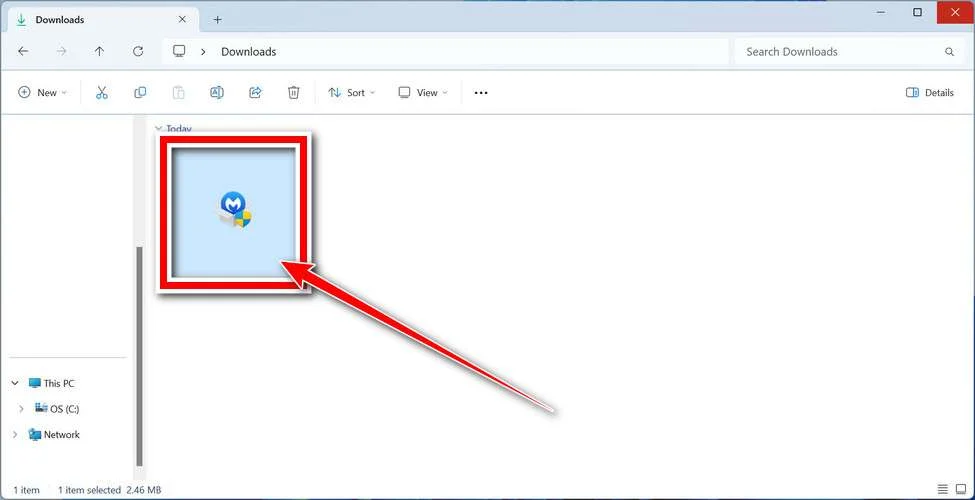
Follow the On-Screen Prompts to Install Malwarebytes
The setup wizard will walk you through a few quick screens:
-
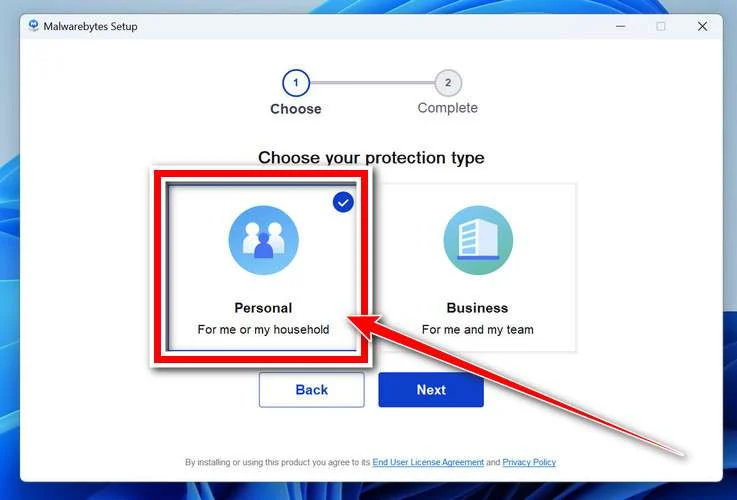
Choose where you’re installing the program — “Personal Computer” or “Work Computer” — then click Next.
-
Malwarebytes will now install on your device. This usually takes under a minute.

-
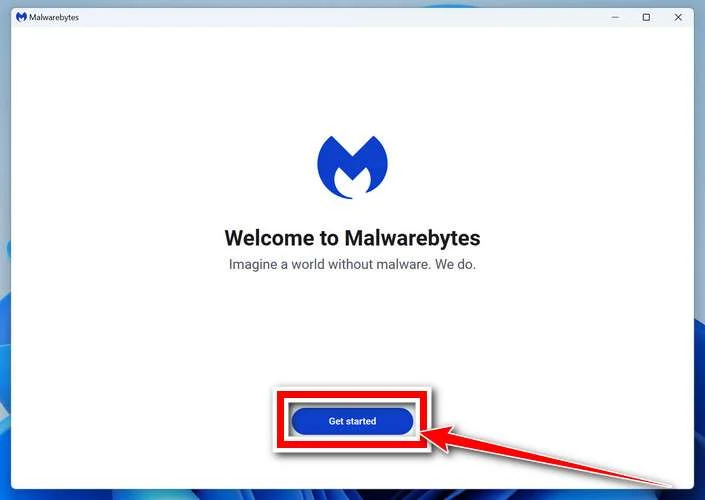
When installation is complete, the “Welcome to Malwarebytes” screen will open automatically.
-
On the final screen, click Open Malwarebytes to launch the program.

-
Enable “Scan for Rootkits”
Before scanning, turn on rootkit detection so Malwarebytes can find even the most hidden threats. Click the Settings gear icon on the left side of the screen.
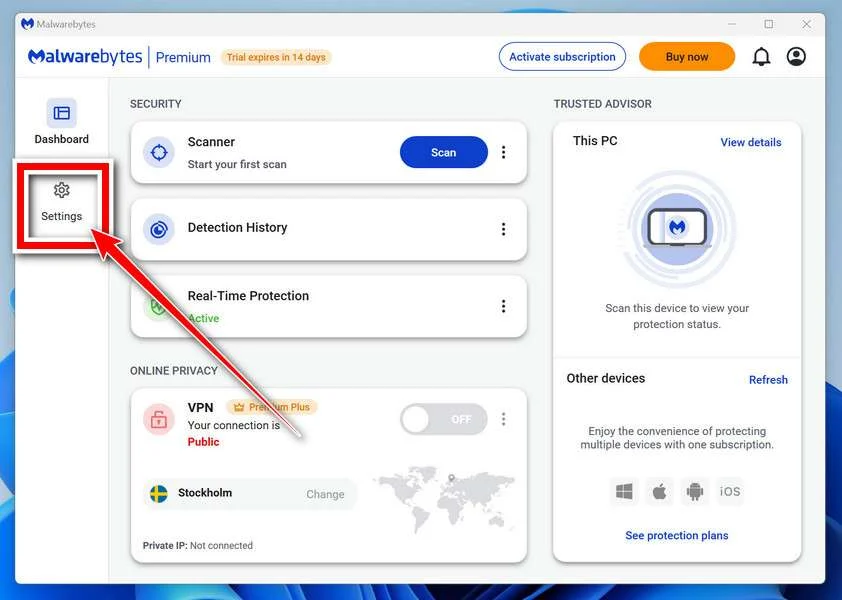
In the settings menu, find “Scan for rootkits” and click the toggle so it turns blue.

Done? Click “Dashboard” in the left pane to return to the main screen.
Start the Scan
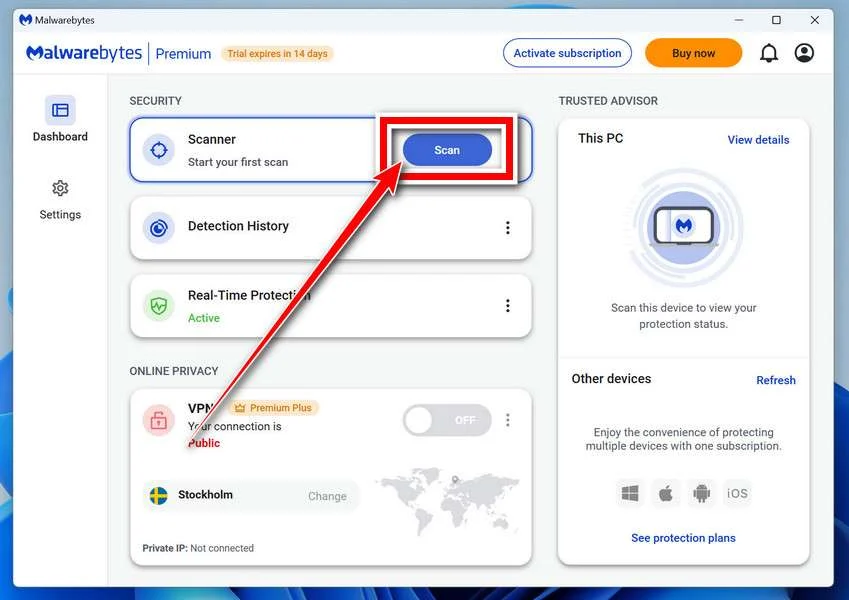
Click the blue Scan button. Malwarebytes will automatically update its virus database and start checking your computer for malware.
-
Wait for the Scan to Finish
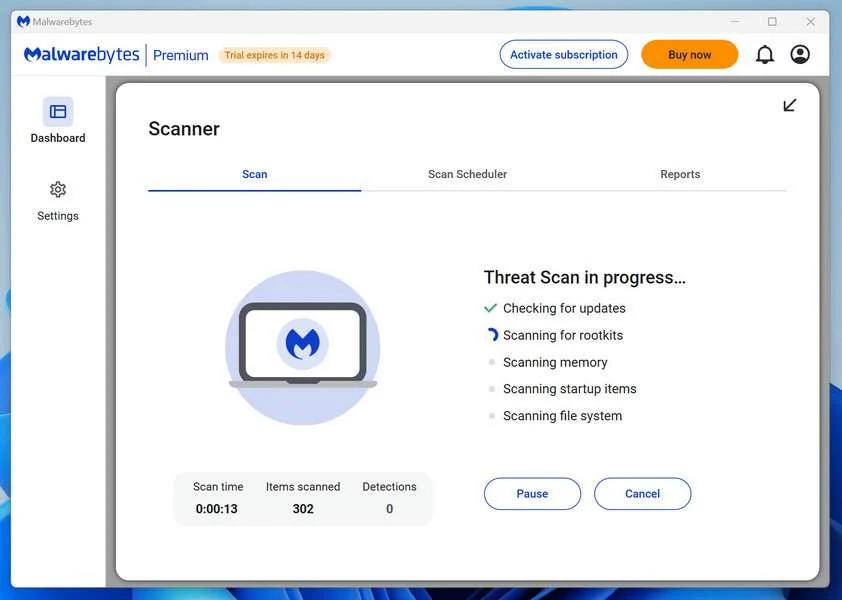
The scan checks your entire system for browser hijackers and other malicious programs, so it can take 5 to 20 minutes depending on your computer. Feel free to do something else — just check back occasionally to see the progress.
-
Quarantine the Detected Threats
When the scan is done, you’ll see a list of everything Malwarebytes found — malware, adware, and potentially unwanted programs. Click the “Quarantine” button to remove all of them at once.
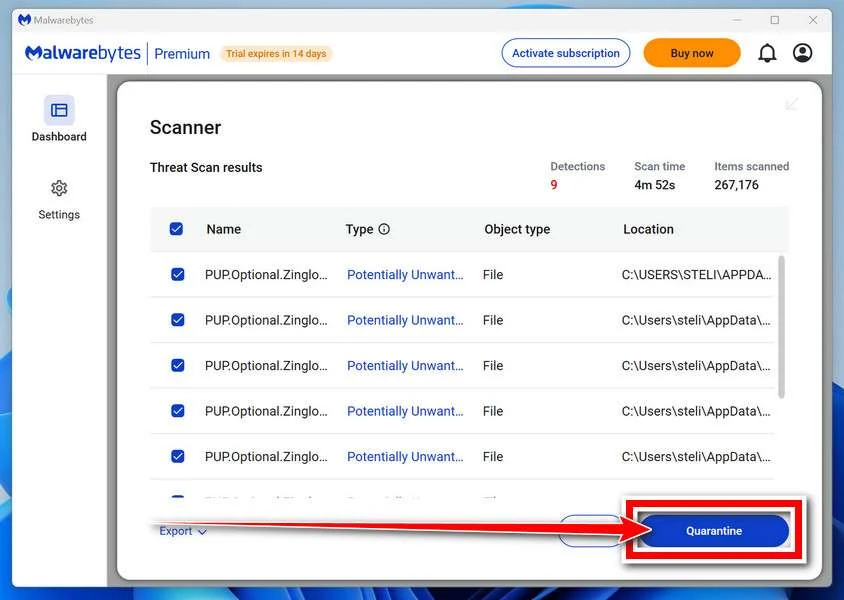
Malwarebytes will now remove the malicious files and registry entries and move them safely into quarantine.
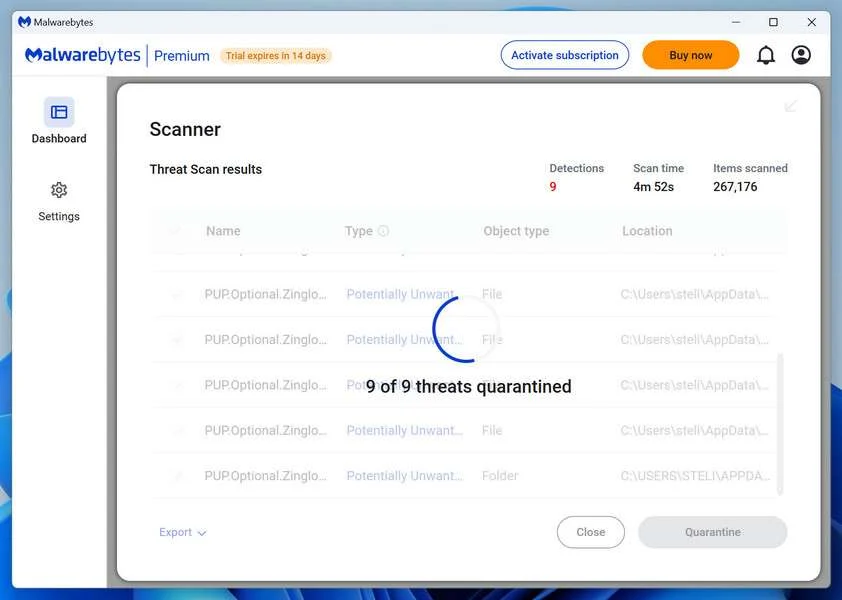
-
Restart Your Computer
Some threats can only be fully removed after a reboot. If Malwarebytes asks you to restart, click Yes. Once you’re logged back in, Malwarebytes has finished removing the threats it found.
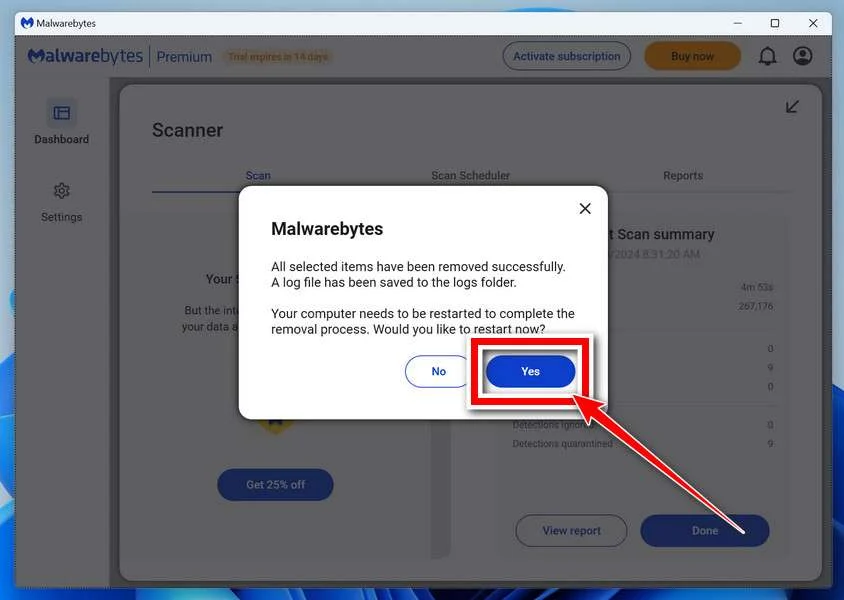
That’s it — your Windows PC is now clean of trojans, adware, and other malware, and should be back to running smoothly.
If you are still having problems with your computer after completing these instructions, then please follow one of the steps:
- Run a computer scan with ESET Online Scanner
- Ask for help in our Windows Malware Removal Help & Support forum.
Run a Malware Scan with Malwarebytes for Mac
Malwarebytes for Mac is a free on-demand scanner that removes the malware other security software tends to miss — adware, browser hijackers, and unwanted programs included. Cleaning an infected Mac with Malwarebytes has always been completely free, and it’s our go-to recommendation. Follow the steps below to scan and clean your Mac in just a few minutes.
-
Download Malwarebytes for Mac
Click the button below to download the latest version of Malwarebytes for Mac.
Download MalwarebytesOfficial installer for macOS. Your download starts right away.Want real-time protection? See Malwarebytes PremiumMalwarebytes Free for MacScans and removes malware at no cost -
Open the Malwarebytes setup file
When the download finishes, open your Downloads folder and double-click the setup file to begin the installation.
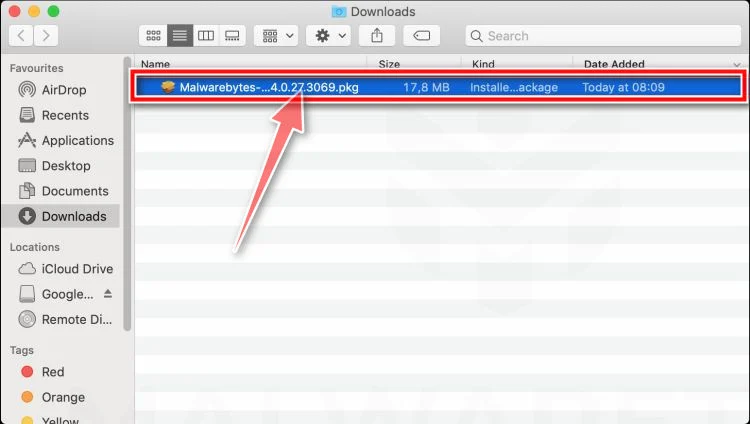
-
Follow the On-Screen Prompts to Install Malwarebytes
The Malwarebytes for Mac Installer will guide you through a few quick screens. Click “Continue” and keep following the prompts until the installation completes.
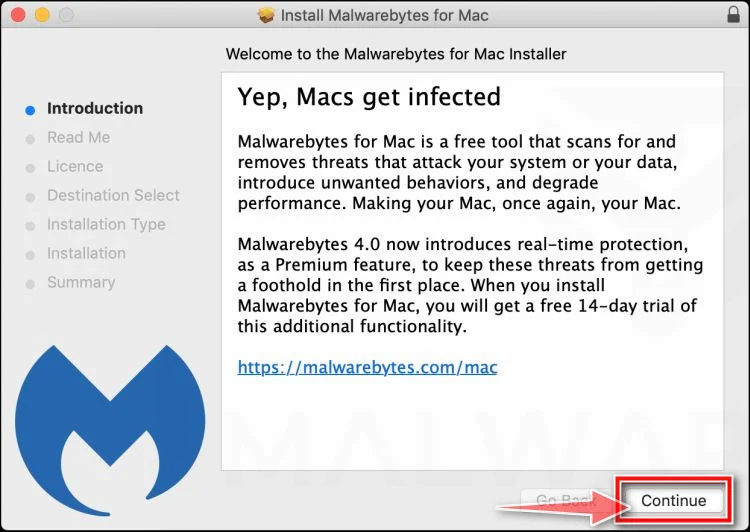
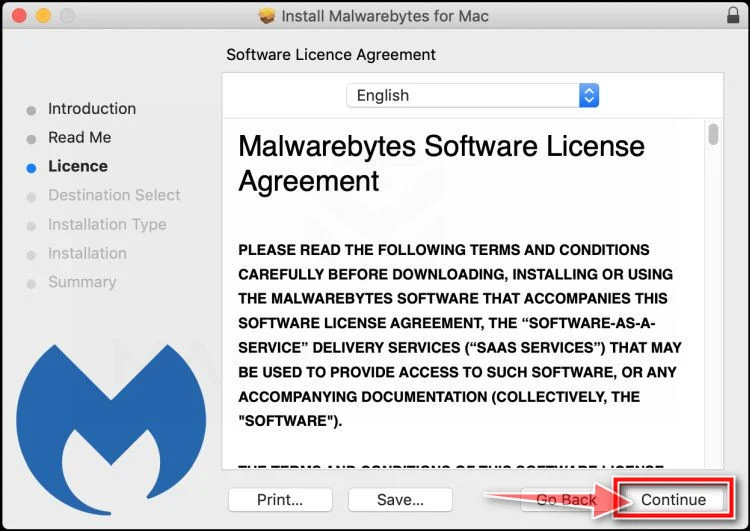
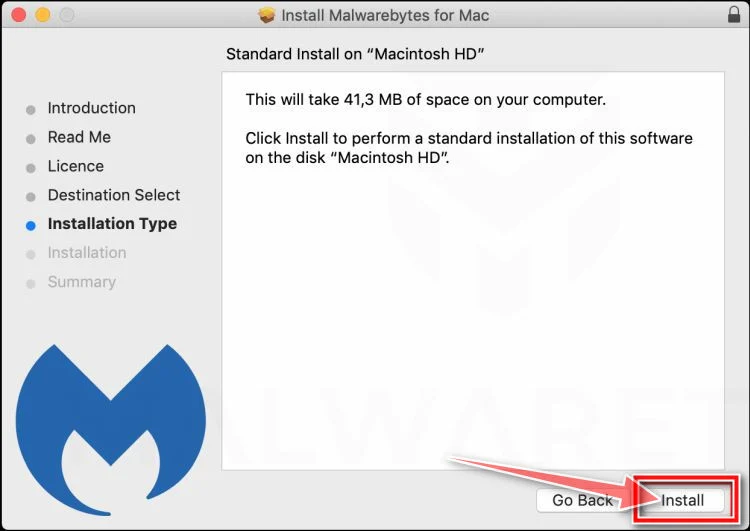
When the installation is complete, Malwarebytes opens to the Welcome to Malwarebytes screen. Click “Get started“.
-
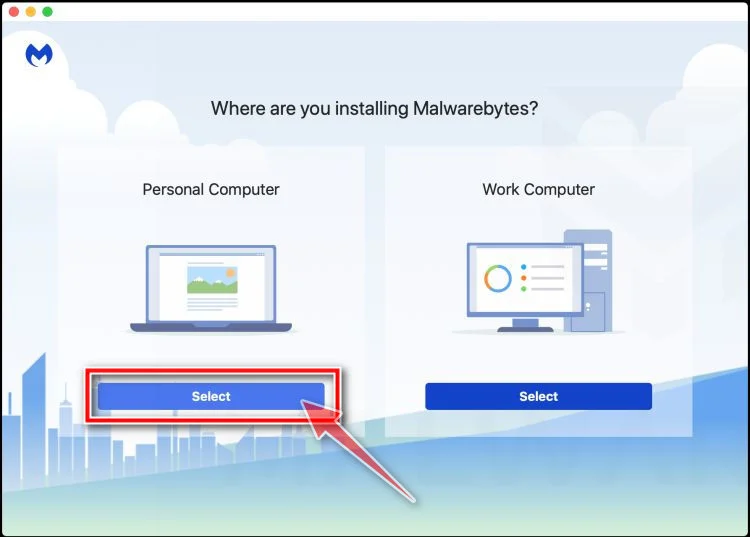
Select “Personal Computer” or “Work Computer”
Malwarebytes will ask what type of computer you’re installing it on. Click either Personal Computer or Work Computer, whichever applies.
-
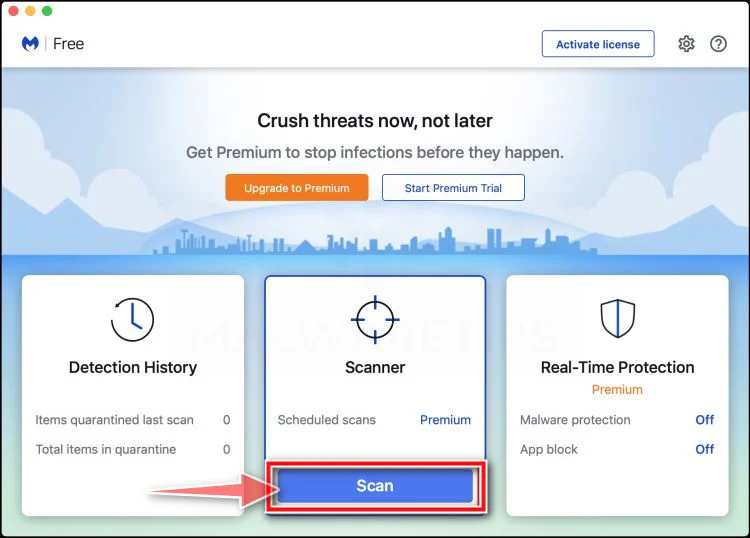
Start the Scan
Click the “Scan” button. Malwarebytes will automatically update its detection database and begin checking your Mac for malware.
-
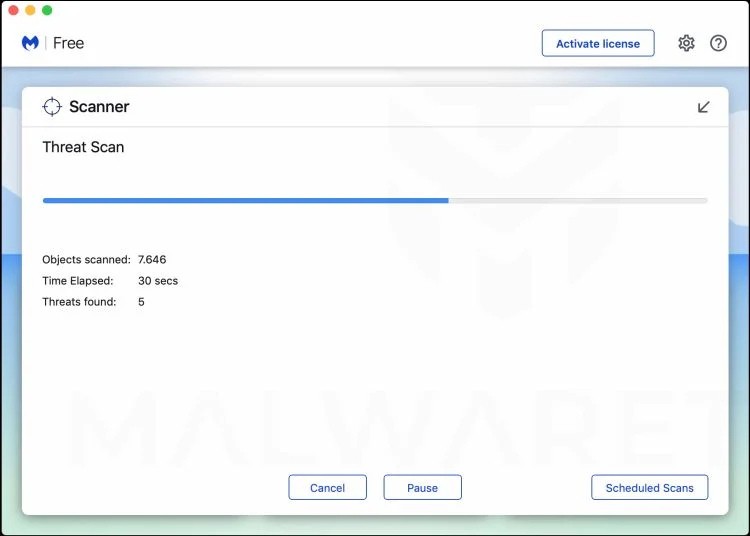
Wait for the Scan to Finish
Malwarebytes will scan your Mac for adware, browser hijackers, and other malicious programs. This can take a few minutes, so feel free to do something else — just check back occasionally to see the progress.
-
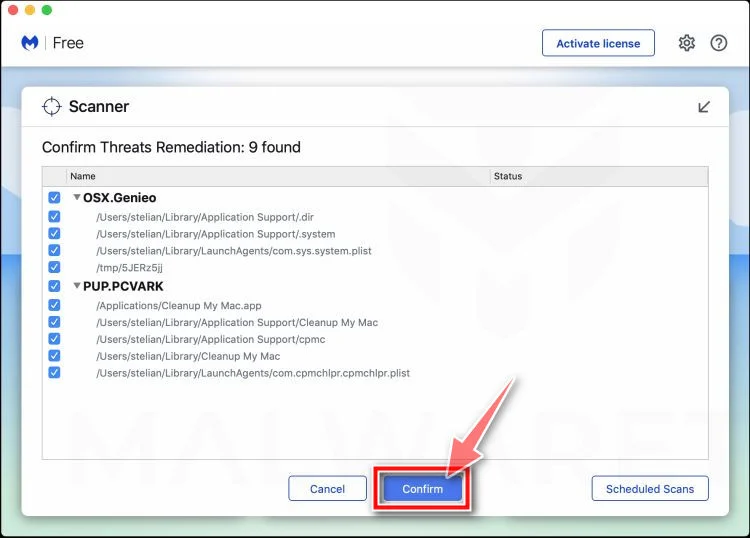
Quarantine the Detected Threats
When the scan is done, you’ll see a list of everything Malwarebytes found. Click the “Quarantine” button to remove all the threats at once.
-
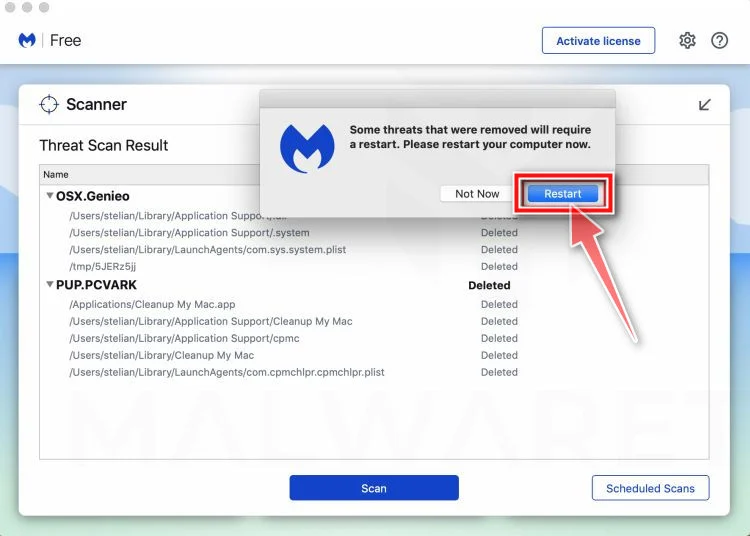
Restart Your Mac
Malwarebytes will now remove all the malicious files it found. Some threats can only be fully removed after a reboot — if Malwarebytes asks you to restart, allow it. Once you’re logged back in, your Mac is clean.
That’s it — your Mac is now free of adware, rogue browser extensions, and other potentially harmful software.
If you are still experiencing problems while trying to remove a malicious program from your computer, please ask for help in our Mac Malware Removal Help & Support forum.
Run a Malware Scan with Malwarebytes for Android
Malwarebytes for Android automatically detects and removes dangerous threats like malware and ransomware so you don’t have to worry about your most-used device being compromised. Aggressive detection of adware and potentially unwanted programs keeps your Android phone or tablet running smooth.
-
Download Malwarebytes for Android.
You can download Malwarebytes for Android by clicking the link below.
Get Malwarebytes for AndroidOpens Google Play in a new tab.Want real-time protection? See Malwarebytes Premium for AndroidMalwarebytes for AndroidScans your phone and removes malware at no cost -
Install Malwarebytes for Android on your phone.
In the Google Play Store, tap “Install” to install Malwarebytes for Android on your device.

When the installation process has finished, tap “Open” to begin using Malwarebytes for Android. You can also open Malwarebytes by tapping on its icon in your phone menu or home screen.

-
Follow the on-screen prompts to complete the setup process
When Malwarebytes will open, you will see the Malwarebytes Setup Wizard which will guide you through a series of permissions and other setup options.
This is the first of two screens that explain the difference between the Premium and Free versions. Swipe this screen to continue.
Tap on “Got it” to proceed to the next step.
Malwarebytes for Android will now ask for a set of permissions that are required to scan your device and protect it from malware. Tap on “Give permission” to continue.
Tap on “Allow” to permit Malwarebytes to access the files on your phone.
-
Update database and run a scan with Malwarebytes for Android
You will now be prompted to update the Malwarebytes database and run a full system scan.

Click on “Update database” to update the Malwarebytes for Android definitions to the latest version, then click on “Run full scan” to perform a system scan.

-
Wait for the Malwarebytes scan to complete.
Malwarebytes will now start scanning your phone for adware and other malicious apps. This process can take a few minutes, so we suggest you do something else and periodically check on the status of the scan to see when it is finished.

-
Click on “Remove Selected”.
When the scan has been completed, you will be presented with a screen showing the malware infections that Malwarebytes for Android has detected. To remove the malicious apps that Malwarebytes has found, tap on the “Remove Selected” button.

-
Restart your phone.
Malwarebytes for Android will now remove all the malicious apps that it has found. To complete the malware removal process, Malwarebytes may ask you to restart your device.
That’s it — your Android phone is now clean — no more malicious apps, adware, or browser redirects.
If you are still having problems with your phone after completing these instructions, then please follow one of the steps:
- Restore your phone to factory settings by going to Settings > General management > Reset > Factory data reset.
- Ask for help in our Mobile Malware Removal Help & Support forum.
Stay Protected: Block Ads and Malicious Sites
Now that your device is clean, keep it that way. Most infections start with a malicious ad or a fake download button — so blocking them at the source is your best defense.
We recommend AdGuard, which blocks malicious ads, phishing pages, and dangerous redirects before they can reach you.
👉 Download AdGuard and browse safely
The Bottom Line
The Costco Meat Box Giveaway Scam succeeds because it does not look like a classic scam. It looks like a helpful deal from a familiar retailer, wrapped in a survey and finished with a small shipping fee.
That is exactly what makes it dangerous.
If a random page claims you have won a free meat box, asks you to act quickly, and then requests payment or personal information to claim the reward, treat it as suspicious immediately. A trusted brand name on a page does not make the page trustworthy.
The safest move is simple: do not claim the prize through the link. Go directly to the retailer’s official website if you want to verify whether a promotion is real. That one habit can save you money, time, and a great deal of stress.

Join the discussion
0 commentsShare your experience or ask a question about this article.
Discussion
Start the conversation
Have a question or something useful to share? Add the first comment.