

Getting a verification code email for an account you never created can be unsettling.
At first glance, it looks like one of three things: a scam, a hack, or a sign that someone is trying to use your email address without permission. That is exactly why these messages can trigger immediate concern.
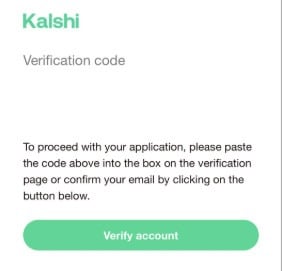
In this case, the email appeared to come from Kalshi and included a verification code along with a button to verify an account. The message looked normal for a sign-up process, but there was one problem: the recipient had never signed up for Kalshi and had never requested the code.
That raises an obvious question: what does this kind of email actually mean?
What the email said
The message appeared to be a standard verification email. It included a subject line along the lines of:
xxxx is your Kalshi verification code
Inside the email, there was a verification code, a short explanation telling the recipient to paste the code into the verification page, and a button labeled Verify account.
On the surface, nothing about that format is unusual. Many websites send exactly this kind of email during account registration or login confirmation.
The unusual part was not the message format itself. The unusual part was that it arrived completely out of the blue.
Why this kind of email feels suspicious
Unexpected verification emails are concerning because they create uncertainty.
When you did not initiate the sign-up, several possibilities immediately come to mind:
- Someone is trying to open an account using your email address
- Someone mistyped their own email and entered yours by accident
- The email is part of a phishing campaign
- A site is sending verification emails too aggressively
- A bad actor is entering random email addresses into registration forms
All of those are possible in different situations. That is why the safest response is not to click anything right away.
A verification email you never requested does not automatically mean your inbox has been hacked. It also does not automatically mean the sender is fake. Sometimes the explanation is much more ordinary, even if the email initially looks alarming.
What appears to be happening in cases like this
Based on the explanation provided after contacting support, this appears to be a common issue tied to user sign-up behavior rather than a direct compromise of the recipient’s email account.
According to that explanation, people sometimes enter random or incorrect email addresses during registration. When that happens, the platform sends its normal verification email to whoever owns that address.
That means the email lands in the inbox of someone who never signed up.
In practical terms, the message may have been triggered by one of these scenarios:
1. Someone mistyped their email address
This is probably the most harmless explanation.
A user intended to enter their own email but accidentally typed a similar one instead. If your address is short, common, or easy to guess, the odds of this happening can increase.
2. Someone used a random email during testing
Some people enter disposable, fake, or random email addresses when experimenting with sign-up forms. They may not expect the address to belong to a real person, but many do.
When the site automatically sends a code, the real owner of that address receives it.
3. Someone deliberately entered your email
This is less innocent, but it still does not necessarily mean they can access your account.
A person may enter your email address to test the platform, annoy the site, or trigger verification emails. In that case, they still cannot complete the registration unless they also gain access to the code sent to your inbox.
4. A phishing email was designed to look like a real verification email
This is the more dangerous possibility and the one you should always keep in mind.
Even if the email looks convincing, unexpected messages should be treated cautiously. Attackers know that verification codes, password reset emails, and security alerts get attention quickly. They use that urgency to push people into clicking links or entering credentials on fake websites.
Is it a scam?
The most accurate answer is this: not necessarily, but it should still be treated carefully.
A legitimate company can send a real verification code email even when the recipient never requested it. That can happen because someone else entered the wrong email address.
At the same time, phishing emails can imitate this exact format. That means you should not decide based only on how professional the message looks.
A clean design, a recognizable brand name, and a normal-looking button do not prove that an email is safe.
The right question is not “Does this email look real?”
The right question is “Did I personally trigger this action?”
If the answer is no, then caution is the correct response.
The key point most people miss
Receiving a verification code email does not usually mean someone has already taken over your email account.
That distinction matters.
If someone is trying to create an account using your email address, they generally still need access to the code sent to your inbox in order to continue. If you do not click the button, do not forward the code, and do not type it anywhere, the process is usually blocked at the verification stage.
So while the message may be annoying or unsettling, it often represents a failed sign-up attempt rather than a successful compromise.
That said, if you start receiving many verification emails from different services, or if they are combined with password reset notifications, unfamiliar login alerts, or account changes, then the situation becomes more serious and deserves closer review.
What you should do if you get one
If you receive a Kalshi verification code email you never requested, take these steps:
1. Do not click the verification button
This is the most important rule.
Even if the email is legitimate, there is no reason to interact with it if you did not initiate the process. Clicking unnecessary account verification links is never a good habit.
2. Do not share the code with anyone
No legitimate support agent, stranger, or online contact should ask you to send them that code.
Verification codes are sensitive because they are designed to prove control over the email account receiving them.
3. Do not enter the code anywhere
If you were not actively creating an account, there is no reason to paste the code into any website.
4. Check the sender carefully, but do not rely on appearance alone
Look at the sender address, the domain, and the links only if you know how to inspect them safely. A message can look polished and still be malicious.
5. Visit the official site manually if you want to investigate
If you are concerned, do not use links from the email. Type the company name into your browser and go to the official website yourself.
That reduces the risk of landing on a phishing page.
6. Contact the company through official support channels
If you want confirmation, contact support directly from the official website. Explain that you received a verification email you did not request and ask whether it was likely triggered by a mistaken sign-up attempt.
7. Secure your own email account anyway
Even if this particular message turns out to be harmless, it is smart to review your email security:
- Change your password if it is weak or reused
- Enable two-factor authentication
- Check recent login activity
- Review forwarding rules and recovery options
These steps are worth doing periodically regardless of this one email.
When you should be more concerned
In many cases, a single unexpected verification email is just noise. But there are situations where the risk level goes up.
Take it more seriously if:
- You receive repeated verification emails from the same service
- You also receive password reset emails you did not request
- You notice failed login alerts for your email account
- You see suspicious activity in your inbox
- The message pressures you to act urgently
- The links lead to strange domains or look mismatched
Those signs suggest you may be dealing with more than a simple mistyped email address.
Why ignoring the email is often enough
In most standard verification systems, the account cannot be confirmed without access to the code or verification link.
That means doing nothing is often the safest and most effective response.
If someone entered your address by mistake, the registration attempt usually stalls. If the sender was testing random emails, they gain nothing without the code. If it is a phishing email, ignoring it prevents interaction with the trap.
Sometimes the best security move is the simplest one: do not engage.
A practical way to think about it
A verification email is like a locked door asking, “Are you really the owner of this address?”
If you never walked up to that door in the first place, there is no reason to unlock it.
That is the mindset people should keep when dealing with these messages.
Unexpected verification emails are not always a sign of disaster. But they are always a sign to slow down, avoid clicking, and verify independently before doing anything else.
Final takeaway
The Kalshi verification code email described here does not automatically mean your email account was hacked or that your personal data was exposed.
A more likely explanation is that someone entered the wrong email address, used a random one during sign-up, or triggered the platform’s verification system without realizing the address belonged to a real person.
Still, the email should not be trusted blindly.
Do not click the button. Do not share the code. Do not type it anywhere unless you personally started the registration process. If you want answers, contact the company through its official website, not through the email.
That approach keeps you safe whether the message was legitimate, mistaken, or malicious.
FAQ
Why did I get a Kalshi verification code email if I never signed up?
The most likely reason is that someone entered your email address during registration, either by mistake or on purpose. The site then sent its normal verification message to your inbox.
Does this mean someone hacked my email?
Not necessarily. A single verification code email usually means someone tried to use your address, not that they gained access to your inbox.
Should I click the verify button just to see what happens?
No. If you did not request the code, do not click the button and do not interact with the email.
Is it safe to ignore the email?
In many cases, yes. If the account requires email verification, ignoring the message usually prevents the registration from being completed.
What if I keep getting these emails?
If it happens repeatedly, contact the company’s support team through its official website and review the security of your email account, including password strength and two-factor authentication.
Could this still be phishing?
Yes. Even if the email looks legitimate, unexpected verification emails can be used in phishing campaigns. That is why you should always verify independently and avoid clicking email links.
If you want, I can also turn this into a more MalwareTips-style article with a stronger SEO intro, scam signals section, and a short comment reply version.

Join the discussion
0 commentsShare your experience or ask a question about this article.
Discussion
Start the conversation
Have a question or something useful to share? Add the first comment.