

The water bill arrives when you expect it. Your name, the charges, and the familiar layout all seem right, so you prepare the transfer.
But there’s one detail worth checking outside the email, even when the invoice itself looks entirely ordinary.
Overview
A genuine invoice can carry a substituted bank account
The De Watergroep invoice scam can involve criminals changing a real bill after it reaches a compromised mailbox, replacing the payment account with their own.
Safeonweb describes that specific mailbox-based invoice fraud. The dangerous detail isn’t necessarily an obviously fake sender or a completely invented water charge.
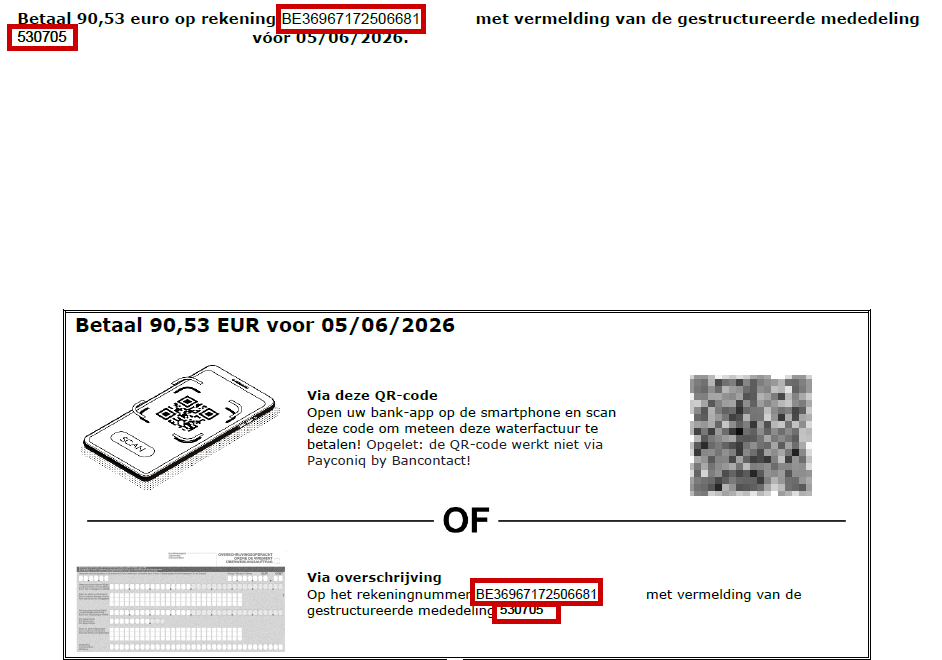
The image is an original fraudulent-invoice example published by De Watergroep. Its annotations and obscured QR code are preserved, not added as evidence of a separate investigation.
Your real water supplier isn’t the one changing the account
The legitimate water company may really have issued a bill. The attacker redirects the payment by changing instructions the recipient relies on.
The attack described by Safeonweb starts in your mailbox. It doesn’t mean De Watergroep’s systems were breached.
It also doesn’t mean every questionable water invoice follows this route. Other impersonations exist, so compare your bill with the official customer account.
The payment destination needs its own check
- Open De Watergroep’s customer area independently, or use your established Doccle access.
- Compare the payment instructions, not just the amount and your personal details.
- Stop if the bank reports an unexpected recipient mismatch or you notice an unexplained account change.
- Don’t use support details printed in the suspicious attachment to verify that attachment.
- If you already paid, contact the bank and the real supplier promptly.
Why Familiar Details Can Make This Fraud Harder to Spot
Many phishing warnings tell you to watch for a strange sender, poor spelling, or an invoice for something you never bought.
Those checks are still useful, but they don’t solve a bill altered inside a mailbox. Much of the document may be based on a genuine transaction.
You might recognize the customer account, expected amount, or normal timing. Those details make sense because the criminal doesn’t need to invent the entire relationship.
The changed bank account is enough to redirect a manual transfer. A document can look mostly correct while its most consequential instruction is wrong.
That is why checking the amount isn’t the same as checking the destination. The question isn’t only whether you owe money, but who would receive it.
Don’t blame yourself for not noticing an obvious fake if the invoice wasn’t an obvious fake. Use the official customer area to establish a trustworthy comparison.
The attack also explains why replying within the same mailbox may not be sufficient verification. If someone has access there, they may see your doubts.
How the De Watergroep Invoice Scam Works
Step 1: Criminals obtain access to the recipient’s mailbox
In Safeonweb’s described scenario, mailbox access comes before the invoice alteration. The warning doesn’t identify one universal method used to obtain that access.
Don’t assume a password leak, malicious app, or particular email provider caused your case without investigation. The immediate task is securing the account.
That includes checking sessions and rules, not merely deleting the suspicious invoice. The bill may be a visible consequence of an earlier compromise.
Step 2: A real bill provides a convincing document
The attacker uses an invoice that has reached the mailbox. Its ordinary appearance and recognizable details make it more persuasive than a random payment demand.
You may be expecting precisely that bill. Expectation helps the fraud because it removes one of the questions you would ask about an unexpected invoice.
Still, recognizing the bill doesn’t prove that the version you’re viewing retains the supplier’s original payment instructions.
Step 3: The beneficiary account is replaced
The attacker changes where the money goes. In De Watergroep’s published example, red boxes highlight the account printed in the payment instructions.
The amount shown is €90.53. Its apparent reasonableness shouldn’t distract you from verifying the account receiving the transfer.
Some inconsistencies may be visible, such as a changed font or unfamiliar layout. Their absence doesn’t make a document safe.
Step 4: The recipient authorizes payment to the wrong destination
A transfer can be technically processed as instructed even though the instructions came from an impostor. Your banking app can’t know the story behind every invoice.
Read any recipient-name or account warning rather than dismissing it as an inconvenience. Don’t override a mismatch just because the document carries a familiar company name.
The supplier may not receive the money. Paying the altered instructions doesn’t automatically settle a genuine balance on the real customer account.
When the Real Bill Still Shows as Unpaid
The problem may surface when you compare records or the real supplier still shows an unpaid bill. Don’t send another payment until you’ve clarified the position.
Tell the bank about the fraudulent destination and ask about a recall or investigation. Separately, tell the utility which invoice and amount are involved.
Then secure the mailbox. Otherwise, a criminal who remains inside may interfere with new messages or attempt another redirection.
Verify the Invoice Somewhere the Attacker Didn’t Choose
Use the customer area or your established Doccle account
De Watergroep recommends viewing and paying invoices through its customer zone or Doccle. Reach them through access you already trust, not a new link in the questionable email.
Look for the invoice and compare its identifying details. Then inspect the actual payment instructions rather than assuming every field in the attachment matches.
If the invoice isn’t there or something differs, pause. The supplier’s real customer service can investigate without relying on the attachment’s contact details.
Compare the recipient, not just the reference
A structured payment reference helps identify a bill, but it doesn’t authenticate the bank account printed beside it.
Likewise, an IBAN that has a plausible format isn’t necessarily the supplier’s IBAN. A syntactically valid account can still belong to the wrong recipient.
Use the current instructions in the company’s official phishing guidance or confirmed customer area. Don’t rely on a copied account number from a third-party article.
Question a change without trusting its explanation
A message saying bank details recently changed isn’t independent verification of that change. It may be the very claim you need to investigate.
Call an established supplier contact and ask them to confirm the destination. Don’t let an email correspondent choose the telephone number used for that check.
If a colleague normally handles payment, use your normal internal channel to discuss the discrepancy. Forwarding a suspicious instruction isn’t authorization to pay it.
The Mailbox Needs More Than a New Password
A password change is important, but account controls deserve attention too. Review available sign-in history, recovery addresses, and connected applications.
Remove sessions you don’t recognize using the provider’s genuine security tools. If you can’t tell which activity is yours, ask the provider for help rather than guessing.
Inspect forwarding rules and filters. An unwanted rule can send correspondence elsewhere or hide messages that would reveal the fraud.
Keep a record of suspicious settings before removing them. Don’t leave a harmful rule active simply because you haven’t finished documenting everything.
Enable available two-step authentication and protect the recovery account too. A recovery route controlled by someone else can undermine your new password.
If the mailbox belongs to work, involve IT before making broad changes. They may need to preserve logs and check whether other accounts or invoices were affected.
For personal email, review other recent bills and reset messages. One altered invoice is a reason to inspect relevant activity, not proof that every message was changed.
What to Do if You Have Fallen Victim to This Scam
-
Call the sending bank immediately if you paid. Describe invoice redirection and provide the amount, beneficiary account, transfer time, and transaction reference.
Ask whether the transfer can be stopped, recalled, or investigated. Outcomes depend on timing and circumstances; don’t accept anyone’s guarantee that recovery is automatic.
-
Contact the real De Watergroep independently. Explain that you may have paid altered instructions and ask it to confirm the genuine invoice and outstanding balance.
Ask how the account should be handled while you investigate. Don’t assume the fraudulent transfer settled the bill, and don’t rush into paying it twice without clarification.
-
Protect the email account from a trusted device. Replace the password, review security settings, and use the provider’s controls to remove unfamiliar access.
Change that password on any other account where it was reused. Use distinct replacements, especially for financial services and the email account’s own recovery address.
-
Inspect mailbox rules and related correspondence. Check forwarding, filters, deleted mail, and sent messages for changes or activity you didn’t authorize.
If suspicious instructions went to contacts from your address, warn them through another verified channel. Identify the affected messages without broadcasting private invoices.
-
Check the device if compromise may involve software. Investigate unexpected installations, extensions, or downloads rather than assuming the altered bill itself explains the original account theft.
Malwarebytes can assist with checking supported devices for malware. It can’t remove mailbox forwarding rules for you or recover a transfer sent to an impostor.
AdGuard can help reduce encounters with some malicious links and ads. Account security and independently verifying payment destinations remain necessary.
-
Preserve both the invoice and the payment evidence. Keep the suspicious document, original message if available, official comparison, and bank reference.
Don’t edit the only copy to highlight the wrong account. Store the original privately and use a separate annotated copy if support asks for an explanation.
-
Report the fraud through established channels. Give the police the financial and communication details if money was lost, and follow the supplier’s reporting guidance.
Tell genuine investigators what you know about mailbox access, without claiming a particular breach cause you haven’t established.
-
Reject a second request to rescue the payment. Don’t send a release fee, verifying transfer, or recovery deposit to someone who contacts you unexpectedly.
Keep the bank’s genuine case reference and return to that institution for updates. A stranger’s familiarity with the loss doesn’t authenticate them.
A QR Code Is Still a Payment Instruction
A QR code doesn’t remove the need to verify the beneficiary. It can make payment more convenient without establishing who created the instructions it contains.
The code in the published invoice example is already obscured by the issuer. Don’t attempt to reconstruct it or search for an unobscured copy to test.
If you use a QR code on a bill you obtained through a trusted route, still inspect the recipient and amount before approving payment.
For the suspicious document, use the official customer-area comparison instead. You don’t need to scan a questionable code to find out whether its destination is safe.
A familiar reference in the banking screen also isn’t a substitute for the beneficiary check. Attackers can preserve a convincing reference while changing the receiving account.
If a payment was scheduled but hasn’t executed, tell the bank that too. A pending instruction may need different handling from a transfer already completed.
For accounting records, keep the suspected transfer distinct from the real invoice. That makes it easier to explain why money left your account without settling the supplier’s balance.
Ask the supplier to confirm any arrangement in a channel you’ve verified. Don’t accept a fresh email inside a still-compromised mailbox as the only confirmation.
Make the Next Bill Easier to Check
Choose an established route for household bills before another arrives. Save the real customer-area address and know where invoices appear within it.
If several people can authorize payments, agree that beneficiary changes need independent confirmation. A forwarded attachment shouldn’t silently bypass that check.
Don’t build a permanent whitelist from one screenshot. Supplier arrangements can change legitimately, which is why a verified current channel matters more than memorizing yesterday’s number.
De Watergroep also describes direct debit as an option. Consider payment arrangements through the real supplier, never through an unexpected activation demand.
For the current incident, keep the two workstreams visible: recovering the redirected payment and closing the mailbox access that allowed the change.
Finishing only one can leave the other unresolved. A clean inbox doesn’t recover money, and a bank investigation doesn’t secure an email account.
Frequently Asked Questions
Can the bill be real even when the payment account is fraudulent?
Yes. The described fraud alters payment instructions on a real invoice inside a compromised mailbox. Genuine-looking billing details don’t authenticate the destination account.
Does this warning mean De Watergroep was hacked?
No. Safeonweb’s scenario concerns access to the recipient’s mailbox. Don’t infer a breach of the utility from a changed invoice alone.
Where should I compare my invoice?
Use De Watergroep’s customer area or established Doccle access, reached independently. Compare the payment details as well as the invoice amount and reference.
Will a correctly formatted IBAN prove the account is safe?
No. Formatting doesn’t establish ownership. Verify the beneficiary through the real supplier and take any bank recipient-mismatch warning seriously.
What happens to my genuine water bill after I pay the wrong account?
It may remain unpaid with the supplier. Contact De Watergroep to confirm the balance and discuss the situation while your bank investigates the fraudulent transfer.
Is changing the email password enough?
Also review available sessions, recovery information, connected apps, filters, and forwarding rules. Get trusted support if you can’t confidently remove unfamiliar access.
The Bottom Line
Don’t pay a De Watergroep invoice solely because the bill looks familiar. Verify the payment destination through the real customer area or independently contacted supplier.
If money went to altered instructions, call your bank now, clarify the genuine balance with De Watergroep, and secure the mailbox as a separate urgent task.

Join the discussion
0 commentsShare your experience or ask a question about this article.
Discussion
Start the conversation
Have a question or something useful to share? Add the first comment.