

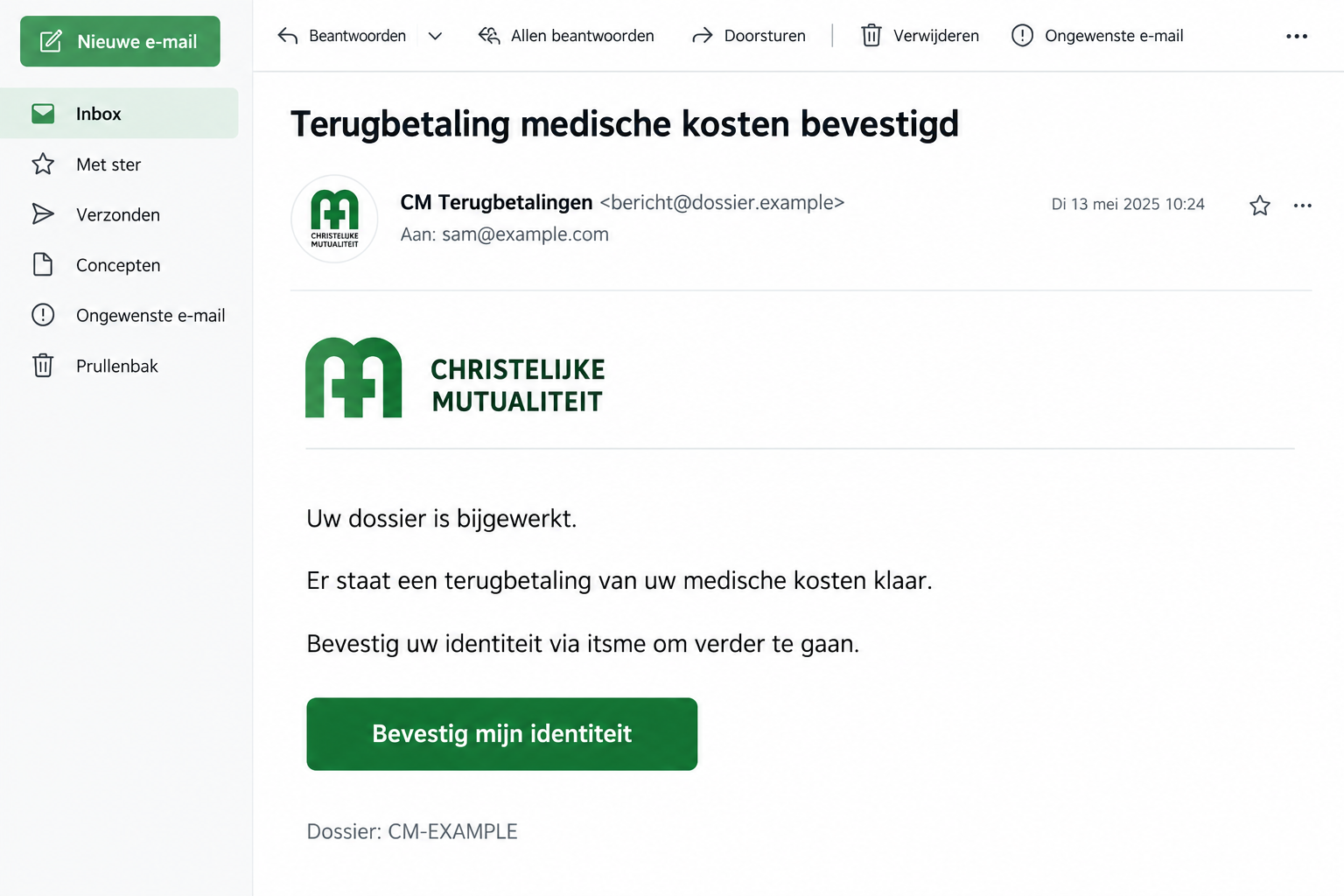
An email says your medical expenses are being reimbursed. There’s a case reference, a familiar CM name, and one remaining identity check.
If you’ve recently paid for treatment, that message can land at exactly the right moment. Here’s what to check before following it.
Overview
A promised reimbursement is used to request identity information
The CM medical refund scam impersonates Christelijke Mutualiteit, the Belgian health insurer. It claims a medical reimbursement is ready and asks for identity confirmation through itsme.
CM’s official phishing warning identifies this specific message as false. Its July 2026 alert also mentions convincing case references and stated reimbursement amounts.
The fraudulent message isn’t evidence that CM itself is a scam. It is an impersonation of a real organization and a familiar healthcare process.
Don’t provide personal details, banking information, or authentication codes through the message. Check the claim through your genuine CM account instead.
Specific details can make a fake claim feel settled
A reference number gives the impression that somebody has already reviewed a file. A precise amount makes the payment sound calculated rather than invented.
Anyone can put a number in an email. Check whether the reimbursement itself exists in your real CM account.
The lead image is an illustration with fictional details, showing the type of request. It isn’t a real member’s reimbursement notification.
- The message claims money is available for medical expenses.
- A dossier or reference number makes the email appear administrative.
- A link asks for identity confirmation before the money can arrive.
- The itsme name is used to make that step sound secure.
- The recipient is steered away from checking CM independently.
The safe route is through CM, not the inbox button
CM directs members to its official contact channels and Mijn CM when they doubt a message. That’s where a real account question belongs.
You don’t have to decide whether every logo, sentence, and case number is convincing. Remove the email’s link from the process.
If a reimbursement is real, checking through the genuine service lets you address it without trusting the stranger who delivered the claim.
Why Medical Reimbursement Makes a Persuasive Hook
A medical bill can be expensive, stressful, and difficult to understand. News that some money is coming back feels welcome.
You may also be juggling several real organizations: a clinic, pharmacy, insurer, employer, or government service. Another administrative message doesn’t necessarily seem unusual.
The scam exploits that routine rather than offering an obviously impossible prize. It asks you to complete a process you might genuinely expect.
That doesn’t mean the sender knows about your treatment. A mass email can reach people who happen to have recent medical expenses.
A correct-looking reference number isn’t evidence that someone accessed your health file. Don’t assume a breach solely because the message includes one.
Likewise, don’t disclose treatment details to test the sender. Asking whether it knows your doctor’s name can turn a verification attempt into another disclosure.
Take the question to CM through its real website. You should not have to prove your medical history to a stranger in your inbox.
The itsme reference adds another layer of familiarity. People use identity services for genuine tasks, so the name may sound like reassurance.
But the safety of an authentication tool doesn’t authenticate every message mentioning it. You still need to know what action you’re being asked to approve.
How the CM Medical Refund Scam Works
Step 1: The message announces an approved reimbursement
The email or message presents the payment as something already decided. The recipient isn’t invited to investigate eligibility, only to complete a final step.
That framing creates momentum. Rejecting the message can feel like walking away from money you’re entitled to receive.
Don’t let that feeling make the decision. A genuine entitlement can be checked independently without surrendering control to the notification.
Step 2: Administrative details supply borrowed credibility
A dossier reference, apparent reimbursement amount, or health-insurance branding makes the message look connected to an existing file.
These details are easy to accept because they resemble the language of real administration. Most recipients don’t memorize how a legitimate reference should look.
Instead of trying to decode the number, compare the claim with your real account. Don’t use the suspicious email as the source of both claim and confirmation.
Copied branding also doesn’t prove a verified sender. The visible contents of a message are different from the service’s checks on who sent it.
Step 3: The recipient is directed to an identity-confirmation link
The offered route asks the reader to confirm identity through itsme so the payment can proceed. This is the specific lure CM warns about.
A link’s text can mention CM even when the destination belongs elsewhere. Don’t enter details while trying to work out whether the page is genuine.
Close it and open CM through your own bookmark or a manually entered address. The inconvenience is smaller than fixing an exposed account.
If you can’t inspect the destination safely on a phone, you don’t need to. An independent visit avoids depending on that link.
Step 4: The refund story is used to justify sensitive requests
The risk is disclosure of personal information, banking details, or authentication codes under a false medical-payment explanation.
Only approve an identity action you initiated for a service you independently chose. An unexpected prompt needs an explanation outside the suspicious email.
Read what the genuine app actually asks you to do. Don’t assume the email’s “receive money” story describes every action that follows.
CM’s warning doesn’t establish one identical final page for every copy. The confirmed deception is the false reimbursement and identity-confirmation request.
How to Check a CM Refund Safely
Start at the real member service
Navigate to cm.be yourself and follow its Mijn CM link. You can review the service through CM’s digital-office guidance.
Don’t open the suspicious email again to find a shortcut. Keep the genuine session separate so you know which route you’re using.
Look for the information relevant to the reimbursement you’re expecting. If something doesn’t match, ask CM rather than trying different links in the message.
Not seeing a payment immediately isn’t proof that your account has been compromised. It means the email hasn’t supplied a reliable answer.
Use CM’s published contact options
Reach CM through the contact page on its official site. Describe the subject and request without sending unnecessary medical information.
If you already have a known contact, use that existing route. Don’t substitute a new number printed at the bottom of the questionable email.
Ask whether the specific notification is genuine and whether any action is needed in your real account. Keep the question narrow and useful.
A supposed support agent who arrives after you click should be treated as part of the same unverified approach until independently confirmed.
Check the address, but don’t stop there
CM lists its sender domains and website destinations in its warning. Expand the sender information instead of relying on the friendly display name.
A clear mismatch is a reason to stop. An address that appears familiar isn’t permission to ignore an unexpected request for sensitive information.
Don’t search for a padlock as the final answer. Encrypted connections also exist on fraudulent websites; encryption doesn’t establish that CM controls the page.
The strongest practical check remains an independent route into the service. It avoids needing to solve the entire email’s technical history yourself.
What Different Types of Exposure Mean
Receiving the email is different from entering banking credentials. Try to remember the steps you completed without assuming the worst.
If you only read it, preserve or report it and remove it from your inbox. There’s no need to invent an infection diagnosis.
If you entered contact details, be alert for more tailored messages. A later caller may repeat those details to sound like a legitimate follow-up.
Sharing a member reference or medical detail deserves a report to CM. Explain exactly what was disclosed so it can advise on the account.
Banking credentials, card details, and unexpected approvals need a faster response from the bank or relevant identity provider. Don’t wait for CM to reply first.
If you installed software, that is a separate device-security issue. Mention the file or app by name when asking for help.
Keeping those exposures separate helps the people assisting you. “I was scammed” is understandable, but the specific actions determine the appropriate response.
What to Do if You Have Fallen Victim to This Scam
-
Stop using the refund link. Refuse any unexpected authentication request and end conversations connected to the message. Don’t approve something else to reverse it.
Take a moment to list what you entered and what you approved. You don’t need perfect technical language to explain those actions.
-
Contact your bank for financial exposure. Report any card details, banking login, or transaction approval you supplied through the false reimbursement process.
Use the bank’s existing app or contact details. Ask it to review recent activity and explain the steps needed to protect the account.
-
Check the affected identity account through its genuine support route. If an itsme action was involved, explain what the prompt described and whether you approved it.
Don’t tell an unsolicited caller your authentication codes. Provider support should be reached independently, not through someone responding to the fraudulent email.
-
Replace any exposed password on the real service. If you reused it elsewhere, change those accounts too, starting with important email and financial access.
Review available sign-in and session controls. Get provider assistance if you can’t tell whether a session or account change belongs to you.
-
Tell CM about the impersonation and any member information disclosed. Use its official contact or reporting instructions rather than replying to the original sender.
Keep medical details out of broad public warnings. Send sensitive information only through the appropriate private channel when it’s actually needed.
-
Keep useful records for reporting. Save the original message, sender address, destination URL if already available, screenshots, and any bank case reference.
If money disappeared or identity misuse occurred, report it to the relevant police service. Follow CM’s official guidance for reporting the phishing message.
-
Deal with unwanted downloads or permissions separately. Remove suspicious software with reputable assistance and use Malwarebytes if the message led to a risky installation.
AdGuard may reduce exposure to known phishing destinations. It cannot recover a payment, replace a bank report, or establish that an authentication request is legitimate.
Keep Your Healthcare Information Out of the Follow-Up
Someone trying to resolve a missing reimbursement may be willing to send an invoice, identity document, or treatment summary. Don’t supply those to the email’s sender.
A medical document can contain much more than the amount you paid. Names, dates, provider details, and identifying references can all travel with the attachment.
If CM genuinely needs a document, ask through the real service how to submit it. You can complete legitimate administration without replying to the questionable address.
When reporting the incident, explain the categories of information disclosed first. Don’t automatically attach your entire medical history to every help request.
If you sent a document already, preserve the sent message. That record shows what left your account and where you directed it.
Don’t assume deleting the attachment from your own mailbox retrieves it. Tell CM what was shared and ask which account protections or follow-up checks are appropriate.
A later caller may reference that information and claim to be handling your case. Specific knowledge still doesn’t replace independent contact with the insurer.
If a family member manages the claim for you, coordinate who will contact CM. Two parallel conversations can make an already confusing incident harder to explain.
Keep ordinary reimbursement questions in that legitimate channel. You shouldn’t lose access to real help simply because a criminal borrowed the insurer’s identity.
The practical aim is to protect both the account and the private information around it, without sending extra documents to prove the first message was false.
Frequently Asked Questions
Is CM actually offering this email refund?
CM identifies the medical-refund message asking for itsme confirmation as phishing. Check any genuine reimbursement question through Mijn CM or CM’s established contact channels.
Does a dossier number prove it refers to my medical file?
No. A convincing reference can be fabricated. Don’t reveal medical details to test it; ask CM through the real service whether the claim belongs to your account.
Is itsme unsafe to use?
The scam misuses its name and an identity-confirmation story. Use identity services for actions you knowingly initiate, and refuse unexpected requests linked to an unverified message.
What if the reimbursement amount looks right?
A plausible amount doesn’t authenticate the sender. Compare it with your genuine account information, then resolve any discrepancy directly with CM.
Should I send a medical invoice back to the email address?
No. Don’t send documents to help an unverified sender “find” your refund. Use CM’s actual document-submission process if a legitimate reimbursement needs supporting information.
Can antivirus undo an identity approval?
No. Device tools don’t revoke a financial or identity authorization. Contact the relevant provider immediately and describe the action you approved.
The Bottom Line
Don’t follow the CM medical refund scam into an identity check. Open Mijn CM yourself and verify the reimbursement through the real insurer.
If you already shared banking information or approved an unexpected action, contact the bank or affected provider first. Save and report the message afterward.

Join the discussion
0 commentsShare your experience or ask a question about this article.
Community experiences
Did this happen to you?
Your experience could help someone recognize the same scam. Submit a private report for our team to review.
I experienced this tooReports are reviewed before publication. Sharing publicly is always your choice.
Discussion
Start the conversation
Have a question or something useful to share? Add the first comment.