


There is something genuinely impressive about opening a webpage and finding yourself playing GTA 5. Not watching a trailer, not clicking through a GTA-themed imitation, but getting into a car, driving through traffic, and playing the game inside your browser.
That is what we experienced with Fiveplay.lol. After loading, the game was playable, with the familiar single-player gameplay and autosave functionality that make it more than a brief technical demonstration.
Getting there still requires some patience—and care with the advertising on the loading page. But this time, the game behind that loading screen gave us a reason to stay.
What Is Fiveplay.lol?
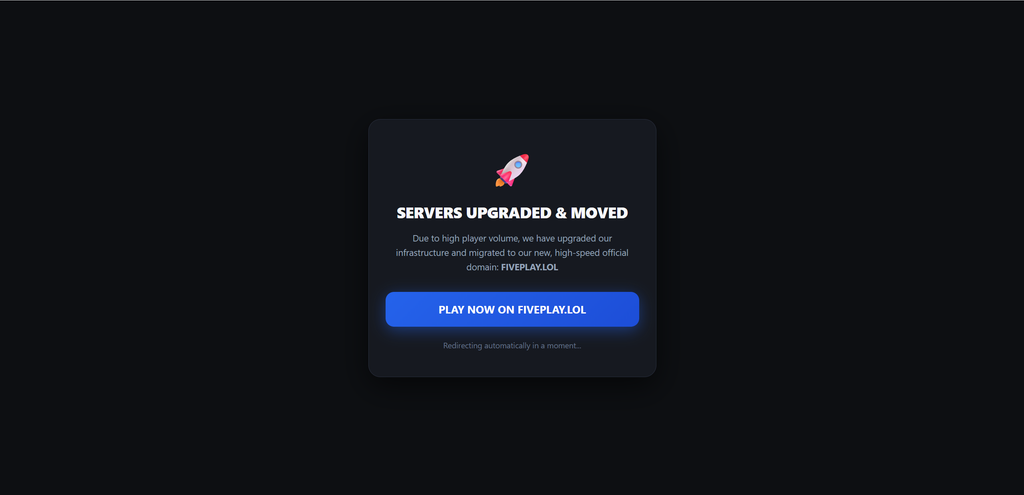
Fiveplay.lol is a third-party website that lets you play a browser-based version of Grand Theft Auto V. It is the new destination promoted by gta.deloskiyt.pl, which displays a server-migration announcement and redirects visitors to the new address.
Instead of launching a conventionally installed copy, you open the webpage and let the browser load the game. Its startup interface offers Story Mode and Sandbox Mode, with Enter assigned to Story Mode and the space bar assigned to Sandbox Mode. Those options are present in the captured page source.
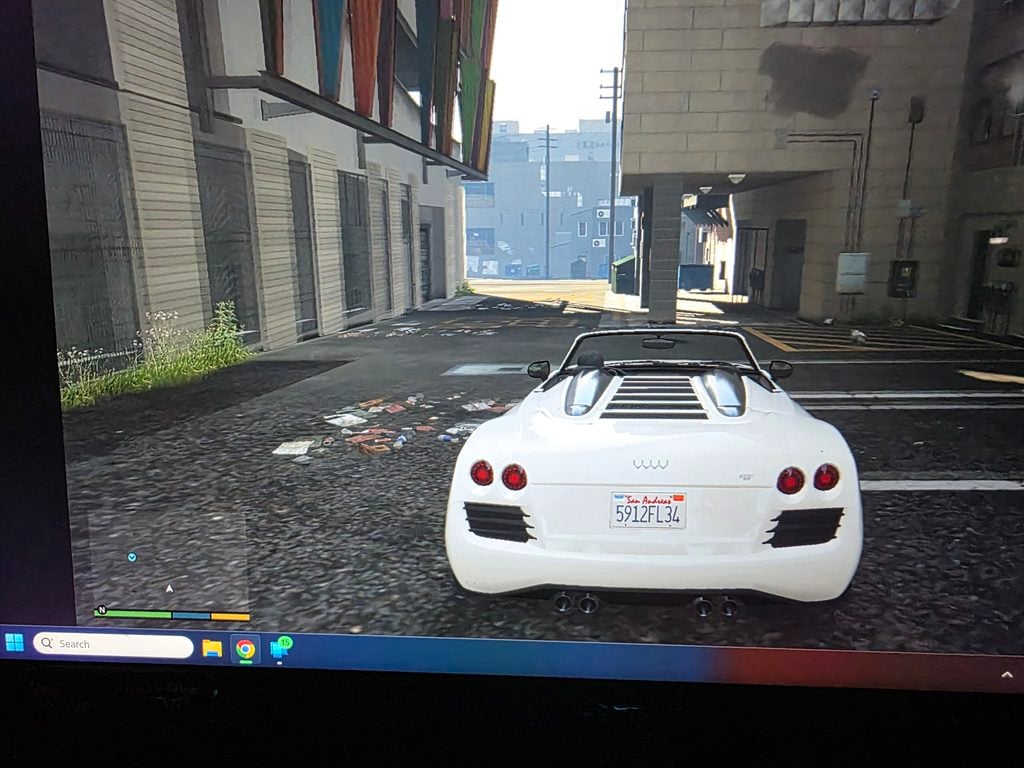
The important part is what happens afterward. In our latest test, we could actually play GTA 5: move through the world, take part in mission gameplay, enter vehicles, and drive.
That makes Fiveplay.lol more substantial than the phrase “browser experiment” might suggest. The technology is unusual, but the experience on screen is recognizable GTA V.
The question is no longer whether there is a playable game behind the loading screen. There is. The more useful questions are how well it plays and what visitors should watch out for.

Why Does Gta.deloskiyt.pl Redirect to Fiveplay.lol?
Visitors to the original address are shown a notice headed “SERVERS UPGRADED & MOVED.” The announcement attributes the move to high player volume, says the infrastructure has been upgraded, and points visitors toward Fiveplay.lol. It includes a button to open the new address and a message announcing an automatic redirect.
According to that notice, Fiveplay.lol is the project’s new home rather than an unrelated website that happens to offer a similar game.
The notice also uses the phrase “official domain.” That describes the operator’s chosen address; it does not, by itself, establish Rockstar’s approval or involvement.
For our review, the most noticeable change was practical: getting into the game took much less time than it had during our earlier visit.
Our Latest Test: Approximately 3–5 Minutes to Load
Our first experience with gta.deloskiyt.pl was frustrating. Loading took approximately 30 minutes, including extended waits at 6% and 76%. An error then interrupted the game shortly after it started.
Our latest experience with Fiveplay.lol was considerably better. Loading took approximately three to five minutes, and we were able to play afterward.
That is still a wait, but it changes the experience substantially. A few minutes of startup followed by playable GTA 5 is a very different proposition from spending half an hour wondering whether anything will happen.
| Part of the experience | What we found |
|---|---|
| Initial loading | Approximately 3–5 minutes in our latest test |
| Gameplay | GTA 5 was playable inside the browser |
| Activities tested | On-foot movement, mission gameplay, entering vehicles, and driving |
| Autosave | Available in the tested experience |
| Comparison with an installed copy | Not the same overall quality, but still enjoyable and playable |
| Main drawback | Embedded advertising around the loading experience |
These observations describe our setup and testing, not a guaranteed loading time or performance level for every visitor.
The improvement should also be judged on its own terms. The earlier problems happened, but they do not fairly describe everything we experienced on our return visit.
This time, we got past the loading screen and into the game.
Yes, It Really Is GTA 5—and Seeing It in a Browser Is Impressive
The strongest part of Fiveplay.lol is not its promise. It is the moment you start playing and realize that the promise is being delivered.
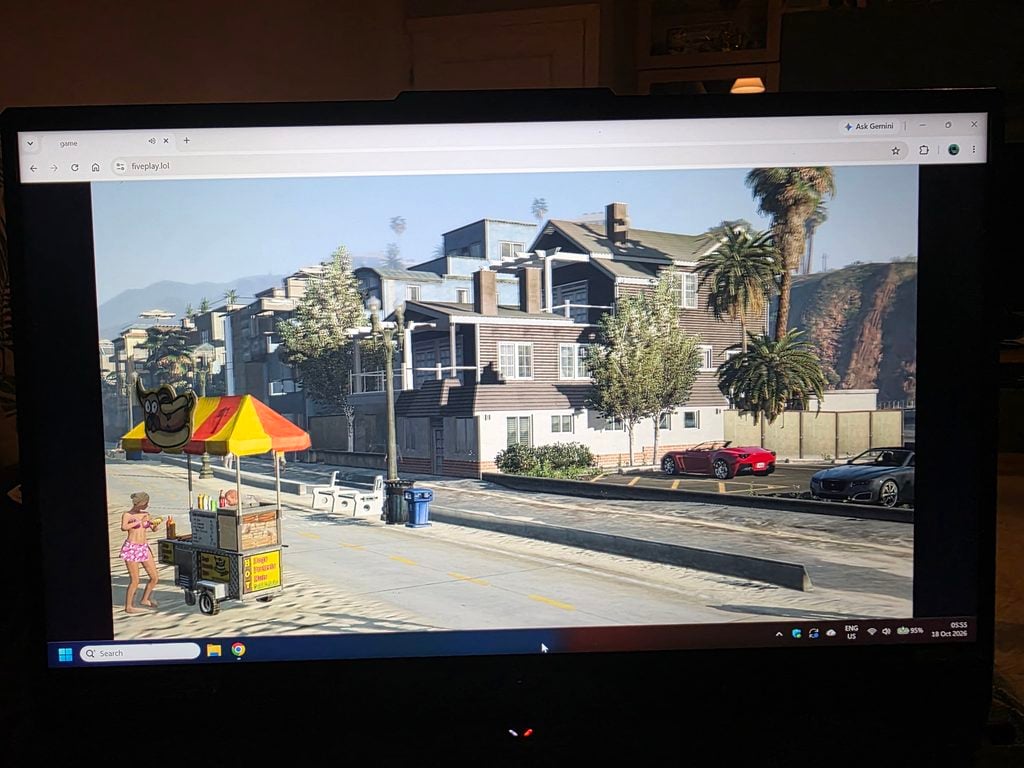
Our gameplay recording shows a character approaching parked cars, getting into one, and driving through traffic. The browser interface is visible around the game. Other captures show on-foot gameplay and a highway-driving scene with the familiar in-game interface. cvgt
Once you are playing, the appeal becomes obvious. You are not just waiting for an impressive-looking scene to appear. You are interacting with the game.
That is an important distinction from our earlier assessment. Describing Fiveplay.lol only as a loading-screen curiosity would undersell the latest experience. There is actual gameplay here, and we found it good enough to enjoy.
The surprise is not that GTA 5 remains entertaining. It is that you are doing these familiar things inside a browser tab.
How Does It Compare With the Installed Version?
In our experience, the browser version did not match the overall quality of playing an installed copy. Nevertheless, it was playable, recognizable, and impressive in its own right.
Those two observations are not contradictory.
You can notice a difference in presentation or performance while still enjoying the game. The browser version does not need to win a side-by-side comparison to make driving around Los Santos through a webpage a compelling experience.
We did not record controlled frame-rate benchmarks, so we would not attach an unsupported performance figure to that impression. Our assessment is based on playing it: the experience was good enough to move beyond simply admiring the technical achievement.
Autosave Makes It More Than a One-Off Demo
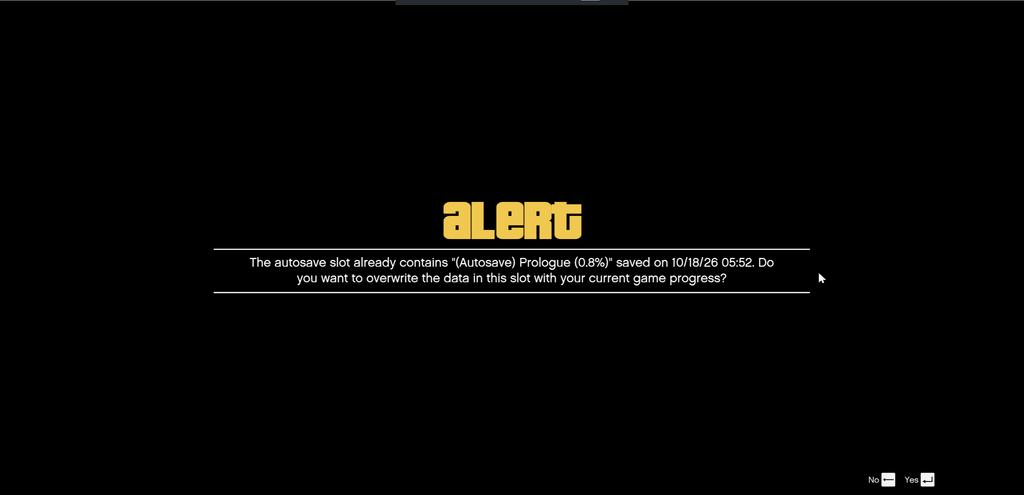
The browser experience also includes autosave. That matters because saving progress is part of what turns a novelty you briefly try into a game you can continue playing.
The captured startup code supports continuation from an existing save: it explicitly describes Story Mode loading the most recent saved game rather than always restarting from the prologue.
This is a meaningful part of the experience, not a minor detail. Alongside the mission gameplay, driving, and on-foot action, saving gives the browser version more of the familiar structure of playing GTA V normally.
It is therefore more accurate to describe what we tested as a playable browser version of GTA V’s single-player experience, with autosave, rather than a short demonstration that merely gets the game running.
There is one distinction worth keeping clear when comparing its features with the installed release: this review concerns single-player GTA V, not GTA Online. The captured launch configuration disables networking and Social Club integration, so the presence of Story Mode and saving should not be read as a claim that Rockstar’s online services are included.
Within the single-player gameplay we tried, however, the experience was much closer to playing GTA 5 than simply testing whether a browser could display it.
The Main Drawback: Embedded Ads During Loading
The part of Fiveplay.lol we liked least was the advertising around the loading experience.
The page contains third-party advertising scripts embedded directly in its HTML. The captured source includes a Monetag-related tag and external script references to quge5.com and alwingulla.com. These are part of the webpage surrounding the game, not the fictional advertising inside GTA V.
While the game loads, it is tempting to click around. You might be checking whether the page is responding, selecting a mode, or trying to work out whether the game is ready.
That is when an accidental click can become a problem. Clicking an advertisement may open an unrelated website rather than do anything to advance the loading process.
Be particularly careful where you click during startup. The fact that the game works does not make every advertisement on the page trustworthy.
This does not mean every ad is malicious, and we have not established that every destination is dangerous. The concern is that visitors can end up somewhere they did not intend to go while trying to interact with the game.
If an unexpected page opens, close it rather than treating its instructions as a required part of launching GTA 5. Do not provide payment information, install unrelated software, or approve browser notifications simply to get past something that appeared while loading.
The distinction is straightforward: the game is the attraction; an unrelated advertising page is not part of the gameplay.
We Recommend AdGuard Before You Start
We recommend enabling AdGuard before opening the game’s loading page.
AdGuard Browser Extension is a free ad blocker available for browsers including Chrome, Firefox, and Edge. It is designed to block advertisements, pop-ups, and trackers, making it a relevant precaution for a page that includes embedded advertising scripts – AdGuard
Use AdGuard’s official installation instructions to reach the appropriate browser-store listing. Its documentation provides installation routes for Chrome-based browsers, Firefox, and Microsoft Edge, among others. Do not install an extension from an unexpected advertisement claiming that it is necessary to play GTA 5.
Once it is enabled, avoid unnecessary clicks while the game is loading and use the recognizable game controls.
AdGuard is an additional precaution, not a guarantee that every advertisement or redirect will be blocked. Its own documentation notes that browser restrictions can limit filtering and allow some ads or trackers through.
An ad blocker and careful clicking are a better combination than assuming the entire page is trustworthy because the game itself works.
Playing in a Browser Does Not Mean There Is Nothing to Download
One detail can get lost in the excitement of “GTA 5 without installing it”: the browser still needs to obtain game data.
The captured page source tracks downloaded game data and updates the loading display as that data arrives. Opening the website avoids a conventional installation process, but it does not make the loading work disappear.
The source also describes the game engine running in dedicated browser workers, with the webpage providing the canvas used for rendering. That helps explain why this is more than a webpage displaying a video.
For the player, the practical takeaway is simple: expect a loading period rather than instant access. In our latest test, that meant roughly three to five minutes.
The impressive achievement is that the game becomes playable through the browser—not that it has somehow stopped needing data or processing power.
Is Fiveplay.lol Legit?
In the sense that it delivers playable GTA 5 rather than an empty promise, yes: that is what we experienced.
We loaded the game, played it, and found autosave functionality. Calling it a fake GTA-themed page would not accurately describe our test.
However, “the game works” and “everything associated with the website is safe or officially authorized” are different statements. Our gameplay test does not certify every third-party advertisement, and the site’s migration announcement does not establish Rockstar endorsement.
The useful verdict does not need to be more complicated than that: Fiveplay.lol delivered the gaming experience it attracted us with, while the surrounding advertising remained the main reason for caution.
Is It Worth Trying?
For someone curious about playing GTA 5 in a browser, our latest experience gives Fiveplay.lol real appeal.
The loading time was much more manageable than before. Once the game started, we could play rather than simply look at a scene. Autosave also made the experience more substantial than a disposable demonstration.
We would still choose an installed copy when seeking the best overall quality. But that does not take away from what Fiveplay.lol accomplished in our test.
It is impressive to see GTA 5 running this way, and it is enjoyable to actually play it. The loading-page advertising is the main thing we would prepare for before returning.
The Bottom Line
Fiveplay.lol really let us play GTA 5 in a browser, with familiar single-player gameplay and autosave. This was not just a loading screen or a momentary glimpse of the game. We could get into vehicles, drive, and play.
Loading took approximately three to five minutes in our latest test—a substantial improvement over our earlier experience at gta.deloskiyt.pl. Although the browser version did not match the overall quality of an installed copy, it was still playable and genuinely impressive.
The main drawback was the embedded advertising around the loading experience. Use AdGuard as an additional precaution, watch where you click, and do not mistake an unexpected third-party page for a required step in starting the game.
The game deserves credit for working. The advertising deserves caution.
Seeing GTA 5 in a browser is impressive. Being able to play it – and save your progress – is what makes it worth more than a passing look.

Reviews & discussion
43 commentsShare a firsthand experience, or ask a question.
Community reviews
fiveplay.lol
38 approved reviewsSee rating breakdown
Moderated reader experiences, not an editorial verdict.
Reader experience
Micel
Jjjjjjjjjjjkjkj
Reader experience
I CAN’T PLAY AND BUT NICE FOR THAT IT CAN BE PLAYED
Reader experience
aura aura aura aura aura ù
Reader experience
muito legal
e bem esperienre
Reader experience
Jogar GTA 5 muito bom tá ligado
Reader experience
the game is realistic
Reader experience
i was getting some wired ads man
Reader experience
Gta 5
Free
Fof8e6e65dghnlxx
Reader experience
My review is not working
Reader experience
no any thing i dont now
Reader experience
v2.fireplay.jolasuneher.html
Reader experience
Gta 5 on mobile
Play on
Reader experience
Mari kab Chala gi koi to bata do
Reader experience
Like this game
Xvmxxrisodjhclckgdftdlg,gkfulfjtxhpcititdyrzuratisyifpyxyo
Reader experience
Ok gua mau main
Gem GTA 5
Reader experience
Aku suka kamu whehsve
Reader experience
No work this game is a no work I am a play GTA v on desktop no working I am recommend this is a fake website only cannot recommend your Gmail okay your Gmail risk on hacking
In reply to William butcher
what the **** are you saying
In reply to William butcher
Read our investigation of fiveplay.lol before you buy or pay: https://malwaretips.com/blogs/fiveplay-lol-gta-5-in-your-browser-fake-or-real-investigation/
Reader experience
Happy happy happy happy happy happy happy happy happy happy happy happy happy happy happy
Reader experience
I am very happy and i play game in gta 5
Reader experience
Good good good good good good