

The tax email says €690.90 is waiting for you. It asks you to finish a short confirmation, and even the sender’s address looks official.
That last detail can make the message especially convincing. It isn’t the check that should decide whether you continue.
Overview
A false refund hides behind an apparently genuine sender
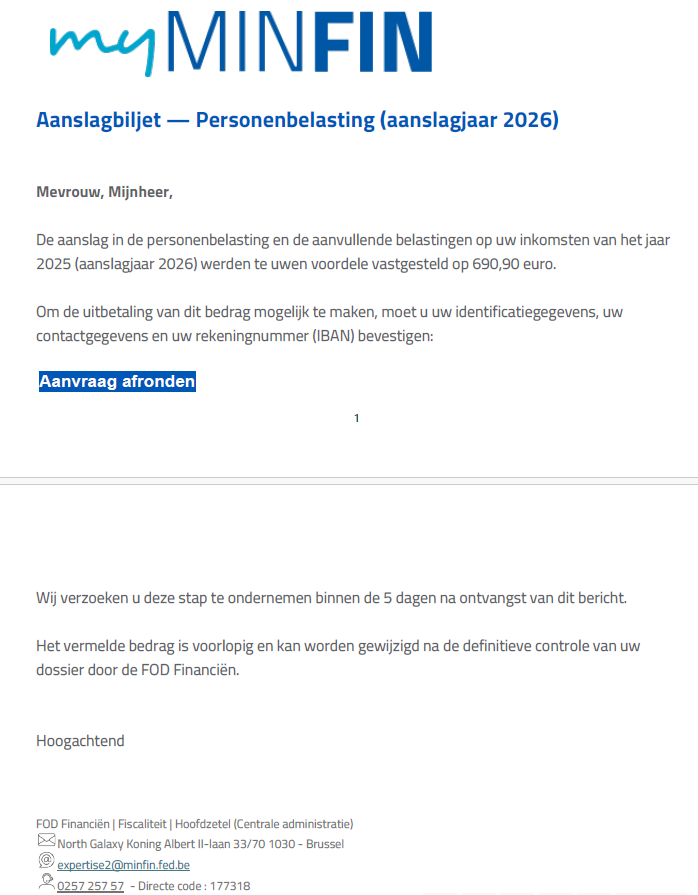
The Belgian tax refund email scam impersonates FOD Financiën, also called SPF Finances. A documented version claims the recipient is owed €690.90.
It asks for identity, contact, and bank-account confirmation through a link. The destination imitates the tax service but isn’t its real portal.
Safeonweb’s October 2026 warning identifies this as phishing and highlights the misuse of a genuine official email address through spoofing.
The tax authority is real. The accusation belongs to the false email and imitation destination, not the institution whose identity is being borrowed.
The message asks you to trust the wrong piece of evidence
Many people check the sender before opening a link. This campaign shows why a sender address that looks right cannot be your only safeguard.
Spoofing means making a message appear to come from another identity. It doesn’t, by itself, establish that the authority’s mail server was breached.
In the published example, several details work together:
- MyMinfin branding makes the notice look like ordinary tax correspondence.
- A specific refund amount makes the claim feel calculated.
- A short deadline encourages the recipient to finish quickly.
- The button requests confirmation of sensitive personal and banking information.
- An official-looking sender distracts from the separate destination address.
Your real tax documents have an independent home
Don’t use the refund button to establish whether a refund exists. Go to the genuine tax service and check your documents there.
The official FOD Financiën phishing guidance points people toward MyMinfin for authentic tax documents and information.
Someone promising a tax payment doesn’t get to choose where you disclose information. A real administrative question can be resolved through the real account.
Why This Email Can Beat a Quick Sender Check
The usual advice to “check who sent it” is useful but incomplete. An email has visible names, addresses, reply fields, links, and other technical information.
Those pieces don’t all prove the same thing. A familiar name in one field doesn’t establish who controls the website behind a button.
Many inboxes also hide details until you expand the message. A quick glance can turn a plausible label into more reassurance than it deserves.
This is why the refund claim needs an independent check. You shouldn’t have to become an email administrator to decide whether to share banking information.
The amount adds another persuasive detail. €690.90 sounds less like a random prize than a figure produced by an administrative calculation.
Two decimal places don’t make a payment real. The amount needs to match a genuine tax document, not merely sound plausible.
The tax language also encourages compliance. A reader may worry that ignoring a request will delay money or create a problem with an official file.
Take the legitimate concern seriously, but change the route. Check the file through MyMinfin rather than letting an unverified email manage your next action.
How the Belgian Tax Refund Email Scam Works
Step 1: A tax-branded message announces money due
The email presents itself as an official update about personal income tax. It tells the reader that a favorable calculation has produced a refund.
The example shown above uses MyMinfin branding and requests action within five days. That is the message’s pressure tactic, not a deadline readers should obey.
A real tax matter may have its own dates. Find those in the genuine document instead of assuming the email’s countdown applies to your account.
Step 2: A real-looking address makes the notice feel authenticated
The sender information appears reassuring because it uses an official identity. This is the feature Safeonweb specifically warns readers not to rely on.
A copied official address can make an otherwise ordinary phishing email harder to dismiss. It is not proof that a government employee sent the message.
Don’t accuse the person named in the address or reply demanding an explanation. Preserve the message and report it through the proper channel.
Even if your inbox shows no warning, you still need to verify a sensitive request. The absence of an alert isn’t an approval from the tax authority.
Step 3: A confirmation button moves the reader to another site
The email’s action button promises to finish the request. Behind that familiar phrase is the destination that actually receives your interaction.
The fraudulent portal borrows the official appearance. Visual similarity can keep the recipient focused on the refund rather than on the address bar.
A domain containing tax-related words isn’t automatically a government service. Treat the full destination as a separate identity that needs checking.
There’s no need to test the form to see what comes next. Stop before entering anything and open the real portal independently.
Step 4: The refund pretext collects personal and banking details
The message says identification, contact information, and an IBAN must be confirmed for the payment to proceed. That links disclosure to a promised benefit.
Someone expecting money may regard those questions as practical necessities. In a false portal, they’re information being handed to the impersonator.
Don’t assume every copy asks for the same information or follows an identical banking sequence. Respond according to what you actually disclosed or approved.
Whatever the final form requests, the original email hasn’t established your entitlement or the legitimacy of its collection process.
Where to Check a Real Belgian Tax Refund
Open MyMinfin without the email
Start from the official finance website and follow its MyMinfin route. Avoid shortcuts pasted into a message that you’re trying to verify.
Check the genuine assessment or document associated with your account. Compare the tax year, amount, and any action it actually requires.
The goal isn’t to find a document with roughly similar wording. It’s to establish whether the specific request exists in the authentic service.
If you need assistance, use contact information from the official website or an existing trusted tax document. Don’t use the suspicious email’s suggested support route.
Keep account changes inside the official process
A real bank-account update can be sensitive. Make it through the authorized process after navigating independently, not inside a page opened by the refund bait.
If you manage taxes for another person, confirm that you’re in their authorized account. Don’t improvise access because an email says the payment is urgent.
When using an accountant, send the question through your established contact. A new address claiming to represent that accountant needs its own verification.
Never let the stranger remain on the phone coaching you through an approval. You need time to read the genuine service’s instructions without pressure.
Don’t treat every official-looking notice as false
The lesson isn’t to ignore taxes or delete all government correspondence. It’s to verify the request where the tax authority actually keeps your information.
A real notification may prompt you to check an account. You can do that safely without using the notification’s link.
If the official account confirms a real requirement, handle that requirement there. You don’t have to return to the questionable message to complete it.
This approach protects access while keeping genuine administration on track. Suspicion shouldn’t leave you missing a real deadline because you never checked.
What the Stolen Information Could Be Used For
Personal and contact details can make later impersonation more convincing. A caller who repeats your information isn’t necessarily the official helping with your refund.
An IBAN disclosure should be described accurately to your bank. It isn’t the same as handing over a password, card security code, or transaction approval.
If the page asked for more than an account number, tell the bank every category involved. Don’t summarize all banking information as “just my details.”
Keep track of any authentication request that appeared. The action described by the genuine app matters more than the fake page’s explanation.
Be suspicious of follow-up messages claiming a fee is needed to release or repair the refund. Verify any such demand through the real tax service.
This warning doesn’t establish that all recipients suffer the same loss. The immediate task is to contain your actual exposure, not predict every possible outcome.
What to Do if You Have Fallen Victim to This Scam
-
Leave the imitation portal and refuse further prompts. Don’t submit another form to cancel the refund request or undo an approval.
If you still need to check your taxes, start a separate visit through the official site. Don’t keep the fraudulent page open as a reference.
-
Contact your bank for financial information or approvals. Explain which details you entered and whether you confirmed a sign-in, card action, or transfer.
Ask about protective steps and review any activity you don’t recognize. For a payment already made, request urgent investigation rather than waiting for the supposed refund.
-
Replace exposed credentials through the genuine provider. If you entered a password, change it on the actual service and protect other accounts using it.
Review sessions and authentication settings where available. If identity verification was involved, ask the affected provider about the specific request you approved.
-
Preserve the original email and available evidence. Save the full message, visible sender details, screenshots, destination information, and records of any transaction.
Keep this material private for the bank, provider, or police. Don’t publish a live phishing link while warning friends or colleagues.
-
Report the false tax message through official channels. Use the reporting guidance on the finance authority’s website and Safeonweb’s legitimate reporting route.
If you lost money or suffered identity misuse, make a police report and retain the reference. Reporting the email alone doesn’t secure an exposed account.
-
Handle any downloaded software as a separate exposure. If following the link led to an installation, stop using that program and seek reputable help.
Malwarebytes can assist with checking suspicious software. AdGuard can help block known malicious destinations, but neither replaces bank action or revokes identity approvals.
-
Watch for refund-recovery impersonation. Someone who knows about the incident may offer to recover money or release the tax payment for a fee.
Work only through contacts you independently establish. Don’t provide new bank approvals because a caller claims to be fixing the first scam.
A Useful Check Before You Forward the Warning
Warn the people who might receive the same message, but describe the mechanism rather than circulating only one sender address.
An address-only warning can teach the wrong lesson: that every other address is safe. Here, the apparently official sender is part of the deception.
Tell people to check tax documents in MyMinfin independently. That instruction remains useful when the amount, subject, or copied identity changes.
Remove personal details from any screenshot you share socially. Keep the untouched original for private reporting rather than distributing it widely.
When the Email Appears to Come From a Real Official
Don’t mistake a borrowed identity for the person responsible. The genuine employee named in an address may have no involvement in the message.
Forwarding angry replies to that address can also send your personal details somewhere you didn’t intend. Use the authority’s published reporting process instead.
If your email service allows you to save the original message, keep that version. It may preserve technical fields that a screenshot leaves out.
You don’t need to interpret those fields yourself. Give the original to the relevant security team or reporting service when requested.
A screenshot remains useful for recording the amount, deadline, and requested action. The two formats answer different questions rather than replacing each other.
If you received the email at work, follow your organization’s phishing-reporting process too. Its security team may need to protect other recipients in the same mailbox system.
Don’t test delivery by replying, and don’t send a second message asking whether the first one was genuine. Choose an independently established contact.
That keeps the investigation focused on the fraudulent instruction without accusing an innocent address owner or continuing the impersonator’s conversation.
Frequently Asked Questions
Is the €690.90 refund email genuine?
The version identified by Safeonweb is fraudulent. Don’t claim the payment through its link; establish your actual tax position through MyMinfin.
Can a scam email display a real FOD Financiën address?
Yes. This warning specifically concerns a spoofed official identity. A convincing sender field doesn’t authenticate the linked website or the request for information.
Does spoofing prove the tax authority was hacked?
No. An apparent sender can be forged without establishing a breach of that sender’s account or mail infrastructure. Don’t infer a separate incident without evidence.
What if I really am expecting a refund?
Check it through the genuine tax portal. A real expected payment doesn’t validate an unrelated email that happens to arrive at a believable time.
Is it enough to inspect the logo and website padlock?
No. Branding can be copied, and encrypted sites can still be fraudulent. Use an independently opened official service to verify the actual request.
Should I call the phone number inside the email?
Use a number from the authority’s genuine website or existing trusted documents instead. Contact information inside a suspicious message is part of what needs verification.
The Bottom Line
Don’t claim a Belgian tax refund through an unsolicited confirmation link, even when the sender looks official. Check the real document in MyMinfin.
If the Belgian tax refund email scam led to banking disclosure or an approval, contact the bank promptly. Preserve the message and report the impersonation.

Join the discussion
0 commentsShare your experience or ask a question about this article.
Community experiences
Did this happen to you?
Your experience could help someone recognize the same scam. Submit a private report for our team to review.
I experienced this tooReports are reviewed before publication. Sharing publicly is always your choice.
Discussion
Start the conversation
Have a question or something useful to share? Add the first comment.