

A text says a traffic problem is about to affect your New Jersey driving privileges. You weren’t expecting a notice, but the deadline suddenly feels important.
Before rearranging your day around it, look closely at who wants your attention and where they want you to go.
Overview
The NJMVC name is being used to sell a false emergency
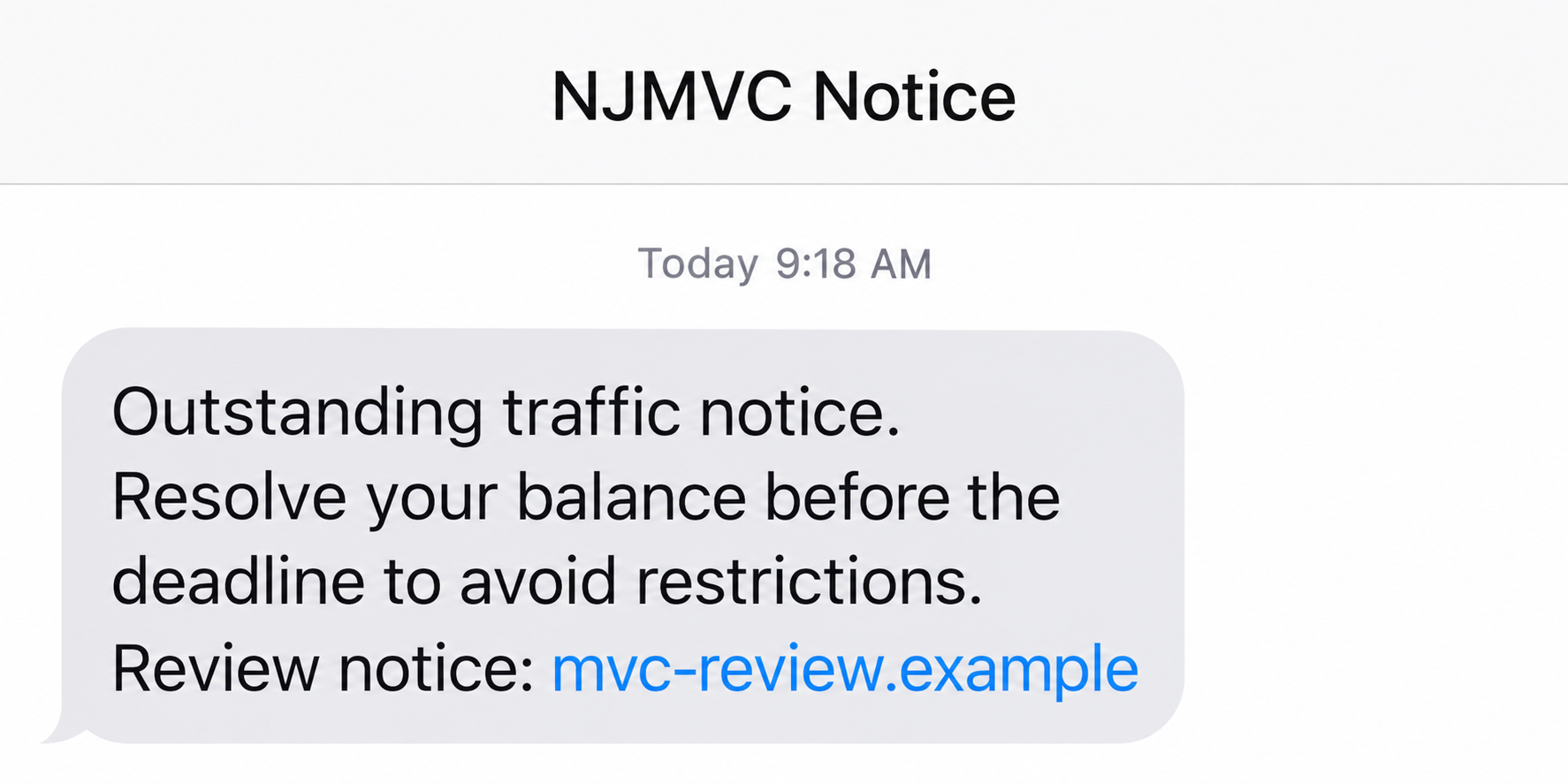
The NJMVC text scam impersonates New Jersey’s Motor Vehicle Commission to push drivers toward a fraudulent payment link. The real agency isn’t responsible for these messages.
A supposed unpaid ticket or toll becomes a threat to your license or registration. Paying through the supplied address is presented as the easiest escape.
The image above is a fictional illustration of that approach, not an original message or an official MVC payment screen.
Official warnings explain the mismatch
A City of Linden advisory describes copied MVC branding on deceptive websites. Familiar government wording appeared on pages whose actual addresses belonged elsewhere.
The advisory distinguishes MVC appointment reminders from unsolicited toll-payment demands. An expected appointment text does not make an unrelated collection message trustworthy.
This matters because the scam borrows a real institution but changes the reason it supposedly contacted you.
The route to payment matters more than the threat
Watch for a combination of these details rather than waiting for an obvious spelling mistake:
- An unexpected demand concerning a ticket, toll, or driving restriction.
- A short deadline that discourages checking an existing account.
- A link supplied as the only convenient way to resolve the claim.
- Requests for payment details before you can independently confirm the alleged obligation.
Different versions can change the wording and destination. No single sender number, displayed balance, or web address defines every NJMVC impersonation attempt.
Tickets, Tolls, and MVC Fees Are Different Problems
Start with the organization that actually issued the charge
New Jersey drivers deal with several systems. A municipal traffic ticket, a toll account, and an MVC restoration fee should not be treated as interchangeable bills.
The MVC online services directory separates its services and identifies traffic-ticket payment as a New Jersey Courts service.
Use that distinction when checking a message. Ask what the charge concerns, which office issued it, and where that office keeps its records.
If the answer keeps changing from a toll to a license renewal to a court fine, don’t let the familiar state name fill the gaps.
A real obligation may still need attention. Rejecting an unsolicited payment link does not mean ignoring paperwork you received through an independently verified channel.
A recent trip is a reason to check, not a reason to pay the text
Someone who recently crossed a bridge or borrowed a car may find the allegation plausible. That coincidence can make a generic warning feel personally informed.
Look at your own trip records or the relevant account instead. If a rental vehicle was involved, use the rental company’s established support route.
Don’t provide a stranger with your rental agreement simply to prove the message wrong. Verification should reduce unnecessary disclosure, not create another exchange of documents.
For a family vehicle, ask the other driver whether anything needs checking. Keep the suspicious payment address out of the conversation.
How the NJMVC Text Scam Works
Step 1: An unfamiliar message introduces an official-sounding problem
The opening borrows the agency name or a traffic-related label. It aims to sound like a routine administrative notice rather than a sales pitch.
You may recognize the institution before noticing that the sender hasn’t identified a verifiable case. That small shift gives the message a head start.
A sender label is not a signature you can authenticate by appearance. Likewise, an area code that looks local does not establish who sent the message.
Receiving it does not demonstrate that someone accessed your driving record. A broad, alarming allegation can be sent without knowing whether the recipient owns a vehicle.
Can you find the alleged obligation without letting the sender lead the way? That is the question to answer before opening a payment form.
Step 2: A deadline turns uncertainty into pressure
The next part connects delay with a consequence you would rather avoid. A driving restriction is especially unsettling when you depend on your vehicle for work.
The message encourages a quick calculation: paying now seems less disruptive than investigating. That calculation leaves out the risk of giving payment information to an impersonator.
A threatening paragraph is still only a claim from the sender. It does not independently establish a suspension, court order, or change to your registration.
Don’t negotiate with the countdown. Open a separate route to the relevant office, even if the text says you must act before its timer expires.
If you already have a genuine notice, compare against that record. Do not replace its verified instructions with directions from a newer, more urgent message.
Step 3: The supplied link borrows the appearance of a service portal
Following the address moves you away from the message and into a page that may use familiar colors, headings, or agency wording.
What a page calls itself is different from who controls its address. A government name in a heading does not give that website government authority.
Consider a fictional address such as njmvc.example. The agency-like word is part of the presentation; the reserved example domain identifies it as an illustration.
On a real suspicious page, avoid testing forms or hunting for a working payment button. You don’t need to finish the process to justify leaving.
A secure-connection symbol would not settle the question either. Encryption can protect a connection to the wrong recipient.
Step 4: Checking the claim becomes a request for sensitive information
The dangerous transition happens when viewing a supposed obligation requires information the unverified site should not receive.
A form may ask for identifying details, payment information, or both. Judge your exposure by the fields you actually supplied, not by the page’s reassuring labels.
Don’t enter a different card if a payment attempt appears unsuccessful. An error message doesn’t tell you whether the first details were recorded.
If another message requests a banking code, read the code’s genuine notification independently. Never pass it along just because the payment page describes it as verification.
The exact form can vary. There is no basis for assuming every recipient sees the same checkout or that every visit produces a charge.
Step 5: A reassuring result can delay the bank call
A page may appear to finish normally, or you may leave before it does. Neither outcome determines whether information you entered needs protecting.
A receipt from an unverified destination does not prove that a municipal ticket or toll account has been paid.
Check the relevant official record separately. If you exposed a card, speak to its issuer without waiting for the alleged traffic matter to be resolved.
Be cautious if a later caller already knows details from the exchange. Repeating information you supplied is not independent proof of an investigator’s identity.
A genuine recovery conversation should begin through your bank’s established channel, not through an unexpected offer to reverse the original problem.
How to Check an NJMVC Notice Without Following Its Link
Separate your records from the sender’s story
Write down what the message alleges in plain language. Is it a ticket, a toll, an expired document, or an outstanding MVC fee?
Then open the appropriate official service independently. Begin with a bookmark you already trust or the state agency’s current directory, not a sponsored search result.
A website may legitimately direct you to another authorized service. Verify that connection from the official starting page rather than trusting a contractor’s name in the text.
Don’t use the blanket rule that every legitimate New Jersey transaction must remain on one government domain. Authorized services and court systems have their own arrangements.
Ask a narrow question when you contact the office
Use the official MVC contact directory for an actual MVC matter. For a ticket, follow the court route identified by the official services list.
Explain that an unsolicited message alleges a specific problem. Ask which record can confirm it and what information the office genuinely needs from you.
You do not need to read out card details or a banking password to ask where a ticket should be checked.
If an online lookup returns nothing, don’t invent a reason to trust the text. Ask the relevant office about any uncertainty using independently obtained contact details.
For employers managing several vehicles, route the question through the person who normally handles fleet records. An urgent message shouldn’t bypass an established approval process.
Keep your confirmation from the genuine service after checking. If another warning arrives, compare it with that record instead of beginning the same anxious search again.
If the official office confirms an unpaid amount, ask it about the available payment or dispute route. Don’t return to the text for a supposedly faster option.
What to Do if You Have Fallen Victim to This Scam
-
Stop the exchange and keep a usable record. Save the original message, its sender, the displayed address, and any transaction confirmation already available.
Record when you clicked, what you entered, and whether money moved. Don’t reopen the suspect site just to obtain a tidier screenshot.
Keep unredacted evidence for your bank or an official report. Remove card numbers, addresses, and identifying details before showing the message publicly.
-
Contact the card issuer if payment information was exposed. Use the number on your card or your bank’s genuine app, not the message’s support contact.
Tell the issuer the details went into a suspected traffic-payment phishing site. Ask about restricting or replacing the card and reviewing pending activity.
Explain which transactions you approved and which you don’t recognize. Dispute options depend on the circumstances; nobody can promise an automatic refund.
-
Protect any credentials you actually entered. Change an exposed password through the genuine service. Replace it elsewhere if you reused the same password.
Review unfamiliar sessions and recovery settings. If you disclosed a banking code, tell the bank what its original notification said it would authorize.
Merely receiving the text isn’t a reason to reset every account. Concentrate on information or permissions that left your control.
-
Take proportionate action on identity details. Note whether you supplied a license number, birth date, identity-document image, or Social Security number.
For sensitive identity exposure or signs of misuse, visit IdentityTheft.gov for a recovery plan. Ask the relevant issuing agency about document-specific precautions.
A name alone and a complete identity-document upload are different situations. Describe the actual disclosure rather than assuming every possible consequence has occurred.
-
Deal with device changes only if the interaction involved them. Check for unexpected downloads or notification permissions if you opened the page.
If software was installed or unfamiliar behavior followed, Malwarebytes is one option for checking unwanted programs on a supported device.
AdGuard can add filtering against some deceptive web content. It cannot retract information from a submitted form or recover a payment.
A phishing text is not, by itself, evidence of a malware infection. Don’t pay a supposed court technician to clean a device.
-
Report the message, then block it. Use your messaging app’s reporting feature or forward the text to 7726 where your carrier supports that service.
Submit the essential details through ReportFraud.ftc.gov. Keep reference numbers and any bank correspondence together so you don’t have to reconstruct the timeline later.
Reporting doesn’t pay a genuine ticket. Continue any separate court or toll inquiry through the correct official route.
-
Watch the relevant accounts without following new instructions. Enable genuine transaction alerts and review statements for activity you cannot explain.
If someone offers to recover the money for an advance fee, stop. Contact the payment provider yourself and ask whether the supposed recovery contact is real.
Share the warning with another household driver if useful. Focus on the suspicious request, not blame; quick, clear communication makes practical recovery easier.
Frequently Asked Questions
Does NJMVC send any legitimate text messages?
The Linden advisory distinguishes scheduled MVC appointment reminders from toll demands. Check whether the message relates to an appointment you actually arranged through an official service.
Does using the correct agency name make a text genuine?
No. Both an accurate name and a copied logo can be borrowed. Authenticate the underlying request using records or contacts you obtained independently.
What if I really do owe a New Jersey traffic ticket?
Use the New Jersey Courts route identified by the MVC services directory. A genuine debt does not authenticate a separate payment link arriving by text.
Can a strange message suspend my license?
The message’s threat doesn’t establish an actual restriction. Check your status through the appropriate official service, especially if you already have a genuine unresolved notice.
I entered my card but the page failed. Should I act?
Yes. Tell your issuer the information was supplied to a suspected phishing page. An apparent failure doesn’t prove the details stayed private.
Should I reply to ask for a citation number?
Don’t continue the conversation. A number supplied by the same sender adds little reassurance. Ask the relevant official office what records can verify the claim.
The Bottom Line
Don’t pay through an unexpected NJMVC text. Check the alleged ticket, toll, or agency fee with the organization that actually handles it.
If you already supplied financial information, contact your issuer now. That protects the exposed payment method while you verify any genuine driving-related obligation separately.

Join the discussion
0 commentsShare your experience or ask a question about this article.
Community experiences
Did this happen to you?
Your experience could help someone recognize the same scam. Submit a private report for our team to review.
I experienced this tooReports are reviewed before publication. Sharing publicly is always your choice.
Discussion
Start the conversation
Have a question or something useful to share? Add the first comment.