

Your listing has a buyer, and an email says the item is sold. The payment supposedly needs one final confirmation before the money can reach you.
It looks like the sale has already happened. Before scanning the invoice or pressing the payout button, check what you’re being asked to confirm.
Overview
The tutti payment confirmation scam invents a release step
A supposed buyer sends convincing payment paperwork, then a separate message claims the sale is complete. Both steer the seller toward a counterfeit financial process.
Police document the false invoice, QR code, and confirmation email. The linked site asks the seller to accept payment, select a bank, and supply login details.
The legitimate marketplace and financial services are being impersonated. The scheme isn’t evidence that tutti.ch actually holds the advertised payment.
Two messages can point to the same dishonest destination
The invoice’s QR code and the later email link lead to the same false website. Their agreement doesn’t provide two independent confirmations.
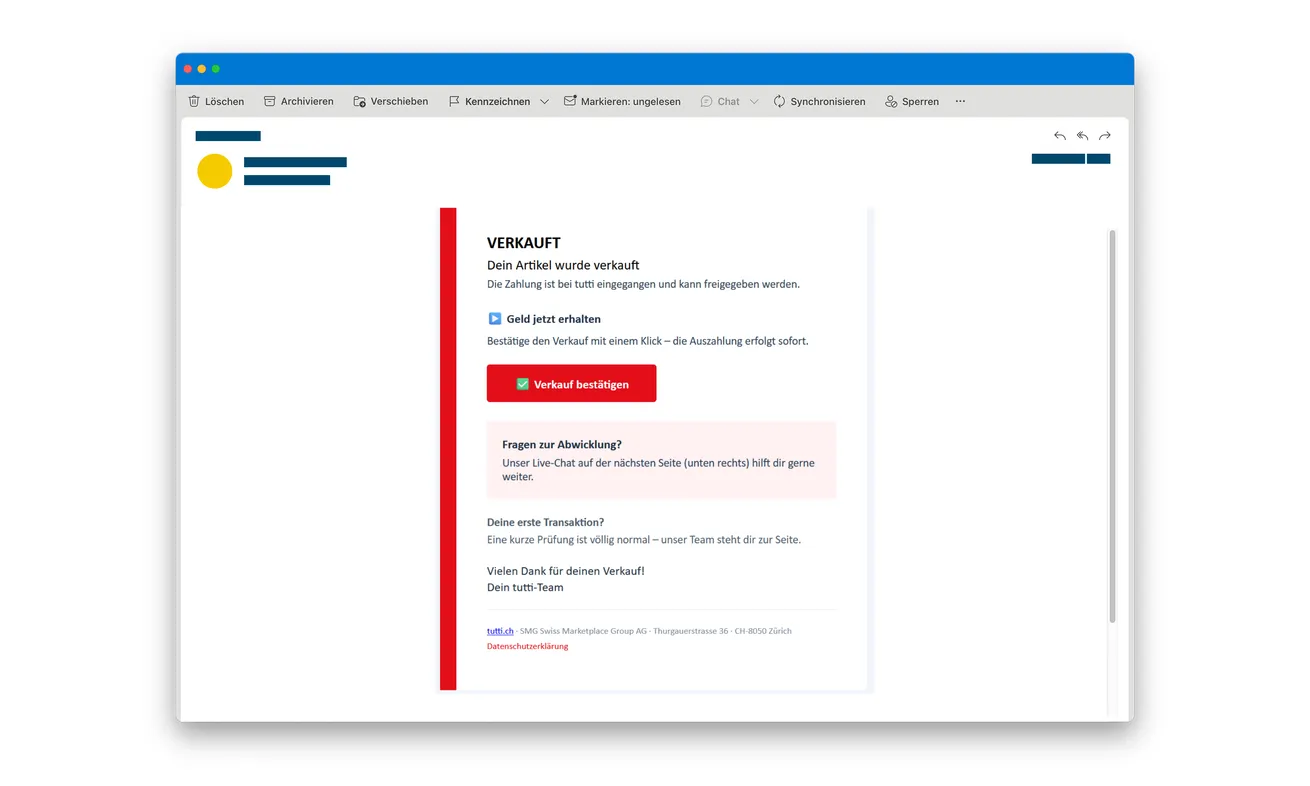
The original email pictured here says the item is sold and offers a confirmation button. The QR code belongs to the separate attached invoice, not this pictured message.
The login request creates the central danger. Police warn that collected information can enable takeover and misuse of the seller’s TWINT account.
The genuine platform rejects credential checks for receiving money
Tutti’s current phishing guidance says sellers shouldn’t supply card, TWINT, or e-banking login information to receive payment.
- Check a supposed incoming payment in your own financial records.
- Don’t use the buyer’s QR code as a banking sign-in route.
- Keep the item until the genuine payment or handover arrangement is confirmed.
- Report exposed credentials to the relevant financial provider.
- Report the false buyer through the real marketplace separately.
Why a Sale Confirmation Can Make You Stop Checking
Selling something online involves decisions you’re expecting to make: price, collection, shipping, and whether a buyer is serious. A completed-payment message seems to settle the hardest one.
The apparent buyer has also responded to your actual listing. That makes the paperwork feel connected to something real rather than a random promise of money.
A separate email in the marketplace’s name can then seem like confirmation from someone other than the buyer. In this scheme, that separation is only part of the presentation.
Check who is confirming the payment. Two emails from the buyer’s process don’t carry the same weight as an incoming entry in your own account.
The final button also sounds harmless. Confirming a sale feels different from making a payment or sharing banking access.
Watch when that simple task changes. Selecting a bank and entering its credentials is a different action from acknowledging that you sold an item.
The buyer doesn’t acquire a right to your financial login by agreeing to a price. Receiving money should not require handing that access to a stranger’s page.
If you’re new to the platform, don’t let a claim about first-time verification silence the question. Check the real service’s instructions before accepting a new process.
How the Tutti Payment Confirmation Scam Works
Step 1: A supposed buyer responds to an ordinary listing
The initial contact resembles a genuine sales inquiry. The impostor discusses the advertised item and presents themselves as ready to buy.
Details from your public advertisement can help the conversation feel specific. Knowing the item or price doesn’t independently identify the buyer.
Keep the exchange connected to the original listing. A move into email shouldn’t make you forget which account started the inquiry.
Agree on the actual payment and handover arrangement before treating a document as the next required task. An unexpected platform-release process deserves a fresh check.
Step 2: A branded invoice introduces a QR code
The buyer supplies an attached invoice made to resemble tutti.ch paperwork. Its instruction tells the seller to confirm the sale to receive the money.
The QR code gives that instruction an easy route onto another device. Scanning can feel like checking the transaction rather than following the buyer’s chosen website.
But a QR code is still a destination supplied by the sender. Its square pattern doesn’t identify the operator or establish that payment has arrived.
Don’t scan it to test the claim. Check your genuine payment app or bank record without using a route embedded in the invoice.
Step 3: A separate sold email repeats the payment story
Another message appears to come from the marketplace. It confirms the supposed sale and offers a link for releasing the money.
The added email can make the invoice seem verified. In reality, its button and the invoice’s QR code lead to the same counterfeit site.
The selected original message also offers help on the next page. A chat inside the disputed process isn’t independent support, even if someone answers quickly.
If you need help, reach the marketplace through its own verified service. Don’t let the person controlling the payment page certify that page for you.
Step 4: Accepting money turns into selecting a bank and logging in
The false website guides the seller through apparent payment acceptance. A bank selection is followed by a screen imitating the relevant financial application.
Choosing your real bank doesn’t make the screen genuine. The attacker can list legitimate institutions and copy the appearance of the one you select.
Stop at the request for credentials. You came to receive a sale payment, not to provide banking access through a website introduced by the buyer.
If another authentication request appears, read its actual purpose. Don’t provide codes or approve an operation because the false page calls it payout processing.
Step 5: A completion screen can hide the account-access problem
The counterfeit process displays an apparent successful outcome. That reassurance can delay the seller from checking the real account.
Information already submitted goes to the attackers. The police warning links this credential collection to possible TWINT takeover and unwanted payments.
The published case doesn’t establish an identical authentication sequence for every recipient. Describe the password, code, or approval you actually supplied when seeking help.
A success page isn’t evidence of received funds. Likewise, a failed attempt isn’t evidence that the credentials remained private.
A Buyer Can Claim Payment, but Your Provider Records It
Use your ordinary financial app or banking route to check an incoming transfer. Don’t accept a screenshot or branded invoice as a replacement for that record.
If the status is unclear, ask the provider what the entry means. Avoid shipping an item while relying on the buyer’s interpretation of pending or missing money.
Match the payment to the arrangement you actually made. A similar amount in a screenshot doesn’t explain who paid, where it went, or whether it can be used.
Keep communication about collection separate from banking authentication. A buyer can arrange a time without needing a login, code, or access to your payment account.
If they demand a release fee or another financial action, stop the sale process and verify independently. Don’t add money to rescue a payout that hasn’t been established.
The platform’s genuine help page distinguishes private trading from the false held-payment story. Follow its current guidance rather than a procedure invented in the buyer’s attachment.
This warning doesn’t mean every marketplace payment or delivery option is fraudulent. It concerns the counterfeit confirmation and its request for financial credentials.
If the Item Has Already Left Your Hands
Act on the item and account issues in parallel. Trying to retrieve a parcel shouldn’t delay reporting exposed banking information.
Locate your own shipment receipt and contact the actual carrier through its verified service. Ask whether any available interception or delivery-change option applies.
Don’t rely on a new tracking link supplied by the supposed buyer. The person behind the payment story may also supply misleading delivery instructions.
For a completed collection, preserve the arranged time, messages, and relevant handover information you already have. Don’t confront someone or arrange another meeting to investigate.
Tell the genuine marketplace what happened to the listing and item. Include the buyer account, the false confirmation, and the destination without exposing banking secrets publicly.
If money or the item was lost, discuss a report with the appropriate local police. The platform can address its account records, but it doesn’t replace financial protection.
Keep promises of later payment as part of the evidence. They are not a reason to postpone reporting a completed loss or an exposed login.
Choose the Right TWINT Help, Not Just a Website Report
TWINT’s official fraud and blocking page distinguishes its Prepaid app from TWINT apps issued by other providers.
Check which app you actually use. A bank-issued app’s customer support may be the appropriate route, rather than the Prepaid procedure.
Explain the financial sign-in introduced by the false sale. The problem isn’t only that a payment you expected hasn’t appeared.
Ask about unauthorized access, changed account associations, and unwanted activity relevant to your interaction. Let the provider interpret its own records.
Reporting a phishing destination helps address the fraudulent site. It doesn’t automatically block your account or undo information that you supplied.
If the bank login is also used outside TWINT, tell the bank about that exposure. Protecting a marketplace password alone wouldn’t address a separate financial credential.
If only a public listing and email address were involved, don’t assume an account was taken over. Keep your report proportionate to what actually happened.
What to Do if You Have Fallen Victim to This Scam
-
Stop the false payment-acceptance process. Leave the supplied page and don’t retry the bank selection or follow a replacement confirmation link.
Don’t continue with the page’s chat to ask why the payout failed. Preserve the correspondence before blocking further contact.
-
Contact the institution whose login you entered. Use your established app, trusted contact, or its independently reached official website.
Explain the tutti sale pretext and the financial screen you completed. Mention authentication codes or approvals separately, including requests you refused.
Ask about securing access, reviewing changes, and investigating unwanted payments. Don’t wait for a visible loss before reporting disclosed credentials.
-
Follow the support route for your actual TWINT app. Identify whether the account belongs to a bank-issued app or TWINT Prepaid.
Use the provider’s genuine blocking and recovery guidance. Keep a record of what protection was confirmed, rather than assuming a website report secured access.
-
Change passwords that were exposed. Start through the real services and address reused credentials on other relevant accounts.
Tell support if a password reset fails or recovery details look unfamiliar. Don’t complete a recovery form delivered by the supposed buyer.
If no marketplace password was entered, distinguish that from the financial login. Report the specific accounts involved rather than saying every account was hacked.
-
Record actual financial activity. Save dates, amounts, currencies, recipients, and transaction references from genuine provider records.
Ask about the applicable dispute or recovery process. Don’t approve another payment on the assurance that it reverses the first.
-
Protect the item and preserve the sales record. Pause handover if payment isn’t independently confirmed; contact the real carrier about any already-sent parcel.
Keep the advertisement reference, buyer messages, invoice attachment, separate confirmation, and any existing screenshots. Don’t rescan the QR code to collect more evidence.
-
Notify the real marketplace and relevant authorities. Report the buyer and false payment documents through verified tutti support.
For financial harm or item loss, seek the appropriate police reporting route. Keep the report reference alongside the financial provider’s case details.
-
Distrust a new offer to release the money. Another apparent support agent may repeat the item, amount, or previous conversation.
That knowledge doesn’t establish authority. Don’t pay for a recovery or provide fresh codes to complete a sale that the real records never confirmed.
Frequently Asked Questions
Does the sold email prove the buyer paid?
No. Check the actual payment through your own provider. The police describe a fabricated invoice and confirmation used to introduce the phishing process.
Why do both the QR code and email lead to the same page?
They are two entry points supplied by the same fraudulent process, not independent checks. Neither authenticates the bank-looking destination.
Should I enter banking credentials to receive a sale payment?
Not through this supplied route. Tutti’s own warning says sellers shouldn’t disclose card or TWINT/e-banking login information to receive money.
Is the payment page’s live chat safe to ask?
It isn’t independent verification. Reach the genuine marketplace or financial institution separately before accepting instructions from a chat on the disputed page.
What if the page said the transaction completed successfully?
Check genuine account records and report credentials already entered. A success screen controlled by the attacker doesn’t establish a payout or protect your login.
Does reporting the fake site block my TWINT account?
Don’t assume that. Use the appropriate account-protection route for your actual TWINT provider and ask what action has been confirmed.
The Bottom Line
Don’t accept a tutti sale payment through this email’s link or attached QR code. The false confirmation leads to financial-login collection, not verified money waiting for release.
If you entered credentials, contact the bank and relevant TWINT provider promptly. Check the item and payment separately, and report the false buyer through genuine marketplace support.

Join the discussion
0 commentsShare your experience or ask a question about this article.
Discussion
Start the conversation
Have a question or something useful to share? Add the first comment.