


A document that opened yesterday now has an unfamiliar ending. Beside it sits a text file with a name you don’t remember creating.
Then a countdown appears, and every decision starts to feel urgent. Before touching the files or following the note, take stock of what has changed.
Overview
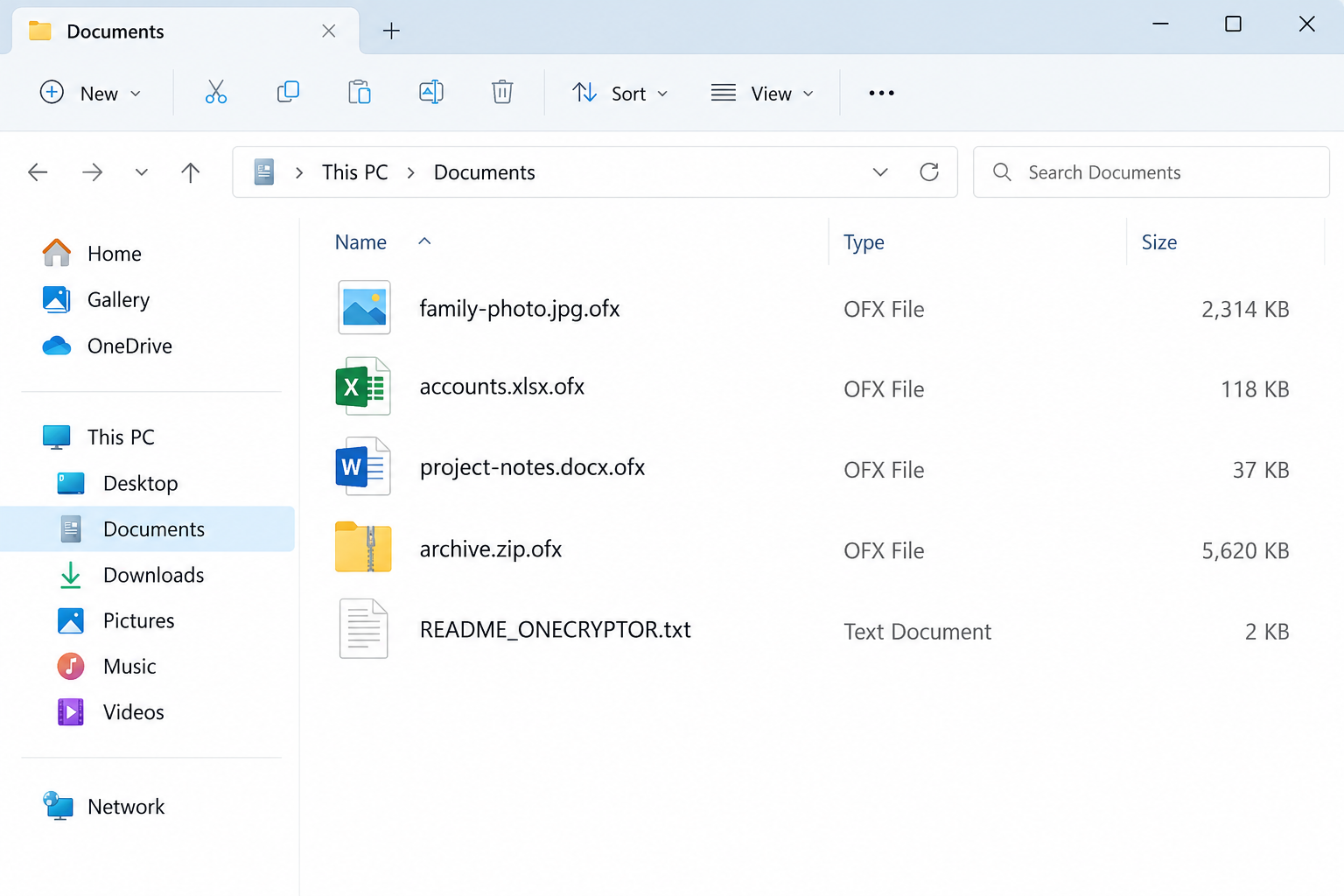
The .ofx filenames and OneCryptor note are the identifying clues
One Decryptor ransomware is reported to append .ofx to encrypted filenames and create README_ONECRYPTOR.txt. A popup accompanies the note.
The OneCryptor name also appears in the attacker’s material. These details help distinguish the incident from an ordinary application error or a damaged single document.
There is an important exception: .ofx is also used legitimately for financial-data files. A file extension alone is not a malware diagnosis.
The payment clock is an extortion demand, not a recovery guarantee
The reported demand starts at 0.42 BNB and threatens to double after 72 hours. The attacker claims payment will produce a decryptor.
Those are the criminal’s terms, not instructions to follow. A convincing timer cannot demonstrate that a working recovery tool will be delivered.
Claims about encryption and deleted recovery data should be checked against the affected machine. Do not assume that every statement in a ransom note is independently verified.
Containment, removal, and recovery are three different jobs
First stop further exposure. Then address the infection and investigate how it arrived. Only afterward should restored data return to a trusted environment.
- Disconnect affected systems and keep clean backups away from them.
- Preserve the ransom note and untouched encrypted files.
- Use qualified incident help for business systems or irreplaceable data.
- Remove malware or rebuild the affected environment before restoration.
- Check matching recovery options without experimenting on your only copies.
The image is a fictional file-list illustration. The filenames and sizes explain the visible pattern, not the contents of an actual infected computer.
Recognizing Encryption Without Making the Damage Worse
Start with the change you can observe. Were many previously usable files renamed around the same time, and did a ransom message appear with them?
A spreadsheet named accounts.xlsx.ofx is different from a bank statement that was always an OFX file. Its earlier name and behavior provide necessary context.
Do not repeatedly open every document to test the damage. Once a wider encryption pattern is apparent, isolation matters more than producing a complete list manually.
Do not remove the appended extension as a repair attempt. Renaming a file changes its label, not the encrypted contents inside it.
Keep the original folder structure where possible. It can help compare encrypted material with backups and prevent restored files from being confused with damaged ones.
If the computer belongs to an employer, stop troubleshooting alone. The machine may be only one affected part of a larger environment.
Use a separate, clean communication device to tell the response team what you saw. Avoid using the suspect computer to open password managers or business accounts.
Keep original, encrypted, and restored copies clearly separated
Give each recovery destination a clear purpose. Mixing restored files back into the damaged folder can make later comparisons unnecessarily difficult.
Record which backup date supplied a restored folder and when the restoration occurred. That helps explain missing recent work without mistaking it for another encryption event.
For shared projects, ask users to avoid replacing each other’s copies while recovery is underway. One apparently newer document may contain less usable work than an older backup.
Preserve application-specific records too. A collection of database files is not necessarily a consistent backup that the application can safely reopen.
When handing the incident to another technician, include the recovery history. They need to know which files remain untouched and which tools have already changed copies.
What One Decryptor’s Ransom Message Is Trying to Achieve
It presents the attacker as the only route back
The note’s encryption language is intended to make the files appear dependent on a key controlled by the criminal. It discourages attempts at independent recovery.
Strong encryption can indeed prevent ordinary file repair. But the note cannot tell you whether a separate backup, surviving version, or suitable specialist tool exists.
Do not confuse those possibilities. A backup restores another copy; a decryptor reverses supported encryption; deleted-file recovery looks for originals that may still remain.
None is interchangeable with buying antivirus software. A scanner may detect malicious components without recovering a single encrypted photograph or database.
It uses a deadline to crowd out careful decisions
The doubling threat turns time into another source of distress. People may believe every minute spent seeking help reduces their chance of recovering important work.
That pressure favors the attacker. A rushed payment can leave the victim poorer while the underlying infection and recovery problem remain unresolved.
Do not let the countdown determine whether evidence is preserved or whether backups are safely assessed. Those actions can matter regardless of what the attacker later does.
The reported material also discourages restarting. Do not treat the criminal as your incident-response adviser; isolation and evidence-preservation decisions belong to the person handling recovery.
What to Do If Your Files Have Been Encrypted
-
Isolate the affected computer. Unplug its network cable and disconnect Wi-Fi. Leave backup drives disconnected and do not attach another clean storage device casually.
For a workplace, contact the incident team immediately. Coordinate isolation of affected systems without shutting down unrelated critical services on your own.
-
Preserve the incident before cleanup. Record the note, changed filenames, approximate discovery time, and any recent suspicious activity. Do not delete encrypted files to clear space.
A specialist may need a disk image or volatile evidence. Avoid improvised restarts, registry edits, or multiple repair utilities before they decide what should be retained.
-
Keep money and account decisions separate. Do not send the demanded cryptocurrency or contact the extortionist to test whether they respond.
Use a clean device for sensitive accounts. If there is evidence that credentials or business information were exposed, address that with the responsible provider or administrator.
-
Choose the right level of recovery help. A home computer and a production server need different responses. Tell your technician which files and systems are irreplaceable.
The CISA ransomware guide emphasizes coordinated isolation and evidence preservation. An antivirus scan alone is not a complete organizational incident response.
One Decryptor Removal and File Recovery
Step 1: Protect backups and preserve a recoverable starting point
Keep the affected machine isolated while a plan is established. Do not sign it into cloud storage or reconnect a backup just to see whether files open.
From a clean device, identify backups that existed before the incident. Record their dates and keep the original backup unchanged while its integrity is assessed.
For valuable or business data, have a qualified responder preserve the affected disk before cleanup changes it. Copying random files is not equivalent to a forensic image.
If isolation is impossible and damage is continuing, obtain urgent incident advice about stopping the device. Powering off can lose volatile evidence, so explain the circumstances.
A repaired desktop is not enough if the only usable backup was overwritten along the way. Preserve the data before prioritizing convenience.
Step 2: Use a trusted cleanup route, not an advertised decryptor
Obtain the Malwarebytes Windows installer through the vendor’s official download page. Read the installation choices carefully; manual cleanup does not require buying real-time protection.
Our optional Premium protection page concerns paid protection features. It is not an offer of a OneCryptor decryptor or a guarantee that encrypted files can be restored.
Use a clean computer to obtain trusted software if necessary. A responder should arrange safe transfer and updates without exposing backup media to the infected environment.
Read installation choices and decline optional offers you do not need. Do not disable Windows security controls or install an unknown driver because a recovery advertisement requests it.
If security software will not run, stop stacking utilities on the affected disk. Ask for help or use a professionally planned rebuild after evidence has been preserved.
Step 3: Scan, review detections, and assess whether rebuilding is necessary
In Malwarebytes for Windows, open the Scanner tile’s three-dot menu, choose Advanced Scan, then Custom Scan. Select the system locations to inspect and start the scan.
The vendor’s Custom Scan instructions show the current controls. Use the options available in your installed version rather than following an old screenshot blindly.
Review detections and quarantine confirmed threats. Save the report. Arrange any requested restart with the person preserving the incident, especially on a business machine.
Malwarebytes’ feature comparison lists manual Custom Scan as free and Threat Scan as paid. Do not buy a plan believing it supplies the missing encryption key.
A clean result is useful information, not proof of complete recovery. A responder must still assess persistence, other access, and whether a clean rebuild is safer.
Step 4: Look for a genuinely matching decryption option
Check the No More Ransom decryption catalog from a clean device. No exact OneCryptor or One Decryptor entry was listed during this check.
That is a current catalog observation, not a guarantee about every tool elsewhere or what may become available later. Preserve encrypted originals for future options.
Do not choose a decryptor merely because its description mentions Windows, ransomware, or a similar extension. Read the supported family and version requirements carefully.
When seeking identification help, avoid uploading confidential business documents or personal records indiscriminately. Ask the responder which non-sensitive evidence can safely identify the variant.
If a suitable tool becomes available, test it against copies in a separate location. Keep the untouched originals even if the first results appear successful.
Step 5: Restore verified backups or surviving versions to a clean system
A confirmed clean backup from before encryption is different from another folder on the affected disk. Check that the backup itself contains readable, unaffected files.
Restore to a trusted destination only after the malware and its access path have been addressed. Keep the recovery environment separate from still-affected systems.
Open representative restored documents and application data. A database or project may require its own validation, not simply a filename check.
Cloud version history or surviving local snapshots may offer another copy. Availability varies, and the note’s claim of deleted recovery data should not replace an actual assessment.
Deleted-file recovery software cannot decrypt properly encrypted bytes. If a specialist considers it appropriate, avoid installing it on the source drive or saving recovered data there.
Step 6: Reconnect carefully and address how the incident happened
Before normal use resumes, patch relevant software, review exposed access, and verify the backup plan. Do not restore an old malicious installer with the recovered documents.
The initial entry route is not established for this case. Investigate recent downloads, account access, and other evidence rather than blaming a particular email without support.
For organizations, involve the people responsible for legal reporting, insurance, affected data, and operational recovery. Duties depend on the incident and jurisdiction.
Test future restoration while everything is working. A backup that remains continuously writable from the affected machine may be vulnerable during another incident.
Recovery Offers That Deserve a Second Look
After searching the ransom-note name, you may encounter services promising immediate decryption. Some are legitimate specialists; others sell false hope or simply negotiate with criminals.
Ask what the service actually proposes, what evidence supports recovery, and whether payment is required before a meaningful assessment. Keep that conversation separate from the attacker.
Do not allow an unknown caller remote access to your only encrypted copies. A genuine specialist should explain the preservation plan before changing anything.
Keep invoices, scope, and promised outcomes in writing. A confident sales claim is not proof that the provider has a matching OneCryptor decryptor.
MalwareTips’ Windows malware-removal help forum is an established place to request guidance. Do not post passwords, confidential files, or private business records publicly.
Frequently Asked Questions
Is every .ofx file encrypted by One Decryptor?
No. OFX is also a legitimate financial-data format. Look for a newly appended extension, widespread unreadable files, and the matching ransom note together.
Will removing One Decryptor restore my documents?
No. Malware removal addresses malicious software. File recovery requires a clean backup, surviving version, or a decryption method that actually supports the encryption involved.
Is there a guaranteed free OneCryptor decryptor?
No matching entry appeared in the checked No More Ransom catalog. Avoid guarantees, preserve original encrypted data, and recheck trusted resources for later developments.
Should I obey the note’s instruction not to restart?
Follow a qualified response plan, not the attacker. Keep the system isolated and obtain advice about evidence preservation, ongoing damage, and whether shutdown is necessary.
Can a paid antivirus subscription supply the encryption key?
No. Protection and cleanup features are not decryption keys. Buying security software does not establish that it can unlock files encrypted by this ransomware.
Can I recover files after the payment timer expires?
A backup or suitable independent recovery method does not depend on the criminal’s sales deadline. Keep copies and investigate legitimate options rather than rushing to pay.
The Bottom Line
Do not pay One Decryptor’s ransom or experiment on your only encrypted files. Isolate the machine, preserve the evidence, and arrange appropriate cleanup or rebuilding.
Restore verified clean backups only to a trusted system. If no recovery path currently works, retain untouched encrypted copies and seek qualified help without accepting decryption guarantees.

Join the discussion
0 commentsShare your experience or ask a question about this article.
Your progress
Did these steps help?
Let us know how the guide worked for you.
Describe what you see and the step you reached. Keep passwords and other private information out.
Discussion
Start the conversation
Have a question or something useful to share? Add the first comment.